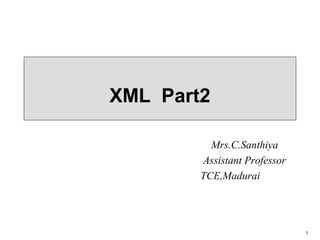
The document provides information on XML including:
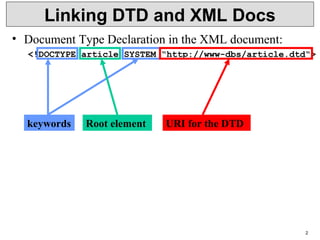
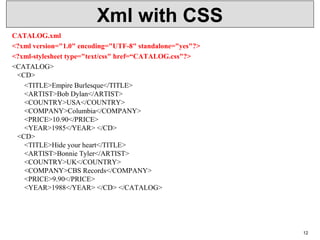
- Linking DTDs and XML documents using internal and external DTDs.
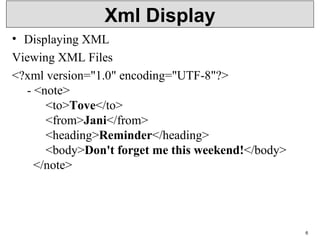
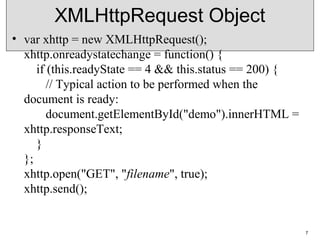
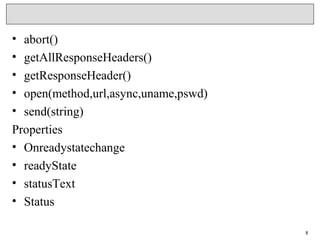
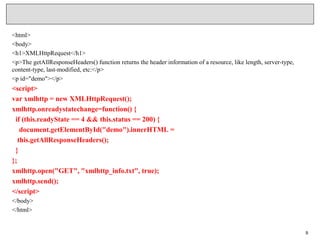
- Using the XMLHttpRequest object to make HTTP requests and display XML data.
- Parsing XML documents using DOM parsers and displaying elements using XPath queries.
![3
Linking DTD and XML Docs
• Internal DTD:
<?xml version=“1.0“?>
<!DOCTYPE article [
<!ELEMENT article (title,author+,text)>
...
<!ELEMENT index (#PCDATA)>
]>
<article>
...
</article>
• Both ways can be mixed, internal DTD overwrites
external entity information:
<!DOCTYPE article SYSTEM „article.dtd“ [
<!ENTITY % pub_content (title+,author*,text)
]>](https://image.slidesharecdn.com/xmlp2-180105202916/85/Xml-p2-Lecture-Notes-3-320.jpg)
![Internal & External DTD
• <?xml version="1.0" encoding="UTF-8"?>
<!DOCTYPE note SYSTEM "Note.dtd">
• Note.dtd
<!DOCTYPE note
[
<!ELEMENT note (to,from,heading,body)>
<!ELEMENT to (#PCDATA)>
<!ELEMENT from (#PCDATA)>
<!ELEMENT heading (#PCDATA)>
<!ELEMENT body (#PCDATA)>
]>
4](https://image.slidesharecdn.com/xmlp2-180105202916/85/Xml-p2-Lecture-Notes-4-320.jpg)
![• <?xml version="1.0"?>
<!DOCTYPE note [
<!ELEMENT note (to,from,heading,body)>
<!ELEMENT to (#PCDATA)>
<!ELEMENT from (#PCDATA)>
<!ELEMENT heading (#PCDATA)>
<!ELEMENT body (#PCDATA)>
]>
<note>
<to>Tove</to>
<from>Jani</from>
<heading>Reminder</heading>
<body>Don't forget me this weekend</body>
</note>
5](https://image.slidesharecdn.com/xmlp2-180105202916/85/Xml-p2-Lecture-Notes-5-320.jpg)
![DOM Parser
• <script>
var text, parser, xmlDoc;
text = "<bookstore><book>" +
"<title>Everyday Italian</title>" +
"<author>Giada De Laurentiis</author>" +
"<year>2005</year>" +
"</book></bookstore>";
parser = new DOMParser();
xmlDoc = parser.parseFromString(text,"text/xml");
document.getElementById("demo").innerHTML =
xmlDoc.getElementsByTagName("title")[0].childNodes[0].nodeValue;
</script>
11](https://image.slidesharecdn.com/xmlp2-180105202916/85/Xml-p2-Lecture-Notes-11-320.jpg)

![Xpath
/bookstore/book[1]
/bookstore/book[last()]
/bookstore/book[last()-1]
/bookstore/book[position()<3]
//title[@lang]
//title[@lang='en‘]
/bookstore/book[price>35.00]
/bookstore/book[price>35.00]/title
15](https://image.slidesharecdn.com/xmlp2-180105202916/85/Xml-p2-Lecture-Notes-15-320.jpg)



![3
Linking DTD and XML Docs
• Internal DTD:
<?xml version=“1.0“?>
<!DOCTYPE article [
<!ELEMENT article (title,author+,text)>
...
<!ELEMENT index (#PCDATA)>
]>
<article>
...
</article>
• Both ways can be mixed, internal DTD overwrites
external entity information:
<!DOCTYPE article SYSTEM „article.dtd“ [
<!ENTITY % pub_content (title+,author*,text)
]>](/p?url=https%3A%2F%2Fimage.slidesharecdn.com%2Fxmlp2-180105202916%2F85%2FXml-p2-Lecture-Notes-3-320.jpg&__src=https%3A%2F%2Fwww.slideshare.net%2Fslideshow%2Fxml-p2-lecture-notes%2F85775048&__type=image)
![Internal & External DTD
• <?xml version="1.0" encoding="UTF-8"?>
<!DOCTYPE note SYSTEM "Note.dtd">
• Note.dtd
<!DOCTYPE note
[
<!ELEMENT note (to,from,heading,body)>
<!ELEMENT to (#PCDATA)>
<!ELEMENT from (#PCDATA)>
<!ELEMENT heading (#PCDATA)>
<!ELEMENT body (#PCDATA)>
]>
4](/p?url=https%3A%2F%2Fimage.slidesharecdn.com%2Fxmlp2-180105202916%2F85%2FXml-p2-Lecture-Notes-4-320.jpg&__src=https%3A%2F%2Fwww.slideshare.net%2Fslideshow%2Fxml-p2-lecture-notes%2F85775048&__type=image)
![• <?xml version="1.0"?>
<!DOCTYPE note [
<!ELEMENT note (to,from,heading,body)>
<!ELEMENT to (#PCDATA)>
<!ELEMENT from (#PCDATA)>
<!ELEMENT heading (#PCDATA)>
<!ELEMENT body (#PCDATA)>
]>
<note>
<to>Tove</to>
<from>Jani</from>
<heading>Reminder</heading>
<body>Don't forget me this weekend</body>
</note>
5](/p?url=https%3A%2F%2Fimage.slidesharecdn.com%2Fxmlp2-180105202916%2F85%2FXml-p2-Lecture-Notes-5-320.jpg&__src=https%3A%2F%2Fwww.slideshare.net%2Fslideshow%2Fxml-p2-lecture-notes%2F85775048&__type=image)


![DOM Parser
• <script>
var text, parser, xmlDoc;
text = "<bookstore><book>" +
"<title>Everyday Italian</title>" +
"<author>Giada De Laurentiis</author>" +
"<year>2005</year>" +
"</book></bookstore>";
parser = new DOMParser();
xmlDoc = parser.parseFromString(text,"text/xml");
document.getElementById("demo").innerHTML =
xmlDoc.getElementsByTagName("title")[0].childNodes[0].nodeValue;
</script>
11](/p?url=https%3A%2F%2Fimage.slidesharecdn.com%2Fxmlp2-180105202916%2F85%2FXml-p2-Lecture-Notes-11-320.jpg&__src=https%3A%2F%2Fwww.slideshare.net%2Fslideshow%2Fxml-p2-lecture-notes%2F85775048&__type=image)


![Xpath
/bookstore/book[1]
/bookstore/book[last()]
/bookstore/book[last()-1]
/bookstore/book[position()<3]
//title[@lang]
//title[@lang='en‘]
/bookstore/book[price>35.00]
/bookstore/book[price>35.00]/title
15](/p?url=https%3A%2F%2Fimage.slidesharecdn.com%2Fxmlp2-180105202916%2F85%2FXml-p2-Lecture-Notes-15-320.jpg&__src=https%3A%2F%2Fwww.slideshare.net%2Fslideshow%2Fxml-p2-lecture-notes%2F85775048&__type=image)


