CLOUD COMPUTING
WHAT IS CLOUD COMPUTING
 Cloud computing is the on-demand delivery of IT resources over the internet with pay-as-you-go pricing.
 Instead of buying, owning, and maintaining physical data centers and servers, you can access technology
services, such as computing power, storage, and databases, on an as-needed basis from a cloud provider
like amazon web services (AWS).
 Cloud computing means manipulating ,configuring and accessing the application online.it offers online
data storage, infrastructures and application.
 Cloud computing means storing and accessing data and programs over internet instead of your computer
hard drive.
 It is use of remote servers(non-physical servers) on the internet to store manage and process data rather
than on local servers..
 Cloud-------->collection of servers (cloud is not connected to servers)
 Computing------>processing
 We don’t need to install a piece of software on our local PC and that’s how cloud computing overcome
platform dependency issues.
• There are many cloud providers . But there are main there are very famous among industry..
1.AWS(Amazon Web Services)
2. Microsoft Cloud(AZURE)
3.Google Cloud
WHAT IS BEFORE CLOUD??
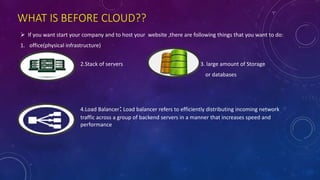
 If you want start your company and to host your website ,there are following things that you want to do:
1. office(physical infrastructure)
2.Stack of servers 3. large amount of Storage
or databases
4.Load Balancer:Load balancer refers to efficiently distributing incoming network
traffic across a group of backend servers in a manner that increases speed and
performance
LOAD BALANCER:
All user send request
To load balancer not
To servers directly
User can use any devices r1 r2 r3 r4 r5
Like mobile ,laptop, re1 re2 re3 re4 re5
Tablet , desktop
r request and re  response
Server 1 Server 2
Load balancer
user3user2user1 user4 user5
 All servers are connected to load
balancer(LB)
 LB take care about health and traffic of
each servers . According to this LB can
activate or deactivate servers to decrease
traffic after decrease traffic LB activate
that servers
 LB can get request and send to that
servers which have less amount of traffic.
 And than send response to that user.
LOAD BALANCING:
 Load balancing is the process of distributing network traffic across multiple servers.
 This ensures no single server bears too much demand. By spreading the work evenly, load balancing improves
application responsiveness.
 It also increases availability of applications and websites for users.
There are Three types of load balancers:
1.Application load balancer
2.Network load balancer
3.Classic load balancer
5. 24*7 services:
• You have to provide 24*7 hours services .
• Hence you have to take care about many things like:
1.Traffic on site
2.Is servers properly work or not
3.Is that any security issue or not
4.Is there any problem with hardware or not
Like these you have to take care about many things and though you can’t pay
attention on your products.
Hence we can’t make focus on our product.
6.MAN-POWER
 We know that to maintain any company or product manpower is required.
 But scalability of man power can be large or small . Without cloud
manpower increase because to maintain physical infrastructure and servers
and many hard wares , maintain offices , computers and many more.
7.compliance:
 It means, your transaction will be done in your country servers only hence
data can’t be leaked . This type of things you have to take care about.
 This is one type of security issue or thing which is necessary.
 Cloud compliance is about complying with the laws and regulations that
apply to using the cloud.
 You also need to consider interception laws or access to information laws,
which may enable Governments or others to access your data in the cloud.
8.HARDWARE WEAR OUT!!!!
 As you start your product or company we need a lots of hardware things like
computers , servers , circuits ,memory drives ,switches , routers ,
firewalls, physical load balancer ,
backup drives etc.
 These type of things are very costly. And we know that in market , new things
are arriving so fast hence after some time we have to replace our servers and
other hard-wares hence it become costly if we want to sale our old hard-wares
we can’t be got large amount because every electric element become less
costly after use of it.
 Hence replacing of hardware become headache and you can’t make focus on
our product.
9.HIGH END CONSULTANTS & MONITORING SERVERS AND OTHER THINGS:
 To monitoring your servers and many other things you need high end
consultants who has a lot of knowledge about servers and other
things like circuits and array of storage(DBS),how to manage traffic
on servers and how to manage Load balancer according to traffic on
servers.
 This types of people are hard to find though you find those type of
people you have to give high salary to them.
 Hence your cost of product become high. If you pay attention on
monitoring you can’t pay attention on your product quality
 Hence you can’t make focus on our product.
10.TESTING OF NEW PRODUCT:
 If you want to test your new product you have to buy new
server and shift your running product on new one and test
your product on old servers.
 This method of product testing is very hard and time
consuming. If there is big problem in product some servers
can be affected and they become un-useful hence testing
of product become headache for any-one or company
without cloud
11.GLOBAL EXPANSION OF YOUR PRODUCT:
 If you want to launch your product or app or website on different religion or different country first you
need some infrastructures at that location.
 Second, you have to buy servers at that location or religions.
 You need to heir manpower and high end consultants for your multi-country business.
 You also have to monitoring those servers and your infrastructures.
 Hence without cloud it become costly.
SCALABILITY:
• The main problem that occurs without cloud computing is scalability.
company make a website
in starting there is small traffic on site
hence using some servers company can handle traffic
after that suddenly traffic on site increases
hence many servers crashed and site can’t load on client side
hence company need to increase servers and put LB
After some time or years traffic on site become
very low
Hence company has two options if they keep on
all servers which become costly or switch off that
servers
company keep on or keep off servers
maintenance is required because if servers are
not in use after some time some technical
problems may occurs
Hence scalability of servers up and down become costly for anyone hence without cloud
computing this problem can’t be solved or become headach
 HOW CLOUD COMPUTING SOLVE THESE PROBLEMS:
 You don’t need to worry about above things or problems.cloud computing solve this problem very easily
1. You don’t need to buy anything physically like servers and other things.
2. Using cloud computing you can create and start servers by just one click . You not need to buy any server
physically all servers are provided by cloud provider.
3. Cloud provider also provide almost unlimited storage but you have to pay as you use that services.
4. They also provide LB and you can connect your servers with it buy just one click from your home.
5. You need not worry about maintenance of servers or other hardware cloud provider is responsible for it.
6. Monitoring of servers is also responsibility of cloud provider hence you need not have to heir high-end
consultants and don’t pay to them
7. To keep servers online 24*7 is responsibility of cloud provider so you can pay attention on
your product.
8. You don’t need to worry about hard ware wear out it is cloud provider’s responsibility to
provide latest technical things (servers and other things).
9. You also need not to worry about shifting of running application while testing new product.
10.Cloud provider also take care about compliance.
11.Scalability factor can be maintain smartly by cloud computing . ex:: if traffic is increase cloud
provider increase servers without asking to user to keep online his website after traffic is in
control servers(extra) are automatically decreases (off) and you have to pay that extra charge of
those extra servers as much as time use by your product it this is not too costly than buying new
servers. Hence you can take any no of resources(servers and other things) as per need.
 The main thing about cloud computing is you can easily globalize your product .
 You need not to buy servers at particular religion .
 You can create any no of servers at any particular religion by just one click at home.
 That’s how you can bring your product in international market too.
 Hence your money can be saved using cloud computing.
 You need not buy any office/land/space in any religion to bring your product at that location.
The main thing to use cloud is high
speed internet.
If you have internet you can access
cloud from anywhere
In the world
Benefits
Application as
utilize over
internet
High efficiency,
reliability &
flexibility
Manipulate and
configure apps
online
Cost
effective
No software
required
On-demand
services Resources
available on
network
Online
development and
deployment tool
1.Reduce cost:
 Moving to cloud computing may reduce the cost of managing and maintaining your IT systems.
 Rather than purchasing expensive systems and equipment for your business.
 You may be able to reduce your operating costs because:
1.the cost of system upgrades, new hardware and software may be included In your contract
2.you no longer need to pay wages for expert staff
3.your energy consumption costs may be reduced there are fewer time delays.
2.Scalability(Elasticity):
 With cloud computing, you don’t have to over-provision resources up front to handle peak
levels of business activity in the future.
 Instead, you provision the amount of resources that you actually need. You can scale these
resources up or down to instantly to grow and shrink capacity as your business needs change.
3.Agility(ability to move quickly and easily.):
 The cloud gives you easy access to a broad range of technologies so that you can innovate faster and build
nearly anything that you can imagine.
 You can quickly spin up resources as you need them–from infrastructure services, such as:
1. compute
2. storage
3. databases
4. Internet of Things
5. machine learning
6. data lakes and analytics
and much more.
4. Deploy globally in minutes:
 With the cloud, you can expand to new geographic regions and deploy globally in minutes.
 For example, AWS has infrastructure all over the world, so you can deploy your application in multiple
physical locations with just a few clicks.
 Putting applications in closer proximity to end users reduces latency and improves their experience.
BASIC CONCEPT:
 There are many services and models which are working behind and making cloud computing feasible and
accessible to end users:
1. Deployment models
2. Service models
 Each type of cloud service, and deployment method, provides you with different levels of control, flexibility,
and management.
 Cloud deployment refers to the enablement of SaaS (software as a service), PaaS (platform as a service) or
IaaS (infrastructure as a service) solutions that may be accessed on demand by end users or consumers.
 There are mainly four deployment models.
1. Public cloud
2. Private cloud
3. Hybrid cloud
4. community cloud
1. Public Cloud:
 Public Cloud allows systems and services to be easily accessible to general public.
 The IT giants such as Google, Amazon and Microsoft offer cloud services via Internet.
 In a public cloud, you share the same hardware,
storage and network devices with other organization.
 Public cloud deployments are frequently used to
provide web-based email, online office applications,
storage and testing and development environments.
Benefits
Cost Effective Reliability
Utility Style
Costing
High
Scalability
Flexibility
Location
Independence
Cost Effective:
Since public cloud shares same resources
with large number of customers it become less
expensive
Reliability
The public cloud employs large number of
resources from different locations. If any of the
resources fails, public cloud can employ another
one.
Flexibility
The public cloud can smoothly integrate with
private cloud, which gives customers a flexible
approach.
Location Independence:
Public cloud services are delivered through
Internet, ensuring location independence.
Utility Style Costing
Public cloud is also based on pay-per-
use model and resources are accessible
whenever customer needs them.
High Scalability
Cloud resources are made available on demand
from a pool of resources, i.e., they can be scaled
up or down according the requirement.
Disadvantages:
Low Security:
In public cloud model, data is hosted off-site and resources are shared publicly,
therefore does not ensure higher level of security.
 Less Customizable:
It is comparatively less customizable than private cloud.
EAXAMPLE:
2. Private Cloud:
 Private Cloud allows systems and services to be accessible within an organization.
 The Private Cloud is operated only within a single organization.
 However, it may be managed internally by the organization itself or by third-party.
 in a private cloud, the services and infrastructure
are always maintained on a private network and
the hardware and software are dedicated solely
to your organisation.
 Private cloud make it easy to organisation for
customize it’s resources as per it’s IT
requirement.
 Private cloud are often used by Gov . Agencies ,
financial institution and other mid-large org…
 It is used for critical operations mainly….
Benefits
High security
and privacy
More control
More control
Improve
reliability
High Security and Privacy
Private cloud operations are not available to
general public and resources are shared from
distinct pool of resources. Therefore, it ensures
high security and privacy.
Cost and Energy Efficiency
The private cloud resources are not as cost
effective as resources in public clouds but they
offer more efficiency than public cloud
resources.
More Control
The private cloud has more control on its
resources and hardware than public cloud
because it is accessed only within an
organization.
MORE RELIABILITY
Disadvantages:
Restricted Area of Operation:
The private cloud is only accessible locally and is very difficult to deploy
globally.
High Priced:
Purchasing new hardware in order to fulfill the demand is a costly
transaction.
 Limited Scalability:
The private cloud can be scaled only within capacity of internal hosted
resources.
Additional Skills
In order to maintain cloud deployment, organization requires skilled
expertise.
3. Hybrid Cloud:
 Hybrid Cloud is a mixture of public and private cloud.
 Non-critical activities are performed using public cloud while the critical activities are performed using
private cloud.
 In a hybrid cloud, data and applications can move
between private and public clouds for greater flexibility
and more deployment options.
 For instance, you can use the public cloud for high-
volume, lower-security needs such as web-based
email and private cloud for sensitive, business-critical
operations like financial reporting.
Benefits
security
Scalability
Cost
efficiencies
Flexibility
Scalability
It offers features of both, the public
cloud scalability and the private cloud
scalability.
Flexibility
It offers secure resources and scalable
public resources.
Cost Efficiency
Public clouds are more cost effective
than private ones. Therefore, hybrid
clouds can be cost saving.
Security
The private cloud in hybrid cloud
ensures higher degree of security.
Disadvantages:
Networking Issues
Networking becomes complex due to presence of private and public
cloud.
Security Compliance
It is necessary to ensure that cloud services are compliant with
security policies of the organization.
Infrastructure Dependency
The hybrid cloud model is dependent on internal IT infrastructure,
therefore it is necessary to ensure redundancy across data centers.
4. Community cloud:
 Community Cloud allows system and services to be accessible by group of organizations.
 A community cloud is a multi-organization platform which allows several companies work on the
same platform, given that they have similar needs and concerns.
 It is owned, managed, and operated by one or more organizations in the community, a third party,
or a combination of them
 However, everyone is hitting these servers with the
same purpose -- to access that one application --
which is what makes it a community cloud.
 If two different organization are working on same
app or product , instead of giving their own servers
for that app or product ,hosting organization allows
multiple customers in their environment.
Benefits
Secure and
compliance
Flexibility
and
scalability
Improved
services
Cost
effective
Available
And
Reliable
ISSUES:
 Since all data is located at one place, one must be careful in storing
data in community cloud because it might be accessible to others.
 It is also challenging to allocate responsibilities of governance,
security and cost among organizations.
SERVICES MODELS OF CLOUD COMPUTING
Iaas
Paas
SaaS
 Understanding the differences between
IaaS, PaaS, and SaaS, as well as what
deployment strategies you can use, can
help you decide what set of services is
right for your needs.
IaaS(Infrastructure as a Services):-
 typically provide access to networking features, computers (virtual or on dedicated hardware), and data
storage space. Infrastructure as a Service provides you with the highest level of flexibility and management
control over your IT resources and is most similar to existing IT resources that many IT departments and
developers are familiar with today.
 IaaS doesn’t include applications or even an operating system (implementing all of that is left up to the
customer)
 typically provide access to networking features, computers (virtual or on dedicated hardware), and data
storage space. Infrastructure as a Service provides you with the highest level of flexibility and management
control over your IT resources and is most similar to existing IT resources that many IT departments and
developers are familiar with today.
 Examples : Amazon EC2, IBM SoftLayer, and Google’s Compute Engine (GCE)
WHY SHOULD YOU OPT IaaS??
1. Minimize Costs – Deploying an IaaS you not need to deploy on-premise hardware that reduces the costs.
2. Enhanced Scalability – As the most flexible cloud computing model, IaaS allows you to scale the resources up
or down based on demand.
3. Simple Deployment – IaaS lets you easily deploy the servers, processing, storage, and networking to make it
up and run very fast(quickly).
4. IaaS is very flexible , you can customize and manage hardware infrastructure according to your requirements.
5. Whether you are running a startup or a large enterprise, IaaS gives access to computing resources without the
need to invest in them separately.
DrawBACK::IaaS is costlier Than Paas and SaaS
PaaS(Platform as a Services):-
 PaaS as a cloud service model where the cloud is used to deliver a platform to users from which they can
develop, initialize and manage applications.
 In this service we are not flexible to select OS according to us.
 PaaS offerings typically include a base OS and a suite of applications and development tools.
 Platforms as a service remove the need for organizations to manage the underlying infrastructure (usually
hardware and operating systems) and allow you to focus on the deployment and management of your
applications.
 PaaS is sometimes called ‘middleware’, referring to how it conceptually sits somewhere between SaaS and
IaaS.
 you don’t need to worry about resource procurement, capacity planning, software maintenance, patching, or
any.
 Examples:Google’s App Engine, IBM BlueMix, and Apache’s Stratos
WHY SHOULD YOU OPT IaaS??
1. Minimal Development Time – PaaS reduces the development time because cloud provider manage
all the things like server-side resources hence you don’t be worried
about it.
2. PaaS has multiple programming language platform support.
3. PaaS is the preferred option if your project involves multiple developers and vendors.
4. PaaS simplifies the app development process that minimizes your organizational costs.
DrawBack:
 A typical disadvantage with PaaS is that since it is built on virtualized technology , hence you have less
control over the data processing.
 it is also less flexible compared to the IaaS cloud model.
SaaS(Software as a Services):-
 Software as a Service provides you with a completed product that is run and managed by the service
provider.
 In most cases, people referring to Software as a Service are referring to end-user applications.
 With a SaaS offering you do not have to think about how the service is maintained or how the underlying
infrastructure is managed; you only need to think about how you will use that particular piece of software.
 A common example of a SaaS application is web-based email where you can send and receive email
without having to manage feature additions to the email product or maintaining the servers and operating
systems that the email program is running on.
 Example:Office365 run on AZURE
WHY SHOULD YOU OPT SaaS??
1. Affordable – SaaS is affordable as it eliminates the costs involved in the purchase, installation, maintenance
and upgrades of computing hardware.
2. Anywhere Accessibility – With SaaS, you can access the services from anywhere using any device such as
smartphones, which eliminates the constraints set by on-premise software.
3. Ready to Use –All it takes is that you sign up for the service to get access to fast and powerful computing
resources.
4. With SaaS, communication, transferring of content and scheduling meetings are made easy.
5. SaaS is the ideal choice for small-scale businesses who do not have the necessary budget and resources to
deploy on-premise hardware.
DrawBack:
 it leaves you no control over the hardware allotted to you as only the vendor can manage the software.
THANK YOU FOR
WATCHING
Have
A
Good day