Web framework
What is a Web Framework?
A web framework is a server-side application framework ,
that is designed to support the development of
* dynamic websites
* web applications
* web services and
* resources
More about web Framework
• A Python web framework is a code library,
• that makes the life of a web application developer much easier
• for building flexible, scalable and maintainable web
applications.
• A web development framework is a set of resources and tools for
software developers to build and manage web applications,
web services and websites.
Why Django ?
• Tight Integration between Components
• Object-Relational Mapper (ORM)
• Automatic Administration Interface Multi-Lingual Support
Introduction to Django framework.
There are following frameworks in Python.
• Django
• CherryPy
• pylons
• Flask
• Bottle
• Pyramid
• Cubic Web
• GAE framework
What is Django Framework ?
• Django is basically a high-level Python web application
framework that enables the rapid development of web
applications.
• It achieves so with pragmatic, much cleaner design in
comparison of other frameworks.
• Django takes care of the difficult stuff so that you can
concentrate on building your web applications.
MVT Pattern
• How does Django Work?
• Django follows the MVT design pattern (Model View Template).
• MVT stands for Model – View – Template.
• MVT architecture is the software design pattern used by the
Django web framework.
Model
• In Django, the data is delivered as an Object Relational
Mapping (ORM)
• which is a technique designed to make it easier to work with
databases.
• Django, with ORM, makes it easier to communicate with the
database, without having to write complex SQL statements.
View
• A view is a function or method that takes
• http requests as arguments
• imports the relevant model(s)
• and finds out what data to send to the template
• and returns the final result.
• The views are usually located in a file called views.py.
Templates
• A template is a file where you describe how the result should be
represented.
• Templates are often .html files, with HTML code describing the layout of
a web page.
• but it can also be in other file formats to present other results, but here
we will concentrate on .html files.
URLs
• When a user requests a URL, Django decides which view it will send it
to.
• This is done in a file called urls.py.
Installation
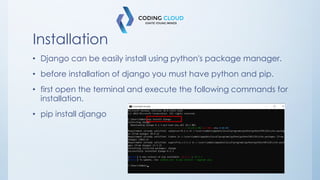
• Django can be easily install using python's package manager.
• before installation of django you must have python and pip.
• first open the terminal and execute the following commands for
installation.
• pip install django
Project
• Create a project in django
• open the terminal and navigate a folder in your system where
you want to create a project.
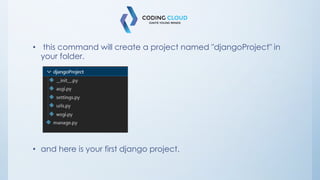
• Django-admin startproject djangoProject
• this command will create a project named "djangoProject" in
your folder.
• and here is your first django project.
Project
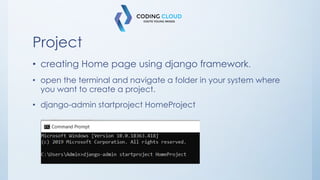
• creating Home page using django framework.
• open the terminal and navigate a folder in your system where
you want to create a project.
• django-admin startproject HomeProject
• cd HomeProject
• Create app of our project
– python manage.py startapp myapp
– code .
– it will open the project in coding app in your system.
Application Register
• create a folder named "Templates" in Application.
• After creating Templates create a new file named "home.html".
• After creating a file make their view in views.py.
• create a url for http response.
• Then run your project using this commands
• Open new terminal
– python manage.py runserver
– follow the link.
And here is your project
Creating a webApp
• Creating navbar of webapp
• Code for navbar
• Adding data in web app using django models
– Create a model in floder named “models.py”
• Model Migrations
– Open new terminal and execute the following commands
– Python manage.py makemigrations
• - python manage.py migrate
Model Registration
• Open a folder named “admin.py” in application
– Import the created Model in admin.py.
– Register the model
• Import the model in views.py
• Adding content using cards
• Defined code for image & card
Cards
• Adding content
• Footer for webapp
• Creating footer for project
Admin-panel in Django
• Creating admin panel of webapp
– Open new terminal and follow the given commands
– Python manage.py createsuperuser
Admin panel
• Added data in panel
• Adding dynamic data to web using MVT architecture.
• Creating template for Page
• Create html file in folder named “Templates” in application
– And follow the code
• Creating a view for template
– Click to python file named views.py
– And create the view for template
• Getting URL for specific created http response(view)
– Click to python file named Urls.py
– Add views from application
– And give a path
Static
• Adding Static files in web app
– Click to settings.py and follow the defined code
• Then move to urls.py and follow the steps for static image
Thank you
304 Aditya Arcade,
Nr. Choice Restaurant
CG Road
Ahmedabad
Contact 9537344018
www.codingcloudinstitute.com