Here are the answers to the quiz questions:
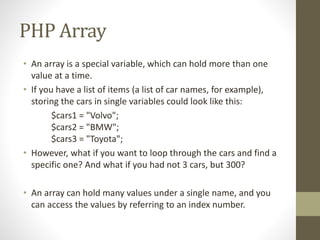
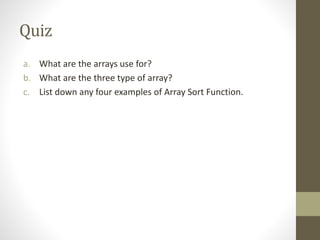
a. Arrays are used to store multiple values in a single variable. They allow efficient storage and retrieval of data from memory.
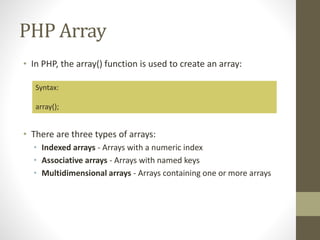
b. The three main types of arrays in PHP are:
- Indexed arrays - Arrays with a numeric index
- Associative arrays - Arrays with named keys
- Multidimensional arrays - Arrays containing one or more arrays
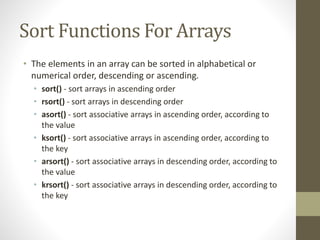
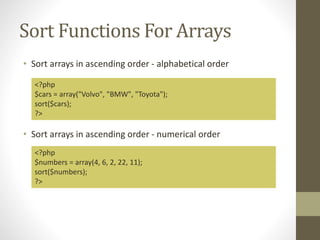
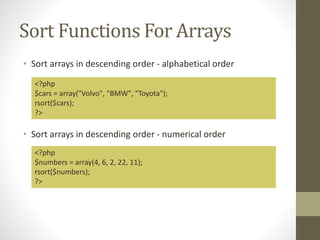
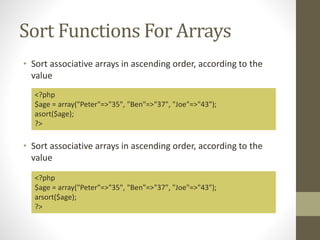
c. Four examples of array sort functions are:
- sort() - Sort arrays in ascending order
- rsort() - Sort arrays in descending order
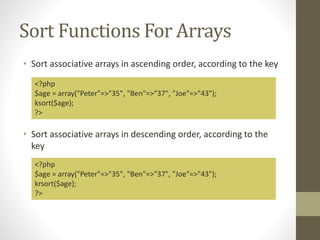
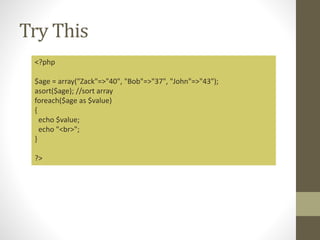
- asort() - Sort associative arrays in ascending order according to value
- ksort() - Sort associative arrays in ascending

![Indexed Arrays
• There are two ways to create indexed arrays
• The index can be assigned automatically (index always starts
at 0):
• The following example creates an indexed array named $cars,
assigns three elements to it, and then prints a text containing
the array values:
$cars[0] = "Volvo";
$cars[1] = "BMW";
$cars[2] = "Toyota";
<?php
$cars = array("Volvo", "BMW", "Toyota");
echo "I like " . $cars[0] . ", " . $cars[1] . " and " . $cars[2] . ".";
?>](https://image.slidesharecdn.com/cn5109chapter4-210219041913/85/Web-Application-Development-using-PHP-Chapter-4-4-320.jpg)
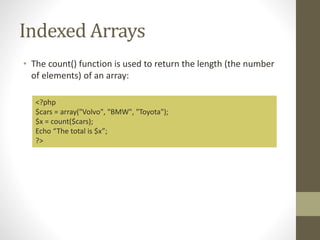
![Indexed Arrays
• To loop through and print all the values of an indexed array,
you could use a for loop, like this:
<?php
$cars = array("Volvo", "BMW", "Toyota");
$arrlength = count($cars);
for($x = 0; $x < $arrlength; $x++) {
echo $cars[$x];
echo "<br>";
}
?>](https://image.slidesharecdn.com/cn5109chapter4-210219041913/85/Web-Application-Development-using-PHP-Chapter-4-6-320.jpg)
![Indexed Arrays
• To loop through and print all the values of an indexed array,
you could use a for loop, like this:
<?php
$cars = array("Volvo", "BMW", "Toyota");
$arrlength = count($cars);
for($x = 0; $x < $arrlength; $x++) {
echo $cars[$x];
echo "<br>";
}
?>](https://image.slidesharecdn.com/cn5109chapter4-210219041913/85/Web-Application-Development-using-PHP-Chapter-4-7-320.jpg)
![Associative Arrays
• Associative arrays are arrays that use named keys that you
assign to them.
• There are two ways to create an associative array:
or
$age = array("Peter"=>"35", "Ben"=>"37", "Joe"=>"43");
$age['Peter'] = "35";
$age['Ben'] = "37";
$age['Joe'] = "43";](https://image.slidesharecdn.com/cn5109chapter4-210219041913/85/Web-Application-Development-using-PHP-Chapter-4-8-320.jpg)
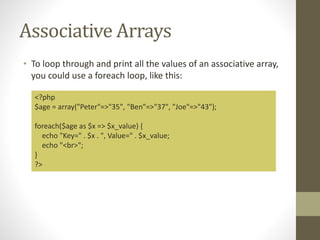
![Associative Arrays
• The named keys can then be used in a script:
<?php
$age = array("Peter"=>"35", "Ben"=>"37", "Joe"=>"43");
echo "Peter is " . $age['Peter'] . " years old.";
?>](https://image.slidesharecdn.com/cn5109chapter4-210219041913/85/Web-Application-Development-using-PHP-Chapter-4-9-320.jpg)
![Try This
<?php
// First method to create array.
$numbers = array( 1, 2, 3, 4, 5);
foreach( $numbers as $value )
{
echo "Value is $value <br />";
}
// Second method to create array.
$numbers[0] = "one";
$numbers[1] = "two";
$numbers[2] = "three";
$numbers[3] = "four";
$numbers[4] = "five";
foreach( $numbers as $value )
{
echo "Value is $value <br />";
}
?>](https://image.slidesharecdn.com/cn5109chapter4-210219041913/85/Web-Application-Development-using-PHP-Chapter-4-11-320.jpg)
![Try This
<?php
// First method to associate create array.
$salaries = array("mohammad" => 2000, "qadir" => 1000, "zara" => 500);
echo "Salary of mohammad is ". $salaries['mohammad'] . "<br />";
echo "Salary of qadir is ". $salaries['qadir']. "<br />";
echo "Salary of zara is ". $salaries['zara']. "<br />";
// Second method to create array.
$salaries['mohammad'] = "high";
$salaries['qadir'] = "medium";
$salaries['zara'] = "low";
echo "Salary of mohammad is ". $salaries['mohammad'] . "<br />";
echo "Salary of qadir is ". $salaries['qadir']. "<br />";
echo "Salary of zara is ". $salaries['zara']. "<br />";
?>](https://image.slidesharecdn.com/cn5109chapter4-210219041913/85/Web-Application-Development-using-PHP-Chapter-4-12-320.jpg)
![Try This
<?php
$cars = array("Proton","Mazda","Toyota");
sort($cars); //sort array
$arrlength = count($cars);
for ($x=0;$x<$arrlength;$x++)
{
echo $cars[$x];
echo "<br>";
}
?>](https://image.slidesharecdn.com/cn5109chapter4-210219041913/85/Web-Application-Development-using-PHP-Chapter-4-18-320.jpg)


![Indexed Arrays
• There are two ways to create indexed arrays
• The index can be assigned automatically (index always starts
at 0):
• The following example creates an indexed array named $cars,
assigns three elements to it, and then prints a text containing
the array values:
$cars[0] = "Volvo";
$cars[1] = "BMW";
$cars[2] = "Toyota";
<?php
$cars = array("Volvo", "BMW", "Toyota");
echo "I like " . $cars[0] . ", " . $cars[1] . " and " . $cars[2] . ".";
?>](/p?url=https%3A%2F%2Fimage.slidesharecdn.com%2Fcn5109chapter4-210219041913%2F85%2FWeb-Application-Development-using-PHP-Chapter-4-4-320.jpg&__src=https%3A%2F%2Fwww.slideshare.net%2Fslideshow%2Fweb-application-development-using-php-chapter-4%2F243013456&__type=image)

![Indexed Arrays
• To loop through and print all the values of an indexed array,
you could use a for loop, like this:
<?php
$cars = array("Volvo", "BMW", "Toyota");
$arrlength = count($cars);
for($x = 0; $x < $arrlength; $x++) {
echo $cars[$x];
echo "<br>";
}
?>](/p?url=https%3A%2F%2Fimage.slidesharecdn.com%2Fcn5109chapter4-210219041913%2F85%2FWeb-Application-Development-using-PHP-Chapter-4-6-320.jpg&__src=https%3A%2F%2Fwww.slideshare.net%2Fslideshow%2Fweb-application-development-using-php-chapter-4%2F243013456&__type=image)
![Indexed Arrays
• To loop through and print all the values of an indexed array,
you could use a for loop, like this:
<?php
$cars = array("Volvo", "BMW", "Toyota");
$arrlength = count($cars);
for($x = 0; $x < $arrlength; $x++) {
echo $cars[$x];
echo "<br>";
}
?>](/p?url=https%3A%2F%2Fimage.slidesharecdn.com%2Fcn5109chapter4-210219041913%2F85%2FWeb-Application-Development-using-PHP-Chapter-4-7-320.jpg&__src=https%3A%2F%2Fwww.slideshare.net%2Fslideshow%2Fweb-application-development-using-php-chapter-4%2F243013456&__type=image)
![Associative Arrays
• Associative arrays are arrays that use named keys that you
assign to them.
• There are two ways to create an associative array:
or
$age = array("Peter"=>"35", "Ben"=>"37", "Joe"=>"43");
$age['Peter'] = "35";
$age['Ben'] = "37";
$age['Joe'] = "43";](/p?url=https%3A%2F%2Fimage.slidesharecdn.com%2Fcn5109chapter4-210219041913%2F85%2FWeb-Application-Development-using-PHP-Chapter-4-8-320.jpg&__src=https%3A%2F%2Fwww.slideshare.net%2Fslideshow%2Fweb-application-development-using-php-chapter-4%2F243013456&__type=image)
![Associative Arrays
• The named keys can then be used in a script:
<?php
$age = array("Peter"=>"35", "Ben"=>"37", "Joe"=>"43");
echo "Peter is " . $age['Peter'] . " years old.";
?>](/p?url=https%3A%2F%2Fimage.slidesharecdn.com%2Fcn5109chapter4-210219041913%2F85%2FWeb-Application-Development-using-PHP-Chapter-4-9-320.jpg&__src=https%3A%2F%2Fwww.slideshare.net%2Fslideshow%2Fweb-application-development-using-php-chapter-4%2F243013456&__type=image)

![Try This
<?php
// First method to create array.
$numbers = array( 1, 2, 3, 4, 5);
foreach( $numbers as $value )
{
echo "Value is $value <br />";
}
// Second method to create array.
$numbers[0] = "one";
$numbers[1] = "two";
$numbers[2] = "three";
$numbers[3] = "four";
$numbers[4] = "five";
foreach( $numbers as $value )
{
echo "Value is $value <br />";
}
?>](/p?url=https%3A%2F%2Fimage.slidesharecdn.com%2Fcn5109chapter4-210219041913%2F85%2FWeb-Application-Development-using-PHP-Chapter-4-11-320.jpg&__src=https%3A%2F%2Fwww.slideshare.net%2Fslideshow%2Fweb-application-development-using-php-chapter-4%2F243013456&__type=image)
![Try This
<?php
// First method to associate create array.
$salaries = array("mohammad" => 2000, "qadir" => 1000, "zara" => 500);
echo "Salary of mohammad is ". $salaries['mohammad'] . "<br />";
echo "Salary of qadir is ". $salaries['qadir']. "<br />";
echo "Salary of zara is ". $salaries['zara']. "<br />";
// Second method to create array.
$salaries['mohammad'] = "high";
$salaries['qadir'] = "medium";
$salaries['zara'] = "low";
echo "Salary of mohammad is ". $salaries['mohammad'] . "<br />";
echo "Salary of qadir is ". $salaries['qadir']. "<br />";
echo "Salary of zara is ". $salaries['zara']. "<br />";
?>](/p?url=https%3A%2F%2Fimage.slidesharecdn.com%2Fcn5109chapter4-210219041913%2F85%2FWeb-Application-Development-using-PHP-Chapter-4-12-320.jpg&__src=https%3A%2F%2Fwww.slideshare.net%2Fslideshow%2Fweb-application-development-using-php-chapter-4%2F243013456&__type=image)


![Try This
<?php
$cars = array("Proton","Mazda","Toyota");
sort($cars); //sort array
$arrlength = count($cars);
for ($x=0;$x<$arrlength;$x++)
{
echo $cars[$x];
echo "<br>";
}
?>](/p?url=https%3A%2F%2Fimage.slidesharecdn.com%2Fcn5109chapter4-210219041913%2F85%2FWeb-Application-Development-using-PHP-Chapter-4-18-320.jpg&__src=https%3A%2F%2Fwww.slideshare.net%2Fslideshow%2Fweb-application-development-using-php-chapter-4%2F243013456&__type=image)


