The VMWare View Virtualization Sanjoy Sanyal: Tech for Non Geek
Virtualization – what is it? Separation of a resource or a request for service from the physical delivery of the service Provides a layer of abstraction between computing, storage and networking hardware and the applications running on it Virtualization makes possible: Hardware independence of OS and applications  Virtual machines can be provisioned to any system  OS and Application can be encapsulated into one virtual system  Sanjoy Sanyal: Tech for Non Geek  Each virtual machine represents a complete system with processors, memory, networking, storage…..
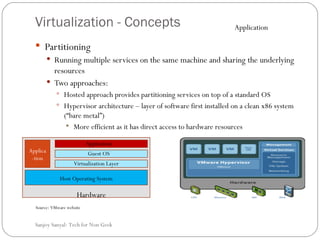
Virtualization - Concepts Partitioning  Running multiple services on the same machine and sharing the underlying resources  Two approaches: Hosted approach provides partitioning services on top of a standard OS  Hypervisor architecture – layer of software first installed on a clean x86 system (“bare metal”) More efficient as it has direct access to hardware resources  Source: VMware website Sanjoy Sanyal: Tech for Non Geek  Hardware Host Operating System Applica-tion Application Virtualization Layer Guest OS Application
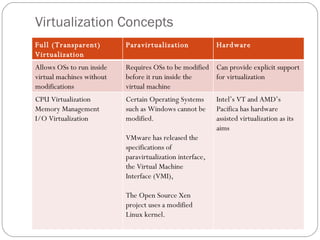
Virtualization Concepts Sanjoy Sanyal: Tech for Non Geek  Full (Transparent) Virtualization Paravirtualization Hardware Allows OSs to run inside virtual machines without modifications Requires OSs to be modified before it run inside the virtual machine Can provide explicit support for virtualization CPU Virtualization  Memory Management I/O Virtualization Certain Operating Systems such as Windows cannot be modified.  VMware has released the specifications of paravirtualization interface, the Virtual Machine Interface (VMI),  The Open Source Xen project uses a modified Linux kernel. Intel’s VT and AMD’s Pacifica has hardware assisted virtualization as its aims
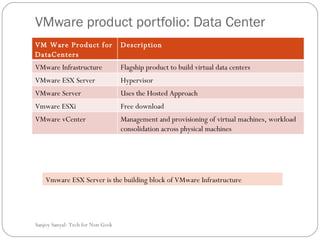
VMware product portfolio: Data Center  Sanjoy Sanyal: Tech for Non Geek  Vmware ESX Server is the building block of VMware Infrastructure VM Ware Product for DataCenters Description VMware Infrastructure  Flagship product to build virtual data centers  VMware ESX Server Hypervisor VMware Server Uses the Hosted Approach  Vmware ESXi Free download VMware vCenter Management and provisioning of virtual machines, workload consolidation across physical machines
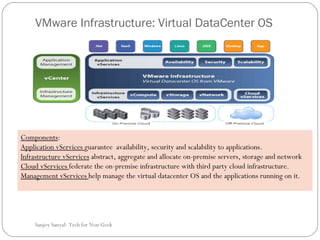
VMware Infrastructure: Virtual DataCenter OS Components :  Application vServices  guarantee  availability, security and scalability to applications. Infrastructure vServices  abstract, aggregate and allocate on-premise servers, storage and network  Cloud vServices  federate the on-premise infrastructure with third party cloud infrastructure.  Management vServices  help manage the virtual datacenter OS and the applications running on it. Sanjoy Sanyal: Tech for Non Geek
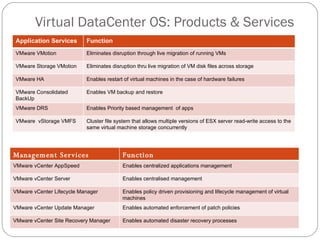
Virtual DataCenter OS: Products & Services Sanjoy Sanyal: Tech for Non Geek  Application Services Function VMware VMotion Eliminates disruption through live migration of running VMs VMware Storage VMotion Eliminates disruption thru live migration of VM disk files across storage  VMware HA Enables restart of virtual machines in the case of hardware failures VMware Consolidated BackUp Enables VM backup and restore VMware DRS Enables Priority based management  of apps VMware  vStorage VMFS Cluster file system that allows multiple versions of ESX server read-write access to the same virtual machine storage concurrently Management Services Function VMware vCenter AppSpeed Enables centralized applications management  VMware vCenter Server Enables centralised management VMware vCenter Lifecycle Manager  Enables policy driven provisioning and lifecycle management of virtual machines VMware vCenter Update Manager Enables automated enforcement of patch policies VMware vCenter Site Recovery Manager  Enables automated disaster recovery processes
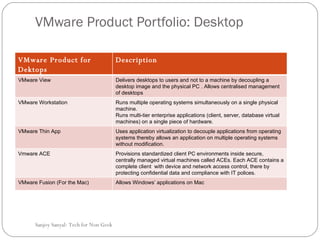
VMware Product Portfolio: Desktop Sanjoy Sanyal: Tech for Non Geek  VMware Product for Dektops Description VMware View Delivers desktops to users and not to a machine by decoupling  a desktop image and the physical PC . Allows centralised management of desktops VMware Workstation Runs multiple operating systems simultaneously on a single physical machine.  Runs multi-tier enterprise applications (client, server, database virtual machines) on a single piece of hardware. VMware Thin App Uses application virtualization  to decouple applications from operating systems thereby allows an application on multiple operating systems without modification. Vmware ACE  Provisions standardized client PC environments inside secure, centrally managed virtual machines called ACEs. Each ACE contains a complete client  with device and network access control, there by protecting confidential data and compliance with IT polices. VMware Fusion (For the Mac) Allows  Windows’ applications on Mac
VMWare Product: Mobile  VMware MVP: VMware Mobile Virtualization Platform A thin layer of software embedded on a mobile phone to decouple the applications and data from the underlying hardware.  It is optimized to run efficiently on low power consuming and memory constrained mobile phones.  Currently supports Windows CE 5.0 and 6.0, Linux 2.6.x, Symbian 9.x, eCos, µITRON NORTi and µC/OS-II. Benefits : Accelerate time to market by  is reducing the effort in porting the software stack for multiple mobile platforms.  Easily migrate to richer Oss Allows multiple personas for the user.  Sanjoy Sanyal: Tech for Non Geek
Standards Open Virtualization Format (OVF) how virtual appliances can be packaged in a vendor-neutral format to be run on any hypervisor.  Virtual Appliances are pre-built software solutions, comprised of virtual machines packaged, updated, maintained and managed as a unit.  Virtual Machine Disk Format (VMDK)  Describes the virtual machine environment and how it is stored. (critical to how virtual environments are provisioned, manipulated, patched, updated, scanned and backed up.) Vmware has released a toolkit for developers creating Virtual Disk management applications . Sanjoy Sanyal: Tech for Non Geek
Acknowledgements  VMware Website Sanjoy Sanyal: Tech for Non Geek