SQL Saturday Night


   Using T-SQL


      March 30, 2013
   SQL Saturday Night #19
Η παρουσίαση αυτή θα καταγραφεί ώστε να είναι διαθέσιμη
για όσους θέλουν να την ξαναδούν, ή δεν είχαν την
δυνατότητα να την παρακολουθήσουν σε πραγματικό χρόνο.
Εάν κάποιος από τους παραβρισκόμενους σε αυτή έχει το
οποιοδήποτε πρόβλημα ή αντίρρηση να είναι μέρος της
καταγραφή αυτής, παρακαλείται να αποχωρήσει άμεσα.
Σε διαφορετική περίπτωση η παραμονή σε αυτή εκλαμβάνεται
ως αποδοχή της καταγραφής.
Η παρουσίαση αυτή διατίθεται δωρεάν,
και θα αρχίσει σε 1 λεπτό…
Αυτή την στιγμή ο παρουσιαστής μιλάει και σας ζητάει να
βεβαιώσετε ότι τον ακούτε.
Εάν αυτό δεν είναι δυνατόν παρακαλείστε να αλλάξετε το
χρώμα της κάρτας σας στο αντίστοιχο χρώμα ώστε να
τον ενημερώσετε.
Αυτό μπορεί να γίνει πατώντας την αντίστοιχη επιλογή
που βρίσκεται στο πάνω δεξί μέρος του περιβάλλοντος
του live meeting.
Σας ευχαριστούμε για την συνεργασία.
Using T-SQL


SQL Saturday Night # 19 – March 30, 2013
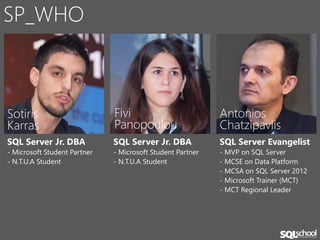
SP_WHO


Sotiris                       Fivi                          Antonios
Karras                        Panopoulou                    Chatzipavlis
SQL Server Jr. DBA            SQL Server Jr. DBA            SQL Server Evangelist
- Microsoft Student Partner   - Microsoft Student Partner   - MVP on SQL Server
- N.T.U.A Student             - N.T.U.A Student             - MCSE on Data Platform
                                                            - MCSA on SQL Server 2012
                                                            - Microsoft Trainer (MCT)
                                                            - MCT Regional Leader
SOCIAL CONNECTIONS


@antoniosch
@sqlschool    SQL School Greece   www.sqlschool.gr   help@sqlschool.gr
Agenda
Using T-SQL
PRESENTATION TOPICS - 1
• Introduction to Microsoft SQL Server 2012
• SQL Server Management Studio
• Introduction to T-SQL Querying
• SELECT Statements / Queries
• Querying Multiple Tables
• Sorting and Filtering Data
• Grouping and Aggregating Data
PRESENTATION TOPICS - 2
• Using Sub-queries
• Using Views, Table Value Functions and
  Table Expressions
• Using Set Operators
• Using Stored Procedures
• Using Window Functions
• What’s New in SQL Server 2012
Introduction
to Microsoft SQL Server 2012
SQL SERVER ARCHITECTURE
• Services
• Instances
• Tools
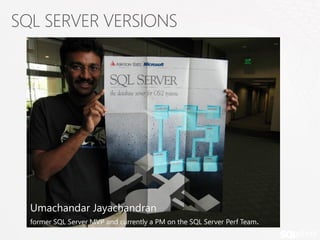
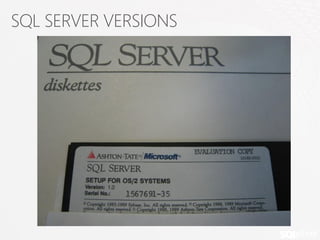
SQL SERVER VERSIONS


  Umachandar Jayachandran
  former SQL Server MVP and currently a PM on the SQL Server Perf Team.
SQL SERVER VERSIONS
SQL SERVER VERSIONS
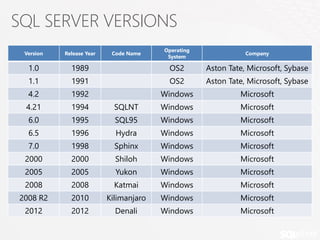
                                        Operating
 Version   Release Year    Code Name                           Company
                                         System

  1.0        1989                        OS2        Aston Tate, Microsoft, Sybase
  1.1        1991                        OS2        Aston Tate, Microsoft, Sybase
  4.2        1992                       Windows              Microsoft
 4.21        1994           SQLNT       Windows              Microsoft
  6.0        1995           SQL95       Windows              Microsoft
  6.5        1996           Hydra       Windows              Microsoft
  7.0        1998           Sphinx      Windows              Microsoft
 2000        2000           Shiloh      Windows              Microsoft
 2005        2005           Yukon       Windows              Microsoft
 2008        2008           Katmai      Windows              Microsoft
2008 R2      2010         Kilimanjaro   Windows              Microsoft
 2012        2012           Denali      Windows              Microsoft
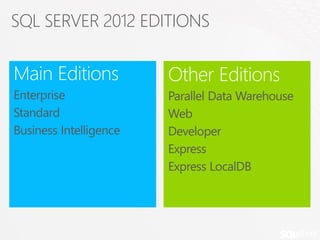
SQL SERVER 2012 EDITIONS

Main Editions           Other Editions
Enterprise              Parallel Data Warehouse
Standard                Web
Business Intelligence   Developer
                        Express
                        Express LocalDB
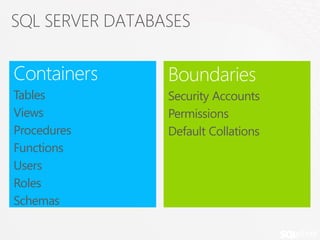
SQL SERVER DATABASES

Containers       Boundaries
Tables           Security Accounts
Views            Permissions
Procedures       Default Collations
Functions
Users
Roles
Schemas
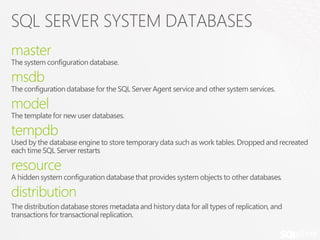
SQL SERVER SYSTEM DATABASES
master
The system configuration database.

msdb
The configuration database for the SQL Server Agent service and other system services.

model
Τhe template for new user databases.

tempdb
Used by the database engine to store temporary data such as work tables. Dropped and recreated
each time SQL Server restarts

resource
Α hidden system configuration database that provides system objects to other databases.

distribution
The distribution database stores metadata and history data for all types of replication, and
transactions for transactional replication.
SSMS
SQL Server Management Studio
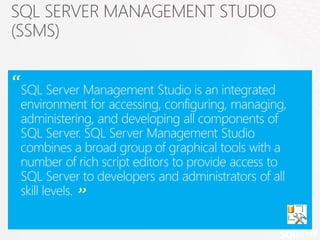
SQL SERVER MANAGEMENT STUDIO
(SSMS)

“SQL Server Management Studio is an integrated
 environment for accessing, configuring, managing,
 administering, and developing all components of
 SQL Server. SQL Server Management Studio
 combines a broad group of graphical tools with a
 number of rich script editors to provide access to
 SQL Server to developers and administrators of all
 skill levels. ”
Using SQL Server Management
Studio
Introduction
to T-SQL Querying
INTRODUCING TRANSACT-SQL (T-SQL)
Is the language in which you will write your
queries for SQL Server.
Structure Query Language (SQL)
Developed by IBM in 1970
Adopted as ANSI and ISO standards
Widely used in industry

SQL is declarative not procedural
CATEGORIES OF T-SQL STATEMENTS
Data Manipulation Language (DML)
Statement for querying and modify data
SELECT, INSERT, UPDATE, DELETE
Data Definition Language (DDL)
Statements for Objects definitions
CREATE, ALTER, DROP
Data Control Language (DCL)
Statements for security permissions
GRANT, DENY, REVOKE
PREDICATES AND OPERATORS
Predicates
IN, BETWEEN, LIKE                 Operators Precedence

                                  1   ( ) Parentheses
Comparison Operators              2   *, /, %
=, >, <, >=, <=, <>, !=, !>, !<   3   +, -

Logical Operators
                                  4   =, <, >, >=, <=, !=, !>, !<
                                  5   NOT
AND, OR, NOT                      6   AND

Arithmetic Operators              7
                                  8
                                      BETWEEN, IN, LIKE, OR
                                      =
+, -, *, /, %

Concatenation
+
FUNCTIONS CATEGORIES
•   Rowset Functions       • Mathematical Functions
•   Aggregate Functions    • Metadata Functions
•   Ranking Functions
                           • Security Functions
•   Configuration
    Functions              • String Functions
•   Conversion Functions   • System Functions
•   Cursor Functions
                           • System Statistical
•   Date and Time Data       Functions
    Types and Functions
•   Logical Functions      • Text and Image
                             Functions
VARIABLES
• Local variables in T-SQL temporarily store a value of specific data
  type
• Name begins with single @ sign
• @@ reserved for system functions
• Assigned a data type
• Must be declared and used within the same batch
• You can declare and initialize in the same statement (from SQL
  Server 2008 and later)

DECLARE @variablename            datatype [=init value]

DECLARE @myVar INT = 20;
EXPRESSIONS
• Combination of identifiers, values and
  operators evaluated to obtain a single result
• Can be used in many situations like
  • SELECT clause
  • WHERE clause
  • SET clause


SELECT YEAR(SalesOrderDate) + 1 …

SELECT Quantity * UnitPrice …
CONTROL FLOW STATEMENTS
• IF…ELSE
• WHILE
• BREAK
• CONTINUE
• BEGIN…END
ERRORS AND ERROR HANDLING
• @@error system function
• RAISERROR
• THROW
• TRY…CATCH
TRANSACTION CONTROL STATEMENTS
• BEGIN TRANSACTION
• COMMIT TRANSACTION
• ROLLBACK TRANSACTION
T-SQL Elements
COMMENTS
Block comments
/*
     SELECT …
     other code…
*/


Inline comments
-- inline comment
DECLARE @myVar INT = 20; -- initial value
BATCHES AND BATCH SEPARATOR
• Batches are sets of commands sent to SQL Server as a unit
• Batches determine variable scope and name resolution
• To separate statements into batches SQL Server uses the
  GO keyword
  •   GO is not a SQL Server command!
  •   We can define our batch separator
  •   GO n time feature added in SQL Server 2005 and later.

DECLARE @CustomerID NCHAR(5) = ‘ANTON’;
SELECT CustomerID, CompanyName FROM Orders
WHERE CustomerID = @CustomerID;
GO
CREATE TABLE T(c1 INT);
GO
CREATE VIEW V AS SELECT * FROM T;
GO
SQL SERVER DATA TYPES
• SQL Server defines a set of system data types
  for
  • storing data in columns,
  • holding values temporarily in variables,
  • for operating on data in expressions,
  • for passing parameters in stored procedures and functions

• Data Types specify the
  • Type
  • Length
  • Precision
  • Scale
SQL SERVER DATA TYPES CATEGORIES
• Exact numeric
• Approximate numeric
• Date & Time
• Character string
• Unicode character strings
• Binary string
• Other data types
EXACT NUMERIC DATA TYPES
Data type    Range                               Storage (bytes)

tinyint      0 to 255                            1
smallint     -32,768 to 32,768                   2
int          2^31 (-2,147,483,648) to            4
             2^31-1 (2,147,483,647)
bigint       -2^63 - 2^63-1                      8
             (+/- 9 quintillion)
bit          1, 0 or NULL                        1
decimal      - 10^38 +1 through 10^38 – 1 when   5-17
             maximum precision is used
numeric      - 10^38 +1 through 10^38 – 1 when   5-17
             maximum precision is used
money        -922,337,203,685,477.5808 to        8
             922,337,203,685,477.5807
smallmoney   - 214,748.3648 to 214,748.3647      4
APPROXIMATE NUMERIC DATA TYPES
Data Type    Range                                        Storage (bytes)

float(n)     - 1.79E+308 to -2.23E-308, 0 and 2.23E-      Depends on value of n, 4
             308 to 1.79E+308                             or 8 bytes
real         - 3.40E + 38 to -1.18E - 38, 0 and 1.18E -
                                                          4
             38 to 3.40E + 38


• float(24) is the ISO synonym for float
   • In float(n), n is the number of bytes used to store the mantissa of the float
     number in scientific notation

• Values of float are truncated when converted
  to integer types
DATE & TIME DATA TYPES
• Older versions of SQL Server supported only
  DATETIME and SMALLDATETIME
• DATE, TIME, DATETIME2, and
  DATETIMEOFFSET introduced in SQL Server
  2008
• SQL Server 2012 adds new functionality for
  working with date and time data types
DATE & TIME DATA TYPES
                 Storage                                       Recommended Entry
Data Type                  Date Range             Accuracy
                 (bytes)                                       Format

DATETIME           8       January 1, 1753 to       3-1/3      'YYMMDD
                           December 31, 9999    milliseconds   hh:mm:ss:nnn'
SMALLDATETIME      4       January 1, 1900 to    1 minute      'YYMMDD
                           June 6, 2079                        hh:mm:ss:nnn'
DATETIME2        6 to 8    January 1, 0001 to       100        'YYMMDD
                           December 31, 9999    nanoseconds    hh:mm:ss.nnnn
                                                               nn'
DATE               3       January 1, 0001 to      1 day       'YYYY-MM-DD'
                           December 31, 9999
TIME             3 to 5                             100        'hh:mm:ss:nnn
                                                nanoseconds    nnnn'
DATETIMEOFFSET   8 to 10 January 1, 0001 to         100        'YY-MM-DD
                         December 31, 9999      nanoseconds    hh:mm:ss:nnnn
                                                               nnn [+|-
                                                               ]hh:mm'
CHARACTER STRING DATA TYPES
• One byte per character
Data Type           Range                 Storage

CHAR(n)             1-8000 characters     n bytes, padded     Fixed Length
VARCHAR(n)          1-8000 characters     n+2 bytes           Variable Length
VARCHAR(MAX)        1-2^31-1 characters   Actual length + 2   Variable Length


• TEXT deprecated
       • Use VARCHAR(MAX) instead
UNICODE CHARACTER STRING DATA TYPES

• Two bytes per character
Data Type           Range                 Storage

NCHAR(n)            1-8000 characters     2*n bytes, padded Fixed Length
NVARCHAR(n)         1-8000 characters     (2*n)+2 bytes       Variable Length
NVARCHAR(MAX)       1-2^31-1 characters   Actual length + 2   Variable Length


• NTEXT deprecated
       • Use NVARCHAR(MAX) instead
BINARY STRING
Data Type        Range                          Storage (bytes)

binary(n)        1-8000 bytes                   n bytes
varbinary(n)     1-8000 bytes                   n bytes + 2
varbinary(MAX)   1-2.1 billion (approx) bytes   actual length + 2


• IMAGE deprecated
   • Use VARBINARY(MAX) instead
OTHER DATA TYPES
Data Type          Range            Storage      Remarks
                                    (bytes)

rowversion         Auto-generated   8            Successor type to
                                                 timestamp
uniqueidentifier   Auto-generated   16           Globally unique identifier
                                                 (GUID)
xml                0-2 GB           0-2 GB       Stores XML in native
                                                 hierarchical structure
cursor             N/A              N/A          Not a storage data type
hierarchyid        N/A              Depends on   Represents position in a
                                    content      hierarchy
sql_variant        0-8000 bytes     Depends on   Can store data of various
                                    content      data types
table              N/A              N/A          Not a storage data type,
                                                 used for query and
                                                 programmatic operations
DATA TYPES PRESENTENCE
• Data type precedence determines which data
  type will be chosen when expressions of different
  types are combined
• Data type with the lower precedence is converted
  to the data type with the higher precedence
• Important for understanding implicit conversions
  •   Conversion to type of lower precedence must be made explicitly (with CAST
      function)

• Example (low to high):
  •   CHAR -> VARCHAR -> NVARCHAR -> TINYINT -> INT -> DECIMAL -> TIME ->
      DATE -> DATETIME2 -> XML
DATA TYPES CONVERSION
• Data type conversion scenarios
  • When data is moved, compared, or combined with other data
  • During variable assignment

• Implicit conversion
  • When comparing data of one type to another
  • Transparent to user
  WHERE <column of smallint type> = <value of int type>

• Explicit conversion
  • Uses CAST or CONVERT functions
  CAST(unitprice AS int)

• Not all conversions allowed by SQL Server
SELECT Statement
The Select Statement and Writing Queries
SELECT STATEMENT – MAIN CLAUSES
• [ WITH <common_table_expression>]
• SELECT select_list [ INTO new_table ]
• [ FROM table_source ] [ WHERE search_condition ]
• [ GROUP BY group_by_expression ]
• [ HAVING search_condition ]
• [ ORDER BY order_expression [ ASC | DESC ] ]
SELECT STATEMENT – LOGICAL PROCESSING
• FROM
• ON
• JOIN
• WHERE
• GROUP BY
• WITH CUBE or WITH ROLLUP
• HAVING
• SELECT
• DISTINCT
• ORDER BY
• TOP
Select statement – Full statement
SELECT DISTINCT
• Specifies that only unique rows can appear in the
  result set
• Removes duplicates based on column list results,
  not source table
• Provides uniqueness across set of selected
  columns
• Removes rows already operated on by WHERE,
  HAVING, and GROUP BY clauses
• Some queries may improve performance by
  filtering out duplicates prior to execution of
  SELECT clause
COLUMN ALIASES
• Column aliases using AS
 SELECT orderid, unitprice, qty AS quantity
 FROM   OrderDetails;

• Column aliases using =
 SELECT orderid, unitprice, quantity = qty
 FROM   OrderDetails;

• Accidental column aliases
 SELECT orderid, unitprice quantity
 FROM   OrderDetails;
TABLE ALIASES
• Create table aliases in the FROM clause
• Table aliases with AS
  SELECT custid, orderdate
  FROM   dbo.Orders AS SO;

• Table aliases without AS
  SELECT custid, orderdate
  FROM   Sales.Orders SO;

• Using table aliases in the SELECT clause
  SELECT SO.custid, SO.orderdate
  FROM   Sales.Orders AS SO;
SELECT STATEMENT – CASE EXPRESSION

Simple Case expression
CASE input_expression
     WHEN when_expression THEN result_expression [ ...n ]
     [ ELSE else_result_expression ]
END

Searched CASE expression
CASE
       WHEN boolean_expression THEN result_expression [ ...n ]
       [ ELSE else_result_expression ]
END
SELECT Statement
Querying Multiple
Tables
Writing Join Queries
JOIN CLAUSE – INTRODUCTION
• By using joins, you can retrieve data from two or more tables
  based on logical relationships between the tables.
• Three types of Joins
  1.     Inner Joins, which use a comparison operator to match rows from two tables
         based on the values in common columns from each table
  2.     Outer Joins, in which all the rows of the specified table(s) are returned, not
         just the ones in which the joined columns match
  3.     Cross Joins, which produce the Cartesian product of the tables involved in the
         join (if there is no WHERE clause present)
  4.     Self Joins which you need to compare and retrieve data stored in the same
         table

• Main Join Clause
       SELECT select_list
       FROM first_table
       join_type second_table [ON (join_condition)]
       [WHERE (search_condition)]
T-SQL JOIN SYNTAX CHOICES
• ANSI SQL-92
 • Tables joined by JOIN operator in FROM Clause
 • Preferred syntax
  SELECT ...
  FROM   Table1 JOIN Table2
         ON <on_predicate>

• ANSI SQL-89
 • Tables joined by commas in FROM Clause
 • Not recommended: accidental Cartesian products!

  SELECT ...
  FROM   Table1, Table2
  WHERE <where_predicate>
Join Multiple Tables
Sorting & Filtering
Sorting and Filtering Data
SORTING/FILTERING – SORTING

• You can sort data retrieved by a SELECT
  statement using the ORDER BY clause

• ORDER BY clause syntax:
ORDER BY order_by_expression
   [ COLLATE collation_name ]
   [ ASC | DESC ]
   [ ,...n ]
[ <offset_fetch> ]
SORTING/FILTERING – COLLATION

• Specifies that the ORDER BY operation
  should be performed according to the
  collation specified in collation_name
• Using collations to sort data, depending
  on encoding or case sensitive/accent
  sensitive options
SORTING/FILTERING – TOP/OFFSET
  <offset_fetch> ::=
  {
      OFFSET { integer_constant | offset_row_count_expression } { ROW |
  ROWS }
      [
        FETCH { FIRST | NEXT } {integer_constant |
  fetch_row_count_expression } { ROW | ROWS } ONLY
      ]
  }


• Specifies the number of rows to return after the OFFSET
  clause has been processed. The value can be an integer
  constant or expression that is greater than or equal to one.
• Both OFFSET and FETCH can use variables as input and thus
  are able to be optimized for specified values of those values
  using the OPTIMIZE FOR hint
SORTING/FILTERING – WORKING WITH NULL VALUES

• NULL has three logical interpretations
  •   Unknown value
  •   Unavailable value
  •   Not supported value

• SET ANSI_NULLS { ON | OFF }
• Setting ANSI_NULLS ON, causes the SELECT
  statements using WHERE column_name = NULL
  to return zero rows even if there are null values
  in column_name ( thus operators =, <> follow the ISO
  standard)
• Option in future versions ANSI_NULLS will by default
  be set to ON
Sorting & Filtering
Grouping &
Aggregating
Grouping and Aggregating Data
AGGREGATE FUNCTIONS

• Aggregate functions perform a calculation
  on a set of values and return a single value.
• Deterministic in nature. They return the
  same value any time that they are called by
  using a specific set of input values.
               List of Aggregate Functions
             AVG                        MIN
         CHECKSUM_AVG                   SUM
            COUNT                      STDEV
           COUNT_BIG                  STDEVP
           GROUPING                     VAR
          GROUPING_ID                  VARP
             MAX
GROUP BY CLAUSE
• Groups sets of rows, using the values of one or
  more columns or expressions.
• Each group is represented by one and only one
  row.
• Usually aggregates are used to provide the
  grouping criterion
• Can filter the groups created using the HAVING
  keyword
• A GROUP BY clause can include GROUPING
  SETS, CUBE AND ROLLUP keywords
DISTINCT & NULL WITH AGGREGATE FUNCTIONS

• Use DISTINCT with aggregate functions to summarize only unique
  values

• DISTINCT aggregates eliminate duplicate values, not rows (unlike
  SELECT DISTINCT)
• Most aggregate functions ignore NULL
  •   COUNT(<column>) ignores NULL
  •   COUNT(*) counts all rows


• NULL may produce incorrect results (such as use of AVG)
• Use ISNULL or COALESCE to replace NULLs before aggregating
GROUPING SETS
• GROUPING SETS subclause builds on T-SQL
  GROUP BY clause
• Allows multiple groupings to be defined in
  same query
 SELECT <column list with aggregate(s)>
 FROM <source>
 GROUP BY
 GROUPING SETS(
       (<column_name>),--one or more columns
       (<column_name>),--one or more columns
       () -- empty parentheses if aggregating all rows
             );
GROUPING_ID
• Multiple grouping sets present a problem in
  identifying the source of each row in the result set
• NULLs could come from the source data or could be
  a placeholder in the grouping set
• The GROUPING_ID function provides a method to
  mark a row with a 1 or 0 to identify which grouping
  set the row is a member of
SELECT GROUPING_ID(Category)AS grpCat,
      GROUPING_ID(CustomerID) AS grpCust,
      Category, CustomerID, SUM(Qty) AS TotalQty
FROM CategorySales
GROUP BY CUBE(Category,CustomerID)
ORDER BY Category, CustomerID;
Grouping & Aggregating
CUBE/ROLLUP
• CUBE provides shortcut for defining grouping sets given a list of
  columns
• All possible combinations of grouping sets created
   SELECT <column list with aggregate(s)>
   FROM <source>
   GROUP BY CUBE (<column_name>, <column_name>, ...);

• ROLLUP provides shortcut for defining grouping sets, creates
  combinations assuming input columns form a hierarchy
   SELECT <column list with aggregate(s)>
   FROM <source>
   GROUP BY CUBE (<column_name>, <column_name>, ...);
PIVOT
• Pivoting data is rotating data from a rows-based orientation
  to a columns-based orientation
• Distinct values from a single column are projected across as
  headings for other columns - may include aggregation
PIVOT SYNTAX
• Pivoting includes three phases:
1. Grouping determines which element gets a row in the
   result set
2. Spreading provides the distinct values to be pivoted across
3. Aggregation performs an aggregation function (such as
   SUM)
                        Grouping

   SELECT Category, [2006],[2007],[2008]
   FROM ( SELECT Category, Qty, Orderyear
          FROM Sales.CategoryQtyYear) AS D
   PIVOT(SUM(QTY) FOR orderyear
               IN([2006],[2007],[2008])           Spreading
               ) AS pvt;

      Aggregation
UNPIVOT
• Unpivoting data is rotating data from a columns-based orientation to a
  rows-based orientation
• Spreads or splits values from one source row into one or more target rows
• Each source row becomes one or
  more rows in result set based on
  number of columns being pivoted
UNPIVOT SYNTAX
• Unpivoting includes three elements:
 • Source columns to be unpivoted
 • Name to be assigned to new values column
 • Name to be assigned to names columns


  SELECT category, qty, orderyear
  FROM CategorySales
  UNPIVOT(qty FOR orderyear
  IN([2006],[2007],[2008])) AS unpvt;
CUBE, ROLLUP PIVOT, UNPIVOT
            ,
Using Sub-queries
What is and How to write Sub-queries
SUBQUERIES
• Nesting queries within queries
  • Outer query : result set returned to caller
  • Inner query : result set returned to outer query


• Types of subqueries based on return value:
  • Single –valued (scalar)
  • Multivalued
  • Table-valued
DEPENDENCY ON OUTER QUERY
• Self-Contained Subqueries
 • Subquery not dependent on outer query
 • Can be evaluated by executing the subquery once and substituting the
   result into the WHERE clause of the outer query
 • Easier to debug

• Correlated Subqueries
 • The subquery depends on the outer query for its values
 • The subquery is executed repeatedly, once for each row that might be
   selected by the outer query
 • Known as repeating subquery
USE

 •   Anywhere an expression is allowed
 •   Not in an ORDER BY clause
 •   Subqueries within subqueries
 •   Commonly used with (NOT) IN and EXISTS
EXISTS PREDICATE
• Tests existence of rows.
• Returns TRUE or FALSE
• Usually * consists the SELECT list of the subquery,
  no reason to list column names
• Enough to determine whether the subquery returns
  at least one row, so engine doesn’t need to process
  all rows
Using Subqueries
Views, TVFs, Table
Expressions
Using Views, Table Value Functions and Table
Expressions
VIEWS
A view is a virtual table whose contents (rows and
columns) are defined by a query.
• The rows and columns of data come from tables
  referenced in the query defining the view and are
  produced dynamically when the view is referenced.
• Updatable view: modifying an underlying base table
  through the view
• Indexed view: The view definition has been
  computed and the resulting data stored just like a
  table.
USE
• To focus, simplify, and customize the perception
  each user has of the database.
• As a security mechanism by allowing users to
  access data through the view, without granting the
  users permissions to directly access the underlying
  base tables.
• To provide a backward compatible interface to
  emulate a table whose schema has changed.
OPTIONS
• CHECK OPTION
  Prevent data modifications through the view that conflict
  with the views filter
• ENCRYPTION
  Encrypt text of the CREATE VIEW statement in
  sys.syscomments
• SCHEMABINDING
  Prevent modification of underlying views that would affect
  the view definition
Using Views
INLINE TABLE-VALUED FUNCTIONS
• Table-valued functions (TVFs) are named table
  expressions with definitions stored in a database
• TVFs return a virtual table to the calling query
• SQL Server provides two types of TVFs
  •   Inline, based on a single SELECT statement
  •   Multi-statement, which creates and loads a table variable

• Unlike views, TVFs support input parameters
• Inline TVFs may be thought of as parameterized
  views
WRITING INLINE TVF
• Table-valued functions are created by administrators and
  developers
• Create and name function and optional parameters with
  CREATE FUNCTION
• Declare return type as TABLE
• Define inline SELECT statement following RETURN
   CREATE FUNCTION Sales.fn_LineTotal (@orderid INT)
   RETURNS TABLE
   AS
   RETURN
       SELECT orderid,
          CAST((qty * unitprice * (1 - discount)) AS
                 DECIMAL(8, 2)) AS line_total
       FROM    OrderDetails
       WHERE   orderid = @orderid ;
Inline Table Value Functions
DERIVED TABLES
• Derived tables are named query expressions created within an
  outer SELECT statement
• Not stored in database – represents a virtual relational table
• When processed, unpacked into query against underlying
  referenced objects
•   Allow you to write more modular queries

    SELECT <column_list>
    FROM (
          <derived_table_definition>
          ) AS <derived_table_alias>;


• Scope of a derived table is the query in which it is defined
Derived Tables
COMMON TABLE EXPRESSIONS
• CTEs are named table expressions defined in
  a query
• CTEs are similar to derived tables in scope
  and naming requirements
• Unlike derived tables, CTEs support multiple
  definitions, multiple references, and recursion
   WITH <CTE_name>
   AS (
      <CTE_definition>
         )
   <outer query referencing CTE>;
WRITING CTE
• Define the table expression in WITH clause
• Assign column aliases (inline or external)
• Pass arguments if desired
• Reference the CTE in the outer query
 WITH CTE_year AS
        (
        SELECT YEAR(orderdate) AS orderyear, customerid
        FROM Orders
        )
 SELECT orderyear,
        COUNT(DISTINCT customerid) AS cust_count
 FROM CTE_year
 GROUP BY orderyear;
Common Table Expressions
Set Operators
Using Set Operators
SET OPERATORS
Set operators combine results from two or more queries into
a single result set.
• The number and the order of the columns must be the same in all
  queries.
• The data types must be compatible
• ORDER BY clause applied to result of operator
• Names of columns in result are specified by the first query
• NULLS are equal                               Input Query 1
                                                set operator
                                                Input Query 2
                                                [ORDER BY … ]
SET OPERATORS
• UNION: returns all rows that belong to at least one
  of the input queries.
  • By default result set has no duplicates. To get result set with
    duplicates specify ALL option.

• INTERSECT: returns any distinct values that are
  returned by both the left query and the right one.
• EXCEPT: returns any distinct values from the left
  query that are not also found on the right query.