Unit Testing Software Quality Principles Dr Danny Powell K. J. Ross & Associates Pty. Ltd. Suite 4, Ground Floor 13a Narrabang Way Belrose NSW 2085 Telephone: 02 9450 2333 Facsimile: 02 9450 2744 Mobile: 0404 922 177 Email: dannyp@kjross.com.au http//www.kjross.com.au $ÆD$Hè#A=A=’”ÃèV@=”Ãè@=èä?=RPˆÆD$pèF=ÇD$Pè[|,L$LT$PQh$èƒ?=è?=è?= Ëè-èC=$‹Ì‰d$0RèùB>=$->=$L$(ÆD$Dè¾==è°==‹|$PËèÆD$pèF=ÇD-èC=$‹Ì‰d$0Rè BW‹ÎètÆD$pèF=ÇD==ÿèƒÇÿÿÿÿ‹t$j‹Îèc<=PT$QD$ RPL$@èTþÿÿL$èÛ:=QRL$4è¸ýÿÿ ‹ D$…À~AD$4L$PT$QDèÛ:=$ RPL$@è“[|,L$LT$PQh$èƒ?=è?=è?=-Ëè-èC=$‹Ì‰d$0R èùB>=$->=$L$(ÆD$Dè¾==è°==‹|$PËè-C=$‹þÿÿL$èš:=QRL$4è̉dèÛ:=$,Pè Ž G=Æ $hØ#PRŒ$ € ÆD$tè4F=ÆD$pèF=ÇD$(DjRÿüñ‚‹Èèäçÿÿë3À‹L$H‹QR‹ÈÆD$@‰F4è ™ êÿÿ‹N4jèßêËè-èC=$‹Ì‰d$0RèùBÿÿ…Àu8hV‹Ëè-èC=$‹Ì‰d$0RèùB=B=‘A=-ÿÿPL$Æ D$Hè#A=A=’”ÃèV@=”Ãè@=èä·ýÿÿ‹D$…À¿èÛ:=¸$”ÆD$pèF=ÇD:=$j/L$0è:=L$,ˆ$$ è“9=;Öt‹ASW‹°‹<‰‹A‰<°_[^Âó«‹„$4_^3À[ÄÇD$RSÿìêÁéó¥‹Èƒáó¤¾ìêøê Æ„$¤’Æ„$¤Æ„èÛ:=$¤ÆD$pèF=ÇD‹Ì‰dÆD$pèF=ÇD$,Pè Ž G=ÆD$hØ#PèÛ:=RŒ$ € ÆD$tè4F=ÆD$pèF=ÇD$(DjRÿüñ‚‹Èèäçÿÿë3À‹L$H‹QR‹ÈÆD$@‰F4è™ê[|,L$LT$PQ h$èƒ?=è?=è?=-Ëè-èC=$‹ÌèÛ:=‰d$0RèùB>=$->=$L$(ÆD$DèÆèÛ:=D$pèF=ÇD¾==è°= =‹|$PËè-èC=$‹Ëè-èC=$‹Ì‰d$0RèùBÿÿ‹N4jèßêÿÿ…Àu8hV‹Ëè-èC=$‹Ì‰d$0RèùB=B=‘A= -óÿÿPL$ÆD$Hè#A=A=’”ÃèV@=”Ãè@=èä?=RPˆÆD$pèF=ÇD$Pè[|,L$LT$PQh$èƒ?=è? =è?=-Ëè-èC=$‹Ì‰d$0RèùB>=$->=$L$(ÆD$Dè¾==è°==‹|$PËèÆD$pèF=ÇD-èC=$‹Ì‰d$0 RèùBW‹ÎètÆD$pèF=ÇD==ÿèƒÇÿÿÿÿ‹t$j‹Îèc<=PT$QD$ RPL$@èTþÿÿL$èÛ:=QRL$4è¸ýÿ ÿ‹D$…À~AD$4L$PT$QDèÛ:=$ RPL$@è“[|,L$LT$PQh$èƒ?=è?=è?=-Ëè-èC=$‹Ì‰d$0Rè ùB>=$-=$L$(ÆD$Dè¾==è°==‹|$PËè-èC=$‹þÿÿL$èš:=QRL$4è̉dèÛ:=$,Pè Ž G=ÆD$hØ #PRŒ$ € ÆD$tè4F=ÆD$pèF=ÇD$(DjRÿüñ‚‹Èèäçÿÿë3À‹L$H‹QR‹ÈÆD$@‰F4è™êÿÿ‹N 4jèßêËè-èC=$‹Ì‰d$0RèùBÿÿ…Àu8hV‹Ëè-èC=$‹Ì‰d$0RèùB=B=‘A=-PL$ÆD$Hè#A=A=’” ÃèV@=”Ãè@=èä·ýÿÿ‹D$…À¿èÛ:=¸$”ÆD$pèF=ÇD:=$j/L$0è:=L$,ˆ$$è“9=;Öt‹ASW‹°‹< ‰‹A‰<°_[^Âó«‹„$4_^3À[ÄÇD$RSÿìêÁéó¥‹Èƒáó¤¾ìêøêÆ„$¤’Æ„$¤Æ„èÛ :=$¤ÆD$pèF=ÇD‹Ì‰dÆD$pèF=ÇD$,Pè Ž G=ÆD$hØ#PèÛ:=RŒ$ € ÆD$tè4F=ÆD$pèF= ÇD$(DjRÿüñ‚‹Èèäçÿÿë3À‹L$H‹QR‹ÈÆD$@‰F4è™ê[|,L$LT$PQh$èƒ?=è?=è?=-Ëè-èC=$ ‹ ÌèÛ:=‰d$0RèùB>=$->=$L$(ÆD$DèÆèÛ:=D$pèF=ÇD¾==è°==‹|$PËè-èC=$‹Ëè-èC=$‹Ì‰ d$0RèùBÿÿ‹N4jèßêÿÿ…Àu8hV‹Ëè-èC=$‹Ì‰d$0RèùB=B=‘A=-óÿÿPL$ÆD$Hè#A=A=’” ÃèV@=”Ãè@=èä?=RPˆÆD$pèF=ÇD$Pè[|,L$LT$PQh$èƒ?=è?=è?=-Ëè-èC=$‹Ì‰d$0R èùB>=$->=$L$(ÆD$Dè¾==è°==‹|$PËèÆD$pèF=ÇD-èC=$‹Ì‰d$0RèùBW‹ÎètÆD$pèF= D==ÿèƒÇÿÿÿÿ‹t$j‹Îèc<=PT$QD$ RPL$@èTþÿÿL$èÛ:=QRL$4è¸ýÿÿ‹D$…À~AD$4L$PT$ QDèÛ:=$ RPL$@è“[|,L$LT$PQh$èƒ?=è?=è?=-Ëè-èC=$‹Ì‰d$0RèùB>=$->=$L$(ÆD$Dè ==è°==‹|$PËè-èC=$‹þÿÿL$èš:=QRL$4è̉dèÛ:=$,Pè Ž G=ÆD$hØ#PRŒ$ € ÆD$tè4F= ÆD$pèF=ÇD$(DjRÿüñ‚‹Èèäçÿÿë3À‹L$H‹QR‹ÈÆD$@‰F4è™êÿÿ‹N4jèßêËè-èC=$‹Ì‰d$ 0RèùBÿÿ…Àu8hV‹Ëè-èC=$‹Ì‰d$0RèùB=B=‘A=-óÿÿPL$ÆD$Hè#A=A=’”ÃèV@=”Ãè@= èä·ýÿÿ‹D$…À¿èÛ:=¸$”ÆD$pèF=ÇD:=$j/L$0è:=L$,ˆ$$è“9=;Öt‹ASW‹°‹<‰‹A‰<° _[^Âó«‹„$4_^3À[ÄÇD$RSÿìêÁéó¥‹Èƒáó¤¾ìêøêÆ„$¤’Æ„$¤Æ„èÛ:=$¤ÆD$pèF=ÇD $ÆD$Hè#A=A=’”ÃèV@=”Ãè@=èä?=RPˆÆD$pèF=ÇD$Pè[|,L$LT$PQh$èƒ?=è?=è?= Ëè-èC=$‹Ì‰d$0RèùB>=$->=$L$(ÆD$Dè¾==è°==‹|$PËèÆD$pèF=ÇD-èC=$‹Ì‰d$0Rè BW‹ÎètÆD$pèF=ÇD==ÿèƒÇÿÿÿÿ‹t$j‹Îèc<=PT$QD$ RPL$@èTþÿÿL$èÛ:=QRL$4è¸ýÿÿ ‹ D$…À~AD$4L$PT$QDèÛ:=$ RPL$@è“[|,L$LT$PQh$èƒ?=è?=è?=-Ëè-èC=$‹Ì‰d$0R èùB>=$->=$L$(ÆD$Dè¾==è°==‹|$PËè-C=$‹þÿÿL$èš:=QRL$4è̉dèÛ:=$,Pè Ž G=Æ $hØ#PRŒ$ € ÆD$tè4F=ÆD$pèF=ÇD$(DjRÿüñ‚‹Èèäçÿÿë3À‹L$H‹QR‹ÈÆD$@‰F4è ™ êÿÿ‹N4jèßêËè-èC=$‹Ì‰d$0RèùBÿÿ…Àu8hV‹Ëè-èC=$‹Ì‰d$0RèùB=B=‘A=-ÿÿPL$Æ D$Hè#A=A=’”ÃèV@=”Ãè@=èä·ýÿÿ‹D$…À¿èÛ:=¸$”ÆD$pèF=ÇD:=$j/L$0è:=L$,ˆ$$ è“9=;Öt‹ASW‹°‹<‰‹A‰<°_[^Âó«‹„$4_^3À[ÄÇD$RSÿìêÁéó¥‹Èƒáó¤¾ìêøê Æ„$¤’Æ„$¤Æ„èÛ:=$¤ÆD$pèF=ÇD‹Ì‰dÆD$pèF=ÇD$,Pè Ž G=ÆD$hØ#PèÛ:=RŒ$ € ÆD$tè4F=ÆD$pèF=ÇD$(DjRÿüñ‚‹Èèäçÿÿë3À‹L$H‹QR‹ÈÆD$@‰F4è™ê[|,L$LT$PQ h$èƒ?=è?=è?=-Ëè-èC=$‹ÌèÛ:=‰d$0RèùB>=$->=$L$(ÆD$DèÆèÛ:=D$pèF=ÇD¾==è°= =‹|$PËè-èC=$‹Ëè-èC=$‹Ì‰d$0RèùBÿÿ‹N4jèßêÿÿ…Àu8hV‹Ëè-èC=$‹Ì‰d$0RèùB=B=‘A= -óÿÿPL$ÆD$Hè#A=A=’”ÃèV@=”Ãè@=èä?=RPˆÆD$pèF=ÇD$Pè[|,L$LT$PQh$èƒ?=è? ‹ D$…À~AD$4L$PT$QDèÛ:=$ RPL$@è“[|,L$LT$PQh$èƒ?=è?=è?=-Ëè-èC=$‹Ì‰d$0Rè ùB>=$-=$L$(ÆD$Dè¾==è°==‹|$PËè-èC=$‹þÿÿL$èš:=QRL$4è̉dèÛ:=$,Pè Ž G=ÆD$hØ #PRŒ$ € ÆD$tè4F=ÆD$pèF=ÇD$(DjRÿüñ‚‹Èèäçÿÿë3À‹L$H‹QR‹ÈÆD$@‰F4è™êÿÿ‹N 4jèßêËè-èC=$‹Ì‰d$0RèùBÿÿ…Àu8hV‹Ëè-èC=$‹Ì‰d$0RèùB=B=‘A=-PL$ÆD$Hè#A=A=’” ÃèV@=”Ãè@=èä·ýÿÿ‹D$…À¿èÛ:=¸$”ÆD$pèF=ÇD:=$j/L$0è:=L$,ˆ$$è“9=;Öt‹ASW‹°‹< ‰‹A‰<°_[^Âó«‹„$4_^3À[ÄÇD$RSÿìêÁéó¥‹Èƒáó¤¾ìêøêÆ„$¤’Æ„$¤Æ„èÛ :=$¤ÆD$pèF=ÇD‹Ì‰dÆD$pèF=ÇD$,Pè Ž G=ÆD$hØ#PèÛ:=RŒ$ € ÆD$tè4F=ÆD$pèF= ÇD$(DjRÿüñ‚‹Èèäçÿÿë3À‹L$H‹QR‹ÈÆD$@‰F4è™ê[|,L$LT$PQh$èƒ?=è?=è?=-Ëè-èC=$
Test Driven Development http://www.testdriven.com/ “ Test driven development (TDD) is emerging as one of the most successful developer productivity enhancing techniques to be recently discovered. The three-step: write test, write code, refactor – is a dance many of us are enjoying.”
Overview White-Box Test Design Unit Test Automation Unit/Integration Test Issues
Overview White-Box Test Design Statement, Branch and Path Coverage Loop Testing Decision Coverage Data Flow Coverage Unit Test Automation Unit/Integration Test Issues
White-Box Testing Common goal to exercise every path through a program Infeasible to do this Techniques for selecting paths to test. Often associated with  test coverage metrics Measure the percentage of paths of the selected type that are exercised by test cases. Target coverage levels are set to guide how thoroughly a program must be tested.
White-Box Testing White-box testing works at the code level The structure of the code is analysed to propose test cases Test paths are proposed based on the structure
Overview White-Box Test Design Statement, Branch and Path Coverage Loop Testing Decision Coverage Data Flow Coverage LCSAJ Coverage Pros and Cons Unit Test Automation Unit/Integration Test Issues
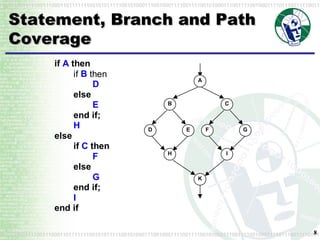
Statement, Branch and Path Coverage
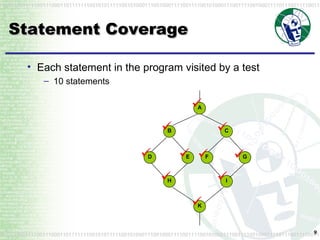
Statement Coverage Each statement in the program visited by a test 10 statements
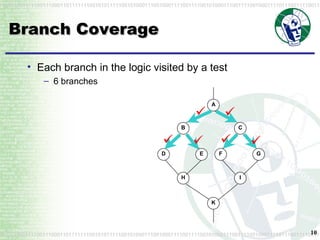
Branch Coverage Each branch in the logic visited by a test 6 branches
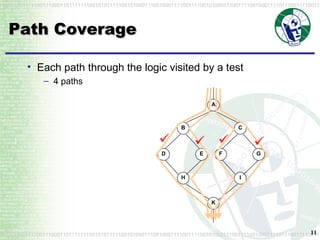
Path Coverage Each path through the logic visited by a test 4 paths
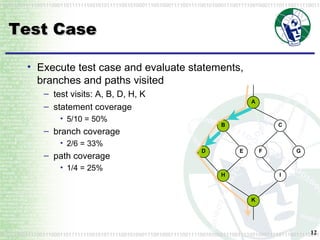
Test Case Execute test case and evaluate statements, branches and paths visited test visits: A, B, D, H, K statement coverage 5/10 = 50% branch coverage 2/6 = 33% path coverage 1/4 = 25%
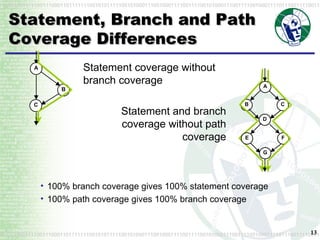
Statement, Branch and Path Coverage Differences Statement coverage without branch coverage Statement and branch coverage without path coverage 100% branch coverage gives 100% statement coverage 100% path coverage gives 100% branch coverage
Coverage Test Design Steps Analyse source code to derive flow graph Propose coverage test paths on flow graph Evaluate source code conditions to achieve each path Propose input and output values based on conditions
Binary Search
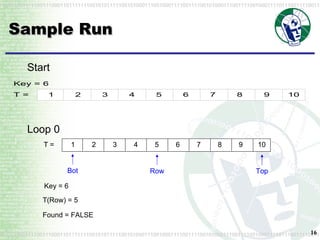
Sample Run Start Loop 0 1 2 3 4 5 6 7 8 9 10 T = Bot Row Top T(Row) = 5 Found = FALSE Key = 6
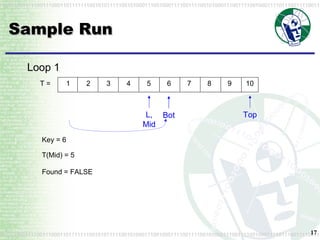
Sample Run Loop 1 1 2 3 4 5 6 7 8 9 10 T = Bot L, Mid Top T(Mid) = 5 Found = FALSE Key = 6
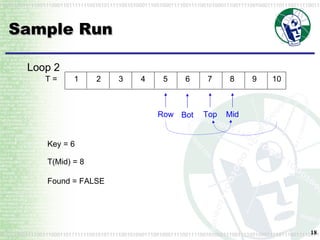
Sample Run Loop 2 1 2 3 4 5 6 7 8 9 10 T = Bot Row Top T(Mid) = 8 Found = FALSE Key = 6 Mid
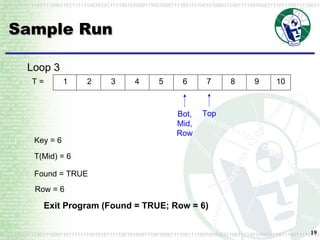
Sample Run Loop 3 Exit Program (Found = TRUE; Row = 6) 1 2 3 4 5 6 7 8 9 10 T = Bot, Mid, Row Top T(Mid) = 6 Found = TRUE Key = 6 Row = 6
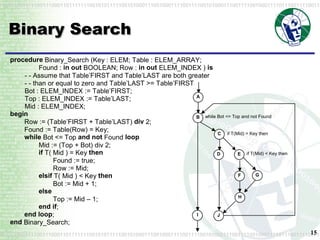
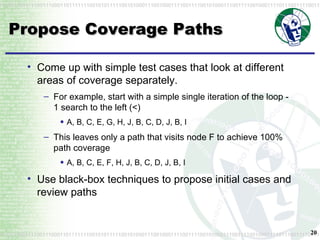
Propose Coverage Paths Come up with simple test cases that look at different areas of coverage separately. For example, start with a simple single iteration of the loop - 1 search to the left (<) A, B, C, E, G, H, J, B, C, D, J, B, I This leaves only a path that visits node F to achieve 100% path coverage A, B, C, E, F, H, J, B, C, D, J, B, I Use black-box techniques to propose initial cases and review paths
Proposing Test Cases It is possible to work backwards from a path to obtain a test case, but it takes some analysis May be necessary when your guesses at test cases still aren’t covering the path you require You need to develop an understanding of the conditions in the program that force a particular path to be taken Must be able to trace the path through the program and record the decisions that are made to stay on the path.
Propose Coverage Paths One path can provide 100% statement and branch coverage (100% path coverage is not feasible): A, B, C, E, F, H, J, B, C, E, G, H, J, B, C, D, J, B, I This path corresponds to the example illustrated above.
Propose Coverage Paths Some combinations of paths in the graph will not be achievable within the program E.g. the following gives 100% statement and branch coverage A, B, C, D, J, B, C, E, F, H, J, B, C, E, G, H, J, B, I This path is not possible B, C, D, J can’t happen first
Review of Coverage Example Difficult to determine what paths are feasible and test case values to satisfy paths Requires solid understanding of the program logic Easier to have a number of smaller paths Typical to first apply black-box testing, measure coverage, and then use white-box testing to gain further coverage Sufficiency of test case questionable Didn’t consider both conditions on the while loop Possible to separate the conditions as two decisions in the flow graph Didn’t cover loops in detail
Overview White-Box Test Design Statement, Branch and Path Coverage Loop Testing Decision Coverage Unit Test Automation Unit/Integration Test Issues
Loop Testing Loops easily lead to programs in which it is not feasible to test all paths Combinatorial explosion Basis paths  provide mechanism to tackle path testing involving loops Zero-path Represents short circuit of the loop One-path Represent a loop in which only one iteration is performed Basis paths represents atomic components of all paths Possible paths are combinations and sequences of basis paths
Basis Path Testing Each basis path is exercised by at least one test Both for zero-path and one-path basis paths Combinations and sequences of basis paths do not need to be exercised by a test They are covered by combinations and sequences of already tested basis paths
Basis Path Example Binary_Search Basis Paths Zero-paths A, B, I One-paths B, C, D, J B, C, E, F, H, J B, C, E, G, H, J
Review of Basis Path Testing Doesn’t consider Proper loop termination (e.g. reaching maximum value) Switching between conditions used in each iteration
Beizer’s Loop Tests [Bei95a]  A number of other iteration test categories: Bypass : any value that causes loop to be exited immediately Once : values that cause the loop to be executed exactly once Twice : values that cause the loop to be executed exactly twice Typical : a typical number of iterations Max : the maximum number of allowed iterations Max + 1 : one more than the maximum allowed Max - 1 : one less than the maximum allowed Min : the minimum number iterations required Min + 1 : one more than the minimum required Min - 1 : one less than the minimum required Null : one with a null or empty value for number of iterations Negative : one with a negative value for number of iterations Some cases may overlap e.g. Bypass with Min/Null/Negative, etc.
Overview White-Box Test Design Statement, Branch and Path Coverage Loop Testing Decision Coverage Unit Test Automation Unit/Integration Test Issues
Branch Condition Testing Identifies individual boolean operands within decisions Tests exercise individual and combinations of boolean operand values Example: if A or (B and C) then do_something else do_something_else
Branch Condition Coverage Each operand is tested with values of TRUE and FALSE Example’s operands A, B and C Weaknesses Can often be achieved with just two cases Can often be achieved without exercising both decision outcomes
Branch Condition Combination Coverage All combination of boolean operand values Requires 2 n  cases for n operands for 100% coverage Rapidly  becomes infeasible for more complex conditions
Modified Condition Decision Coverage Pragmatic compromise that requires fewer test cases than branch condition combination Used widely in avionics software Required by RTCA/DO-178B Show that each boolean operand can independently affect the decision outcome
Modified Condition Decision Coverage Decision outcome = A or (B and C)
Modified Condition Decision Coverage Minimal tests: A1 & B1 same, B2 & C1 same 100% coverage requires minimum of n+1 test cases maximum of 2n test cases
Condition Coverage Issues Placement of boolean conditions outside decision FLAG := A or (B and C) if FLAG then … Variation is to test for all boolean expressions Compiler optimisation C and C++ short-circuits && and || Not possible to show coverage Other decision structures Case and switch statements
White-Box Techniques Conclusions Useful for analysing particular paths in programs to exercise them with tests Gives rise to large number of test cases Used in conjunction with black-box techniques Look for unexecuted parts of program Techniques are also useful when applied as black-box techniques Specification involving logic are used in place of source code (e.g. flow chart; transaction scenario diagram)
Pros and Cons of White-Box Testing Advantages Easier to identify decisions, and equivalence classes that are being used in the logic than with black-box testing More objective than black box testing, different people deriving test cases will arrive at corresponding results Automated tools available to propose paths to test and to monitor coverage as the code is tested
Pros and Cons of White-Box Testing Disadvantages Incorrect code gives rise to tests that do not conform to expected operation as well Can’t detect wrong function being implemented, or missing functions or code. Need to have a good understanding of the code to understand the meaning of each test path through the code Some paths are difficult to visit Doesn’t consider interfacing issues Need access to the code
Pros and Cons of White-Box Testing More disadvantages  Impossible to test “ spaghetti code ” or “ pacincko code ” as there are excessive numbers of paths Problems with multiple processes, threads, interrupts, event processing Dynamically changing data and code is difficult to analyse Only practical at low levels, for whole systems the number of paths through a whole program is incredibly large
How could white-box techniques be applied to your black-box testing approaches? Discussion
Overview White-Box Test Design Unit Test Automation Unit Test Frameworks Unit Test Tools Unit/Integration Test Issues
Unit Test Frameworks Provides the test scaffolding around the code under development Available tools: Commercial Tools Jtest, Cantata, etc. Extreme Programming frameworks (OpenSource) (http://c2.com/cgi/wiki?TestingFramework) Junit, HTTPUnit, DelphiUnit, CppUnit, PerlUnit, PhPUnit, etc.
JUnit Java (code-level) regression testing framework Written by Erich Gamma & Kent Beck See www.junit.org Open Source Many extensions and documentation
Building JUnit Tests Define a subclass of  TestCase Override the  setUp()  method to initialise objects under test Override the  tearDown()  method to release objects under test Define one or more  testXXX()  methods to exercise objects under test Define a  suite()  factory method the creates all the  testXXX()  methods or the  TestCase Define a  main()  method to run the  TestCase
Case Study - Money Class class Money { private int fAmount; private String fCurrency; public Money(int amount, String currency) {         fAmount= amount; fCurrency= currency; } public int amount() { return fAmount; } public String currency() {   return fCurrency; } public Money add(Money m) { return new Money(amount()+m.amount(), currency()); } }
Case Study - Test Case Need an equals method in Money public class MoneyTest extends TestCase { //… public void testSimpleAdd() { Money m12CHF= new Money(12, CHF&quot;);   Money m14CHF= new Money(14, &quot;CHF&quot;); Money expected= new Money(26, &quot;CHF&quot;); Money result=m12CHF.add(m14CHF);  assert(expected.equals(result)); } } Object Creation Method Under Test Result Verification assert - check boolean result is true Junit Test Case
Case Study - Test Case Create test for Equals first public void testEquals() { Money m12CHF= new Money(12, &quot;CHF&quot;); Money m14CHF= new Money(14, &quot;CHF&quot;); assert(!m12CHF.equals(null));  assertEquals(m12CHF, m12CHF);  assertEquals(m12CHF, new Money(12, &quot;CHF&quot;));  assert(!m12CHF.equals(m14CHF)); } Result Verification assertEquals - compare two values
Case Study - Optimised Test Cases public class MoneyTest extends TestCase { private Money f12CHF; private Money f14CHF;  protected void setUp() { f12CHF= new Money(12, &quot;CHF&quot;); f14CHF= new Money(14, &quot;CHF&quot;); } public void testEquals() { assert(!f12CHF.equals(null)); assertEquals(f12CHF, f12CHF); assertEquals(f12CHF, new Money(12, &quot;CHF&quot;)); assert(!f12CHF.equals(f14CHF)); } public void testSimpleAdd() { Money expected= new Money(26, &quot;CHF&quot;); Money result= f12CHF.add(f14CHF); assert(expected.equals(result)); } } setUp & tearDown methods available to manage objects
Case Study - Test Suite public static Test suite() { TestSuite suite= new TestSuite(); suite.addTest(new MoneyTest(&quot;testEquals&quot;)); suite.addTest(new MoneyTest(&quot;testSimpleAdd&quot;)); return suite; }  Suite is a static method Test cases are added to the suite
Case Study - Running Tests /** * Uncomment choice of UI **/  public static  void main() { String[] testCaseName = {MoneyTest.class.getName()}; // junit.textui.TestRunner.main(testCaseName); // junit.swingui.TestRunner.main(testCaseName); junit.ui.TestRunner.main(testCaseName); }  Choice of: Textual UI Swing UI AWT UI
JUnit Reports failures - expected and actual Summarises outcomes
JUnit Ant JCoverage Cruise Control Demonstration
Ant http://jakarta.apache.org/ant/index.html Similar to  make Cross-platform Defacto standard for Java builds Support for continuous integration: Build Test Documentation Package Deploy NAnt  – similar framework on .Net
Code Coverage Shows code visited after completing tests Screen shot of Jcoverage (GPL) www.jcoverage.com
Code Coverage Drill down to view the Class code Graphically shows the code missed in the listing
Cruise Control http://cruisecontrol.sourceforge.net/ CruiseControl is a framework for a continuous build process It includes plugins for email notification Ant various source control tools Web interface is provided to view the details of the current and previous builds Also CruiseControl.NET
eLVAS Cruise Control
Unit Test Organisation Create the tests in the same package as the code under test For each Java package in the application, define a TestSuite class that contains all the tests for verifying the class Make sure the build process includes the compilation of all test suites and test cases
Unit Test Principles Code a little, test a little, code a little, test a little Run tests as often as possible, at least as often as you run compiler Run all the tests in the system at least once per day Begin by writing tests for the area of code that your most worried about breaking Write tests that have highest possible return on your testing investment When you need to add new functionality, add the tests first If you find yourself debugging using println, write a test case instead When a bug is reported, write a test case to expose the bug Next time someone asks for help debugging, write a test case to expose the bug Don’t deliver code that doesn’t pass all the tests
Other Frameworks http://c2.com/cgi/wiki?TestingFramework AsUnit - Action Script ASPUnit  - ASP using VB CPPUnit - C++, C# CuUnit - VisualC++ COMUnit DelphiUnit DotNetUnit, DotUnit  - .net EiffelUnit ForteUnit JsUnit - Javascript LingoUnit Nunit, NUnitASP, NUnitForms PerlUnit PhPUnit PLSQLUnit - Oracle PowerBuilderUnit PythonUnit SmallTalkUnit VBUnit VBAUnit XMLUnit XSLTUnit
HTTP Unit Free, Opensource JAVA API Accesses web sites without browser Combined with Junit framework for web testing Designed and implemented by Russell Gold
HTTP Unit WebConversation wc = new WebConversation(); WebRequest req = new GetMethodWebRequest(&quot;http://www.meterware.com/testpage.html&quot; ); WebResponse resp = wc.getResponse( req ); WebConversation class Takes the place of a browser talking to a single site Maintains session context, which it does via cookies returned by the server Response manipulated either as pure text (via the  toString()  method), as a DOM (via the  getDOM()  method), or by using the various other methods WebConversation wc = new WebConversation(); WebResponse resp = wc.getResponse( &quot;http://www.meterware.com/testpage.html&quot; );
HTTP Unit WebConversation wc = new WebConversation(); // read page WebResponse resp = wc.getResponse( &quot;http://httpunit.sourceforge.net/doc/Cookbook.html&quot; ); // find the link WebLink link = resp.getLinkWith( &quot;response&quot; ); // convert it to a request WebRequest req = link.getRequest(); // retrieve the referenced page  WebResponse jdoc = wc.getResponse( req ); Navigation Retrieve and follow links Image links can be followed WebResponse.getLinkWithImageText()
HTTP Unit // select the first form in the page WebForm form = resp.getForms()[0]; assertEquals( &quot;La Cerentolla&quot;, form.getParameterValue( &quot;Name&quot; ) );  assertEquals( &quot;Chinese&quot;, form.getParameterValue( &quot;Food&quot; ) ); assertEquals( &quot;Manayunk&quot;, form.getParameterValue( &quot;Location&quot; ) ); assertEquals( &quot;on&quot;, form.getParameterValue( &quot;CreditCard&quot; ) );  Form evaluation Properties Submit request = form.getRequest(); request.setParameter( &quot;Food&quot;, &quot;Italian&quot; ); request.removeParameter( &quot;CreditCard&quot; ); response = wc.getResponse( request );
HTTP Unit WebTable table = resp.getTables()[0]; assertEquals( &quot;rows&quot;, 4, table.getRowCount() ); assertEquals( &quot;columns&quot;, 3, table.getColumnCount() ); assertEquals( &quot;links&quot;, 1, table.getTableCell( 0, 2 ).getLinks().length );  Table evaluation Properties Content String[][] colors = resp.getTables()[1].asText(); assertEquals( &quot;Name&quot;, colors[0][0] ); assertEquals( &quot;Color&quot;, colors[0][1] ); assertEquals( &quot;gules&quot;, colors[1][0] ); assertEquals( &quot;red&quot;, colors[1][1] ); assertEquals( &quot;sable&quot;, colors[2][0] ); assertEquals( &quot;black&quot;, colors[2][1] );  name color gules red sable black
HTML Unit Like HTTP Unit Extensions for supporting Javascript (latest version) Uses Apache Rhino javascript interpreter
SQLUnit http://sqlunit.sourceforge.net Regression and unit testing harness for testing database stored procedures. Test suite written as an XML file. The SQLUnit harness is written in Java Uses the JUnit unit testing framework to convert the XML test specifications to JDBC calls and compare the results generated from the calls with the specified results. It should be possible, at least in theory, to write unit tests for stored procedures for any database that provides a JDBC driver.
SQLUnit GUI Tool Generates test <test name=&quot;Checking returned value from customer&quot;> <sql> <stmt>select custId from customer where custId=?</stmt>   <param id=&quot;1&quot; type=&quot;INTEGER&quot; inout=&quot;in&quot; is-null=&quot;false&quot;> 1</param> </sql> <result><resultset id=&quot;1&quot;> <row id=&quot;1&quot;><col id=&quot;1&quot; type=&quot;INTEGER&quot;>1</col></row> </resultset></result>  </test>
SQLUnit Output Buildfile: build.xml init: test-ant-task: [sqlunit] Getting connection...  [sqlunit] Setting up test...  [sqlunit] Running test[1]: Adding department HR  [sqlunit] Running test[2]: Adding department InfoTech using non-Callable form  [sqlunit] Running test[3]: Adding Employee John Doe to InfoTech  [sqlunit] Running test[4]: Adding John Doe again  [sqlunit] Running test[5]: Adding Jane Doe to HR  [sqlunit] Running test[6]: Adding Dick Tracy to InfoTech  [sqlunit] Running test[7]: Updating Hourly Rate for John  [sqlunit] Running test[8]: Looking up John Doe by name  [sqlunit] Running test[9]: Looking up all employees in InfoTech  [sqlunit] Running test[10]: Adding timecard for John  [sqlunit] Running test[11]: Adding another timecard for John  [sqlunit] Running test[12]: Adding timecard for Dick
[sqlunit] Running test[13]: Getting monthly report for InfoTech  [sqlunit] No match on variable at [rset,row,col]=([1,1,4]  [sqlunit] *** expected:  [sqlunit] <result>  [sqlunit] <resultset id=&quot;1&quot;>  [sqlunit] <row id=&quot;1&quot;>  [sqlunit] <col id=&quot;1&quot; type=&quot;VARCHAR&quot;>Information Technology</col>  [sqlunit] <col id=&quot;2&quot; type=&quot;VARCHAR&quot;>John Doe</col>  [sqlunit] <col id=&quot;3&quot; type=&quot;INTEGER&quot;>16</col>  [sqlunit] <col id=&quot;4&quot; type=&quot;NUMERIC&quot;>56.00</col>  [sqlunit] <col id=&quot;5&quot; type=&quot;NUMERIC&quot;>880.00</col>   [sqlunit] </row>  [sqlunit] <row id=&quot;2&quot;>   [sqlunit] </row>  sqlunit] </resultset>  [sqlunit] </result>  [sqlunit] *** but got:  [sqlunit] <result>  [sqlunit] <resultset id=&quot;1&quot;>  [sqlunit] <row id=&quot;1&quot;>  [sqlunit] <col id=&quot;1&quot; type=&quot;VARCHAR&quot;>Information Technology</col>  [sqlunit] <col id=&quot;2&quot; type=&quot;VARCHAR&quot;>John Doe</col>  [sqlunit] <col id=&quot;3&quot; type=&quot;INTEGER&quot;>16</col>  [sqlunit] <col id=&quot;4&quot; type=&quot;NUMERIC&quot;>55.00</col> [sqlunit] <col id=&quot;5&quot; type=&quot;NUMERIC&quot;>880.00</col>   [sqlunit] </row>   [sqlunit] </resultset>  [sqlunit] </result>  [sqlunit] Tearing down test...  [sqlunit] Time: 1.204   [sqlunit] OK (1 tests)  [sqlunit] BUILD SUCCESSFUL Total time: 2 seconds
DBUnit http://dbunit.sourceforge.net JUnit extension that puts your database into a known state between test runs Helps you avoid the problems that can occur when one test corrupts the database and causes subsequent tests to fail or give faulty results. It can read the contents of a table and store it to XML using a  FlatXmlDataSet
DBUnit Table data saved as XML for restore during testing <EMPLOYEE employee_uid='1‘ start_date='2001-01-01‘ first_name='Andrew‘ ssn=‘000-29-2030‘ last_name='Glover‘ />
Nunit .Net framework Similar to JUnit
Nunit Example StackTest.cs See Book Chapter http://richclients.org/files/newkirk/TDD%20in%20Microsoft%20.NET%20Chapter%202.pdf using System; using NUnit.Framework; [TestFixture] public class StackFixture { private Stack stack; [SetUp] public void Init() { stack = new Stack(); } [Test] public void Empty() { Assert.IsTrue(stack.IsEmpty); } [Test] public void PushOne() { stack.Push(“first element”); Assert.IsFalse(stack.IsEmpty, “ After Push, IsEmpty should  be false”); } [Test] public void Pop() { stack.Push(“first element”); stack.Pop(); Assert.IsTrue(stack.IsEmpty, “ After Push - Pop, IsEmpty  should be true”); } … …
Nunit Example Stack.cs using System; using System.Collections; public class Stack { private ArrayList elements = new ArrayList(); public bool IsEmpty { get {   return (elements.Count ==  0); } } public void Push(object element) { elements.Insert(0, element); } public object Pop() { object top = Top(); elements.RemoveAt(0); return top; } public object Top() { if(IsEmpty)   throw new    InvalidOperationException( “Stack is Empty”); return elements[0]; } }
What are the perceived pros and cons of test driven development, continuous integration, and iterative releases Develop a checklist of recommendations areas to encourage  areas to avoid Discussion
Review other Junit tools on www.junit.org Discussion
Overview White-Box Test Design Unit Test Automation Unit Test Frameworks Unit Test Tools Unit/Integration Test Issues
Tools to Aid in Testing Debugger e.g. softice test coverage e.g TCMON, PureCoverage, Numega, ATTOL, C-Cover, CTC++, TCAT memory analysis (usage, leaks, etc) e.g. BoundsChecker, Purify, GlowCode,  Performance e.g. Quantify, Jprobe Integrated Cantata, AdaTest, JTest, VectorCAST See Source Tools at http://www.aptest.com/resources.html
Testing with a Debugger In general, a slow, labour-intensive way to test Should not be used to test new developments A proper test suite may take longer to create but when regression test runs are required (and they will be) you will save more time in the long run Can be useful as a last resort when maintaining badly designed software with no test suite
Testing with a Debugger Procedure Start the program and breakpoint the method requiring test Exercise a program feature that will trigger a call to the method Change the input parameters and object state in the debugger as appropriate to set up the test pre-state Either step through the code or breakpoint the end of the method and examine the post-state against expected criterion You should document the tests done so that they can be repeated if necessary (as a checklist)
Types of Test Coverage Types of test coverage, in order of difficulty and completeness Statement (or segment) coverage Branch Coverage Branch Condition Coverage Multiple-Condition Coverage Path Coverage Exhaustive coverage (rarely possible)
Test Coverage How much coverage is enough? “ It compiled!” “ I ran through it a couple of times and it seemed to work okay.” “ I ran 64 test cases and achieved 100% statement and 77% branch coverage.”
Test Coverage IEEE 1008 requires a minimum 100% statement coverage (as does IBM’s corporate standard) statement coverage alone is not considered a good criterion of test coverage A high branch coverage in addition to statement coverage is a better indication of good test coverage (but may be difficult to achieve)
Test Coverage - Case Study Test coverage achieved by functional test suites for AWK and TeX Source :  Handbook of software reliability engineering,  Horgan, 1996
Getting High Test Coverage High test coverage is difficult when code depends on the results of external modules. replace external modules with stubs stubs are designed to return values which will exercise different paths of the code Discussion: what approaches could be used to test the error handling in the following fragment of C? mem = (char *) malloc(MEMSIZE); if (mem != null) { /* do something with mem */ } else { /* error handling */ }
Test Coverage - a Final Note Sometimes it seems that getting 100% statement coverage is impossible. There may be good reasons: tests are run with debugging code compiled into the executable, but the debugging code is switched off (i.e protected by conditionals) some of the code is dead and can never be executed.  When maintenance is done on a program and old code is left hanging around because “somebody might need it”, this is known as “Lava Flow”. With proper Configuration Management, there is no excuse for leaving dead code around; test coverage analysis can help to find dead code.
Code Coverage Tools Instrument the code during compile When the code is run it collects coverage data Assess coverage to determine where to extend tests See http://c2.com/cgi/wiki?CodeCoverageTools
http://c2.com/cgi/wiki?CodeCoverageTools for Java EMMA @  http://emma.sourceforge.net/ Hansel @  http://hansel.sourceforge.net/   jcoverage @  http://www.jcoverage.com/   Clover @  http://www.thecortex.net/clover/   GroboUtils  @  http://groboutils.sourceforge.net   NoUnit ?  @  http://nounit.sourceforge.net/   Quilt @  http://quilt.sourceforge.net/   Gretel @  http://sourceforge.net/projects/gretel   The &quot;Java Test Coverage Tool&quot; @  http://www.semanticdesigns.com/Products/TestCoverage/JavaTestCoverage.html   MutationTesting :  (which isn't really  CodeCoverage , but it's related)   JesTer  @  http://jester.sourceforge.net/   for .NET:   NCover @  http://ncover.sourceforge.net/   CoverageEye ? .NET @  http://www.gotdotnet.com/Community/UserSamples/Details.aspx?SampleGuid=881a36c6-6f45-4485-a94e-060130687151   The &quot;C# Test Coverage Tool&quot; @  http://www.semanticdesigns.com/Products/TestCoverage/CSharpTestCoverage.html   &quot;DevPartner ?  Studio Professional Edition&quot; @  http://www.compuware.com/products/devpartner/1563_ENG_HTML.htm   &quot;Perform Code Coverage Analysis with .NET to Ensure Thorough Application Testing&quot;, an MSDN article on building &quot;A custom code coverage tool&quot; @  http://msdn.microsoft.com/msdnmag/issues/04/04/CodeCoverageAnalysis/default.aspx   C/C++:   tcov = Sun Unix C profiler. See &quot;tcov(1)&quot; man page. It annotates (mangles) your source code to add instrumentation.  gcov = GNU C/C++ equivilent of &quot;tcov&quot;.  Dynamic Code Coverage for Sun Solaris @  http://www.dynamic-memory.com/coverageanalysis.php
Test Coverage Compilation setup  Logging tests Results
Test Coverage
Test Coverage Tools
Memory Bugs Common memory use bugs memory allocated in constructors is not de-allocated in corresponding destructors (or anywhere else) indexed memory reads and writes go out of bounds memory is not initialised before use memory is not accessed after de-allocation Rational Purify detects all of these things (plus others) GPL or free libraries exist that detect these bugs by replacing memory management routines search for “memory leak”  on www.freshmeat.net are usually specific to UNIX/Linux and GCC
Memory Leak Detection Instrument the code during compile When the code is run it collects memory allocation data When the code closes it looks for leaked memory