Downloaded 141 times


![Linux Quick Reference Guide
Key C o m m a n d s , F i l e s a n d D i r e c t o r i e s
Novell Customer Communities
Console Usage Tips Boot Information:
$0 Command name GRUB
' ' Full quote (no expansion) grub GRUB is the GRand Unified
" " Partial quote (allows variable and Bootloader. This newer bootloader
command expansion) provides filesystem support where
$$ Process id it can use filenames as opposed to
$* All arguments as a simple word sector locations for the kernel,
contents initrd, etc. This allows you to
$n nth argument (n from 0 to 9) leave a configuration file
$var Use value for variable untouched and still be able to boot
next
& Run process in background. from a new kernel, change
( ) Execute in subshell; output from geometry on the drive, and change
previous
multiple lines can be directed to filesystems without problems. The
one file by using this option. GRUB boot loader gives you either
* wildcard - represents everything. a menu to choose predefined boot
eg. 'cp from/* to' will copy all files options from, or a command line
in the from directory to the to interface for custom boot options.
directory grub-install
. Single Period ' . ' - The current Installs grub onto the hard disk
directory, used in './<command>' to LILO
execute the file 'command'
lilo
.. Double Period ' ..' - Parent LILO is Linux's older boot loader.
Directory
LILO is typically in the MBR, but
./configure can be installed in the ROOT ( / )
Execute the script preparing the partition. LILO cannot look beyond
installed files for compiling the first 1024 cylinders (8 GB) of
; Separate commands on same line the boot drive to find the boot
? Single character wildcard. eg. cp loader UNLESS LBA mode is
config.? /configs will copy all files enabled."
beginning with the name config. In lilo -D dos
the current directory to the set LILO default OS (default=dos in
directory named configs. lilo.conf)
[ ] Match any characters enclosed lilo.conf
[xyz] LILO boot loder configuration file
Choice of character wildcards. eg. Linux Kernel Boot Options
ls [xyz]* will list all files in the
current directory starting with the <linux boot option> init=/bin/sh rw
letter x, y, or z. Gain root access during boot
Quote the following character. prompt without password, can be
Also used to enter text that is not used to fix some problems.
normally available on keyboard. <linux boot option> single
Also used to break a command line At the lilo prompt, start in single
into multiple lines. user mode. This is useful if you
` ` ( back ticks ) Substitute output of have forgotten your password. Boot
enclosed command in single user mode, then run the
passwd command.
| ( pipe ) - Takes the stdout and it
becomes the stdin for the
command after the pipe
Mount — Options and Examples
< Redirect input mount -t iso9660 /dev/cdrom mnt/cdrom
Mount the device cdrom and call it
<< Uses a delimiter with text to pass cdrom under the /mnt/ directory.
as input to a command. Helpful for
scripting programs such as mount -t msdos /dev/hdd /mnt/ddrive
Mount hard disk “d” as a msdos file
ftp/telnet for cron jobs.
system and call it ddrive under the
> Redirect output /mnt/ directory.
>> Used to append data to another mount -t vfat /dev/hda1 /mnt/cdrive
file. Example: Mount hard disk “a” as a VFAT file
ls >> ls_weekly.out system and call it cdrive under the
This example will append the /mnt/ directory.
results of ls to the end of the file
1
ls_weekly.out
Novell Customer Communities
© Copyright 2004 Insitute for Network Professionals and Novell, Inc. All rights reserverd.](https://image.slidesharecdn.com/susequickref-110301021634-phpapp01/85/SUSE-Linux-quick-reference-4-320.jpg)
![Important Linux Directories, /lib/
Library Files Directory. This is a
Configuration Files and STANDARD Directory.
Block Devices - continued /mnt/
/etc/printcap.local Mount Point Directory. This is a
Printer database, changes should be STANDARD Directory.
made here as /etc/printcap is /opt/
regenerated each time the daemon Optional Directory. This is a
loads. This file is not used nor STANDARD Directory.
referenced with a CUPS solution.
/proc/
/etc/profile Kernel Process Information
Sets up shell variables that are Directory. This is an OPTIONAL
global for everyone. Loaded right Directory.
after login. Executes once only at
login. /proc/interrupts
Contains which interrupts are in
/etc/profile.local use and which are available.
Changes to your global variables
contents should be made here. /proc/ioports
Contains which I/O addresses are
/etc/protocols in use and which are available.
next This file contains protocol IDs and
their names. Useful for /proc/pci
previous determining network traffic Lists which PCI devices are
problems. already installed and their I/O
/etc/rc.d/init.d/lpd [option] addresses and interrupts.
[option] should be replaced with: /root/
start - Starts the print daemon Root User's Home Directory. This
status - Displays the status of the is an OPTIONAL Directory.
print daemon /sbin/
stop - Stops the print daemon System Binaries Directory. This is
/etc/rc.d/rc.inet1 a STANDARD Directory.
IP address, Network mask, Default /srv/
gateway are in these files. May edit This directory is used for
manually to modify network services' runtimes and working
parameters. files. This is an OPTIONAL
/etc/rc.d/rc.local Directory.
Bash script that is executed at the /tmp/
end of login process - like Temporary Director. This is a
autoexec.bat in DOS STANDARD Directory.
/etc/resolv.conf /usr/
Defines IP addresses of DNS servers This directory is used as a system
/etc/rpc resource. Many times, libraries,
applications, and source code
RPC service name to their program are installed in this folder.
numbers mapping. Kernel compiling usually takes
/etc/services place in the /usr/src/linux/
TCP/IP services and ports mapping. subdirectory. This is a STANDARD
/etc/shadow directory.
Read-only to Root access processes, /var/
used to avoid theft of user Logfiles are generally stored in
passwords. the /var directory or log
/etc/shells subdirectory. Variable data from
The /etc/shells file serves as the applications and some binaries
list of valid shells that may be are installed here. This is a
loaded. STANDARD directory.
/etc/skel/ ~/.Xdefaults
Template folder that contains files Defines some parameters for
for new users. X-Windows (~ refers to user's
Home Directory)
/etc/smb.conf ~/.xinitrc
Configuration for the SAMBA server
to allow file and print sharing with Defines windows manager loaded
Windows clients by X-Windows (~ refers to user's
Home Directory)
/etc/sysconfig/
A directory containing system X Window Keystrokes
configuration files.
ctrl+alt+backspace
/etc/sysconfig/network Stop X server (some systems use
The networking configuration file, ctrl+alt+esc)
specifies network interfaces, IP
addresses, and other protocols. ctrl+alt+F1
Switch to text mode console 1
/etc/X11/XF86Config
Configuration file for XFree86's X ctrl+alt+F7
Server Switch back to graphic mode
/home/
3
The mountpoint or directory where
user's personal data is stored. This
is an OPTIONAL directory.](https://image.slidesharecdn.com/susequickref-110301021634-phpapp01/85/SUSE-Linux-quick-reference-6-320.jpg)
![Linux Commands cpio
(DOS/Windows in red) Copy files to and from archives
adduser cron
Script to create an new user A program that exeutes
interactively commands at scheduled times.
alias The file that specifies what
This command is used to create this scheduale and commands
an alias to a command, can be are is /var/spool/cron.
used to simplify or automate long crontab
tasks Show or edit cron jobs.
apropos [subject] cut Extract columns
List manual pages for subject date
aspell (date/time) Set/display date
Check spelling interactively and time
at Schedule a job dd (rawrite) Write directly to a
awk Interpreter for awk scripts device
contents bash df (chkdsk) View amount of disk
(command.com) Advanced space available
next command interpreter diff
bg Move a job to the background (fc) Compare files line by line
previous break dnsdomainname
(break) Break from loop Show DNS domain name.
statements dos2unix
bzip2 Convert text file from/to linux
Compress files (BZip2) format
cat [file] du (dir /a /s; chkdsk) View
(type) Display the contents of a amount of disk space used by a
file; output can be redirected directory recursively
cd (cd) Change the current dump
directory. Back up a disk
cdparanoia e2fsck
Rip audio (chkdsk/scandisk) Test a
cdrecord filesystem for errors (see also
fsck)
Burn a CD
echo
chfn (echo) Display output
Modify finger information (full
name, phone number etc.) elm E-mail reader
chage emacs
Modify account policy (password Programming environment and
length, expire data etc.) editor
chattr env (set) Much like the set
Change advanced file attributes command in that without
arguements it displays current
chgrp environment variables for the
Change group ownership of a file current shell, except env DOES
chmod NOT display the functions and
(attrib) Change file or directory they are not displayed in
attributes or (permissions. Note alphabetical order. With
that file attributes on DOS are arguements(as in env
completely different from $VARIABLE), env can be used
permissions on Linux. to change or add environment
chown variables to the current shell.
Change ownership of a file eval
chsh Evaluate arguments
Change default login shell exec
clear (call) Execute a new shell
(cls) Clear the terminal screen exit
cmp (fc) Compare files byte by byte (exit) logs out of a SU session
comm or shell
Compare sorted files exportfs
compress export file system listed in
Lempel-Ziv compression program exports
continue fdformat
(format) Format a floppy disk
Resume a program loop
fdisk
cp (copy) The cp command simply
(fdisk) Modify the partition
copies a file or multiple files to a table
target consisting of a file name
or directory.cp -l - Will prompt if fg Move a job to the foreground
a file exists at destination with file
4
the same file name.cp -r or cp -R Identify file types
- Copy a whole directory
structure (recursively)](https://image.slidesharecdn.com/susequickref-110301021634-phpapp01/85/SUSE-Linux-quick-reference-7-320.jpg)
![Linux Commands - continued hostname
(DOS/Windows in red) Print the system’s hostname
find ifconfig
(dir /s) Search for a file (ipconfig) Configures network
interfaces and displays hardware
free and IP addresses for each
(mem) Display a summary of interface.
current memory usage and
availability. ifdown
fsck Bring down a network interface
(chkdsk/scandisk) Check a ifup
disk for errors (see e2fsck) Bring up a network interface
ftp (ftp) Get/send remote files inn
fuser filename News sever
Show processes using the file: ipchains
filename FFirewall and NAT
gaim (/etc/sysconfig/ipchains on
contents Redhat)
Instant messaging/IRC
gpm (mouse) Mouse server iptables
next Firewall and NAT
grep (/etc/sysconfig/iptables on
previous (find) Used to find Redhat)
information in a file
Format: irc Internet Relay Chat client
grep [options] pattern [files] jobs
grep -v Print only the lines Display current jobs
that do not match joe Wordstar compatible editor
grep -c Print only the count
(or number) of matching lines
kbd_mode
(mode) Set or query the
grep -l Print only names of keyboard mode
files with matches
grep -n Print matching lines kbdrate
with line numbers (mode) Set the keyboard repeat
grep -i Ignore case in letters
rate
(uppercase and lowercase kill
ignored) (taskkill) Sends signals to
grep -w Whole word search process ID'sSignals:
grep -s Suppress all error 01 Hangup; if you logout before
messages process is done, then process will
hang
grip
09 Kill signal
Play CDs and rip MP3s
15 Terminate (default)
groupadd
Add group killall
(taskkill /t) Kill processes by
groupdel name
Delete group
ldd <application>
groupmod An ldd is a Dynamically Linked
Modify group System Library (much like a .dll
grpck file in MS Windows). Displays the
Verify integrity of group files. shared libraries required by each
of the applications listed on it's
grpconv command line.
Convert to shadow groups.
less
grpquota (more) Page forward and
Manage disk space quota per backward through files
group
ln (mountvol) Create a link to a
grpuncov file or directory
Convert from shadow groups.
locate
gv View Postscript/PDF files Search for a file via a database
gzip look
Program used to compress a Look up spelling
file. After it compresses the
file, it gives the files the lpc Printer control tool
extension .gz to show that it lpq Display jobs in print queue
has been compressed. lpr (print) Print a file
halt lprm
Stop all processes Remove jobs from queue
head ls (dir) The list command.
Displays the first 10 lines of a ls -a List all files, including any
file hidden files (files that begin with
head -n filename a period, as in .bash_history)
Displayfirst n number of lines ls -l Long format listing
of file filename (includes permissions, owner,
5
host size, modification time, etc.)
(nslookup) lookup host name ls -R List directories and their
or IP contents recursively](https://image.slidesharecdn.com/susequickref-110301021634-phpapp01/85/SUSE-Linux-quick-reference-8-320.jpg)
![Linux Commands - continued paste
(DOS/Windows in red) Appends columns
lsattr perl
List advanced file attributes Interpreter for perl scripts
lsof
List opened files persist
Reestablishes a terminated PPP
lspci connection
Lists PCI configuration
information for currently pico
installed PCI buses and devices (edit) Easy to use text editor
connected to them pine
lynx/links E-mail and news reader
Text-only web browser ping
mail (ping) Check if host is reachable
Minimal email client pppd
makewhatis Point-to-Point Protocol (PPP)
contents Daemon; Required to establish a
Make the whatis database
dial-up connection. pppd does NOT
next man <command> start up at boot time, and usually
(<command> /? ) Get help on a
needs to be activated in the
command modem "chat" script.
previous
md5sum pppsetup
Compute checksums Setup PPP connection (Slackware).
mkdir printtool
(md) Create a new subdirectory.
Similar syntax Start X printer setup interface
mke2fs ps (tasklist) Display list of running
processes
(format) Create a filesystem on
a partition pstree
(tasklist) Displays a list of
more processes in hierarchal order from
(more) Display the contents of a parent to child
file one page/screen at a time.
The less utility allows scrolling pwck
back and forth. Verify integrity of password files
mount pwconv
(mountvol/net use) Attach a Convert to shadow passwords
filesystem to the root filesystem, pwd Print current directory name
uses /etc/fstab to define default pwunconv
options for drives and mount Convert from shadow passwords
points
Quota
mozilla Manage disk quota
(mozilla) Web browser
rd (rmdir)
mt Control a tape drive (rd) Remove a directory
mutt rdate
Text-based email client Query a remote host for the date
mv (move/ren) Move/rename a file reboot
ncftp Stop all processes and then reboot –
Fancier version of ftp same as above
netstat renice
Show networking statistics Change process priorities
newgrp reset
Change to a new group Reset the keyboard and screen to
newusers default modes
Update and create new users restore
(batch mode) Restore a dump
nice rlogin
Run a program with modified Remote login
scheduling priority
rm Delete files
nl Returns the number of lines in a -R (del) Delete a directory and all
text file its contents, including
nmap subdirectories.
Scan a host for opened ports -rf (deltree) Recursively delete
od a directory tree
Octal Dump; dumps the specified rmdir (rd)
file to standard output. (rmdir) Delete an empty
od -c filename ASCII Characters subdirectory (with -rf it will
od -o filename Octal Characters function like deltree)
(the default) route
od -x filename Hexadecimal Show routing information
6
Characters
passwd [accountname]
Give accountname a new
password](https://image.slidesharecdn.com/susequickref-110301021634-phpapp01/85/SUSE-Linux-quick-reference-9-320.jpg)
![Linux Commands - continued whatis
(DOS/Windows in red) Search the whatis database
top whereis
Display top CPU processes Locate standard files
touc which
Set the timestamp on a file Locate commands
tr Translate characters which missingfilename
traceroute Show the subdirectory containing
Display the route to a remost the executable file called
system missingfilename
trn whois
Threaded news reader Look up domain registrants
umask write
Set default file permissions Send messages to a terminal
umount xargs
contents Detach a filesystem from the root Causes a command to take as stdin
filesystem a file with many arguments and yet
runs the command only once
next uname
(ver) Displays information about Xconfigurator
the kernel and system Run another X configuration menu
previous with automatic probing of graphics
uncompress cards
Uncompress compressed files
xdm X Display Manager; may be stopped
uniq with [Ctrl-Alt-Backspace], or killall
Locate identical lines xdm.
unix2dos xdvi
Convert text file from/to linux View TeX DVI files
format
xf86config
unset Setup X server and generate
Used to remove a variable from the XF86config
current shell
XF86Setup
unzip Run the X configuration menu with
(pkunzip) Extract files from a zip automatic probing of graphics
file cards
updatedb XFree86 –configure
Create searchable database of files XFree86 auto configuration
uptime (Plug-n-Play), generate a template
View the system load named “XF86Config.new”
useradd xhost
Create an new user or update Server access control program for X
default new user information xload
userdel Monitor system load
Delete an new user or update xlsfonts
Default new user information
Server font list displayer for X
usermod
Modify an new user or update xmms
default new user information (winamp) Play audio files
usermount xmodmap
Executes graphical application for Modifying key map and mouse
mounting and unmounting file button map.
systems xset
vi (edit) Text editor program: To Server preference utility for X
begin the editor type in vi and the xsetroot
file name ( vi filename ) Root window parameter setting
vi commands: utility for X
:x Quits and saves xvidtune
i Enters the insert mode Run the X graphics tuning utility
ESC (ESC key) - quit the insert
mode xxd View binary data
: Enter a command zip (pkzip) Create a zip file
:! Enter an external command line
command prepared by:
:w Saves the changes without Institute for Network Professionals
exiting
vim (edit) Vi IMproved text editor
w List users’ processes
wait
Wait for a background job to finish
watch
8
Run programs at set intervals
wc Count bytes/words/lines
wget
Retrieve web pages to disk
Novell Customer Communities
© Copyright 2004 Insitute for Network Professionals and Novell, Inc. All rights reserverd.](https://image.slidesharecdn.com/susequickref-110301021634-phpapp01/85/SUSE-Linux-quick-reference-11-320.jpg)




![Linux Quick Reference Guide
Key C o m m a n d s , F i l e s a n d D i r e c t o r i e s
Novell Customer Communities
Console Usage Tips Boot Information:
$0 Command name GRUB
' ' Full quote (no expansion) grub GRUB is the GRand Unified
" " Partial quote (allows variable and Bootloader. This newer bootloader
command expansion) provides filesystem support where
$$ Process id it can use filenames as opposed to
$* All arguments as a simple word sector locations for the kernel,
contents initrd, etc. This allows you to
$n nth argument (n from 0 to 9) leave a configuration file
$var Use value for variable untouched and still be able to boot
next
& Run process in background. from a new kernel, change
( ) Execute in subshell; output from geometry on the drive, and change
previous
multiple lines can be directed to filesystems without problems. The
one file by using this option. GRUB boot loader gives you either
* wildcard - represents everything. a menu to choose predefined boot
eg. 'cp from/* to' will copy all files options from, or a command line
in the from directory to the to interface for custom boot options.
directory grub-install
. Single Period ' . ' - The current Installs grub onto the hard disk
directory, used in './<command>' to LILO
execute the file 'command'
lilo
.. Double Period ' ..' - Parent LILO is Linux's older boot loader.
Directory
LILO is typically in the MBR, but
./configure can be installed in the ROOT ( / )
Execute the script preparing the partition. LILO cannot look beyond
installed files for compiling the first 1024 cylinders (8 GB) of
; Separate commands on same line the boot drive to find the boot
? Single character wildcard. eg. cp loader UNLESS LBA mode is
config.? /configs will copy all files enabled."
beginning with the name config. In lilo -D dos
the current directory to the set LILO default OS (default=dos in
directory named configs. lilo.conf)
[ ] Match any characters enclosed lilo.conf
[xyz] LILO boot loder configuration file
Choice of character wildcards. eg. Linux Kernel Boot Options
ls [xyz]* will list all files in the
current directory starting with the <linux boot option> init=/bin/sh rw
letter x, y, or z. Gain root access during boot
Quote the following character. prompt without password, can be
Also used to enter text that is not used to fix some problems.
normally available on keyboard. <linux boot option> single
Also used to break a command line At the lilo prompt, start in single
into multiple lines. user mode. This is useful if you
` ` ( back ticks ) Substitute output of have forgotten your password. Boot
enclosed command in single user mode, then run the
passwd command.
| ( pipe ) - Takes the stdout and it
becomes the stdin for the
command after the pipe
Mount — Options and Examples
< Redirect input mount -t iso9660 /dev/cdrom mnt/cdrom
Mount the device cdrom and call it
<< Uses a delimiter with text to pass cdrom under the /mnt/ directory.
as input to a command. Helpful for
scripting programs such as mount -t msdos /dev/hdd /mnt/ddrive
Mount hard disk “d” as a msdos file
ftp/telnet for cron jobs.
system and call it ddrive under the
> Redirect output /mnt/ directory.
>> Used to append data to another mount -t vfat /dev/hda1 /mnt/cdrive
file. Example: Mount hard disk “a” as a VFAT file
ls >> ls_weekly.out system and call it cdrive under the
This example will append the /mnt/ directory.
results of ls to the end of the file
1
ls_weekly.out
Novell Customer Communities
© Copyright 2004 Insitute for Network Professionals and Novell, Inc. All rights reserverd.](/p?url=https%3A%2F%2Fimage.slidesharecdn.com%2Fsusequickref-110301021634-phpapp01%2F85%2FSUSE-Linux-quick-reference-4-320.jpg&__src=https%3A%2F%2Fwww.slideshare.net%2Fslideshow%2Fsuse-linux-quick-reference%2F7098855&__type=image)

![Important Linux Directories, /lib/
Library Files Directory. This is a
Configuration Files and STANDARD Directory.
Block Devices - continued /mnt/
/etc/printcap.local Mount Point Directory. This is a
Printer database, changes should be STANDARD Directory.
made here as /etc/printcap is /opt/
regenerated each time the daemon Optional Directory. This is a
loads. This file is not used nor STANDARD Directory.
referenced with a CUPS solution.
/proc/
/etc/profile Kernel Process Information
Sets up shell variables that are Directory. This is an OPTIONAL
global for everyone. Loaded right Directory.
after login. Executes once only at
login. /proc/interrupts
Contains which interrupts are in
/etc/profile.local use and which are available.
Changes to your global variables
contents should be made here. /proc/ioports
Contains which I/O addresses are
/etc/protocols in use and which are available.
next This file contains protocol IDs and
their names. Useful for /proc/pci
previous determining network traffic Lists which PCI devices are
problems. already installed and their I/O
/etc/rc.d/init.d/lpd [option] addresses and interrupts.
[option] should be replaced with: /root/
start - Starts the print daemon Root User's Home Directory. This
status - Displays the status of the is an OPTIONAL Directory.
print daemon /sbin/
stop - Stops the print daemon System Binaries Directory. This is
/etc/rc.d/rc.inet1 a STANDARD Directory.
IP address, Network mask, Default /srv/
gateway are in these files. May edit This directory is used for
manually to modify network services' runtimes and working
parameters. files. This is an OPTIONAL
/etc/rc.d/rc.local Directory.
Bash script that is executed at the /tmp/
end of login process - like Temporary Director. This is a
autoexec.bat in DOS STANDARD Directory.
/etc/resolv.conf /usr/
Defines IP addresses of DNS servers This directory is used as a system
/etc/rpc resource. Many times, libraries,
applications, and source code
RPC service name to their program are installed in this folder.
numbers mapping. Kernel compiling usually takes
/etc/services place in the /usr/src/linux/
TCP/IP services and ports mapping. subdirectory. This is a STANDARD
/etc/shadow directory.
Read-only to Root access processes, /var/
used to avoid theft of user Logfiles are generally stored in
passwords. the /var directory or log
/etc/shells subdirectory. Variable data from
The /etc/shells file serves as the applications and some binaries
list of valid shells that may be are installed here. This is a
loaded. STANDARD directory.
/etc/skel/ ~/.Xdefaults
Template folder that contains files Defines some parameters for
for new users. X-Windows (~ refers to user's
Home Directory)
/etc/smb.conf ~/.xinitrc
Configuration for the SAMBA server
to allow file and print sharing with Defines windows manager loaded
Windows clients by X-Windows (~ refers to user's
Home Directory)
/etc/sysconfig/
A directory containing system X Window Keystrokes
configuration files.
ctrl+alt+backspace
/etc/sysconfig/network Stop X server (some systems use
The networking configuration file, ctrl+alt+esc)
specifies network interfaces, IP
addresses, and other protocols. ctrl+alt+F1
Switch to text mode console 1
/etc/X11/XF86Config
Configuration file for XFree86's X ctrl+alt+F7
Server Switch back to graphic mode
/home/
3
The mountpoint or directory where
user's personal data is stored. This
is an OPTIONAL directory.](/p?url=https%3A%2F%2Fimage.slidesharecdn.com%2Fsusequickref-110301021634-phpapp01%2F85%2FSUSE-Linux-quick-reference-6-320.jpg&__src=https%3A%2F%2Fwww.slideshare.net%2Fslideshow%2Fsuse-linux-quick-reference%2F7098855&__type=image)
![Linux Commands cpio
(DOS/Windows in red) Copy files to and from archives
adduser cron
Script to create an new user A program that exeutes
interactively commands at scheduled times.
alias The file that specifies what
This command is used to create this scheduale and commands
an alias to a command, can be are is /var/spool/cron.
used to simplify or automate long crontab
tasks Show or edit cron jobs.
apropos [subject] cut Extract columns
List manual pages for subject date
aspell (date/time) Set/display date
Check spelling interactively and time
at Schedule a job dd (rawrite) Write directly to a
awk Interpreter for awk scripts device
contents bash df (chkdsk) View amount of disk
(command.com) Advanced space available
next command interpreter diff
bg Move a job to the background (fc) Compare files line by line
previous break dnsdomainname
(break) Break from loop Show DNS domain name.
statements dos2unix
bzip2 Convert text file from/to linux
Compress files (BZip2) format
cat [file] du (dir /a /s; chkdsk) View
(type) Display the contents of a amount of disk space used by a
file; output can be redirected directory recursively
cd (cd) Change the current dump
directory. Back up a disk
cdparanoia e2fsck
Rip audio (chkdsk/scandisk) Test a
cdrecord filesystem for errors (see also
fsck)
Burn a CD
echo
chfn (echo) Display output
Modify finger information (full
name, phone number etc.) elm E-mail reader
chage emacs
Modify account policy (password Programming environment and
length, expire data etc.) editor
chattr env (set) Much like the set
Change advanced file attributes command in that without
arguements it displays current
chgrp environment variables for the
Change group ownership of a file current shell, except env DOES
chmod NOT display the functions and
(attrib) Change file or directory they are not displayed in
attributes or (permissions. Note alphabetical order. With
that file attributes on DOS are arguements(as in env
completely different from $VARIABLE), env can be used
permissions on Linux. to change or add environment
chown variables to the current shell.
Change ownership of a file eval
chsh Evaluate arguments
Change default login shell exec
clear (call) Execute a new shell
(cls) Clear the terminal screen exit
cmp (fc) Compare files byte by byte (exit) logs out of a SU session
comm or shell
Compare sorted files exportfs
compress export file system listed in
Lempel-Ziv compression program exports
continue fdformat
(format) Format a floppy disk
Resume a program loop
fdisk
cp (copy) The cp command simply
(fdisk) Modify the partition
copies a file or multiple files to a table
target consisting of a file name
or directory.cp -l - Will prompt if fg Move a job to the foreground
a file exists at destination with file
4
the same file name.cp -r or cp -R Identify file types
- Copy a whole directory
structure (recursively)](/p?url=https%3A%2F%2Fimage.slidesharecdn.com%2Fsusequickref-110301021634-phpapp01%2F85%2FSUSE-Linux-quick-reference-7-320.jpg&__src=https%3A%2F%2Fwww.slideshare.net%2Fslideshow%2Fsuse-linux-quick-reference%2F7098855&__type=image)
![Linux Commands - continued hostname
(DOS/Windows in red) Print the system’s hostname
find ifconfig
(dir /s) Search for a file (ipconfig) Configures network
interfaces and displays hardware
free and IP addresses for each
(mem) Display a summary of interface.
current memory usage and
availability. ifdown
fsck Bring down a network interface
(chkdsk/scandisk) Check a ifup
disk for errors (see e2fsck) Bring up a network interface
ftp (ftp) Get/send remote files inn
fuser filename News sever
Show processes using the file: ipchains
filename FFirewall and NAT
gaim (/etc/sysconfig/ipchains on
contents Redhat)
Instant messaging/IRC
gpm (mouse) Mouse server iptables
next Firewall and NAT
grep (/etc/sysconfig/iptables on
previous (find) Used to find Redhat)
information in a file
Format: irc Internet Relay Chat client
grep [options] pattern [files] jobs
grep -v Print only the lines Display current jobs
that do not match joe Wordstar compatible editor
grep -c Print only the count
(or number) of matching lines
kbd_mode
(mode) Set or query the
grep -l Print only names of keyboard mode
files with matches
grep -n Print matching lines kbdrate
with line numbers (mode) Set the keyboard repeat
grep -i Ignore case in letters
rate
(uppercase and lowercase kill
ignored) (taskkill) Sends signals to
grep -w Whole word search process ID'sSignals:
grep -s Suppress all error 01 Hangup; if you logout before
messages process is done, then process will
hang
grip
09 Kill signal
Play CDs and rip MP3s
15 Terminate (default)
groupadd
Add group killall
(taskkill /t) Kill processes by
groupdel name
Delete group
ldd <application>
groupmod An ldd is a Dynamically Linked
Modify group System Library (much like a .dll
grpck file in MS Windows). Displays the
Verify integrity of group files. shared libraries required by each
of the applications listed on it's
grpconv command line.
Convert to shadow groups.
less
grpquota (more) Page forward and
Manage disk space quota per backward through files
group
ln (mountvol) Create a link to a
grpuncov file or directory
Convert from shadow groups.
locate
gv View Postscript/PDF files Search for a file via a database
gzip look
Program used to compress a Look up spelling
file. After it compresses the
file, it gives the files the lpc Printer control tool
extension .gz to show that it lpq Display jobs in print queue
has been compressed. lpr (print) Print a file
halt lprm
Stop all processes Remove jobs from queue
head ls (dir) The list command.
Displays the first 10 lines of a ls -a List all files, including any
file hidden files (files that begin with
head -n filename a period, as in .bash_history)
Displayfirst n number of lines ls -l Long format listing
of file filename (includes permissions, owner,
5
host size, modification time, etc.)
(nslookup) lookup host name ls -R List directories and their
or IP contents recursively](/p?url=https%3A%2F%2Fimage.slidesharecdn.com%2Fsusequickref-110301021634-phpapp01%2F85%2FSUSE-Linux-quick-reference-8-320.jpg&__src=https%3A%2F%2Fwww.slideshare.net%2Fslideshow%2Fsuse-linux-quick-reference%2F7098855&__type=image)
![Linux Commands - continued paste
(DOS/Windows in red) Appends columns
lsattr perl
List advanced file attributes Interpreter for perl scripts
lsof
List opened files persist
Reestablishes a terminated PPP
lspci connection
Lists PCI configuration
information for currently pico
installed PCI buses and devices (edit) Easy to use text editor
connected to them pine
lynx/links E-mail and news reader
Text-only web browser ping
mail (ping) Check if host is reachable
Minimal email client pppd
makewhatis Point-to-Point Protocol (PPP)
contents Daemon; Required to establish a
Make the whatis database
dial-up connection. pppd does NOT
next man <command> start up at boot time, and usually
(<command> /? ) Get help on a
needs to be activated in the
command modem "chat" script.
previous
md5sum pppsetup
Compute checksums Setup PPP connection (Slackware).
mkdir printtool
(md) Create a new subdirectory.
Similar syntax Start X printer setup interface
mke2fs ps (tasklist) Display list of running
processes
(format) Create a filesystem on
a partition pstree
(tasklist) Displays a list of
more processes in hierarchal order from
(more) Display the contents of a parent to child
file one page/screen at a time.
The less utility allows scrolling pwck
back and forth. Verify integrity of password files
mount pwconv
(mountvol/net use) Attach a Convert to shadow passwords
filesystem to the root filesystem, pwd Print current directory name
uses /etc/fstab to define default pwunconv
options for drives and mount Convert from shadow passwords
points
Quota
mozilla Manage disk quota
(mozilla) Web browser
rd (rmdir)
mt Control a tape drive (rd) Remove a directory
mutt rdate
Text-based email client Query a remote host for the date
mv (move/ren) Move/rename a file reboot
ncftp Stop all processes and then reboot –
Fancier version of ftp same as above
netstat renice
Show networking statistics Change process priorities
newgrp reset
Change to a new group Reset the keyboard and screen to
newusers default modes
Update and create new users restore
(batch mode) Restore a dump
nice rlogin
Run a program with modified Remote login
scheduling priority
rm Delete files
nl Returns the number of lines in a -R (del) Delete a directory and all
text file its contents, including
nmap subdirectories.
Scan a host for opened ports -rf (deltree) Recursively delete
od a directory tree
Octal Dump; dumps the specified rmdir (rd)
file to standard output. (rmdir) Delete an empty
od -c filename ASCII Characters subdirectory (with -rf it will
od -o filename Octal Characters function like deltree)
(the default) route
od -x filename Hexadecimal Show routing information
6
Characters
passwd [accountname]
Give accountname a new
password](/p?url=https%3A%2F%2Fimage.slidesharecdn.com%2Fsusequickref-110301021634-phpapp01%2F85%2FSUSE-Linux-quick-reference-9-320.jpg&__src=https%3A%2F%2Fwww.slideshare.net%2Fslideshow%2Fsuse-linux-quick-reference%2F7098855&__type=image)

![Linux Commands - continued whatis
(DOS/Windows in red) Search the whatis database
top whereis
Display top CPU processes Locate standard files
touc which
Set the timestamp on a file Locate commands
tr Translate characters which missingfilename
traceroute Show the subdirectory containing
Display the route to a remost the executable file called
system missingfilename
trn whois
Threaded news reader Look up domain registrants
umask write
Set default file permissions Send messages to a terminal
umount xargs
contents Detach a filesystem from the root Causes a command to take as stdin
filesystem a file with many arguments and yet
runs the command only once
next uname
(ver) Displays information about Xconfigurator
the kernel and system Run another X configuration menu
previous with automatic probing of graphics
uncompress cards
Uncompress compressed files
xdm X Display Manager; may be stopped
uniq with [Ctrl-Alt-Backspace], or killall
Locate identical lines xdm.
unix2dos xdvi
Convert text file from/to linux View TeX DVI files
format
xf86config
unset Setup X server and generate
Used to remove a variable from the XF86config
current shell
XF86Setup
unzip Run the X configuration menu with
(pkunzip) Extract files from a zip automatic probing of graphics
file cards
updatedb XFree86 –configure
Create searchable database of files XFree86 auto configuration
uptime (Plug-n-Play), generate a template
View the system load named “XF86Config.new”
useradd xhost
Create an new user or update Server access control program for X
default new user information xload
userdel Monitor system load
Delete an new user or update xlsfonts
Default new user information
Server font list displayer for X
usermod
Modify an new user or update xmms
default new user information (winamp) Play audio files
usermount xmodmap
Executes graphical application for Modifying key map and mouse
mounting and unmounting file button map.
systems xset
vi (edit) Text editor program: To Server preference utility for X
begin the editor type in vi and the xsetroot
file name ( vi filename ) Root window parameter setting
vi commands: utility for X
:x Quits and saves xvidtune
i Enters the insert mode Run the X graphics tuning utility
ESC (ESC key) - quit the insert
mode xxd View binary data
: Enter a command zip (pkzip) Create a zip file
:! Enter an external command line
command prepared by:
:w Saves the changes without Institute for Network Professionals
exiting
vim (edit) Vi IMproved text editor
w List users’ processes
wait
Wait for a background job to finish
watch
8
Run programs at set intervals
wc Count bytes/words/lines
wget
Retrieve web pages to disk
Novell Customer Communities
© Copyright 2004 Insitute for Network Professionals and Novell, Inc. All rights reserverd.](/p?url=https%3A%2F%2Fimage.slidesharecdn.com%2Fsusequickref-110301021634-phpapp01%2F85%2FSUSE-Linux-quick-reference-11-320.jpg&__src=https%3A%2F%2Fwww.slideshare.net%2Fslideshow%2Fsuse-linux-quick-reference%2F7098855&__type=image)


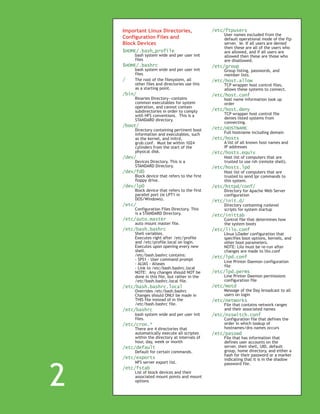
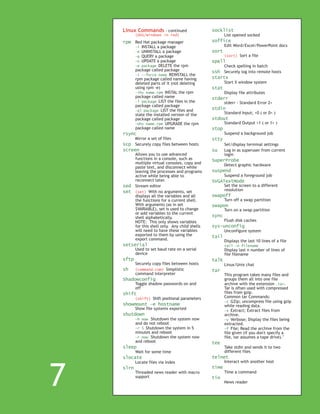
The document is a Linux quick reference guide that includes: - Console usage tips and boot information - Important Linux directories, configuration files, and block devices - X Window keystrokes - Linux commands with DOS/Windows equivalents - Sponsor pages for GroupLink customer engagement solutions and HOT Labs Linux certification training


