
Computer Productivity and  Personal Knowledge Management  for the medical student Ryan Joyce St. George’s University, Iota Epsilon Alpha, SGA September 22, 2010
Personal Information Management Lifehacking Personal Knowledge Management Computer-Supported Collaboration Technology-Enhanced LearningE-Learning
Themes to Identify Saving time/Accelerating workflow . Improving  computer/software  performance . Organizing  large amounts of  knowledge and information  into an  easily accessed  and  usable digital format . Keeping  this digital  data forever . Reducing usage of  paper, clutter, and damage  to your data. Collaborating  with colleagues in the digital realm. Evolutionary nature  of digital information, applications, and software.
Accelerating Your  Workflow , Saving Time, and Enhancing Your  Desktop Environment Built-In Tools and Tricks to Accelerate Workflow Bloatware, Time-wasters, and their Alternatives Application Software for Enhancing your Desktop
Built-In Tools (Mac or PC)
Application Hotkeys  are  everywhere , learning them will save you time. Cheat sheet for Mac users Cheat sheet for PC users KeyCue (for Mac users)
Cursor  navigation  – what they didn’t tell you in keyboarding class. Vs.
Common Cursor Shortcuts for Efficient Text Editing Key/Key Combination (PC) Function Key/Key Combination (Mac) Ctrl+Left or Right Move to beginning/end of previous/next word Opt+Left or Right Home Move to beginning of line Cmd+Left End Move to end of line Cmd+Right Shift in combination with any of the above Selects the text you are moving through Shift in combination with any of the above Del Deletes the character in front of cursor. Cmd+Delete
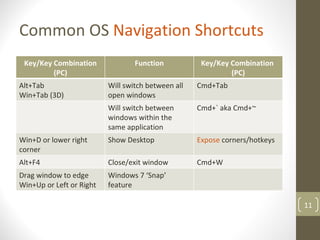
Operating System  Navigation shortcuts can also save lots of time.
Common OS  Navigation Shortcuts Key/Key Combination (PC) Function Key/Key Combination  (PC) Alt+Tab Win+Tab (3D) Will switch between all open windows Cmd+Tab  Will switch between windows within the same application Cmd+` aka Cmd+~  Win+D or lower right corner Show Desktop Expose  corners/hotkeys Alt+F4 Close/exit window Cmd+W Drag window to edge Win+Up or Left or Right Windows 7 ‘Snap’ feature
Common  Bloatware , Time-Wasters, and their Alternatives
Uninstall   Bloatware  for Faster Overall Performance Revo Uninstaller Trashme  - Mac
Keep Your Computer Clean for Optimum Performance CCleaner  (PC)/ Cocktail  (Mac)
Antivirus Software should be free and ‘minimally invasive’. AVAST Antivirus Free Microsoft Security Essentials AVG Lifehacker.com recommends AVAST
Internet Explorer has become an obsolete browser for most uses. Chrome / Firefox / Opera / Safari
Adobe Acrobat PDF Reader isn’t terrible, but there is better! FOXIT / PDF-XCHANGE VIEWER /Mac’s Built-in  Preview Lifehacker.com’s Five Best PDF Readers
Inferior Media Players often come pre-installed on PC’s VLC  – VideoLan Player
WinZip, WinRAR used to be standard, now obsolete 7-ZIP  (PC)/ THE UNARCHIVER  (Mac) Lifehacker.com recommends 7-Zip and The Unarchiver
Photo Managers often come pre-installed as  bloatware PICASA
Application Software  for Enhancing Your  Desktop Environment
YouTube  is a great resource for medically related videos
Google Search  has powerful, often untapped,  search features Boolean Operator Function “ search term” You are telling Google to consider the exact words in that exact order without any change site:  e.g. mac site:lifehacker.com, anatomy site:.edu - Terms you want to exclude,  e.g. jaguar –football -cars * Wild card e.g. Obama voted * in the * bill OR e.g. NY Giants 2004 OR 2005
Google Calendar  is a powerful calendar  Webapp
Google Docs  allow for multi-device access and  collaboration
Google Reader  is a useful  RSS   reader ; serves as your internet hub Lifehacker.com - Getting Good with Google Reader
Fences  keeps your desktop tidy and organized. PC only
Lastpass  is a universal password saver with auto-login capability. Chrome/Firefox/Safari/IE9/Mac/PC
Executor  is a multi-function application launcher for all tasks.  LAUNCHY  (PC)/ QUICKSILVER  (Mac)
ReadItLater  saves websites for later, extremely useful (i.e. wiki) Chrome/Firefox/Mac/PC/iOS/Android/ Blackberry/WebOS
Dropbox  keeps documents backed up and synced to the web. PC/Mac/iOS/Android/Web  It is also a great tool for group  collaboration
Onenote / Evernote  are excellent note-taking applications Onenote - Paid/MSOffice/PC Evernote - Mac/PC/iOS/Android/WebOS/Free
Mozy / Carbonite  support unlimited data backup to the web. PC/Mac; Paid subscription $55/year
Text Expanders allow you to replace text quickly. PHRASEEXPRESS  (PC)/ TEXTEXPANDER  (Mac)
Autohotkey  lets you make custom hotkeys PC only Documentation
Websites that have great posts with tricks/tips like these! Lifehacker.com  – great school-related and other tips! Makeuseof.com  – great school-related and other tips! Alternativeto.net  – alternatives to software we talked about can be found here. Gizmodo.com  – the latest in gadget and computer news.
In Summary, we’ve covered a lot of great ways to increase productivity on your computer! Built-In Tools and Tricks Getting rid of Bloatware and using better software Application Software for Enhancing Your Desktop Time Saved Applications Run Better, Easier To Use Get Things Done Efficiently! Time Saved, Stress Reduced, Less Work!
Thank You for Listening Everyone in attendance and watching online, thanks for listening! Special Thanks to: Iota Epsilon Alpha Santhosh Cherian Aladean Abdrabbo Student Government Association Samiran Chaudhury PDF of Presentation available here: http://bit.ly/sguaccelerate Video & Audio recording to follow on ANGEL Questions or Comments?  Email me: rpjrugby@gmail.com