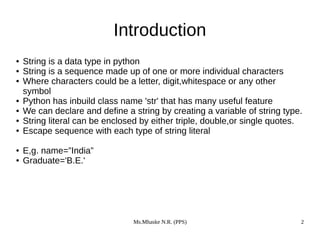
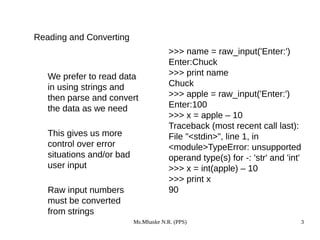
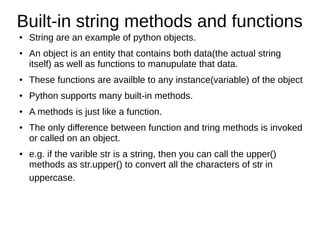
This document provides an introduction and overview of strings in Python. It discusses that strings are a data type that can contain sequences of characters. The built-in string class is 'str' and strings can be defined using single, double, or triple quotes. Strings support various methods like indexing, slicing, concatenation, formatting and more. Common string methods are also described such as upper(), lower(), split(), join() which allow manipulating strings. The document also discusses comparing and slicing strings in Python.
![Indexing
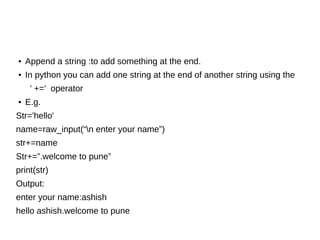
• We can get at any single
character in a string using
an index specified in square
brackets
• The index value must be an
integer and starts at zero
• The index value can be an
expression that is computed
>>> fruit = 'banana'
>>> letter = fruit[1]
>>> print letter
a
>>> n = 3
>>> w = fruit[n - 1]
>>> print w
n
00
bb
11
aa
22
nn
33
aa
44
nn
55
aa](https://image.slidesharecdn.com/unitiv-200102081749/85/Strings-in-Python-4-320.jpg)
![Traversing a string
● A string can be traversed by accessing characters from one index to another
● E,g.
message=”hello”
Index=0
for i in message:
print(“message[“ , index,” ] ”= ”, i)
index += 1
OUTPUT: message[0]=h
message[1]=e
message[2]=l
message[3]=l
message[4]=o
●](https://image.slidesharecdn.com/unitiv-200102081749/85/Strings-in-Python-5-320.jpg)





![Indexing
• We can get at any single
character in a string using
an index specified in square
brackets
• The index value must be an
integer and starts at zero
• The index value can be an
expression that is computed
>>> fruit = 'banana'
>>> letter = fruit[1]
>>> print letter
a
>>> n = 3
>>> w = fruit[n - 1]
>>> print w
n
00
bb
11
aa
22
nn
33
aa
44
nn
55
aa](/p?url=https%3A%2F%2Fimage.slidesharecdn.com%2Funitiv-200102081749%2F85%2FStrings-in-Python-4-320.jpg&__src=https%3A%2F%2Fwww.slideshare.net%2Fslideshow%2Fstrings-in-python-214161504%2F214161504%2315&__type=image)
![Traversing a string
● A string can be traversed by accessing characters from one index to another
● E,g.
message=”hello”
Index=0
for i in message:
print(“message[“ , index,” ] ”= ”, i)
index += 1
OUTPUT: message[0]=h
message[1]=e
message[2]=l
message[3]=l
message[4]=o
●](/p?url=https%3A%2F%2Fimage.slidesharecdn.com%2Funitiv-200102081749%2F85%2FStrings-in-Python-5-320.jpg&__src=https%3A%2F%2Fwww.slideshare.net%2Fslideshow%2Fstrings-in-python-214161504%2F214161504%2315&__type=image)


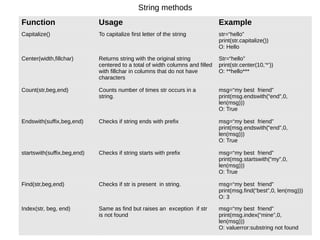
![String methods
Format Usage Example
len(string) Returns the length of the string str=“hello”
print(len(str))
O : 5
ljust(width,[fillchar]) Returns a string left justified to a total of width columns. Columns
without characters are padded with the character specified in the
fillchar argument
str=“hello”
print(ljust(10,”’*’))
O : hello*****
rjust(width,[fillchar]) Returns a string right justified to a total of width columns.
Columns without characters are padded with the character
specified in the fillchar argument
str=“hello”
print(rjust(10,”’*’))
O : *****hello
zfill(width) Returns string left padded with zeros to a total of width
characters.
str=“1234”
Print(str.zfill(10))
O:0000001234
lower() Converts all characters in the string into lowercase str=“Hello”
print(str.lower())
O : hello
upper() Converts all characters in the string into uppercase str=“hello”
print(str.upper())
O : HELLO
lstrip() Removes all leading whitespace in string str=“hello”
print(lstr.lstrip())
O : hello](/p?url=https%3A%2F%2Fimage.slidesharecdn.com%2Funitiv-200102081749%2F85%2FStrings-in-Python-22-320.jpg&__src=https%3A%2F%2Fwww.slideshare.net%2Fslideshow%2Fstrings-in-python-214161504%2F214161504%2315&__type=image)
![String methods
Format Usage Example
rstrip() Removes all trailing whitespace in string str=“hello ”
print(rstr.lstrip())
O : hello
strip() Removes all leading and trailing whitespace in string str=“ hello ”
print(str.lstrip())
O : hello
max(str) Returns the highest alphabetical character (having highest
ASCII value) from the string str
str=“hello friendz”
print(max(str))
O : z
min(str) Returns the lowest alphabetical character (having lowest ASCII
value) from the string str
str=“hello friendz”
print(min(str))
O : d
replace(old,new[,
max])
Replaces all or max occurrences of old in string with new str=“hello hello hello”
Print(str.replace(“he”,”fo”))
O:follo follo follo
title() Return string in title case str=“python language”
Print(str.title())
O: Python Language
swapcase() Toggles the case of every character str=“python Language”
Print(str.swapcase())
O: PYTHON lANGUAGE](/p?url=https%3A%2F%2Fimage.slidesharecdn.com%2Funitiv-200102081749%2F85%2FStrings-in-Python-23-320.jpg&__src=https%3A%2F%2Fwww.slideshare.net%2Fslideshow%2Fstrings-in-python-214161504%2F214161504%2315&__type=image)
![String methods
FormatFormat UsageUsage ExampleExample
split(delim) Returns a list of substrings seperated by the
specified delimiter. If no delimiter is specified
then by default it spilts strings on all whiespace
characters
str=“abc,def,ghi,jkl”
print(str.split(,))
O: [‘abc’,’’def’,’ghi’,’jkl’]
join(list) Joins a list of strings using the delimiter with
which the function invoked.
print(‘-’.join([‘abc’,’def’,’gh
i’,’jkl’])
O:abc-def-ghi-jkl
isidentifier() Returns true if the string is a valid identifier str=“hello”
print(str.isidentifier())
O: True
enumerate(str) Returns an enumerate object that lists the
index and value of all the characters in the
string as pairs
str=“hello”
print(list(enumerate(str))
O: [(0,’h’),(1,’e’),(2,’l’),
(3,’l’),(4,’o’)]](/p?url=https%3A%2F%2Fimage.slidesharecdn.com%2Funitiv-200102081749%2F85%2FStrings-in-Python-24-320.jpg&__src=https%3A%2F%2Fwww.slideshare.net%2Fslideshow%2Fstrings-in-python-214161504%2F214161504%2315&__type=image)


![SLICE Operation
● A substring of a stirng is called a slice.
● The slice operation is used to refer to sub parts of sequence and
string
● You can take subset of a string from the original string by using [ ]
operator also known as slicing operator.
● e.g. string with indexing](/p?url=https%3A%2F%2Fimage.slidesharecdn.com%2Funitiv-200102081749%2F85%2FStrings-in-Python-28-320.jpg&__src=https%3A%2F%2Fwww.slideshare.net%2Fslideshow%2Fstrings-in-python-214161504%2F214161504%2315&__type=image)
![●
The syntax of slice opeartion is s[start:end]
● Where start specifies the beginning index of the substring and end-1 is the index of
the last chacters.
● Eg
str=”python”
print(“str[1:5]=”,str[1:5])
print(“str[:6]=”,str[:6])
print(“str[:]=”,str[:])
print(“str[1:20]=”,str[1:20])
● Output:
str[1:5]=ytho
Str[:6]=python
Str[:]=python
Str[1:20]=ython](/p?url=https%3A%2F%2Fimage.slidesharecdn.com%2Funitiv-200102081749%2F85%2FStrings-in-Python-29-320.jpg&__src=https%3A%2F%2Fwww.slideshare.net%2Fslideshow%2Fstrings-in-python-214161504%2F214161504%2315&__type=image)
![● Slice opration with negative index
str=”python”
print(“str[-1]=”,str[-1])
print(“str[-6]=”,str[-6])
print(“str[-2:]=”,str[-2:])
print(“str[:-2]=”,str[:-2])
print(“str[-5:-2]=”,str[-5:-2])
● Output:
str[-1]=N
str[-6]=p
str[-2:]=on
str[:-2]=Pyth
str[-5:-2]=yth
●](/p?url=https%3A%2F%2Fimage.slidesharecdn.com%2Funitiv-200102081749%2F85%2FStrings-in-Python-30-320.jpg&__src=https%3A%2F%2Fwww.slideshare.net%2Fslideshow%2Fstrings-in-python-214161504%2F214161504%2315&__type=image)
![Specifying stride while slicing strings
● In the slice operation , you can specify a third argument as the stride.
● Which refers to the number of characters to move forward after the first character is retrieved from the string.
● The default value of stride is 1.
str=”welcome to the world of python”
print(“str[2:10]=”,str[2:10])
print(“str[2:10:1]=”,str[2:10:1])
print(“str[2:10:2]=”,str[2:10:2])
print(“str[2:13:4]=”,str[2:13:4])
Output:
str[2:10]=lcome to
Str[2:10:1]=lcome to
Str[2:10:2]=loet
str[2:13:4]=le](/p?url=https%3A%2F%2Fimage.slidesharecdn.com%2Funitiv-200102081749%2F85%2FStrings-in-Python-31-320.jpg&__src=https%3A%2F%2Fwww.slideshare.net%2Fslideshow%2Fstrings-in-python-214161504%2F214161504%2315&__type=image)
![● Program to demonstrate slice opration with just
last(neagtive)argument.
● i.e print string in reverse order
str=”welcome to learn python:
print(“str[:-1]=”,str[::-1])
Output:
Str[:::-1]=nohtyp nrael ot emoclew
● Print[::-3]=nyr c](/p?url=https%3A%2F%2Fimage.slidesharecdn.com%2Funitiv-200102081749%2F85%2FStrings-in-Python-32-320.jpg&__src=https%3A%2F%2Fwww.slideshare.net%2Fslideshow%2Fstrings-in-python-214161504%2F214161504%2315&__type=image)

![Str=”welcome to the world of python”
print(“uppercase=”,str.upper())
print(“lowercase=”,str.lower())
print(split=”,str.split())
print(“join =”,'-'.join(str.split()))
print(“replace=”,str.replace(“python”,”java”))
print(“count of o”,str.count('o'))
print(“find of=”,str.find(“of”))
Output:
Uppercase=WELCOME TO THE WORLD OFPYTHON
lowercse=welcome to the world of python
Split =['wlcome','to', 'the',' world', 'of', 'python']
join=welcome- to- the- world -of -python
Replace-welcome to the world of java
Count of o -5
Find of-21](/p?url=https%3A%2F%2Fimage.slidesharecdn.com%2Funitiv-200102081749%2F85%2FStrings-in-Python-34-320.jpg&__src=https%3A%2F%2Fwww.slideshare.net%2Fslideshow%2Fstrings-in-python-214161504%2F214161504%2315&__type=image)


