![LPAD Syntax: LPAD(String1, x [,string2]) Purpose : Returns string1 after padding string2 from left to length x. If string2 is less than x characters, it is duplicated as necessary. If string2 is more than x characters, only the first required x characters are used. If string2 is not specified, it defaults to a single blank for each space. Examples: SELECT LPAD (‘have a good day’,18) “First” from dual; Output: First ----- have a good day](https://image.slidesharecdn.com/sqloperatorsfunctions3-111119075709-phpapp01/85/Sql-operators-functions-3-19-320.jpg)
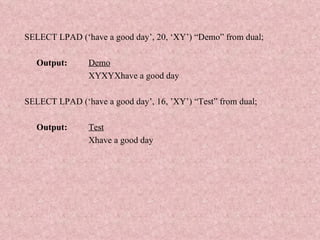


![LPAD Syntax: LPAD(String1, x [,string2]) Purpose : Returns string1 after padding string2 from left to length x. If string2 is less than x characters, it is duplicated as necessary. If string2 is more than x characters, only the first required x characters are used. If string2 is not specified, it defaults to a single blank for each space. Examples: SELECT LPAD (‘have a good day’,18) “First” from dual; Output: First ----- have a good day](/p?url=https%3A%2F%2Fimage.slidesharecdn.com%2Fsqloperatorsfunctions3-111119075709-phpapp01%2F85%2FSql-operators-functions-3-19-320.jpg&__src=https%3A%2F%2Fwww.slideshare.net%2Fslideshow%2Fsql-operators-functions-3%2F10232440&__type=image)

![RPAD Syntax: RPAD(String1,x[,string2]) Purpose: Returns string1 padded on the right to length x with the characters in string2. If string2 is less than x characters, it is duplicated as necessary. If string2 is more than x characters, only the first x are used. If string2 is not specified, it defaults to a single blank. Examples: SELECT RPAD (‘Cricket’, 10, ‘!’) “First” from dual; Output: First ---------- Cricket!!!](/p?url=https%3A%2F%2Fimage.slidesharecdn.com%2Fsqloperatorsfunctions3-111119075709-phpapp01%2F85%2FSql-operators-functions-3-21-320.jpg&__src=https%3A%2F%2Fwww.slideshare.net%2Fslideshow%2Fsql-operators-functions-3%2F10232440&__type=image)

![RTRIM Syntax: RTRIM(String1[,string2]) Purpose: Returns string1 with the rightmost characters appearing in string2 removed. String2 defaults to a single blank. The database will scan String1, starting from the rightmost position. When the first character not in String2 is encountered, the result is returned. Examples: SELECT RTRIM(‘This is a string ’) “First” from dual; Output: First This is a string](/p?url=https%3A%2F%2Fimage.slidesharecdn.com%2Fsqloperatorsfunctions3-111119075709-phpapp01%2F85%2FSql-operators-functions-3-23-320.jpg&__src=https%3A%2F%2Fwww.slideshare.net%2Fslideshow%2Fsql-operators-functions-3%2F10232440&__type=image)


![REPLACE Syntax: REPLACE (String, search_str[, replace_str]) Purpose : Returns string with every occurrence of search_str replaced with replace_str. If replace_str is not specified, all occurrences of search_str are removed. Examples: SELECT REPLACE (‘This and That’, ‘Th’, ‘B’)”First” from dual; Output: First Bis and Bat](/p?url=https%3A%2F%2Fimage.slidesharecdn.com%2Fsqloperatorsfunctions3-111119075709-phpapp01%2F85%2FSql-operators-functions-3-26-320.jpg&__src=https%3A%2F%2Fwww.slideshare.net%2Fslideshow%2Fsql-operators-functions-3%2F10232440&__type=image)

![SUBSTR Syntax : SUBSTR ( string , a [, b ]) Purpose: Returns a portion of string starting at character a, b characters long . If a is 0, it is treated as 1(the beginning of the string). If b is positive, characters are returned counting from the left. If b is negative, characters are returning starting from the end of string, and counting from the right . If b is not present, it defaults to the entire string. If b is less than 1, NULL is returned. Examples: SELECT SUBSTR('He is a Good Boy', 2) "First" from dual; Output: First e is a Good Boy SELECT SUBSTR('He is a Good Boy', 2, 4) "Second" from dual Output: Second e is](/p?url=https%3A%2F%2Fimage.slidesharecdn.com%2Fsqloperatorsfunctions3-111119075709-phpapp01%2F85%2FSql-operators-functions-3-28-320.jpg&__src=https%3A%2F%2Fwww.slideshare.net%2Fslideshow%2Fsql-operators-functions-3%2F10232440&__type=image)


![TRUNC Syntax: TRUNC(d, [,format]) Purpose: Returns the date d truncated to the unit specified by format. If format is not specified, it defaults to 'DD', which truncates d to the nearest day. Example: SELECT TRUNC( FROM dual; Output: First Day -------------- 01-JAN-71](/p?url=https%3A%2F%2Fimage.slidesharecdn.com%2Fsqloperatorsfunctions3-111119075709-phpapp01%2F85%2FSql-operators-functions-3-39-320.jpg&__src=https%3A%2F%2Fwww.slideshare.net%2Fslideshow%2Fsql-operators-functions-3%2F10232440&__type=image)


![Conversion Functions TO_NUMBER Syntax: TO_NUMBER( string [, format [,nlsparams]]) Purpose: Converts the CHAR or VARCHAR2 string to a NUMBER value. If format is specified, string should correspond to number format. Example: SELECT TO_NUMBER('25') + TO_NUMBER('50') "TOTAL" FROM DUAL; Output: TOTAL 75](/p?url=https%3A%2F%2Fimage.slidesharecdn.com%2Fsqloperatorsfunctions3-111119075709-phpapp01%2F85%2FSql-operators-functions-3-43-320.jpg&__src=https%3A%2F%2Fwww.slideshare.net%2Fslideshow%2Fsql-operators-functions-3%2F10232440&__type=image)
![TO_CHAR (WITH NUMBERS) Syntax: TO_CHAR( num, [,format[, nlsparams ]]) Purpose: Converts the NUMBER argument num to a VARCHAR2. If format not specified, the resultant string will have exactly as many characters as necessary to hold the significant digits of num. Example: SELECT TO_CHAR(123) FROM DUAL; Output TO_ 123](/p?url=https%3A%2F%2Fimage.slidesharecdn.com%2Fsqloperatorsfunctions3-111119075709-phpapp01%2F85%2FSql-operators-functions-3-44-320.jpg&__src=https%3A%2F%2Fwww.slideshare.net%2Fslideshow%2Fsql-operators-functions-3%2F10232440&__type=image)
![TO_CHAR (WITH DATE) Syntax: TO_CHAR(d,[,format [,nlsparams]]) Purpose: TO_CHAR can also be used for the conversion of dates values to a specified character format. TO_CHAR allows us to format the date in various different ways. Example 1: SELECT TO_CHAR(SYSDATE, ‘DAY DDSPTH MONTH YEAR') FROM DUAL; Output : TO_CHAR(SYSDATE,'DAYDDSPTHMONTHYEAR') --------------------------------------------------------------------- WEDNESDAY FOURTEENTH MARCH TWO THOUSAND ONE](/p?url=https%3A%2F%2Fimage.slidesharecdn.com%2Fsqloperatorsfunctions3-111119075709-phpapp01%2F85%2FSql-operators-functions-3-45-320.jpg&__src=https%3A%2F%2Fwww.slideshare.net%2Fslideshow%2Fsql-operators-functions-3%2F10232440&__type=image)


![AVG Syntax: AVG([DISTINCT | ALL]col) Purpose: Returns the average of the column values. Example: SELECT AVG(sal) FROM EMP;](/p?url=https%3A%2F%2Fimage.slidesharecdn.com%2Fsqloperatorsfunctions3-111119075709-phpapp01%2F85%2FSql-operators-functions-3-49-320.jpg&__src=https%3A%2F%2Fwww.slideshare.net%2Fslideshow%2Fsql-operators-functions-3%2F10232440&__type=image)
![COUNT Syntax : COUNT(*|[DISTINCT |ALL]col) Purpose : Count function determines the number of rows or non-NULL column values. If * is passed, then the total number of rows is returned. Example 1: SELECT COUNT(*) FROM EMP; Example 2: SELECT COUNT(deptno) FROM EMP; Example3: SELECT COUNT(DISTINCT deptno) FROM EMP;](/p?url=https%3A%2F%2Fimage.slidesharecdn.com%2Fsqloperatorsfunctions3-111119075709-phpapp01%2F85%2FSql-operators-functions-3-50-320.jpg&__src=https%3A%2F%2Fwww.slideshare.net%2Fslideshow%2Fsql-operators-functions-3%2F10232440&__type=image)
![MAX Syntax: MAX([DISTINCT | ALL] coL) Purpose : Returns the maximum value of the select list item. Example 1: SELECT MAX(SAL) FROM EMP; Example 2: SELECT MAX(LENGTH(ENAME)) FROM EMP; This example returns the length of the longest name in the EMP table:](/p?url=https%3A%2F%2Fimage.slidesharecdn.com%2Fsqloperatorsfunctions3-111119075709-phpapp01%2F85%2FSql-operators-functions-3-51-320.jpg&__src=https%3A%2F%2Fwww.slideshare.net%2Fslideshow%2Fsql-operators-functions-3%2F10232440&__type=image)
![MIN Syntax : MIN([DISTINCT | ALL] coL) Purpose: Returns the maximum value of the select list item. Example: SELECT MIN(COMM) “MIN-COMM”, MIN(SAL) “MIN-SAL” FROM EMP; Output: MIN-COMM MIN-SAL ----------------- ------------- 0 800](/p?url=https%3A%2F%2Fimage.slidesharecdn.com%2Fsqloperatorsfunctions3-111119075709-phpapp01%2F85%2FSql-operators-functions-3-52-320.jpg&__src=https%3A%2F%2Fwww.slideshare.net%2Fslideshow%2Fsql-operators-functions-3%2F10232440&__type=image)
![SUM Syntax : SUM([DISTINCT | ALL] Col) Purpose: Returns the sum of the values for the select list item. Example 1: SELECT SUM(SAL) FROM EMP;](/p?url=https%3A%2F%2Fimage.slidesharecdn.com%2Fsqloperatorsfunctions3-111119075709-phpapp01%2F85%2FSql-operators-functions-3-53-320.jpg&__src=https%3A%2F%2Fwww.slideshare.net%2Fslideshow%2Fsql-operators-functions-3%2F10232440&__type=image)


![GREATEST Syntax : GREATEST (expr1[,expr2]…) Purpose : Returns the greatest expression of its arguments. Each expression is implicitly converted to the type of expr1 before the comparisons are made. Example 1: SELECT GREATEST (10, '7', -1) FROM dual; Output: GREATEST (10, '7', -1) --------------------- 10 Example 2: SELECT GREATEST(‘ASHWIN’, ‘SOFIA’) FROM DUAL; Output: GREAT --------- SOFIA](/p?url=https%3A%2F%2Fimage.slidesharecdn.com%2Fsqloperatorsfunctions3-111119075709-phpapp01%2F85%2FSql-operators-functions-3-57-320.jpg&__src=https%3A%2F%2Fwww.slideshare.net%2Fslideshow%2Fsql-operators-functions-3%2F10232440&__type=image)
![LEAST Syntax : LEAST(expr1 [, expr2]…) Purpose : This function returns the least value in the list of expressions. LEAST behaves similarly to GREATEST, in that all expressions are implicitly converted to the datatype of the first. Example 1: SELECT LEAST (10, '7', -1) FROM dual; Output: LEAST(10,'7', -1) ---------------- -1 Example 2: SELECT LEAST ('ASHWIN', 'SOFIA') FROM DUAL; Output: LEAST( ------ ASHWIN](/p?url=https%3A%2F%2Fimage.slidesharecdn.com%2Fsqloperatorsfunctions3-111119075709-phpapp01%2F85%2FSql-operators-functions-3-58-320.jpg&__src=https%3A%2F%2Fwww.slideshare.net%2Fslideshow%2Fsql-operators-functions-3%2F10232440&__type=image)


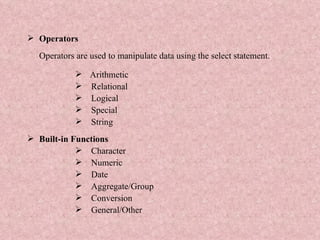
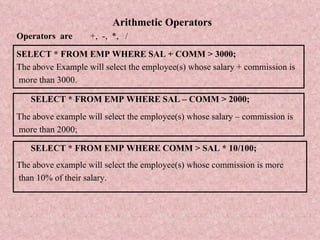
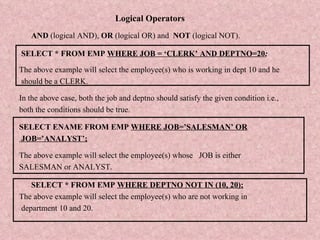
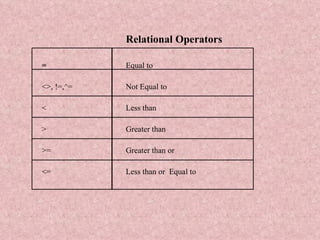
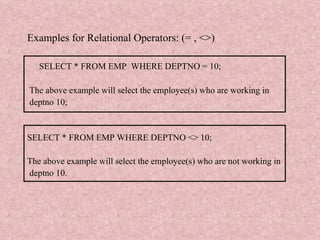
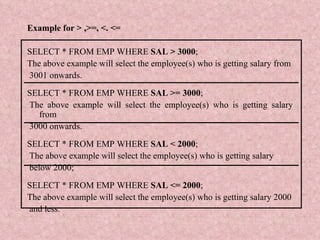
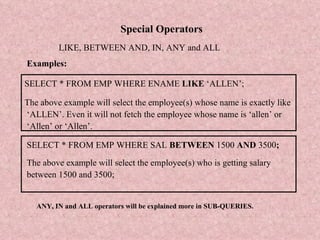
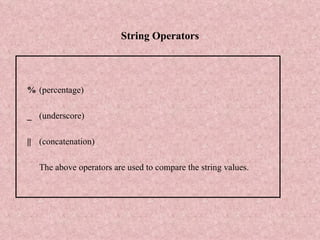
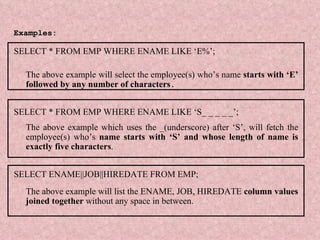
This document summarizes various SQL operators and built-in functions. It describes arithmetic, relational, logical, and string operators. It also discusses different types of built-in functions including character, numeric, date, aggregate/group, conversion, and general functions. Examples are provided to demonstrate how each operator and function works.


