1 
Network Programming and 
Java Sockets 
Rajkumar Buyya 
Grid Computing and Distributed Systems (GRIDS) Laboratory 
Dept. of Computer Science and Software Engineering 
University of Melbourne, Australia 
http://www.cs.mu.oz.au/~raj or http://www.buyya.com
2 
Agenda 
 Introduction 
 Elements of Client Server Computing 
 Networking Basics 
 Understanding Ports and Sockets 
 Java Sockets 
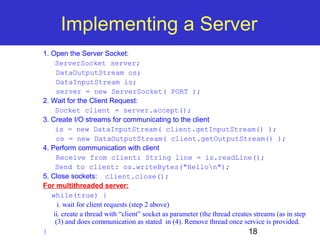
 Implementing a Server 
 Implementing a Client 
 Sample Examples 
 Conclusions
3 
Introduction 
 Internet and WWW have emerged as global 
ubiquitous media for communication and 
changing the way we conduct science, 
engineering, and commerce. 
 They also changing the way we learn, live, 
enjoy, communicate, interact, engage, etc. It 
appears like the modern life activities are 
getting completely centered around the 
Internet.
Internet Applications Serving Local 
4 
and Remote Users 
Internet 
Server 
PC client 
Local Area Network 
PDA
Internet & Web as a delivery Vehicle 
5
Increased demand for Internet 
6 
applications 
 To take advantage of opportunities presented by 
the Internet, businesses are continuously seeking 
new and innovative ways and means for offering 
their services via the Internet. 
 This created a huge demand for software 
designers with skills to create new Internet-enabled 
applications or migrate existing/legacy applications 
on the Internet platform. 
 Object-oriented Java technologies—Sockets, 
threads, RMI, clustering, Web services-- have 
emerged as leading solutions for creating portable, 
efficient, and maintainable large and complex 
Internet applications.
Elements of C-S Computing 
7 
a client, a server, and network 
Network 
Request 
Result 
Client 
Server 
Client machine 
Server machine
8 
Networking Basics 
 Applications Layer 
 Standard apps 
 HTTP 
 FTP 
 Telnet 
 User apps 
 Transport Layer 
 TCP 
 UDP 
 Programming Interface: 
 Sockets 
 Network Layer 
 IP 
 Link Layer 
 Device drivers 
 TCP/IP Stack 
Application 
(http,ftp,telnet,…) 
Transport 
(TCP, UDP,..) 
Network 
(IP,..) 
Link 
(device driver,..)
9 
Networking Basics 
 TCP (Transport Control 
Protocol) is a connection-oriented 
protocol that 
provides a reliable flow of 
data between two 
computers. 
 Example applications: 
 HTTP 
 FTP 
 Telnet 
 TCP/IP Stack 
Application 
(http,ftp,telnet,…) 
Transport 
(TCP, UDP,..) 
Network 
(IP,..) 
Link 
(device driver,..)
10 
Networking Basics 
 UDP (User Datagram 
Protocol) is a protocol 
that sends independent 
packets of data, called 
datagrams, from one 
computer to another with 
no guarantees about 
arrival. 
 Example applications: 
 Clock server 
 Ping 
 TCP/IP Stack 
Application 
(http,ftp,telnet,…) 
Transport 
(TCP, UDP,..) 
Network 
(IP,..) 
Link 
(device driver,..)
Packet 
11 
Understanding Ports 
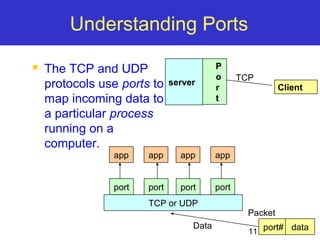
 The TCP and UDP 
protocols use ports to 
map incoming data to 
a particular process 
running on a 
computer. 
server 
Port 
Client 
TCP 
app app app app 
port port port port 
TCP or UDP 
Data port# data
12 
Understanding Ports 
 Port is represented by a positive (16-bit) integer 
value 
 Some ports have been reserved to support 
common/well known services: 
 ftp 21/tcp 
 telnet 23/tcp 
 smtp 25/tcp 
 login 513/tcp 
 User level process/services generally use port 
number value >= 1024
13 
Sockets 
 Sockets provide an interface for programming networks 
at the transport layer. 
 Network communication using Sockets is very much 
similar to performing file I/O 
 In fact, socket handle is treated like file handle. 
 The streams used in file I/O operation are also applicable to 
socket-based I/O 
 Socket-based communication is programming language 
independent. 
 That means, a socket program written in Java language can 
also communicate to a program written in Java or non-Java 
socket program.
Socket Communication 
 A server (program) runs on a specific 
computer and has a socket that is bound 
to a specific port. The server waits and 
listens to the socket for a client to make a 
connection request. 
server Client 
14 
Connection request 
port
Socket Communication 
 If everything goes well, the server accepts the 
connection. Upon acceptance, the server gets a new 
socket bounds to a different port. It needs a new socket 
(consequently a different port number) so that it can 
continue to listen to the original socket for connection 
requests while serving the connected client. 
15 
server 
Client 
Connection 
port 
port 
port
Sockets and Java Socket Classes 
 A socket is an endpoint of a two-way 
communication link between two 
programs running on the network. 
 A socket is bound to a port number so 
that the TCP layer can identify the 
application that data destined to be sent. 
 Java’s .net package provides two 
classes: 
 Socket – for implementing a client 
 ServerSocket – for implementing a server 
16
17 
Java Sockets 
ServerSocket(1234) 
Socket(“128.250.25.158”, 1234) 
Output/write stream 
Input/read stream 
It can be host_name like “mandroo.cs.mu.oz.au” 
Client 
Server
Implementing a Server 
18 
1. Open the Server Socket: 
ServerSocket server; 
DataOutputStream os; 
DataInputStream is; 
server = new ServerSocket( PORT ); 
2. Wait for the Client Request: 
Socket client = server.accept(); 
3. Create I/O streams for communicating to the client 
is = new DataInputStream( client.getInputStream() ); 
os = new DataOutputStream( client.getOutputStream() ); 
4. Perform communication with client 
Receive from client: String line = is.readLine(); 
Send to client: os.writeBytes("Hellon"); 
5. Close sockets: client.close(); 
For multithreaded server: 
while(true) { 
i. wait for client requests (step 2 above) 
ii. create a thread with “client” socket as parameter (the thread creates streams (as in step 
(3) and does communication as stated in (4). Remove thread once service is provided. 
}
19 
Implementing a Client 
1. Create a Socket Object: 
client = new Socket( server, port_id ); 
2. Create I/O streams for communicating with the server. 
is = new DataInputStream(client.getInputStream() ); 
os = new DataOutputStream( client.getOutputStream() ); 
3. Perform I/O or communication with the server: 
 Receive data from the server: 
String line = is.readLine(); 
 Send data to the server: 
os.writeBytes("Hellon"); 
4. Close the socket when done: 
client.close();
A simple server (simplified code) 
20 
// SimpleServer.java: a simple server program 
import java.net.*; 
import java.io.*; 
public class SimpleServer { 
public static void main(String args[]) throws IOException { 
// Register service on port 1234 
ServerSocket s = new ServerSocket(1234); 
Socket s1=s.accept(); // Wait and accept a connection 
// Get a communication stream associated with the socket 
OutputStream s1out = s1.getOutputStream(); 
DataOutputStream dos = new DataOutputStream (s1out); 
// Send a string! 
dos.writeUTF("Hi there"); 
// Close the connection, but not the server socket 
dos.close(); 
s1out.close(); 
s1.close(); 
} 
}
A simple client (simplified code) 
21 
// SimpleClient.java: a simple client program 
import java.net.*; 
import java.io.*; 
public class SimpleClient { 
public static void main(String args[]) throws IOException { 
// Open your connection to a server, at port 1234 
Socket s1 = new Socket("mundroo.cs.mu.oz.au",1234); 
// Get an input file handle from the socket and read the input 
InputStream s1In = s1.getInputStream(); 
DataInputStream dis = new DataInputStream(s1In); 
String st = new String (dis.readUTF()); 
System.out.println(st); 
// When done, just close the connection and exit 
dis.close(); 
s1In.close(); 
s1.close(); 
} 
}
22 
Run 
 Run Server on mundroo.cs.mu.oz.au 
 [raj@mundroo] java SimpleServer & 
 Run Client on any machine (including mundroo): 
 [raj@mundroo] java SimpleClient 
Hi there 
 If you run client when server is not up: 
 [raj@mundroo] sockets [1:147] java SimpleClient 
Exception in thread "main" java.net.ConnectException: Connection refused 
at java.net.PlainSocketImpl.socketConnect(Native Method) 
at java.net.PlainSocketImpl.doConnect(PlainSocketImpl.java:320) 
at java.net.PlainSocketImpl.connectToAddress(PlainSocketImpl.java:133) 
at java.net.PlainSocketImpl.connect(PlainSocketImpl.java:120) 
at java.net.Socket.<init>(Socket.java:273) 
at java.net.Socket.<init>(Socket.java:100) 
at SimpleClient.main(SimpleClient.java:6)
23 
Socket Exceptions 
try { 
Socket client = new Socket(host, port); 
handleConnection(client); 
} 
catch(UnknownHostException uhe) 
{ System.out.println("Unknown host: " + host); 
uhe.printStackTrace(); 
} 
catch(IOException ioe) { 
System.out.println("IOException: " + ioe); 
ioe.printStackTrace(); 
}
ServerSocket & Exceptions 
 public ServerSocket(int port) throws IOException 
 Creates a server socket on a specified port. 
 A port of 0 creates a socket on any free port. You can use 
getLocalPort() to identify the (assigned) port on which this 
socket is listening. 
 The maximum queue length for incoming connection 
indications (a request to connect) is set to 50. If a connection 
indication arrives when the queue is full, the connection is 
refused. 
24 
 Throws: 
 IOException - if an I/O error occurs when opening the socket. 
 SecurityException - if a security manager exists and its 
checkListen method doesn't allow the operation.
Server in Loop: Always up 
// SimpleServerLoop.java: a simple server program that runs forever in a single thead 
import java.net.*; 
import java.io.*; 
public class SimpleServerLoop { 
public static void main(String args[]) throws IOException { 
// Register service on port 1234 
ServerSocket s = new ServerSocket(1234); 
while(true) 
{ 
25 
Socket s1=s.accept(); // Wait and accept a connection 
// Get a communication stream associated with the socket 
OutputStream s1out = s1.getOutputStream(); 
DataOutputStream dos = new DataOutputStream (s1out); 
// Send a string! 
dos.writeUTF("Hi there"); 
// Close the connection, but not the server socket 
dos.close(); 
s1out.close(); 
s1.close(); 
} 
} 
}
Multithreaded Server: For Serving 
Multiple Clients Concurrently 
Client 1 Process Server Process 
Server 
Threads 
26 
Client 2 Process 
 Internet
27 
Conclusion 
 Programming client/server applications in 
Java is fun and challenging. 
 Programming socket programming in 
Java is much easier than doing it in other 
languages such as C. 
 Keywords: 
 Clients, servers, TCP/IP, port number, 
sockets, Java sockets