With LinkedIn Sales Navigator, you can:
Focus on the right people and companies
Stay up-to-date on what’s happening at your accounts
Build trust with your prospects and customers
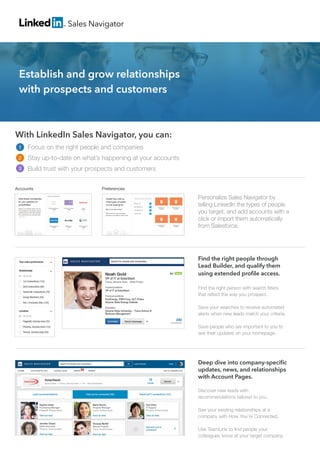
Personalize Sales Navigator by
telling LinkedIn the types of people
you target, and add accounts with a
click or import them automatically
from Salesforce.
Sales Navigator
PreferencesAccounts
Find the right people through
Lead Builder, and qualify them
using extended profile access.
Find the right person with search filters
that reflect the way you prospect.
Save your searches to receive automated 	
alerts when new leads match your criteria.
Save people who are important to you to
see their updates on your homepage.
Deep dive into company-specific
updates, news, and relationships
with Account Pages.
Discover new leads with
recommendations tailored to you.
See your existing relationships at a
company with How You’re Connected.
Use TeamLink to find people your
colleagues know at your target company.
Establish and grow relationships
with prospects and customers
1
2
3
Copyright © 2015 LinkedIn Corporation. LinkedIn, the LinkedIn logo, and InMail, are registered trademarks of LinkedIn Corporation in
the United States and/or other countries. All other brands and names are the property of their respective owners. All rights reserved.
Uncover the best way to get
introduced with TeamLink.
See the people in your company’s network
who can introduce you to a prospect.
When you are on the go, stay up to 	
date on accounts and leads with 	
LinkedIn Sales Navigator mobile app
(available on Android and iPhone).
View LinkedIn information directly 		
in Salesforce and Microsoft 		
Dynamics CRM.
Tap into the power of LinkedIn with LinkedIn Sales Navigator. Designed for sales professionals,
LinkedIn Sales Navigator combines LinkedIn’s network data, relevant news sources, and your
accounts, leads, and preferences to produce customized recommendations and insights.
Stay up-to-date on what’s happening
with the people and companies you’re
interested in:
Lead Updates: Be one of the first to know when
your leads change roles, have an anniversary or
connect with someone in your network.
Shares: Understand what your leads care about
by seeing their professional shares on LinkedIn.
Company Updates: Receive key information
about your accounts that is posted to their
Linkedin.com Company Page.
In the news: See when people or companies
get mentioned the news, sourced from sites
across the web.
Potential Leads: Identify new potential
contacts or decision makers when accounts
make new key hires.