


![© SkillBrew http://skillbrew.com
Accessing elements of a dictionary
5
mydict = {
'one': 1,
'two': 2,
}
print mydict['one']
print mydict['two']
Output:
1
2
dict[key]](https://image.slidesharecdn.com/pythonprogrammingessentials-m14-dictionaries-140819043205-phpapp01/85/Python-Programming-Essentials-M14-Dictionaries-5-320.jpg)
![© SkillBrew http://skillbrew.com
Accessing elements of a dictionary (2)
6
mydict = {
'one': 1,
'two': 2,
}
print mydict['three']
Output:
KeyError: 'three' Accessing a key that does
not exist throws
KeyError](https://image.slidesharecdn.com/pythonprogrammingessentials-m14-dictionaries-140819043205-phpapp01/85/Python-Programming-Essentials-M14-Dictionaries-6-320.jpg)


![© SkillBrew http://skillbrew.com
Tuples as keys
10
• Tuples can be used as keys if they contain only other
immutable types – strings, numbers, or tuples
• If a tuple contains any mutable type, it cannot be used
as a key
mydict = {
([1, 2, 3], 4): 'one',
}
TypeError: unhashable type: 'list'](https://image.slidesharecdn.com/pythonprogrammingessentials-m14-dictionaries-140819043205-phpapp01/85/Python-Programming-Essentials-M14-Dictionaries-10-320.jpg)
![© SkillBrew http://skillbrew.com
Accessing keys
11
contact = {
"first": "John",
"last": "Doe",
"age": 39,
"sex": "M",
"salary": 70000,
"registered": True,
}
print contact.keys()
['salary', 'last', 'age', 'sex', 'registered',
'first']
dict.keys() gives an
unordered list of keys in a
dictionary](https://image.slidesharecdn.com/pythonprogrammingessentials-m14-dictionaries-140819043205-phpapp01/85/Python-Programming-Essentials-M14-Dictionaries-11-320.jpg)
![© SkillBrew http://skillbrew.com
Accessing values
12
contact = {
"first": "John",
"last": "Doe",
"age": 39,
"sex": "M",
"salary": 70000,
"registered": True,
}
print contact.values()
[70000, 'Doe', 39, 'M', True, 'John']
dict.values() gives an
unordered list of values in
dictionary](https://image.slidesharecdn.com/pythonprogrammingessentials-m14-dictionaries-140819043205-phpapp01/85/Python-Programming-Essentials-M14-Dictionaries-12-320.jpg)
![© SkillBrew http://skillbrew.com
Updating an element
13
contact = {
"first": "John",
"last": "Doe",
"age": 39,
"sex": "M",
"salary": 70000,
"registered": True,
}
contact['salary'] = 90000
print contact
Output:
{'salary': 90000, 'last': 'Doe', 'age': 39, 'sex': 'M',
'registered': True, 'first': 'John'}
dict[key] = newvalue](https://image.slidesharecdn.com/pythonprogrammingessentials-m14-dictionaries-140819043205-phpapp01/85/Python-Programming-Essentials-M14-Dictionaries-13-320.jpg)
![© SkillBrew http://skillbrew.com
Deleting an element
14
contact = {
"first": "John",
"last": "Doe",
"age": 39,
"sex": "M",
"salary": 90000,
"registered": True,
}
del contact['last']
print contact
Output:
{'salary': 90000, 'age': 39, 'sex': 'M', 'registered': True,
'first': 'John'}
del dict[key]](https://image.slidesharecdn.com/pythonprogrammingessentials-m14-dictionaries-140819043205-phpapp01/85/Python-Programming-Essentials-M14-Dictionaries-14-320.jpg)



![© SkillBrew http://skillbrew.com
Example: Contact information
contacts = [
{'name': 'Pavan Verma',
'mobile': '9999900000',
'email': 'pavan@p3infotech.in', }
{'name': 'Sahil Chug',
'mobile': '9999900001',
'email': 'sahil@p3infotech.in', }
{'name': 'Abijith MG',
'mobile': '9999900007',
'email': 'abijith@p3infotech.in', }
]
20](https://image.slidesharecdn.com/pythonprogrammingessentials-m14-dictionaries-140819043205-phpapp01/85/Python-Programming-Essentials-M14-Dictionaries-20-320.jpg)


![© SkillBrew http://skillbrew.com
Accessing elements of a dictionary
5
mydict = {
'one': 1,
'two': 2,
}
print mydict['one']
print mydict['two']
Output:
1
2
dict[key]](/p?url=https%3A%2F%2Fimage.slidesharecdn.com%2Fpythonprogrammingessentials-m14-dictionaries-140819043205-phpapp01%2F85%2FPython-Programming-Essentials-M14-Dictionaries-5-320.jpg&__src=https%3A%2F%2Fwww.slideshare.net%2Fslideshow%2Fpython-programming-essentials-m14-dictionaries%2F38124253&__type=image)
![© SkillBrew http://skillbrew.com
Accessing elements of a dictionary (2)
6
mydict = {
'one': 1,
'two': 2,
}
print mydict['three']
Output:
KeyError: 'three' Accessing a key that does
not exist throws
KeyError](/p?url=https%3A%2F%2Fimage.slidesharecdn.com%2Fpythonprogrammingessentials-m14-dictionaries-140819043205-phpapp01%2F85%2FPython-Programming-Essentials-M14-Dictionaries-6-320.jpg&__src=https%3A%2F%2Fwww.slideshare.net%2Fslideshow%2Fpython-programming-essentials-m14-dictionaries%2F38124253&__type=image)


![© SkillBrew http://skillbrew.com
Tuples as keys
10
• Tuples can be used as keys if they contain only other
immutable types – strings, numbers, or tuples
• If a tuple contains any mutable type, it cannot be used
as a key
mydict = {
([1, 2, 3], 4): 'one',
}
TypeError: unhashable type: 'list'](/p?url=https%3A%2F%2Fimage.slidesharecdn.com%2Fpythonprogrammingessentials-m14-dictionaries-140819043205-phpapp01%2F85%2FPython-Programming-Essentials-M14-Dictionaries-10-320.jpg&__src=https%3A%2F%2Fwww.slideshare.net%2Fslideshow%2Fpython-programming-essentials-m14-dictionaries%2F38124253&__type=image)
![© SkillBrew http://skillbrew.com
Accessing keys
11
contact = {
"first": "John",
"last": "Doe",
"age": 39,
"sex": "M",
"salary": 70000,
"registered": True,
}
print contact.keys()
['salary', 'last', 'age', 'sex', 'registered',
'first']
dict.keys() gives an
unordered list of keys in a
dictionary](/p?url=https%3A%2F%2Fimage.slidesharecdn.com%2Fpythonprogrammingessentials-m14-dictionaries-140819043205-phpapp01%2F85%2FPython-Programming-Essentials-M14-Dictionaries-11-320.jpg&__src=https%3A%2F%2Fwww.slideshare.net%2Fslideshow%2Fpython-programming-essentials-m14-dictionaries%2F38124253&__type=image)
![© SkillBrew http://skillbrew.com
Accessing values
12
contact = {
"first": "John",
"last": "Doe",
"age": 39,
"sex": "M",
"salary": 70000,
"registered": True,
}
print contact.values()
[70000, 'Doe', 39, 'M', True, 'John']
dict.values() gives an
unordered list of values in
dictionary](/p?url=https%3A%2F%2Fimage.slidesharecdn.com%2Fpythonprogrammingessentials-m14-dictionaries-140819043205-phpapp01%2F85%2FPython-Programming-Essentials-M14-Dictionaries-12-320.jpg&__src=https%3A%2F%2Fwww.slideshare.net%2Fslideshow%2Fpython-programming-essentials-m14-dictionaries%2F38124253&__type=image)
![© SkillBrew http://skillbrew.com
Updating an element
13
contact = {
"first": "John",
"last": "Doe",
"age": 39,
"sex": "M",
"salary": 70000,
"registered": True,
}
contact['salary'] = 90000
print contact
Output:
{'salary': 90000, 'last': 'Doe', 'age': 39, 'sex': 'M',
'registered': True, 'first': 'John'}
dict[key] = newvalue](/p?url=https%3A%2F%2Fimage.slidesharecdn.com%2Fpythonprogrammingessentials-m14-dictionaries-140819043205-phpapp01%2F85%2FPython-Programming-Essentials-M14-Dictionaries-13-320.jpg&__src=https%3A%2F%2Fwww.slideshare.net%2Fslideshow%2Fpython-programming-essentials-m14-dictionaries%2F38124253&__type=image)
![© SkillBrew http://skillbrew.com
Deleting an element
14
contact = {
"first": "John",
"last": "Doe",
"age": 39,
"sex": "M",
"salary": 90000,
"registered": True,
}
del contact['last']
print contact
Output:
{'salary': 90000, 'age': 39, 'sex': 'M', 'registered': True,
'first': 'John'}
del dict[key]](/p?url=https%3A%2F%2Fimage.slidesharecdn.com%2Fpythonprogrammingessentials-m14-dictionaries-140819043205-phpapp01%2F85%2FPython-Programming-Essentials-M14-Dictionaries-14-320.jpg&__src=https%3A%2F%2Fwww.slideshare.net%2Fslideshow%2Fpython-programming-essentials-m14-dictionaries%2F38124253&__type=image)


![© SkillBrew http://skillbrew.com
Example: Contact information
contacts = [
{'name': 'Pavan Verma',
'mobile': '9999900000',
'email': 'pavan@p3infotech.in', }
{'name': 'Sahil Chug',
'mobile': '9999900001',
'email': 'sahil@p3infotech.in', }
{'name': 'Abijith MG',
'mobile': '9999900007',
'email': 'abijith@p3infotech.in', }
]
20](/p?url=https%3A%2F%2Fimage.slidesharecdn.com%2Fpythonprogrammingessentials-m14-dictionaries-140819043205-phpapp01%2F85%2FPython-Programming-Essentials-M14-Dictionaries-20-320.jpg&__src=https%3A%2F%2Fwww.slideshare.net%2Fslideshow%2Fpython-programming-essentials-m14-dictionaries%2F38124253&__type=image)


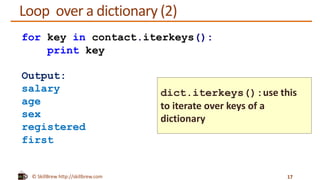
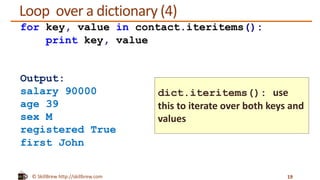
Dictionaries in Python are used to store data values in key-value pairs. A dictionary is created using curly braces {} with keys and their corresponding values separated by colons. Values can be accessed using their keys and dictionaries can be iterated over to access both keys and values. Common uses of dictionaries include storing contact information with name, phone, email as keys and values. Keys must be immutable objects like strings or numbers.


