p ho d e
by Ab i h ma
Who I ….?
My a s A is K ma d I
an A ro f ar el , as l
as P ho S r r . I li wo n
ne c lo n r e t to .
So I've d P ho x a n
Hop u l ke .
Linkedin : www.linkedin.com/in/abhishek-kumar-24ab98167
Gmail : abhiak11.ak@gmail.com
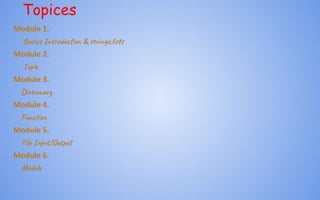
Topices
Module 1.
Bas In od on & s in ,li s
Module 2.
Tup
Module 3.
Dic ar
Module 4.
Fun n
Module 5.
Fil I t/Out
Module 6.
Mod
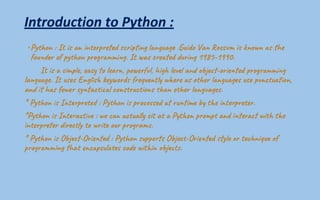
Introduction to Python :
• Py on : It i n e p d ri n n u .Gu d a s i k n he
fo r o y on g mi . It a c ed n 1985-1990.
It i m e, e s le , po f , hi l an j -or ed g mi
la ge. It u En is y d re t w e s o r gu us c u on,
an h ew y ac l o s c o s n er g a .
* Py on I t re : Py on r e s ru m t e t re .
*Py on I t a t : we c u l t a P t p o p d er w t e
in p er c y o r o p ra .
* Py on O j -Ori d : Py on p s O ec -Ori d y e t ni o
p o r n ha c ul co t i b t .
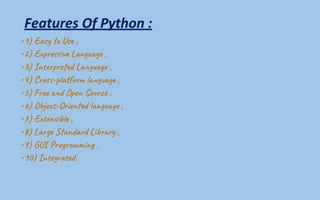
Features Of Python :
•1) Eas Us ,
•2) Ex es Lan e ,
•3) In e p d La ge ,
•4) Cro -p a f l u g ,
•5) Fre Ope S ce ,
•6) Ob e t-Ori d a g e ,
•7) Ex e s ,
•8) Lar n a d L r ,
•9) GU ro m g ,
•10) In e r .
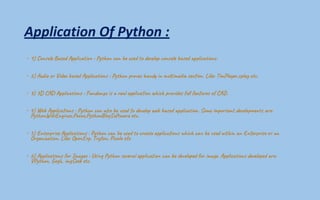
Application Of Python :
• 1) Con Bas A p i t o : Py on b u t e l on ba p ic o s.
• 2) Aud o V o b Ap ic o s : Py on v an n ti a s on. Lik : Tim r,c ay .
• 3) 3D A p ic o s : Fan g i al l a n ic r es l a r o CA .
• 4) Web A li on : Py on l o se d e p ba p ic o . Som or t el n ar :
Py on E gi ,Poc ,Py on f ar .
• 5) En e p Ap ic o s : Py on b u t e t a l i n h ca se t an E r se
Or a z i . Lik : Ope p, Tr on, Pic e c.
• 6) Ap ic o s Im e : Usi Py on ra p at an ve d o m e. Ap ic o s lo re:
V y on, Gog , im S et .
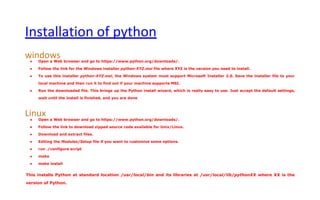
Installation of python
windowsā— Open a Web browser and go to https://www.python.org/downloads/.
ā— Follow the link for the Windows installer python-XYZ.msi file where XYZ is the version you need to install.
ā— To use this installer python-XYZ.msi, the Windows system must support Microsoft Installer 2.0. Save the installer file to your
local machine and then run it to find out if your machine supports MSI.
ā— Run the downloaded file. This brings up the Python install wizard, which is really easy to use. Just accept the default settings,
wait until the install is finished, and you are done
Linuxā— Open a Web browser and go to https://www.python.org/downloads/.
ā— Follow the link to download zipped source code available for Unix/Linux.
ā— Download and extract files.
ā— Editing the Modules/Setup file if you want to customize some options.
ā— run ./configure script
ā— make
ā— make install
This installs Python at standard location /usr/local/bin and its libraries at /usr/local/lib/pythonXX where XX is the
version of Python.
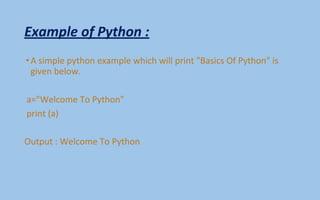
Example of Python :
•A simple python example which will print "Basics Of Python" is
given below.
a="Welcome To Python"
print (a)
Output : Welcome To Python
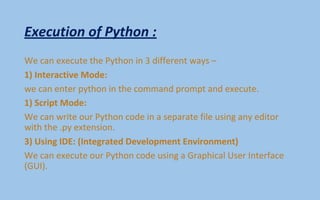
Execution of Python :
We can execute the Python in 3 different ways –
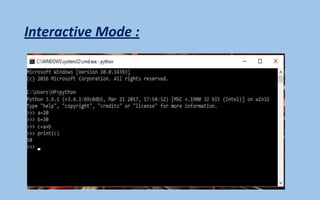
1) Interactive Mode:
we can enter python in the command prompt and execute.
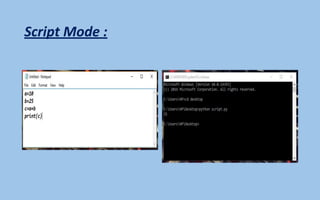
1) Script Mode:
We can write our Python code in a separate file using any editor
with the .py extension.
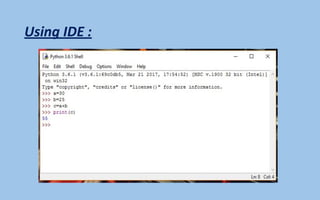
3) Using IDE: (Integrated Development Environment)
We can execute our Python code using a Graphical User Interface
(GUI).
Interactive Mode :
Script Mode :
Using IDE :
Python Variables :
•Variable is a name of the memory location where data is stored.
Once a variable is stored that means a space is allocated in
memory.
Based on the data type of a variable, the interpreter allocates memory and
decides what can be stored in the reserved memory. Therefore, by
assigning different data types to the variables, we can store integers,
decimals or characters in these variables
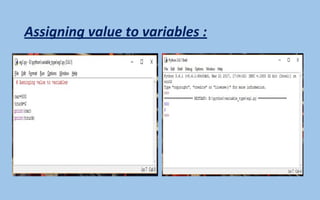
Assigning values to Variable :
We need not to declare explicitly variable in Python. When we
assign any value to the variable that variable is declared
automatically.
The assignment is done using the equal (=) operator.
Example :
car=500
truck=2
print(car)
print(truck)
Assigning value to variables :
Multiple Assignment :
Multiple assignment can be done in Python at a time.
There are two ways to assign values in Python:
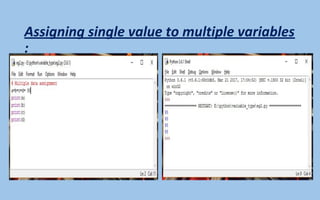
1) Assigning single value to multiple variables:
2) Assigning multiple values to multiple variables:
Assigning single value to multiple variables
:
Assigning multiple values to multiple
variables:
Basic Fundamentals :
There are some basic fundamental of Python :
i)Tokens and their types.
ii) Comments
Tokens :
Tokens can be defined as a punctuator mark, reserved words and
each individual word in a statement.
Token is the smallest unit inside the given program.
āž¢There are following tokens in Python:
ā‘Keywords.
ā‘Identifiers.
ā‘Literals.
ā‘Operators.
Tuples :
Tuple is another form of collection where different type of data can
be stored.
It is similar to list where data is separated by commas. Only the
difference is that list uses square bracket and tuple uses
parenthesis.
Tuples are enclosed in parenthesis and cannot be changed.
Example of tuple :
Result of Example of Tuple :
Dictionary :
Dictionary is a collection which works on a key-value pair.
It works like an associated array where no two keys can be same.
Dictionaries are enclosed by curly braces ({}) and values can be
retrieved by square bracket([]).
Example of Dictionary :
Result of example of dictionary :
Python Keywords :
Python Keywords are special reserved words which convey a
special meaning to the compiler/interpreter. Each keyword have a
special meaning and a specific operation.
List of keywords used in Python :
Identifiers :
Identifiers are the names given to the fundamental building blocks in a
program. These can be variables ,class ,object ,functions , lists , dictionaries
etc.
There are certain rules defined for naming i.e., Identifiers.
I. An identifier is a long sequence of characters and numbers.
II. No special character except underscore ( _ ) can be used as an identifier.
III. Keyword should not be used as an identifier name.
IV. Python is case sensitive. So using case is significant.
V. First character of an identifier can be character, underscore ( _ ) but not
digit.
Reserved Words :
Python Literals :
Literals can be defined as a data that is given in a variable or
constant.
Python support the following literals:
I. String literals:
II. Numeric literals:
III. Boolean literals:
IV. Special literals.
V. Literal Collections.
String Literals :
String literals can be formed by enclosing a text in the quotes. We
can use both single as well as double quotes for a String.
Example:
"Ashish" , '12345'
Types of String Literals :
There are two types of String :
There are two types of Strings supported in Python:
a).Single line String-
Strings that are terminated within a single line are known as Single
line Strings
Example :
>>> text=ā€˜hello’
Multiline String :
A piece of text that is spread along multiple lines is known as
Multiple line String.
There are two ways to create Multiline Strings:
1). Adding black slash at the end of each line.
Example :
>>> text=ā€˜basicpython’
>>> text
ā€˜basicpython’
Multiline String :
2).Using triple quotation marks:
Example :
>>> str1=ā€˜ā€™ā€™welcome
To
Python’’’
>>> print str1
Welcome
To
Python
Numeric literals:
Python Operators :
Operators are particular symbols which operate on some values and
produce an output.
The values are known as Operands.
Eg. :
50+30=80
Here 50&30 are Operands and (+),(=) signs are the operators. Which
produce the result 80.
Operators in Python :
•Arithmetic Operators.
•Relational Operators.
•Assignment Operators.
•Logical Operators.
•Membership Operators.
•Identity Operators.
•Bitwise Operators.
Arithmetic Operators :
Relational Operators :
Assignment Operators :
Logical Operators :
Membership operators :
Identity Operators :
Python Comments :
Python supports two types of comments:
1) Single lined comment :
If user wants to specify a single line comment, then comment must start
with ?#?
Eg : #This is introduction to python.
2) Multi lined Comment:
Multi lined comment can be given inside triple quotes.
ā€œā€™ā€™ā€™ This
Is
Ashish’’’
If Statement :
The if statement in python is same as c language which is used test a
condition. If condition is true, statement of if block is executed otherwise it
is skipped.
Syntax of python if statement:
if(condition):
statements
Eg:
a=20
if a==20:
print (ā€œtrueā€)
Result= true
If else statement :
Syntax :
if(condition): False
statements
else: True
statements
Flow chart of if else :
Example of if else :
Result of Example of if else :
elif statement :
Syntax :
If statement:
Body
elif statement:
Body
else:
Body
Example of elif :
Result of example of elif :
for Loop :
for Loop is used to iterate a variable over a sequence(i.e., list or string) in
the order that they appear.
Syntax :
for <variable> in <sequence>:
Explanation :
• Firstly, the first value will be assigned in the variable.
• Secondly all the statements in the body of the loop are executed with the
same value.
• Thirdly, once step second is completed then variable is assigned the next
value in the sequence and step second is repeated.
• Finally, it continues till all the values in the sequence are assigned in the
variable and processed.
Example of for Loop :
Result of for Loop :
Nested Loop :
Loops defined within another Loop is called Nested Loop.
When an outer loop contains an inner loop in its body it is called
Nested Looping.
Syntax :
for <expression>:
for <expression>:
Body
Example of Nested Loop :
Result of nested loop :
While Loop :
while Loop is used to execute number of statements or body till the
condition passed in while is true. Once the condition is false, the
control will come out of the loop.
Syntax :
while <expression>:
Body
Example of while loop :
Result of example of while loop :
Python String :
Strings are the simplest and easy to use in Python.
String pythons are immutable.
We can simply create Python String by enclosing a text in single as
well as double quotes. Python treat both single and double quotes
statements same.
Accessing Strings :
In Python, Strings are stored as individual characters in a contiguous
memory location.
The benefit of using String is that it can be accessed from both the
directions in forward and backward.
Both forward as well as backward indexing are provided using
Strings in Python.
• Forward indexing starts with 0,1,2,3,....
• Backward indexing starts with -1,-2,-3,-4,....
String Operators :
There are basically 3 types of Operators supported by String:
1)Basic Operators.
2)Membership Operators.
3)Relational Operators.
•Basic Operators:
•There are two types of basic operators in String. They are "+"
and "*".
String Functions and Methods:
• capitalize() It capitalizes the first character of the String.
• count(string,begin,end) Counts number of times substring occurs in a String
between begin and end index.
• endswith(suffix ,begin=0,end=n) Returns a Boolean value if the string
terminates with given suffix between begin and end.
• find(substring ,beginIndex, endIndex) It returns the index value of the string
where substring is found between begin index and end index.
• index(subsring, beginIndex, endIndex) Same as find() except it raises an
exception if string is not found.
• isalnum() It returns True if characters in the string are alphanumeric i.e.,
alphabets or numbers and there is at least 1 character. Otherwise it returns
False.
• isalpha() It returns True when all the characters are alphabets and there is at
least one character, otherwise False.
String Functions and Methods :
• isdigit() It returns True if all the characters are digit and there is at least one
character, otherwise False.
• islower() It returns True if the characters of a string are in lower case,
otherwise False.
• isupper() It returns False if characters of a string are in Upper case, otherwise
False.
• isspace() It returns True if the characters of a string are whitespace,
otherwise false.
• len(string) len() returns the length of a string.
• lower() Converts all the characters of a string to Lower case.
• upper() Converts all the characters of a string to Upper Case.
• startswith(str ,begin=0,end=n) Returns a Boolean value if the string starts
with given str between begin and end.
String Functions and Methods
•swapcase() Inverts case of all characters in a string.
•lstrip() Remove all leading whitespace of a string. It can also be
used to remove particular character from leading.
•rstrip() Remove all trailing whitespace of a string. It can also be
used to remove particular character from trailing.
Capitalize () :
Result of Capitalization() :
Count(string) :
Endswith(string) :
Result of endswith(string)
Find(string)
Result of find(string)
Isalnum :
Result of isalnum :
Isalpha
Result of isalpha
Isdigit :
Result of isdigit :
Islower :
Result of islower :
Isnumeric :
Result of isnumeric :
Isspace :
Result of isspace :
Isupper :
Result of isupper :
Join :
Result of join :
Length :
Result of length
Istrip :
Result of istrip :
Maketrans :
Result of maketrans :
Max :
Result of Max :
Min :