Day 3: AdvancedControl
Flow
Nested Loops, Break/Continue, and
Logic
3.
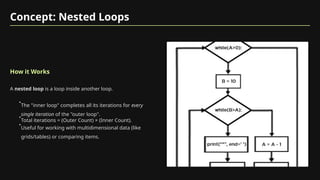
Concept: Nested Loops
Howit Works
A nested loop is a loop inside another loop.
•
The "inner loop" completes all its iterations for every
single iteration of the "outer loop".
•
Total iterations = (Outer Count) × (Inner Count).
•
Useful for working with multidimensional data (like
grids/tables) or comparing items.
4.
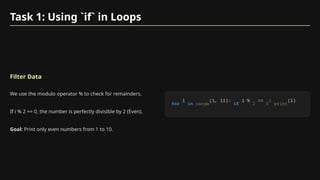
Task 1: Using`if` in Loops
Filter Data
We use the modulo operator % to check for remainders.
If i % 2 == 0, the number is perfectly divisible by 2 (Even).
Goal: Print only even numbers from 1 to 10.
for in range if 2 0 print
5.
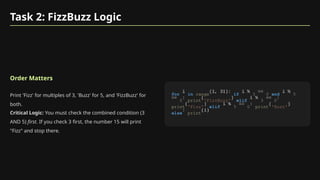
Task 2: FizzBuzzLogic
Order Matters
Print 'Fizz' for multiples of 3, 'Buzz' for 5, and 'FizzBuzz' for
both.
Critical Logic: You must check the combined condition (3
AND 5) first. If you check 3 first, the number 15 will print
"Fizz" and stop there.
for in range if 3 0 and 5
0 print 'FizzBuzz' elif 3 0
print 'Fizz' elif 5 0 print 'Buzz'
else print
6.
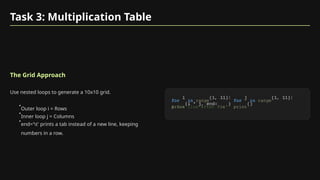
Task 3: MultiplicationTable
The Grid Approach
Use nested loops to generate a 10x10 grid.
•
Outer loop i = Rows
•
Inner loop j = Columns
•
end='t' prints a tab instead of a new line, keeping
numbers in a row.
for in range for in range
print 't' print
# New line after row
7.
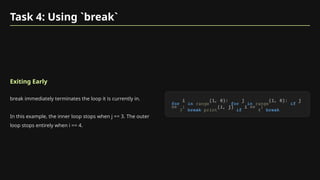
Task 4: Using`break`
Exiting Early
break immediately terminates the loop it is currently in.
In this example, the inner loop stops when j == 3. The outer
loop stops entirely when i == 4.
for in range for in range if
3 break print if 4 break
8.
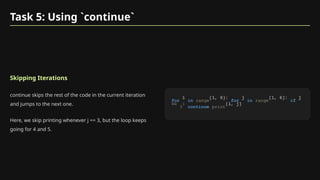
Task 5: Using`continue`
Skipping Iterations
continue skips the rest of the code in the current iteration
and jumps to the next one.
Here, we skip printing whenever j == 3, but the loop keeps
going for 4 and 5.
for in range for in range if
3 continue print
9.
Task 6: GuessingGame
While Loops & Logic
We use a while loop to keep the game running as long as the
user has attempts left.
We check High/Low conditions and provide feedback. If the
user runs out of attempts, the else block reveals the answer.
import 1 20 5
while 0 int input 'Guess (1-20): ' if
print 'Correct!' break elif
print 'Too low!' else print 'Too high!' 1 else
print f'Number was {target}'
10.
Task 7: TrianglePattern
Visual Patterns
The outer loop i represents the row number.
The inner loop runs from 1 to i. So on row 3, it runs 3 times,
printing 3 stars.
5 for in range 1 for in
range 1 print '*' ' ' print
11.
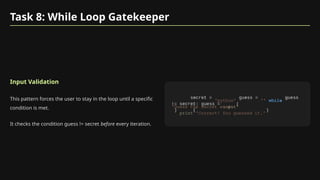
Task 8: WhileLoop Gatekeeper
Input Validation
This pattern forces the user to stay in the loop until a specific
condition is met.
It checks the condition guess != secret before every iteration.
'python' '' while
input
'Guess the secret word: '
print 'Correct! You guessed it.'
12.
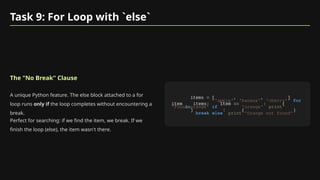
Task 9: ForLoop with `else`
The "No Break" Clause
A unique Python feature. The else block attached to a for
loop runs only if the loop completes without encountering a
break.
Perfect for searching: if we find the item, we break. If we
finish the loop (else), the item wasn't there.
'apple' 'banana' 'cherry' for
in if 'orange' print
'Found orange'
break else print 'Orange not found'
13.
Task 10: DiceSimulation
Generating Randomness
Simulating 10 rolls of two dice.
Inside the loop, we generate two new random numbers every
time.
import for in range
print f'Roll {i+1}: {dice1} & {dice2}'
14.
Task 11: PrimeChecker
Nested Logic
To check if num is prime, we try to divide it by every number
from 2 up to num.
If num % i == 0, it's not prime (set flag to False and break). If
the inner loop finishes and flag is still True, it is prime.
for in range True for
in range if
False break if print
f'{num} is prime'
15.
Task 12: Factorial
AccumulatorPattern
Calculating 5! (5 * 4 * 3 * 2 * 1).
We start with factorial = 1 (identity for multiplication) and
multiply it by each number in the range.
5 1 for in range
print
f'Factorial of {num} is {factorial}'
16.
Task 13: MaxValue
Manual Search Algorithm
How to find a max value without max().
Assume the first item is the max. Check every other item; if
you find a larger one, update your record.
for in if
print f'Max is {max_num}'
17.
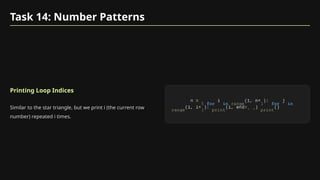
Task 14: NumberPatterns
Printing Loop Indices
Similar to the star triangle, but we print i (the current row
number) repeated i times.
5 for in range 1 for in
range 1 print ' ' print
18.
Task 15: ReversingList (Loop)
Manual Reverse
We use slicing [::-1] to iterate over the list backwards,
appending each item to a new list.
for in
print
Concept: Python Lists
Ordered& Mutable
A list is a collection of items in a specific order.
•
Created with square brackets [].
•
Mutable: You can add, remove, or change items.
•
0-indexed: The first item is at index 0.
21.
List Task 1:Intro to Lists
Creation & Iteration
Define a list with [].
Use a for loop to access every item sequentially.
for in
print
22.
List Task 2:Adding Items
.append()
We often start with an empty list [].
The .append(value) method adds a new item to the end of
the list.
for in range
print
23.
List Task 3:Removing Items
.remove()
Finds and deletes the first occurrence of a value.
Note: If the item doesn't exist, Python will raise an error.
'apple' 'banana' 'cherry'
'apple' print
24.
List Task 4:Indexing
Accessing Positions
Python uses 0-based indexing.
•
[0] = First item
•
[-1] = Last item (wraps around)
'pen' 'book' 'laptop'
print 0 # First print 1 # Last
25.
List Task 5:Slicing
Getting Subsets
Syntax: list[start:stop]
It includes the start index but excludes the stop index.
[:5] means "from the start up to index 5".
print
26.
List Task 6:Iteration
Processing Data
The standard way to work with lists of strings.
"For every student inside the students list, print their name."
'Alice' 'Bob' 'Charlie'
for in print
27.
List Task 7:Membership
The `in` Operator
Checks if a value exists within the list.
Returns True or False. Very fast and readable.
'banana' 'cherry' 'orange'
if 'apple' in print 'Found it' else
print 'Not found'
28.
List Task 8:Sorting
.sort()
Sorts the list in ascending order (smallest to largest).
Important: It modifies the list in-place. It does not return a
new list.
print 'Sorted: {numbers}'
29.
List Task 9:Reversing
.reverse()
Flips the order of the list elements.
Like sort, this also modifies the list in-place.
print 'Reversed: {numbers}'
30.
List Task 10:Comprehension
The Pythonic Way
A concise way to create lists.
Syntax: [expression for item in iterable].
Generates a list of squares in a single line of code.
2 for in range
print
31.
List Task 11:Concatenation
Merging Lists
The + operator joins two lists together.
It creates a new list containing elements from both.
'apple' 'banana'
'cherry' 'mango'
print
32.
List Task 12:Length
len()
Returns the total number of items in the list.
Useful for looping or validating data size.
'pen' 'book' 'eraser'
print f'Length is {len(items)}'
33.
List Task 13:Min & Max
Built-in Stats
max() finds the largest value.
min() finds the smallest value.
print
f'Max: {max(numbers)}'
print f'Min: {min(numbers)}'
34.
List Task 14:Counting
.count()
Returns the number of times a specific value appears in the
list.
print
f'2 appears {count} times'
35.
List Task 15:Nested Lists
Matrix Structure
A list inside a list.
When you loop through the main list, each item (variable
sublist) is itself a list.
for in print




![Task 15: Reversing List (Loop)
Manual Reverse
We use slicing [::-1] to iterate over the list backwards,
appending each item to a new list.
for in
print](https://image.slidesharecdn.com/pythonbootcampweek2-251208192909-0fbbd0c8/85/Python-Loop-Nested-Loop-and-advanced-operations-18-320.jpg)
![Concept: Python Lists
Ordered & Mutable
A list is a collection of items in a specific order.
•
Created with square brackets [].
•
Mutable: You can add, remove, or change items.
•
0-indexed: The first item is at index 0.](https://image.slidesharecdn.com/pythonbootcampweek2-251208192909-0fbbd0c8/85/Python-Loop-Nested-Loop-and-advanced-operations-20-320.jpg)


![Task 15: Reversing List (Loop)
Manual Reverse
We use slicing [::-1] to iterate over the list backwards,
appending each item to a new list.
for in
print](/p?url=https%3A%2F%2Fimage.slidesharecdn.com%2Fpythonbootcampweek2-251208192909-0fbbd0c8%2F85%2FPython-Loop-Nested-Loop-and-advanced-operations-18-320.jpg&__src=https%3A%2F%2Fwww.slideshare.net%2Fslideshow%2Fpython-loop-nested-loop-and-advanced-operations%2F284543365&__type=image)

![Concept: Python Lists
Ordered & Mutable
A list is a collection of items in a specific order.
•
Created with square brackets [].
•
Mutable: You can add, remove, or change items.
•
0-indexed: The first item is at index 0.](/p?url=https%3A%2F%2Fimage.slidesharecdn.com%2Fpythonbootcampweek2-251208192909-0fbbd0c8%2F85%2FPython-Loop-Nested-Loop-and-advanced-operations-20-320.jpg&__src=https%3A%2F%2Fwww.slideshare.net%2Fslideshow%2Fpython-loop-nested-loop-and-advanced-operations%2F284543365&__type=image)
![List Task 1: Intro to Lists
Creation & Iteration
Define a list with [].
Use a for loop to access every item sequentially.
for in
print](/p?url=https%3A%2F%2Fimage.slidesharecdn.com%2Fpythonbootcampweek2-251208192909-0fbbd0c8%2F85%2FPython-Loop-Nested-Loop-and-advanced-operations-21-320.jpg&__src=https%3A%2F%2Fwww.slideshare.net%2Fslideshow%2Fpython-loop-nested-loop-and-advanced-operations%2F284543365&__type=image)
![List Task 2: Adding Items
.append()
We often start with an empty list [].
The .append(value) method adds a new item to the end of
the list.
for in range
print](/p?url=https%3A%2F%2Fimage.slidesharecdn.com%2Fpythonbootcampweek2-251208192909-0fbbd0c8%2F85%2FPython-Loop-Nested-Loop-and-advanced-operations-22-320.jpg&__src=https%3A%2F%2Fwww.slideshare.net%2Fslideshow%2Fpython-loop-nested-loop-and-advanced-operations%2F284543365&__type=image)

![List Task 4: Indexing
Accessing Positions
Python uses 0-based indexing.
•
[0] = First item
•
[-1] = Last item (wraps around)
'pen' 'book' 'laptop'
print 0 # First print 1 # Last](/p?url=https%3A%2F%2Fimage.slidesharecdn.com%2Fpythonbootcampweek2-251208192909-0fbbd0c8%2F85%2FPython-Loop-Nested-Loop-and-advanced-operations-24-320.jpg&__src=https%3A%2F%2Fwww.slideshare.net%2Fslideshow%2Fpython-loop-nested-loop-and-advanced-operations%2F284543365&__type=image)
![List Task 5: Slicing
Getting Subsets
Syntax: list[start:stop]
It includes the start index but excludes the stop index.
[:5] means "from the start up to index 5".
print](/p?url=https%3A%2F%2Fimage.slidesharecdn.com%2Fpythonbootcampweek2-251208192909-0fbbd0c8%2F85%2FPython-Loop-Nested-Loop-and-advanced-operations-25-320.jpg&__src=https%3A%2F%2Fwww.slideshare.net%2Fslideshow%2Fpython-loop-nested-loop-and-advanced-operations%2F284543365&__type=image)


![List Task 10: Comprehension
The Pythonic Way
A concise way to create lists.
Syntax: [expression for item in iterable].
Generates a list of squares in a single line of code.
2 for in range
print](/p?url=https%3A%2F%2Fimage.slidesharecdn.com%2Fpythonbootcampweek2-251208192909-0fbbd0c8%2F85%2FPython-Loop-Nested-Loop-and-advanced-operations-30-320.jpg&__src=https%3A%2F%2Fwww.slideshare.net%2Fslideshow%2Fpython-loop-nested-loop-and-advanced-operations%2F284543365&__type=image)


