GOVERNMENT POLYTECHNIC GULZARBAGH
PATNA 7
INTERNET OF THINGS
(Advance)
Introduction to python ……
1.Python is a general-purpose, high-level
programming language.
2.Python was developed by Guido Van Rossum in
1989 But officially Python was made available to
public in 1991.
3.Python is recommended as first
programming language for beginners
What can Python do?
Python can be used on a server to create web applications.
Python can be used to create software
Python can connect to database systems. It can also read and
modify files.
Python can be used to handle big data and perform complex
mathematics.
W
. hy Python?
•Python works on different platforms (Windows, Mac, Linux, Raspberry
Pi, etc).
•Python has a simple syntax similar to the English language.
•Python has syntax that allows developers to write programs with
fewer lines than some other programming languages.
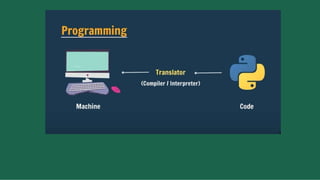
•Python runs on an interpreter system, meaning that code can be
executed as soon as it is written. This means that prototyping can be
very quick.
•Python can be treated in a procedural way, an object-oriented way or
a functional way.
Features of Python
1. Simple and easy to learn:
2. Freeware and Open Source: We can use python without any license
3. High Level Programming language: Hence it is a programmer
friendly language
4. Platform Independent: Once we write a python program it can run
on any platform without rewriting once again.
5. Dynamically Typed: we are not required to declare type for
variables.
6. Extensive Library: we can use library directly and are not
responsible to implement the functionality.
7. Supporting GUI (Graphical User Interface):
It is used for:
•Web development (server-side),
•Software development,
•Mathematics,
•system scripting:- Python is widely used for writing scripts to
automate tasks and processes.
•Operating systems
•Data science and machine learning
•Web frameworks and applications
•Graphic design, image processing, games, and
scientific/computational applications
•Enterprise and business applications:
• Python language is being used by almost all companies like – Google, Amazon, Facebook, Instagram, Uber… etc.
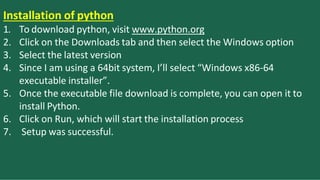
Installation of python
1. To download python, visit www.python.org
2. Click on the Downloads tab and then select the Windows option
3. Select the latest version
4. Since I am using a 64bit system, I’ll select “Windows x86-64
executable installer”.
5. Once the executable file download is complete, you can open it to
install Python.
6. Click on Run, which will start the installation process
7. Setup was successful.
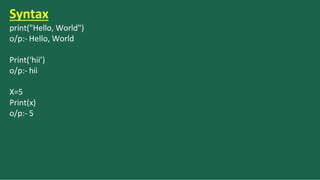
Syntax
print("Hello, World")
o/p:- Hello, World
Print(‘hii’)
o/p:- hii
X=5
Print(x)
o/p:- 5
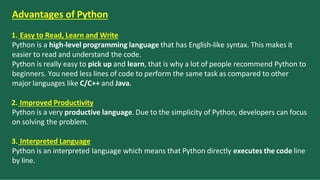
Advantages of Python
1. Easy to Read, Learn and Write
Python is a high-level programming language that has English-like syntax. This makes it
easier to read and understand the code.
Python is really easy to pick up and learn, that is why a lot of people recommend Python to
beginners. You need less lines of code to perform the same task as compared to other
major languages like C/C++ and Java.
2. Improved Productivity
Python is a very productive language. Due to the simplicity of Python, developers can focus
on solving the problem.
3. Interpreted Language
Python is an interpreted language which means that Python directly executes the code line
by line.
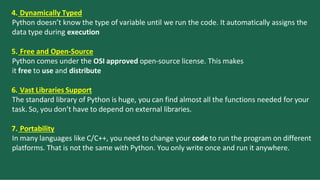
4. Dynamically Typed
Python doesn’t know the type of variable until we run the code. It automatically assigns the
data type during execution
5. Free and Open-Source
Python comes under the OSI approved open-source license. This makes
it free to use and distribute
6. Vast Libraries Support
The standard library of Python is huge, you can find almost all the functions needed for your
task. So, you don’t have to depend on external libraries.
7. Portability
In many languages like C/C++, you need to change your code to run the program on different
platforms. That is not the same with Python. You only write once and run it anywhere.
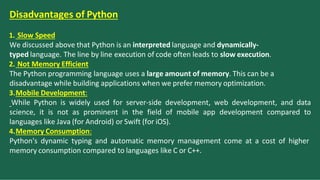
Disadvantages of Python
1. Slow Speed
We discussed above that Python is an interpreted language and dynamically-
typed language. The line by line execution of code often leads to slow execution.
2. Not Memory Efficient
The Python programming language uses a large amount of memory. This can be a
disadvantage while building applications when we prefer memory optimization.
3.Mobile Development:
While Python is widely used for server-side development, web development, and data
science, it is not as prominent in the field of mobile app development compared to
languages like Java (for Android) or Swift (for iOS).
4.Memory Consumption:
Python's dynamic typing and automatic memory management come at a cost of higher
memory consumption compared to languages like C or C++.
5. Runtime Errors
As we know Python is a dynamically typed language so the data type
of a variable can change anytime. A variable containing integer
number may hold a string in the future, which can lead to Runtime
Errors.
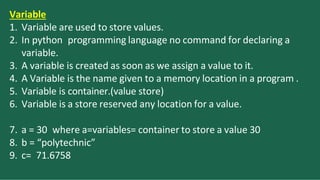
Variable
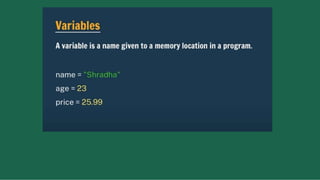
1. Variable are used to store values.
2. In python programming language no command for declaring a
variable.
3. A variable is created as soon as we assign a value to it.
4. A Variable is the name given to a memory location in a program .
5. Variable is container.(value store)
6. Variable is a store reserved any location for a value.
7. a = 30 where a=variables= container to store a value 30
8. b = “polytechnic”
9. c= 71.6758
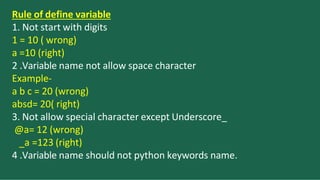
Rule of define variable
1. Not start with digits
1 = 10 ( wrong)
a =10 (right)
2 .Variable name not allow space character
Example-
a b c = 20 (wrong)
absd= 20( right)
3. Not allow special character except Underscore_
@a= 12 (wrong)
_a =123 (right)
4 .Variable name should not python keywords name.
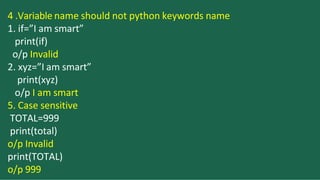
4 .Variable name should not python keywords name
1. if=”I am smart”
print(if)
o/p Invalid
2. xyz=”I am smart”
print(xyz)
o/p I am smart
5. Case sensitive
TOTAL=999
print(total)
o/p Invalid
print(TOTAL)
o/p 999
Reserved words in python
Datatypes in Python
Data types represent the type of data present inside a variable.
Based on value provided , the type will be assigned is Dynamically
typed language.
Text Type: str
int, float, complex
list, tuple, range
dict
Numeric Types:
Sequence Types:
Mapping Type:
Boolean Type: bool
Python contains several inbuilt function
Type():- To check the type of variable
print() to print the value
1.Int Datatype:- We can use int data type to represent whole
numbers(integral value)
Eg:- a=10
print(type(a))
o/p <class’int’>
2 Float Datatype :- we can use float datatype to represent floating
point values(decimal values)
Eg:- f=1.234
print(type(f))
o/p <class ‘float’>
Bool Datatype
we can use this data type to represent Boolean values.
The only allowed values for this data type are: True and False
Python represents True as 1 and False as 0
Example1.b=True
print(type(b))
o/p <class ‘bool’>
2. True+True
o/p:-2
3. True-False
o/p:- 1
3. a=10
b=15
c =a<b
print(c)
o/p True
Str type
2. s1=’hii’
print(s1)
o/p: hiii
• str represents string datatype
• A string is a Sequence of characters enclosed within single quotes or
double quotes.
• By using single quotes or double quotes we cannot represent multi
line strings.
• e.g
• 1. s1="hello”
• print(s1)
• o/p hello
• 3. thanku=”’thanku universe i am so blessed everthing is always
workig out for me. i am so lucky”’
• print(thanku)
Escape Characters
•single quote(') a
= 'ram's car'
print(a)
output:- ram's car
• New Line (n)
a = "HellonWorld"
print(a)
o/p:- Hello
World
tab (t)
a = "HellotWorld"
print(a)
Output :- Hello World
Backspace (b)
a = "IndusbbbIndia"
print(a)
O/p :- InIndia
Carriage Return(r)
a = "IndusrIndia"
print(a)
o/p:- India
Backslash()
a = "IndusIndia"
print(a)
Output:- IndusIndia
Operators
Python Operators. The operator is a symbol that performs a specific
operation between two operands.
OPERATORS: These are the special symbols. E.g.- + , * , /, etc.
OPERAND: It is the value on which the operator is applied.
Arithmetic Operators
Comparison Operators or Relational Operators
Logical Operators
Bitwise Operators
Assignment Operators
Equality operators
Membership Operators
Identity Operators
Arithmetic Operators
Python Arithmetic operators are used to perform basic mathematical
operations like addition, subtraction, multiplication, and division.
Arithmetic operators are used with numeric values to perform
common mathematical operations:
Addition:-sum of x and y
Example:-
x=2
y=3
print(x+y)
0/p:- 5
Subtraction:-Difference of x and y
Example:-
x=4
y=3
print(x-y)
o/p:- 1
Multiplication:- Product of x and y
Example:-x=2 y=3 print(x*y)
o/p:- 6
Division:- quotient of x and y
Example:-
x = 12
y = 3
Print (x / y)
o/p:- 4
Modulus :- remainder of x and y
x = 5 y = 2
Example:-
Print (x % y)
o/p:- 1
Exponent:-x to the power of y
Example:- x = 2 y = 5
print(x ** y)
#same as 2*2*2*2*2
o/p:- 32
Floor division:- quotient of x and y
Example :- x = 15 y = 2
print(x // y)
#the floor division // rounds the result down to the nearest whole
number
o/p:- 7
Comparison Operators.
Relational operators are used for comparing the values. It either
returns True or False according to the condition. These operators are
also known as Comparison Operators.
1) Greater than: This operator returns True if the left operand is greater than the
right operand.
Syntax: x > y
Example:
a = 9
b = 5
print(a > b)
Output:True
2) Less than: This operator returns True if the left operand is less than the right
operand.
Syntax:x < y
Example:
a = 9
b = 5
print(a < b)
Output:False
3) Equal to: This operator returns True if both the operands are equal i.e. if both the
left and the right operand are equal to each other.
Example:
a = 9
b = 5
print(a == b)
Output:False
4) Not equal to: This operator returns True if both the operands are
not equal.
Syntax: x != y
Example:
a = 9
b = 5
print(a != b)
Output:True
5) Greater than or equal to: This operator returns
True if the left operand is greater than or equal to the
right operand.
Syntax:x >= y
Example:
a = 9
b = 5
print(a >= b)
Output:
True
6) Less than or equal to: This operator returns True if the left operand
is less than or equal to the right operand.
Syntax: x <= y
Example:
a = 9
b = 5
print(a <= b)
Output:
False
Logical Operators
Logical operators are used on conditional statements (either True or
False).
They perform Logical AND, Logical OR and Logical NOT operations.
And x and y
True if both x and y are True. Otherwise False.
print(x=True and y=False) ----False
print(x= True and y= True) ----True
Or x or y
True if either x or y are True. Otherwise False.
print(x= False or y= False) ---- False
print(x= True or y = False) ---- True
Not:- Complement
Example 1
x=5
print(not(x>3 and x<10)
o/p: False
Example2
x=5
print(x> 3 or x<4)
o/p: True
Example3
x=5
print(x>3 and x<10)
o/p: True
Assignment Operators
Python assignment operators are used to assign values to variables. These operators
include simple assignment operator, addition assign, subtraction assign,
multiplication assign, division and assign operators etc.
Addition Assignment
x = 5
x += 3
print(x)
o/p:- 8
Subtraction Assignment
x = 5
x -= 3
print(x) //x= x-3
o/p:- 2
Equality operators
==, !=
We can apply these operators for any type even for incompatible
types also
Example:
1.10==20
False
2.False==False
True
3.10!=True
False