Download as PDF, PPTX
![Built-in Object Types
Numbers - 3.1415, 1234, 999L, 3+4j
Strings - 'spam', "guido's"
Lists - [1, [2, 'three'], 4]
Dictionaries - {'food':'spam', 'taste':'yum'}
Tuples - (1, 'spam', 4, 'U')
Files - text = open ('eggs', 'r'). read()](https://image.slidesharecdn.com/pythonsaif-170520162726/85/Python-basic-6-320.jpg)
![String Operators
"hello"+"world" "helloworld" # concatenation
"hello"*3 "hellohellohello" # repetition
"hello"[0] "h" # indexing
"hello"[-1] "o" # (from end)
"hello"[1:4] "ell" # slicing
len("hello") 5 # size
"hello" < "jello" 1 # comparison
"e" in "hello" 1 # search
String Formatting: "a %s parrot" % 'dead‘
Iteration: for char in str](https://image.slidesharecdn.com/pythonsaif-170520162726/85/Python-basic-8-320.jpg)
![Common Statements
Raise - raise endSearch, location
Import, From - import sys; from sys import stdin
Def, Return - def f(a, b, c=1, d): return a+b+c+d
Class - class subclass: staticData = []
Global - function(): global X, Y; X = 'new'
Del - del data[k]; del data [i:j]; del obj.attr
Exec - yexec "import" + modName in gdict, ldict
Assert - assert X > Y](https://image.slidesharecdn.com/pythonsaif-170520162726/85/Python-basic-10-320.jpg)
![List Operations
>>> a = range(5) # [0,1,2,3,4]
>>> a.append(5) # [0,1,2,3,4,5]
>>> a.pop() # [0,1,2,3,4]
5
>>> a.insert(0, 42) # [42,0,1,2,3,4]
>>> a.pop(0) # [0,1,2,3,4]
5.5
>>> a.reverse() # [4,3,2,1,0]
>>> a.sort() # [0,1,2,3,4]](https://image.slidesharecdn.com/pythonsaif-170520162726/85/Python-basic-12-320.jpg)
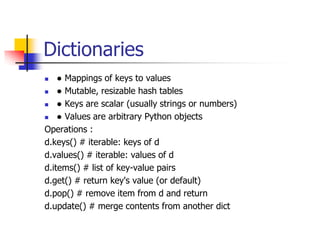
![Dictionaries
dict = {'Name': 'Zara', 'Age': 7, 'Class': 'First'}
>>> print "dict['Name']: ", dict['Name']
dict['Name']: Zara
>>> print "dict['Age']: ", dict['Age']
dict['Age']: 7
dict['Age'] = 8; # update existing entry
dict['School'] = "DPS School"; # Add new entry](https://image.slidesharecdn.com/pythonsaif-170520162726/85/Python-basic-14-320.jpg)


![Built-in Object Types
Numbers - 3.1415, 1234, 999L, 3+4j
Strings - 'spam', "guido's"
Lists - [1, [2, 'three'], 4]
Dictionaries - {'food':'spam', 'taste':'yum'}
Tuples - (1, 'spam', 4, 'U')
Files - text = open ('eggs', 'r'). read()](/p?url=https%3A%2F%2Fimage.slidesharecdn.com%2Fpythonsaif-170520162726%2F85%2FPython-basic-6-320.jpg&__src=https%3A%2F%2Fwww.slideshare.net%2Fslideshow%2Fpython-basic-76159731%2F76159731&__type=image)

![String Operators
"hello"+"world" "helloworld" # concatenation
"hello"*3 "hellohellohello" # repetition
"hello"[0] "h" # indexing
"hello"[-1] "o" # (from end)
"hello"[1:4] "ell" # slicing
len("hello") 5 # size
"hello" < "jello" 1 # comparison
"e" in "hello" 1 # search
String Formatting: "a %s parrot" % 'dead‘
Iteration: for char in str](/p?url=https%3A%2F%2Fimage.slidesharecdn.com%2Fpythonsaif-170520162726%2F85%2FPython-basic-8-320.jpg&__src=https%3A%2F%2Fwww.slideshare.net%2Fslideshow%2Fpython-basic-76159731%2F76159731&__type=image)

![Common Statements
Raise - raise endSearch, location
Import, From - import sys; from sys import stdin
Def, Return - def f(a, b, c=1, d): return a+b+c+d
Class - class subclass: staticData = []
Global - function(): global X, Y; X = 'new'
Del - del data[k]; del data [i:j]; del obj.attr
Exec - yexec "import" + modName in gdict, ldict
Assert - assert X > Y](/p?url=https%3A%2F%2Fimage.slidesharecdn.com%2Fpythonsaif-170520162726%2F85%2FPython-basic-10-320.jpg&__src=https%3A%2F%2Fwww.slideshare.net%2Fslideshow%2Fpython-basic-76159731%2F76159731&__type=image)

![List Operations
>>> a = range(5) # [0,1,2,3,4]
>>> a.append(5) # [0,1,2,3,4,5]
>>> a.pop() # [0,1,2,3,4]
5
>>> a.insert(0, 42) # [42,0,1,2,3,4]
>>> a.pop(0) # [0,1,2,3,4]
5.5
>>> a.reverse() # [4,3,2,1,0]
>>> a.sort() # [0,1,2,3,4]](/p?url=https%3A%2F%2Fimage.slidesharecdn.com%2Fpythonsaif-170520162726%2F85%2FPython-basic-12-320.jpg&__src=https%3A%2F%2Fwww.slideshare.net%2Fslideshow%2Fpython-basic-76159731%2F76159731&__type=image)

![Dictionaries
dict = {'Name': 'Zara', 'Age': 7, 'Class': 'First'}
>>> print "dict['Name']: ", dict['Name']
dict['Name']: Zara
>>> print "dict['Age']: ", dict['Age']
dict['Age']: 7
dict['Age'] = 8; # update existing entry
dict['School'] = "DPS School"; # Add new entry](/p?url=https%3A%2F%2Fimage.slidesharecdn.com%2Fpythonsaif-170520162726%2F85%2FPython-basic-14-320.jpg&__src=https%3A%2F%2Fwww.slideshare.net%2Fslideshow%2Fpython-basic-76159731%2F76159731&__type=image)


![Defining a Function
You can define functions to provide the required functionality. Here are
simple rules to define a function in Python.
Function blocks begin with the keyword def followed by the function
name and parentheses ( ( ) ).
Any input parameters or arguments should be placed within these
parentheses. You can also define parameters inside these parentheses.
The first statement of a function can be an optional statement - the
documentation string of the function or docstring.
The code block within every function starts with a colon (:) and is
indented.
The statement return [expression] exits a function, optionally passing
back an expression to the caller. A return statement with no arguments
is the same as return None.](/p?url=https%3A%2F%2Fimage.slidesharecdn.com%2Fpythonsaif-170520162726%2F85%2FPython-basic-21-320.jpg&__src=https%3A%2F%2Fwww.slideshare.net%2Fslideshow%2Fpython-basic-76159731%2F76159731&__type=image)
![Defining a Function
Syntax
def functionname( parameters ):
"function_docstring"
function_suite
return [expression]
Example
The following function takes a string as input parameter and prints it on
standard screen.
def printme( str ):
"This prints a passed string into this function"
print str
return](/p?url=https%3A%2F%2Fimage.slidesharecdn.com%2Fpythonsaif-170520162726%2F85%2FPython-basic-22-320.jpg&__src=https%3A%2F%2Fwww.slideshare.net%2Fslideshow%2Fpython-basic-76159731%2F76159731&__type=image)
![Defining a Function
Pass by reference vs value
All parameters (arguments) in the Python language are passed by reference. It means if you
change what a parameter refers to within a function, the change also reflects back in the calling
function.
For example −
# Function definition is here
def changeme( mylist ):
"This changes a passed list into this function"
mylist.append([1,2,3,4]);
print "Values inside the function: ", mylist
return
# Now you can call changeme function
mylist = [10,20,30];
changeme( mylist );
print "Values outside the function: ", mylist
Output :
Values inside the function: [10, 20, 30, [1, 2, 3, 4]]
Values outside the function: [10, 20, 30, [1, 2, 3, 4]]](/p?url=https%3A%2F%2Fimage.slidesharecdn.com%2Fpythonsaif-170520162726%2F85%2FPython-basic-23-320.jpg&__src=https%3A%2F%2Fwww.slideshare.net%2Fslideshow%2Fpython-basic-76159731%2F76159731&__type=image)
![Defining a Function
#!/usr/bin/python
# Function definition is here
def changeme( mylist, listCnt = 0 ):
"This changes a passed list into this function"
mylist = [1,2,3,4]; # This would assig new reference in mylist
print "Values inside the function: ", mylist
return
# Now you can call changeme function
mylist = [10,20,30];
changeme( mylist );
print "Values outside the function: ", mylist
The parameter mylist is local to the function changeme. Changing mylist within the function
does not affect mylist. The function accomplishes nothing and finally this would produce the
following result:
Values inside the function: [1, 2, 3, 4]
Values outside the function: [10, 20, 30]](/p?url=https%3A%2F%2Fimage.slidesharecdn.com%2Fpythonsaif-170520162726%2F85%2FPython-basic-24-320.jpg&__src=https%3A%2F%2Fwww.slideshare.net%2Fslideshow%2Fpython-basic-76159731%2F76159731&__type=image)


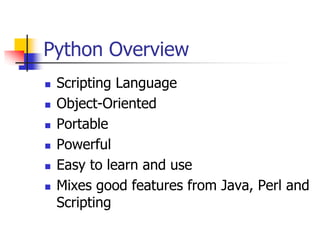
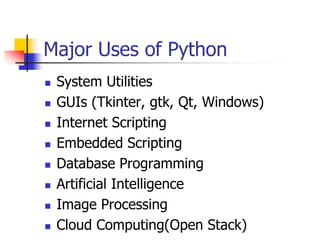
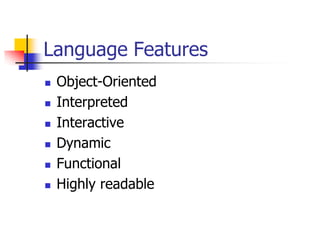
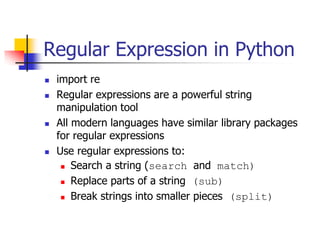
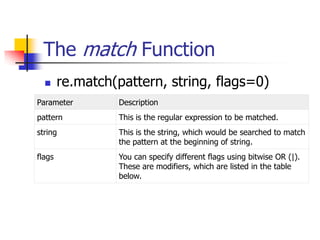
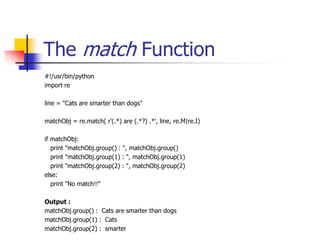
Python is a versatile, object-oriented programming language that can be used for web development, data analysis, and more. It has a simple syntax and is easy to read and learn. Key features include being interpreted, dynamically typed, supporting functional and object-oriented programming. Common data types include numbers, strings, lists, dictionaries, tuples, and files. Functions and classes can be defined to organize and reuse code. Regular expressions provide powerful string manipulation. Python has a large standard library and is used widely in areas like GUIs, web scripting, AI, and scientific computing.


