Downloaded 69 times


![Python Basics
/usr/local/bin/python
#! /usr/bin/env python
interactive use
Python 1.6 (#1, Sep 24 2000, 20:40:45) [GCC 2.95.1 19990816 (release)] on sunos5
Copyright (c) 1995-2000 Corporation for National Research Initiatives.
All Rights Reserved.
Copyright (c) 1991-1995 Stichting Mathematisch Centrum, Amsterdam.
All Rights Reserved.
>>>
python –c command [arg] ...
python –i script
read script first, then interactive](https://image.slidesharecdn.com/python-171115172916/85/Python-8-320.jpg)


![Numbers Contd….
In Python, Numbers are immutable
Assigning Numbers
var1 = 1
var2 = 10
Deleting one or more variables
del var1[,var2[,var3[....,varN]]]]
del var1
del var1, var2](https://image.slidesharecdn.com/python-171115172916/85/Python-17-320.jpg)
![Strings
In Python, Strings are immutable
word = 'word'
sentence = "This is a sentence."
paragraph = """This is a paragraph. It is
made up of multiple lines and sentences."""
var1 = 'Hello World!'
var2 = "Python Programming“
print "var1[0]: ", var1[0]
print "var2[1:5]: ", var2[1:5]
Result
var1[0]: H
var2[1:5]: ytho](https://image.slidesharecdn.com/python-171115172916/85/Python-18-320.jpg)
![ Operations on Strings (slicing)
#!/usr/bin/python
str = 'Hello World!'
print str # Prints complete string
print str[0] # Prints first character of the string
print str[2:5] # Prints characters starting from 3rd to 5th
print str[2:] # Prints string starting from 3rd character
print str * 2 # Prints string two times
print str + "TEST" # Prints concatenated string
Result
Hello World!
H
llo
llo World!
Hello World!Hello World!
Hello World!TEST](https://image.slidesharecdn.com/python-171115172916/85/Python-19-320.jpg)
![Strings Contd….
String Updation
You can "update" an existing string by (re)assigning a variable to another string.
The new value can be related to its previous value or to a completely different string altogether
#!/usr/bin/python
var1 = 'Hello World!'
print "Updated String :- ", var1[:6] + 'Python‘
Result:
Updated String :- Hello Python](https://image.slidesharecdn.com/python-171115172916/85/Python-20-320.jpg)


![Python Basics
/usr/local/bin/python
#! /usr/bin/env python
interactive use
Python 1.6 (#1, Sep 24 2000, 20:40:45) [GCC 2.95.1 19990816 (release)] on sunos5
Copyright (c) 1995-2000 Corporation for National Research Initiatives.
All Rights Reserved.
Copyright (c) 1991-1995 Stichting Mathematisch Centrum, Amsterdam.
All Rights Reserved.
>>>
python –c command [arg] ...
python –i script
read script first, then interactive](/p?url=https%3A%2F%2Fimage.slidesharecdn.com%2Fpython-171115172916%2F85%2FPython-8-320.jpg&__src=https%3A%2F%2Fwww.slideshare.net%2Fslideshow%2Fpython-82116598%2F82116598%235&__type=image)


![Numbers Contd….
In Python, Numbers are immutable
Assigning Numbers
var1 = 1
var2 = 10
Deleting one or more variables
del var1[,var2[,var3[....,varN]]]]
del var1
del var1, var2](/p?url=https%3A%2F%2Fimage.slidesharecdn.com%2Fpython-171115172916%2F85%2FPython-17-320.jpg&__src=https%3A%2F%2Fwww.slideshare.net%2Fslideshow%2Fpython-82116598%2F82116598%235&__type=image)
![Strings
In Python, Strings are immutable
word = 'word'
sentence = "This is a sentence."
paragraph = """This is a paragraph. It is
made up of multiple lines and sentences."""
var1 = 'Hello World!'
var2 = "Python Programming“
print "var1[0]: ", var1[0]
print "var2[1:5]: ", var2[1:5]
Result
var1[0]: H
var2[1:5]: ytho](/p?url=https%3A%2F%2Fimage.slidesharecdn.com%2Fpython-171115172916%2F85%2FPython-18-320.jpg&__src=https%3A%2F%2Fwww.slideshare.net%2Fslideshow%2Fpython-82116598%2F82116598%235&__type=image)
![ Operations on Strings (slicing)
#!/usr/bin/python
str = 'Hello World!'
print str # Prints complete string
print str[0] # Prints first character of the string
print str[2:5] # Prints characters starting from 3rd to 5th
print str[2:] # Prints string starting from 3rd character
print str * 2 # Prints string two times
print str + "TEST" # Prints concatenated string
Result
Hello World!
H
llo
llo World!
Hello World!Hello World!
Hello World!TEST](/p?url=https%3A%2F%2Fimage.slidesharecdn.com%2Fpython-171115172916%2F85%2FPython-19-320.jpg&__src=https%3A%2F%2Fwww.slideshare.net%2Fslideshow%2Fpython-82116598%2F82116598%235&__type=image)
![Strings Contd….
String Updation
You can "update" an existing string by (re)assigning a variable to another string.
The new value can be related to its previous value or to a completely different string altogether
#!/usr/bin/python
var1 = 'Hello World!'
print "Updated String :- ", var1[:6] + 'Python‘
Result:
Updated String :- Hello Python](/p?url=https%3A%2F%2Fimage.slidesharecdn.com%2Fpython-171115172916%2F85%2FPython-20-320.jpg&__src=https%3A%2F%2Fwww.slideshare.net%2Fslideshow%2Fpython-82116598%2F82116598%235&__type=image)

![Strings Contd….
String Special Operators
Assume string variable a holds 'Hello' and variable b holds 'Python', then
Operator Example
+ a + b will give HelloPython
* a*2 will give -HelloHello
[] a[1] will give e
[ : ] a[1:4] will give ell
in H in a will give 1
not in M not in a will give 1
r/R print r'n' prints n and print R'n'prints n
% See at next section](/p?url=https%3A%2F%2Fimage.slidesharecdn.com%2Fpython-171115172916%2F85%2FPython-22-320.jpg&__src=https%3A%2F%2Fwww.slideshare.net%2Fslideshow%2Fpython-82116598%2F82116598%235&__type=image)


![Lists Contd….
list1 = ['physics', 'chemistry', 1997, 2000];
list2 = [1, 2, 3, 4, 5, 6, 7 ];
list3 = ["a", "b", "c", "d"];
Accessing Values:
print "list1[0]: ", list1[0]
print "list2[1:5]: ", list2[1:5]
Result:
list1[0]: physics
list2[1:5]: [2, 3, 4, 5]](/p?url=https%3A%2F%2Fimage.slidesharecdn.com%2Fpython-171115172916%2F85%2FPython-27-320.jpg&__src=https%3A%2F%2Fwww.slideshare.net%2Fslideshow%2Fpython-82116598%2F82116598%235&__type=image)
![Lists Contd….
Updating Lists
#!/usr/bin/python
list = ['physics', 'chemistry', 1997, 2000];
print "Value available at index 2 : "
print list[2];
list[2] = 2001;
print "New value available at index 2 : "
print list[2];
Result:
Value available at index 2 :
1997
New value available at index 2 :
2001](/p?url=https%3A%2F%2Fimage.slidesharecdn.com%2Fpython-171115172916%2F85%2FPython-28-320.jpg&__src=https%3A%2F%2Fwww.slideshare.net%2Fslideshow%2Fpython-82116598%2F82116598%235&__type=image)
![Lists Contd….
Delete List Elements
#!/usr/bin/python
list1 = ['physics', 'chemistry', 1997, 2000];
print list1;
del list1[2];
print "After deleting value at index 2 : "
print list1;
Result:
['physics', 'chemistry', 1997, 2000]
After deleting value at index 2 :
['physics', 'chemistry', 2000]](/p?url=https%3A%2F%2Fimage.slidesharecdn.com%2Fpython-171115172916%2F85%2FPython-29-320.jpg&__src=https%3A%2F%2Fwww.slideshare.net%2Fslideshow%2Fpython-82116598%2F82116598%235&__type=image)
![Lists Contd….
Basic List Operations
Python Expression Results Description
len([1, 2, 3]) 3 Length
[1, 2, 3] + [4, 5, 6] [1, 2, 3, 4, 5, 6] Concatenation
['Hi!'] * 4 ['Hi!', 'Hi!', 'Hi!', 'Hi!'] Repetition
3 in [1, 2, 3] TRUE Membership
for x in [1, 2, 3]: print x, 1 2 3 Iteration](/p?url=https%3A%2F%2Fimage.slidesharecdn.com%2Fpython-171115172916%2F85%2FPython-30-320.jpg&__src=https%3A%2F%2Fwww.slideshare.net%2Fslideshow%2Fpython-82116598%2F82116598%235&__type=image)
![Lists Contd….
Slicing
L = ['spam', 'Spam', 'SPAM!']
Python Expression Results Description
L[2] 'SPAM!' Offsets start at zero
L[-2] 'Spam'
Negative: count from the
right
L[1:] ['Spam', 'SPAM!'] Slicing fetches sections](/p?url=https%3A%2F%2Fimage.slidesharecdn.com%2Fpython-171115172916%2F85%2FPython-31-320.jpg&__src=https%3A%2F%2Fwww.slideshare.net%2Fslideshow%2Fpython-82116598%2F82116598%235&__type=image)

![Lists Contd….
Built-in List Methods
SN Function with Description
1 list.append(obj)
Appends object obj to list
2 list.count(obj)
Returns count of how many times obj occurs in list
3 list.extend(seq)
Appends the contents of seq to list
4 list.index(obj)
Returns the lowest index in list that obj appears
5 list.insert(index, obj)
Inserts object obj into list at offset index
6 list.pop(obj=list[-1])
Removes and returns last object or obj from list
7 list.remove(obj)
Removes object obj from list
8 list.reverse()
Reverses objects of list in place
9 list.sort([func])
Sorts objects of list, use compare func if given](/p?url=https%3A%2F%2Fimage.slidesharecdn.com%2Fpython-171115172916%2F85%2FPython-33-320.jpg&__src=https%3A%2F%2Fwww.slideshare.net%2Fslideshow%2Fpython-82116598%2F82116598%235&__type=image)
![Tuple
A tuple is a sequence of immutable Python objects
Created with open parenthesis ()
• Example : tuple1=(1,2,3)
• Empty Tuple : tup()
• Tuple with single value : tuple1(10,)
Accessing Tuple elements:
Can be accessed using index
Tuple1= (1,2,3,4,5)
Print Tuple1[0] will print 1
Print tuple1[1:3] will print 2,3
Print tuple1[0:] will print 1,2,3,4,5](/p?url=https%3A%2F%2Fimage.slidesharecdn.com%2Fpython-171115172916%2F85%2FPython-34-320.jpg&__src=https%3A%2F%2Fwww.slideshare.net%2Fslideshow%2Fpython-82116598%2F82116598%235&__type=image)
![Tuple Contd….
Updating Tuples
#!/usr/bin/python
tup1 = (12, 34.56);
tup2 = ('abc', 'xyz');
# Following action is not valid for tuples
# tup1[0] = 100;
# So let's create a new tuple as follows
tup3 = tup1 + tup2;
print tup3;
Result
(12, 34.56, 'abc', 'xyz')](/p?url=https%3A%2F%2Fimage.slidesharecdn.com%2Fpython-171115172916%2F85%2FPython-35-320.jpg&__src=https%3A%2F%2Fwww.slideshare.net%2Fslideshow%2Fpython-82116598%2F82116598%235&__type=image)


![Tuple Contd….
Slicing
L = ('spam', 'Spam', 'SPAM!‘)
Python Expression Results Description
L[2] 'SPAM!' Offsets start at zero
L[-2] 'Spam'
Negative: count from the
right
L[1:] ['Spam', 'SPAM!'] Slicing fetches sections](/p?url=https%3A%2F%2Fimage.slidesharecdn.com%2Fpython-171115172916%2F85%2FPython-38-320.jpg&__src=https%3A%2F%2Fwww.slideshare.net%2Fslideshow%2Fpython-82116598%2F82116598%235&__type=image)


![Dictionary Contd…
• Accessing Values in Dictionary:
#!/usr/bin/python
dict = {'Name': 'Zara', 'Age': 7, 'Class': 'First'};
print "dict['Name']: ", dict['Name'];
print "dict['Age']: ", dict['Age'];
• Result:
dict['Name']: Zara
dict['Age']: 7](/p?url=https%3A%2F%2Fimage.slidesharecdn.com%2Fpython-171115172916%2F85%2FPython-41-320.jpg&__src=https%3A%2F%2Fwww.slideshare.net%2Fslideshow%2Fpython-82116598%2F82116598%235&__type=image)
![Dictionary Contd….
• Updating Dictionary:
#!/usr/bin/python
dict = {'Name': 'Zara', 'Age': 7, 'Class': 'First'};
dict['Age'] = 8; # update existing entry
dict['School'] = "DPS School"; # Add new entry
print "dict['Age']: ", dict['Age'];
print "dict['School']: ", dict['School'];
• Result:
dict['Name']: Zara
dict['Age']: 7](/p?url=https%3A%2F%2Fimage.slidesharecdn.com%2Fpython-171115172916%2F85%2FPython-42-320.jpg&__src=https%3A%2F%2Fwww.slideshare.net%2Fslideshow%2Fpython-82116598%2F82116598%235&__type=image)
![Dictionary Contd….
• Deleting Dictionary Elements:
#!/usr/bin/python
dict = {'Name': 'Zara', 'Age': 7, 'Class': 'First'};
del dict['Name']; # remove entry with key 'Name'
dict.clear(); # remove all entries in dict
del dict ; # delete entire dictionary
print "dict['Age']: ", dict['Age'];
print "dict['School']: ", dict['School‘
• Result:
dict['Age']:
Traceback (most recent call last): File "test.py", line 8, in <module> print
"dict['Age']: ", dict['Age'];
TypeError: 'type' object is unsubscriptable](/p?url=https%3A%2F%2Fimage.slidesharecdn.com%2Fpython-171115172916%2F85%2FPython-43-320.jpg&__src=https%3A%2F%2Fwww.slideshare.net%2Fslideshow%2Fpython-82116598%2F82116598%235&__type=image)

![Dictionary Contd….
Built-in Dictionary Methods
SN Methods with Description
1
dict.clear()
Removes all elements of dictionary dict
2
dict.copy()
Returns a shallow copy of dictionary dict
3
dict.fromkeys()
Create a new dictionary with keys from seq and values set to value.
4
dict.get(key, default=None)
For key key, returns value or default if key not in dictionary
5
dict.has_key(key)
Returns true if key in dictionary dict, false otherwise
6
dict.items()
Returns a list of dict's (key, value) tuple pairs
7
dict.keys()
Returns list of dictionary dict's keys
8
dict.setdefault(key, default=None)
Similar to get(), but will set dict[key]=default if key is not already in dict
9
dict.update(dict2)
Adds dictionary dict2's key-values pairs to dict
10
dict.values()
Returns list of dictionary dict's values](/p?url=https%3A%2F%2Fimage.slidesharecdn.com%2Fpython-171115172916%2F85%2FPython-45-320.jpg&__src=https%3A%2F%2Fwww.slideshare.net%2Fslideshow%2Fpython-82116598%2F82116598%235&__type=image)


![• A Simple Definite
Loop
for i in [5, 4, 3, 2, 1] :
print i
5
4
3
2
1
Loops and Iteration contd….](/p?url=https%3A%2F%2Fimage.slidesharecdn.com%2Fpython-171115172916%2F85%2FPython-65-320.jpg&__src=https%3A%2F%2Fwww.slideshare.net%2Fslideshow%2Fpython-82116598%2F82116598%235&__type=image)
![• A Definite Loop with
Strings
friends = [‘Mahesh', ‘kiran', ‘Arun']
for friend in friends :
print 'Happy New Year:', friend
print 'Done!'
Happy New Year: Mahesh
Happy New Year: Kiran
Happy New Year: Arun
Done!
Loops and Iteration contd….](/p?url=https%3A%2F%2Fimage.slidesharecdn.com%2Fpython-171115172916%2F85%2FPython-66-320.jpg&__src=https%3A%2F%2Fwww.slideshare.net%2Fslideshow%2Fpython-82116598%2F82116598%235&__type=image)
![ Looking at In...
The iteration variable
“iterates” though
sequence (ordered
set)
The block (body) of
code is executed
once for each value
in the sequence
The iteration variable
moves through all of
the values in the
sequence
for i in [5, 4, 3, 2, 1] :
print i
Iteration variable
Five-element sequence
Loops and Iteration contd….](/p?url=https%3A%2F%2Fimage.slidesharecdn.com%2Fpython-171115172916%2F85%2FPython-67-320.jpg&__src=https%3A%2F%2Fwww.slideshare.net%2Fslideshow%2Fpython-82116598%2F82116598%235&__type=image)


![List Comprehensions contd….
Syntax
[ expression for item in list if conditional ]
This is equivalent to:
for item in list:
if conditional:
expression
Example
squares = [x**2 for x in range(10)]
print squares
Result:
[0, 1, 4, 9, 16, 25, 36, 49, 64, 81]](/p?url=https%3A%2F%2Fimage.slidesharecdn.com%2Fpython-171115172916%2F85%2FPython-74-320.jpg&__src=https%3A%2F%2Fwww.slideshare.net%2Fslideshow%2Fpython-82116598%2F82116598%235&__type=image)

![Dictionary
Comprehensions
contd….
Example:
squares = {x: x*x for x in range(6)}
print squares
Result:
{0: 0, 1: 1, 2: 4, 3: 9, 4: 16, 5: 25}
This is equivalent to
squares = {}
for x in range(6):
squares[x] = x*x
print squares](/p?url=https%3A%2F%2Fimage.slidesharecdn.com%2Fpython-171115172916%2F85%2FPython-76-320.jpg&__src=https%3A%2F%2Fwww.slideshare.net%2Fslideshow%2Fpython-82116598%2F82116598%235&__type=image)


![Syntax for defining a function
Function without parameter and without return type
def function_name():
declarations,operations
Function with parameter and without return type
def function_name(parameter):
declarations, operations
Function with parameter and with return type
def function_name(parameter):
declarations, operations
return [expression]](/p?url=https%3A%2F%2Fimage.slidesharecdn.com%2Fpython-171115172916%2F85%2FPython-79-320.jpg&__src=https%3A%2F%2Fwww.slideshare.net%2Fslideshow%2Fpython-82116598%2F82116598%235&__type=image)


![Named Arguments
When a function is called, parameters can be explicitly assigned a value by name.
These are often used to implement default values
Eg 1: def foo(val1, val2, val3, calcSum=True):
# Calculate the sum
if calcSum:
return val1 + val2 + val3
# Calculate the average instead
else:
return (val1 + val2 + val3) / 3
foo(1,2,3,calcSum=True)
Eg 2: def foo(val, arr=[]):
arr.append(val)
return arr](/p?url=https%3A%2F%2Fimage.slidesharecdn.com%2Fpython-171115172916%2F85%2FPython-82-320.jpg&__src=https%3A%2F%2Fwww.slideshare.net%2Fslideshow%2Fpython-82116598%2F82116598%235&__type=image)


![Lambda function
Define one-line mini-functions
No parentheses around the argument list, No return keyword
In case if you want to use the value of a lambda function assign it to a variable and
then use it
Syntax:
variable=lambda argument: expression
Eg 1:with one argument
g=lambda y:(y**2)
g(2)
Eg 2: with many arguments
g=lambda *y:[(x**2) for x in y]
g(2,3,4)](/p?url=https%3A%2F%2Fimage.slidesharecdn.com%2Fpython-171115172916%2F85%2FPython-85-320.jpg&__src=https%3A%2F%2Fwww.slideshare.net%2Fslideshow%2Fpython-82116598%2F82116598%235&__type=image)

![Implementing a Stack in Python
class Stack:
def __init__(self):
self.items = []
def isEmpty(self):
return self.items == []
def push(self, item):
self.items.append(item)
def pop(self):
return self.items.pop()
def peek(self):
return self.items[len(self.items)-1]
def size(self):
return len(self.items)](/p?url=https%3A%2F%2Fimage.slidesharecdn.com%2Fpython-171115172916%2F85%2FPython-87-320.jpg&__src=https%3A%2F%2Fwww.slideshare.net%2Fslideshow%2Fpython-82116598%2F82116598%235&__type=image)

![Implementing a Queue in Python
class Queue:
def __init__(self):
self.items = []
def isEmpty(self):
return self.items == []
def enqueue(self, item):
self.items.insert(0,item)
def dequeue(self):
return self.items.pop()
def size(self):
return len(self.items)](/p?url=https%3A%2F%2Fimage.slidesharecdn.com%2Fpython-171115172916%2F85%2FPython-89-320.jpg&__src=https%3A%2F%2Fwww.slideshare.net%2Fslideshow%2Fpython-82116598%2F82116598%235&__type=image)


![Modules Cont…
You can use any Python source file as a module by executing an
import statement in some other Python source file. The import
has the following syntax:
import module1[, module2[,... moduleN]
When the interpreter encounters an import statement, it
imports the module if the module is present in the search path.
A search path is a list of directories that the interpreter searches
before importing a module. For example, to import the module
hello.py, you need to put the following command at the top of
the script −
# Import module support
import support](/p?url=https%3A%2F%2Fimage.slidesharecdn.com%2Fpython-171115172916%2F85%2FPython-92-320.jpg&__src=https%3A%2F%2Fwww.slideshare.net%2Fslideshow%2Fpython-82116598%2F82116598%235&__type=image)
![The from...import Statement
Python's from statement lets you import specific attributes from a
module into the current namespace. The from...import has the following
syntax −
from modname import name1[, name2[, ... nameN]]
Example:
from fib import Fibonacci
This statement does not import the entire module fib into the current
namespace; it just introduces the item fibonacci from the module fib into
the global symbol table of the importing module.](/p?url=https%3A%2F%2Fimage.slidesharecdn.com%2Fpython-171115172916%2F85%2FPython-93-320.jpg&__src=https%3A%2F%2Fwww.slideshare.net%2Fslideshow%2Fpython-82116598%2F82116598%235&__type=image)

![The dir( ) Function
The dir() built-in function returns a sorted list of strings containing the names
defined by a module.
The list contains the names of all the modules, variables and functions that
are defined in a module. Following is a simple example −
#!/usr/bin/python
# Import built-in module math
import math
content = dir(math)
print content;
OUTPUT:
['__doc__', '__file__', '__name__', 'acos', 'asin', 'atan', 'atan2', 'ceil', 'cos', 'cosh',
'degrees', 'e', 'exp', 'fabs', 'floor', 'fmod', 'frexp', 'hypot', 'ldexp', 'log',
'log10', 'modf', 'pi', 'pow', 'radians', 'sin', 'sinh',
'sqrt', 'tan', 'tanh']](/p?url=https%3A%2F%2Fimage.slidesharecdn.com%2Fpython-171115172916%2F85%2FPython-95-320.jpg&__src=https%3A%2F%2Fwww.slideshare.net%2Fslideshow%2Fpython-82116598%2F82116598%235&__type=image)


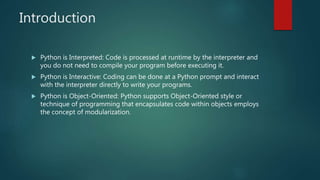
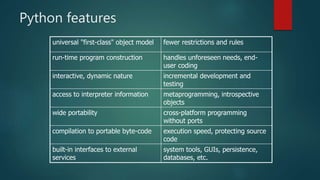
This document provides an agenda and overview for a Python training course. The agenda covers key Python topics like dictionaries, conditional statements, loops, functions, modules, input/output, error handling, object-oriented programming and more. The introduction section explains that Python is an interpreted, interactive and object-oriented language well-suited for beginners. It also outlines features like rapid development, automatic memory management and support for procedural and object-oriented programming. The document concludes by explaining Python's core data types including numbers, strings, lists, tuples and dictionaries.


