Classes and Objects; Inheritance
• Python supports Functional programming, procedural programming,
Object oriented Programming
• OOP- To relate to real world entities.(objects)
• Every object has
• some property/ attribute/data - store data - variables
• Behaviour - actions – methods(functions)
• Class - a template
• Method or Message - A defined capability of a class
• Field or attribute- A bit of data in a class
• Object or Instance - A particular instance of a class
CONCEPTS
CLASSES - Design – blueprint
OBJECTS - use design to create multiple objects - real entities –
instance of the class
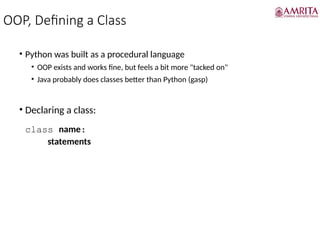
OOP, Defining a Class
• Python was built as a procedural language
• OOP exists and works fine, but feels a bit more "tacked on"
• Java probably does classes better than Python (gasp)
• Declaring a class:
class name:
statements
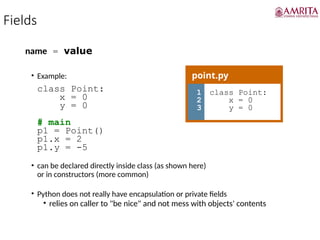
Fields
name = value
• Example:
class Point:
x = 0
y = 0
# main
p1 = Point()
p1.x = 2
p1.y = -5
• can be declared directly inside class (as shown here)
or in constructors (more common)
• Python does not really have encapsulation or private fields
• relies on caller to "be nice" and not mess with objects' contents
point.py
1
2
3
class Point:
x = 0
y = 0
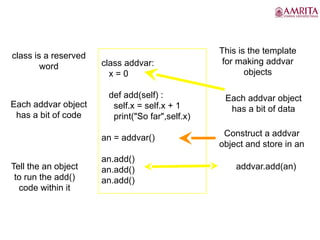
class addvar:
x = 0
def add(self) :
self.x = self.x + 1
print("So far",self.x)
an = addvar()
an.add()
an.add()
an.add()
This is the template
for making addvar
objects
class is a reserved
word
Each addvar object
has a bit of data
Each addvar object
has a bit of code
Construct a addvar
object and store in an
Tell the an object
to run the add()
code within it
addvar.add(an)
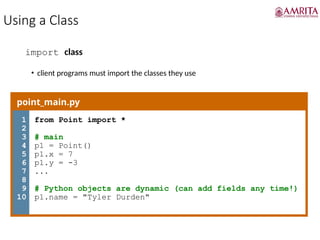
Using a Class
import class
• client programs must import the classes they use
point_main.py
1
2
3
4
5
6
7
8
9
10
from Point import *
# main
p1 = Point()
p1.x = 7
p1.y = -3
...
# Python objects are dynamic (can add fields any time!)
p1.name = "Tyler Durden"
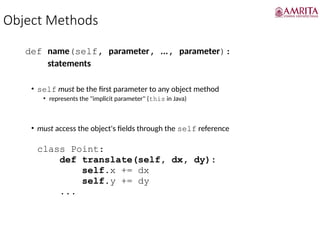
Object Methods
def name(self, parameter, ..., parameter):
statements
• self must be the first parameter to any object method
• represents the "implicit parameter" (this in Java)
• must access the object's fields through the self reference
class Point:
def translate(self, dx, dy):
self.x += dx
self.y += dy
...
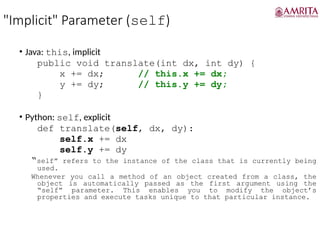
"Implicit" Parameter (self)
• Java: this, implicit
public void translate(int dx, int dy) {
x += dx; // this.x += dx;
y += dy; // this.y += dy;
}
• Python: self, explicit
def translate(self, dx, dy):
self.x += dx
self.y += dy
“self” refers to the instance of the class that is currently being
used.
Whenever you call a method of an object created from a class, the
object is automatically passed as the first argument using the
“self” parameter. This enables you to modify the object’s
properties and execute tasks unique to that particular instance.
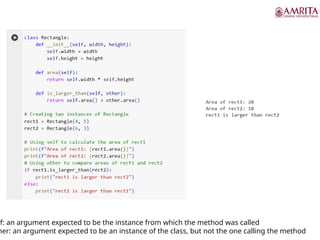
lf: an argument expected to be the instance from which the method was called
her: an argument expected to be an instance of the class, but not the one calling the method
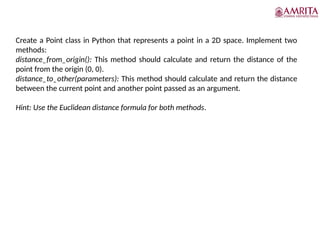
Create a Point class in Python that represents a point in a 2D space. Implement two
methods:
distance_from_origin(): This method should calculate and return the distance of the
point from the origin (0, 0).
distance_to_other(parameters): This method should calculate and return the distance
between the current point and another point passed as an argument.
Hint: Use the Euclidean distance formula for both methods.
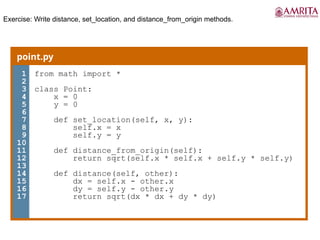
Exercise: Write distance, set_location, and distance_from_origin methods.
point.py
1
2
3
4
5
6
7
8
9
10
11
12
13
14
15
16
17
from math import *
class Point:
x = 0
y = 0
def set_location(self, x, y):
self.x = x
self.y = y
def distance_from_origin(self):
return sqrt(self.x * self.x + self.y * self.y)
def distance(self, other):
dx = self.x - other.x
dy = self.y - other.y
return sqrt(dx * dx + dy * dy)
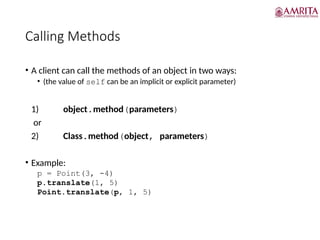
Calling Methods
• A client can call the methods of an object in two ways:
• (the value of self can be an implicit or explicit parameter)
1) object.method(parameters)
or
2) Class.method(object, parameters)
• Example:
p = Point(3, -4)
p.translate(1, 5)
Point.translate(p, 1, 5)
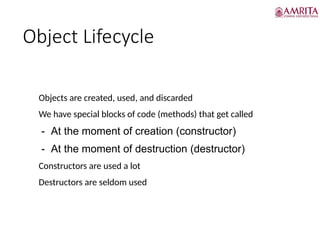
Object Lifecycle
• Objects are created, used, and discarded
• We have special blocks of code (methods) that get called
- At the moment of creation (constructor)
- At the moment of destruction (destructor)
• Constructors are used a lot
• Destructors are seldom used
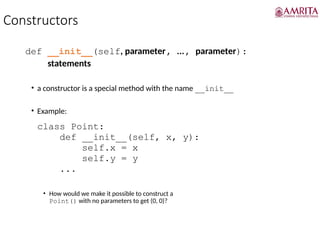
Constructors
def __init__(self, parameter, ..., parameter):
statements
• a constructor is a special method with the name __init__
• Example:
class Point:
def __init__(self, x, y):
self.x = x
self.y = y
...
• How would we make it possible to construct a
Point() with no parameters to get (0, 0)?
Destructors
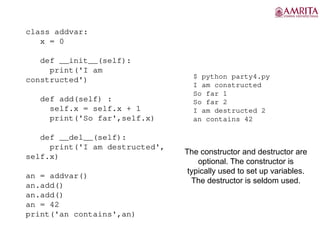
Destructors are called when an object gets destroyed.
In Python, destructors are not needed as much as in C++ because Python has a garbage
collector that handles memory management automatically.
The __del__() method is a known as a destructor method in Python. It is called when all
references to the object have been deleted i.e when an object is garbage collected.
A reference to objects is also deleted when the object goes out of reference or when the
program ends.
Key Concepts:
Reference Counting: Python tracks how many variables reference an object. When the
count drops to zero, the object is ready for garbage collection.
Garbage Collection: This is an automatic process where Python reclaims memory by
destroying objects that are no longer referenced.
Destructors (__del__): These are special methods that are called when an object is about
to be destroyed, allowing for cleanup activities.
class addvar:
x = 0
def __init__(self):
print('I am
constructed')
def add(self) :
self.x = self.x + 1
print('So far',self.x)
def __del__(self):
print('I am destructed',
self.x)
an = addvar()
an.add()
an.add()
an = 42
print('an contains',an)
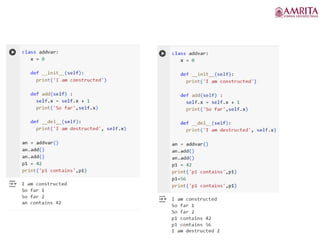
$ python party4.py
I am constructed
So far 1
So far 2
I am destructed 2
an contains 42
The constructor and destructor are
optional. The constructor is
typically used to set up variables.
The destructor is seldom used.
Many Instances
• We can create lots of objects - the class is the template for the
object
• We can store each distinct object in its own variable
• We call this having multiple instances of the same class
• Each instance has its own copy of the instance variables
Constructors can have
additional parameters.
These can be used to set up
instance variables for the
particular instance of the
class (i.e., for the particular
object).
party5.py
class Party:
x = 0
name = ""
def __init__(self, z):
self.name = z
print(self.name,"constructed")
def party(self) :
self.x = self.x + 1
print(self.name,"party count",self.x)
s = Party("Sally")
j = Party("Jim")
s.party()
j.party()
s.party()
class BirthdayParty:
x = 0
name = ""
def __init__(self, z):
self.name = z
print(self.name,"constructed")
def party(self) :
self.x = self.x + 1
print(self.name,"party count",self.x)
s = BirthdayParty("Sally")
j = BirthdayParty("Jim")
s.party()
j.party()
s.party()
Sally constructed
Jim constructed
Sally party count 1
Jim party count 1
Sally party count 2
toString and __str__
def __str__(self):
return string
• equivalent to Java's toString (converts object to a string)
• invoked automatically when str or print is called
Exercise: Write a __str__ method for Point objects that returns strings like "(3,
-14)"
def __str__(self):
return "(" + str(self.x) + ", " + str(self.y) + ")"
The __str__ method in a Python class is a special
method that returns a string representation of an object
when it's printed or converted to a string. This method
is useful for defining how objects of your class should be
represented as strings, which can make debugging and
logging much easier.
Variables
Size of an object – depends on the no. of variables
Size is allocated by Constructor __init__
Variables
Instance variables – independent copy for
all objects
objectname.instance variables
Class/Static variables – common for all objects
classname.classvariables
hi
Methods
• Constructors
• Instance methods – passing self- for particular
object
• Accessor methods – fetch the variable values getters
functions
• Mutator methods – change the values – setter functions
• Class methods
to work with class variables – use cls and not
self - @classmethod – Decorator before the class
method
then call classname.classmethod()
Methods
• Static method :
• No cls or self
• Common function – not related to class /object
• Classname.staticmethod()
• Decorator -@staticmethod
• Write functions
• PolartoCartesian_Coordinates()x= rcos(theta), y=r
sin(theta)
• CartesiantoPolar_Coordinates()r=sqrt(X^2+y^2)
• Theta= tan-1
(y/x)
• Choose the method(instance/class/static) to be used to
implement
Instance Methods are used when the method needs to interact with or modify the
instance’s data.
Class Methods are useful for creating instances in a controlled way or
accessing/modifying class-level data.
Static Methods are ideal for utility functions that perform operations independent of
instance or class state.
class UserProfile:
def __init__(self, username,
status):
self.username = username
self.status = status
def update_status(self,
new_status):
self.status = new_status
print(f"Status updated
to: {self.status}")
user = UserProfile("johndoe",
"Feeling great!")
user.update_status("Just had a
coffee!")
class Shape:
def __init__(self, name):
self.name = name
@classmethod
def create_circle(cls, radius):
return cls(f"Circle with radius
{radius}")
@classmethod
def create_square(cls, side_length):
return cls(f"Square with side length
{side_length}")
circle = Shape.create_circle(10)
square = Shape.create_square(5)
print(circle.name)
print(square.name)
import math
class MathUtils:
@staticmethod
def gcd(x, y):
return math.gcd(x, y)
print(MathUtils.gcd(48, 18))
You are designing a class for managing an online bookstore. The class will handle different types of operations
related to books and orders. Based on the following descriptions of various functions, determine whether each
function should be an instance method, a class method, or a static method:
add_book(title, author, price)
o This method adds a new book to the bookstore's inventory. It needs to update the inventory which is specific
to each instance of the bookstore.
remove_book(book_id)
o This method removes a book from the bookstore's inventory based on its unique identifier. It needs to modify
the inventory of a specific instance of the bookstore.
get_book_count()
o This method returns the total number of books currently available in the bookstore. It operates based on the
class-level data that tracks the total number of books across all instances.
create_order(order_details)
o This method creates a new order. The details of the order are provided as parameters, and the method does
not depend on any specific instance or class state.
calculate_discount(price, discount_rate)
o This method calculates the discounted price based on the original price and discount rate. It is a utility
function that does not rely on instance or class attributes.
get_store_info()
o This method provides information about the bookstore, such as its name, location, and other store-specific
details. It needs to access class-level attributes.
Instructions:
Identify whether each of the following methods should be implemented as an instance method, a class method, or a
static method
add_book(title, author, price) Instance Method: This method needs to update the inventory,
which is specific to each instance of the bookstore.
remove_book(book_id)Instance Method: This method modifies the inventory of a specific
instance of the bookstore by removing a book. The operation is tied to a particular instance,
making it an instance method.
get_book_count()Class Method: This method returns the total number of books available in
the bookstore. Since it operates based on class-level data that tracks books across all
instances, it should be a class method.
create_order(order_details)Static Method: This method creates a new order based on the
provided details and does not depend on any specific instance or class state.
calculate_discount(price, discount_rate)Static Method: This method calculates the
discounted price using the given parameters.
get_store_info()Class Method: This method provides information about the bookstore, such
as its name and location, which are class-level attributes shared across all instances.
Inheritance
c
Inheritance is one such concept in object oriented programming. Code
reusability being the forte of inheritance, it helps in a lot of applications
when we are working on Python.
The method of inheriting the properties of parent class into a child
class is known as inheritance. It is an OOP concept. Following are the
benefits of inheritance.
1.Code reusability- we do not have to write the same code again and
again, we can just inherit the properties we need in a child class.
2.It represents a real world relationship between parent class and child
class.
3.It is transitive in nature. If a child class inherits properties from a
parent class, then all other sub-classes of the child class will also inherit
the properties of the parent class.
Types of Inheritance
• Depending upon the number of child and parent classes
involved, there are four types of inheritance in python.
Different types of Python Inheritance
There are 5 different types of inheritance in Python. They are as follows:
Single inheritance: When a child class inherits from only one parent class, it is called
single inheritance. We saw an example above.
Multiple inheritances: When a child class inherits from multiple parent classes, it is
called multiple inheritances.
Multilevel inheritance: When we have a child and grandchild relationship. This means that a
child class will inherit from its parent class, which in turn is inheriting from its parent class.
Hierarchical inheritance More than one derived class can be created from a single base.
Hybrid inheritance: This form combines more than one form of inheritance. Basically, it is a
blend of more than one type of inheritance.
Single inheritance
• When a child class inherits only a single parent class.
Class ?
E.g. inheritance in python
class Parent():
def first(self):
print('first function')
class Child(Parent):
def second(self):
print('second function')
ob = Child()
ob.first()
ob.second()
Multilevel Inheritance
• When a child class becomes a parent class for another child
class.
10/19/2024 41
# Python program to demonstrate
# multilevel inheritance
# Base class
class Grandfather:
def __init__(self, grandfathername):
self.grandfathername = grandfathername
# Intermediate class
class Father(Grandfather):
def __init__(self, fathername, grandfathername):
self.fathername = fathername
# invoking constructor of Grandfather class
Grandfather.__init__(self, grandfathername)
# Derived class
class Son(Father):
def __init__(self, sonname, fathername, grandfathername):
self.sonname = sonname
# invoking constructor of Father class
Father.__init__(self, fathername, grandfathername)
def print_name(self):
print('Grandfather name :', self.grandfathername)
print("Father name :", self.fathername)
print("Son name :", self.sonname)
# Driver code
s1 = Son('Prince', 'Rampal', 'Lal mani')
print(s1.grandfathername)
s1.print_name()
Multiple Inheritance
• When a child class inherits from more than one parent
class. Class parent1:
10/19/2024 43
# Python program to demonstrate
# multiple inheritance
# Base class1
class Mother:
mothername = ""
def mother(self):
print(self.mothername)
# Base class2
class Father:
fathername = ""
def father(self):
print(self.fathername)
# Derived class
class Son(Mother, Father):
def parents(self):
print("Father :", self.fathername)
print("Mother :", self.mothername)
# Driver's code
s1 = Son()
s1.fathername = "RAM"
s1.mothername = "SITA"
s1.parents()
Hierarchical Inheritance
• Hierarchical inheritance involves multiple inheritance from
the same base or parent class.
10/19/2024 45
# Python program to demonstrate
# Hierarchical inheritance
# Base class
class Parent:
def func1(self):
print("This function is in parent class.")
# Derived class1
class Child1(Parent):
def func2(self):
print("This function is in child 1.")
# Derivied class2
class Child2(Parent):
def func3(self):
print("This function is in child 2.")
# Driver's code
object1 = Child1()
object2 = Child2()
object1.func1()
object1.func2()
object2.func1()
object2.func3()
Hybrid Inheritance
10/19/2024 47
# Python program to demonstrate
# hybrid inheritance
class School:
def func1(self):
print("This function is in school.")
class Student1(School):
def func2(self):
print("This function is in student 1. ")
class Student2(School):
def func3(self):
print("This function is in student 2.")
class Student3(Student1, School):
def func4(self):
print("This function is in student 3.")
# Driver's code
object = Student3()
object.func1()
object.func2()
Python Inheritance
Inheritance allows us to define a class that inherits all the methods and properties from
another class.
Parent class is the class being inherited from, also called base class.
Child class is the class that inherits from another class, also called derived class.
Add the __init__() Function
The __init__() function is called automatically every time the class is being used to
create a new object.
class Student(Person):
def __init__(self, fname, lname):
#add properties etc.
When you add the __init__() function, the child class will no longer inherit the parent's
__init__() function.
Note: The child's __init__() function overrides the inheritance of the parent's __init__()
function.
To keep the inheritance of the parent's __init__() function, add a call to the parent's
__init__() function:
class Student(Person):
def __init__(self, fname, lname):
Person.__init__(self, fname, lname)
Python also has a super() function that will make the child class inherit all the methods
and properties from its parent:
class Student(Person):
def __init__(self, fname, lname):
super().__init__(fname, lname)
Adding Properties
One of the features that inheritance provides is inheriting the properties of the parent
class as well as adding new properties of our own to the child class
OUTPUT
Method Overriding
Private members of the parent class
We don’t always want the instance variables of the parent class to be inherited by the
child class i.e. we can make some of the instance variables of the parent class private,
which won’t be available to the child class.
In Python inheritance, we can make an instance variable private by adding double
underscores before its name
10/19/2024 55
single leading underscore is used a lot in classes. Programmers can
create private variables and methods, but like the previous examples,
these variables and methods can still be used from the outside. n general,
the single leading underscore is only a naming convention to indicate the
variable or function is for internal use. Programmers are still able to
import the name if they really want.
class Parent:
def __init__(self , fname, fage):
self.firstname = fname
self.age = fage
def view(self):
print(self.firstname , self.age)
class Child(Parent):
def __init__(self , fname , fage):
Parent.__init__(self, fname, fage)
# super().__init__(self, fname, fage)
self.lastname = “Ten"
def view(self):
print(“first name" , self.firstname ,"first came", self.age ,
" years ago." , self.lastname, " is his/her lastname")
ob = Child(“Ben" , '28')
ob.view()
Output: ?
Output ?
class A:
def m(self):
("m of A called")
class B(A):
def m(self):
("m of B called")
class C(A):
def m(self):
("m of C called")
class D(B,C):
def m(self):
("m of D called")
Obj1= D()
Obj1.m()
Output: ?
Output ?
class A:
def m(self):
("m of A called")
class B(A):
def m(self):
("m of B called")
A.m(self)
class C(A):
def m(self):
("m of C called")
A.m(self)
class D(B,C):
def m(self):
("m of D called")
B.m(self) C.m(self)
Obj= D()
Obj.m()
OUTPUT : ?
Output ?
class A:
def m(self):
print("m of A called")
class B(A):
def _m(self):
print("m of B called")
def m(self):
self._m()
A.m(self)
class C(A):
def _m(self):
print("m of C called")
A.m(self)
class D(B,C):
def m(self):
print("m of D called")
B._m(self)
C._m(self)
A.m(self)
d1=D()
d1.m()
10/19/2024 60
• m of D called
• m of B called
• m of C called
• m of A called
• m of A called
Polymorphism
The word polymorphism means having many forms. In
programming, polymorphism means the same function name
(but different signatures) being used for different types.
built poly-morphic functions : len
User defined polymorphic function : with default values
Polymorphism with classes: two classes with same functions
Polymorphism
class Tomato:
def type(self):
print("Vegetable")
def color(self):
print("Red")
class Apple:
def type(self):
print("Fruit")
def color(self):
print("Red")
Output :
def func(obj):
obj.type()
obj.color()
obj_tomato = Tomato()
obj_apple = Apple()
func(obj_tomato)
func(obj_apple)
Underscore(_) in python
Single standalone underscore _
Single standalone underscore _ is a valid character for a
Python identifier, so it can be used as a variable name.
• Represent the last expression in the interpreter
• According to Python doc, the special identifier _ is used in the interactive
interpreter to store the result of the last evaluation. It is stored in the
builtin module.
• >>> '_' in dir(__builtins__)
False
>>> 1+1
2
>>> '_' in dir(__builtins__)
True
>>> _
2
Underscore (_) in python
Single standalone underscore _ can also be
used as a visual separator for digit grouping
purposes.
it works for integers, floating-point, and
complex number literals.
i = 1_000
amount = 1_000_000.1
binary = 0b_0100_1110
hex = 0xCAFE_F00D
>>> print(amount)
1000000.1
>>> print(binary)
78
Underscore(_V) in python
Single leading underscore:
_var is intended for internal use.
from Module import *
doesn’t import objects whose names
start with an underscore
Underscore(_V) in python
It warns the developer that
this variable, method, or
function is not supposed to
be imported and used
publicly. Nevertheless,
Python doesn’t completely
prevent them from being
imported and used.
Eg,
#m.py
external = "external"
_internal = "internal"
# main1.py - doesn't work
from m import *
print(external)
# external
print(_internal)
# NameError: name '_internal' is not
defined
# main2.py - works
from m import external, _internal
print(external)
# external
print(_internal)
# internal
# main3.py - works
import m
print(m.external)
# external
print(m._internal)
# internal
Underscore(_V) in python
single leading underscore is used a
lot in classes. Programmers can
create private variables and methods,
but like the previous examples, these
variables and methods can still be
used from the outside. n general, the
single leading underscore is only a
naming convention to indicate the
variable or function is for internal use.
Programmers are still able to import
the name if they really want.
class Point:
def __init__(self,x1,y1):
self.x=x1
self._y=y1
def disp(self):
print(self.x, self._y)
p1 = Point(4,5)
p1._y=25
p1.disp()
Underscore(_ _V) in python
Double Leading Underscore _ _var
Python interpreter will do name
mangling to identifiers with leading
underscores. Name mangling is the
process to overwrite such identifiers
in a class to avoid conflicts of names
between the current class and its
subclasses.
Will see in inheritance
class Point:
def __init__(self,x1,y1):
self.x=x1
self._ _y=y1
def disp(self):
print(self.x, self._ _y)
p1 = Point(4,5)
p1._ _y=25
print(p1._ _y)
p1.disp()
print(dir(p1))
Name mangling is a technique we use to
protect instance variables from being
accidentally overwritten or shadowed by
instance variables with the same name in
derived classes.
Name mangling works by adding a double
underscore prefix to the name of an instance
variable, and replacing any occurrences of the
underscore character in the name with an
10/19/2024 69
10/19/2024 70
10/19/2024 71
Underscore(V_) in python
Single Trailing Underscore
VAR_
There is only one reason to use single
trailing underscore which is to avoid
conflicts with Python keywords.
import keyword
print(keyword.kwlist)
False_
Underscore(V_ _) in python
Double trailing underscores Unlike
single trailing underscore, there is no
special meaning for double trailing
underscores. You can probably think
of var_ _ as an extension of var_.
import keyword
print(keyword.kwlist)
True_ _
Underscore(_ _V_ _) in python
Double Leading and Trailing
Underscore _ _var_ _
Python doesn’t apply name mangling
to such attributes, but names with
double leading and trailing
underscores are reserved for special
use in Python. They are called Magic
Names.
import keyword
print(keyword.kwlist)
True_ _
Underscore(_ _V_ _) in python
Double Leading and Trailing
Underscore _ _var_ _
These magic attributes and magic
methods are allowed to be
overwritten, but you need to know
what you are doing.
E.g. _ _str_ _ is a method that returns
the string representation of the
object. This method is called when
you do print() or str(). In the example,
we overwrite the string presentation,
then we will get a new format in the
output.
def __str__(self):
return str("("+str(self.x)
+","+str(self.__y)+")")
You are allowed to have a customized
name with double leading and trailing
underscore like __disp__. Python will
just take it as a regular attribute name
and will not apply name mangling on
it. However, it’s not a good practice to
have a name like this without a strong
reason.
10/19/2024 76
• In Python, the underscore (_) has several meanings and uses, which can vary based on the
context. It's a versatile character that can be used in interpreter, for ignoring values, in
variable naming, and more.
• Single and Double Underscores
• Single Underscore:
• In the Interpreter: The underscore is used to hold the result of the last executed expression
in an interactive session, allowing you to reuse this value in subsequent operations.
• For Ignoring Values: When unpacking values, if you're not interested in one or more values,
you can assign them to the underscore, indicating that these are throwaway variables.
• After a Name: If a variable name conflicts with a Python keyword, appending an underscore
to the name is a common practice to avoid such conflicts.
• Before a Name: A single underscore before a name is used to indicate that the attribute or
method is intended for internal use. This convention suggests that it should not be accessed
from outside the class or module.
• In Numeric Literals: Underscores can be used in numeric literals to improve readability by
separating digits, similar to how commas or spaces are used as thousand separators.
• Double Underscores:
• Before a Name (Name Mangling): Double underscores at the beginning of a name are
used by the Python interpreter to rename attributes in a class to avoid naming conflicts with
subclasses. This process is known as name mangling.
• Before and After a Name (Dunder Methods): Names that begin and end with double
underscores are special methods in Python. These are often referred to as "dunder"
methods (short for "double underscore") and include built-in methods like __init__ for
object constructors or __str__ for string representations.
Dunder or Magic methods
Dunder or magic methods in Python are the methods
having two prefix and suffix underscores in the method
name. Dunder here means “Double Under (Underscores)”.
These are commonly used for operator overloading.
Few examples for magic methods are: __init__, __add__,
__len__, __repr__ etc.
The __init__ method for initialization is invoked without any
call, when an instance of a class is created, like constructors
in certain other programming languages such as C++, Java,
C#, PHP etc. These methods are the reason we can add two
strings with ‘+’ operator without any explicit typecasting.
Operator overloading
class Point:
def __init__(self,x1,y1):
self.x=x1
self.__y=y1
def disp(self):
print(self.x, self.__y)
def __add__(self, other):
return(Point(self.x+other.x,self.__y+other.__y))
def __str__(self):
return str("("+str(self.x)+","+str(self.__y)+")")
p1 = Point(4,5)
p2 = Point(10,20)
p3=p1+p2
print(p3)
Getters and setters
In Python, getters and setters are not the same as those
in other object-oriented programming languages.
Basically, the main purpose of using getters and setters
in object-oriented programs is to ensure data
encapsulation. Private variables in python are not
actually hidden fields like in other object oriented
languages. Getters and Setters in python are often used
when:
• We use getters & setters to add validation logic around
getting and setting a value.
• To avoid direct access of a class field i.e. private
variables cannot be accessed directly or modified by
external user.
• Getters are the methods that are used in Object-Oriented
Programming (OOP) to access a class's private attributes.
The setattr() function in Python corresponds to
the getattr() function in Python. It alters an object's
attribute values.
• The setter is a method that is used to set the property's
value. It is very useful in object-oriented programming to
set the value of private attributes in a class.
Normal functions as getters and setters
class Point:
num_points=0
def __init__(self,a,b):
self.x=a
self.y=b
Point.num_points=Point.num_points+1
def disp(self):
print(self.x,"", self.y, end=" ")
def getxy(self):
return (self.x,self.y)
def setxy(self,a,b):
self.x=a
self.y=b
p1 = Point(4,5)
p2 = Point(10,20)
print(p1.getxy())
p2.setxy(100,200)
print(p2.getxy())
p1.x=10
p1.y=20
Using property() function to achieve getters and
setters behaviour
def setx(self,a):
self._x=a
print("setter")
def sety(self, b):
self._y=b
def __str__(self):
return str("("+str(self.x)
+","+str(self.y)+")")
x = property(getx, setx)
y = property(gety, sety)
p1 = Point(4,5)
p2 = Point(10,20)
print(p1.x)
p2.x=10
print(p2.x)
ass Point:
num_points=0
def __init__(self,a,b):
self._x=a
self._y=b
Point.num_points=Point.num_points+1
def disp(self):
print(self._x,"", self._y, end=" ")
def getx(self):
print("getter")
return (self._x)
def gety(self):
return self._y
10/19/2024 85
class Circle:
def __init__(self, radius):
self._radius = radius # The underscore indicates this is a "protected" attribute
# Getter for radius
@property
def radius(self):
return self._radius
# Setter for radius
@radius.setter
def radius(self, value):
if value < 0:
raise ValueError("Radius cannot be negative")
self._radius = value
# Method to calculate area
def area(self):
return 3.14159 * self._radius ** 2
# Usage
c = Circle(5)
print(c.radius) # Uses the getter, output: 5
print(c.area()) # Output: 78.53975
c.radius = 10 # Uses the setter
print(c.radius) # Output: 10
print(c.area()) # Output: 314.159
# c.radius = -5 # Uncommenting this will raise a ValueError
Using the @property decorators to achieve getters and
setter behavior:
@x.setter
def x(self,a):
self._x=a
print("setter")
@y.setter
def y(self, b):
self._y=b
p1 = Point(4,5)
p2 = Point(10,20)
print(p1.x)
p2.x=10
print(p2.x)
@property is one of Python's built-in decorators. The primary goal of
any decorator is to modify the class methods or attributes so that the
class user does not need to change their code.
class Point:
num_points=0
def __init__(self,a,b):
self._x=a
self._y=b
Point.num_points=Point.num_points+1
def disp(self):
print(self._x,"", self._y, end=" ")
@property
def x(self):
print("getter")
return (self._x)
@property
def y(self):
return self._y