KEY STAGE 1
Pupils	
  should	
  be	
  taught	
  to:	
  	
  
•understand	
  what	
  algorithms	
  are,	
  how	
  they	
  are	
  implemented	
  as	
  programs	
  on	
  digital	
  
devices,	
  and	
  	
  
•that	
  programs	
  execute	
  by	
  following	
  a	
  sequence	
  of	
  instruc<ons	
  	
  
•write	
  and	
  test	
  simple	
  programs	
  	
  
•use	
  logical	
  reasoning	
  to	
  predict	
  the	
  behaviour	
  of	
  simple	
  programs	
  	
  
•organise,	
  store,	
  manipulate	
  and	
  retrieve	
  data	
  in	
  a	
  range	
  of	
  digital	
  formats	
  	
  
•communicate	
  safely	
  and	
  respec=ully	
  online,	
  keeping	
  personal	
  informa<on	
  private,	
  and	
  	
  
•recognise	
  common	
  uses	
  of	
  informa<on	
  technology	
  beyond	
  school.	
  	
  
KEY STAGE 1
Pupils	
  should	
  be	
  taught	
  to:	
  	
  understand	
  what	
  algorithms	
  are,	
  how	
  they	
  are	
  implemented	
  as	
  
programs	
  on	
  digital	
  devices,	
  and	
  that	
  programs	
  execute	
  by	
  following	
  a	
  sequence	
  of	
  
instruc<ons	
  	
  
Algorithm:	
  A	
  list	
  of	
  instruc<ons	
  to	
  complete	
  a	
  task	
  or	
  solve	
  a	
  problem.	
  
How	
  to	
  teach?	
  
•  You	
  can	
  provide	
  	
  indoor	
  and	
  outdoor	
  	
  opportuni<es	
  for	
  children	
  to	
  	
  give	
  and	
  follow	
  
instruc<ons.	
  
•  You	
  can	
  ask	
  	
  children	
  to	
  work	
  in	
  pairs	
  to	
  carry	
  out	
  some	
  instruc<ons	
  e.g.	
  brushing	
  teeth	
  or	
  
seBng	
  direc<ons	
  in	
  the	
  classroom	
  using	
  bee-­‐bots,	
  roamers.	
  	
  
•  You	
  can	
  set	
  your	
  classroom	
  as	
  a	
  liDle	
  café	
  	
  for	
  children	
  to	
  prac<ce	
  giving	
  and	
  following	
  
instruc<ons	
  	
  through	
  role	
  play.	
  For	
  example	
  they	
  could	
  focus	
  on	
  how	
  to	
  bake	
  a	
  cake	
  or	
  how	
  
to	
  make	
  a	
  milkshake	
  etc.	
  They	
  could	
  write	
  the	
  instruc<ons	
  for	
  their	
  chosen	
  recipe	
  and	
  
allow	
  	
  their	
  friends	
  to	
  test	
  it	
  out	
  by	
  making	
  it.	
  
Resources:	
  Bee-­‐bots,	
  	
  roamers	
  and	
  other	
  resources	
  for	
  brushing	
  teeth,	
  baking	
  a	
  cake	
  and	
  
making	
  a	
  milkshake.	
  	
  
Useful	
  Links:	


  hDp://rethinkingict.wikispaces.com/Algorithms	
  
hDp://www.mar<ngsaunders.com/2013/03/a-­‐workshop-­‐on-­‐algorithms-­‐for-­‐primary-­‐schools/	


KEY STAGE 1
Pupils	
  should	
  be	
  taught	
  to:	
  	
  design,	
  write	
  and	
  	
  debug	
  simple	
  programs	
  	
  
Debugging:	
  The	
  process	
  of	
  tes<ng	
  to	
  iden<fy	
  and	
  correct	
  errors	
  from	
  instruc<ons	
  or	
  programs.	
  
How	
  to	
  teach?	
  Retell	
  a	
  story	
  using	
  picture	
  cards.	
  Put	
  the	
  cards	
  	
  in	
  the	
  wrong	
  order.	
  Can	
  they	
  
sequence	
  the	
  events	
  correctly?	
  You	
  could	
  lay	
  the	
  cards	
  on	
  the	
  floor	
  and	
  use	
  bee-­‐bot	
  to	
  visit	
  
different	
  events	
  in	
  a	
  sequence.	
  
Let	
  children	
  watch	
  a	
  video	
  of	
  making	
  a	
  jam	
  sandwich.	
  Create	
  images	
  of	
  each	
  step	
  and	
  display	
  
them	
  in	
  the	
  wrong	
  order.	
  Can	
  they	
  sequence	
  the	
  events	
  correctly?	
  
Show	
  them	
  a	
  simple	
  script	
  to	
  move	
  the	
  cat	
  across	
  the	
  screen	
  on	
  Scratch.	
  Show	
  them	
  another	
  
one	
  with	
  a	
  script	
  error.	
  Discuss;	
  Why	
  is	
  not	
  working?	
  What	
  is	
  the	
  problem?	
  Can	
  they	
  iden<fy	
  
the	
  error?	
  	
  
Resources:	
  	
  Bee-­‐bots,	
  Scratch,	
  story	
  cards.	
  
Useful	
  Links:	
  Scratch is available from http://scratch.mit.edu
Jam	
  Sandwich	
  algorithm	
  video	
  available	
  at:	
  hDp://www.youtube.com/watch?v=leBEFaVHllE	


KEY STAGE 1
Pupils	
  should	
  be	
  taught	
  to:	
  	
  use	
  logical	
  reasoning	
  to	
  predict	
  the	
  behaviour	
  of	
  simple	
  
programs	
  	
  
Logical	
  reasoning:	
  	
  Applying	
  rules	
  in	
  a	
  systema<c	
  way	
  to	
  solve	
  problems.	
  This	
  can	
  take	
  
place	
  in	
  many	
  different	
  contexts;	
  in	
  mathema<cs	
  when	
  solving	
  a	
  problem	
  ,	
  in	
  literacy	
  
when	
  structuring	
  a	
  story	
  or	
  in	
  programming	
  when	
  debugging.	
  
How	
  to	
  teach	
  ?	
  Provide	
  children	
  with	
  opportuni<es	
  where	
  they	
  can	
  predict	
  the	
  outcome	
  
of	
  	
  a	
  set	
  of	
  instruc<ons.	
  
Children	
  talk	
  about	
  a	
  set	
  of	
  instruc<ons	
  to	
  move	
  a	
  Probot	
  to	
  draw	
  shapes.	
  They	
  write	
  it,	
  
test	
  it	
  and	
  correct	
  any	
  errors.	
  They	
  then	
  place	
  their	
  instruc<ons	
  in	
  a	
  box	
  or	
  bag	
  without	
  
naming	
  it.	
  They	
  select	
  a	
  random	
  instruc<on	
  sheet	
  from	
  the	
  bag	
  and	
  try	
  to	
  iden<fy	
  the	
  
shape.	
  	
  
You	
  can	
  also	
  evaluate	
  the	
  instruc<ons	
  as	
  a	
  whole	
  class.	
  You	
  could	
  ask	
  the	
  children	
  if	
  the	
  
instruc<ons	
  were	
  correct	
  for	
  their	
  purpose?	
  How	
  can	
  you	
  make	
  them	
  beDer?	
  
This	
  ac<vity	
  can	
  also	
  be	
  done	
  on	
  Scratch,	
  Daisy	
  the	
  Dinosaur	
  or	
  Hopscotch.	
  Children	
  can	
  
write	
  scripts	
  to	
  move	
  objects	
  and	
  keep	
  the	
  outcome	
  a	
  secret.	
  Their	
  partners	
  can	
  try	
  to	
  
guess	
  the	
  	
  ac<on/	
  effect	
  on	
  screen.	
  
Resources:	
  Probot,	
  Scratch,	
  Hopscotch,	
  Daisy	
  the	
  Dinosaur.	
  
Useful	
  links:	
  
hDp://www.itass.newham.gov.uk/curriculum/fssow/topic.aspx?topic=6&resource=8	
  
hDp://www.iboard.co.uk/iwb/Drawing-­‐with-­‐a-­‐Control-­‐Toy-­‐697	
  
KEY STAGE 1
Pupils	
  should	
  be	
  taught	
  to:	
  	
  organise,	
  store,	
  manipulate	
  and	
  retrieve	
  data	
  in	
  a	
  range	
  of	
  
digital	
  formats	
  	
  
PBL(	
  Project	
  Based	
  Learning)	
  approach	
  and	
  teaching	
  in	
  a	
  context	
  will	
  make	
  learning	
  more	
  
relevant	
  to	
  learners.	
  Providing	
  opportuni<es	
  for	
  children	
  to	
  learn	
  in	
  a	
  context	
  such	
  as	
  story-­‐
telling	
  using	
  a	
  stop-­‐mo<on	
  anima<on	
  or	
  crea<ng	
  a	
  presenta<on	
  on	
  a	
  specific	
  topic	
  over	
  a	
  
longer	
  period	
  of	
  term	
  will	
  enable	
  them	
  to	
  master	
  many	
  transferable	
  skills	
  including	
  
collabora<on,	
  communica<on,	
  crea<vity,	
  and	
  cri<cal	
  thinking.	
  
How	
  to	
  teach	
  it?	
  Let	
  children	
  create	
  a	
  document	
  using	
  either	
  a	
  word-­‐processor	
  or	
  an	
  online	
  
web	
  2	
  tool	
  such	
  as	
  Wikis.	
  They	
  should	
  prac<ce	
  wri<ng	
  sentences,	
  insert	
  images/clip	
  arts,	
  
correct	
  their	
  mistakes.	
  For	
  example	
  when	
  learning	
  about	
  tradi<onal	
  stories	
  from	
  China,	
  we	
  
divided	
  the	
  class	
  into	
  4	
  groups.	
  Each	
  group	
  focused	
  on	
  a	
  specific	
  story.	
  They	
  organised	
  and	
  
presented	
  their	
  ideas	
  using	
  text,	
  images	
  and	
  videos.	
  
Resources:	
  	
  Word-­‐processing	
  and	
  presenta<on	
  so]ware,	
  wikis,	
  blogs,	
  anima<on	
  programmes.	
  
Useful	
  Links:	
  hDp://www.clayanimator.com/english/stop_mo<on_animator.html	
  
hDp://connec<ngclassroomswithchina.wikispaces.com/Wilbury+Primary+School	


KEY STAGE 1
Pupils	
  should	
  be	
  taught	
  to:	
  communicate	
  safely	
  and	
  respec]ully	
  online,	
  keeping	
  personal	
  
informa<on	
  private,	
  and	
  recognise	
  common	
  uses	
  of	
  informa<on	
  technology	
  beyond	
  school.	
  	
  
How	
  to	
  teach?	
  Discuss	
  with	
  children:	
  
•  Who	
  should	
  they	
  talk	
  to	
  when	
  someone	
  or	
  something	
  upsets	
  them	
  online.	
  
•  What	
  do	
  they	
  understand	
  	
  from	
  ‘keeping	
  personal	
  informa<on	
  private’.	
  
•  You	
  could	
  also	
  discuss	
  what	
  kind	
  of	
  technologies	
  they	
  use	
  at	
  home,	
  are	
  they	
  
programmable?	
  
Useful	
  Links:	
  There	
  are	
  many	
  useful	
  websites	
  which	
  have	
  a	
  vast	
  range	
  of	
  resources	
  for	
  
teaching	
  	
  children	
  to	
  use	
  technology	
  in	
  a	
  responsible	
  way.	
  	
  
hDp://www.digital-­‐literacy.org.uk/Home.aspx	
  
hDp://www.swgfl.org.uk/Staying-­‐Safe#	
  
hDp://www.childnet.com/resources/kia/	
  
hDp://www.school-­‐portal.co.uk/GroupWorkspaces.asp?
GroupID=389043&WorkspaceID=1113846&Javascript=False	


KEY STAGE 2
Pupils	
  should	
  be	
  taught	
  to:	
  	
  
•design	
  and	
  write	
  programs	
  that	
  accomplish	
  specific	
  goals,	
  including	
  controlling	
  or	
  
simula<ng	
  physical	
  systems;	
  solve	
  problems	
  by	
  decomposing	
  them	
  into	
  smaller	
  parts	
  	
  
•use	
  sequence,	
  selec<on,	
  and	
  repe<<on	
  in	
  programs;	
  work	
  with	
  variables	
  and	
  various	
  
forms	
  of	
  input	
  and	
  output;	
  generate	
  appropriate	
  inputs	
  and	
  predicted	
  outputs	
  to	
  test	
  
programs	
  	
  
•use	
  logical	
  reasoning	
  to	
  explain	
  how	
  a	
  simple	
  algorithm	
  works	
  and	
  to	
  detect	
  and	
  
correct	
  errors	
  in	
  algorithms	
  and	
  programs	
  	
  
•understand	
  computer	
  networks	
  including	
  the	
  internet;	
  how	
  they	
  can	
  provide	
  mul<ple	
  
services,	
  such	
  as	
  the	
  world-­‐wide	
  web;	
  and	
  the	
  opportuni<es	
  they	
  offer	
  for	
  
communica<on	
  and	
  collabora<on	
  	
  
•describe	
  how	
  internet	
  search	
  engines	
  find	
  and	
  store	
  data;	
  use	
  search	
  engines	
  
effec<vely;	
  be	
  discerning	
  in	
  evalua<ng	
  digital	
  content;	
  respect	
  individuals	
  and	
  
intellectual	
  property;	
  use	
  technology	
  responsibly,	
  securely	
  and	
  safely	
  	
  
•select,	
  use	
  and	
  combine	
  a	
  variety	
  of	
  so]ware	
  (including	
  internet	
  services)	
  on	
  a	
  range	
  of	
  
digital	
  devices	
  to	
  accomplish	
  given	
  goals,	
  including	
  collec<ng,	
  analyzing,	
  evalua<ng	
  and	
  
presen<ng	
  data	
  and	
  informa<on	
  
KEY STAGE 2
Design,	
  write	
  and	
  debug	
  programs	
  that	
  accomplish	
  specific	
  goals,	
  including	
  controlling	
  or	
  
simula<ng	
  physical	
  systems;	
  solve	
  problems	
  by	
  decomposing	
  them	
  into	
  smaller	
  parts.	
  
Physical	
  systems:	
  this	
  refers	
  to	
  anything	
  that	
  can	
  be	
  aDached	
  to	
  a	
  computer	
  such	
  as	
  sensors,	
  motors,	
  
makey	
  makey.	
  
Decomposi<on:	
  Solving	
  problems	
  by	
  breaking	
  them	
  into	
  smaller	
  parts.	
  
How	
  to	
  teach?	
  
•  It	
  is	
  always	
  useful	
  to	
  start	
  with	
  algorithm	
  games	
  to	
  remind	
  children	
  of	
  the	
  importance	
  of	
  having	
  
precise	
  instruc<ons	
  to	
  achieve	
  specific	
  goals.	
  
•  Hopscotch,	
  Scratch,	
  Alice	
  can	
  be	
  used	
  by	
  children	
  to	
  design	
  simple	
  games	
  such	
  as	
  racing	
  where	
  
they	
  develop	
  their	
  programming	
  skills.	
  
•  Programs	
  such	
  as	
  Enchan<ng	
  can	
  be	
  used	
  with	
  Scratch	
  for	
  children	
  to	
  write	
  programs	
  to	
  control	
  
physical	
  objects.	
  You	
  can	
  view	
  an	
  example	
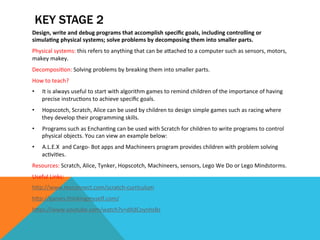
  below:	
  
•  A.L.E.X	
  	
  and	
  Cargo-­‐	
  Bot	
  apps	
  and	
  Machineers	
  program	
  provides	
  children	
  with	
  problem	
  solving	
  
ac<vi<es.	
  
Resources:	
  Scratch,	
  Alice,	
  Tynker,	
  Hopscotch,	
  Machineers,	
  sensors,	
  Lego	
  We	
  Do	
  or	
  Lego	
  Mindstorms.	
  
Useful	
  Links:	
  	
  
hDp://www.tesconnect.com/scratch-­‐curriculum	
  	
  
hDp://games.thinkingmyself.com/	
  
hDps://www.youtube.com/watch?v=dXdCoynhsBs	


KEY STAGE 2
Pupils	
  should	
  be	
  taught	
  to:	
  	
  use	
  sequence,	
  selec<on,	
  and	
  repe<<on	
  in	
  programs;	
  work	
  with	
  variables	
  and	
  
various	
  forms	
  of	
  input	
  and	
  output;	
  generate	
  appropriate	
  inputs	
  and	
  predicted	
  outputs	
  to	
  test	
  programs.	
  	
  
Variable:	
  In programming, a variable is a placeholder for some value, like x and y are variables in algebra.	
  
Repe<<on:	
  Repea<ng	
  a	
  set	
  of	
  instruc<ons	
  	
  un<l	
  a	
  specific	
  goal	
  	
  is	
  achieved.	
  
How	
  to	
  teach?	
  
•  Probot	
  can	
  be	
  used	
  for	
  prac<sing	
  sequencing	
  and	
  repe<<ons.	
  Children	
  can	
  discuss	
  how	
  many	
  <mes	
  an	
  
instruc<on	
  needs	
  to	
  be	
  repeated	
  for	
  example	
  to	
  draw	
  a	
  rectangle.	
  A	
  similar	
  ac<vity	
  can	
  also	
  be	
  done	
  
using	
  Scratch.	
  
•  Simple	
  maze	
  games	
  on	
  Scratch	
  can	
  be	
  used	
  to	
  model	
  repe<<on	
  and	
  loops.	
  
•  Discuss	
  with	
  children	
  the	
  elements	
  of	
  a	
  game.	
  You	
  can	
  compare	
  a	
  Scratch	
  anima<on	
  and	
  Scratch	
  game.	
  
Focus	
  on	
  <me,	
  score,	
  levels	
  etc.	
  These	
  are	
  variables.	
  You	
  can	
  model	
  it	
  using	
  this	
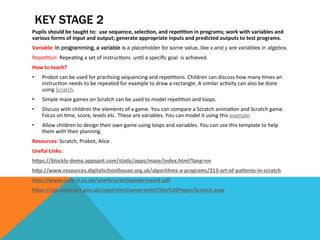
  example.	
  
•  Allow	
  children	
  to	
  design	
  their	
  own	
  game	
  using	
  loops	
  and	
  variables.	
  You	
  can	
  use	
  this	
  template	
  to	
  help	
  
them	
  with	
  their	
  planning.	
  
Resources:	
  Scratch,	
  Probot,	
  Alice	
  .	
  
Useful	
  Links:	
  	
  
hDps://blockly-­‐demo.appspot.com/sta<c/apps/maze/index.html?lang=en	
  
hDp://www.resources.digitalschoolhouse.org.uk/algorithms-­‐a-­‐programs/213-­‐art-­‐of-­‐paDerns-­‐in-­‐scratch	
  
hDp://www.code-­‐it.co.uk/year4/scratchspidermaze2.pdf	
  
hDps://slp.somerset.gov.uk/cypd/elim/somerse<ct/Site%20Pages/Scratch.aspx	


KEY STAGE 2
Pupils	
  should	
  be	
  taught	
  to:	
  	
  Use	
  logical	
  reasoning	
  to	
  explain	
  how	
  some	
  simple	
  algorithms	
  
work	
  and	
  to	
  detect	
  and	
  correct	
  errors	
  in	
  algorithms	
  and	
  programs.	
  
Algorithm:	
  A	
  list	
  of	
  instruc<ons	
  to	
  complete	
  a	
  task	
  or	
  solve	
  a	
  problem.	
  
How	
  to	
  teach?	
  
•  Use	
  the	
  ac<vi<es	
  at	
  hDp://games.thinkingmyself.com/	
  to	
  introduce	
  algorithms.	
  
•  Give	
  examples	
  of	
  algorithms	
  from	
  daily	
  lives.	
  Examples	
  can	
  be	
  seen	
  at:	
  
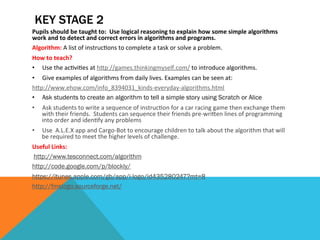
hDp://www.ehow.com/info_8394031_kinds-­‐everyday-­‐algorithms.html	
  
•  Ask students to create an algorithm to tell a simple story using Scratch or Alice	
  
•  Ask	
  students	
  to	
  write	
  a	
  sequence	
  of	
  instruc<on	
  for	
  a	
  car	
  racing	
  game	
  then	
  exchange	
  them	
  
with	
  their	
  friends.	
  	
  Students	
  can	
  sequence	
  their	
  friends	
  pre-­‐wriDen	
  lines	
  of	
  programming	
  
into	
  order	
  and	
  iden<fy	
  any	
  problems	
  
•  Use	
  	
  A.L.E.X	
  app	
  and	
  Cargo-­‐Bot	
  to	
  encourage	
  children	
  to	
  talk	
  about	
  the	
  algorithm	
  that	
  will	
  
be	
  required	
  to	
  meet	
  the	
  higher	
  levels	
  of	
  challenge.	
  
Useful	
  Links:	


  http://www.tesconnect.com/algorithm
http://code.google.com/p/blockly/
https://itunes.apple.com/gb/app/i-logo/id435280247?mt=8
http://fmslogo.sourceforge.net/


KEY STAGE 2
Pupils	
  should	
  be	
  taught	
  to:	
  understand	
  computer	
  networks	
  including	
  the	
  internet;	
  how	
  they	
  can	
  
provide	
  mul<ple	
  services,	
  such	
  as	
  the	
  world-­‐wide	
  web;	
  and	
  the	
  opportuni<es	
  they	
  offer	
  for	
  
communica<on	
  and	
  collabora<on	
  	
  
HTML:	
  HTML	
  or	
  HyperText	
  Markup	
  Language	
  is	
  the	
  standard	
  markup	
  language	
  used	
  to	
  create	
  web	
  pages.	
  
TCP	
  /	
  IP:	
  in	
  full	
  Transmission	
  Control	
  Protocol/Internet	
  Protocol,	
  	
  standard	
  Internet	
  communica<ons	
  protocols	
  that	
  
allow	
  digital	
  computers	
  to	
  communicate	
  over	
  long	
  distances.	
  	
  
CSS:	
  Cascading	
  Style	
  Sheets,	
  most	
  of	
  the	
  <me	
  abbreviated	
  as	
  CSS,	
  is	
  a	
  stylesheet	
  language	
  used	
  to	
  describe	
  the	
  
presenta<on	
  of	
  a	
  document	
  wriDen	
  in	
  HTML	
  or	
  XML	
  
How	
  to	
  teach?	
  
•  Tell	
  children	
  to	
  get	
  in	
  a	
  circle	
  and	
  	
  put	
  one	
  hand	
  on	
  the	
  shoulder	
  of	
  the	
  person	
  standing	
  next	
  to	
  them.	
  Say	
  a	
  
sentence	
  to	
  one	
  of	
  the	
  child	
  and	
  ask	
  her/him	
  to	
  pass	
  it	
  on	
  to	
  the	
  next	
  child.	
  Can	
  the	
  message	
  pass	
  correctly,	
  or	
  
are	
  any	
  parts	
  missing	
  in	
  the	
  process?	
  What	
  happens	
  if	
  one	
  child	
  removes	
  their	
  hand	
  from	
  a	
  shoulder	
  of	
  
another?	
  Can	
  the	
  message	
  s<ll	
  be	
  carried	
  around?	
  
•  Discuss	
  with	
  children	
  how	
  the	
  computers	
  from	
  all	
  around	
  the	
  world	
  understand	
  each	
  other	
  (They	
  use	
  the	
  same	
  
language-­‐TCP/IP).	
  Watch	
  the	
  following	
  videos	
  with	
  children	
  and	
  let	
  them	
  ask	
  ques<ons	
  or	
  just	
  share	
  their	
  
thoughts.	
  You	
  could	
  also	
  ask	
  children	
  to	
  draw	
  how	
  the	
  internet	
  works	
  before	
  and	
  at	
  the	
  end	
  of	
  the	
  lesson	
  to	
  
check	
  their	
  understanding.	
  
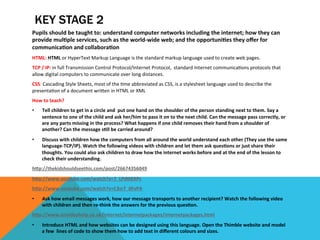
hDp://thekidshouldseethis.com/post/26674356049	
  
hDp://www.youtube.com/watch?v=7_LPdDKXPc	
  
hDp://www.youtube.com/watch?v=C3sr7_0FyPA	
  
•  Ask	
  how	
  email	
  messages	
  work,	
  how	
  our	
  message	
  transports	
  to	
  another	
  recipient?	
  Watch	
  the	
  following	
  video	
  
with	
  children	
  and	
  then	
  re-­‐think	
  the	
  answers	
  for	
  the	
  previous	
  ques<on.	
  
hDp://www.ictvideohelp.co.uk/internet/internetpackages/internetpackages.html	
  
•  Introduce	
  HTML	
  and	
  how	
  websites	
  can	
  be	
  designed	
  using	
  this	
  language.	
  Open	
  the	
  Thimble	
  website	
  and	
  model	
  
a	
  few	
  	
  lines	
  of	
  code	
  to	
  show	
  them	
  how	
  to	
  add	
  text	
  in	
  different	
  colours	
  and	
  sizes.	
  
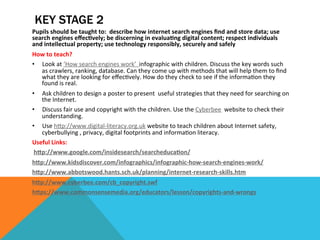
KEY STAGE 2
Pupils	
  should	
  be	
  taught	
  to:	
  	
  describe	
  how	
  internet	
  search	
  engines	
  find	
  and	
  store	
  data;	
  use	
  
search	
  engines	
  effec<vely;	
  be	
  discerning	
  in	
  evalua<ng	
  digital	
  content;	
  respect	
  individuals	
  
and	
  intellectual	
  property;	
  use	
  technology	
  responsibly,	
  securely	
  and	
  safely	
  	
  
How	
  to	
  teach?	
  
•  Look	
  at	
  ‘How	
  search	
  engines	
  work’	
  	
  infographic	
  with	
  children.	
  Discuss	
  the	
  key	
  words	
  such	
  
as	
  crawlers,	
  ranking,	
  database.	
  Can	
  they	
  come	
  up	
  with	
  methods	
  that	
  will	
  help	
  them	
  to	
  find	
  
what	
  they	
  are	
  looking	
  for	
  effec<vely.	
  How	
  do	
  they	
  check	
  to	
  see	
  if	
  the	
  informa<on	
  they	
  
found	
  is	
  real.	
  
•  Ask	
  children	
  to	
  design	
  a	
  poster	
  to	
  present	
  	
  useful	
  strategies	
  that	
  they	
  need	
  for	
  searching	
  on	
  
the	
  Internet.	
  
•  Discuss	
  fair	
  use	
  and	
  copyright	
  with	
  the	
  children.	
  Use	
  the	
  Cyberbee	
  	
  website	
  to	
  check	
  their	
  
understanding.	
  
•  Use	
  hDp://www.digital-­‐literacy.org.uk	
  website	
  to	
  teach	
  children	
  about	
  Internet	
  safety,	
  
cyberbullying	
  ,	
  privacy,	
  digital	
  footprints	
  and	
  informa<on	
  literacy.	
  
Useful	
  Links:	


  hDp://www.google.com/insidesearch/searcheduca<on/	
  
hDp://www.kidsdiscover.com/infographics/infographic-­‐how-­‐search-­‐engines-­‐work/	
  
hDp://www.abbotswood.hants.sch.uk/planning/internet-­‐research-­‐skills.htm	
  
hDp://www.cyberbee.com/cb_copyright.swf	
  
hDps://www.commonsensemedia.org/educators/lesson/copyrights-­‐and-­‐wrongs	


KEY STAGE 2
Pupils	
  should	
  be	
  taught	
  to:	
  	
  select,	
  use	
  and	
  combine	
  a	
  variety	
  of	
  sorware	
  (including	
  internet	
  
services)	
  on	
  a	
  range	
  of	
  digital	
  devices	
  to	
  accomplish	
  given	
  goals,	
  including	
  collec<ng,	
  analyzing,	
  
evalua<ng	
  and	
  presen<ng	
  data	
  and	
  informa<on	
  
How	
  to	
  teach?	
  
This	
  strand	
  of	
  the	
  Compu<ng	
  curriculum	
  can	
  be	
  taught	
  	
  through	
  cross	
  curricular	
  ac<vi<es.	
  
Provide	
  opportuni<es	
  for	
  children	
  to:	
  
•  Use	
  different	
  	
  online	
  tools,	
  so]ware	
  and	
  hardware	
  to	
  achieve	
  specific	
  goals.	
  
•  To	
  review,	
  edit,	
  share	
  and	
  evaluate	
  their	
  work.	
  
•  Work	
  collabora<vely	
  and	
  independently.	
  
Example	
  ac<vi<es:	
  
•  Using	
  	
  programs	
  and	
  apps	
  like	
  Keynote,	
  PowerPoint,	
  Prezi,	
  Book	
  creator	
  app	
  to	
  create	
  
presenta<ons.	
  
•  Use	
  Padlet,	
  Primary	
  Pad	
  or	
  similar	
  online	
  tools	
  to	
  create	
  and	
  share	
  ideas	
  collabora<vely.	
  
•  Crea<ng	
  anima<ons,	
  podcasts	
  or	
  films	
  to	
  share	
  and	
  evaluate	
  	
  their	
  ideas.	
  
Useful	
  Links:	
  	
  
hDp://padlet.com/	
  
hDps://prezi.com/profile/registra<on/?license_type=PUBLIC	
  
hDp://www.launchpadtoys.com/toontas<c/	
  
hDp://primarypad.com/	


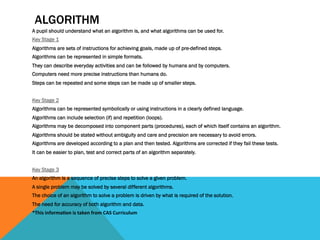
ALGORITHM
A pupil should understand what an algorithm is, and what algorithms can be used for.
Key Stage 1
Algorithms are sets of instructions for achieving goals, made up of pre-defined steps.
Algorithms can be represented in simple formats.
They can describe everyday activities and can be followed by humans and by computers.
Computers need more precise instructions than humans do.
Steps can be repeated and some steps can be made up of smaller steps.
Key Stage 2
Algorithms can be represented symbolically or using instructions in a clearly defined language.
Algorithms can include selection (if) and repetition (loops).
Algorithms may be decomposed into component parts (procedures), each of which itself contains an algorithm.
Algorithms should be stated without ambiguity and care and precision are necessary to avoid errors.
Algorithms are developed according to a plan and then tested. Algorithms are corrected if they fail these tests.
It can be easier to plan, test and correct parts of an algorithm separately.
Key Stage 3
An algorithm is a sequence of precise steps to solve a given problem.
A single problem may be solved by several different algorithms.
The choice of an algorithm to solve a problem is driven by what is required of the solution.
The need for accuracy of both algorithm and data.
*This	
  informa<on	
  is	
  taken	
  from	
  CAS	
  Curriculum	
  
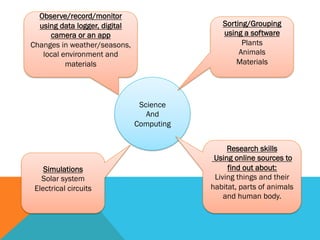
Science
And
Computing
Sorting/Grouping
using a software
Plants
Animals
Materials
Observe/record/monitor
using data logger, digital
camera or an app
Changes in weather/seasons,
local environment and
materials
Simulations
Solar system
Electrical circuits
Research skills
Using online sources to
find out about:
Living things and their
habitat, parts of animals
and human body.
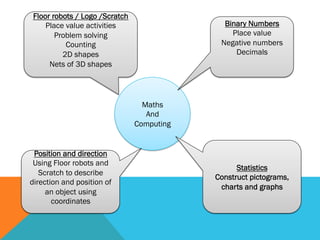
Maths
And
Computing
Binary Numbers
Place value
Negative numbers
Decimals
Floor robots / Logo /Scratch
Place value activities
Problem solving
Counting
2D shapes
Nets of 3D shapes
Position and direction
Using Floor robots and
Scratch to describe
direction and position of
an object using
coordinates
Statistics
Construct pictograms,
charts and graphs
THANK YOU!
y.allsop@mmu.ac.uk
@yallsop