Tutorial 1
      Introduction to
        JavaScript

Section A – Programming, HTML,
         and JavaScript

         JavaScript   Tutorial 1 - Introduction to JavaScript   1
Tutorial 1A Topics
   Section A – Programming, HTML, and
    JavaScript
    •   About the World Wide Web
    •   Uses of JavaScript
    •   About Hypertext Markup Language
    •   How to creating an HTML document
    •   About the JavaScript programming language
    •   About logic and debugging


                   JavaScript           2
                                     Tutorial 1 - Introduction
Programming, HTML, and
            JavaScript
   The World Wide Web
    • Created in 1989
         European Laboratory for Particle Physics
          (Geneva Switzerland)
    • Purpose
         Provide an easy way to access cross-
          referenced documents that exist on the
          internet


                   JavaScript             3
                                       Tutorial 1 - Introduction
Programming, HTML, and
            JavaScript
   The World Wide Web
    • Hypertext links
         Contain reference to locate and open specific
          documents
    • Hypertext Markup Language (HTML)
         Language used to design web pages
          (documents)
    • Web Browser
         Program that displays HTML documents


                   JavaScript             4
                                       Tutorial 1 - Introduction
Programming, HTML, and
            JavaScript
   The World Wide Web
    • Uniform Resource Locator (URL)
         A type of Uniform Resource Identifier (URI)
           • Identifies names and addresses on the WWW
         A unique identifier for a web document
           • e.g., a telephone number or mailing address


                    JavaScript                5
                                           Tutorial 1 - Introduction
Programming, HTML, and
            JavaScript
   The World Wide Web
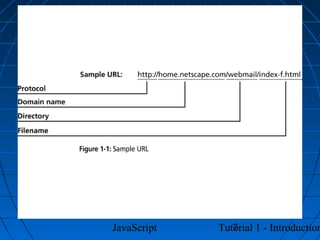
    • Uniform Resource Locator (URL)
         Consists of 4 parts:
           •   Protocol → Hyper Text Transfer Protocol (HTTP)
           •   Domain Name → or Internet Protocol (IP) address
           •   Directory
           •   Filename
                  Specific document filename

                  index.(s)htm(l) or default.(s)htm(l)


                      JavaScript               6
                                            Tutorial 1 - Introduction
JavaScript      7
             Tutorial 1 - Introduction
Programming, HTML, and
             JavaScript
   JavaScript’s role on the Web
    • HTML
       Purpose → tell the browser how a document
        should appear
       Static → can view or print (no interaction)


                 JavaScript            8
                                    Tutorial 1 - Introduction
Programming, HTML, and
             JavaScript
   JavaScript’s role on the Web
    • JavaScript Programming Language
       Developed by Netscape for use in Navigator
        Web Browsers
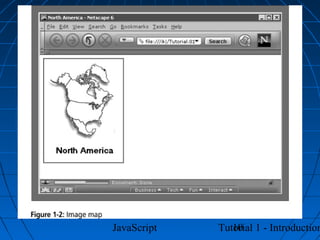
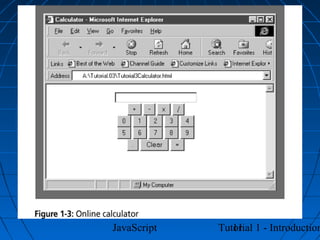
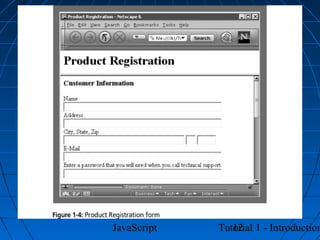
       Purpose → make web pages (documents)

        more dynamic and interactive
          • Change contents of document, provide forms and
            controls, animation, control web browser window,
            etc.


                   JavaScript                9
                                          Tutorial 1 - Introduction
JavaScript      10
             Tutorial 1 - Introduction
JavaScript      11
             Tutorial 1 - Introduction
JavaScript      12
             Tutorial 1 - Introduction
Programming, HTML, and
            JavaScript
   Hypertext Markup Language
    • HTML Document
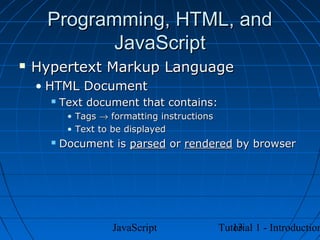
         Text document that contains:
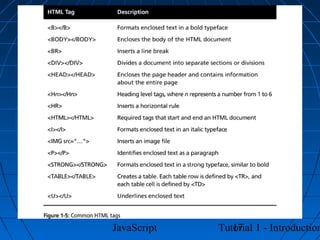
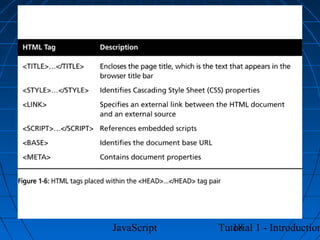
           • Tags → formatting instructions
           • Text to be displayed
         Document is parsed or rendered by browser


                    JavaScript                   13
                                              Tutorial 1 - Introduction
Programming, HTML, and
            JavaScript
   Hypertext Markup Language
    • HTML Document
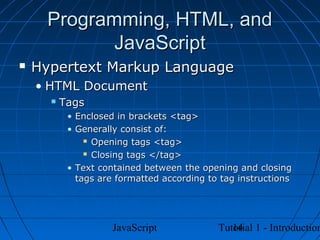
         Tags
           • Enclosed in brackets <tag>
           • Generally consist of:
                Opening tags <tag>

                Closing tags </tag>

           • Text contained between the opening and closing
             tags are formatted according to tag instructions


                     JavaScript                14
                                            Tutorial 1 - Introduction
Programming, HTML, and
            JavaScript
   Hypertext Markup Language
    • HTML Document
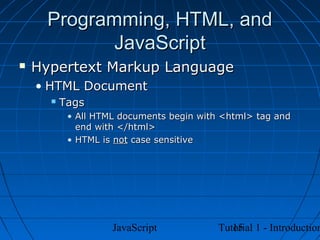
         Tags
           • All HTML documents begin with <html> tag and
             end with </html>
           • HTML is not case sensitive


                    JavaScript               15
                                          Tutorial 1 - Introduction
Programming, HTML, and
            JavaScript
   Hypertext Markup Language
    • HTML Document
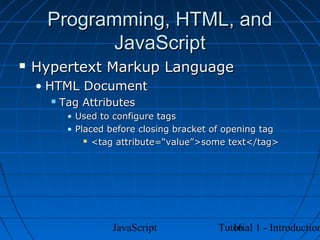
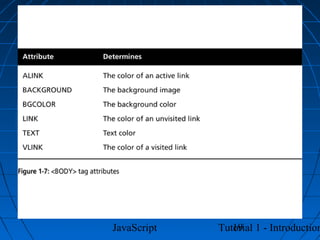
         Tag Attributes
           • Used to configure tags
           • Placed before closing bracket of opening tag
                <tag attribute=“value”>some text</tag>


                    JavaScript                16
                                           Tutorial 1 - Introduction
JavaScript      17
             Tutorial 1 - Introduction
JavaScript      18
             Tutorial 1 - Introduction
JavaScript      19
             Tutorial 1 - Introduction
Programming, HTML, and
            JavaScript
   Hypertext Markup Language
    • HTML Document
       Web browser only acknowledges text and
        valid tags
       Web browser ignores non-printing

        characters
           • Spaces, tabs, carriage returns
         Must use valid tags or special character
          codes to accomplish this:
           • Non-breaking space → &nbsp;


                     JavaScript                  20
                                              Tutorial 1 - Introduction
JavaScript      21
             Tutorial 1 - Introduction
JavaScript      22
             Tutorial 1 - Introduction
Programming, HTML, and
             JavaScript
   Creating an HTML Document
    • Text editor (text)
         Notepad, WordPad
    • Word Processor (that can create text
      files)
         Word
    • HTML Editor (WYSIWYG)
         FrontPage, PageMill
    • HTML Converters (WYSIWYG)
         Word, PowerPoint

                   JavaScript      23
                                Tutorial 1 - Introduction
JavaScript      24
             Tutorial 1 - Introduction
Programming, HTML, and
             JavaScript
   The JavaScript Programming
    Language
    • Scripting Languages
       Executed by an interpreter contained within
        the web browser (scripting host)
       Interpreter uses a scripting engine

          • Converts code to executable format each time it
            runs
          • Converted when browser loads web document


                   JavaScript                25
                                          Tutorial 1 - Introduction
Programming, HTML, and
             JavaScript
   The JavaScript Programming
    Language
    • JavaScript
       Originally called LiveScript when introduced
        in Netscape Navigator
       In Navigator 2.0, name changed to

        JavaScript
       Current version 1.5


    • JScript
         MS version of JavaScript
           • Current version 5.5
                     JavaScript         26
                                     Tutorial 1 - Introduction
Programming, HTML, and
             JavaScript
   The JavaScript Programming
    Language
    • ECMAScript
       International, standardized version (Edition
        3)
       Both versions (JavaScript and JScript)

        conform to the standard
           • Although both have proprietary extensions
         Focus of this text


                    JavaScript                27
                                           Tutorial 1 - Introduction
Programming, HTML, and
             JavaScript
   The JavaScript Programming
    Language
    • JavaScript
         Two formats:
           • Client-side
                Program runs on client (browser)

           • Server-side
                Program runs on server

                Proprietary to web server platform


                     JavaScript                28
                                            Tutorial 1 - Introduction
JavaScript      29
             Tutorial 1 - Introduction
Programming, HTML, and
             JavaScript
   Logic and Debugging
    • Syntax
         Rules of the language
    • Logic
         Order of execution of various parts of the
          program


                    JavaScript             30
                                        Tutorial 1 - Introduction
Programming, HTML, and
             JavaScript
   Logic and Debugging
    • Syntax error
         Misuse of syntax
           • e.g., typing fer instead of for
    • Logic errors
         Unintended operation of program
           • e.g., Infinite loop


                      JavaScript                  31
                                               Tutorial 1 - Introduction
Programming, HTML, and
             JavaScript
   Logic and Debugging
    • Debugging
       Tracing and resolving errors in a program
       Coined by Admiral Grace Hopper

           • Moth short-circuited a relay
               “bug” in the system

           • Removed it → system “debugged”
         Not an exact science


                   JavaScript              32
                                        Tutorial 1 - Introduction