An Introduction to
ReactJS
What is React?
- React is a Javascript framework that focuses on declarative syntax
and virtualization of DOM.
- It is an open-source Javascript library, Developed by Meta in 2013.
- It provides a declarative and efficient way to create interactive UI
components.
- It allows building more reusable and maintainable UI components
with ease.
Why React?
Virtual DOM
- A Virtual DOM is a lightweight copy of the real DOM.
- Traditionally, only way to change content dynamically on
web was to manipulate the real DOM.
- React's virtual DOM allows for efficient updates and
selective rendering, resulting in faster and smoother
user experiences.
Why React?
- Component-based Architecture
- ReactJS follows a component-based architecture, where UIs are divided into
reusable components.
- Traditional web development often involves a mix of HTML, CSS, and
JavaScript, leading to tightly coupled code.
- React's component-based approach promotes modularity, reusability, and
easier maintenance of code.
Why React?
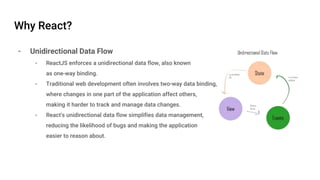
- Unidirectional Data Flow
- ReactJS enforces a unidirectional data flow, also known
as one-way binding.
- Traditional web development often involves two-way data binding,
where changes in one part of the application affect others,
making it harder to track and manage data changes.
- React's unidirectional data flow simplifies data management,
reducing the likelihood of bugs and making the application
easier to reason about.
Why React?
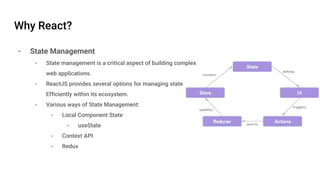
- State Management
- State management is a critical aspect of building complex
web applications.
- ReactJS provides several options for managing state
Efficiently within its ecosystem.
- Various ways of State Management:
- Local Component State
- useState
- Context API
- Redux
What is a React Component?
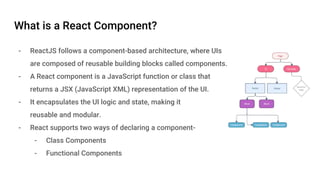
- ReactJS follows a component-based architecture, where UIs
are composed of reusable building blocks called components.
- A React component is a JavaScript function or class that
returns a JSX (JavaScript XML) representation of the UI.
- It encapsulates the UI logic and state, making it
reusable and modular.
- React supports two ways of declaring a component-
- Class Components
- Functional Components
Structure of React Component
- Props
- Props allow passing data from parent components to child components.
- Props are read-only and should not be modified within the component.
- State
- State represents the mutable data within a component.
- State is typically managed within class components using the this.state object and the
setState method.
- Functional components can also have state using React hooks like useState.
- Styling
- Styling can be applied to React components using CSS classes, inline styles, or CSS-in-JS
libraries.
- CSS classes can be added using the className attribute in JSX.
- Inline styles can be applied using the style attribute in JSX.
What is JSX?
- JSX (JavaScript XML) is a syntax extension for
JavaScript used in React.
- JSX allows you to write HTML-like code within JavaScript,
making it easier to create and manipulate the UI.
- JSX allows embedding JavaScript expressions within
curly braces {}.
- JSX needs to be compiled into plain JavaScript to be
understood by the browser.
Component Life Cycle
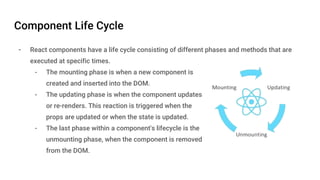
- React components have a life cycle consisting of different phases and methods that are
executed at specific times.
- The mounting phase is when a new component is
created and inserted into the DOM.
- The updating phase is when the component updates
or re-renders. This reaction is triggered when the
props are updated or when the state is updated.
- The last phase within a component's lifecycle is the
unmounting phase, when the component is removed
from the DOM.
Life Cycle Hooks
- componentDidMount()
- This hook is called after a component is mounted (rendered for the first time) in the DOM.
- componentDidUpdate(prevProps, prevState)
- This hook is called after a component is updated and re-rendered in response to changes in
props or state.
- componentWillUnmount()
- This hook is called just before a component is unmounted and removed from the DOM.
- shouldComponentUpdate(nextProps, nextState)
- This hook is called before a component is re-rendered and allows you to control if the re-
rendering should occur.
Running a React Application
- To run a React Application, we need to install
- NodeJS
- Node Package Manager (NPM)
- Install create-react-app
- npm install -g create-react-app
- Create React Application
- npx create-react-app my-app
- Run development server
- cd my-app
- npm start
- Build Project
- npm run build
Conclusion
- React is a powerful JavaScript library for building user interfaces.
- React's component-based architecture and efficient rendering make it a
popular choice for front-end development.
THANK YOU