Prepared By JAVATECH Search us from the World
PLSQL
PLSQL- First SQL is Structure Query Language. Which is used to insert update delete & view
data from database? But we cannot perform programming language in SQL. Programming
language means if else, switch case and while loop. To add this programming language
ORACLE server introduced another tool is called PLSQL. PL stands for Programming
Language SQL is with SQL statement. These programs are executed in Server.
Benefits of PLSQL
1. You can use modularized application in Database. Such as
i. Procedures & Functions (Group logically related statement within block)
ii. Packages
iii. Database Trigger
iv. Looping Structure
2. It allows data manipulation on query statement, which retrieve from
database.
3. It supports Exception Handling.
4. Variable declaration supports & constants declaration.
5. Portability. It can transfer to any HOST machine, No problem if OS is different.
6. It is an Extension of SQL.
Section Description Inclusion
Declare Declare all variables, cursor, constants & user defined
exceptions
Optional
Begin Contains SQL statement to manipulate data in database and
PL/SQL statement to manipulate data in the block.
Mandatory
Exception Specify the action to perform when errors and abnormal
conditions arise in the begin section
Optional
Section keywords DECLARE, BEGIN AND EXCEPTION are not
followed by semicolon. END and other statements is required
semicolon to terminate statement.
Types of Variable
1. Scalar (Single datatypes like as int, char, varchar, varchar2, number, date)
2. Composite (Which is consists of more than one datatype. Like as records or group of
fields. )
3. Reference ( Hold values called pointer. It is called database cursor. )
4. LOB (Large Object- hold value called locator. E.g. Large Objects like Image file). It is
out of oracle.
NOW WE DISCUSS HOW TO WRITE AND EXECUTE PL/SQL PROGRAM
I will execute my names in PL/SQL. So you write all grouped statement into notepad and
give their name. And give @filename press enter then again press / slash to execute
program.
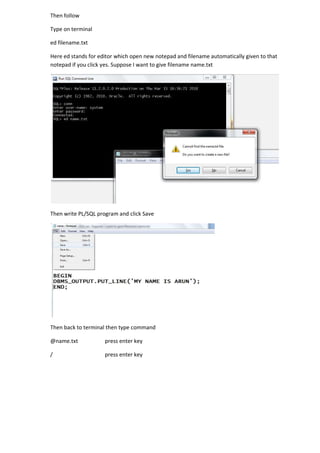
First open terminal connect using system and password system.
Then follow
Type on terminal
ed filename.txt
Here ed stands for editor which open new notepad and filename automatically given to that
notepad if you click yes. Suppose I want to give filename name.txt
Then write PL/SQL program and click Save
Then back to terminal then type command
@name.txt press enter key
/ press enter key
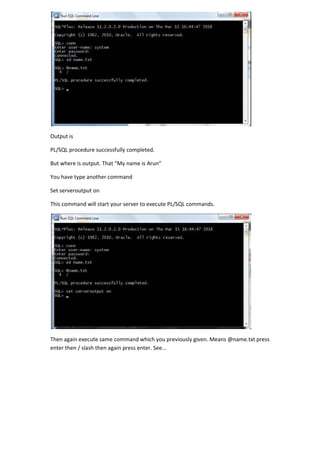
Output is
PL/SQL procedure successfully completed.
But where is output. That “My name is Arun”
You have type another command
Set serveroutput on
This command will start your server to execute PL/SQL commands.
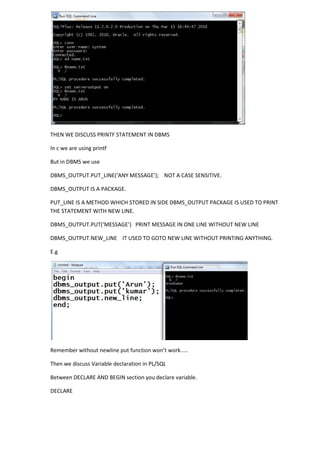
Then again execute same command which you previously given. Means @name.txt press
enter then / slash then again press enter. See...
THEN WE DISCUSS PRINTF STATEMENT IN DBMS
In c we are using printf
But in DBMS we use
DBMS_OUTPUT.PUT_LINE(‘ANY MESSAGE’); NOT A CASE SENSITIVE.
DBMS_OUTPUT IS A PACKAGE.
PUT_LINE IS A METHOD WHICH STORED IN SIDE DBMS_OUTPUT PACKAGE IS USED TO PRINT
THE STATEMENT WITH NEW LINE.
DBMS_OUTPUT.PUT(‘MESSAGE’) PRINT MESSAGE IN ONE LINE WITHOUT NEW LINE
DBMS_OUTPUT.NEW_LINE IT USED TO GOTO NEW LINE WITHOUT PRINTING ANYTHING.
E.g
Remember without newline put function won’t work.....
Then we discuss Variable declaration in PL/SQL
Between DECLARE AND BEGIN section you declare variable.
DECLARE
Roll int;
Name varchar(20);
Salary number(5,2)
BEGIN
Assignment value to variable use [ := symbol used for assign value ]
Roll int:=5;
Name varchar(20):=’ashok’;
Take the input in PL/SQL
Same use ‘&’ symbol to take input in PL/SQL
E.g.
Roll int := &Roll;
Name varchar(20):=’&name’;
E.g.
HOW TO ADD TWO NO IN PL/SQL PROGRAM
declare
x int:=&x;
y int:=&y;
sum1 int;
begin
sum1:=x+y;
dbms_output.put_line('Sum is : '||sum1);
end;
Then try to execute above.....
Sum variable can’t work because sum aggregate is there in SQL.
Comment line is double hyphen [ -- ]
Declare constant keyword. It is used to declare the variable which is readonly. Means you
can’t re-assign again.
E.g
Name constant varchar(10):=’amar’; it is fixed.
IF ELSE PROGRAM IN PL/SQL
Syntax
If condition then
Print statement
Else
Print statement
End if
Then & End if keyword used. Condition not given in parenthesis.
WAP TO CHECK GREATER NO BETWEEN TWO NO.
declare
x int:=&x;
y int:=&y;
begin
if x>y then
dbms_output.put_line(x||' is greater');
else
dbms_output.put_line(y||' is greater');
end if;
end;
MULTIPLE IF CONDITIONS
Syntax
If condition then
Print statement1
Elsif condition then
Print statement2
Else
Print statement3
End if
Here you type ELSIF not else if ok......
WAP TO CHECK NO IS POSITIVE, NEGATIVE OR EQUALS TO ZERO.
declare
x int:=&x;
begin
if x>0 then
dbms_output.put_line(x||' is positive');
elsif x<0 then
dbms_output.put_line(x||' is negative');
else
dbms_output.put_line(' equals to zero');
end if;
end;
LOOP IN PL/SQL
Loop is used to do a specific task repeatedly.
1. Basic loop
2. While loop
3. For loop
4. Cursor loop
Syntax of basic loop
Loop
Statement
Increment/decrement
Exit when condition;
End loop;
Here You will specify the condition when loop will be exist. It is same as do while loop in c. If
condition is false it will continue otherwise it terminates.
Wap to print your name 10 times on screen by using basic loop.
declare
count1 int:=1;
begin
loop
dbms_output.put_line('ARUN');
count1:=count1+1;
exit when count1>10;
end loop;
end;
WHILE LOOP
Syntax
While condition
Loop
Statement
Increment/decrement
End loop
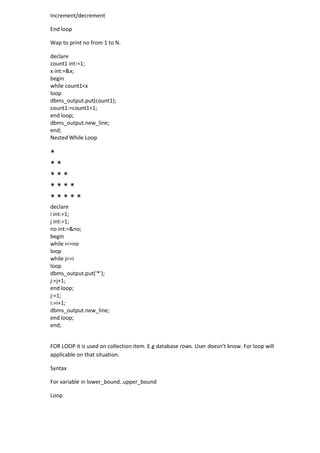
Wap to print no from 1 to N.
declare
count1 int:=1;
x int:=&x;
begin
while count1<x
loop
dbms_output.put(count1);
count1:=count1+1;
end loop;
dbms_output.new_line;
end;
Nested While Loop
*
* *
* * *
* * * *
* * * * *
declare
i int:=1;
j int:=1;
no int:=&no;
begin
while i<=no
loop
while j<=i
loop
dbms_output.put('*');
j:=j+1;
end loop;
j:=1;
i:=i+1;
dbms_output.new_line;
end loop;
end;
FOR LOOP it is used on collection item. E.g database rows. User doesn’t know. For loop will
applicable on that situation.
Syntax
For variable in lower_bound..upper_bound
Loop
Statement
Increment/decrement [ no need ]
End loop
Specify two dot [ . . ] between upper bound and lower bound.
Wap to display your name 10 times on screen.
declare
i int;
begin
for i in 1..10
loop
dbms_output.put_line('aaa');
end loop;
end;
DISPLAY REVERSE IN FOR LOOP
SAME SYNTAX BUT USED REVERSE KEYWORD
declare
i int;
begin
for i in REVERSE 1..10
loop
dbms_output.put_line(I);
end loop;
end;
CURSOR LOOP IS USED TO VIEW DATABASE ROWS IN PL/SQL PROGRAM.
Suppose We don’t know how many no of rows are in database. This case we use cursor.
Cursor is used to point individual rows in database. Just we only declare cursor cur_name
which hold database records.
Syntax
Declare
Cursor cur_name is select * from table_name;
Begin
For i in cur_name
Loop
Print cur_name.col name;
End loop
End;
Waq to display the table rows in PL/SQL by using cursor for loop.
In previous example cursor c1 contains all rows from table in database. When we use cursor
for loop it automatically move one by one rows. And this record individually stored in i
variable. Means i variable contains individual record. I here references to row. When we
type i.roll it display roll no.
SWITCH CASE STATEMENT
Syntax of Switch Case
Case selector
When expression1 then result1
When expresseion2 then result2
Else
Result
End Case;
Waq to display Day from day no. E.g 1 for Monday 2 for Tuesday like as...
declare
dd1 int:=&dd1;
begin
case dd1
when 1 then
dbms_output.put_line('Monday');
when 2 then
dbms_output.put_line('Tuesday');
when 3 then
dbms_output.put_line('Wednesday');
else
dbms_output.put_line('Invalid day');
end case;
end;
NOW PERFORM DML OPERATION THROUGH PL/SQL
First we declare one variable. Roll1 int & name1 varchar2(20).
And then we select roll & name from database and fetch into roll1 & name1 variable.
Syntax is
Select roll,name into roll1,name1 from student where roll=2;
After this line when we print
Dbms_output.put_line(roll1); print rollno of the student
Dbms_output.put_line(name1); print name of the student.
Wap to display student roll,name & mark in PL/SQL by querying data from database.
Now I will Write PLSQL program which will check your mark is pass or fail from database.
Now I will Write PLSQL program which will check all students mark from table is pass or fail.
We can do this by using
By using cursor for loop (Previously described)
By using cursor for loop
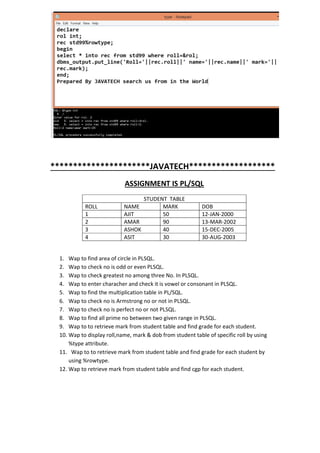
NOW DISCUSS BOTH VARIABLES
1. Scalar Variable [ %type ]
2. Composite Variable [ %rowtype ]
%type is used when we don’t know the exact datatype of the specific column. That case we
use %type.
E.g
Roll1 std99.roll%type; it declare roll1 datatype is roll field type which exits from table.
Here roll1 is a variable which datatype automatically convert into that datatype, is defined
of student table in roll column. If column roll is int type then, %type attribute declare int
type for roll1 variable.
E.g
Another attribute %RowType.
It refers to the whole row only. Suppose we don’t know the datatype of all columns. That
case we use %rowtype. It is used when we want use records in PLSQL. To access column we
use rec.column name. See example
**********************JAVATECH*******************
ASSIGNMENT IS PL/SQL
STUDENT TABLE
ROLL NAME MARK DOB
1 AJIT 50 12-JAN-2000
2 AMAR 90 13-MAR-2002
3 ASHOK 40 15-DEC-2005
4 ASIT 30 30-AUG-2003
1. Wap to find area of circle in PLSQL.
2. Wap to check no is odd or even PLSQL.
3. Wap to check greatest no among three No. In PLSQL.
4. Wap to enter characher and check it is vowel or consonant in PLSQL.
5. Wap to find the multiplication table in PL/SQL.
6. Wap to check no is Armstrong no or not in PLSQL.
7. Wap to check no is perfect no or not PLSQL.
8. Wap to find all prime no between two given range in PLSQL.
9. Wap to to retrieve mark from student table and find grade for each student.
10. Wap to display roll,name, mark & dob from student table of specific roll by using
%type attribute.
11. Wap to to retrieve mark from student table and find grade for each student by
using %rowtype.
12. Wap to retrieve mark from student table and find cgp for each student.
****************PYRAMID IN PLSQL***************
*
* *
* * *
* * * *
* * * * *
A
A B
A B C
A B C D
*
* *
* * *
1
0 1
0 1 0
1 0 1 0
A
A B
A B C
A B C D