PL/ SQL - II
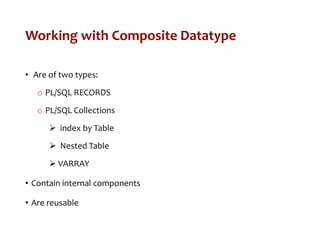
Working with Composite Datatype
• Are of two types:
o PL/SQL RECORDS
o PL/SQL Collections
 index by Table
 Nested Table
 VARRAY
• Contain internal components
• Are reusable
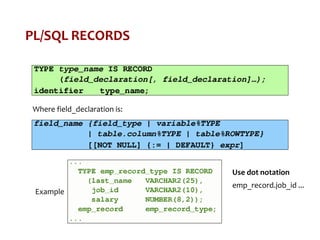
PL/SQL RECORDS
Where field_declaration is:
Example
Use dot notation
emp_record.job_id ...
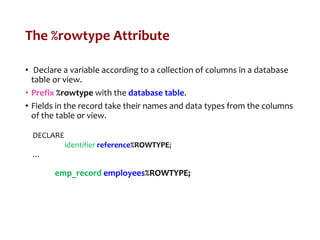
The %rowtype Attribute
• Declare a variable according to a collection of columns in a database
table or view.
• Prefix %rowtype with the database table.
• Fields in the record take their names and data types from the columns
of the table or view.
DECLARE
identifier reference%ROWTYPE;
…
emp_record employees%ROWTYPE;
Index by Tables
• An associative array (also called an index-by table)
o A set of key-value pairs.
o Each key is unique, and is used to locate the corresponding value.
o The key can be either an integer or a string.
• Using a key-value pair for the first time adds that pair to the
associative array.
• Using the same key with a different value changes the value.
Index by Tables
Example
SQL> DECLARE
2 -- Associative array indexed by string:
3
4 TYPE population IS TABLE OF NUMBER -- Associative array type
5 INDEX BY VARCHAR2(64);
6
7 city_population population; -- Associative array variable
8 i VARCHAR2(64);
9
10 BEGIN
11 -- Add new elements to associative array:
12
13 city_population('Smallville') := 2000;
14 city_population('Midland') := 750000;
15 city_population('Megalopolis') := 1000000;
16
17 -- Change value associated with key 'Smallville':
18
19 city_population('Smallville') := 2001;
20
21 -- Print associative array:
22
23 i := city_population.FIRST;
24
25 WHILE i IS NOT NULL LOOP
26 DBMS_Output.PUT_LINE
27 ('Population of ' || i || ' is ' || TO_CHAR(city_population(i)));
28 i := city_population.NEXT(i);
29 END LOOP;
30 END;
31 /
Using index by Table Methods
Index by Table of Records
• Define a table variable with a permitted PL/SQL data type.
• Declare a PL/SQL variable to hold department information.
Example
DECLARE
TYPE stud_table_type is table of
student%ROWTYPE INDEX BY BINARY_INTEGER;
my_stud_table stud_table_type;
v_count NUMBER(9):= 550156548;
BEGIN
FOR i IN 550156548..v_count LOOP
SELECT * INTO my_stud_table(i) FROM student
WHERE snum = i;
END LOOP;
FOR i IN my_stud_table.FIRST..my_stud_table.LAST LOOP
DBMS_OUTPUT.PUT_LINE(my_stud_table(i).sname);
END LOOP;
END;
Cursors
• Every SQL statement executed by the Oracle Server has an individual
cursor associated with it:
o Implicit cursors: Declared for all DML and PL/SQL select
statements
o Explicit cursors: Declared and named by the programmer
Implicit Cursor
• Oracle Engine explicitly opens a cursor
PL/SQL Code
Block on Client
Machine
Server
Oracle
Engine HDD
• Cursor Opened on the Server
• Rows retrieved
Cursor Attributes: %ISOPEN, %FOUND, %NOTFOUND, %ROWCOUNT
Usage: SQL%ROWCOUNT
Explicit Cursor
Declare
• Create a
named
SQL area
Open
• Identify
the Active
Set
Fetch
• Load the
current
row into
variables
Verify
• Check
whether
empty or
not
Close
• Release
the active
set if
empty
Use explicit cursors to individually process each row returned by a
multiple-row SELECT statement.
Explicit Cursor Working Principle
Client
Machine
Server
Open <CursorName>
Oracle
Engine HDD
C1 C2 C3 C4
Server RAM
Active Data Set
Fetch <CursorName> INTO …
Client RAM
V1
V2
V3
V4
Fetch One row
at a time
Advance the
cursor
Declaring the Cursor
• Do not include the into clause in the
cursor declaration.
• If processing rows in a specific
sequence is required use the order
by clause in the query.
DECLARE
CURSOR emp_cursor IS
SELECT employee_id, FROM employees;
CURSOR dept_cursor IS
SELECT * FROM departments WHERE location_id = 170;
BEGIN
…
Opening the Cursor
• Open the cursor to execute the query and identify the active set.
• If the query returns no rows, no exception is raised.
• Use cursor attributes to test the outcome after a fetch.
1. Dynamically allocates memory for a context area that eventually contains
crucial processing information.
2. Parses the SELECT statement.
3. Binds the input variables—sets the value for the input variables by
obtaining their memory addresses.
4. Identifies the active set—the set of rows that satisfy the search criteria.
Rows in the active set are not retrieved into variables when the OPEN
statement is executed. Rather, the FETCH statement retrieves the rows.
5. Positions the pointer just before the first row in the active set.
Fetching Data from the Cursor
• Retrieve the current row values into variables.
• Include the same number of variables.
• Match each variable to correspond to the columns positionally.
• Test to see whether the cursor contains rows.
Example
SET SERVEROUTPUT ON
DECLARE
v_empno employees.employee_id%TYPE;
v_ename employees.last_name%TYPE;
CURSOR emp_cursor IS
SELECT employee_id, last_name FROM employees;
BEGIN
OPEN emp_cursor;
FOR i IN 1..10 LOOP
FETCH emp_cursor INTO v_empno, v_ename;
DBMS_OUTPUT.PUT_LINE (TO_CHAR(v_empno) II' 'II
v_ename);
END LOOP;
END ;
Closing the Cursor
• Close the cursor after completing the processing of the rows.
• Reopen the cursor, if required.
• Do not attempt to fetch data from a cursor after it has been closed.
More Example
Example
DECLARE
CURSOR emp_cursor IS
SELECT employee_id, last_name FROM employees;
emp_record emp_cursor%ROWTYPE;
BEGIN
OPEN emp_cursor;
LOOP
FETCH emp_cursor INTO emp_record;
EXIT WHEN emp_cursor%NOTFOUND;
INSERT INTO temp_list (empid, empname) VALUES
(emp_record.employee_id, emp_record.last_name);
END LOOP;
COMMIT;
CLOSE emp_cursor;
END;
Another Way
• DECLARE
• TYPE emp_record IS RECORD ( eid NUMBER, ename VARCHAR2(30) );
• employee EMP_RECORD;
• CURSOR cur IS SELECT empid, empname FROM employee ;
• BEGIN
• OPEN cur ;
• LOOP
• FETCH cur INTO employee;
• EXIT WHEN cur%NOTFOUND;
• dbms_output.put_line( 'NAME' || employee.ename );
• END LOOP;
• CLOSE cur ;
• END;
• /
Cursor with If statement
• DECLARE
• TYPE emp_record IS RECORD ( eid NUMBER, ename VARCHAR2(30) );
• employee EMP_RECORD;
• CURSOR cur IS SELECT empid, empname FROM employee where empid = -1 ;
• BEGIN
• OPEN cur ;
• LOOP
• FETCH cur INTO employee;
• IF cur%NOTFOUND THEN
• IF cur%ROWCOUNT = 0 THEN
• dbms_output.put_line( 'No Data Found' );
• END IF;
• EXIT;
• ELSE
• dbms_output.put_line( 'NAME' || employee.ename );
• END IF;
• END LOOP;
• CLOSE cur ;
• END;
• /
Cursor for Loops
• The cursor for loop is a shortcut to process explicit cursors.
• Implicit open, fetch, exit, and close occur.
• The record is implicitly declared.
Example
DECLARE
CURSOR emp_cursor IS
SELECT last_name, department_id
FROM employees;
BEGIN
FOR emp_record IN emp_cursor LOOP
—implicit open and implicit fetch occur
IF emp_record.department_id = 80 THEN
DBMS_OUTPUT.PUT_LINE ('Employee ' ||
emp_record.last_name
|| ' works in the Sales Dept. ');
END IF;
END LOOP; --implicit close and implicit loop exit
END ;
DECLARE
v_employee_id employees.employee_id%TYPE;
v_job_id employees.job_id%TYPE;
v_start_date DATE;
v_end_date DATE;
CURSOR emp_cursor IS
SELECT employee_id, job_id, start_date, end_date
FROM job_history
ORDER BY employee_id;
BEGIN
OPEN emp_cursor;
LOOP
FETCH emp_cursor
INTO v_employee_id, v_job_id, v_start_date, v_end_date;
DBMS_OUTPUT.PUT_LINE ('Employee #: ' || v_employee_id ||
' held the job of ' || v_job_id || ' FROM ' || v_start_date | | ' TO ' I I
v_end_date);
EXIT WHEN emp_cursor%ROWCOUNT > 4 OR
emp_cursor%NOTFOUND;
END LOOP;
CLOSE emp_cursor;
END;
Handling Exceptions with PL/SQL
• An Exception is an identifier in PL/SQL that is raised during execution.
• How is it raised?
o An Oracle error occurs.
o You raise it explicitly.
• How do you handle it?
o Trap it with a handler.
oPropagate it to the calling environment.
Handling Exception
Example
Predefined Exceptions
User Defined Exception
PL/SQL Program Constructs
Block Structure for PL/SQL Subprograms
- The PL/SQL subprogram type, that is, either a procedure or a function
- The name of the subprogram
- The parameter list, if one exists
- The RETURN clause, which applies only to functions
The IS or AS
keyword is
mandatory.
The keyword
DECLARE is not
used
Procedure
• The replace option indicates that if the procedure exists, it will be dropped
and replaced with the new version created by the statement.
• PL/SQL block starts with either begin or the declaration of local variables
and ends with either end or end procedure_name.
• Type of argument: IN (default) , OUT , IN OUT
Formal Versus Actual Parameters
CREATE PROCEDURE raise_sal (p_id NUMBER, p_amount NUMBER)
…
END raise_sal;
raise_sal(v_id, 2000)
Procedure Parameter Model
Attempts to change the value of an IN
parameter will result in an error.
Creating Procedures with Parameters
IN OUT IN OUT
Default mode Must be specified Must be specified
Value is passed into
subprogram
Returned to calling
environment
Passed into subprogram;
returned to calling
environment
Formal parameter acts
as a constant
Uninitialized variable Initialized variable
Actual parameter can be
a literal, expression,
constant, or initialized
variable
Must be a variable Must be a variable
Can be assigned a
default value
Cannot be assigned
a default value
Cannot be assigned a default
value
In, Out Parameters: Example
CREATE OR REPLACE PROCEDURE getDBUSERByUserId
( p_userid IN DBUSER.USER_ID%TYPE,
o_username OUT DBUSER.USERNAME%TYPE,
o_createdby OUT DBUSER.CREATED_BY%TYPE,
o_date OUT DBUSER.CREATED_DATE%TYPE)
IS
BEGIN
SELECT USERNAME , CREATED_BY, CREATED_DATE INTO o_username,
o_createdby, o_date from DBUSER WHERE USER_ID = p_userid;
END;
/
Calling the procedure
DECLARE
o_username DBUSER.USERNAME%TYPE;
o_createdby DBUSER.CREATED_BY%TYPE;
o_date DBUSER.CREATED_DATE%TYPE;
BEGIN
getDBUSERByUserId(1001,o_username,o_createdby,o_date);
DBMS_OUTPUT.PUT_LINE('username : ' || o_username);
DBMS_OUTPUT.PUT_LINE('createdby : ' || o_createdby);
DBMS_OUTPUT.PUT_LINE('createddate : ' || o_date);
END;
/
Insert through Procedure
CREATE OR REPLACE PROCEDURE insertDBUSER
( p_userid IN DBUSER.USER_ID%TYPE,
p_username IN DBUSER.USERNAME%TYPE,
p_createdby IN DBUSER.CREATED_BY%TYPE,
p_date IN DBUSER.CREATED_DATE%TYPE)
IS
BEGIN
INSERT INTO DBUSER ("USER_ID", "USERNAME", "CREATED_BY",
"CREATED_DATE") VALUES (p_userid, p_username,p_createdby,
p_date);
COMMIT;
END;
/
BEGIN
insertDBUSER(1001,'mkyong','system',SYSDATE);
END;
Update through procedure
CREATE OR REPLACE PROCEDURE updateDBUSER
( p_userid IN DBUSER.USER_ID%TYPE,
p_username IN DBUSER.USERNAME%TYPE)
IS
BEGIN
UPDATE DBUSER SET USERNAME = p_username where USER_ID
= p_userid;
COMMIT;
END;
/
BEGIN
updateDBUSER(1001,'new_mkyong');
END;
Functions
The RETURN data type must not
include a size specification.
There must be at least one RETURN (expression)
CREATE OR REPLACE Function IncomeLevel
( name_in IN varchar2 )
RETURN varchar2
IS
monthly_value number(6);
ILevel varchar2(20);
cursor c1 is SELECT SAL FROM scott.EMP WHERE ename = name_in;
BEGIN
open c1;
fetch c1 into monthly_value;
close c1;
IF monthly_value <= 1000 THEN
ILevel := 'Low Income';
ELSIF monthly_value > 1000 and monthly_value <= 2000 THEN
ILevel := 'Avg Income';
ELSIF monthly_value > 2000 and monthly_value <= 3000 THEN
ILevel := 'Moderate Income';
ELSE ILevel := 'High Income';
END IF;
RETURN ILevel;
END;
Locations to Call User-Defined Functions
• Select list of a select command
• Condition of the where and having clauses
• CONNECT BY, START WITH, ORDER BY, and GROUP by clauses
• values clause of the insert command
• set clause of the update command
o E.g. select empno, IncomeLevel(ename) as Income from
scott.EMP where ename='KING'
Restrictions
• To be callable from SQL expressions, a user-defined function must:
o Be a stored function
o Accept only in parameters
o Accept only valid SQL data types, not PL/SQL specific types, as
parameters
o Return data types that are valid SQL data types, not PL/SQL
specific types
o Functions called from SQL expressions cannot contain DML
statements.
Restrictions
• To be callable from SQL expressions, a user-defined function must:
oFunctions called from update/delete statements on a table T
cannot contain DML on the same table T.
oFunctions called from a DML statement on a table T cannot query
the same table.
oFunctions called from SQL statements cannot contain statements
that end the transactions.
oCalls to subprograms that break the previous restriction are not
allowed in the function.
Comparing Procedures and Functions
Procedure Function
Execute as a PL/SQL statement Invoke as part of an expression
No return clause in the header Must contain a return clause in the
header
Can return none, one, or many
values
Must return a single value
Can contain a return statement Must contain at least one return
statement