
PHP: The Basics
What is it?PHP is a scripting language commonly used on web servers.Stands for “PHP: Hypertext Preprocessor”Open sourceEmbedded codeComparable with ASPMultiple operating systems/web servers
The PHP Resourcewww.php.net
What can it do?Dynamic generation of web-page contentDatabase interactionProcessing of user supplied dataEmailFile handlingText processingNetwork interactionAnd more…
FundamentalsPHP is embedded within xhtml pages within the tags: <?php  …  ?>The short version of these tags can also be used: <? …  ?>Each line of PHP is terminated, like MySQL, with a semi-colon.
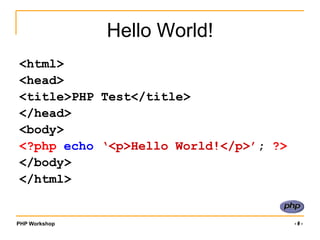
Hello World!<html> <head> <title>PHP Test</title> </head> <body> <?phpecho ‘<p>Hello World!</p>’;?></body> </html>
Preparing to code with PHP
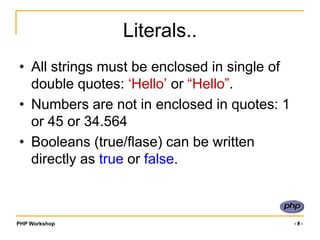
Literals..All strings must be enclosed in single of double quotes: ‘Hello’ or “Hello”.Numbers are not in enclosed in quotes: 1 or 45 or 34.564Booleans (true/flase) can be written directly as true or false.
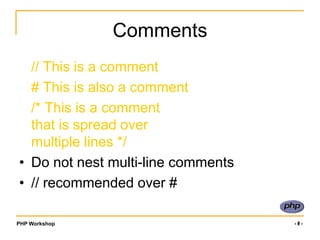
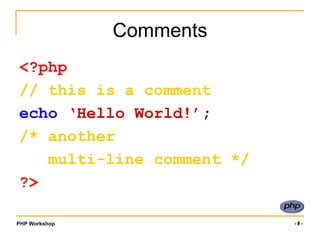
Comments	// This is a comment	# This is also a comment	/* This is a commentthat is spread overmultiple lines */Do not nest multi-line comments// recommended over #
Comments<?php// this is a commentecho ‘Hello World!’;/* another     multi-line comment */?>
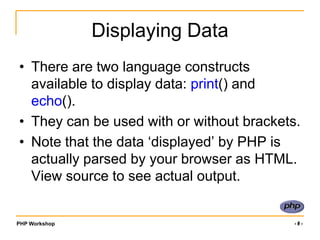
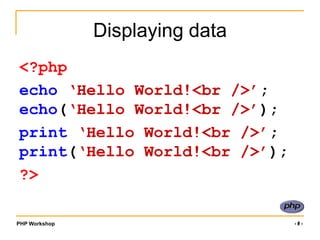
Displaying DataThere are two language constructs available to display data: print() and echo().They can be used with or without brackets.Note that the data ‘displayed’ by PHP is actually parsed by your browser as HTML. View source to see actual output.
Displaying data<?phpecho ‘Hello World!<br />’;echo(‘Hello World!<br />’);print ‘Hello World!<br />’;print(‘Hello World!<br />’);?>
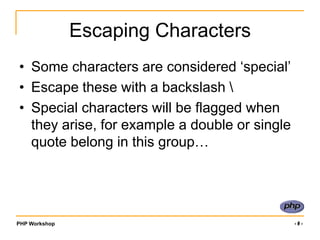
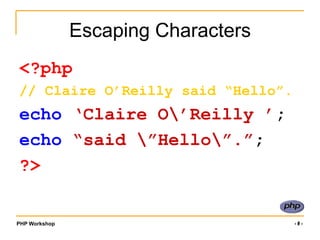
Escaping CharactersSome characters are considered ‘special’Escape these with a backslash Special characters will be flagged when they arise, for example a double or single quote belong in this group…
Escaping Characters<?php// Claire O’Reilly said “Hello”.echo ‘Claire O’Reilly ’;echo “said ”Hello”.”; ?>
Variables: What are they?When we work in PHP, we often need a labelled place to store a value (be it a string, number, whatever) so we can use it in multiple places in our script.These labelled ‘places’ are called VARIABLES
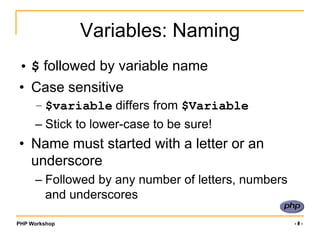
Variables: Naming$ followed by variable nameCase sensitive$variable differs from $VariableStick to lower-case to be sure!Name must started with a letter or an underscoreFollowed by any number of letters, numbers and underscores
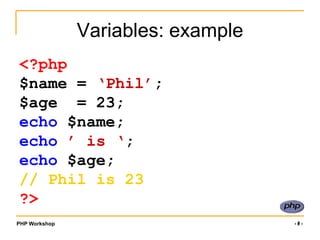
Variables: example<?php$name = ‘Phil’;$age  = 23;echo $name;echo ’ is ‘;echo $age;// Phil is 23?>
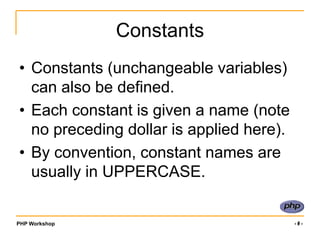
ConstantsConstants (unchangeable variables) can also be defined.Each constant is given a name (note no preceding dollar is applied here).By convention, constant names are usually in UPPERCASE.
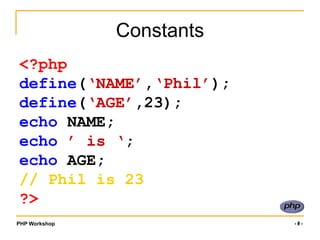
Constants<?phpdefine(‘NAME’,‘Phil’);define(‘AGE’,23);echo NAME;echo ’ is ‘;echo AGE;// Phil is 23?>
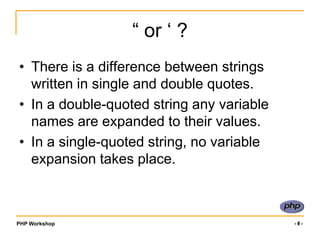
“ or ‘ ?There is a difference between strings written in single and double quotes.In a double-quoted string any variable names are expanded to their values.In a single-quoted string, no variable expansion takes place.
“ or ‘ ?<?php$name = ‘Phil’;$age  = 23;echo “$name is $age”;// Phil is 23?>
“ or ‘ ?<?php$name = ‘Phil’;$age  = 23;echo ‘$name is $age’;// $name is $age?>
ReviewWe’ve started PHP..Escaping XHTMLCommentsBasic SyntaxVariablesConstants
PHP: Moving On..
Expressions and Operators
ReminderPHP is embedded within xhtml pages within the tags: <?php  …  ?>The short version of these tags can also be used: <? …  ?>Each line of PHP is terminated, like MySQL, with a semi-colon.
ReminderVariables are automatically initialised when you start to use them.e.g.   <?php	$name = ‘Rob’;echo $name;?>
ExpressionsUsing variables within expressions to do something is what PHP is all about.	<?php	$name = ‘Rob’;echo $name;?>ExpressionOperator
Some Types of OperatorIncrementing/decrementing
Logical
StringArithmeticAssignmentBitwiseComparisonTernary
String OperatorsUse a dot to concatenate two strings:e.g.	$firstname = ‘Rob’;	$surname = ‘Tuley’;// displays ‘Rob Tuley’echo $firstname.’ ‘.$surname;
Arithmetic Operators
Assignment Operators
Combining OperatorsNote that you can combine operators, for example use =, + and / in one expression:	$a = 4;	$b = 2;	$c = $a + $b + ($a/$b);// $c has value 4+2+(4/2) = 8Brackets help group operators.
Comparison Operators
ComparisonsComparison expressions return a value of TRUE (or ‘1’) or FALSE (or ‘0’). e.g.	$a = 10;	$b = 13;// result is true (‘1’) echo $a < $b;
Incrementing/Decrementing
Logical Operators
Finally, a tricky one!A single ? is the ternary operator.(expr) ? if_expr_true : if_expr_false;A test expression evaluates to TRUE or FALSE. TRUE gives first result (before colon)FALSE gives second result (after colon)
Ternary Operator example<?php$a = 10;$b = 13;echo $a<$b ? ‘a smaller’:‘b smaller’;// string ‘a smaller’ is echoed // to the browser..?>
Groups of variablesSo far, we have stored ONE piece of data in each variable. It is also possible to store multiple pieces of data in ONE variable by using an array.Each piece of data in an array has a key..
An arrayNormal Variable, no key:$name = ‘Rob’;Array Variable, multiple pieces with ‘keys’:$name[0] = ‘Rob’;		$name[1] = ‘Si’;		$name[2] = ‘Sarah’;		…The ‘key’
Array keysArray keys can be strings as well as numbers..	$surname[‘rob’] = ‘Tuley’;	$surname[‘si’] = ‘Lewis’;Notice the way that the key is specified, in square brackets following the variable name.
Working with arrays..Create Array (automatic keys):$letters = array('a','b','c','d');The array keys are automatically assigned by PHP as 0, 1, 2, 3i.e. $letters[1] has value‘b’Create Array (explicit keys):	$letters = array(10=>’a’,13=>’b’);	i.e. $letters[13] has value‘b’
Working with arrays…Create array (component by component):	$letters[10] = ‘a’;	$letters[13] = ‘b’;Access array component:echo $letters[10];	// displays a	echo $letters[10].$letters[13];	// displays ab
Working with arrays…Note that trying to echo an entire array will not display the data. To print an entire array to screen (for debug, for example) use the function print_r instead.	echo $letters;	print_r($letters);
So..We know we can:Store things in named variables.Use expressions to operate on the contents of these variables.Can compare variables..	How do we actually include logic in the code such as ‘if this is bigger than that, do this’?
Control Structuresif, elseif, elsewhile, do … whilefor, foreachswitchbreak, continue, returnrequire, include, require_once, include_once
If …To do something depending on a comparison, use an if statement.if (comparison) {expressions; // do if TRUE	}NB: Notice the curly brackets – these are important!
If example<?php	$a = 10;	$b = 13;if ($a<$b) {echo‘a is smaller than b’;	}?>
Extending IF statementsIt is possible to add extra optional clauses to if statements..	if (comparison) {expressions; // do if TRUE	} else {expressions; // do otherwise	}
Extending If statements	if (comparison1) {expressions;	} elseif (comparison2) {expressions; 	} else {		expressions;	}
An example..$a = 10;$b = 13;if ($a<$b) {echo‘a is smaller than b’;} elseif ($a==$b) {echo‘a is equal to b’;} else {echo‘a is bigger than b’;}
While loopsMight want to do something repeatedly while a comparison is true..while (comparison) {expressions;	}
ExampleLets count to 10! Displays 1,2,3,4,5,..,10:$i = 1;while ($i <= 10) {   echo $i++; }
Do .. WhileAn alternative... $i = 1;do {   echo $i++; } while ($i <= 10);
For loopSometimes we want to loop around the same bit of code a number of times.. Use a for loop.for (expr1; expr2; expr3) { statements; }expr1 evaluated/executed initiallyexpr2 evaluated at beginning of each iteration (Continues if TRUE)expr3 evaluated/executed at end of each iteration
For loop exampleTo count from 1 to 10:for ($i=1; $i<=10; $i++) {echo $i;	}Continue if trueinitialiseExecute at end of loop
Foreach loopA foreach loop is designed for arrays. Often you want to loop through each item in an array in turn..	$letters = array(‘a’,’b’,’c’);	foreach ($letters as $value) {   echo $value; 	} // outputs a,b,c in turn
Foreach.. With keysSometimes we want to use the array ‘key’ value too:$letters = array(‘a’,’b’,’c’);	foreach ($letters as $key => $value) {   echo“array $key to $value”; 	}
Switch statementswitch (expr) {case (result1):statements;break;case (result2):statements;break;default:statements;}expr is evaluated
Case corresponding to result is executed
Otherwise default case is executed
break
Ensures next case isn’t executedSwitch Exampleswitch ($name) {case‘Rob’:echo‘Your name is Rob’;break;case‘Fred’:echo‘You are called Fred’;break;default:	 echo ‘Not sure what your name is’;}
break, continue, returnbreakEnds execution of current for, foreach, do … while, while or switch structureOption: Number of nested structures to break out ofcontinueSkip rest of current loopOption: Number of nested loops to skipreturnEnds execution of current function/statement/script
Indentation..Code readability IS important – notice how all the code inside a loop/control structure is indented.Once you start writing nested control loops, indentation is the only way to keep track of your code!
require, includerequire('filename.ext')Includes and evaluates the specified fileError is fatal (will halt processing)include('filename.ext')Includes and evaluates the specified fileError is a warning (processing continues)require_once/ include_onceIf already included won’t be included again
Code Re-useOften you will want to write a piece of code and re-use it several times (maybe within the same script, or maybe between different scripts).Functions are a very nice way to encapsulate such pieces of code..
Eh..? What?You have already used functions..echo(‘text to display’);Function NAMEFunction ARGUMENT
What is a function?A function takes some arguments (inputs) and does something with them (echo, for example, outputs the text input to the user).As well as the inbuilt PHP functions, we can define our own functions..
Definition vs. CallingThere are two distinct aspects to functions:Definition: Before using a function, that function must be defined – i.e. what inputs does it need, and what does it do with them?Calling: When you call a function, you actually execute the code in the function.
Function DefinitionA function accepts any number of input arguments, and returns a SINGLE value.functionmyfunction($arg1,$arg2,…,$argN){statements;return $return_value;}
ExampleFunction to join first and last names together with a space..function make_name($first,$last) {$fullname = $first.’ ‘.$last;return $fullname;}
Calling functions..Can be done anywhere..myfunction($arg1,$arg2,…,$argN)or$answer = myfunction($arg1,$arg2,…,$argN)e.g.echo make_name(‘Rob’,’Tuley’);// echoes ‘Rob Tuley’
Functions: Return ValuesUse return()Causes execution of function to ceaseControl returns to calling scriptTo return multiple valuesReturn an arrayIf no value returnedNULL
‘Scope’A function executes within its own little protected bubble, or local scope.What does this mean? Its means that the function can’t ‘see’ any of the variables you have defined apart from those passed in as arguments..Each new function call starts a clean slate in terms of internal function variables.
In other words..Variables within a functionAre local to that functionDisappear when function execution endsVariables outside a functionAre not available within the functionUnless set as globalRemembering variablesNot stored between function callsUnless set as static
Global variables..To access a variable outside the ‘local’ scope of a function, declare it as a global:function add5toa(){	global $a;	$a = $a  + 5;} $a = 9;add5toa();echo $a; // 14
Static VariablesLocal function variable values are not saved between function calls unless they are declared as static:function counter(){	static $num = 0;return ++$num;} echo counter(); // 1echo counter(); // 2echo counter(); // 3
Default ArgumentsCan specify a default value in the function definition which is used only if no value is passed to the function when called..Defaults must be specified last in the listfunction myfunction($arg1,$arg2=‘blah’)…function myfunction($arg1=‘blah’,$arg2)…
Passing ReferencesPass a reference to a variableNot the actual variableWhy?Enables a function to modify its argumentsHow?Use an ampersand in front of the variable&$variable
ReviewMore PHP!ExpressionsOperatorsControl StructuresFunctions
File Handling with PHP
Files and PHPFile HandlingData StorageThough slower than a databaseManipulating uploaded filesFrom formsCreating Files for download
Open/Close a FileA file is opened with fopen() as a “stream”, and PHP returns a ‘handle’ to the file that can be used to reference the open file in other functions.Each file is opened in a particular mode.A file is closed with fclose() or when your script ends.
File Open Modes
File Open/Close Example<?php// open file to read$toread = fopen(‘some/file.ext’,’r’);// open (possibly new) file to write$towrite = fopen(‘some/file.ext’,’w’);// close both filesfclose($toread);fclose($towrite);?>
Now what..?If you open a file to read, you can use more in-built PHP functions to read data..If you open the file to write, you can use more in-built PHP functions to write..
Reading DataThere are two main functions to read data:fgets($handle,$bytes)Reads up to $bytes of data, stops at newline or end of file (EOF)fread($handle,$bytes)Reads up to $bytes of data, stops at EOF.
Reading DataWe need to be aware of the End Of File (EOF) point..feof($handle)Whether the file has reached the EOF point. Returns true if have reached EOF.
Data Reading Example		$handle = fopen('people.txt', 'r');		while (!feof($handle)) {			echo fgets($handle, 1024);			echo '<br />';			}fclose($handle);
Data Reading Example		$handle = fopen('people.txt', 'r');		while (!feof($handle)) {			echo fgets($handle, 1024);			echo '<br />';			}fclose($handle);$handle = fopen('people.txt', 'r');Open the file and assign the resource to $handle
Data Reading Example		$handle = fopen('people.txt', 'r');		while (!feof($handle)) {			echo fgets($handle, 1024);			echo '<br />';			}fclose($handle);while (!feof($handle)) {	echo fgets($handle, 1024);	echo '<br />';	}While NOT at the end of the file, pointed to by $handle,get and echo the data line by line
Data Reading Example		$handle = fopen('people.txt', 'r');		while (!feof($handle)) {			echo fgets($handle, 1024);			echo '<br />';			}fclose($handle);Close the filefclose($handle);
File Open shortcuts..There are two ‘shortcut’ functions that don’t require a file to be opened:$lines = file($filename)Reads entire file into an array with each line a separate entry in the array.$str = file_get_contents($filename)Reads entire file into a single string.
Writing DataTo write data to a file use:fwrite($handle,$data)Write $data to the file.
Data Writing Example		$handle = fopen('people.txt', 'a');fwrite($handle, “
Fred:Male”);fclose($handle);
Data Writing Example		$handle = fopen('people.txt', 'a');fwrite($handle, '
Fred:Male');fclose($handle);Open file to append data (mode 'a') $handle = fopen('people.txt', 'a');fwrite($handle, “
Fred:Male”);Write new data (with line break after previous data)