Downloaded 153 times


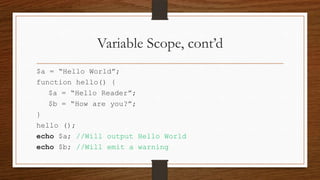
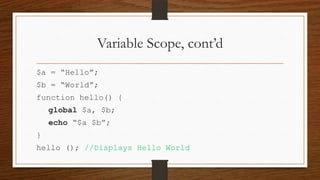
![Variable Scope, cont’d
$a = “Hello”;
$b = “World”;
function hello() {
echo $GLOBALS[„a‟].‟ „.$GLOBALS[„b‟];
}
hello (); //Displays Hello World](https://image.slidesharecdn.com/4-140126133930-phpapp02/85/PHP-Functions-Arrays-10-320.jpg)
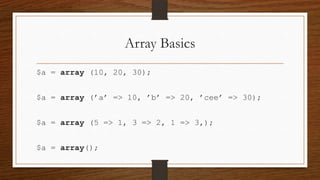
![Array Basics
$x[] = 10;
$x[‟aa‟] = 11;
echo $x[0]; // Outputs 10](https://image.slidesharecdn.com/4-140126133930-phpapp02/85/PHP-Functions-Arrays-16-320.jpg)
![Enumerative vs Associative, cont’d
When an element is added to an array without specifying a key, PHP
automatically assigns a numeric one that is equal to the greatest numeric key
already in existence in the array, plus one:
$a = array (2 => 5);
$a[] = ‟a‟; // This will have a key of 3
$a = array (‟4‟ => 5, ‟a‟ => ‟b‟);
$a[] = 44; // This will have a key of 5](https://image.slidesharecdn.com/4-140126133930-phpapp02/85/PHP-Functions-Arrays-19-320.jpg)


![Variable Scope, cont’d
$a = “Hello”;
$b = “World”;
function hello() {
echo $GLOBALS[„a‟].‟ „.$GLOBALS[„b‟];
}
hello (); //Displays Hello World](/p?url=https%3A%2F%2Fimage.slidesharecdn.com%2F4-140126133930-phpapp02%2F85%2FPHP-Functions-Arrays-10-320.jpg&__src=https%3A%2F%2Fwww.slideshare.net%2Fslideshow%2Fphp-functions-arrays%2F30457302&__type=image)


![Array Basics
$x[] = 10;
$x[‟aa‟] = 11;
echo $x[0]; // Outputs 10](/p?url=https%3A%2F%2Fimage.slidesharecdn.com%2F4-140126133930-phpapp02%2F85%2FPHP-Functions-Arrays-16-320.jpg&__src=https%3A%2F%2Fwww.slideshare.net%2Fslideshow%2Fphp-functions-arrays%2F30457302&__type=image)


![Enumerative vs Associative, cont’d
When an element is added to an array without specifying a key, PHP
automatically assigns a numeric one that is equal to the greatest numeric key
already in existence in the array, plus one:
$a = array (2 => 5);
$a[] = ‟a‟; // This will have a key of 3
$a = array (‟4‟ => 5, ‟a‟ => ‟b‟);
$a[] = 44; // This will have a key of 5](/p?url=https%3A%2F%2Fimage.slidesharecdn.com%2F4-140126133930-phpapp02%2F85%2FPHP-Functions-Arrays-19-320.jpg&__src=https%3A%2F%2Fwww.slideshare.net%2Fslideshow%2Fphp-functions-arrays%2F30457302&__type=image)

![Multi-dimensional Arrays
$array = array();
$array[] = array(‟foo‟, ‟bar‟);
$array[] = array(‟baz‟, ‟bat‟);
echo $array[0][1] . $array[1][0]; //output is barbaz](/p?url=https%3A%2F%2Fimage.slidesharecdn.com%2F4-140126133930-phpapp02%2F85%2FPHP-Functions-Arrays-21-320.jpg&__src=https%3A%2F%2Fwww.slideshare.net%2Fslideshow%2Fphp-functions-arrays%2F30457302&__type=image)

![array(6) {
[0]=>
Array Operations
int(1)
[1]=>
int(2)
[2]=>
$a = array (1, 2, 3);
int(3)
$b = array (‟a‟ => 1, ‟b‟ => 2, ‟c‟ => 3);
["a"]=>
var_dump ($a + $b);
int(1)
["b"]=>
int(2)
["c"]=>
int(3)
}](/p?url=https%3A%2F%2Fimage.slidesharecdn.com%2F4-140126133930-phpapp02%2F85%2FPHP-Functions-Arrays-23-320.jpg&__src=https%3A%2F%2Fwww.slideshare.net%2Fslideshow%2Fphp-functions-arrays%2F30457302&__type=image)
![Array Operations, cont’d
array(4) {
[0]=>
int(1)
$a = array (1, 2, 3);
[1]=>
$b = array (‟a‟ => 1, 2, 3);
int(2)
var_dump ($a + $b);
[2]=>
int(3)
["a"]=>
int(1)
}](/p?url=https%3A%2F%2Fimage.slidesharecdn.com%2F4-140126133930-phpapp02%2F85%2FPHP-Functions-Arrays-24-320.jpg&__src=https%3A%2F%2Fwww.slideshare.net%2Fslideshow%2Fphp-functions-arrays%2F30457302&__type=image)


![Counting, Searching and Deleting Elements, cont’d
$a = array (‟a‟ => 1, ‟b‟ => 2);
echo isset ($a[‟a‟]); // True
echo isset ($a[‟c‟]); // False
$a = array (‟a‟ => NULL, ‟b‟ => 2);
echo isset ($a[‟a‟]); // False](/p?url=https%3A%2F%2Fimage.slidesharecdn.com%2F4-140126133930-phpapp02%2F85%2FPHP-Functions-Arrays-28-320.jpg&__src=https%3A%2F%2Fwww.slideshare.net%2Fslideshow%2Fphp-functions-arrays%2F30457302&__type=image)

![Counting, Searching and Deleting Elements, cont’d
$a = array (‟a‟ => NULL, ‟b‟ => 2);
unset ($a[‟b‟]);
echo in_array ($a, 2); // False](/p?url=https%3A%2F%2Fimage.slidesharecdn.com%2F4-140126133930-phpapp02%2F85%2FPHP-Functions-Arrays-30-320.jpg&__src=https%3A%2F%2Fwww.slideshare.net%2Fslideshow%2Fphp-functions-arrays%2F30457302&__type=image)
![Flipping and Reversing
$a = array (‟a‟, ‟b‟, ‟c‟);
array(3) {{
array(3)
["a"]=>
[0]=>
int(0)
string(1) "c"
["b"]=>
[1]=>
int(1)
string(1) "b"
["c"]=>
["x"]=>
int(2)
string(1) "a"
var_dump (array_flip ($a));
$a = array (‟x‟ => ‟a‟, 10 => ‟b‟, ‟c‟);
var_dump (array_reverse ($a));
}}](/p?url=https%3A%2F%2Fimage.slidesharecdn.com%2F4-140126133930-phpapp02%2F85%2FPHP-Functions-Arrays-31-320.jpg&__src=https%3A%2F%2Fwww.slideshare.net%2Fslideshow%2Fphp-functions-arrays%2F30457302&__type=image)


![array(2) {
["internal"]=>
Passive Iteration
&array(3) {
[0]=>
string(3) "RSS"
[1]=>
function setCase(&$value, &$key)
string(4) "HTML"
{
[2]=>
string(3) "XML"
$value = strtoupper($value);
}
}
["custom"]=>
$type = array(‟internal‟, ‟custom‟);
&array(2) {
$output_formats[] = array(‟rss‟, ‟html‟, ‟xml‟);
[0]=>
$output_formats[] = array(‟csv‟, ‟json‟);
string(3) "CSV"
$map = array_combine($type, $output_formats);
[1]=>
array_walk_recursive($map, ‟setCase‟);
string(4) "JSON"
}
var_dump($map);
}](/p?url=https%3A%2F%2Fimage.slidesharecdn.com%2F4-140126133930-phpapp02%2F85%2FPHP-Functions-Arrays-35-320.jpg&__src=https%3A%2F%2Fwww.slideshare.net%2Fslideshow%2Fphp-functions-arrays%2F30457302&__type=image)
![Sorting Arrays: sort()
$array = array(‟a‟ => ‟foo‟, ‟b‟ => ‟bar‟, ‟c‟ => ‟baz‟);
sort($array);
array(3) {
[0]=>
var_dump($array);
string(3) "bar"
[1]=>
string(3) "baz"
[2]=>
string(3) "foo"
}](/p?url=https%3A%2F%2Fimage.slidesharecdn.com%2F4-140126133930-phpapp02%2F85%2FPHP-Functions-Arrays-36-320.jpg&__src=https%3A%2F%2Fwww.slideshare.net%2Fslideshow%2Fphp-functions-arrays%2F30457302&__type=image)
![Sorting Arrays: asort()
$array = array(‟a‟ => ‟foo‟, ‟b‟ => ‟bar‟, ‟c‟ => ‟baz‟);
asort($array);
var_dump($array);
array(3) {
["b"]=>
string(3) "bar"
["c"]=>
string(3) "baz"
["a"]=>
string(3) "foo“
}](/p?url=https%3A%2F%2Fimage.slidesharecdn.com%2F4-140126133930-phpapp02%2F85%2FPHP-Functions-Arrays-37-320.jpg&__src=https%3A%2F%2Fwww.slideshare.net%2Fslideshow%2Fphp-functions-arrays%2F30457302&__type=image)

![Sorting Arrays: natsort()
$array = array(‟10t‟, ‟2t‟, ‟3t‟);
natsort($array);
array(3) {
[1]=>
var_dump($array);
string(2) "2t"
[2]=>
string(2) "3t"
[0]=>
string(3) "10t"
}](/p?url=https%3A%2F%2Fimage.slidesharecdn.com%2F4-140126133930-phpapp02%2F85%2FPHP-Functions-Arrays-39-320.jpg&__src=https%3A%2F%2Fwww.slideshare.net%2Fslideshow%2Fphp-functions-arrays%2F30457302&__type=image)
![Anti-Sorting: shuffle()
$cards = array (1, 2, 3, 4);
array(4) {
[0]=>
shuffle($cards);
int(4)
var_dump($cards);
[1]=>
int(1)
[2]=>
int(2)
[3]=>
int(3)
}](/p?url=https%3A%2F%2Fimage.slidesharecdn.com%2F4-140126133930-phpapp02%2F85%2FPHP-Functions-Arrays-40-320.jpg&__src=https%3A%2F%2Fwww.slideshare.net%2Fslideshow%2Fphp-functions-arrays%2F30457302&__type=image)
![Anti-Sorting: array_keys()
$cards = array (‟a‟ => 10, ‟b‟ => 12, ‟c‟ => 13);
$keys = array_keys ($cards);
shuffle($keys);
foreach ($keys as $v) {
echo $v . " - " . $cards[$v] . "n";
}](/p?url=https%3A%2F%2Fimage.slidesharecdn.com%2F4-140126133930-phpapp02%2F85%2FPHP-Functions-Arrays-41-320.jpg&__src=https%3A%2F%2Fwww.slideshare.net%2Fslideshow%2Fphp-functions-arrays%2F30457302&__type=image)
![Anti-Sorting: array_rand()
$cards = array (‟a‟ => 10, ‟b‟ => 12, ‟c‟ =>array(2) { {
13);
array(3)
$keys = array_rand ($cards, 2);
["a"]=>
[0]=>
int(10)
string(1) "a"
["b"]=>
[1]=>
var_dump($keys);
int(12)
string(1) "b"
var_dump($cards);
["c"]=>
}
int(13)
}](/p?url=https%3A%2F%2Fimage.slidesharecdn.com%2F4-140126133930-phpapp02%2F85%2FPHP-Functions-Arrays-42-320.jpg&__src=https%3A%2F%2Fwww.slideshare.net%2Fslideshow%2Fphp-functions-arrays%2F30457302&__type=image)

![Arrays as Stacks, Queues and Sets
array(2) {
[0]=>
$queue = array(‟qux‟, ‟bar‟, ‟baz‟);
string(3) "bar"
[1]=>
$first_element = array_shift($queue);
var_dump($queue);
string(3) "baz"
}
array(3) {
array_unshift($queue, ‟foo‟);
[0]=>
string(3) "foo"
var_dump($queue);
[1]=>
string(3) "bar"
[2]=>
string(3) "baz"
}](/p?url=https%3A%2F%2Fimage.slidesharecdn.com%2F4-140126133930-phpapp02%2F85%2FPHP-Functions-Arrays-44-320.jpg&__src=https%3A%2F%2Fwww.slideshare.net%2Fslideshow%2Fphp-functions-arrays%2F30457302&__type=image)


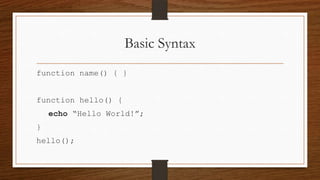
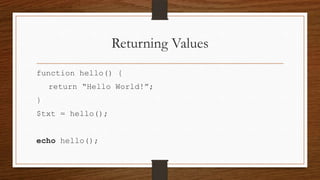
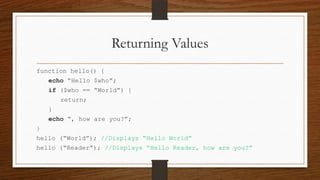
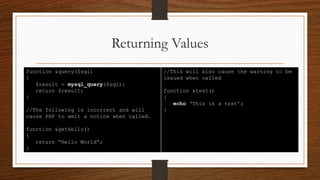
This document discusses PHP functions and arrays. It covers basic syntax for defining functions, returning values from functions, and variable scope. It also covers array basics like indexing and printing arrays, as well as operations like sorting, searching, and iterating over arrays. Functions for stacks, queues and sets using arrays are also demonstrated. The document is a comprehensive reference for working with functions and arrays in PHP.


