Copyright © 2004, Oracle. All rights reserved.
Oracle SQL & PL/SQL


                                                   Huiyun Mao
                                             Yolanda.mao@oracle.com


Copyright © 2004, Oracle. All rights reserved.
SQL Overview


Copyright © 2004, Oracle. All rights reserved.
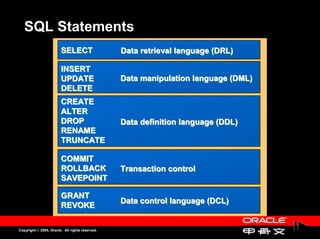
SQL Statements
                        SELECT                   Data retrieval language (DRL)

                        INSERT
                        UPDATE                   Data manipulation language (DML)
                        DELETE
                        CREATE
                        ALTER
                        DROP                     Data definition language (DDL)
                        RENAME
                        TRUNCATE

                        COMMIT
                        ROLLBACK                 Transaction control
                        SAVEPOINT

                        GRANT
                                                 Data control language (DCL)
                        REVOKE

Copyright © 2004, Oracle. All rights reserved.
Tables Used in the Course
          Three main tables are used in this course:
          Three main tables are used in this course:
                –
                –      EMP table
                       EMP table
                –
                –      DEPT table
                       DEPT table


Copyright © 2004, Oracle. All rights reserved.
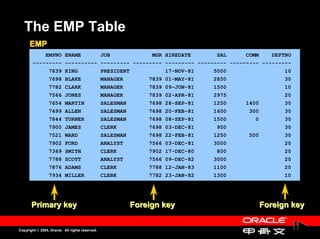
The EMP Table
      EMP
            EMPNO          ENAME                 JOB             MGR HIREDATE        SAL      COMM    DEPTNO
        ---------          ----------            --------- --------- --------- --------- --------- ---------
             7839          KING                  PRESIDENT           17-NOV-81      5000                  10
             7698          BLAKE                 MANAGER        7839 01-MAY-81      2850                  30
             7782          CLARK                 MANAGER        7839 09-JUN-81      1500                  10
             7566          JONES                 MANAGER        7839 02-APR-81      2975                  20
             7654          MARTIN                SALESMAN       7698 28-SEP-81      1250      1400        30
             7499          ALLEN                 SALESMAN       7698 20-FEB-81      1600       300        30
             7844          TURNER                SALESMAN       7698 08-SEP-81      1500         0        30
             7900          JAMES                 CLERK          7698 03-DEC-81       950                  30
             7521          WARD                  SALESMAN       7698 22-FEB-81      1250       500        30
             7902          FORD                  ANALYST        7566 03-DEC-81      3000                  20
             7369          SMITH                 CLERK          7902 17-DEC-80       800                  20
             7788          SCOTT                 ANALYST        7566 09-DEC-82      3000                  20
             7876          ADAMS                 CLERK          7788 12-JAN-83      1100                  20
             7934          MILLER                CLERK          7782 23-JAN-82      1300                  10


       Primary key                                        Foreign key                             Foreign key


Copyright © 2004, Oracle. All rights reserved.
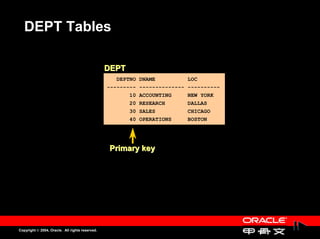
DEPT Tables

                                                 DEPT
                                                    DEPTNO DNAME          LOC
                                                 --------- -------------- ----------
                                                        10 ACCOUNTING     NEW YORK
                                                        20 RESEARCH       DALLAS
                                                        30 SALES          CHICAGO
                                                        40 OPERATIONS     BOSTON


                                                  Primary key


Copyright © 2004, Oracle. All rights reserved.
Writing Basic
    SQL Statements


Copyright © 2004, Oracle. All rights reserved.
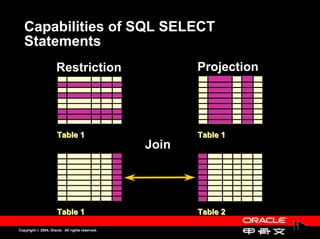
Capabilities of SQL SELECT
   Statements
                      Restriction                       Projection


                      Table 1                           Table 1
                                                 Join


                      Table 1                           Table 2

Copyright © 2004, Oracle. All rights reserved.
Basic SELECT Statement

       SELECT                                [DISTINCT] {*, column [alias],...}
       FROM                                  table
       [WHERE                                condition(s)]
       [GROUP BY                             group_by_expression]
       [ORDER BY                             column];


                     –
                     –      SELECT identifies the columns to be displayed.
                            SELECT identifies the columns to be displayed.
                     –
                     –      FROM identifies the table that contains the columns.
                            FROM identifies the table that contains the columns.


Copyright © 2004, Oracle. All rights reserved.
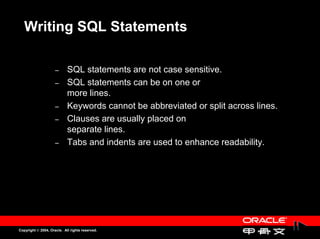
Writing SQL Statements

                     –
                     –      SQL statements are not case sensitive.
                            SQL statements are not case sensitive.
                     –
                     –      SQL statements can be on one or
                            SQL statements can be on one or
                            more lines.
                            more lines.
                     –
                     –      Keywords cannot be abbreviated or split across lines.
                            Keywords cannot be abbreviated or split across lines.
                     –
                     –      Clauses are usually placed on
                            Clauses are usually placed on
                            separate lines.
                            separate lines.
                     –
                     –      Tabs and indents are used to enhance readability.
                            Tabs and indents are used to enhance readability.


Copyright © 2004, Oracle. All rights reserved.
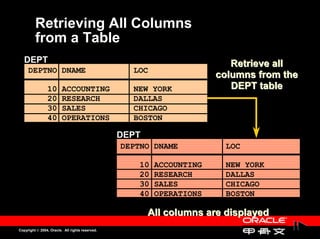
Retrieving All Columns
         from a Table
   DEPT                                                                   Retrieve all
     DEPTNO DNAME                                  LOC
                                                                       columns from the
                10       ACCOUNTING                NEW YORK               DEPT table
                20       RESEARCH                  DALLAS
                30       SALES                     CHICAGO
                40       OPERATIONS                BOSTON

                                                 DEPT
                                                 DEPTNO DNAME           LOC

                                                     10   ACCOUNTING    NEW YORK
                                                     20   RESEARCH      DALLAS
                                                     30   SALES         CHICAGO
                                                     40   OPERATIONS    BOSTON

                                                        All columns are displayed
Copyright © 2004, Oracle. All rights reserved.
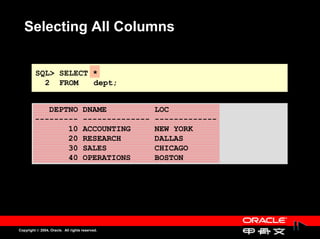
Selecting All Columns


         SQL> SELECT *
           2 FROM    dept;


            DEPTNO                   DNAME            LOC
         ---------                   --------------   -------------
                10                   ACCOUNTING       NEW YORK
                20                   RESEARCH         DALLAS
                30                   SALES            CHICAGO
                40                   OPERATIONS       BOSTON


Copyright © 2004, Oracle. All rights reserved.
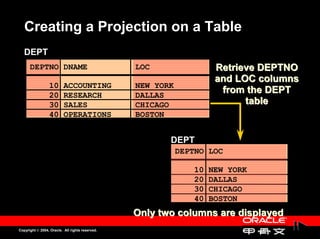
Creating a Projection on a Table
   DEPT
      DEPTNO DNAME                               LOC                  Retrieve DEPTNO
                                                                      and LOC columns
                 10       ACCOUNTING             NEW YORK
                 20       RESEARCH               DALLAS
                                                                       from the DEPT
                 30       SALES                  CHICAGO                    table
                 40       OPERATIONS             BOSTON


                                                        DEPT
                                                            DEPTNO LOC

                                                                10   NEW YORK
                                                                20   DALLAS
                                                                30   CHICAGO
                                                                40   BOSTON
                                                 Only two columns are displayed
Copyright © 2004, Oracle. All rights reserved.
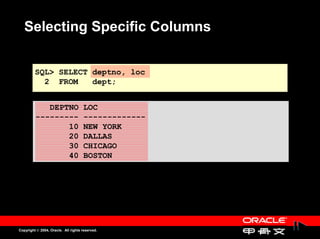
Selecting Specific Columns


         SQL> SELECT deptno, loc
           2 FROM    dept;


            DEPTNO                   LOC
         ---------                   -------------
                10                   NEW YORK
                20                   DALLAS
                30                   CHICAGO
                40                   BOSTON


Copyright © 2004, Oracle. All rights reserved.
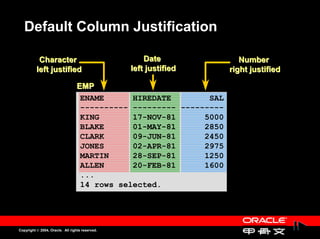
Default Column Justification

           Character                                 Date              Number
          left justified                         left justified     right justified

                                  EMP
                                   ENAME      HIREDATE        SAL
                                   ---------- --------- ---------
                                   KING       17-NOV-81      5000
                                   BLAKE      01-MAY-81      2850
                                   CLARK      09-JUN-81      2450
                                   JONES      02-APR-81      2975
                                   MARTIN     28-SEP-81      1250
                                   ALLEN      20-FEB-81      1600
                                   ...
                                   14 rows selected.


Copyright © 2004, Oracle. All rights reserved.
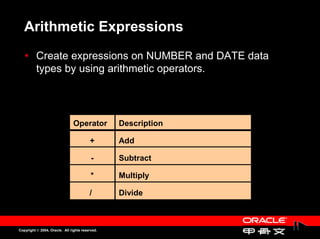
Arithmetic Expressions
          Create expressions on NUMBER and DATE data
          Create expressions on NUMBER and DATE data
          types by using arithmetic operators.
          types by using arithmetic operators.


                                Operator         Description

                                         +       Add

                                          -      Subtract

                                          *      Multiply

                                         /       Divide


Copyright © 2004, Oracle. All rights reserved.
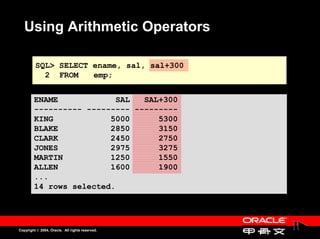
Using Arithmetic Operators

         SQL> SELECT ename, sal, sal+300
           2 FROM    emp;


        ENAME            SAL   SAL+300
        ---------- --------- ---------
        KING            5000      5300
        BLAKE           2850      3150
        CLARK           2450      2750
        JONES           2975      3275
        MARTIN          1250      1550
        ALLEN           1600      1900
        ...
        14 rows selected.


Copyright © 2004, Oracle. All rights reserved.
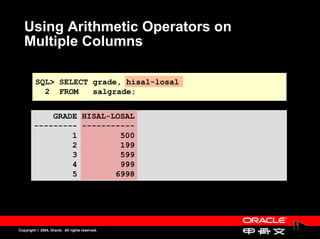
Using Arithmetic Operators on
   Multiple Columns

         SQL> SELECT grade, hisal-losal
           2 FROM    salgrade;


            GRADE HISAL-LOSAL
        --------- -----------
                1         500
                2         199
                3         599
                4         999
                5        6998


Copyright © 2004, Oracle. All rights reserved.
Operator Precedence

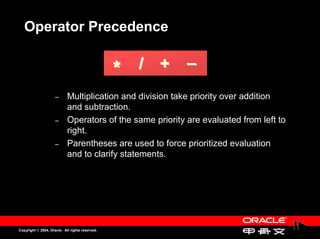
                                                     / +   _
                                                 *
                     –
                     –      Multiplication and division take priority over addition
                            Multiplication and division take priority over addition
                            and subtraction.
                            and subtraction.
                     –
                     –      Operators of the same priority are evaluated from left to
                            Operators of the same priority are evaluated from left to
                            right.
                            right.
                     –
                     –      Parentheses are used to force prioritized evaluation
                            Parentheses are used to force prioritized evaluation
                            and to clarify statements.
                            and to clarify statements.


Copyright © 2004, Oracle. All rights reserved.
Operator Precedence

         SQL> SELECT ename, sal, 12*sal+100
           2 FROM    emp;


          ENAME            SAL 12*SAL+100
          ---------- --------- ----------
          KING            5000      60100
          BLAKE           2850      34300
          CLARK           2450      29500
          JONES           2975      35800
          MARTIN          1250      15100
          ALLEN           1600      19300
          ...
          14 rows selected.


Copyright © 2004, Oracle. All rights reserved.
Using Parentheses

        SQL> SELECT ename, sal, 12*(sal+100)
          2 FROM    emp;


        ENAME            SAL 12*(SAL+100)
        ---------- --------- -----------
        KING            5000       61200
        BLAKE           2850       35400
        CLARK           2450       30600
        JONES           2975       36900
        MARTIN          1250       16200
        ...
        14 rows selected.


Copyright © 2004, Oracle. All rights reserved.
Defining a Column Alias

                     –
                     –      Renames a column heading
                             Renames a column heading
                     –
                     –      Is useful with calculations
                             Is useful with calculations
                     –
                     –      Immediately follows column name; optional AS
                             Immediately follows column name; optional AS
                            keyword between column name and alias
                             keyword between column name and alias
                     –
                     –      Requires double quotation marks if it is case sensitive
                             Requires double quotation marks if it is case sensitive
                            or contains spaces or special characters
                             or contains spaces or special characters


Copyright © 2004, Oracle. All rights reserved.
Using Column Aliases


         SQL> SELECT ename AS name, sal salary
           2 FROM    emp;


          NAME             SALARY
          ------------- ---------
          KING               5000
          BLAKE              2850
          CLARK              2450
          JONES              2975
          ...
          14 rows selected.


Copyright © 2004, Oracle. All rights reserved.
Using Column Aliases


         SQL> SELECT ename "Name",
           2         sal*12 "Annual Salary"
           3 FROM    emp;


          Name          Annual Salary
          ------------- -------------
          KING                  60000
          BLAKE                 34200
          CLARK                 29400
          ...
          14 rows selected.


Copyright © 2004, Oracle. All rights reserved.
Concatenation Operator

                     –
                     –      Concatenates columns or character strings to other
                             Concatenates columns or character strings to other
                            columns
                             columns
                     –
                     –      Is represented by two vertical bars ||
                             Is represented by two vertical bars ||
                     –
                     –      Creates a result column that is a character expression
                             Creates a result column that is a character expression


Copyright © 2004, Oracle. All rights reserved.
Using the Concatenation Operator


          SQL> SELECT                            ename||job AS "Employees"
            2 FROM                               emp;


           Employees
           -------------------
           KINGPRESIDENT
           BLAKEMANAGER
           CLARKMANAGER
           JONESMANAGER
           MARTINSALESMAN
           ALLENSALESMAN
           ...
           14 rows selected.


Copyright © 2004, Oracle. All rights reserved.
Literals

                     –
                     –      A literal is a constant value of character, expression, or
                            A literal is a constant value of character, expression, or
                            number that can be included in the SELECT list.
                            number that can be included in the SELECT list.
                     –
                     –      Date and character literal values must be enclosed in
                            Date and character literal values must be enclosed in
                            single quotation marks.
                            single quotation marks.
                     –
                     –      Each character string is output once for each row
                            Each character string is output once for each row
                            returned.
                            returned.


Copyright © 2004, Oracle. All rights reserved.
Using Literal Character Strings

         SQL> SELECT ename||' is a '||job AS
           2 "Employee Details"
           3 FROM    emp;


         Employee Details
         -------------------------
         KING is a PRESIDENT
         BLAKE is a MANAGER
         CLARK is a MANAGER
         JONES is a MANAGER
         MARTIN is a SALESMAN
         ...
         14 rows selected.


Copyright © 2004, Oracle. All rights reserved.
Duplicate Rows
          The default display of queries is all rows, including
          The default display of queries is all rows, including
          duplicate rows.
          duplicate rows.


            SQL> SELECT                          deptno
              2 FROM                             emp;


                 DEPTNO
              ---------
                    10
                    30
                    10
                    20
                    ..
              14 rows selected.

Copyright © 2004, Oracle. All rights reserved.
Eliminating Duplicate Rows
          Eliminate duplicate rows by using the DISTINCT
          Eliminate duplicate rows by using the DISTINCT
          keyword in the SELECT clause.
          keyword in the SELECT clause.


          SQL> SELECT DISTINCT deptno
            2 FROM    emp;


             DEPTNO
          ---------
                 10
                 20
                 30


Copyright © 2004, Oracle. All rights reserved.
Restricting and Sorting Data


Copyright © 2004, Oracle. All rights reserved.
Limiting Rows by Using a Restriction

  EMP
        EMPNO ENAME                         JOB         ...   DEPTNO
                                                                           Retrieve all
           7839          KING               PRESIDENT             10       employees
           7698          BLAKE              MANAGER               30    in department 10
           7782          CLARK              MANAGER               10
           7566          JONES              MANAGER               20
           ...

                                                  EMP
                                                   EMPNO ENAME    JOB       ...   DEPTNO

                                                    7839 KING   PRESIDENT             10
                                                    7782 CLARK MANAGER                10
                                                    7934 MILLER CLERK                 10


Copyright © 2004, Oracle. All rights reserved.
Using the WHERE Clause

        SQL> SELECT ename, job, deptno
          2 FROM    emp
          3 WHERE deptno=10;


        ENAME                          JOB          DEPTNO
        ----------                     --------- ---------
        KING                           PRESIDENT        10
        CLARK                          MANAGER          10
        MILLER                         CLERK            10


Copyright © 2004, Oracle. All rights reserved.
Character Strings and Dates

                     –
                     –      Character strings and date values are enclosed in
                            Character strings and date values are enclosed in
                            single quotation marks.
                            single quotation marks.
                     –
                     –      Character values are case sensitive and date values
                            Character values are case sensitive and date values
                            are format sensitive.
                            are format sensitive.
                     –
                     –      Default date format is DD-MON-YY.
                            Default date format is DD-MON-YY.


            SQL> SELECT                          ename, job, deptno, hiredate
              2 FROM                             emp
              3 WHERE                            ename = 'JAMES';


Copyright © 2004, Oracle. All rights reserved.
Comparison Operators

                                      Operator        Meaning

                                                 =    Equal to

                                                 >    Greater than

                                                 >=   Greater than or equal to

                                                 <    Less than

                                                 <=   Less than or equal to

                                                 <>   Not equal to


Copyright © 2004, Oracle. All rights reserved.
Using the Comparison Operators
   with Another Column


         SQL> SELECT ename, sal, comm
           2 FROM    emp
           3 WHERE sal<=comm;


         ENAME            SAL      COMM
         ---------- --------- ---------
         MARTIN          1250      1400


Copyright © 2004, Oracle. All rights reserved.
Using the Comparison Operators
   with Characters


         SQL> SELECT ename, mgr
           2 FROM    emp
           3 WHERE ename='SMITH';


         ENAME            MGR
         ---------- ---------
         SMITH           7902


Copyright © 2004, Oracle. All rights reserved.
Other SQL Comparison Operators


                         Operator                Meaning

                         BETWEEN                 Between two values (inclusive)
                         ...AND...

                         IN(list)                Match any of a list of values

                         LIKE                    Match a character pattern

                         IS NULL                 Is a null value


Copyright © 2004, Oracle. All rights reserved.
Using the BETWEEN Operator
          Use the BETWEEN operator to display rows based on
          Use the BETWEEN operator to display rows based on
          a range of values.
          a range of values.

         SQL> SELECT                             ename, sal
           2 FROM                                emp
           3 WHERE                               sal BETWEEN 1000 AND 1500;

         ENAME            SAL
         ---------- ---------                               Lower    Higher
         MARTIN          1250                                limit    limit
         TURNER          1500
         WARD            1250
         ADAMS           1100
         MILLER          1300


Copyright © 2004, Oracle. All rights reserved.
Using the IN Operator
          Use the IN operator to test for values in a list.
          Use the IN operator to test for values in a list.


            SQL> SELECT                          empno, ename, sal, mgr
              2 FROM                             emp
              3 WHERE                            mgr IN (7902, 7566, 7788);


              EMPNO                   ENAME            SAL       MGR
          ---------                   ---------- --------- ---------
               7902                   FORD            3000      7566
               7369                   SMITH            800      7902
               7788                   SCOTT           3000      7566
               7876                   ADAMS           1100      7788


Copyright © 2004, Oracle. All rights reserved.
Using the IN Operator with Strings
          Use the IN operator to test for values in a list of
          Use the IN operator to test for values in a list of
          strings.
          strings.

          SQL> SELECT ename, deptno, hiredate
            2 FROM    emp
            3 WHERE ename IN ('BLAKE','MARTIN');


          ENAME         DEPTNO HIREDATE
          ---------- --------- ---------
          BLAKE             30 01-MAY-81
          MARTIN            30 28-SEP-81


Copyright © 2004, Oracle. All rights reserved.
Using the LIKE Operator

                     –
                     –      Use the LIKE operator to perform wildcard searches of
                            Use the LIKE operator to perform wildcard searches of
                            valid search string values.
                            valid search string values.
                     –
                     –      Search conditions can contain either literal characters
                            Search conditions can contain either literal characters
                            or numbers.
                            or numbers.
                                    % denotes zero or many characters
                                    % denotes zero or many characters
                                    _ denotes one character
                                    _ denotes one character


           SQL> SELECT                           ename
             2 FROM                              emp
             3 WHERE                             ename LIKE 'S%';

Copyright © 2004, Oracle. All rights reserved.
Using the LIKE Operator
        • You can combine pattern matching
        • You can combine pattern matching
          characters.
          characters.

          SQL> SELECT                            ename
            2 FROM                               emp
            3 WHERE                              ename LIKE '_A%';


          ENAME
          ----------
          MARTIN
          JAMES
          WARD

        • Use the ESCAPE identifier to search for
        • Use the ESCAPE identifier to search for
          % or _.
          % or _.
Copyright © 2004, Oracle. All rights reserved.
Using the IS NULL Operator

               Test for null values with the IS NULL operator.
               Test for null values with the IS NULL operator.

          SQL> SELECT                            ename, mgr
            2 FROM                               emp
            3 WHERE                              mgr IS NULL;


           ENAME      MGR
           ---------- ---------
           KING


Copyright © 2004, Oracle. All rights reserved.
Logical Operators


                     Operator                    Meaning

                     AND                         Returns TRUE if both component
                                                 conditions are TRUE
                     OR                          Returns TRUE if either component
                                                 condition is TRUE

                     NOT                         Returns TRUE if the following
                                                 condition is FALSE


Copyright © 2004, Oracle. All rights reserved.
Using the AND Operator
          AND requires both conditions to be TRUE.
          AND requires both conditions to be TRUE.

          SQL>          SELECT              empno, ename, job, sal
            2           FROM                emp
            3           WHERE               sal>=1100
            4           AND                 job='CLERK';


              EMPNO                   ENAME          JOB             SAL
          ---------                   ----------     --------- ---------
               7876                   ADAMS          CLERK          1100
               7934                   MILLER         CLERK          1300


Copyright © 2004, Oracle. All rights reserved.
Using the AND Operator
          AND requires both conditions to be TRUE.
          AND requires both conditions to be TRUE.

         SQL>           SELECT             ename, mgr, sal,deptno
           2            FROM               emp
           3            WHERE              sal>1000
           4            AND                deptno = 10;

           ENAME            MGR       SAL    DEPTNO
           ---------- --------- --------- ---------
           KING                      5000        10
           CLARK           7839      2450        10
           MILLER          7782      1300        10


Copyright © 2004, Oracle. All rights reserved.
Using the OR Operator

                     OR requires either condition to be TRUE.
                     OR requires either condition to be TRUE.
          SQL>          SELECT              empno, ename, job, sal
            2           FROM                emp
            3           WHERE               sal>=2000
            4           OR                  job='CLERK';
              EMPNO ENAME                            JOB             SAL
          --------- ----------                       --------- ---------
               7839 KING                             PRESIDENT      5000
               7698 BLAKE                            MANAGER        2850
               7782 CLARK                            MANAGER        2450
               7566 JONES                            MANAGER        2975
               7900 JAMES                            CLERK           950
               7902 FORD                             ANALYST        3000
               ...
          10 rows selected.
Copyright © 2004, Oracle. All rights reserved.
Using the OR Operator
                OR requires either condition to be TRUE.
                OR requires either condition to be TRUE.


          SQL>         SELECT              ename, deptno, mgr
            2          FROM                emp
            3          WHERE               deptno = 10
            4          OR                  mgr = 7839;


         ENAME                               DEPTNO     MGR
         ----------                          --------   ---------
         KING                                10
         BLAKE                               30         7839
         CLARK                               10         7839
         JONES                               20         7839
         MILLER                              10         7782

Copyright © 2004, Oracle. All rights reserved.
Using the NOT Operator

         SQL> SELECT ename, job
           2 FROM    emp
           3 WHERE job NOT IN ('CLERK','MANAGER','ANALYST');


         ENAME                          JOB
         ----------                     ---------
         KING                           PRESIDENT
         MARTIN                         SALESMAN
         ALLEN                          SALESMAN
         TURNER                         SALESMAN
         WARD                           SALESMAN


Copyright © 2004, Oracle. All rights reserved.
Using the NOT Operator

              SQL> SELECT empno,ename,deptno,mgr
                2 FROM    emp
                3 WHERE mgr NOT LIKE '78%';


           EMPNO    ENAME         DEPTNO       MGR
          --------- ---------- --------- ---------
               7654 MARTIN            30      7698
               7499 ALLEN             30      7698
               ...
               ...
               7902 FORD              20      7566
               7369 SMITH             20      7902
               ...
          10 rows selected.


Copyright © 2004, Oracle. All rights reserved.
Using the NOT Operator

         SQL> SELECT empno, sal, mgr
           2 FROM    emp
           3 WHERE sal NOT BETWEEN 1000 AND 1500;

             EMPNO       SAL       MGR
         --------- --------- ---------
              7839      5000
              7698      2850      7839
              7782      2450      7839
              7566      2975      7839
              7499      1600      7698
              7900       950      7698
              7902      3000      7566
              7369       800      7902
              7788      3000      7566

         9 rows selected.
Copyright © 2004, Oracle. All rights reserved.
Using the NOT Operator

         SQL>          SELECT ename, sal AS "Salary Before Commission",
           2           comm
           3           FROM   emp
           4           WHERE comm IS NOT NULL;

         ENAME      Salary Before Commission      COMM
         ---------- ------------------------ ---------
         MARTIN                         1250      1400
         ALLEN                          1600       300
         TURNER                         1500         0
         WARD                           1250       500


Copyright © 2004, Oracle. All rights reserved.
Rules of Precedence

          Order Evaluated                        Operator
                1                                All comparison
                                                 operators
                                   2             NOT
                                   3             AND
                                   4             OR

                 Use parentheses to override rules of precedence.
                 Use parentheses to override rules of precedence.


Copyright © 2004, Oracle. All rights reserved.
Rules of Precedence

         SQL>          SELECT              ename, job, sal
           2           FROM                emp
           3           WHERE               job='SALESMAN'
           4           OR                  job='PRESIDENT'
           5           AND                 sal>1500;


         ENAME                            JOB          SAL
         ----------                       -------      ---------
         KING                             PRESIDENT    5000
         MARTIN                           SALESMAN     1250
         ALLEN                            SALESMAN     1600
         TURNER                           SALESMAN     1500
         WARD                             SALESMAN     1250


Copyright © 2004, Oracle. All rights reserved.
Rules of Precedence
           Use parentheses to force priority.
           Use parentheses to force priority.
         SQL>           SELECT                   ename, job, sal
           2            FROM                     emp
           3            WHERE                    (job='SALESMAN'
           4            OR                       job='PRESIDENT')
           5            AND                      sal>1500;


          ENAME                          JOB                    SAL
          ----------                     ---------           ---------
          KING                           PRESIDENT                  5000
          ALLEN                          SALESMAN                   1600


Copyright © 2004, Oracle. All rights reserved.
ORDER BY Clause
                –
                –      Sort rows with the ORDER BY clause:
                       Sort rows with the ORDER BY clause:
                               ASC: ascending order, default
                               ASC: ascending order, default
                               DESC: descending order
                               DESC: descending order
                –
                –      The ORDER BY clause comes last in the SELECT
                       The ORDER BY clause comes last in the SELECT
                       statement.
                       statement.


          SQL> SELECT ename, job, deptno
            2 FROM    emp
            3 ORDER BY deptno;
         ENAME      JOB          DEPTNO
         ---------- --------- ---------
         KING       PRESIDENT        10
         CLARK      MANAGER          10
         ...
         JONES      MANAGER          20
         SCOTT      ANALYST          20
         ...
         14 rows selected.
Copyright © 2004, Oracle. All rights reserved.
Sorting in Descending Order

          SQL> SELECT ename, job, deptno, sal
            2 FROM     emp
            3 ORDER BY sal DESC;


           ENAME      JOB          DEPTNO       SAL
           ---------- --------- --------- ---------
           KING       PRESIDENT        10      5000
           FORD       ANALYST          20      3000
           SCOTT      ANALYST          20      3000
           JONES      MANAGER          20      2975
           BLAKE      MANAGER          30      2850
           CLARK      MANAGER          10      2450
           ALLEN      SALESMAN         30      1600
           ...
           14 rows selected.

Copyright © 2004, Oracle. All rights reserved.
Sorting by Column Alias

         SQL> SELECT  empno, ename, sal*12 annsal
           2 FROM     emp
           3 ORDER BY annsal;


             EMPNO ENAME         ANNSAL
         --------- ---------- ---------
              7369 SMITH           9600
              7900 JAMES          11400
              7876 ADAMS          13200
              7654 MARTIN         15000
              7521 WARD           15000
              7934 MILLER         15600
              7844 TURNER         18000
              ...
         14 rows selected.

Copyright © 2004, Oracle. All rights reserved.
Sorting by Multiple Columns
          The order of an ORDER BY list is the order of the
          The order of an ORDER BY list is the order of the
          sort.
          sort.

             SQL> SELECT  ename, deptno, sal
               2 FROM     emp
               3 ORDER BY deptno, sal DESC;

             ENAME         DEPTNO       SAL
             ---------- --------- ---------
             KING              10      5000
             CLARK             10      2450
             MILLER            10      1300
             FORD              20      3000
             ...
             14 rows selected.

Copyright © 2004, Oracle. All rights reserved.
Sorting by a Column Not in the
        SELECT List
         SQL> SELECT  ename, deptno
           2 FROM     emp
           3 ORDER BY sal;

         ENAME         DEPTNO
         ---------- ---------
         SMITH             20
         JAMES             30
         ADAMS             20
         MARTIN            30
         WARD              30
         MILLER            10
         ...
         14 rows selected.


Copyright © 2004, Oracle. All rights reserved.
Single-Row Number and Character
    Functions


Copyright © 2004, Oracle. All rights reserved.
How a Function Works


      Input                                      Function    Output

                                                 Performs
                                                 operation


Copyright © 2004, Oracle. All rights reserved.
Two Types of SQL Functions


                                                 Functions


                    Single-row                               Multiple-row
                     functions                                functions


Copyright © 2004, Oracle. All rights reserved.
Single-Row Functions

                     –
                     –      Manipulate data items
                            Manipulate data items
                     –
                     –      Accept arguments and return one value
                            Accept arguments and return one value
                     –
                     –      Act on each row returned
                            Act on each row returned
                     –
                     –      Return one result per row
                            Return one result per row
                     –
                     –      Can modify the data type
                            Can modify the data type
                     –
                     –      Can be nested
                            Can be nested


Copyright © 2004, Oracle. All rights reserved.
Single-Row Functions


                   Character                                  Number


                                                 Single-row
                                                  functions


                 Conversion                                    Date


Copyright © 2004, Oracle. All rights reserved.
Character Functions
                                                 Character
                                                 functions


               Case conversion                        Character manipulation
                  functions                                 functions

                      LOWER
                      UPPER
                      INITCAP


Copyright © 2004, Oracle. All rights reserved.
Case Conversion Functions
          Convert the case for character strings
          Convert the case for character strings


                                 Function               Result
          LOWER('SQL Course')                    sql course
          UPPER('SQL Course')                    SQL COURSE
          INITCAP('SQL Course')                  Sql Course


Copyright © 2004, Oracle. All rights reserved.
Using Case Conversion Functions


          Display the employee number, name, and department
          Display the employee number, name, and department
          number for employee Blake.
          number for employee Blake.

         SQL> SELECT empno, ename, deptno
           2 FROM     emp
           3 WHERE    ename = 'blake';
         no rows selected

         SQL> SELECT                             empno, ename, deptno
           2 FROM                                emp
           3 WHERE                               ename = UPPER('blake');

             EMPNO ENAME         DEPTNO
         --------- ---------- ---------
              7698 BLAKE             30

Copyright © 2004, Oracle. All rights reserved.
Using Case Conversion Functions
          Display the employee name for all employees with an
           Display the employee name for all employees with an
          initial capital.
           initial capital.

          SQL> SELECT INITCAP(ename) as EMPLOYEE
            2 FROM    emp;

           EMPLOYEE
           ----------
           King
           Blake
           Clark
           Jones
           Martin
           ...
           14 rows selected.

Copyright © 2004, Oracle. All rights reserved.
Number Functions

                –
                –      ROUND: Rounds value to specified decimal
                       ROUND: Rounds value to specified decimal
                       ROUND(45.926, 2)
                       ROUND(45.926, 2)
                             45.93
                             45.93
                –
                –      TRUNC: Truncates value to specified decimal
                       TRUNC: Truncates value to specified decimal
                       TRUNC(45.926, 2)
                       TRUNC(45.926, 2)
                              45.92
                               45.92
                –
                –      MOD: Returns remainder of division
                       MOD: Returns remainder of division
                       MOD(1600, 300)
                       MOD(1600, 300)
                                      100
                                      100


Copyright © 2004, Oracle. All rights reserved.
Defining a Null Value
                     –
                     –      A null is a value that is unavailable, unassigned,
                            A null is a value that is unavailable, unassigned,
                            unknown, or inapplicable.
                            unknown, or inapplicable.
                     –
                     –      A null is not the same as zero or a blank space.
                            A null is not the same as zero or a blank space.


          SQL> SELECT                            ename, job, comm
            2 FROM                               emp;

         ENAME      JOB            COMM
         ---------- --------- ---------
         KING       PRESIDENT
         BLAKE      MANAGER
         ...
         TURNER     SALESMAN          0
         ...
         14 rows selected.

Copyright © 2004, Oracle. All rights reserved.
Null Values in Arithmetic
   Expressions
          Arithmetic expressions that contain a null value
          Arithmetic expressions that contain a null value
          evaluate to null.
          evaluate to null.


          SQL> SELECT ename NAME, 12*sal+comm
            2 FROM    emp;

        NAME       12*SAL+COMM
        ---------- -----------
        KING
        BLAKE
        CLARK
        JONES
        MARTIN           16400
        ...
        14 rows selected.

Copyright © 2004, Oracle. All rights reserved.
Using the NVL Function

         NVL (expr1, expr2)

               Use the NVL function to force a value where a null
               Use the NVL function to force a value where a null
               would otherwise appear:
               would otherwise appear:
                     –
                     –      NVL can be used with date, character, and number
                            NVL can be used with date, character, and number
                            data types.
                            data types.
                     –
                     –      Data types must match. For example:
                            Data types must match. For example:
                                    NVL(comm,0)
                                    NVL(comm,0)
                                    NVL(hiredate,'01-JAN-97')
                                    NVL(hiredate,'01-JAN-97')
                                    NVL(job,'no job yet')
                                    NVL(job,'no job yet'
                                                    yet')


Copyright © 2004, Oracle. All rights reserved.
Using the NVL Function to Handle
   Null Values

          SQL> SELECT ename, job, sal * 12 + NVL(comm,0)
            2 FROM    emp;

         ENAME      JOB       SAL*12+NVL(COMM,0)
         ---------- --------- ------------------
         KING       PRESIDENT              60000
         BLAKE      MANAGER                34200
         CLARK      MANAGER                29400
         JONES      MANAGER                35700
         MARTIN     SALESMAN               16400
         ALLEN      SALESMAN               19500
         TURNER     SALESMAN               18000
         ...
         14 rows selected.


Copyright © 2004, Oracle. All rights reserved.
Single-Row Date and Conversion
    Functions


Copyright © 2004, Oracle. All rights reserved.
Single-Row Functions

                     Character                                Number


                                                 Single-row
                                                  functions


                 Conversion                                    Date


Copyright © 2004, Oracle. All rights reserved.
Working with Dates
                –
                –      Oracle stores dates in an internal 7 byte numeric format:
                       Oracle stores dates in an internal 7 byte numeric format:
                       century, year, month, day, hours, minutes, seconds.
                       century, year, month, day, hours, minutes, seconds.
                –
                –      The default date format is DD-MON-YY.
                       The default date format is DD-MON-YY.


Copyright © 2004, Oracle. All rights reserved.
SYSDATE

                     –
                     –      Use SYSDATE to display the current date and time.
                            Use SYSDATE to display the current date and time.
                     –
                     –      DUAL is a one-column, one-row table that is used as a
                            DUAL is a one-column, one-row table that is used as a
                            dummy table.
                            dummy table.


          SQL> SELECT SYSDATE
            2 FROM    DUAL;

           SYSDATE
           ---------
           26-JAN-98


Copyright © 2004, Oracle. All rights reserved.
Default Date Formats

                  Columns that are defined as DATE are
                  Columns that are defined as DATE are
                  displayed as DD-MON-YY by default.
                  displayed as DD-MON-YY by default.

          SQL> SELECT ename, hiredate
            2 FROM    emp
            3 WHERE ename='SMITH';


          ENAME      HIREDATE
          ---------- ---------
          SMITH      17-DEC-80


Copyright © 2004, Oracle. All rights reserved.
Arithmetic with Dates
                –
                –      Add or subtract a number to or from a date to obtain a date
                        Add or subtract a number to or from a date to obtain a date
                       value
                        value
                –
                –      Subtract two dates to find the number of days between
                        Subtract two dates to find the number of days between
                       those dates
                        those dates


Copyright © 2004, Oracle. All rights reserved.
Using Arithmetic Operators
   with Dates

          SQL> SELECT ename, hiredate, hiredate+30 "NEW DATE"
            2 FROM    emp
            3 WHERE ename='SMITH';


          ENAME      HIREDATE NEW DATE
          ---------- --------- ---------
          SMITH      17-DEC-80 16-JAN-81


Copyright © 2004, Oracle. All rights reserved.
Using SYSDATE in Calculations

                    Determine for how many weeks employees have
                    Determine for how many weeks employees have
                    worked
                    worked

          SQL> SELECT ename, (SYSDATE-hiredate)/7
            2 "WEEKS AT WORK"
            3 FROM emp
            4 WHERE deptno=10;


          ENAME      WEEKS AT WORK
          ---------- -------------
          KING           844.94617
          CLARK          867.94617
          MILLER         835.37474


Copyright © 2004, Oracle. All rights reserved.
Explicit Data Type Conversion

                                  TO_NUMBER            TO_DATE


               NUMBER                            CHARACTER       DATE


                                      TO_CHAR          TO_CHAR


Copyright © 2004, Oracle. All rights reserved.
Modifying the Display Format of
   Dates


                                                 Tuesday the 27th of January, 1998


      27-JAN-98                                    January 27, 1998


                                                   01/27/98


Copyright © 2004, Oracle. All rights reserved.
TO_CHAR Function with Dates

          TO_CHAR(date, 'fmfmt')

               The format model:
               The format model:
                     –
                     –      Is case sensitive and must be enclosed in single
                             Is case sensitive and must be enclosed in single
                            quotation marks
                             quotation marks
                     –
                     –      Can include any valid date format element
                             Can include any valid date format element
                     –
                     –      Has an fm element to remove padded blanks or
                             Has an fm element to remove padded blanks or
                            suppress leading zeros
                             suppress leading zeros
                     –
                     –      Is separated from the date value by a comma
                             Is separated from the date value by a comma


Copyright © 2004, Oracle. All rights reserved.
Date Format Model Elements

          YYYY                                   Full year in numbers

          YEAR                                   Year spelled out

          MM                                     2-digit value for month

          MONTH                                  Full name of the month
                                                 3-letter abbreviation of the day
          DY
                                                 of the week
          DAY                                    Full name of the day


Copyright © 2004, Oracle. All rights reserved.
Using the TO_CHAR Function with
   Dates
    SQL> SELECT ename, TO_CHAR(hiredate, 'Month DDth, YYYY')
         2        AS HIREDATE
         3        FROM                emp
         4        WHERE job='MANAGER';

    ENAME                          HIREDATE
    ---------- --------------------
    BLAKE                          May           01st, 1981
    CLARK                          June          09th, 1981
    JONES                          April         02nd, 1981


Copyright © 2004, Oracle. All rights reserved.
Using the TO_CHAR Function with
   Dates

   SQL> SELECT                          empno, TO_CHAR(hiredate, 'MM/YY') AS MONTH
     2 FROM                             emp
     3 WHERE                            ename='BLAKE';


        EMPNO MONTH
    --------- -----
         7698 05/81


Copyright © 2004, Oracle. All rights reserved.
Using the TO_CHAR Function with
   Dates

     SQL> SELECT ename,
       2 TO_CHAR(hiredate, 'fmDD Month YYYY') AS HIREDATE
       3 FROM    emp;


    ENAME      HIREDATE
    ---------- -----------------
    KING       17 November 1981
    BLAKE      1 May 1981
    CLARK      9 June 1981
    JONES      2 April 1981
    MARTIN     28 September 1981
    ALLEN      20 February 1981
    ...
    14 rows selected.


Copyright © 2004, Oracle. All rights reserved.
Using the TO_CHAR Function with
    Dates

SQL>      SELECT ename, mgr, sal,TO_CHAR(hiredate,'YYYY-MON-DD')
  2       AS     HIREDATE
  3       FROM   emp
  4       WHERE sal<1000
  5       AND hiredate like '%80';


       ENAME            MGR       SAL HIREDATE
       ---------- --------- --------- -----------
       SMITH           7902       800 1980-DEC-17


 Copyright © 2004, Oracle. All rights reserved.
Using the TO_CHAR Function with
          Dates

SQL>        SELECT empno,ename,deptno,TO_CHAR(hiredate,'MM-DD-YYYY')
  2         AS     HIREDATE
  3         FROM   emp
  4         WHERE hiredate NOT LIKE '%81';


     EMPNO                 ENAME         DEPTNO HIREDATE
  --------                 ---------- --------- -----------
      7369                 SMITH             20 12-17-1980
      7788                 SCOTT             20 12-09-1982
      7876                 ADAMS             20 01-12-1983
      7934                 MILLER            10 01-23-1982


 Copyright © 2004, Oracle. All rights reserved.
Using the TO_CHAR Function with
        Dates
            SQL>          SELECT   ename, job, deptno,
              2           TO_CHAR(hiredate,'DD-MON-YYYY') AS HIRE_DATE
              3           FROM     emp
              4           ORDER BY hiredate DESC;

          ENAME      JOB          DEPTNO HIRE_DATE
          ---------- --------- --------- -----------
          ADAMS      CLERK            20 12-JAN-1983
          SCOTT      ANALYST          20 09-DEC-1982
          MILLER     CLERK            10 23-JAN-1982
          JAMES      CLERK            30 03-DEC-1981
          FORD       ANALYST          20 03-DEC-1981
          KING       PRESIDENT        10 17-NOV-1981
          MARTIN     SALESMAN         30 28-SEP-1981
          ...
          14 rows selected.


Copyright © 2004, Oracle. All rights reserved.
Date Format Model Elements

        • Time elements format the time portion of the date.
          Time elements format the time portion of the date.


          HH24:MI:SS AM                          15:45:32 PM


          DD "of" MONTH                          12 of OCTOBER


           ddspth                                fourteenth


Copyright © 2004, Oracle. All rights reserved.
Using Format Models to Display Time


   SQL> SELECT TO_CHAR(SYSDATE,'HH24:MI:SS') TIME
     2 FROM    DUAL;


    TIME
    --------
    13:55:46


Copyright © 2004, Oracle. All rights reserved.
TO_CHAR Function with Numbers
            TO_CHAR(n,'fmt')
            Use these formats with the TO_CHAR function to
            Use these formats with the TO_CHAR function to
            display a number value as a character:
            display a number value as a character:


                     9                 Represents a number
                     0                 Forces a zero to be displayed
                     $                 Places a floating dollar sign
                     L                 Uses the floating local currency symbol
                     .                 Prints a decimal point
                     ,                 Places a thousand indicator

  Copyright © 2004, Oracle. All rights reserved.
Using the TO_CHAR Function with
    Numbers


         SQL> SELECT                             TO_CHAR(sal,'$99,999') SALARY
           2 FROM                                emp
           3 WHERE                               ename = 'SCOTT';


            SALARY
          --------
            $3,000


                                                    Thousand indicator
   Dollar sign


Copyright © 2004, Oracle. All rights reserved.
Using the TO_NUMBER and
   TO_DATE Functions
                –
                –      Convert a character string to a number data type using the
                       Convert a character string to a number data type using the
                       TO_NUMBER function
                       TO_NUMBER function


               TO_NUMBER(char)


            • Convert a character string to a date data
            • Convert a character string to a date data
              type using the TO_DATE function
              type using the TO_DATE function
                TO_DATE(char[, 'fmt'])


Copyright © 2004, Oracle. All rights reserved.
Using the TO_NUMBER Function


         SQL> SELECT                             TO_NUMBER('1000')+sal AS NEW_SALARY
           2 FROM                                emp
           3 WHERE                               ename = 'SCOTT';


          NEW_SALARY
          ----------
                4000


Copyright © 2004, Oracle. All rights reserved.