Docker Container
Oracle Database on
Guatemala, September 2017
• Open Source
• Container Technology
• Portable standard
• Runs on Linux (Microsoft,
MacOS, Solaris)
• Quickly scale
• Improve it efficiency
• SIMPLY SHARE APPLICATIONS
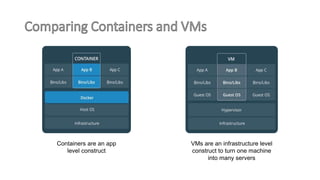
Containers are an app
level construct
VMs are an infrastructure level
construct to turn one machine
into many servers
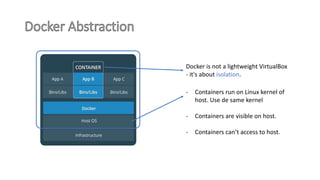
Docker is not a lightweight VirtualBox
- it's about isolation.
- Containers run on Linux kernel of
host. Use de same kernel
- Containers are visible on host.
- Containers can’t access to host.
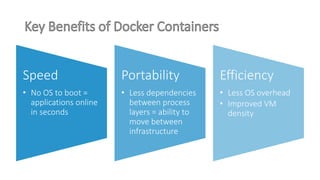
Speed
• No OS to boot =
applications online
in seconds
Portability
• Less dependencies
between process
layers = ability to
move between
infrastructure
Efficiency
• Less OS overhead
• Improved VM
density
Concepts Basics
Introduction to Docker
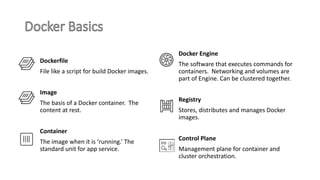
Dockerfile
File like a script for build Docker images.
Image
The basis of a Docker container. The
content at rest.
Container
The image when it is ‘running.’ The
standard unit for app service.
Docker Engine
The software that executes commands for
containers. Networking and volumes are
part of Engine. Can be clustered together.
Registry
Stores, distributes and manages Docker
images.
Control Plane
Management plane for container and
cluster orchestration.
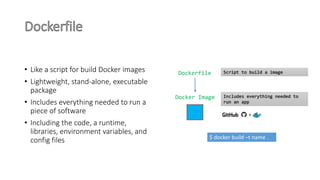
• Like a script for build Docker images
• Lightweight, stand-alone, executable
package
• Includes everything needed to run a
piece of software
• Including the code, a runtime,
libraries, environment variables, and
config files
Dockerfile
Docker Image
Script to build a image
Includes everything needed to
run an app
$ docker build –t name .
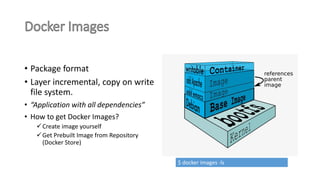
• Package format
• Layer incremental, copy on write
file system.
• “Application with all dependencies”
• How to get Docker Images?
Create image yourself
Get Prebuilt Image from Repository
(Docker Store)
$ docker images -ls
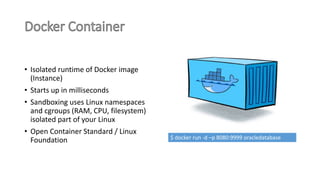
• Isolated runtime of Docker image
(Instance)
• Starts up in milliseconds
• Sandboxing uses Linux namespaces
and cgroups (RAM, CPU, filesystem)
isolated part of your Linux
• Open Container Standard / Linux
Foundation $ docker run -d –p 8080:9999 oracledatabase
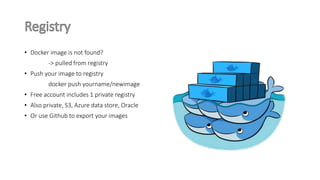
• Docker image is not found?
-> pulled from registry
• Push your image to registry
docker push yourname/newimage
• Free account includes 1 private registry
• Also private, S3, Azure data store, Oracle
• Or use Github to export your images
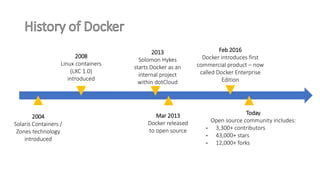
Docker Evolution
2004
Solaris Containers /
Zones technology
introduced
2008
Linux containers
(LXC 1.0)
introduced
2013
Solomon Hykes
starts Docker as an
internal project
within dotCloud
Mar 2013
Docker released
to open source
Feb 2016
Docker introduces first
commercial product – now
called Docker Enterprise
Edition
Today
Open source community includes:
- 3,300+ contributors
- 43,000+ stars
- 12,000+ forks
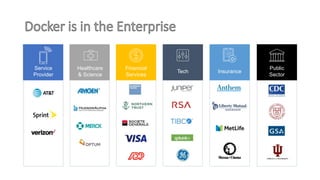
Service
Provider
Tech
Public
Sector
Insurance
Healthcare
& Science
Financial
Services
But …
Oracle Database on Docker ?
• It is possible
• Completely automated
• Support 11g and 12c
• Database is persistent (Share a host filesystem)
• Works like a normal database
• Customizable
• No OS Depended
• Supported by Oracle
• Prerequisite: Docker installed
Some Oracle database features are not supported in this Docker image
release:
• Automatic Memory Management (AMM)
• Multiples Oracle Homes
• Oracle Data Guard
• Multiples instances on the container
• Oracle Grid Infrastructure
Official Image from Docker Store:
https://store.docker.com/images/oracle-database-enterprise-edition
Official Image from Oracle Store:
https://container-registry.oracle.com/
Built your own Image from Official source for Docker configurations by
Oracle:
https://github.com/oracle/docker-images
1. Login in Docker Store (create Docker account before)
$ docker run -d -it --name <Oracle-DB> store/oracle/database-
enterprise:12.2.0.1
2. Run Oracle Database Container. Where Oracle-DB is the container name
$ docker login
3. Connecting to the Database Container. The default password to connect to the database with sys
user is Oradoc_db1
$ docker exec -it <Oracle-DB> bash -c "source
/home/oracle/.bashrc; sqlplus /nolog"
See details:
https://store.docker.com/images/oracle-database-enterprise-edition/plans/08cf8677-bb8f-453c-b667-
6b0c24a388d4?tab=instructions
$ docker build --force-rm=true --no-cache=true -t
oracle/database:12.2.0.1-ee -f Dockerfile.ee .
1. Download the Github repository.
https://github.com/oracle/docker-images
2. On your PC Extract Repository
3. Copy Oracle Software for Linux x64 in the folder appropriate to version.
e.g. For Oracle Database 12.2 copy to folder ./docker-images/OracleDatabase/dockerfiles/12.2.0.1/
4. Build Image
e.g. Build Image for Oracle Database 12.2 Enterprise Edition
$ docker run --name testdb1 
-p 1521:1521 -p 5500:5500 
-e ORACLE_SID=dcdb 
-e ORACLE_PWD=manager1 
-e ORACLE_CHARACTERSET=WE8MSWIN1252 
-e ORACLE_CONTAINERDB=false 
oracle/database:12.2.0.1-ee
Container Name
Map Ports
Database name,
password and some
parameters
Image Name
See details:
https://github.com/oracle/docker-images/tree/master/OracleDatabase
Ready.
You can use your Oracle Database on
Docker Container!
Thank you!
Jesús Guzmán
Blog: https://susguzman.wordpress.com/
Email: susguzman@gmail.com, jguzman@datum.com.gt
http://www.datum.com.gt/