The document provides an overview of control structures in MATLAB programming, categorized into sequences, selection structures, and repetition structures. It details relational and logical operators, various types of selection structures such as 'if', 'else if', and 'find', along with examples of loops including 'for' and 'while'. Additionally, it explains how these structures are used to manage the flow of execution in MATLAB programs.
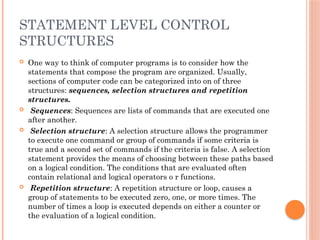
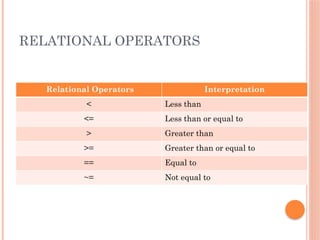
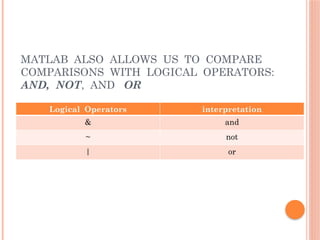
![EXAMPLES
MATLAB has six relational operators for comparing two
matrices of equal size, comparisons are either true or false
and most computer programs use the number 1 for true and
0 for false.
x = [ 1 2 3 4 5 ];
y = [-2 0 2 4 6];
x<y
returns
ans=
0 0 0 0 1
which tells that the comparisons was false for the
first four elements but true for the last one.](https://image.slidesharecdn.com/numericalppt-241109094015-5f9ccf81/85/NUMERICAL-METHODS-WITH-MATLAB-PROGRAMMING-4-320.jpg)
![EXAMPLE FOR LOGICAL
OPERATORS
consider the following:
x = [ 1 2 3 4 5];
y = [ -2 0 2 4 6];
z = [ 8 8 8 8 8 ];
z>x & z>y
returns
ans=
1 1 1 1 1
Both z is greater than both x and y for every
element.](https://image.slidesharecdn.com/numericalppt-241109094015-5f9ccf81/85/NUMERICAL-METHODS-WITH-MATLAB-PROGRAMMING-6-320.jpg)
![• Selection structures MATLAB offers two kinds of
selection structures: find and a family of if structures
• Find
The find command is unique to MATLAB, and can
often be used instead of both if and loop structures. The
usefulness of the find command is best described with
examples.
Assume that you have a list of temperatures
measured in a manufacturing process. If the
temperature is less than 95 degree F, them widgets
produced will be faulty:
temp = [ 100 98 94 101 93 ]
use the find function to determine which widgets are
family:
find(temp<95)
Returns a vector of element numbers;
ans=
3 5](https://image.slidesharecdn.com/numericalppt-241109094015-5f9ccf81/85/NUMERICAL-METHODS-WITH-MATLAB-PROGRAMMING-7-320.jpg)
![Location of all elements greater than 9:
x = [ 1,2,3 10,5,1 3,12,2 8,3,1]
element = find(x>9)
[row, column] = find(x>9)
Returns
x =
1 2 3
10 5 1
3 12 2
8 3 1
Element =
2
7
row =
2
3
column =
1
2
The numbers 10 and 12 are the only two values greater than
9](https://image.slidesharecdn.com/numericalppt-241109094015-5f9ccf81/85/NUMERICAL-METHODS-WITH-MATLAB-PROGRAMMING-8-320.jpg)




![EXAMPLES
MATLAB has six relational operators for comparing two
matrices of equal size, comparisons are either true or false
and most computer programs use the number 1 for true and
0 for false.
x = [ 1 2 3 4 5 ];
y = [-2 0 2 4 6];
x<y
returns
ans=
0 0 0 0 1
which tells that the comparisons was false for the
first four elements but true for the last one.](/p?url=https%3A%2F%2Fimage.slidesharecdn.com%2Fnumericalppt-241109094015-5f9ccf81%2F85%2FNUMERICAL-METHODS-WITH-MATLAB-PROGRAMMING-4-320.jpg&__src=https%3A%2F%2Fwww.slideshare.net%2Fslideshow%2Fnumerical-methods-with-matlab-programming-d984%2F273142200&__type=image)

![EXAMPLE FOR LOGICAL
OPERATORS
consider the following:
x = [ 1 2 3 4 5];
y = [ -2 0 2 4 6];
z = [ 8 8 8 8 8 ];
z>x & z>y
returns
ans=
1 1 1 1 1
Both z is greater than both x and y for every
element.](/p?url=https%3A%2F%2Fimage.slidesharecdn.com%2Fnumericalppt-241109094015-5f9ccf81%2F85%2FNUMERICAL-METHODS-WITH-MATLAB-PROGRAMMING-6-320.jpg&__src=https%3A%2F%2Fwww.slideshare.net%2Fslideshow%2Fnumerical-methods-with-matlab-programming-d984%2F273142200&__type=image)
![• Selection structures MATLAB offers two kinds of
selection structures: find and a family of if structures
• Find
The find command is unique to MATLAB, and can
often be used instead of both if and loop structures. The
usefulness of the find command is best described with
examples.
Assume that you have a list of temperatures
measured in a manufacturing process. If the
temperature is less than 95 degree F, them widgets
produced will be faulty:
temp = [ 100 98 94 101 93 ]
use the find function to determine which widgets are
family:
find(temp<95)
Returns a vector of element numbers;
ans=
3 5](/p?url=https%3A%2F%2Fimage.slidesharecdn.com%2Fnumericalppt-241109094015-5f9ccf81%2F85%2FNUMERICAL-METHODS-WITH-MATLAB-PROGRAMMING-7-320.jpg&__src=https%3A%2F%2Fwww.slideshare.net%2Fslideshow%2Fnumerical-methods-with-matlab-programming-d984%2F273142200&__type=image)
![Location of all elements greater than 9:
x = [ 1,2,3 10,5,1 3,12,2 8,3,1]
element = find(x>9)
[row, column] = find(x>9)
Returns
x =
1 2 3
10 5 1
3 12 2
8 3 1
Element =
2
7
row =
2
3
column =
1
2
The numbers 10 and 12 are the only two values greater than
9](/p?url=https%3A%2F%2Fimage.slidesharecdn.com%2Fnumericalppt-241109094015-5f9ccf81%2F85%2FNUMERICAL-METHODS-WITH-MATLAB-PROGRAMMING-8-320.jpg&__src=https%3A%2F%2Fwww.slideshare.net%2Fslideshow%2Fnumerical-methods-with-matlab-programming-d984%2F273142200&__type=image)


![Presentation on Intro to Matlab [Autosaved].pptx](https://cdn.slidesharecdn.com/ss_thumbnails/presentationonintrotomatlabautosaved-260306142555-6a0fbfec-thumbnail.jpg?width=640&height=640&fit=bounds)


![[GDG-Fremont] Building Multi-Agentic ecosystem using Gemini.pdf](https://cdn.slidesharecdn.com/ss_thumbnails/gdg-fremontbuildingmulti-agenticecosystemusinggemini-260601215542-0431b465-thumbnail.jpg?width=640&height=640&fit=bounds)


