Agenda
ØWhat	
  is	
  Nmap?
ØProcess	
  of	
  Nmap
ØScanning	
  techniques
ØDectect OS	
  with	
  Nmap
ØHost	
  and	
  Port	
  Option
ØReal	
  Time	
  Information
ØLogging	
  Information
What	
  is	
  NMAP?
ØNmap is	
  a	
  free	
  and	
  open	
  source	
  utility	
  for	
  
network	
  discovery	
  and	
  security	
  auditing.
ØLatest	
  version	
  of	
  nmap is	
  7.01	
  
ØNmap supports	
  all	
  platform	
  of	
  OS	
  like
qLinux/Unix
qMicrosoft	
  
qMac
Process	
  of	
  NMAP
1. If	
  hostname use	
  as	
  target,	
  nmap will	
  perform	
  dns
lookup	
  to	
  scan.	
  But	
  if	
  ip address	
  use	
  as	
  target,	
  dns
lookup	
  will	
  not	
  process	
  
2. Nmap pings	
  the	
  romote device.	
  Can	
  disable	
  ping	
  with	
  
option	
  (-­‐Pn)
3. If	
  IP	
  address	
  is	
  specified	
  as	
  the	
  remote	
  host,	
  Reverse	
  
DNS	
  will	
  occur.	
  We	
  can	
  use	
  option	
  (-­‐n)	
  to	
  disable	
  if	
  we	
  
think	
  it	
  is	
  not	
  necessary	
  
4. Nmap executes	
  the	
  scan.	
  
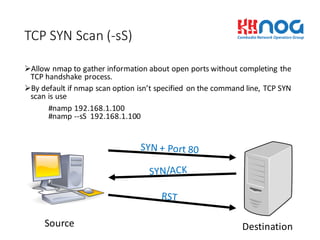
ØAllow	
  nmap to	
  gather	
  information	
  about	
  open	
  ports	
  without	
  completing	
  the	
  
TCP	
  handshake	
  process.
ØBy	
  default	
  if	
  nmap scan	
  option	
  isn’t	
  specified	
  on	
  the	
  command	
  line,	
  TCP	
  SYN	
  
scan	
  is	
  use
#namp 192.168.1.100
#namp -­‐-­‐sS 192.168.1.100
TCP	
  SYN	
  Scan	
  (-­‐sS)
Source Destination
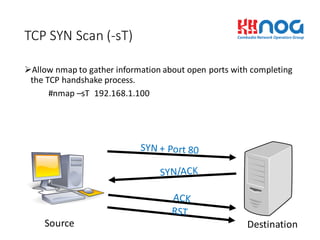
ØAllow	
  nmap to	
  gather	
  information	
  about	
  open	
  ports	
  with	
  completing	
  
the	
  TCP	
  handshake	
  process.
#nmap –sT 192.168.1.100	
  
TCP	
  SYN	
  Scan	
  (-­‐sT)
Source Destination
ØPing	
  Scan	
  is	
  a	
  quickest	
  scan	
  that	
  nmap perform	
  to	
  discovery	
  host	
  
alive.	
  
ØIt	
  is	
  useful	
  to	
  determine	
  remote	
  hosts	
  are	
  up	
  or	
  down.
#nmap -­‐sP 192.168.1.100	
  -­‐-­‐packet_trace
Ping	
  Scan	
  (-­‐sP)
Source Destination
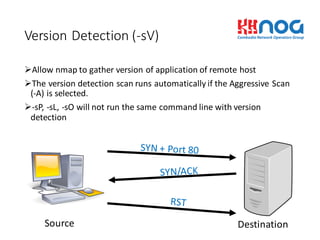
ØAllow	
  nmap to	
  gather	
  version	
  of	
  application	
  of	
  remote	
  host
ØThe	
  version	
  detection	
  scan	
  runs	
  automatically	
  if	
  the	
  Aggressive	
  Scan	
  
(-­‐A)	
  is	
  selected.
Ø-­‐sP,	
  -­‐sL,	
  -­‐sO will	
  not	
  run	
  the	
  same	
  command	
  line	
  with	
  version	
  
detection
Version	
  Detection	
  (-­‐sV)
Source Destination
ØUDP	
  has	
  no	
  need	
  to	
  process	
  3	
  way	
  handshake	
  or	
  SYN,	
  FIN,	
  and	
  RST.
#nmap -­‐sU -­‐v	
  192.168.1.100	
  -­‐-­‐packet_trace
UDP	
  Scan	
  (-­‐sU)
Source Destination
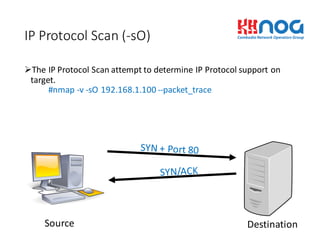
ØThe	
  IP	
  Protocol	
  Scan	
  attempt	
  to	
  determine	
  IP	
  Protocol	
  support	
  on	
  
target.
#nmap -­‐v	
  -­‐sO 192.168.1.100	
  -­‐-­‐packet_trace
IP	
  Protocol	
  Scan	
  (-­‐sO)
Source Destination
ØACK	
  Scan	
  to	
  determine	
  port	
  filter	
  or	
  unfilter
#nmap -­‐sA -­‐v	
  192.168.1.100
ACK	
  Scan	
  (-­‐sA)
Source Destination
ØIdle	
  Scan	
  use	
  other	
  station	
  to	
  scan	
  remote	
  host	
  device
#nmap -­‐sI -­‐v	
  192.168.1.50	
  192.168.1.100	
  
Idlescan (-­‐sI)
Source
Destination
Zombie
How	
  to	
  Detect	
  OS	
  with	
  Nmap
• Technically,	
  nmap provide	
  the	
  rich	
  feature	
  that	
  offer	
  us	
  to	
  dectect what	
  OS	
  
that	
  remote	
  devices	
  are	
  used.	
  
• By	
  using	
  below	
  additional	
  options	
  we	
  can	
  get	
  what	
  OS	
  of	
  remote	
  host
qOS	
  fingerprint	
   with	
  option	
  (-­‐O)	
  
#nmap -­‐sS -­‐O	
  192.168.1.100	
  
qAdditional,	
   Advance,	
  and	
  Aggressive	
  (-­‐A)	
  
Note:	
  shortcut	
  for	
  running	
   (-­‐O)	
  &	
  (-­‐sV)
#nmap -­‐sS -­‐A	
  192.168.1.100
Host	
  and	
  Port	
  options
• Except	
  Target	
  
qExclude	
  Targets	
  (-­‐-­‐exclude	
  host1,host2,….)
This	
  option	
  provide	
  nmap to	
  avoid	
  scanning	
  specific	
  hosts	
  that	
  are	
  not	
  necessary
#nmap -­‐v	
  -­‐sS 192.168.1.0/24	
  -­‐-­‐exclude	
  192.168.1.1-­‐10
qExclude	
  Targets	
  in	
  File	
  (-­‐-­‐excludefile <filename>)
This	
  option	
  provide	
  nmap to	
  avoid	
  scanning	
  specific	
  hosts	
  from	
  file.
#nmap -­‐v	
  -­‐sS 192.168.1.0/24	
  -­‐-­‐ecludefile except_IP.txt
ØInclude	
  Target
qRead	
  Targets	
  from	
  File	
  (-­‐iL <filename>)
This	
  option	
  provide	
  name	
  to	
  scan	
  specific	
  host	
  from	
  file.
#nmap -­‐v	
  -­‐sS -­‐iL IP_Scan.txt
Host	
  and	
  Port	
  options	
  (Cont)
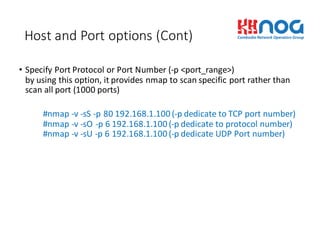
• Specify	
  Port	
  Protocol	
  or	
  Port	
  Number	
  (-­‐p	
  <port_range>)
by	
  using	
  this	
  option,	
  it	
  provides	
  nmap to	
  scan	
  specific	
  port	
  rather	
  than	
  
scan	
  all	
  port	
  (1000	
  ports)
#nmap -­‐v	
  -­‐sS -­‐p	
  80	
  192.168.1.100	
  (-­‐p	
  dedicate	
  to	
  TCP	
  port	
  number)
#nmap -­‐v	
  -­‐sO -­‐p	
  6	
  192.168.1.100	
  (-­‐p	
  dedicate	
  to	
  protocol	
  number)
#nmap -­‐v	
  -­‐sU -­‐p	
  6	
  192.168.1.100	
  (-­‐p	
  dedicate	
  UDP	
  Port	
  number)
Real	
  Time	
  Information
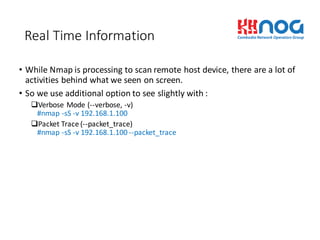
• While	
  Nmap is	
  processing	
  to	
  scan	
  remote	
  host	
  device,	
  there	
  are	
  a	
  lot	
  of	
  
activities	
  behind	
  what	
  we	
  seen	
  on	
  screen.
• So	
  we	
  use	
  additional	
  option	
  to	
  see	
  slightly	
  with	
  :
qVerbose	
  Mode	
  (-­‐-­‐verbose,	
  -­‐v)	
  
#nmap -­‐sS -­‐v	
  192.168.1.100
qPacket	
  Trace	
  (-­‐-­‐packet_trace)
#nmap -­‐sS -­‐v	
  192.168.1.100	
  -­‐-­‐packet_trace
Logging	
  Information
• Nmap provide	
  many	
  options	
  of	
  logging	
  the	
  scan	
  result.	
  
qNormal	
  Format	
  (-­‐oN <Logfilename>)
#nmap -­‐sS -­‐v	
  192.168.1.100	
  -­‐-­‐packet_trace -­‐oN nmap_output
qXML	
  Format	
  (-­‐oX <Logfilenmae>)
#nmap -­‐sS -­‐v	
  192.168.1.100	
  -­‐-­‐packet_trace -­‐oN nmap_output
qGrepable Format	
  (-­‐oG <filename>)
#nmap -­‐sS -­‐v	
  192.168.1.100	
  -­‐-­‐packet_trace -­‐oG nmap_output
qAll	
  Formats	
  (-­‐oA <filename>)
this	
  option	
  will	
  create	
  3	
  different	
  output	
  (Normal,	
  XML,	
  grepable output)
#nmap -­‐sS -­‐v	
  192.168.1.100	
  -­‐-­‐packet_trace -­‐oA nmap_output
Nmap sample	
  command	
  
Nmap command	
   Description	
  
Nmap192.168.1.100 Perform nmap scan	
  default	
  on	
  host	
  192.168.1.100
Nmap192.168.1.0/24 Scan	
  default	
  nmap on	
  network	
  192.168.1.0
Nmap–sP 192.168.1.100 Just ping	
  to	
  identify	
  remote	
  host	
  alive	
  or	
  not
Nmap–sS –O –p	
  22,80,443	
  192.168.1.100 Perform SYN	
  scan	
  on	
  port	
  22,	
  80,	
  and	
  443	
  on	
  remote	
  host	
  and	
  dectect operation	
  system
nmap -­‐sS -­‐Pn-­‐sV -­‐O	
  nmap.org Syn scan,	
  no	
  ping,	
  identify	
  version,	
  and	
  operating	
  system	
  detection.
nmap -­‐v	
  -­‐n	
  -­‐sS -­‐sU -­‐Pn -­‐A	
  -­‐oA scan	
  nmap.org
-­‐v invokes	
  verbosity.
-­‐n skips	
  name	
  resolution.
-­‐sS is	
  a	
  SYN	
  scan.
-­‐sU scans	
  UDP	
  ports.
-­‐Pn skips	
  pinging.
-­‐A enables	
  both	
  OS	
  fingerprinting	
  and	
  version	
  detection	
  (tries	
  to	
  verify	
  what	
  is	
  listening	
  on	
  
found	
  ports).
-­‐oA scan creates	
  reports	
  as scan.nmap, scan.gnmap,	
  and scan.xml.
Q	
  &	
  A