MySQL Performance for DevOps
October 26, 2020
Sveta Smirnova
• MySQL Support engineer
• Author of
• MySQL Troubleshooting
• JSON UDF functions
• FILTER clause for MySQL
• Speaker
• Percona Live, OOW, Fosdem,
DevConf, HighLoad...
Sveta Smirnova
2
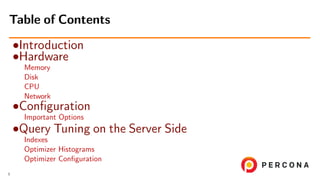
•Introduction
•Hardware
Memory
Disk
CPU
Network
•Configuration
Important Options
•Query Tuning on the Server Side
Indexes
Optimizer Histograms
Optimizer Configuration
Table of Contents
3
Introduction
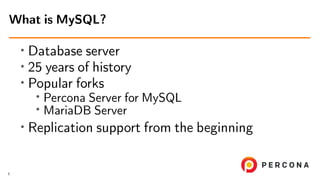
• Database server
• 25 years of history
• Popular forks
•
Percona Server for MySQL
•
MariaDB Server
• Replication support from the beginning
What is MySQL?
5
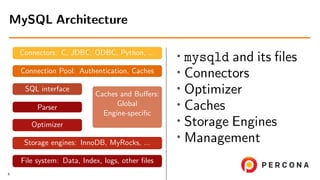
Connectors: C, JDBC, ODBC, Python, ...
Connection Pool: Authentication, Caches
SQL interface
Parser
Optimizer
Caches and Buffers:
Global
Engine-specific
Storage engines: InnoDB, MyRocks, ...
File system: Data, Index, logs, other files
•
mysqld and its files
•
Connectors
•
Optimizer
• Caches
• Storage Engines
• Management
MySQL Architecture
6
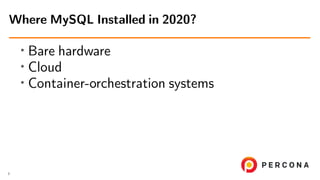
• Bare hardware
• Cloud
• Container-orchestration systems
Where MySQL Installed in 2020?
7
Percona Kubernetes Operator for PXC
MySQL Operator
MySQL Kubernetes Operators
8
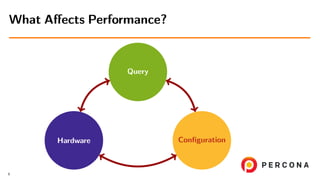
Query
ConfigurationHardware
What Affects Performance?
9
Hardware
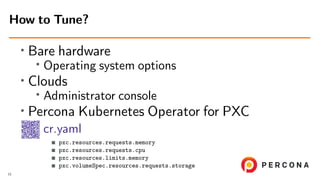
• Bare hardware
•
Operating system options
How to Tune?
11
• Bare hardware
•
Operating system options
•
Clouds
• Administrator console
How to Tune?
11
• Bare hardware
•
Operating system options
•
Clouds
• Administrator console
• Percona Kubernetes Operator for PXC
cr.yaml
pxc.resources.requests.memory
pxc.resources.requests.cpu
pxc.resources.limits.memory
pxc.volumeSpec.resources.requests.storage
How to Tune?
11
• Memory
• Disk
• CPU
•
Network
What to Tune?
12
Hardware
Memory
• No swapping: sysctl vm.swappiness=1
Memory Configuration
14
• No swapping: sysctl vm.swappiness=1
• NUMA interleave: enable in BIOS
Memory Configuration
14
• No swapping: sysctl vm.swappiness=1
• NUMA interleave: enable in BIOS
• More is better
Memory Configuration
14
• No swapping: sysctl vm.swappiness=1
• NUMA interleave: enable in BIOS
• More is better
•
Memory access is faster than disk access
Memory Configuration
14
• No swapping: sysctl vm.swappiness=1
• NUMA interleave: enable in BIOS
• More is better
•
Memory access is faster than disk access
•
Frequently accessed data should be in memory
Memory Configuration
14
• Global buffers
• Allocated up to the limit and freed at shutdown
InnoDB Buffer Pool Size
Performance Schema tables
How MySQL Uses Memory
15
• Global buffers
• Session buffers
•
Allocated when session starts
• Freed at the disconnect
Connection and result buffers: from net buffer length up to max allowed packet
How MySQL Uses Memory
15
• Global buffers
• Session buffers
• Operation-specific buffers
• Allocated for the operation life time
• Can be allocated multiple times
join buffer size: for each tables pair in JOIN
tmp table size: for each temporary table
How MySQL Uses Memory
15
Hardware
Disk
• Faster is better
•
SSD
• NVMe
• Spinning disk
Disk Configuration
17
• Faster is better
•
SSD
• NVMe
• Spinning disk
•
Parallel writes
Disk Configuration
17
• Faster is better
•
SSD
• NVMe
• Spinning disk
•
Parallel writes
•
Battery-backed cache
Disk Configuration
17
• Tables data
How MySQL Uses Disk
18
• Tables data
•
Log files
• Binary
• Storage engine
InnoDB redo log file
• Error, general, audit, ...
How MySQL Uses Disk
18
• Tables data
•
Log files
• Binary
• Storage engine
InnoDB redo log file
• Error, general, audit, ...
•
Disk-based temporary tables
How MySQL Uses Disk
18
• Tables data
•
Log files
• Binary
• Storage engine
InnoDB redo log file
• Error, general, audit, ...
•
Disk-based temporary tables
• You may put these on different disks
How MySQL Uses Disk
18
Hardware
CPU
•
IO scheduler [noop] or [deadline]
• sudo echo noop >
/sys/block/YOUR DISK/queue/scheduler
or sudo echo deadline >
/sys/block/YOUR DISK/queue/scheduler
CPU Configuration
20
•
IO scheduler [noop] or [deadline]
• sudo echo noop >
/sys/block/YOUR DISK/queue/scheduler
or sudo echo deadline >
/sys/block/YOUR DISK/queue/scheduler
•
CPU governor: set to performance
CPU Configuration
20
•
IO scheduler [noop] or [deadline]
• sudo echo noop >
/sys/block/YOUR DISK/queue/scheduler
or sudo echo deadline >
/sys/block/YOUR DISK/queue/scheduler
•
CPU governor: set to performance
•
More cores is better
CPU Configuration
20
• One thread per connection
•
CPU used only for active threads
How MySQL Uses CPU
21
• One thread per connection
•
CPU used only for active threads
• Background work by storage engines
How MySQL Uses CPU
21
Server
Storage Engine
Connection and Engine Threads
22
? <= CPU cores?
What Happens with Threads
23
? <= CPU cores?
Yes Executed simultaneously
What Happens with Threads
23
? <= CPU cores?
Yes Executed simultaneously
No Wait in a queue
What Happens with Threads
23
? <= CPU cores?
Yes Executed simultaneously
No Wait in a queue
? Does the disk support parallel write?
What Happens with Threads
23
? <= CPU cores?
Yes Executed simultaneously
No Wait in a queue
? Does the disk support parallel write?
Yes Write happens
What Happens with Threads
23
? <= CPU cores?
Yes Executed simultaneously
No Wait in a queue
? Does the disk support parallel write?
Yes Write happens
No Wait in a queue
What Happens with Threads
23
Hardware
Network
• As fast as possible
• Speed of the line
RTT
•
Bandwidth
• Stability
To avoid TCP packet re-submission
Network Configuration
25
• As fast as possible
• On the Internet connection
•
Clients can work
• Asynchronous replica will delay
• Synchronous clusters will be not functional
Node disconnects with default options
Very slow response times with adjusted configuration
Network Configuration
25
• Communication between server and client
•
Regular client
• Application
• Replication connection (IO) thread
•
Traffic between synchronous nodes
How MySQL Uses Network
26
Configuration
• Server options
•
Components
• Storage engines
InnoDB
•
Plugins
• Server
Binary logging
Optimizer
What can be Configured?
28
• Global
• Parameters, necessary for all server processes
Location of server files: datadir etc.
Shared buffers
More
•
Session
• Control connection-specific parameters
MySQL Option Tables
System Variables and Options: Scope
29
•
SET [GLOBAL|PERSIST] var = NEW VALUE
System Variables: How to Change
30
•
SET [GLOBAL|PERSIST] var = NEW VALUE
•
Command-line option: --var=new value
System Variables: How to Change
30
•
SET [GLOBAL|PERSIST] var = NEW VALUE
•
Command-line option: --var=new value
• Configuration file
In the default location
• Specified by option --defaults-file
[mysqld]
var=new_value
System Variables: How to Change
30
• PXC Operator Configuration
• In cr.yaml
spec:
secretsName: my-cluster-secrets
pxc:
...
configuration: |
[mysqld]
innodb_log_file_size=8G
System Variables: How to Change
30
• PXC Operator Configuration
• In ConfigMap
Create custom configuration file my.cnf
[mysqld]
innodb_log_file_size=8G
System Variables: How to Change
30
• PXC Operator Configuration
• In ConfigMap
Create custom configuration file my.cnf
[mysqld]
innodb_log_file_size=8G
Create ConfigMap: kubectl create configmap cluster1-pxc --from-file=my.cnf
System Variables: How to Change
30
• PXC Operator Configuration
• In ConfigMap
Create custom configuration file my.cnf
[mysqld]
innodb_log_file_size=8G
Create ConfigMap: kubectl create configmap cluster1-pxc --from-file=my.cnf
Restart PXC
System Variables: How to Change
30
• Global options and few session options
< 8.0 A user with privilege SUPER
8.0 + A user with privilege SYSTEM VARIABLES ADMIN
Dynamic Variables: Who Can Change
31
• Global options and few session options
< 8.0 A user with privilege SUPER
8.0 + A user with privilege SYSTEM VARIABLES ADMIN
• Session options
< 8.0 Anybody
8.0 + Restricted privileges
SYSTEM VARIABLES ADMIN
SESSION VARIABLES ADMIN
8.0 + Not restricted privileges: anybody
Dynamic Variables: Who Can Change
31
• Global options and few session options
< 8.0 A user with privilege SUPER
8.0 + A user with privilege SYSTEM VARIABLES ADMIN
• Session options
< 8.0 Anybody
8.0 + Restricted privileges
SYSTEM VARIABLES ADMIN
SESSION VARIABLES ADMIN
8.0 + Not restricted privileges: anybody
• There are no limits!
Dynamic Variables: Who Can Change
31
• Those which control behavior of whole server
• Once at server startup
• Can start with low values, then grow to specified
Buffers: When Allocated
32
• Those which control behavior of whole server
• Once at server startup
• Can start with low values, then grow to specified
• Connection options
•
For every connection when connection opens
Buffers: When Allocated
32
• Those which control behavior of whole server
• Once at server startup
• Can start with low values, then grow to specified
• Connection options
•
For every connection when connection opens
•
Operation-specific
• For every operation when needed
•
Can be allocated more than once
Buffers: When Allocated
32
Configuration
Important Options
•
innodb buffer pool size
• Ideally should hold active data set
InnoDB
34
•
innodb buffer pool size
• innodb log file size
• Should hold changes for an hour
InnoDB
34
•
innodb buffer pool size
• innodb log file size
• Should hold changes for an hour
• Too low
InnoDB
34
•
innodb buffer pool size
• innodb log file size
• Should hold changes for an hour
• Good
InnoDB
34
•
innodb buffer pool size
• innodb log file size
• innodb thread concurrency
• 0 or number of CPU cores
InnoDB
34
•
innodb buffer pool size
• innodb log file size
• innodb thread concurrency
• innodb io capacity
•
Default is too small for fast disks
• Up to number of IOPS your disk can handle
InnoDB
34
•
innodb buffer pool size
• innodb log file size
• innodb thread concurrency
• innodb io capacity
•
innodb flush method
•
In most cases: O DIRECT
•
Test on your filesystem!
InnoDB
34
• Changing these compromize durability!
Synchronization
35
• Changing these compromize durability!
• innodb flush log at trx commit
1: full ACID, default
Synchronization
35
• Changing these compromize durability!
• innodb flush log at trx commit
1: full ACID, default
2: logs written at each commit, flushed per second
MySQL can handle up to 1M INSERTs per second
Safe with PXC and InnoDB Cluster
Synchronization
35
• Changing these compromize durability!
• innodb flush log at trx commit
1: full ACID, default
2: logs written at each commit, flushed per second
0: logs are written and flushed once per second
Synchronization
35
• Changing these compromize durability!
• innodb flush log at trx commit
1: full ACID, default
2: logs written at each commit, flushed per second
0: logs are written and flushed once per second
• Once per second not guaranteed for 0 and 2
DDL can cause faster flushing
Scheduling may delay flushing
Synchronization
35
• Changing these compromize durability!
• innodb flush log at trx commit
• sync binlog
0: Synchronization handled by the system
1: At each transaction commit, default
No transaction lost
N: After N binary log group commits
In case of power or OS crash not flushed transactions can be lost
Synchronization
35
•
table open cache
• The number of open tables for all threads
•
Increase when
Connections in the PROCESSLIST are waiting for opening a table
Value of global status variable Opened tables is larger than Open tables
Table Handlers
36
•
table open cache
• table definition cache
• Size of the cache for table definitions
• Increase when
Value of Opened table definitions is larger than Open table definitions
Table Handlers
36
•
table open cache
• table definition cache
• Increase OS open files limit if needed
Table Handlers
36
Query Tuning on the Server Side
• You communicate with database using queries
•
Even via NoSQL interface
• They are not SQL queries, but still queries
Heart of the application
38
• You communicate with database using queries
•
Even via NoSQL interface
• They are not SQL queries, but still queries
• Data, which you request, matters
•
1,000,000,000 rows
vs 1 row
Heart of the application
38
Query sent
Connection Pool: Authentication, Caches; SQL interface; Parser
Optimizer
Storage engines
Hardware
Query execution workflow
39
• Selecting a lot of data
• SELECT * FROM many columns table
You May not Be Able to Change Slow Query
40
• Selecting a lot of data
• SELECT * FROM many columns table
• Badly written
•
LEFT JOIN instead of INNER JOIN
•
Many values in IN()
• Retrieving large result set, then discarding
•
Not effective SQL
For particular MySQL version
You May not Be Able to Change Slow Query
40
• Selecting a lot of data
• SELECT * FROM many columns table
• Badly written
•
LEFT JOIN instead of INNER JOIN
•
Many values in IN()
• Retrieving large result set, then discarding
•
Not effective SQL
For particular MySQL version
•
We still can improve performance
You May not Be Able to Change Slow Query
40
Query Tuning on the Server Side
Indexes
SELECT name FROM users SELECT name FROM users WHERE id=12
1 2 5 6 7 9 12 16 18 21 22 23 24 25
Full Table Scan
42
SELECT name FROM users SELECT name FROM users WHERE id=12
1 2 5 6 7 9 12 16 18 21 22 23 24 25
After Index Added
43
d001
d003
d008
d009
d003******
d009******
d008******
d009******
d001******
d003******
d009******
d008******
d009******
d001******
d008******
d008******
d001******
• B-Tree (Mostly)
• Fractal Tree
• LSM Tree
• R-Tree (Spatial)
• Hash (Memory SE)
• Engine-dependent
MySQL Indexes
44
• Single column
CREATE INDEX index name ON
the table(the column)
• Multiple columns
CREATE INDEX index name ON
the table(column1, column2)
How to Create an Index
45
• Single column
ALTER TABLE table name ADD INDEX
[index name] (the column)
• Multiple columns
ALTER TABLE table name ADD INDEX
[index name] (column1, column2)
How to Create an Index
45
•
WHERE the column = a value
• WHERE the column IN(value1, value2,
value3)
• WHERE the column LIKE ’value%’
• WHERE the column LIKE ’%value’
When MySQL Uses Indexes: Conditions
46
•
WHERE left part = value1 AND
right part = value2
• WHERE left part = value1 OR
right part = value2
• WHERE right part = value1 AND
left part = value2
•
WHERE right part = value1 OR left part =
value2
When MySQL Uses Indexes: Conditions
46
•
table1 JOIN table2 ON table1.column1
= table2.column2
When MySQL Uses Indexes: Joins
47
•
table1 JOIN table2 ON table1.column1
= table2.column2
• Same as FROM table1, table2 WHERE
table1.column1 = table2.column2
When MySQL Uses Indexes: Joins
47
•
GROUP BY the column
• GROUP BY left part, right part
• GROUP BY right part, left part
• GROUP BY the index, another index
When MySQL Uses Indexes: GROUP BY
48
•
ORDER BY the column
• ORDER BY left part, right part
• ORDER BY right part, left part
• ORDER BY the index, another index
When MySQL Uses Indexes: ORDER BY
49