Multi-Threading
.NET Multi-ThreadingIntroductory UsageProven PracticesOverture
Hello to the threading world
BlockingThread.Sleep & JoinLockinglock, Mutex & SemaphoreSinglingEventWaitHandle& Wait/PulseNon-BlockingMemory Barrier, Interlocked & VolatileManaging
Managing threads
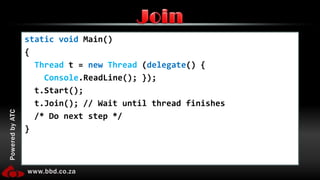
static void Main() {Threadt = newThread (delegate() {Console.ReadLine(); });  t.Start();  t.Join(); // Wait until thread finishes /* Do next step */}Join
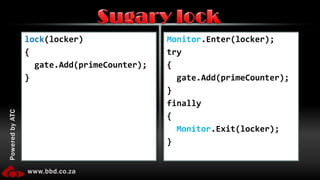
lock(locker){  gate.Add(primeCounter);}Monitor.Enter(locker);try{gate.Add(primeCounter);}finally{Monitor.Exit(locker);}Sugary lock
Same as a lockAdvantage: Can work across processes, meaning multiple applications can use a single mutexMutex
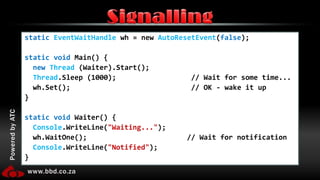
staticEventWaitHandle wh = new AutoResetEvent(false);static void Main() {newThread (Waiter).Start();Thread.Sleep (1000);                  // Wait for some time...wh.Set();                             // OK - wake it up}static void Waiter() {Console.WriteLine("Waiting...");wh.WaitOne();                        // Wait for notificationConsole.WriteLine("Notified");}Signalling
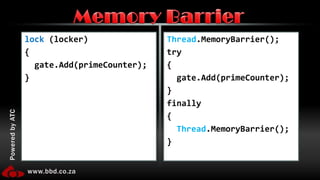
lock(locker){  gate.Add(primeCounter);}Thread.MemoryBarrier();try{gate.Add(primeCounter);}finally{Thread.MemoryBarrier();}Memory Barrier
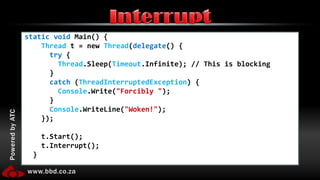
static void Main() {Thread t = new Thread(delegate() {try {Thread.Sleep(Timeout.Infinite); // This is blocking      }catch (ThreadInterruptedException) {Console.Write("Forcibly ");      }Console.WriteLine("Woken!");    });    t.Start();    t.Interrupt();  }Interrupt
Similar usage to InterruptThrows – ThreadAbortExceptionDoes not wait for blockingAbort
Using non-blocking management
Using the built in ThreadPools
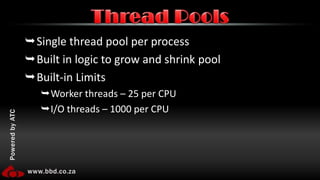
Single thread pool per processBuilt in logic to grow and shrink poolBuilt-in LimitsWorker threads – 25 per CPUI/O threads – 1000 per CPUThread Pools
Threaded controls in WinForms
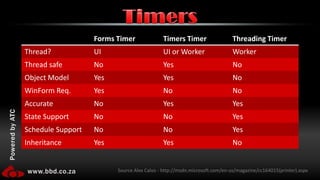
TimersSource Alex Calvo - http://msdn.microsoft.com/en-us/magazine/cc164015(printer).aspx
Talking to the UI thread from a worker thread
“Multi-threaded programming needs a little care” Patricia ShanahanUnderstatement?
CostThread SafetyRace conditionsDead locksException ManagementDebuggingCommon Problems
1 Mb of Address space12k for kernel mode stackNotification of every DLL in the processThreads are expensive
Reads value (5)Adds 1 – (6)Assumes value 6Reads value (6)Adds 1 – (7)Assumes value 7Thread 1Thread 2Race Conditions
If file does not existCreate itPopulate it with initial dataRead data from fileProcess dataWrite to fileLogical Process I
If file does not existCreate itPopulate it with initial data (Write Lock)Read data from file (Read Lock)Process dataWrite to file (Write Lock – if needed)Release locksLogical Process II
Creates fileLocks writerAttempts to lock readerWaits…Locks ReaderProcesses dataAttempts to lock writerWaits…Thread 1Thread 2Dead Locks
Exceptions are limited to a threadExceptionsMainChildtry{}catch{}1
Debugging in Visual Studio
Threads are expensive – use wiselyUse managed threads over native threads.Use Timers or ThreadPool where possible.Or the new parallel extensions in .NET 4.0Avoid mutex, unless you need cross process.Avoid Thread.Abortas it can have high side effectsAvoid Thread.Suspend/Resume as a blocking systemRather use lockProven Practises I
Be careful what you locklock’s are type based shared across all AppDomains. Use static as the solutionthis (instances) have a high chance of deadlocksUse lock over MonitorIf you must use Monitor, use try...finallyInside a lock do as little as possibleIf you are doing math inside the lock rather change to InterlockedNever perform long running operations on the UI threadProven Practises II