Multiple Sequence Alignment
• Alignment of more than two DNA or Protein
sequences of similar length.
• A natural extension of pairwise alignment is
multiple sequence alignment.
• The dynamic programming algorithm used for
optimal alignment of pairs of sequences can be
extended to three sequences, but for more than
three sequences, only a small number of
relatively short sequences may be analyzed.
Uses
• Helps in identification of conserved regions in the
sequences.
• An important step for phylogenetic analysis.
• Useful in designing experiments to test and modify the
function of specific proteins and also in predicting the
function and structure of proteins, and in identifying
new members of protein families.
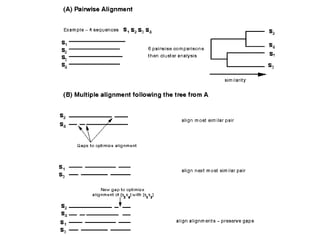
Progressive algorithm
 Possible number of pairs is calculated first.
 Pair-wise alignment is done.
 Based on the scores, distance is calculated.
 Guide tree is built.
 Based on the guide tree, alignment is done again.
T-Coffee
• Tree-based Consistency Objective Function For
alignment Evaluation.
• It is suitable for small alignments.
• Compare all the sequences two by two, producing a
global alignment and a series of local alignments (using
lalign).
• Then combine all these alignments into a multiple
alignment.
• T-Coffee is a consistency-based MSA tool that
attempts to mitigate the pitfalls of progressive
alignment methods.
• It uses a progressive approach like ClustalW.
• But it has advanced features to evaluate the
quality of the alignments and some capacity for
identifying occurrence of motifs.
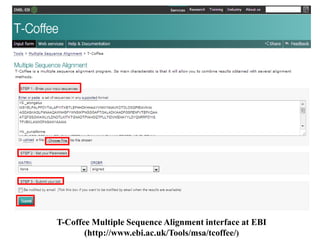
T-Coffee Multiple Sequence Alignment interface at EBI
(http://www.ebi.ac.uk/Tools/msa/tcoffee/)
1. Go to http://www.ebi.ac.uk/Tools/msa/tcoffee/ in your browser.
2. Enter your input sequence. (eg: iron superoxide dismutase
(FeSODs) of Oryza sativa subsp. indica (B8B2C9), Arabidopsis
thaliana (P21276), Escherichia coli (P0AGD3), Nostoc
punctiforme (B2IZB2) and Synechococcus elongatus strain PCC
7942 (P18655))
3. Go to choose file and give your input sequence in any valid format
(GCG, FASTA, EMBL, GenBank, PIR, NBRF or
UniProtKB/Swiss-Prot format).
4. Similarly give other input sequences (There is currently a limit of
500 sequences and 1MB of data).
5. Click on ‘more options’ button to set the alignment options.
Matrix -used when generating the MSA. Default value is: ‘None’,
Other options: BLOSUM and PAM. Order -in which the
sequences appear in the final alignment. Default value is: ‘aligned’
Other option: ‘input’
6. Enter submit.
MSA in aln format
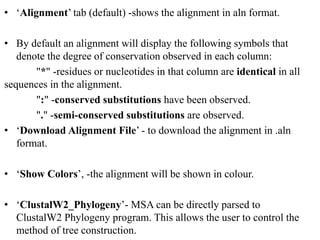
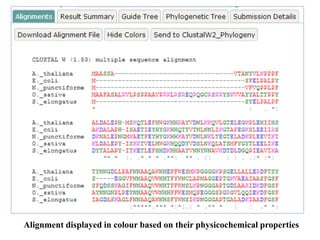
• ‘Alignment’ tab (default) -shows the alignment in aln format.
• By default an alignment will display the following symbols that
denote the degree of conservation observed in each column:
"*" -residues or nucleotides in that column are identical in all
sequences in the alignment.
":" -conserved substitutions have been observed.
"." -semi-conserved substitutions are observed.
• ‘Download Alignment File’ - to download the alignment in .aln
format.
• ‘Show Colors’, -the alignment will be shown in colour.
• ‘ClustalW2_Phylogeny’- MSA can be directly parsed to
ClustalW2 Phylogeny program. This allows the user to control the
method of tree construction.
Alignment displayed in colour based on their physicochemical properties
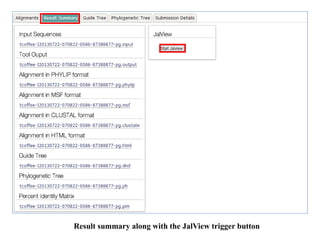
Result summary along with the JalView trigger button
• ‘Result Summary’ -displays the result files
comprising the input sequences for the alignment
(.input), tool output (.output), which is a log file
created during the alignment, alignment in HTML
format (.html), alignment in PHYLIP format
(.phylip), alignment in CLUSTAL format (.clustalw),
alignment in MSF format (.msf) and guide tree
(.dnd) that contains the information for building the
cladogram or phylogram.
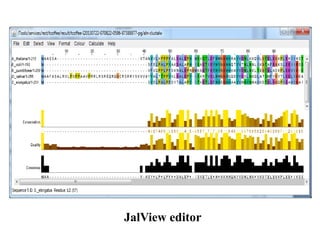
• ‘Start JalView’ under JalView -triggers JalView, a
Java based editor in new window. This requires Java
program to be preinstalled.
JalView editor
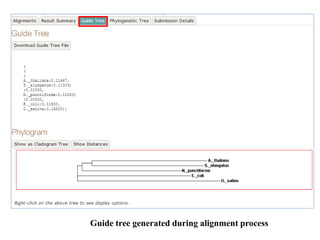
Guide tree generated during alignment process
• Phylogram
-Branching diagram (tree) assumed to be an
estimate of a phylogeny.
-Branch lengths are proportional to the amount of
inferred evolutionary change.
• Cladogram
-Branching diagram (tree) assumed to be an
estimate of a phylogeny where the branches are of equal
length, thus cladograms show common ancestry, but do
not indicate the amount of evolutionary "time"
separating taxa.
Neighbour-joining tree without correcting the distances
submission details of the alignment
MUSCLE
• MUltiple Sequence Comparison by Log-Expectation
• Better average accuracy and better speed than
ClustalW2 or T-Coffee
• An accurate MSA tool, especially good with proteins
and suitable for medium alignments.
• Aligns 5000 sequences with average length of 350.
• MUSLE algorithm includes
-fast distance estimation using kmer counting.
-progressive alignment using a new profile
function called the log‐expectation score.
-refinement using tree‐dependent restricted
partitioning.
MUSCLE MSA interface at EBI (http://www.ebi.ac.uk/Tools/msa/muscle/)
1. Go to http://www.ebi.ac.uk/Tools/msa/muscle/ in your
browser.
2. Enter your input sequence.
3. Go to choose file and give your input sequence in any
valid format (GCG, FASTA, EMBL, GenBank, PIR,
NBRF or UniProtKB/Swiss-Prot format).
4. Similarly give other input sequences (There is currently a
limit of 500 sequences and 1MB of data).
5. Click on ‘more options’ button to set the alignment
options. Change output format to clustalW to get results
in aln format. Default value is Pearson/FASTA [fasta].
Output Order -in which the sequences appear in the
final alignment. Default value is: ‘aligned’.
6. Enter submit.
MSA generated by MUSCLE MSA generated by T-Coffee
Comparison of MSA generated by MUSCLE and T-Coffee
Both the programs use different algorithms,
which is clearly evident from the results
generated by each program. It has to be noted
that, though alignments differ, conservation of
amino acids at the active site are still retained.
Again a phylogenetic tree construction is purely
dependent on the alignment. Hence one should
utmost care in MSA.
• ‘Alignment’ tab (default) -shows the alignment in aln format.
• By default an alignment will display the following symbols that
denote the degree of conservation observed in each column:
"*" -residues or nucleotides in that column are identical in all
sequences in the alignment.
":" -conserved substitutions have been observed.
"." -semi-conserved substitutions are observed.
• ‘Download Alignment File’ - to download the alignment in .aln
format.
• ‘Show Colors’ -the alignment will be shown in colour.
• ‘ClustalW2_Phylogeny’- MSA can be directly parsed to
ClustalW2 Phylogeny program. This allows the user to control the
method of tree construction.
• ‘Result Summary’ -displays the result files comprising the
input sequences for the alignment (.input), tool output
(.output), which is a log file created during the alignment,
alignment in HTML format (.html), alignment in PHYLIP
format (.phylip), alignment in CLUSTAL format (.clustalw),
alignment in MSF format (.msf) and guide tree (.dnd) that
contains the information for building the cladogram or
phylogram.
• ‘Start JalView’ under JalView -triggers JalView, a Java based
editor in new window. This requires Java program to be
preinstalled.
• ‘Phylogeny Tree’ -displays the phylogenetic tree of the
sequences used. It is actually a Neighbour-joining tree without
correcting the distances
• Submission Details’ -displays the information regarding the
program used, its version, input parameters, etc
MAFFT
• Multiple Alignment using Fast Fourier Transform.
• It uses FFT and is suitable for medium-large
sequence alignments.
• computational time is drastically reduced.
• 1st - homologous regions are identified by FFT,
amino acid sequence sequence composed of
volume + polarity values of each amino acid residue.
• 2nd -simplified scoring system is used for reducing
computational time and increasing the accuracy of
alignments.
• Applicable for
-sequences having large insertions or
extensions
-distantly related sequences of similar length
• Methods
Progressive method (FFT-NS-2) -
computational time is drastically reduced with
comparable accuracy
Iterative refinement method (FFT-NS-i) –is
100 times faster than T-COFFEE without
sacrificing the accuracy.
Iterative method
• Problems in progressive alignment method
-errors in the initial alignments of the most
closely related sequences are propagated to the MSA.
-problem is more acute when the starting
alignments are between more distantly related
sequences.
• Iterative methods
–rectify this problem by repeatedly realigning
subgroups of the sequences.
-then by aligning these subgroups into a global
alignment of all of the sequences.
-Major objective is to improve the overall
alignment score, such as a sum of pairs score.
• Selection of groups -based on the ordering of the
sequences on a phylogenetic tree.
MAFFT MSA interface at EBI (http://www.ebi.ac.uk/Tools/msa/mafft/)
•Click on ‘more options’ button to set the alignment options
Change the output format ‘clustalw’ (Default value is:
Pearson/FASTA [fasta]).
Matrix
Protein comparison matrix to be used when adding sequences to the
alignment.
Matrix (Protein Only)
Default value is: BLOSUM 62 [bl62]
Gap Open
Penalty for first base/residue in a gap.
Default value is: 1.53
Gap Extension
Penalty for each additional base/residue in a gap.
Default value is: 0.123
Order
The order in which the sequences appear in the final alignment
Default value is: aligned
Tree Rebuilding Number
Default value is: 1
Guide Tree Output
Generate guide tree file
Default value is: ON [true]
Max Iterate
Maximum number of iterations to perform when refining the
alignment.
Change the Max Iterate value to ‘2’ to change number of
iterations for better alignment.
Default value is: 0
Perform FFTS (Fast Fourier Transform)
Default value is: local pair
• Click ‘submit’
MSA generated by MAFFT
• The N terminal alignment in the result
generated by the MAFFT is similar to the one
generated by the T-Coffee.
• The alignment is in the middle and C terminal
is entirely different from the T-Coffee or
MUSCLE.
• Though alignments differ, conservation of
amino acids at the active site are retained.
Formats
Gaps in sequences
• In all EMBOSS alignment formats, gaps indicated by ‘-
'character.
• Exception
-msf format which uses '.' as the gap character inside
the sequences
-'~' as the gap character at the terminal ends of the
alignment.
Head and tail of the format
• The majority of the alignment formats (except those that are also standard sequence formats, like fasta or MSF) have a
block of information at the start of the alignment describing the program, date, output filename, ID names of the
sequences and some of the parameters and statistics of the alignment.
########################################
# Program: demoalign
# Rundate: Thu Jan 17 09:30:08 2002
# Report_file: stdout
########################################
#=====================================
Aligned_sequences: 4
# 1: IXI_234
# 2: IXI_235
# 3: IXI_236
# 4: IXI_237
# Matrix: EBLOSUM62
# Gap_penalty: 9
# Extend_penalty: ‐1
##
Length: 131
# Identity: 95/131 (72.5%)
# Similarity: 127/131 (96.9%)
# Gaps: 25/131 (19.1%)
#
9/27/2016 Alignment Formats
http://emboss.sourceforge.net/docs/themes/AlignFormats.html 3/6
# #====================================
There is also a block of information at the end of the alignment for summary information.
This is used by a few programs e.g. merger.
Length
The header block contains a line similar to:
# Length: 131
This is the length of the alignment, including any gaps that have been introduced to construct
the alignment.
Identity
The header block contains a line similar to:
# Identity: 95/131 (72.5%)
This is a count of the number of positions over the length of the alignment where all of the residues or
bases at that position are identical. It is followed by '/131' the length of the alignment and '(72.5%)'
the percentage of positions in the alignment where there are identities.
Similarity
The header block contains a line similar to:
# Similarity: 127/131 (96.9%)
This is a count of the number of positions over the length of the alignment where >= 51% of the
residues or bases at that position are similar. Any two residues or bases are defined as similar when
they have positive comparisons (as defined by the comparison matrix being used in the alignment
algorithm). It is followed by '/131' the length of the alignment and '(96.9%)' the percentage of
positions in the alignment where there are similarities. Note that the sum of identical and similar
positions is greater than 100%. This is because the count of similar positions includes the count of
identical positions; if residues are identical,
they must also be similar.
Gaps
The header block contains a line similar to:
# Gaps: 25/131 (19.1%)
This is a count of the number of positions over the
length of the alignment where there are one or more
sequences with a gap.
9/27/2016 Alignment Formats
http://emboss.sourceforge.net/docs/themes/AlignFormat
s.html4/6
It is followed by '/131' the length of the alignment and
'(19.1%)' the percentage of positions in the alignment
where there are gaps.
Score
The header block may contain a line similar to:
# Score: 100.0
This is the score used by the program that calculated the alignment to determine
which is the best possible alignment to report. The algorithm that was used to
derive the score is not part of the alignment formatting routines. You should see
documentation about the relevant algorithm to see how the score is derived.
Markup Line
The markup line is the line commonly placed between a pairwise alignment or at
the bottom of alignments of 3 or more sequences that shows where sequences are
mismatched, gapped, identical or similar. In general the markup line uses a space
for a mismatch or a gap, '.' for any small positive score, ':' for a similarity which
scores more than 1.0, and '|' for an identity where both sequences have the same
residue regardless of its score ('W' matching 'W' scores much more than 'L'
matching 'L' because a conserved tryptophan is more significant than a conserved
leucine). The 'markx' set of alignment formats (produced by the FASTA suite of
programs written by Bill Pearson) use '.' for similarity and ':' for an identity. The '|'
character is not used. This was a design decision by Bill Pearson when he wrote
the FASTA programs.
Alignment Formats (MSA)
Alignment viewers/editors
Name Integrated
with Struct.
Prediction
Tools
Can Align
Sequences
Can
Calculate
Phylogenetic
Trees
Other Features Formats
Supported
License Link
AliView
2016
No Muscle is
integrated.
Other
programs
such as
MAFFT can
be
defined.
External
programs such
as FastTree
can be called
from within
Fast, very easy
navigation through
unlimited mouse
wheel zoom in/out
feature. Handles
unlimited file size
alignments.
Degenerate primer
design.
FASTA,
PHYLIP,
Nexus, MSF
and Clustal
GPL3 (http://www.ormb
unkar.se/aliview)
BioEdit No ClustalW rudimentary,
can read
phylip
plasmid drawing,
ABI
chromatograms
Genbank,
Fasta, Phylip
3.2, Phylip 4,
NBRF/PIR
Free (http://www.mbio.
ncsu.edu/BioEdi
t/bioedit.html)
CINEMA NO, but can
read/show
2D
structure
annotations
ClustalW No Dotplot, 6 frame
translation, Blast
Nexus, MSF,
Clustal,
FASTA,
PHYLIP,
PIR, PRINTS
Free (http://aig.cs.
man.ac.uk/researc
h/utopia/cinema/c
inema.php)
DECIPHER Yes Yes UPGMA, NJ,
ML
Primer/Probe
design, Chimera
finding
FASTA,
FASTQ,
GenBank
GPL (http://deciphe
r.cee.wisc.edu/Do
wnload.html)
MEGA No Native
ClustalW
UPGMA, NJ,
ME, MP, with
bootstrap and
confidence
test
extended support
to phylogenetics
analysis
FASTA,
Clustal,
Nexus,
Mega, etc..
Freeware,
registration
requested
(http://www.m
egasoftware.net/),
table offeatures
(http://www.mega
software.net/feat
ures.html)
Other Tools
• Clustal Omega
New MSA tool that uses seeded guide trees and HMM profile-
profile techniques to generate alignments (protein only). Suitable for
medium-large alignments.
• DbClustal
Create a MSA from a protein BLAST result using the
DbClustal program.
• MView
Transform a Sequence Similarity Search result into a MSA or
reformat a MSA using the MView program.
• WebPRANK
The EBI has a new phylogeny-aware MSA program which
makes use of evolutionary information to help place insertions and
deletions.