COMPUTER VISION (Module-2)
Dr.Ramesh Wadawadagi
Associate Professor
Department of CSE
SVIT, Bengaluru-560064
ramesh.sw@saividya.ac.in
More neighborhood operators
2.
Non-linear filtering
● Inliear filtering each output pixel is estimated as a
weighted sum of neighborhood input pixels.
● Linear filters are easier to compose and are compliant
to frequency response analysis.
● In many cases, however, better performance can be
obtained by using a non-linear combination of
neighboring pixels.
● In this chapter, we will discuss some non-linear filters
applied for image enhancement task.
3.
1. Median filtering
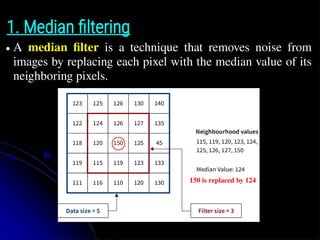
●A median filter is a technique that removes noise from
images by replacing each pixel with the median value of its
neighboring pixels.
150 is replaced by 124
4.
1. Median filtering
●Median values can be computed in expected linear time
using a randomized select algorithm.
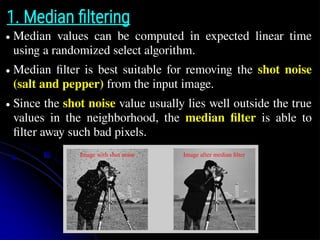
● Median filter is best suitable for removing the shot noise
(salt and pepper) from the input image.
● Since the shot noise value usually lies well outside the true
values in the neighborhood, the median filter is able to
filter away such bad pixels.
Image with shot noise Image after median filter
5.
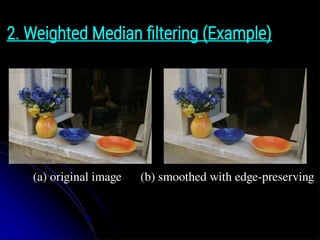
2. Weighted Medianfiltering
● Selecting only one input pixel value to replace each output
pixel is not efficient as that of averaging.
● Another possibility is to compute a weighted median, in
which each pixel is used a number of times depending on
its distance from the center.
● This turns out to be equivalent to minimizing the weighted
objective function.
● where g(i, j) is the desired output value and p = 1 for the
weighted median.
● Useful in image smoothing with edge-preserving.
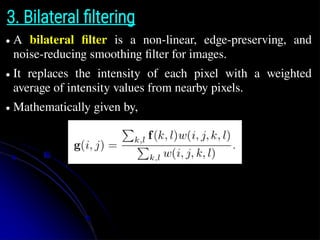
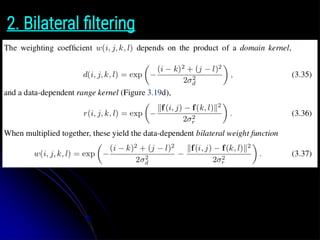
3. Bilateral filtering
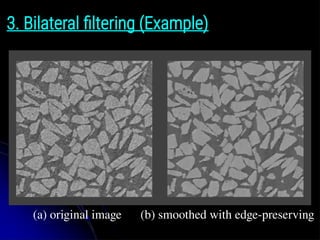
●A bilateral filter is a non-linear, edge-preserving, and
noise-reducing smoothing filter for images.
● It replaces the intensity of each pixel with a weighted
average of intensity values from nearby pixels.
● Mathematically given by,
4. Guided imagefiltering
● Guided image filtering uses context from another image,
known as a guidance image, to influence the output of
image filtering.
● Like other filtering operations, guided image filtering is a
neighborhood operation.
● However, guided image filtering takes into account the
statistics of a region in the corresponding spatial
neighborhood in the guidance image when calculating the
value of the output pixel.
● The guidance image can be the image itself, a different
version of the image, or a completely different image.
4. Guided imagefiltering
The guided image filter models the output value (shown as
qi in the figure, but denoted as g(i, j) in the text) as a local
affine transformation of the guide pixels.
15.
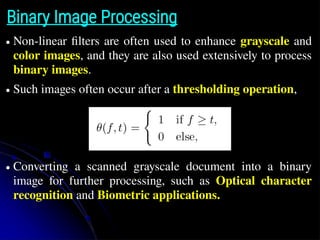
Binary Image Processing
●Non-linear filters are often used to enhance grayscale and
color images, and they are also used extensively to process
binary images.
● Such images often occur after a thresholding operation,
● Converting a scanned grayscale document into a binary
image for further processing, such as Optical character
recognition and Biometric applications.
Morphological Operations
● Morphologicaloperations are image processing
techniques that change the shape and structure of objects
in an image.
● They are based on mathematical morphology, which studies
the properties of shapes and patterns.
● To perform such an operation, we first apply convolution on
the binary image with a binary structuring element.
● Then select a binary output value depending on the
thresholded result of the convolution.
● The structuring element can be any shape, from a simple
3 × 3 box filter, to more complicated disc structures.
Morphological Operations
● Theconvolution of a binary image f with a 3×3 structuring
element s and the resulting images for the operations is
described as c = f ⊗s.
● Where c is an integer-valued count of the number of 1s
inside each structuring element as it is scanned over the
image.
● Let S be the size of the structuring element (number of
pixels)
1) Erosion: erode(f,s) = θ(c, S);
● The basic idea of erosion is just like soil erosion only, it
erodes away the boundaries of foreground object.
● The kernel slides through the image (as in 2D convolution).
● A pixel in the original image (either 1 or 0) will be
considered 1 only if all the pixels under the kernel is 1,
otherwise it is eroded (made to zero).
23.
2) Dilation: dilate(f,s) = θ(c, 1);
● It is just opposite of erosion, and applys padding to the
foreground object.
● Here, a pixel element is '1' if at least one pixel under the
kernel is '1'.
● So it increases the white region in the image or size of
foreground object increases.
● Normally, in cases like noise removal, erosion is followed
by dilation.
● Because, erosion removes white noises, but it also shrinks
our object.
● So we dilate it. Since noise is gone, they won't come back,
but our object area increases. It is also useful in joining
broken parts of an object.
3) Opening: open(f,s) = dilate(erode(f, s), s);
● Opening is just another name of Erosion followed by
Dilation.
● It is useful in removing the noise from the images.
Before After
26.
4) Closing: close(f,s) = erode(dilate(f, s), s).
● Closing is reverse of Opening, Dilation followed by
Erosion.
● It is useful in closing small holes inside the foreground
objects, or small black points on the object.
27.
Distance transforms
● Thedistance transform provides a metric or measure of the
separation of points in the image.
● The distance transform is useful in quickly computing the
distance between a point and a set of points or a curve using
a two-pass raster algorithm.
● It has many applications, including level sets, binary image
alignment, feathering in image stitching and blending, and
nearest point alignment.
28.
Distance transforms
● Thedistance transform D(i, j) of a binary image b(i, j) is
defined as follows.
● Let d(k, l) be some distance metric between pixel offsets.
● Two commonly used metrics include the city block or
Manhattan distance
● and the Euclidean distance
● The distance transform is then defined as:
● i.e., it is the distance to the nearest background pixel whose
value is 0.
29.
City block distance
●City block distance is the distance between two points when
you can only move along grid lines, like in a city.
● It's also known as Manhattan distance, boxcar distance,
or absolute value distance.
30.
Euclidian distance
● TheEuclidean distance between two points in Euclidean
space is the length of the line segment between them.
Distance transforms
● TheD1 city block distance transform can be efficiently
computed using a forward and backward pass of a simple
raster-scan algorithm.
● During the forward pass, each non-zero pixel in b is
replaced by the minimum of 1 + the distance of its north
orwest neighbor.
● During the backward pass, the same occurs, except that the
minimum is both over the current value D and 1 + the
distance of the south and east neighbors.
Connected components
● Anotheruseful semi-global image operation is finding
connected components, which are defined as regions of
adjacent pixels that have the same input value or label.
● Pixels are said to be N4 adjacent if they are immediately
horizontally or vertically adjacent, and N8 if they can also
be diagonally adjacent.
● Both variants of connected components are widely used in a
variety of applications, such as finding individual letters in
a scanned document or finding objects (say, cells) in a
thresholded image and computing their area statistics.
35.
Connected components
● Oncea binary or multi-valued image has been segmented
into its connected components, it is often useful to compute
the area statistics for each individual region R.
Such statistics include:
1)The area (number of pixels);
2)The perimeter (number of boundary pixels);
3)The centroid (average x and y values);
4)The second moments,
● From which the major and minor axis orientation and
lengths can be computed using eigenvalue analysis.
36.
Fourier transforms
● Fourieranalysis could be used to analyze the frequency
characteristics of various signals.
● In this section, we explain both how Fourier analysis lets
us to determine these characteristics (i.e., the frequency
content of an image).
● And also how the Fast Fourier Transform (FFT) lets us to
perform large-kernel convolutions in time-independent of
the kernel’s size.
37.
Image Operations inDifferent Domains
1) Gray value (histogram) domain
● Histogram stretching, equalization, specification, etc...
2) Spatial (image) domain
● Average filter, median filter, gradient, Laplacian, etc…
3) Frequency (Fourier) domain
● Fast Fourier Transform, Wavelets etc...
38.
Fourier transforms
● TheFourier Transform is an important image processing
tool which is used to decompose an image into its sine and
cosine components.
● The output of the transformation represents the image in the
Fourier or frequency domain, while the input image is the
spatial domain equivalent.
● In the Fourier domain image, each point represents a
particular frequency contained in the spatial domain image.
● The Fourier Transform is used in a wide range of
applications, such as image analysis, image filtering, image
reconstruction and image compression.
39.
How an imageappears in two domains
Spatial Domain Frequency Domain
40.
Basics of Fouriertransforms
● For a sinusoidal signal,
● where f is the frequency of signal, and if its frequency
domain is taken, we can see a spike at f, and angular
frequency ω = 2πf, and phase φi.
● If signal is sampled to form a discrete signal, we get the
same frequency domain, but is periodic in the range [-π, π],
or [0, 2π] or [0, N] in for N-point DFT).
● You can consider an image as a signal which is sampled in
two directions.
● So taking Fourier transform in both X and Y directions
gives you the frequency representation of image.
Phase shift usingconvolution
● If we convolve the sinusoidal signal s(x) with a filter whose
impulse response is h(x), we get another sinusoid o(x) of
the same frequency but different magnitude A and phase φo.
43.
● The newmagnitude A is called the gain or magnitude of
the filter, while the phase difference ∆φ = φo − φi is called
the shift or phase.
Complex-valued sinusoid notation
● A more compact notation is to use the complex-valued
sinusoid.
44.
Closed form equation
●However, the above equation does not give an actual
formula for computing the Fourier transform.
● Fortunately, closed form equations for the Fourier transform
exist both in the continuous domain and discrete domain.
● Continuous domain for 1D:
● Discrete domain for 1D:
● The discrete form of the Fourier transform is known as the
Discrete Fourier Transform (DFT).
Two-dimensional Fourier transforms
●The formulas and insights we have developed for one-
dimensional signals and their transforms translate directly
in to two-dimensional images.
● Here, instead of just specifying a horizontal or vertical
frequency ωx or ωy, we can create an oriented sinusoid of
frequency (ωx , ωy).
s(x, y) = sin(ωx x + ωy y).
Discrete cosine transform
●The discrete cosine transform (DCT) is a variant of the
Fourier transform particularly well-suited to compressing
images in a block-wise fashion.
● The 1D DCT is computed by taking the dot product of each
N-wide block of pixels with a set of cosines of different
frequencies.
● where k is the coefficient (frequency) index and the 1/2-
pixel offset is used to make the basis coefficients
symmetric.
Applications:
Sharpening, blur, andnoise removal
● Another common application of image processing is the
enhancement of images through the use of sharpening and
noise removal operations, which require some kind of
neighborhood processing.
● Traditionally, these kinds of operations were performed
using linear filtering.
Image Pyramids
● Weoften used to work with an image of constant size. But
on some occasions, we need to work with the same image
in different resolution.
● For example, we may need to enlarge a small image to
increse its resolution for better quality.
● Alternatively, we may want to reduce the size of an image to
speed up the execution of an algorithm or to save on storage
space or transmission time.
● The set of images with different resolutions are called
Image Pyramids (because when they are kept in a stack
with the highest resolution image at the bottom and the
lowest resolution image at top, it looks like a pyramid).
58.
Image Pyramids
Image Pyramid= Hierarchical representation of an image
Low Resolution
High Resolution
No details in image
(blurred image)
Low frequencies
Details in image
Low+high frequencies
A collection of images at different resolutions.
Image Interpolation (Upsampling)
●Image interpolation is a technique for estimating pixel
values in an image using nearby pixel values.
● It's used to resize, rotate, or enhance images, or to fill in
missing parts.
● In order to interpolate (or upsample) an image to a higher
resolution, we need to select some interpolation kernel with
which to convolve the image,
● where r is the upsampling rate.
Different interpolation kernels
●The nearest neighbor interpolation: Nearest neighbor
interpolation is a simple method of estimating the value of a
function at a new point by using the value of the nearest
known data point.
● The linear interpolation: Estimates pixel values between
known pixels by linearly combining the values of its four
nearest neighbors.
● The bilinear kernel: Bilinear interpolation is an extension
of linear interpolation to a two-dimensional space.
● The bicubic interpolation: Estimates the color in an image
pixel by calculating the average of 16 pixels residing around
pixels that are similar to pixels in the source image.
63.
Nearest neighbour interpolation
NearestNeighbour Interpolation:
● This type of interpolation is the most basic.
● We simply interpolate the nearest pixel to the current pixel.
● The pixels of the below 2x2 image will be as follows:
{‘10’:(0,0), ‘20’: (1,0), ‘30’: (0,1), ‘40’: (1,1)}
● We then project this image on the 4x4 image we require to find
the pixels.
● We find the unknown pixels to be at (-0.5, -0.5), (-0.5, 0.5) and
so on…
● Now compare the values of the known pixels to the values of
the nearest unknown pixels.
● Thereafter, assign the nearest value i.e P(-0.5, -0.5) as 10 which
is the value of the pixel at (0, 0).
64.
The procedure isas follows -
Nearest neighbour interpolation
2x2
4x4
65.
The result isas follows -
Nearest neighbour interpolation
66.
Linear interpolation
● Thepixels of the below 2x2 image will be as follows.
● Suppose it has been enlarged by a factor 5x5.
● Now, find the values of p, q, r, s.
Bilinear interpolation
● Inbilinear interpolation we take the values of four nearest
known neighbours (2x2 neighbourhood) of unknown pixels and
then take the average of these values to assign the unknown
pixel.
● Let’s first understand how this would work on a simple example.
Suppose we take a random point say (0.75, 0.25) which is in the
middle of four points – (0,0), (0,1), (1,0), (1,1).
● We first find the values at points A(0.75, 0) and B(0.75, 1) using
linear interpolation.
● We then find the value of the pixel required (0.75, 0.25) using
linear interpolation on points A and B.
71.
Bilinear interpolation
● Considerthe 2x2 image to be projected onto a 4x4 image but
only the corner pixels retain the values.
● The remaining pixels which are technically in the middle of the
four are then calculated by using a scale to assign weights
depending on the closer pixel.
● For example, consider pixel (0, 0) to be 10 and pixel (0, 3) to be
20. Pixels (0, 1) will be calculated by taking (0.75 * 10) + (0.25
* 20) which gives us 12.5.
72.
Bilinear interpolation
● Thepixels of the below 2x2 image will be as follows.
● Suppose it has been enlarged by a factor 5x5.
● Now, find the values of t and u.
Bicublic interpolation
● Inbicubic interpolation we take 16 pixels around the pixel to be
interpolated (4x4 neighbourhood) as compared to the 4 pixels
(2x2 neighbourhood) we take into account for bilinear
interpolation.
● Considering a 4x4 surface, we can find the values of the
interpolated pixels using this formula:
● The interpolation problem consists of determining the 16
coefficients aᵢⱼ. These coefficients can be determined from the
p(x, y) values which are attained from the matrix of pixels and
partial derivatives of individual pixels.
75.
Bicublic interpolation
● Uponcalculating the coefficients, we then multiply them with
the weights of the known pixels and interpolate the unknown
pixels.
● Let us take the same input 2x2 image we took in the two
examples above.
● Upon bicubic interpolation, we get the following result:
76.
Decimation (Downsampling)
● Whileinterpolation can be used to increase the resolution of an
image, decimation (downsampling) is required to reduce the
resolution.
● Decimation can be done using the following equation:
● where 1/r is the downsampling rate.
77.
Gaussian Pyramid
● TheGaussian Pyramid: It is representation of images in
multiple scales.
Gaussian Pyramid
● Theelements of a Gaussian Pyramids are smoothed
copies of the image at different scales.
● Input: Image I of size (2N
+1) x (2N
+1).
● The "pyramid"is constructed by repeatedly calculating a weighted
average of the neighboring pixels of a source image and scaling the
image down.
● It can be visualized by stacking progressively smaller versions of the
image on top of one another.
● This process creates a pyramid shape with the base as the original
image and the tip a single pixel representing the average value of the
entire image.
82.
Laplacian Pyramid
● Laplacianhave decomposition based on difference-of-
lowpass filters.
● The image is recursively decomposed into low-pass and
highpass bands.
● G0, G1, .... = the levels of a Gaussian Pyramid.
● Predict level Gl from level Gl +1 by expanding Gl +1 to G’l
● Denote by Ll the error in prediction: Ll = Gl – G’l
● L0 , L1, .... = the levels of a Laplacian Pyramid.
83.
Laplacian Pyramid
● Laplacianof Gaussian (LoG) can be approximated by the
difference between two different Gaussians.
84.
Laplacian Pyramid
● Wecreate the Laplacian pyramid from the Gaussian
pyramid using the formula below :
● g0, g1,…. are the levels of a Gaussian pyramid
● L0, L1,…. are the levels of a Laplacian pyramid
Wavelet Transforms
● FourierTransforms are used extensively in computer
vision applications, but some people use wavelet
decompositions as an alternative.
● Wavelets can solve and model complex signal
processing problems.
● Wavelets are filters that localize a signal in both time
and frequency and are defined over a hierarchy of
scales.
● Wavelets provide a smooth way to decompose a signal
into frequency components without blocking and are
closely related to pyramids.
Wavelet transforms
●
Wavelet refersto small waves.
●
Wavelet Transforms is a process that:
●
Convert a signal into a series of wavelets.
●
Provide a way for analyzing waveforms, bounded in both
frequency (horizontal) and time (vertical).
●
Allow signals to be stored more efficiently than by Fourier
transform.
●
Be able to better approximate real-world signals.
●
Well-suited for approximating data with sharp
discontinuities.
89.
Principles of wavelettransforms
●
Split up the signal into a set of small signals.
●
Representing the same signal in different frequency
bands.
●
Provides different frequency bands at different time
intervals.
●
This helps in multi-resolution signal analysis.
Successive Wavelet/Subband Decomposition
Successivelowpass/highpass filtering and downsampling
●
On different level: Captures transitions of different frequency bands
●
On the same level: Captures transitions at different locations
92.
Multiple-Level Decomposition ofwavelets
●
The decomposition process can be iterated, with successive
approximations being decomposed in turn, so that one
signal is broken down into many lower-resolution
components.
●
This is called the wavelet decomposition tree.
93.
Used in imagepyramid construction
Wavelet
Transform
Inverse Wavelet
Transform
Geometric transformations
●
In thissection, we look at how to perform more general
transformations, such as image rotations or general
warping.
●
In point processing we saw the function applied to an
image transformation the range of the image,
g(x) = h(f(x)).
●
Here we look at functions that transform the domain,
g(x) = f(h(x)).
Geometric transformations
●
In general,given a transformation specified by a formula
x` = h(x) and a source image f(x), how do we compute
the values of the pixels in the new image g(x).
●
This process is called forward warping or forward
mapping and is shown in Figure 3.45a.








![Basics of Fourier transforms
● For a sinusoidal signal,
● where f is the frequency of signal, and if its frequency
domain is taken, we can see a spike at f, and angular
frequency ω = 2πf, and phase φi.
● If signal is sampled to form a discrete signal, we get the
same frequency domain, but is periodic in the range [-π, π],
or [0, 2π] or [0, N] in for N-point DFT).
● You can consider an image as a signal which is sampled in
two directions.
● So taking Fourier transform in both X and Y directions
gives you the frequency representation of image.](/p?url=https%3A%2F%2Fimage.slidesharecdn.com%2Fmodule-2computervisioncomplete-250417151638-8d7a6c49%2F85%2FModule-2-Computer-Vision-Image-Processing-40-320.jpg&__src=https%3A%2F%2Fwww.slideshare.net%2Fslideshow%2Fmodule-2-computer-vision-image-processing%2F278068791%2373&__type=image)


