Presented by
Tanjim Rasul
ID:1016
Dept. of Philosophy
Jahangirnagar University
Microsoft Office
Difference Between Office 2007 and 2010
• Microsoft Office is an office suite of applications, servers, and services
developed by Microsoft.
• It was first announced by Bill Gates on August 1, 1988, at COMDEX in
Las Vegas.
• Office 2000 was released at January 27, 1999. It was the 1st version to
support windows 95 and was the last version without product
activation.
• Office XP was released on may 31, 2001this was the last version that
support Windows 98, Me, NT 4.0, 2000 and Windows XP.
History of Microsoft Office
• Office 2003 was released at November 17, 2003. This is the last version
that support Windows 2000.
• Office 2007 was released at January 30, 2007. It was released broadly
alongside windows vista and contains an entirely new graphical user
interface.
• Office 2010 was released at June 15, 2010. It was released featuring
user interface updates, extended file format support and a changed
user experience. It was 1st version to ship both 32 and 62 bits with free
online version.
• Microsoft Office 365 was released in 2012. It is a cloud based
application, makin it easy to communicate, create and share in the
cloud.
• Office 2013 was released at January 29, 2013. Anew cleaned up
interface, a radical pricing model and seamless office SkyDrive
integration are the features of Office 2013.
• The current desktop version is Office 2016 for Windows and OS X,
released on 22 September 2015 and 9 July 2015, respectively. New
features in the Windows release include the ability to create, open, edit,
and save files in the cloud straight from the desktop, a new search tool
for commands available in Word, PowerPoint, Excel and Outlook named
"Tell Me", more "Send As" options in Word and PowerPoint, and co-
authoring in real time with users connected to Office Online.
What do we get in the different version of Office 2016.
• In MS. Office 2007 file option show as office button, but in MS. Office
2010 file option shows in tab.
• Office 2007 made headlines with innovative ribbon menu system
Office 2010 takes it to the next level with a more intuitive ribbon.
• Office 2010 allows to capture an image of a particular screen and
then insert it into a document.
• In 2007 , when we search something a new window is open , but in
2010 , navigation pane is open at the left side of window , so we are
able to do our work and search simultaneously .
Office 2007 Vs 2010
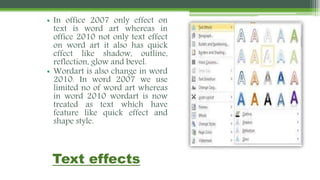
• In office 2007 only effect on text is word art whereas in office 2010
not only text effect on word art it also has quick effect like shadow,
outline, reflection, glow and bevel.
• Wordart is also change in word 2010. In word 2007 we use limited no
of word art whereas in word 2010 wordart is now treated as text
which have feature like quick effect and shape style.
• In 2010 , we have a option to take a preview of the image before paste
it , but in 2007 we have no such option of preview , we had to paste it
directly .
• In 2010, pictures can be cropped and resized. But in 2007, only picture
styles can be changed.
Microsoft Word
MS- Word 2007
MS- Word 2010
Search option :
In 2007 , when we search
something a new window is open ,
but in 2010 , navigation pane is
open at the left side of window , so
we are able to do our work and
search simultaneously .
Text effects
• In office 2007 only effect on
text is word art whereas in
office 2010 not only text effect
on word art it also has quick
effect like shadow, outline,
reflection, glow and bevel.
• Wordart is also change in word
2010. In word 2007 we use
limited no of word art whereas
in word 2010 wordart is now
treated as text which have
feature like quick effect and
shape style.
Paste Options :
Preview option
In 2010 , we have a
option to take a preview
of the image before paste
it , but in 2007 we have
no such option of
preview , we had to
paste it directly .
EDITING TOOLS
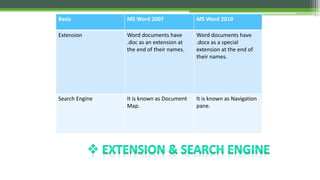
Basis MS Word 2007 MS Word 2010
Extension Word documents have
.doc as an extension at
the end of their names.
Word documents have
.docx as a special
extension at the end of
their names.
Search Engine It is known as Document
Map.
It is known as Navigation
pane.
MICROSOFT POWERPOINT
MS- PowerPoint 2007
MS- PowerPoint 2010
• Instead of Office button in 2007 version, 2010 version has
File tab with advanced set of features.
• The Transitions tab has been separated from Animations
tab in 2010 version.
• There are more animation effects provided to a user in
2010 version as compared to PowerPoint 2007.
In PowerPoint 2010, you can convert the presentation to PDF document
or XPS format whereas this feature is absent in 2007 version.
The PowerPoint 2010 has got advanced options of protecting the content of
the presentation as compared to 2007 version.
Go to the File tab, Info tab
opens by default, click on
Protect Presentations
dropdown menu to choose
any of the options that suit
your requirements.
BROADCAST YOUR PRESENTATION
We have the new an additional
features The Broadcast Slide Show in
PowerPoint 2010.
Microsoft PowerPoint 2010 enable
us to present, share a slide show with
anyone, anywhere, over the Web as
remote audience.
We can
send URL for our slide show.
 pause the slide show at any time,
 re-send the URL to attendees, or
switch to another application
without interrupting the broadcast or
displaying our desktop to attendees.
Web Apps
•In earlier version i.e. (Power Point 2007) we can
just save our document in power point show or in
other format or send direct to email only, but in
•Provide an option to direct post it on a website.
•We can save our presentation to SkyDrive or our
are Point library by using Power Point Web Apps
just by save to Web or save to SharePoint.
Screenshot or Screen Clipping
Screen shot is easy with MS-Power Point
2010,
We can
Add Part of the window or object just
by clicking screen clipping, an additional
features of Ms-PowerPoint 2010.
Select the area of your screen that we
want to capture.
After add the screenshot, we can use
the tools on the Picture Tools tab to edit
and enhance the screenshot.
Power point 2007
Power point 2010
Artistic effect to
a picture
In Ms-Power Point 2007,
we have limited option to
edit our pictures but with
MS Office 2010 ,
we can apply artistic
effects to a picture or a
picture fill to make the
picture look more effective
like a sketch, drawing, or
painting.
.
..
Video effects
In 2010 we have video
controls . We can crop the
picture , change the contrast
and brightness of video ,
whereas in 2007 its just a
video and it is treated as
picture .
Insert the
SmartArt
graphic
picture
layout
Add your
photograph
(s).
Write
descriptive
text
SMART ART GRAPHICS PICTURE
LAYOUT
Basis Power Point 2007 Power Point 2010
Extension PPT presentations
have .ppt as an
extension at the end
of their file names.
PPT presentations
have .pptx as a
special extension at
the end of their file
names.
Variation In Tabs Transitions and
Animations were in a
single tab i.e
Animation Tab.
The Animation Tab
has been split into 2
tabs i.e. Animation
Tab and Transition
tab.
Video Formatting Video was treated as
a picture for
formatting.
Video Editing Tools
have been
introduced to edit
the video.
MICROSOFT EXCEL
MS-Excel 2007
MS- Excel 2010
Customize Ribbons and Define your own
Ribbons
• In Excel 2010 we can define own tab i.e. My Tab.
• We can easily add removes menus, change labels and define
toolbars to easy to work.
• We can even customize existing ribbons by adding new
groups of tools but
• In 2007 we have no such option of customize existing
ribbons and add/remove tabs .
In Excel 2010 provide this
unique auto show paste option
just by clicking source cell. It
show which kind of paste
option u wants.
In Excel 2007 we have a
simple paste option.
Spark lines :
In 2010 we can graphs the line in single cell but ,
In 2007 we have no such option of graphing lines , we
had to create the charts on the other sheet and the
sheet on which we working on .
Power pivot
• Power pivot allows you
analyze large volumes of
data from a SQL server
database
• With Power Pivot
millions of rows of data
from multiple data
sources into a single Excel
workbook can be
inserted.
• Helps in building
PivotTables and Pivot
Charts, and analyzing the
data to make timely
business decisions.
NEW SEARCH FILTER
BASIS 2007 2010
Icon sets a green up arrow( ) for
higher values, a yellow
sideways arrow ( ) for
middle values, and a red
down arrow( ) for lower
values.
more icon sets including
triangles
( ), stars( ), and boxes(
)can be accessed.
Macro recorder It cannot be used to record
formatting changes to
charts and other objects.
It can be used to record
formatting changes to
charts and other objects.
MICROSOFT ACCESS
MS- Access 2007
MS- Access 2010
Table Templates
In 2007 has five
table templates you
can use to generate
new tables with
common fields:
Comments,
Contacts, Issues,
Tasks, and Users.
With a table open
in Design view,
click New Field to
access these
templates. It’s easy
to use. But
This feature is totally missing in
2010. To build a table in MS
Access 2010, do the following:
• 1. Open a blank database and
close Table1.
• 2. Click the Create tab.
• 3. Click Application Parts in the
Templates group.
• 4. Select a form template or one
of the Quick Start options, shown
in Figure to generate objects
CONCLUSION
• One of the biggest changes is that Office 2010 now fully supports 64-bit operating systems. Also, Web
Applications (allowing you to co-author documents across the web in real-time) have finally been
implemented in the newest release, as well. Office 2010 also includes a redesigned Office button, as well
as a nice backstage experience.
• Differences in Word include the search function. In Office 2010, it shows up in a navigation pane, instead
of a small window. Also in Office 2010, you have a paste preview, letting you see what you’re going to
paste BEFORE you actually paste it. There are also enhanced picture editing tools. There are new options
for working with text, including changing plain text into Word Art, or using shapes and styles.
• The differences in Excel include graphs in single cells, instead of only within sheets like in Office 2007.
Formatting tools have also been enhanced and upgraded.
• There are also many interesting and excellent differences found within Outlook, Publisher and other
Office applications. This is the sneak peak at what we can expect when we grab Office 2010 for ourselves!
• Microsoft Office 2010 offers flexible and powerful new ways to deliver your best work—at the office, at
home, or at school. With Office 2010, you’re in control, getting things done and producing amazing
results however and wherever you work best.
;-(