Memory and I/O Interfacing
1 of 55
What is an Interface
• an interface is a concept that refers to a point of
interaction between components, and is
applicable at the level of both hardware and
software.
• This allows a component, (such as a graphics card
or an Internet browser), to function
independently while using interfaces to
communicate with other components via an
input/output system and an associated protocol.
2
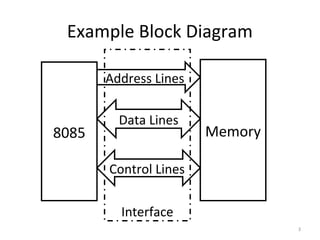
Example Block Diagram
8085 Memory
Address Lines
Data Lines
Control Lines
Interface
3
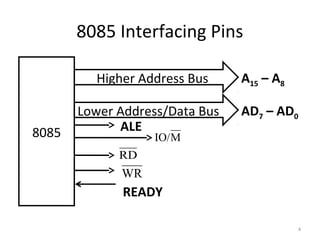
8085 Interfacing Pins
8085
Higher Address Bus
Lower Address/Data Bus
ALE
MIO/
RD
WR
READY
A15 – A8
AD7 – AD0
4
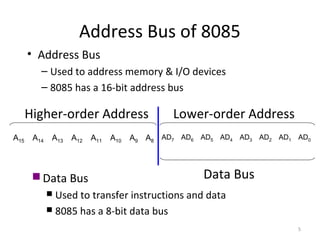
Address Bus of 8085
• Address Bus
– Used to address memory & I/O devices
– 8085 has a 16-bit address bus
A15 A14 A13 A12 A11 A10 A9 A8
AD7 AD6 AD5 AD4 AD3 AD2 AD1 AD0
Lower-order AddressHigher-order Address
 Data Bus
 Used to transfer instructions and data
 8085 has a 8-bit data bus
Data Bus
5
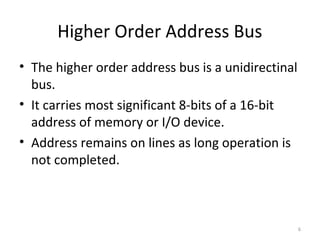
Higher Order Address Bus
• The higher order address bus is a unidirectinal
bus.
• It carries most significant 8-bits of a 16-bit
address of memory or I/O device.
• Address remains on lines as long operation is
not completed.
6
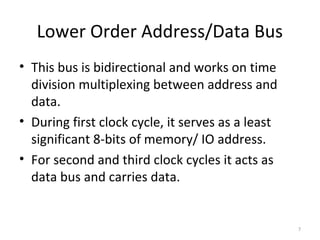
Lower Order Address/Data Bus
• This bus is bidirectional and works on time
division multiplexing between address and
data.
• During first clock cycle, it serves as a least
significant 8-bits of memory/ IO address.
• For second and third clock cycles it acts as
data bus and carries data.
7
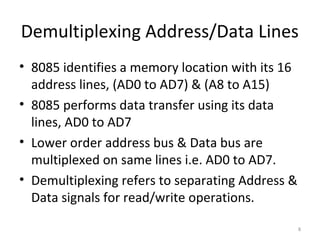
Demultiplexing Address/Data Lines
• 8085 identifies a memory location with its 16
address lines, (AD0 to AD7) & (A8 to A15)
• 8085 performs data transfer using its data
lines, AD0 to AD7
• Lower order address bus & Data bus are
multiplexed on same lines i.e. AD0 to AD7.
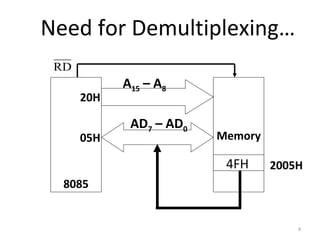
• Demultiplexing refers to separating Address &
Data signals for read/write operations.
8
Need for Demultiplexing…
8085
Memory
20H
05H
2005H
RD
A15 – A8
AD7 – AD0
4FH
9
10
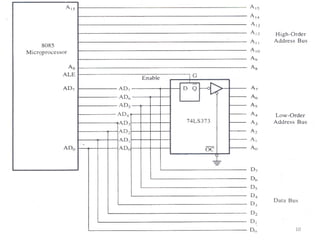
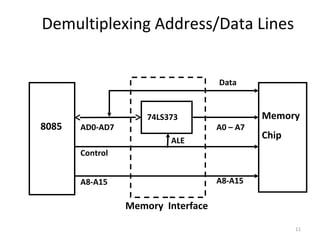
Demultiplexing Address/Data Lines
8085
Memory Interface
Memory
Chip
AD0-AD7
Control
A0 – A7
Data
74LS373
A8-A15 A8-A15
ALE
11
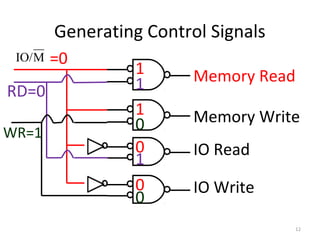
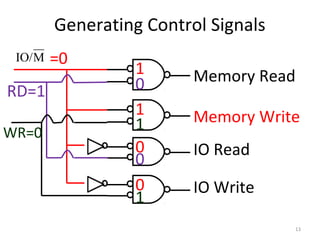
Generating Control Signals
MIO/
Memory Read
Memory Write
IO Read
IO Write
RD=0
WR=1
=0
1
1
0
0
1
1
0
0
12
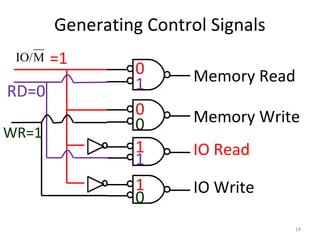
Generating Control Signals
MIO/
Memory Read
Memory Write
IO Read
IO Write
RD=1
WR=0
=0
1
1
0
0
0
0
1
1
13
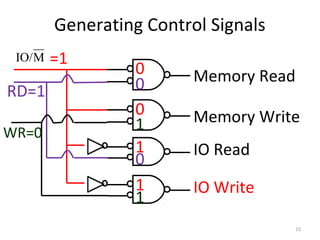
Generating Control Signals
MIO/
Memory Read
Memory Write
IO Read
IO Write
RD=0
WR=1
=1
0
0
1
1
1
1
0
0
14
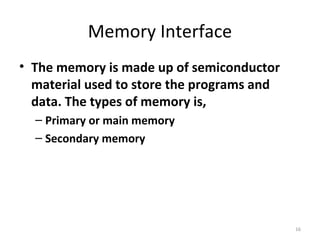
Generating Control Signals
MIO/
Memory Read
Memory Write
IO Read
IO Write
RD=1
WR=0
=1
0
0
1
1
0
0
1
1
15
Memory Interface
• The memory is made up of semiconductor
material used to store the programs and
data. The types of memory is,
– Primary or main memory
– Secondary memory
16
Primary Memory
• RAM and ROM are examples of this type of
memory.
• Microprocessor uses it in storing a program
temporarily (commonly called loading) and
executing a program.
• Hence the speed of this type of memory
should be fast.
17
Secondary Memory
• These are used for bulk storage of data
and information.
• The main examples include Floppy, Hard
Disk, CD-ROM, Magnetic Tape etc.
• Slower and Sequential Access Nature.
• non-volatile nature.
18
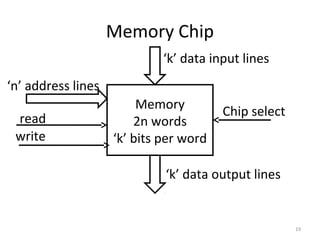
Memory Chip
Memory
2n words
‘k’ bits per word
‘k’ data input lines
‘k’ data output lines
‘n’ address lines
read
write
Chip select
19
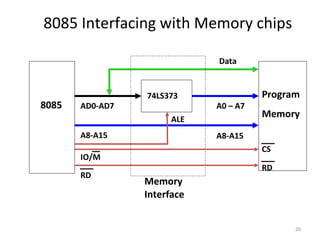
8085 Interfacing with Memory chips
8085
Memory
Interface
Program
Memory
AD0-AD7
IO/M
A0 – A7
Data
74LS373
A8-A15 A8-A15
ALE
RD
RD
CS
20
Interface with two memory chips
11
10
01
00
11
10
01
00
A0
A1
Memory 1 Memory 2
21
Interface with two memory chips
11
10
01
00
11
10
01
00
A0
A1
Memory 1 Memory 2
A3
011
010
001
000
111
110
101
100
CS CS
22
Interface with Multiple Chips
• In case of multiple chips simple circuit
like NOT gate will not work.
• In this case normally decoder circuits like
3-to-8 decoder circuit 74LS138 are used.
• These circuit are called address
decoders.
23
Address decoders
Memory 1CS
Memory 2CS
Memory 3CS
Memory 4CS
A12
A11
A10 - A0
S1
S0
E
A13
O0
O1
O2
O3
2 to 4 decoder
24
The Overall Picture
A15-A8
LatchAD7-AD0
D7- D0
A7- A0
8085
ALE
IO/MRDWR
1K Byte
Memory
Chip
WRRD
CS
A9- A0
A15- A10
Chip Selection
Circuit
25
Types of Address Decoding
• There are two types of address decoding
techniques
– Exhaustive Decoding
– Partial Decoding
26
Exhaustive Decoding
• In this type of scheme all the 16 bits of the
8085 address bus are used to select a
particular location in memory chip.
• Advantages:
– Complete Address Utilization
– Ease in Future Expansion
– No Bus Contention, as all addresses are unique.
• Disadvantages
– Increased hardware and cost.
– Speed is less due to increased delay.
27
Partial Decoding
• In this scheme minimum number of address
lines are used as required to select a memory
location in chip.
• Advantages:
– Simple, Cheap and Fast.
• Disadvantages:
– Unutilized space & fold back (multiple mapping).
– Bus Contention.
– Difficult future expansion.
28
Interfacing I/O Devices
• Using I/O devices data can be transferred
between the microprocessor and the outside
world.
• This can be done in groups of 8 bits using the
entire data bus. This is called parallel I/O.
• The other method is serial I/O where one bit is
transferred at a time using the SID and SOD
pins on the Microprocessor.
29
Types of Parallel Interface
• There are two ways to interface 8085 with I/O
devices in parallel data transfer mode:
– Memory Mapped IO
– IO Mapped IO
30
Memory Mapped IO
• It considers them like any other
memory location.
– They are assigned a 16-bit address within the
address range of the 8085.
– The exchange of data with these devices
follows the transfer of data with memory. The
user uses the same instructions used for
memory.
31
IO Mapped IO
• It treats them separately from memory.
–I/O devices are assigned a “port number”
within the 8-bit address range of 00H to
FFH.
–The user in this case would access these
devices using the IN and OUT instructions
only.
32
IO mapped IO V/s Memory Mapped IO
Memory Mapped IO
• IO is treated as memory.
• 16-bit addressing.
• More Decoder Hardware.
• Can address 216
=64k
locations.
• Less memory is available.
IO Mapped IO
• IO is treated IO.
• 8- bit addressing.
• Less Decoder Hardware.
• Can address 28
=256
locations.
• Whole memory address
space is available.
33
IO mapped IO V/s Memory Mapped IO
Memory Mapped IO
• Memory Instructions are
used.
• Memory control signals are
used.
• Arithmetic and logic
operations can be
performed on data.
• Data transfer b/w register
and IO.
IO Mapped IO
• Special Instructions are
used like IN, OUT.
• Special control signals
are used.
• Arithmetic and logic
operations can not be
performed on data.
• Data transfer b/w
accumulator and IO.
34
The interfacing of output devices
• Output devices are usually slow.
• Also, the output is usually expected to
continue appearing on the output device for a
long period of time.
• Given that the data will only be present on the
data lines for a very short period
(microseconds), it has to be latched
externally.
35
The interfacing of output devices
• To do this the external latch should be enabled
when the port’s address is present on the
address bus, the IO/M signal is set high and WR is
set low.
• The resulting signal would be active when the
output device is being accessed by the
microprocessor.
• Decoding the address bus (for memory-mapped
devices) follows the same techniques discussed
in interfacing memory.
36
Interfacing of Input Devices
• The basic concepts are similar to interfacing of
output devices.
• The address lines are decoded to generate a
signal that is active when the particular port is
being accessed.
• An IORD signal is generated by combining the
IO/M and the RD signals from the
microprocessor.
37
Interfacing of Input Devices
• A tri-state buffer is used to connect the input
device to the data bus.
• The control (Enable) for these buffers is
connected to the result of combining the
address signal and the signal IORD.
38
Basic RAM Cell
• RAM is a type of computer memory that can
be accessed randomly i.e. any location can be
accessed any time within chip.
• It is most common type of memory found in
computers, printers etc.
• It is basically of two types:
– SRAM
– DRAM
39
SRAM
• SRAM stands for Static Random Access
Memory.
• This memory is made up of flip-flops and stores
the bit as a voltage.
• Each cell requires 6 transistors hence chip has
low density but high speed.
• More expensive and consumes more power.
• Often known as cache memory in high speed
PCs.
40
Basic SRAM Cell
41
DRAM
• DRAM stands for Dynamic Random Access
Memory.
• This memory is made up of MOS transistor
gates and it stores the bit as charge.
• High density, low power consumption, cheap
as compared to SRAM.
• Due to leakage of charge requires frequent
refreshing and hence extra circuitry.
42
Basic DRAM
43
ROM
• ROM is a read only memory.
• It retains the information even if power is
turned off.
• It contains permanently stored instructions
that help in staring up of a computer e.g. BIOS
or Basic Input Output System.
• These are of following three basic types
– PROM, EPROM, EEPROM
44
PROM
• The Programmable Read Only Memory
can be programmed only once in its
lifetime.
• Information once stored can not be
erased.
• Requires special hardware circuit to
program it.
45
EPROM
• Stands for Erasable Programmable Read Only
Memory.
• These ROMs can be erased and programmed
again and again.
• Can be erased with UV light or electricity.
• Main disadvantage is that it takes 15 to 20
minutes to erase it.
46
EEPROM
• Stands for Electrically Erasable Programmable
Read Only Memory.
• Information can be erased electrically at
register level rather than erasing entire
information.
• It requires lesser erasing time.
47
Stack
• It is a part of memory, reserved in RAM, used
to temporarily store information during
execution of program.
• Starting address of stack is loaded in “Stack
Pointer (SP)” (a 16-bit register).
• The address pointed to by SP is known as “Top
of Stack”, which is always an empty memory
location.
48
Stack Initialization
• Stack can be defined anywhere in RAM.
• But generally it initialized from highest (end)
address of RAM to avoid any data loss.
FFFFH
F000H
0000H
STACK
MEMORY
SP = FFFFH
TOP OF STACK
49
Size of Stack Memory
• Theoretically there is no limitation on the size
of stack memory.
• Practically the size of stack memory is limited
to the availability of free RAM.
• As RAM is used to store temporarily program
and data during execution, hence only free
RAM can be used as stack.
50
Storing Data on Stack
• Stack is Last-In-First-Out (LIFO) type of
memory.
• When information is stored on stack, the
Stack Pointer register decrements to point to
lower empty address.
• When information is read from stack, the
Stack Pointer register increments to point to
higher empty address.
51
Animation Stack Memory
FFFF
FFFE
FFFD
FFFC
FFFB
FFFA
FFF9
0001
0000
STACK
MEMORY
PUSH B
Stack Pointer
PUSH C
POP B
POP C
52 HB= 52 H
FFFF HFFFE H
35 HC = 35 H
FFFD H
35 H
52 H
52
Advantages of Stack
• Address is always in Stack Pointer, need not
be part of instruction, therefore, stack access
is always faster.
• Stack instructions are short with only one
operand.
• Used to save important data before branch
instruction e.g. jump or interrupt instruction.
53
54