

www.SunilOS.com 1
Supervised Learning
www.sunilos.com
www.raystec.com
www.SunilOS.com 2
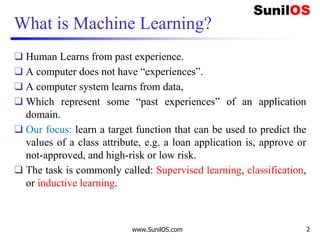
What is Machine Learning?
❑ Human Learns from past experience.
❑ A computer does not have “experiences”.
❑ A computer system learns from data,
❑ Which represent some “past experiences” of an application
domain.
❑ Our focus: learn a target function that can be used to predict the
values of a class attribute, e.g. a loan application is, approve or
not-approved, and high-risk or low risk.
❑ The task is commonly called: Supervised learning, classification,
or inductive learning.
Types of Learning
❑Supervised Learning
o Classification
o Regression
❑Unsupervised Learning
o Clustering
❑Reinforcement Learning
www.SunilOS.com 3
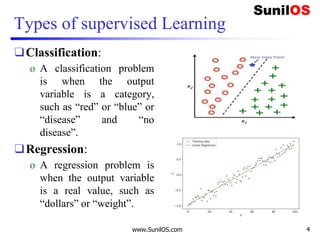
Types of supervised Learning
❑Classification:
o A classification problem
is when the output
variable is a category,
such as “red” or “blue” or
“disease” and “no
disease”.
❑Regression:
o A regression problem is
when the output variable
is a real value, such as
“dollars” or “weight”.
www.SunilOS.com 4
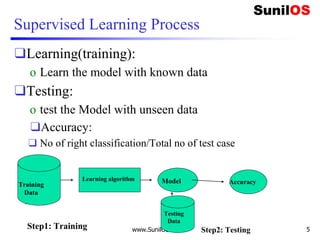
Supervised Learning Process
❑Learning(training):
o Learn the model with known data
❑Testing:
o test the Model with unseen data
❑Accuracy:
❑ No of right classification/Total no of test case
www.SunilOS.com 5
Training
data
Learning algorithm Model AccuracyTraining
Data
Step1: Training Step2: Testing
Testing
Data
Classification example
❑ A loan providing company receives thousands of applications
for new loans.
❑ Each application contains information about an applicant
o Age
o Marital status
o annual salary
o Outstanding debts
o credit rating
o etc.
❑ Problem: to decide whether an application should approved, or
to classify applications into two categories, approved and not
approved.
www.SunilOS.com 6
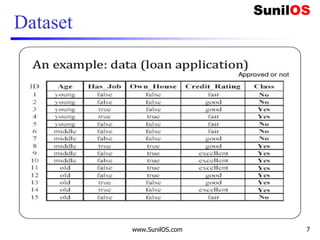
Dataset
www.SunilOS.com 7
www.SunilOS.com 8
An example
❑Data: Loan application data
❑Task: Predict whether a loan should be approved
or not.
❑Performance measure: Accuracy.
❑No learning: classify all future applications (test
data) to the majority class (i.e., Yes):
o Accuracy = 9/15 = 60%.
❑We can do better than 60% with learning.
www.SunilOS.com 9
Evaluating classification methods
❑Predictive accuracy
o Accuracy=No of correct classification / total no of test Case
❑Efficiency
o time to construct the model
o time to use the model
www.SunilOS.com 10
Conclusion
❑ Applications of supervised learning are in almost any field or
domain.
❑ There are numerous classification techniques.
o Bayesian networks
o K- Nearest Neighbors
o Decision Tree Classification
o Fuzzy classification
❑ This large number of methods also show the importance of
classification and its wide applicability.
❑ It remains to be an active research area.
www.SunilOS.com 11
www.SunilOS.com 12
Classification
www.sunilos.com
www.raystec.com
4/16/2020 www.SunilOS.com 12
www.SunilOS.com 13
What is Classification?
 Classification is a supervised machine learning
approach.
 Computer uses Training data for learning and uses this
learning to classify new observations.
 Classification can be:
 Binary class classification : spam or not spam, male or
female Multiclass classification: Fruits, Colors.
4/16/2020 www.SunilOS.com 13
Types of classification algorithm
❑Linear Classifiers: Logistic Regression, Naive
Bayes Classifier
❑K Nearest Neighbor
❑Support Vector Machines
❑Decision Trees
❑Random Forest
4/16/2020 www.SunilOS.com 14
K-Nearest Neighbor
❑ The k-nearest-neighbors algorithm is a supervised
classification technique that based on similar qualities.
❑ KNN assumes, similar things exist near to each other.
❑ The algorithm takes a bunch of labeled points and uses them
to learn how to label other points.
❑ To label a new point, it looks at the labeled points closest to
that new point (those are its nearest neighbors).
❑ Closeness is typically expressed in terms of a dissimilarity
function.
❑ Once it checks with ‘k’ number of nearest neighbors, it
assigns a label based on whichever label the most of the
neighbors have.
www.SunilOS.com4/16/2020 15
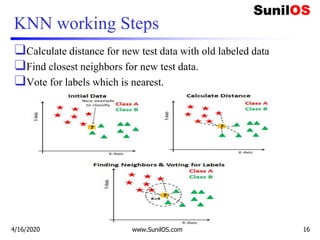
KNN working Steps
❑Calculate distance for new test data with old labeled data
❑Find closest neighbors for new test data.
❑Vote for labels which is nearest.
4/16/2020 www.SunilOS.com 16
KNN algorithm Implementation
❑Define dataset.
❑Prepare data.
❑Train model.
❑Test Model.
❑Calculate accuracy.
4/16/2020 www.SunilOS.com 17
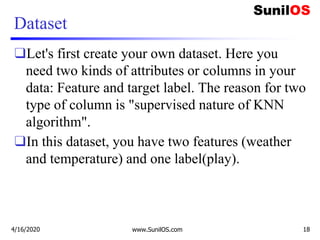
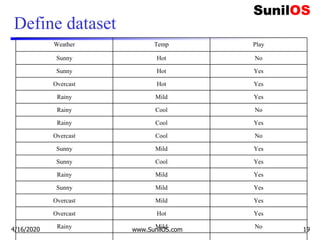
Dataset
❑Let's first create your own dataset. Here you
need two kinds of attributes or columns in your
data: Feature and target label. The reason for two
type of column is "supervised nature of KNN
algorithm".
❑In this dataset, you have two features (weather
and temperature) and one label(play).
4/16/2020 www.SunilOS.com 18
Define dataset
Weather Temp Play
Sunny Hot No
Sunny Hot Yes
Overcast Hot Yes
Rainy Mild Yes
Rainy Cool No
Rainy Cool Yes
Overcast Cool No
Sunny Mild Yes
Sunny Cool Yes
Rainy Mild Yes
Sunny Mild Yes
Overcast Mild Yes
Overcast Hot Yes
Rainy Mild No4/16/2020 www.SunilOS.com 19
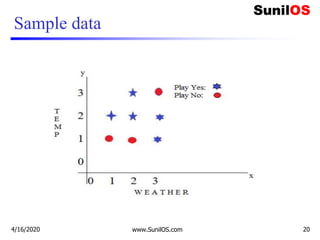
Sample data
4/16/2020 www.SunilOS.com 20
Code implementation in scikit learn
❑ # Assigning features and label variables
❑ # First Feature
❑ weather=['Sunny','Sunny','Overcast','Rainy','Rainy',
'Rainy','Overcast','Sunny','Sunny',
❑ 'Rainy','Sunny','Overcast','Overcast','Rainy']
❑ # Second Feature
❑ temp=['Hot','Hot','Hot','Mild','Cool','Cool','Cool',
'Mild','Cool','Mild','Mild','Mild','Hot','Mild']
❑
❑ # Label or target variable
❑ play=['No','No','Yes','Yes','Yes','No','Yes','No','Y
es','Yes','Yes','Yes','Yes','No']
4/16/2020 www.SunilOS.com 21
Code implementation in scikit learn(cont.)
❑ # Import Label Encoder
❑ from sklearn import preprocessing
❑ #creating label Encoder
❑ le = preprocessing.LabelEncoder()
❑ # Converting string labels into numbers.
❑ weather_encoded=le.fit_transform(weather)
❑ print(weather_encoded)
❑
❑ # converting string labels into numbers
❑ temp_encoded=le.fit_transform(temp)
❑ label=le.fit_transform(play)
❑ print(label)
4/16/2020 www.SunilOS.com 22
Code implementation in scikit learn(cont.)
❑ #combining weather and temp into single list of tuples
❑ features=list(zip(weather_encoded,temp_encoded))
❑ print(features)
❑ #Prepare Model instance
❑ from sklearn.neighbors import KNeighborsClassifier
❑ model = KNeighborsClassifier(n_neighbors=3)
❑ # Train the model using the training sets
❑ model.fit(features,label)
❑ #Predict Output
❑ predicted= model.predict([[0,2]]) # 0:Overcast, 2:Mild
❑ print(predicted)
4/16/2020 www.SunilOS.com 23
Advantage of KNN
❑It is extremely easy to implement
❑This makes the KNN algorithm much faster than other
algorithms that require training e.g. SVM, Linear
Regression etc.
❑Since the algorithm requires no training before making
predictions, new data can be added seamlessly.
❑There are only two parameters required to implement
KNN i.e. the value of K and the distance function (e.g.
Euclidean or Manhattan etc.)
4/16/2020 www.SunilOS.com 24
Disadvantages of KNN
❑ The KNN algorithm doesn't work well with high dimensional
data because with large number of dimensions, it becomes
difficult for the algorithm to calculate distance in each
dimension.
❑ The KNN algorithm has a high prediction cost for large
datasets. This is because in large datasets the cost of
calculating distance between new point and each existing
point becomes higher.
❑ Finally, the KNN algorithm doesn't work well with categorical
features since it is difficult to find the distance between
dimensions with categorical features.
4/16/2020 www.SunilOS.com 25
Naive Bayes Classification Base
❑It uses Bayes theorem of probability for prediction of
unknown class/Label.
❑Naive Bayes classifier assumes that the effect of a
particular feature in a class is independent of other
features.
o For example, a loan applicant is desirable or not depending on his/her
income, previous loan and transaction history, age, and location.
o Even if these features are interdependent, these features are still
considered independently.
o This assumption simplifies computation, and that's why it is considered as
naive
www.SunilOS.com 26
Approve a Loan
❑ Bank has received a loan application and now we want to predict whether
bank will approve or not.
❑ Approval will be decide on the basis of independent attributes specified in the
application form.
❑ Income, previous loan, transaction history, age, and location information
specified in application form are considered as independent attribute.
❑ Now we will calculate separate probability:
❑ probability of approval or rejection of loan on income,
❑ probability of approval or rejection of loan on previous loan,
❑ probability of approval or rejection of loan on age,
❑ probability of approval or rejection of loan on location,
❑ Naive Bayes will help us to multiply above probabilities and forecast approval
and rejection of new loan application.
www.SunilOS.com 27
Naïve Bayes Classification Base (cont.)
❑ Where,
❑ P(c|x) is the posterior probability of class c given predictor ( features).
❑ P(c) is the probability of class.
❑ P(x|c) is the likelihood which is the probability of predictor given class.
❑ P(x) is the prior probability of predictor.
www.SunilOS.com 28
Types of Naive Bayes Algorithm
❑Gaussian Naive Bayes.
❑Multinomial Naive Bayes.
❑Bernoulli Naïve Bayes.
❑P(A|B)=P(B|A)*P(A)
❑ -----------------
❑ P(B)
www.SunilOS.com 29
How Gaussian Naive Bayes classifier works?
❑Given an example of weather conditions and
playing sports.
❑You need to calculate the probability of playing
sports.
❑Now, you need to classify whether players will
play or not, based on the weather condition.
www.SunilOS.com 30
How Naive Bayes classifier works? (cont.)
❑ Naive Bayes classifier calculates the probability of an event in
the following steps:
❑ Calculate the prior probability for given class labels
o p(play)
o P(not play).
❑ Find Likelihood probability with each attribute for each class.
o P(Hot/play) or p(Hot/not play)
o P(Cold/play) p(Cold/not play)
❑ Put these value in Bayes Formula and calculate posterior
probability.
❑ See which class has a higher probability, given the input
belongs to the higher probability class.
www.SunilOS.com 31
Dataset
Weather Play
Sunny No
Sunny Yes
Overcast Yes
Rainy Yes
Rainy No
Rainy Yes
Overcast No
Sunny Yes
Sunny Yes
Rainy Yes
Sunny Yes
Overcast Yes
Overcast Yes
Rainy No
www.SunilOS.com 32
Frequency Table
Weather No Yes
Sunny 1 4 5
Overcast 1 3 4
Rainy 2 3 5
Total 4 10
www.SunilOS.com 33
Prior Probability of class
Weather No Yes
Sunny 1 4 5 5/14=0.35
Overcast 1 3 4 4/14=0.29
Rainy 2 3 5 5/14=0.35
Total 4 10
4/14=0.29 10/14=0.71
www.SunilOS.com 34
Posterior Probability
Weather No Yes Posterior
probability
of No
Posterior
Probability of
Yes
Sunny 1 4 1/4= 0.25 4/10=0.4
Overcast 1 3 1/4= 0.25 3/10=0.3
Rainy 2 3 2/4 =0.5 3/10=0.3
Total 4 10
4/14=0.29 10/14=0.71
www.SunilOS.com 35
Probability of playing when weather is overcast
❑ Equation:
o P(Yes|Overcast)=P(Overcast|Yes)*P(Yes)/P(Overcast)
❑ Calculate Prior Probabilities:
o P(Overcast) = 4/14 = 0.29
o P(Yes)= 10/14 = 0.71
❑ Calculate Posterior Probabilities:
o P(Overcast |Yes) = 3/10 = 0.3
❑ Put Prior and Posterior probabilities in equation
o P (Yes | Overcast) = 0.3 * 0.71 / 0.29 =
0.7344(Higher)
www.SunilOS.com 36
Probability of not playing when weather is overcast
❑ Equation:
o P(No|Overcast)=P(Overcast|No)*P(No)/P(Overcast)
❑ Calculate Prior Probabilities:
o P(Overcast) = 4/14 = 0.29
o P(No)= 4/14 = 0.29
❑ Calculate Posterior Probabilities:
o P(Overcast |No) = 1/4 = 0.25
❑ Put Prior and Posterior probabilities in equation
o P (No | Overcast) = 0.25 * 0.29 / 0.29 =
0.25(Low)
www.SunilOS.com 37
Implementation of Naive Bayes algorithm:
❑ # Assigning features and label variables
❑ weather=['Sunny','Sunny','Overcast','Rainy','Ra
iny','Rainy','Overcast','Sunny','Sunny','Rainy'
,'Sunny','Overcast','Overcast','Rainy']
❑ temp=['Hot','Hot','Hot','Mild','Cool','Cool','C
ool','Mild','Cool','Mild','Mild','Mild','Hot','
Mild']
❑ play=['No','No','Yes','Yes','Yes','No','Yes','N
o','Yes','Yes','Yes','Yes','Yes','No']
www.SunilOS.com 38
Implementation of Naive Bayes algorithm (cont.)
❑ # Import LabelEncoder
o from sklearn import preprocessing
❑ #creating labelEncoder
o le = preprocessing.LabelEncoder()
❑ # Converting string labels into numbers.
o weather_encoded=le.fit_transform(weather)
o print("Weather:",weather_encoded)
❑ # Converting string labels into numbers
o temp_encoded=le.fit_transform(temp)
o print("Temp:",temp_encoded)
o label=le.fit_transform(play)
o print("Play:",label)
www.SunilOS.com 39
Implementation of Naive Bayes algorithm (cont.)
❑ #Combining weather and temp into single list of tuples
o features=list(zip(weather_encoded,temp_encoded))
o print("Features:",features)
❑ #Import Gaussian Naive Bayes model
o from sklearn.naive_bayes import GaussianNB
❑ #Create a Gaussian Classifier
o model = GaussianNB()
❑ # Train the model using the training sets
o model.fit(features,label)
❑#Predict Output: 0:Overcast, 2:Mild
o predicted= model.predict([[0,2]])
o print ("Predicted Value:", predicted)
www.SunilOS.com 40
Multinomial Naive Bayes algorithm:
❑This machine learning algorithm is used for text
data classification.
❑If we are interested in finding out a number of
occurrences of a word in a document then we have
to use a multinomial naive Bayes algorithm.
www.SunilOS.com 41
How does Naive Bayes Algorithm Works ?
❑ Let’s consider an example, classify the review whether it is
positive or negative.
❑ Training Dataset:
www.SunilOS.com 42
Text Reviews
I like the movie Positive
It's a good movie. Nice Story Positive
Nice songs. But sadly a boring
ending.
negative
Overall nice movie Positive
Sad, boring movie negative
❑ We classify whether the text “overall liked the movie” has a
positive review or a negative review. We have to calculate:
❑ P(positive | overall liked the movie) — the probability that
the tag of a sentence is positive.
❑ P(negative | overall liked the movie) — the probability that
the tag of a sentence is negative .
❑ Before that, first, we apply Removing Stopwords and
Stemming in the text.
www.SunilOS.com 43
Removing Stopwords & Stemming
❑ Removing Stopwords: These are common words that don’t
really add anything to the classification, such as an able,
either, else, ever and so on.
❑
❑ Stemming: Stemming to take out the root of the word. A
stemming algorithm reduces the words
o “chocolates”, “chocolaty”, “Choco” to the root word, “chocolate”
o and “retrieval”, “retrieved”, “retrieves” reduce to the stem “retrieve”.
www.SunilOS.com 44
Feature Engineering:
❑The important part is to find the features from the data
to make machine learning algorithms works.
❑ In this case, we have text. We need to convert this text
into numbers that we can do calculations on.
❑ We use word frequencies. That is treating every
document as a set of the words it contains.
❑Our features will be the counts of each words.
www.SunilOS.com 45
Now Calculate Probability
❑ In our case, we have
o P(positive | overall liked the movie)
❑ Since for our classifier we have to find out which tag has a
bigger probability, we can discard the divisor which is the same
for both tags,
o P(overall liked the movie|positive)* P(positive)
o P(overall liked the movie|negative)* P(negative)
www.SunilOS.com 46
❑ There’s a problem though: “overall liked the movie” doesn’t
appear in our training dataset, so the probability is zero. Here, we
assume the ‘naive’ condition that every word in a sentence is
independent of the other ones. This means that now we look at
individual words.
❑ We can write this as:
o P(overall liked the movie) = P(overall) * P(liked) * P(the) * P(movie)
❑ The next step is just applying the Bayes theorem:
o P(overall liked the movie| positive) = P(overall | positive) * P(liked |
positive) * P(the | positive) * P(movie | positive)
❑ And now, these individual words actually show up several times
in our training data, and we can calculate probability of them!
www.SunilOS.com 47
The prior Probability
❑ P(positive) is= 3/5 =0.6.
❑ P(negative) is= 2/5=0.4.
❑ Then, calculating P(overall | positive) means counting how many
times the word “overall” appears in positive texts+1 divided by
the total number of words in positive+ total no of unique words
in all reviews.
o Total words in positive=13.
o Total words in Negative=10.
o Total Unique words in all=15
www.SunilOS.com 48
Calculated Prior Probability
❑ Therefore,
o P(overall | positive) = (1+1)/(13+15)=0.07142
o P(liked | positive) = (1+1)/(13+15)=0.07142
o P(the | positive) = (1+1)/(13+15)=0.07142
o P(movie | positive) = (3+1)/(13+15)=0.1428
❑ Therefore,
o P(overall | negative) = (0+1)/(10+15)=0.04
o P(liked | negative) = (0+1)/(10+15)=0.04
o P(the | negative) = (0+1)/(10+15)=0.04
o P(movie| negative) = (1+1)/(10+15)=0.08
www.SunilOS.com 49
Laplace smoothing
❑If probability comes out to be zero then By using
Laplace smoothing:
❑we add 1 to every count so it’s never zero. To balance
this, we add the number of possible words to the
divisor, so the division will never be greater than 1.
❑In our case, the total unique possible words count are
15.
www.SunilOS.com 50
Calculate Prior Probability
www.SunilOS.com 51
Result: Positive Review
❑ P(overall | positive) * P(liked |positive)
* P(the | positive) * P(movie | positive)
* P(positive )= 3.06 * 10^{-5}=0.0000306
❑ P(overall | negative) * P(liked |negative)
* P(the | negative) * P(movie | negative)
* P(negative) = 0.20 * 10^{-5}=0.000002048
www.SunilOS.com 52
Implementation of Multinomial Naive Bayes algorithm:
❑Multinomial implements the naive Bayes algorithm for
multinomially (discrete no of possible outcome)
distributed data,
❑and is one of the two classic naive Bayes variants used
in text classification (where the data are typically
represented as word vector counts).
www.SunilOS.com 53
Implementation of Multinomial Naive Bayes algorithm:
❑ # Assigning features and label variables
o import numpy as np
o reviews=np.array(['I like the movie',
o 'Its a good movie. Nice Story',
o 'Nice songs. But sadly a boring ending.',
o 'Overall nice movie',
o 'Sad, boring movie'])
o label=["positive","positive","negative","positive
","negative"]
o test=np.array(["Overall i like the movie"])
www.SunilOS.com 54
Implementation of Multinomial Naive Bayes algorithm (cont.)
❑ #encode text data into numeric
o from sklearn import preprocessing
❑ #creating labelEncoder
o le = preprocessing.LabelEncoder()
❑ # Converting string labels into numbers.
o lable_encoded=le.fit_transform(label)
o print("Label:",lable_encoded)
www.SunilOS.com 55
Implementation of Multinomial Naive Bayes algorithm (cont.)
❑ # Generate counts from text using a vectorizer. There are other
vectorizers available, and lots of options you can set.
❑ # This performs our step of computing word counts.
o from sklearn.feature_extraction.text import
CountVectorizer
o vectorizer=CountVectorizer(stop_words='english')
o train_features =vectorizer.fit_transform(reviews)
o test_features = vectorizer.transform(test)
o print("Train vocabulary:",vectorizer.vocabulary_)
❑ #Print Dimension of the training and test data
o print("Shape of Train:",train_features.shape)
o print("Shape of Train:",test_features.shape)
www.SunilOS.com 56
Implementation of Multinomial Naive Bayes algorithm (cont.)
❑ # Fit a naive Bayes model to the training data.
❑ # This will train the model using the word counts we computer,
and the existing classifications in the training set.
o nb = MultinomialNB()
o nb.fit(train_features,lable_encoded)
❑
❑ # Now we can use the model to predict classifications for our test
features.
o predictions = nb.predict(test_features)
o print(predictions)
www.SunilOS.com 57
Bernoulli Naive Bayes:
❑ BernoulliNB implements the naive Bayes training and
classification algorithms for data that is distributed according to
multivariate Bernoulli distributions;
o i.e., there may be multiple features but each one is assumed to be a
binary-valued (boolean) variable.
❑ Therefore, this class requires samples to be represented as
binary-valued feature vectors;
❑ if handed any other kind of data, a BernoulliNB instance may
binarize its input (depending on the binarize parameter).
www.SunilOS.com 58
for a Bernoulli trial
❑ a random experiment that has only two outcomes
o usually called a “Success” or a “Failure”.
❑ For example, the probability of getting a heads (a “success”)
while flipping a coin is 0.5.
❑ The probability of “failure” is 1 – P (1 minus the probability of
success, which also equals 0.5 for a coin toss).
❑ It is a special case of the binomial distribution for n = 1. In other
words, it is a binomial distribution with a single trial (e.g. a
single coin toss).
www.SunilOS.com 59
Implementation of Bernoulli Naive Bayes algorithm (cont.)
❑ # Assigning features and label variables
o import numpy as np
o document=np.array(["Saturn Dealer’s Car",
o "Toyota Car Tercel",
o "Baseball Game Play",
o "Pulled Muscle Game",
o "Colored GIFs Root"])
o label=np.array(["Auto","Auto","Sports","Sports","
Computer"])
o test=np.array(["Home Runs Game","Car Engine
Noises"])
www.SunilOS.com 60
Implementation of Bernoulli Naive Bayes algorithm (cont.)
❑ #Import preprocessing
o from sklearn import preprocessing
❑ #creating labelEncoder
o le = preprocessing.LabelEncoder()
❑ # Converting string labels into numbers.
o lable_encoded=le.fit_transform(label)
o print("Label:",lable_encoded)
www.SunilOS.com 61
Implementation of Bernoulli Naive Bayes algorithm (cont.)
❑ # Generate counts from text using a vectorizer. There are other
vectorizers available, and lots of options you can set.
❑ # This performs our step of computing word Occurrence counts.
o vectorizer=CountVectorizer(stop_words='english',b
inary=True)
o train_features =
vectorizer.fit_transform(document)
o test_features = vectorizer.transform(test)
o print("Train vocabulary:",vectorizer.vocabulary_)
❑ #Print dimention of the Trainning and Ttest data
o print("Shape of Train:",train_features.shape)
o print("Shape of Train:",test_features.shape)
www.SunilOS.com 62
Implementation of Bernoulli Naive Bayes algorithm (cont.)
❑ # Fit a naive Bayes model to the training data.
❑ # This will train the model using the word occurrence counts we
compute, in the existing classifications in the training set.
o nb=BernoulliNB()
o nb.fit(train_features,lable_encoded)
❑
❑ # Now we can use the model to predict classifications for our test
features.
o predictions = nb.predict(test_features)
o print("Prediction:",predictions)
www.SunilOS.com 63
Advantages Of Naïve Bayes
❑ It is Simple, Fast and accurate.
❑ It has very low computation cost.
❑ It can efficiently work on a large dataset.
❑ It can be used with multiple class prediction problems.
❑ It also performs well in the case of text analytics problems.
❑ When the assumption of independence holds, a Naive Bayes
classifier performs better compared to other models like logistic
regression.
www.SunilOS.com 64
Disadvantages of naive Bayes
❑ The assumption of independent features. In practice, it is
almost impossible that model will get a set of predictors which
are entirely independent.
❑ If there is no training tuple of a particular class, this causes
zero posterior probability.
❑ In this case, the model is unable to make predictions. This
problem is known as Zero Probability/Frequency Problem.
www.SunilOS.com 65
www.SunilOS.com 66
Decision Tree
www.sunilos.com
www.raystec.com
Decision tree
www.SunilOS.com 67
What Is Decision Tree?
❑ Decision Tree is a supervised learning algorithm.
❑ It is a tree Like structure for classification and regression Model.
❑ Decision trees can be used for both categorical and numerical
data.
o The categorical data represent: gender, marital status, etc.
o while the numerical data represent age, temperature, etc.
❑ A decision tree is a tree
❑ where each node represents
o a feature (attribute),
❑ each link (branch) represents
o a decision (rule) and
❑ each leaf represents an
o outcome (categorical or continues value).
www.SunilOS.com 68
Reason to choose Decision Tree
❑Decision Trees usually represents human
thinking ability while making a decision, so it is
easy to understand.
❑The logic behind the decision tree can be easily
understood because it shows a tree-like structure.
www.SunilOS.com 69
Terminologies
❑ Root Node: It is first node of the tree. It represents the entire
dataset, which further gets divided into two or more
homogeneous sets.
❑ Leaf Node: It is final nodes of the tree, and the tree cannot be
further divided after getting a leaf node.
❑ Splitting: Splitting is the process of dividing the decision
node/root node into sub-nodes according to the given conditions.
❑ Branch/Sub Tree: A tree formed by splitting the tree.
❑ Pruning: Pruning is the process of removing the unwanted
branches from the tree.
❑ Parent/Child node: The root node of the tree is called the parent
node, and other nodes are called the child nodes.
www.SunilOS.com 70
How Does A Decision Tree Work?
❑ It splits the dataset into subsets on the basis of the most
significant attribute in the dataset.
❑ How the decision tree identifies this attribute and how this
splitting is done is decided by Attribute selection Measure.
❑ The most significant attribute is selected as the root node.
❑ Splitting is done to form sub-nodes called decision nodes.
❑ And the nodes which do not split further are terminal or leaf
nodes.
www.SunilOS.com 71
Attribute selection measure.
❑ While implementing a Decision tree, the main issue arises
that how to select the best attribute for the root node and for
sub-nodes.
❑ So, to solve such problems there is a technique which is
called as Attribute selection measure or ASM.
❑ There are two popular techniques for ASM, which are:
o Information Gain
o Gini Index
www.SunilOS.com 72
Information Gain
❑ It calculates how much information a feature provides us about a
class.
❑ According to the value of information gain, we split the node and
build the decision tree.
❑ A node/attribute having the highest information gain is split first.
It can be calculated using the below formula:
o Information Gain= Entropy(S)- [(Weighted Avg) *Entropy(each feature)
❑ Entropy:It specifies randomness in data. Entropy can be calculated as:
o Entropy(s)= -P(yes)log2 P(yes)- P(no) log2 P(no)Where,
❑ S= Total number of samples
❑ P(yes)= probability of yes
❑ P(no)= probability of no
www.SunilOS.com 73
Gini Index
❑ Gini index is a measure of impurity or purity used while creating
a decision tree in the CART(Classification and Regression Tree)
algorithm.
❑ An attribute with the low Gini index should be preferred as
compared to the high Gini index.
❑ It only creates binary splits, and the CART algorithm uses the
Gini index to create binary splits.
❑ Gini index can be calculated using the below formula:
o Gini Index= 1- ∑jPj
2
www.SunilOS.com 74
Types of decision Trees Algorithms
❑ There are many decision tree algorithms available. Some of
Them are as following
❑ ID3
❑ C4.5
❑ CART
❑ etc.
www.SunilOS.com 75
Advantages & Disadvantages of DT
Advantages
❑ It follows the same process
as human follows in real life
to make decisions.
❑ Easy To Understand.
❑ It can be very useful for
solving decision-related
problems.
❑ It helps to think about all the
possible outcomes for a
problem.
❑ No need of data cleaning.
Disadvantages
❑ The decision tree contains
lots of layers, which makes
it complex.
❑ It may have an overfitting
issue, which can be resolved
using the Random Forest
algorithm.
❑ For more class labels, the
computational complexity of
the decision tree may
increase.
76
Working of CART Algorithm
www.SunilOS.com 77
Day Outlook Temp. Humidity Wind Decision
1 Sunny Hot High Weak No
2 Sunny Hot High Strong No
3 Overcast Hot High Weak Yes
4 Rain Mild High Weak Yes
5 Rain Cool Normal Weak Yes
6 Rain Cool Normal Strong No
7 Overcast Cool Normal Strong Yes
8 Sunny Mild High Weak No
9 Sunny Cool Normal Weak Yes
10 Rain Mild Normal Weak Yes
11 Sunny Mild Normal Strong Yes
12 Overcast Mild High Strong Yes
13 Overcast Hot Normal Weak Yes
14 Rain Mild High Strong No
Gini index:
❑Gini index is a metric for classification tasks in
CART.
❑It stores sum of squared probabilities of each class.
We can formulate it as illustrated below.
❑Gini = 1 – Σ (Pi)2 for i=1 to number of classes
www.SunilOS.com 78
Select attribute to create Root node
❑ Outlook(weather):Outlook is a nominal feature. It can be sunny, overcast
or rain. The final decisions for outlook feature.
❑ Gini(Outlook=Sunny) = 1 – (2/5)2 – (3/5)2 = 1 – 0.16 – 0.36 = 0.48
❑ Gini(Outlook=Overcast) = 1 – (4/4)2 – (0/4)2 = 0
❑ Gini(Outlook=Rain) = 1 – (3/5)2 – (2/5)2 = 1 – 0.36 – 0.16 = 0.48
❑ Then, we will calculate weighted sum of gini indexes for outlook feature.
❑ Gini(Outlook) = (5/14) x 0.48 + (4/14) x 0 + (5/14) x 0.48
❑ Gini(Outlook)= 0.171 + 0 + 0.171 = 0.342
www.SunilOS.com 79
Outlook Yes No Number of instances
Sunny 2 3 5
Overcast 4 0 4
Rainy 3 2 5
Temperature
❑ Similarly, temperature is a nominal feature and it could have 3 different
values: Cool, Hot and Mild. Let’s summarize decisions for temperature
feature.
❑ Gini(Temp=Hot) = 1 – (2/4)2 – (2/4)2 = 0.5
❑ Gini(Temp=Cool) = 1 – (3/4)2 – (1/4)2 = 1 – 0.5625 – 0.0625 = 0.375
❑ Gini(Temp=Mild) = 1 – (4/6)2 – (2/6)2 = 1 – 0.444 – 0.111 = 0.445
❑ We’ll calculate weighted sum of gini index for temperature feature
❑ Gini(Temp) = (4/14) x 0.5 + (4/14) x 0.375 + (6/14) x 0.445
❑ Gini(Temp)= 0.142 + 0.107 + 0.190 = 0.439
www.SunilOS.com 80
Temperature Yes No Number of
instances
Hot 2 2 4
Cool 3 1 4
Mild 4 2 6
Humidity
❑ Humidity is a binary class feature. It can be high or normal.
❑ Gini(Humidity=High) = 1 – (3/7)2 – (4/7)2 = 1 – 0.1836 – 0.326
❑ Gini(Humidity=High) = 0.48
❑ Gini(Humidity=Normal) = 1 – (6/7)2 – (1/7)2 = 1 – 0.734 – 0.020
❑ Gini(Humidity=High) = 0.244
❑ We’ll calculate weighted sum of gini index for Humidity feature
❑ Gini(Wind) = (7/14) x 0.48 + (7/14) x 0.244 = 0.362
www.SunilOS.com 81
Humidity Yes No Number of
instances
High 3 4 7
Normal 6 1 7
Windy
❑ Wind is a binary class similar to humidity. It can be weak and strong.
❑ Gini(Wind=Weak) = 1 – (6/8)2 – (2/8)2 = 1 – 0.5625 – 0.062
❑ Gini(wind=weak)= 0.375
❑ Gini(Wind=Strong) = 1 – (3/6)2 – (3/6)2 = 1 – 0.25 – 0.25
❑ Gini(Wind=Strong)= 0.5
❑We’ll calculate weighted sum of gini index for wind feature
❑ Gini(Wind) = (8/14) x 0.375 + (6/14) x 0.5
❑ Gini(wind)= 0.428
www.SunilOS.com 82
Wind Yes No Number of
instances
Weak 6 2 8
Strong 3 3 6
To Make decision tree
❑ Choose attribute with Lower Gini Index.
❑ Outlook will be the root node because it has minimum gini index
value. Overcast subset has only yes decisions. That means overcast
leaf is over
❑ We will apply same principles to those sub datasets in the following
steps. Focus on the sub dataset for sunny outlook. We need to find the
gini index scores for temperature, humidity and wind features
respectively.
www.SunilOS.com 83
Feature Gini index
Outlook 0.342
Temperature 0.439
Humidity 0.362
Wind 0.428
Sub-tree (subset) sunny
Day Outlook Temp. Humidity Wind Decision
1 Sunny Hot High Weak No
2 Sunny Hot High Strong No
8 Sunny Mild High Weak No
9 Sunny Cool Normal Weak Yes
11 Sunny Mild Normal Strong Yes
www.SunilOS.com 84
Gini of temperature for sunny outlook:
❑ Gini(Outlook=Sunny and Temp.=Hot) = 1 – (0/2)2 – (2/2)2 = 0
❑ Gini(Outlook=Sunny and Temp.=Cool) = 1 – (1/1)2 – (0/1)2 = 0
❑ Gini(Outlook=Sunny and Temp.=Mild) = 1 – (1/2)2 – (1/2)2 = 1 – 0.25
– 0.25 = 0.5
❑ Gini(Outlook=Sunny and Temp.) = (2/5)x0 + (1/5)x0 + (2/5)x0.5 = 0.2
www.SunilOS.com 85
Temperature Yes No Number of
instances
Hot 0 2 2
Cool 1 0 1
Mild 1 1 2
Gini of humidity for sunny Outlook(Weather):
❑ Gini(Outlook=Sunny and Humidity=High) = 1 – (0/3)2 – (3/3)2 = 0
❑ Gini(Outlook=Sunny and Humidity=Normal) = 1 – (2/2)2 – (0/2)2 = 0
❑ Gini(Outlook=Sunny and Humidity) = (3/5)x0 + (2/5)x0 = 0
www.SunilOS.com 86
Humidity Yes No Number of
instances
High 0 3 3
Normal 2 0 2
Gini of wind for sunny outlook:
❑ Gini(Outlook=Sunny and Wind=Weak) = 1 – (1/3)2 – (2/3)2 = 0.266
❑ Gini(Outlook=Sunny and Wind=Strong) = 1- (1/2)2 – (1/2)2 = 0.2
❑ Gini(Outlook=Sunny and Wind) = (3/5)x0.266 + (2/5)x0.2 = 0.466
www.SunilOS.com 87
Wind Yes No Number of
instances
Weak 1 2 3
Strong 1 1 2
Decision for sunny outlook:
❑ We’ve calculated gini index scores for feature when outlook is sunny.
The winner is humidity because it has the lowest value.
❑ We’ll put humidity at the extension of sunny outlook because it has
minimum gini index.
❑ As seen, decision is always no for high humidity and sunny outlook.
On the other hand, decision will always be yes for normal humidity
and sunny outlook. This branch is over.
www.SunilOS.com 88
Feature Gini index
Temperature 0.2
Humidity 0
Wind 0.466
Now, we need to focus on rain outlook.
Day Outlook Temp. Humidity Wind Decision
4 Rain Mild High Weak Yes
5 Rain Cool Normal Weak Yes
6 Rain Cool Normal Strong No
10 Rain Mild Normal Weak Yes
14 Rain Mild High Strong No
www.SunilOS.com 89
Gini of temperature for rain outlook:
❑ Gini(Outlook=Rain and Temp.=Cool) = 1 – (1/2)2 – (1/2)2 = 0.5
❑ Gini(Outlook=Rain and Temp.=Mild) = 1 – (2/3)2 – (1/3)2 = 0.444
❑ Gini(Outlook=Rain and Temp.) = (2/5)x0.5 + (3/5)x0.444 = 0.466
www.SunilOS.com 90
Temperature Yes No Number of
instances
Cool 1 1 2
Mild 2 1 3
Gini of humidity for rain outlook:
❑ Gini(Outlook=Rain and Humidity=High) = 1 – (1/2)2 – (1/2)2 = 0.5
❑ Gini(Outlook=Rain and Humidity=Normal) = 1 – (2/3)2 – (1/3)2 =
0.444
❑ Gini(Outlook=Rain and Humidity) = (2/5)x0.5 + (3/5)x0.444 = 0.466
www.SunilOS.com 91
Humidity Yes No Number of
instances
High 1 1 2
Normal 2 1 3
Gini of wind for rain outlook:
❑ Gini(Outlook=Rain and Wind=Weak) = 1 – (3/3)2 – (0/3)2 = 0
❑ Gini(Outlook=Rain and Wind=Strong) = 1 – (0/2)2 – (2/2)2 = 0
❑ Gini(Outlook=Rain and Wind) = (3/5)x0 + (2/5)x0 = 0
www.SunilOS.com 92
Wind Yes No Number of
instances
Weak 3 0 3
Strong 0 2 2
Decision for rain outlook:
❑ So for rain outlook we will take wind feature for spliting because it has
minimum gini index.
❑ Put the wind feature for rain outlook branch and monitor the new sub
data sets.
❑ As seen, decision is always yes when wind is weak. On the other hand,
decision is always no if wind is strong. This means, this branch is over.
www.SunilOS.com 93
Feature Gini index
Temperature 0.466
Humidity 0.466
Wind 0
Final decision Tree
www.SunilOS.com 94
Code Implementation of CART
❑ #Assigning features and label variables
❑ weather=['Sunny','Sunny','Overcast','Rainy','Rainy',
'Rainy','Overcast','Sunny','Sunny','Rainy','Sunny',
'Overcast', 'Overcast‘ , 'Rainy']
❑
❑ temp=['Hot','Hot','Hot','Mild','Cool','Cool','Cool',
'Mild','Cool','Mild','Mild','Mild','Hot','Mild']
❑
❑ humidity=["High","High","High","High","Normal","Norm
al","Normal","High","Normal","Normal","Normal","High
","Normal","High"]
❑
❑ Windy=["Weak","Strong","Weak","Weak","Weak","Strong“
,"Strong","Weak","Weak","Weak","Strong","Strong","We
ak","Strong"]
www.SunilOS.com 95
Code Implementation of CART
❑ play=['No','No','Yes','Yes','Yes','No','Yes','N
o','Yes','Yes','Yes','Yes','Yes','No']
❑
❑ # Import LabelEncoder
❑ from sklearn import preprocessing
❑
❑ #creating labelEncoder
❑ le = preprocessing.LabelEncoder()
❑
❑ # Converting string labels into numbers.
❑ weather_encoded=le.fit_transform(weather)
❑ print("Weather:",weather_encoded)
❑
www.SunilOS.com 96
Code Implementation of CART
❑ # Converting string labels into numbers
❑ temp_encoded=le.fit_transform(temp)
❑ print("Temp:",temp_encoded)
❑
❑ windy_encoded=le.fit_transform(Windy)
❑ print("Windy:",windy_encoded)
❑
❑ Humadity_encoded=le.fit_transform(humadity)
❑ print("Humadity:",Humadity_encoded)
❑ label=le.fit_transform(play)
❑ print("Play:",label)
www.SunilOS.com 97
Code Implementation of CART
❑ #Combinig weather,temp, Windy, humadity into single listof tuples
❑ features=list(zip(weather_encoded,temp_encoded,windy
_encoded,Humadity_encoded))
❑ print("Features:",features)
❑ #Import the DecisionTreeClassifier
❑ from sklearn.tree import DecisionTreeClassifier
❑ tree = DecisionTreeClassifier(criterion='gini')
❑ #Train the Model
❑ tree.fit(features,label)
❑ #Test Model 2:sunny, 2:Mild 0:Windy:Strong 0:Humadity:High
❑ prediction = tree.predict([[2,2,1,0]])
❑ print("Decision",prediction)
❑
www.SunilOS.com 98
Working of ID3 Algorithm
❑ For ID3 implementation we are using the same dataset
which we have used in CART algorithm.
❑ First step will be to create a root node.
❑ If all results are yes, then the leaf node “yes” will be
returned else the leaf node “no” will be returned.
❑ Find out the Entropy of all observations and entropy with
attribute “x” that is E(S) and E(S, x).
❑ Find out the information gain and select the attribute with
high information gain.
❑ Repeat the above steps until all attributes are covered.
www.SunilOS.com 99
Complete Entropy of dataset
❑ First we will calculate entropy for decision column (play)
Decision column consists of 14 instances and includes two
labels: Yes and No.
o Yes=9
o No=5
❑ Entropy(Decision)= –p(Yes)*log2p(Yes)–p(No)*log2p(No)
❑ Entropy(Decision)= –(9/14) *log2(9/14)–(5/14)*log2(5/14)
= 0.940
❑ Now, we need to find out the most dominant attribute to
make root node of the tree.
www.SunilOS.com 100