This document provides an introduction to learning Java, including:
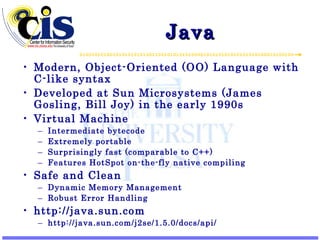
- An overview of Java as an object-oriented language developed by Sun Microsystems, featuring a virtual machine, portability, and memory management.
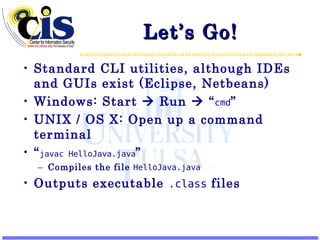
- Instructions for compiling and running a simple "Hello World" Java program from the command line.
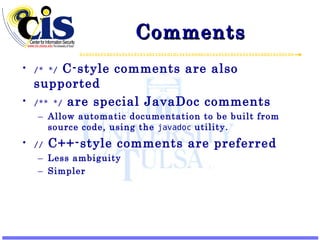
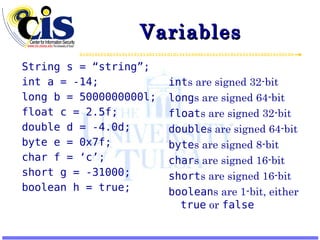
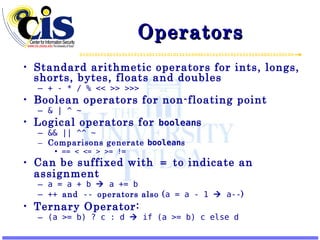
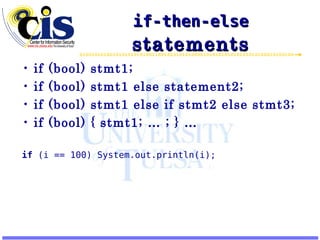
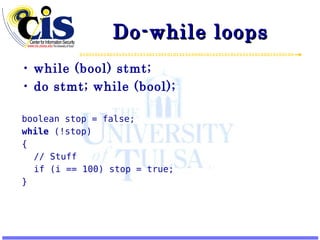
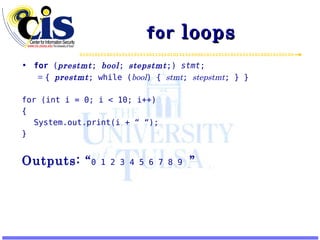
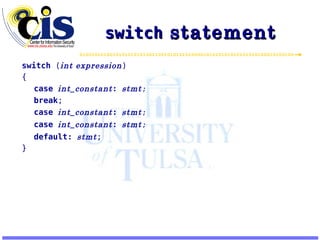
- Explanations of Java programming basics like classes, methods, variables, operators, and control structures.
![HelloJava.java public class HelloJava { public static void main(String[] args) { System.out.println(“Hello World!”); } } Run with: java -cp . HelloJava Outputs: Hello World!](https://image.slidesharecdn.com/learningjava1-introduction-090517132636-phpapp01/85/Learning-Java-1-Introduction-6-320.jpg)
![Some Notes public class HelloJava { … Everything in Java must be in a class (container for code and data). public static void main(String[] args){ … This is a method (which contains executable code). The function called from the command-line is required to be main . Takes a String array (the arguments), and returns nothing ( void ). System.out.println(“Hello World!”); System is a class that contains a lot of useful system-wide tools, like standard I/O, and its out class represents standard out. The println method of out (and all PrintStream objects) prints the String containted within, followed by a newline. java -cp . HelloJava Invokes the Java Virtual Machine (JVM) to execute the main of the named class ( HelloJava ). Searches the current directory for the class file ( -cp . ).](https://image.slidesharecdn.com/learningjava1-introduction-090517132636-phpapp01/85/Learning-Java-1-Introduction-7-320.jpg)
![Arrays int [] array = { 1,2,3 } ; int [] array = new int[ 10 ]; for (int i = 0; i < array.length ; i++) array [ i ] = i; Array indices are from 0 to (length – 1) Multi-dimensional arrays are actually arrays of arrays: int [][] matrix = new int [3][3]; for (int i = 0; i < matrix.length ; i++) for (int j = 0; j < matrix[i].length ; j++) System.out.println(“Row: “ + i + “, Col: “ + j + “ = “ + matrix [i][j] );](https://image.slidesharecdn.com/learningjava1-introduction-090517132636-phpapp01/85/Learning-Java-1-Introduction-19-320.jpg)


![HelloJava.java public class HelloJava { public static void main(String[] args) { System.out.println(“Hello World!”); } } Run with: java -cp . HelloJava Outputs: Hello World!](/p?url=https%3A%2F%2Fimage.slidesharecdn.com%2Flearningjava1-introduction-090517132636-phpapp01%2F85%2FLearning-Java-1-Introduction-6-320.jpg&__src=https%3A%2F%2Fwww.slideshare.net%2Fslideshow%2Flearning-java-1-introduction%2F1448289%2322&__type=image)
![Some Notes public class HelloJava { … Everything in Java must be in a class (container for code and data). public static void main(String[] args){ … This is a method (which contains executable code). The function called from the command-line is required to be main . Takes a String array (the arguments), and returns nothing ( void ). System.out.println(“Hello World!”); System is a class that contains a lot of useful system-wide tools, like standard I/O, and its out class represents standard out. The println method of out (and all PrintStream objects) prints the String containted within, followed by a newline. java -cp . HelloJava Invokes the Java Virtual Machine (JVM) to execute the main of the named class ( HelloJava ). Searches the current directory for the class file ( -cp . ).](/p?url=https%3A%2F%2Fimage.slidesharecdn.com%2Flearningjava1-introduction-090517132636-phpapp01%2F85%2FLearning-Java-1-Introduction-7-320.jpg&__src=https%3A%2F%2Fwww.slideshare.net%2Fslideshow%2Flearning-java-1-introduction%2F1448289%2322&__type=image)


![Arrays int [] array = { 1,2,3 } ; int [] array = new int[ 10 ]; for (int i = 0; i < array.length ; i++) array [ i ] = i; Array indices are from 0 to (length – 1) Multi-dimensional arrays are actually arrays of arrays: int [][] matrix = new int [3][3]; for (int i = 0; i < matrix.length ; i++) for (int j = 0; j < matrix[i].length ; j++) System.out.println(“Row: “ + i + “, Col: “ + j + “ = “ + matrix [i][j] );](/p?url=https%3A%2F%2Fimage.slidesharecdn.com%2Flearningjava1-introduction-090517132636-phpapp01%2F85%2FLearning-Java-1-Introduction-19-320.jpg&__src=https%3A%2F%2Fwww.slideshare.net%2Fslideshow%2Flearning-java-1-introduction%2F1448289%2322&__type=image)


![Objects class Person { String name; int age; } Person me = new Person(); me.name = “Bill”; me.age = 34; Person[] students = new Person[50]; students[0] = new Person();](/p?url=https%3A%2F%2Fimage.slidesharecdn.com%2Flearningjava1-introduction-090517132636-phpapp01%2F85%2FLearning-Java-1-Introduction-23-320.jpg&__src=https%3A%2F%2Fwww.slideshare.net%2Fslideshow%2Flearning-java-1-introduction%2F1448289%2322&__type=image)


![Coding Style class Test { public static void main(String[] args) { if (args.length > 0) System.out.println(“We have args!”); for (int i = 0; i < args.length; i++) { int q = Integer.parseInt(args[i]); System.out.println(2 * q); } System.exit(0); } }](/p?url=https%3A%2F%2Fimage.slidesharecdn.com%2Flearningjava1-introduction-090517132636-phpapp01%2F85%2FLearning-Java-1-Introduction-32-320.jpg&__src=https%3A%2F%2Fwww.slideshare.net%2Fslideshow%2Flearning-java-1-introduction%2F1448289%2322&__type=image)


![Internet and Web Technology (CLASS-16) [Basic Elements of Java Program] | NIC...](https://cdn.slidesharecdn.com/ss_thumbnails/iwtclass-16-200811210335-thumbnail.jpg?width=640&height=640&fit=bounds)
![Internet and Web Technology (CLASS-15) [JAVA Basics] | NIC/NIELIT Web Technol...](https://cdn.slidesharecdn.com/ss_thumbnails/iwtclass-15-200811210151-thumbnail.jpg?width=640&height=640&fit=bounds)


