Learning Git and GitHub
GDSC -Bharat Institute of Technology, Meerut
Before knowing about Git & GitHub we need to
know about an important concept called "VERSION
CONTROL SYSTEM (VCS)"
What is VCS?
● Version Control System is also known as Source
Software Code Management (SCM) System.
● They are a category of software tools that helps in
recording changes made to files by keeping a track of
modifications done to the code.
Benefits of VCS
● We can maintain different versions and we can choose
any version based on requirement.
● With every version/commit we can maintain metadata
like
○ commit message
○ who did changes
○ when he did the change
○ what changes he did
Benefits of VCS (cont..)
● Developers can share the code to the peer developers
in very easy way.
● Multiple developers can work in collaborative way.
● Parallel development.
● We can provide access control like
○ who can read code
○ who can modify code
Type of VCS
There are two VCS:
1. Centralized VCS
2. Distributed VCS
What is Git?
Git is a free and open source distributed version control
system designed to handle everything from small to very
large projects with speed and efficiency.
Git is developed by Linus Torvalds (Finnish software
engineer), who also developed Linux Kernel.
Most of the companies like Microsoft, Facebook, Yahoo,
LinkedIn, Intel using Git as Version Control System Tool.
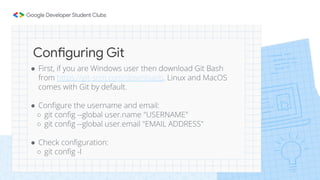
Configuring Git
● First, if you are Windows user then download Git Bash
from https://git-scm.com/downloads. Linux and MacOS
comes with Git by default.
● Configure the username and email:
○ git config --global user.name "USERNAME"
○ git config --global user.email "EMAIL ADDRESS"
● Check configuration:
○ git config -l
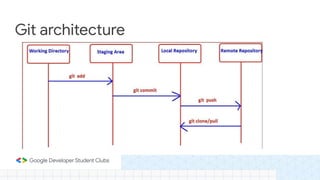
Git architecture
What is GitHub?
GitHub is a code hosting platform for version control and
collaboration.
It lets you and others work together on projects from anywhere.
GitHub is a Git repository hosting service, but it adds many of its
own features. While Git is a command line tool, GitHub provides
a Web-based graphical interface.
It also provides access control and several collaboration
features, such as a wikis and basic task management tools for
every project.
Let’s start
● Create account from https://github.com/signup
● Create a repository on GitHub
● Create a personal token from settings -> Developer settings ->
Personal access tokens (https://github.com/settings/tokens)
Download the repo
To download the repo in your local system, you have to clone
the repo.
$ git clone https://github.com/USERNAME/REPO.git
Creating changes
Make changes in the files
$ git add FILENAME
$ git status
$ git commit -m “COMMIT MESSAGE”
Uploading change to repo
To upload the changes on the remote repository
$ git push -u main
Or
$ git push
Other Git commands
● git init - Create an empty Git repository or reinitialize an existing
one
● git diff - Show changes between commits, commit and working
tree, etc
● git log - Show commit log
● git status - Show status of working tree
● git pull - Fetch from and integrate with another repository or a local
branch
Thank You!