Virtualization
KVM (Kernel-Based Virtual Machine) Solution
Virtualization

sharing
●isolation
●emulation
●
KVM

Full (Hardware-assisted) virtualization
●Intel VT, AMD-V
●Kernel Module
●QEMU
●libvirt (VMM)
●
KVM

Very Active in the Linux Community
●Easy to Use
●Fully Control by ourselves
●Easy for the migration from or to other platforms
●
KVM

In the Linux Kernel Source
●Almost Default VM Solution for GNU/Linux
Distribution : Redhat, OpenSuse, Debian,
Ubuntu...
●
Architecture
Architecture

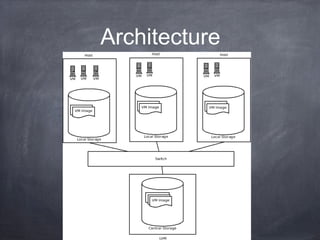
More then 1 Host
●1 LVM for VM image storage
●Using iSCSI between Host and LVM
●Using its own internal network for the connection
between Host and LVM
●
Architecture

At least bond 2 network interfaces (bonding) for
the connection to LVM
●For the Host, it has 2 bridged network, 1 for WAN
and 1 for LAN in PowerBase
●
Management

use “virsh” and the tools started with “virt-” in
console to manage the VMs
●We can also use a GUI tool called Virtual Machine
Manager (virt-manager) on our GNU/Linux
Desktop to manage the VMs
●
Fast Cloning

For the Fast Cloning of VM images, we use LVM
snapshot to do the fast cloning
●We have built up some standard image for the
cloning of new VMs
●
Fast Cloning
VM image
Snapshot
New img
P2V

dd the image into the VM’s LVM device if we have
the disk image

●
V2V
For Xen image, if it uses the original kernel (Full
virtualization), it can use directly on KVM;
otherwise it has to install the original kernel before
the boot in KVM
●For Virtual Box, VMware, there is a tool called
qemu-img to convert those images to RAW data
which could use in KVM.
●
V2V cont.

package virt-goodies contains tools to convert the
config file of VMWare to libvirt readable xml.

●
New VM Creation

For Standard system, we have default VM to
clone
●For those do not have default image, we can use
virt-install to do the new VM installation
●
Live Migration

Live migration means that we can move VMs for 1
Host to another same configuration Host without
shutdown the VMs.

●
Virtualization

Questions?

●