
© Copyright Azul Systems 2016
© Copyright Azul Systems 2015
@speakjava
JDK 9: Big Changes
To Make Java Smaller
Simon Ritter
Deputy CTO, Azul Systems
1
© Copyright Azul Systems 2016
API Structural Changes
© Copyright Azul Systems 2016
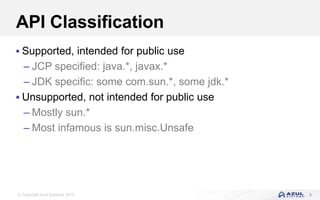
API Classification
 Supported, intended for public use
– JCP specified: java.*, javax.*
– JDK specific: some com.sun.*, some jdk.*
 Unsupported, not intended for public use
– Mostly sun.*
– Most infamous is sun.misc.Unsafe
3
© Copyright Azul Systems 2016
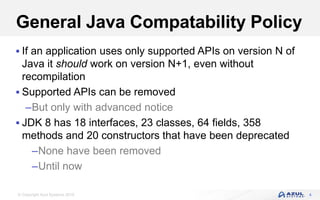
General Java Compatability Policy
 If an application uses only supported APIs on version N of
Java it should work on version N+1, even without
recompilation
 Supported APIs can be removed
–But only with advanced notice
 JDK 8 has 18 interfaces, 23 classes, 64 fields, 358
methods and 20 constructors that have been deprecated
–None have been removed
–Until now
4
© Copyright Azul Systems 2016
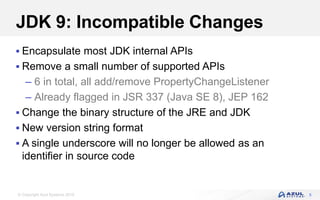
JDK 9: Incompatible Changes
 Encapsulate most JDK internal APIs
 Remove a small number of supported APIs
– 6 in total, all add/remove PropertyChangeListener
– Already flagged in JSR 337 (Java SE 8), JEP 162
 Change the binary structure of the JRE and JDK
 New version string format
 A single underscore will no longer be allowed as an
identifier in source code
5
© Copyright Azul Systems 2016
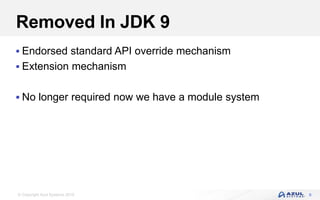
Removed In JDK 9
 Endorsed standard API override mechanism
 Extension mechanism
 No longer required now we have a module system
6
© Copyright Azul Systems 2016
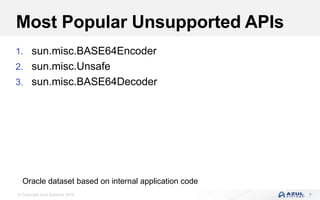
Most Popular Unsupported APIs
1. sun.misc.BASE64Encoder
2. sun.misc.Unsafe
3. sun.misc.BASE64Decoder
7
Oracle dataset based on internal application code
© Copyright Azul Systems 2016
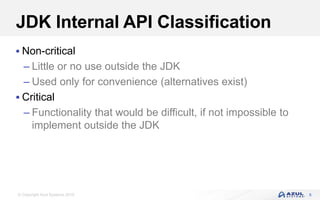
JDK Internal API Classification
 Non-critical
– Little or no use outside the JDK
– Used only for convenience (alternatives exist)
 Critical
– Functionality that would be difficult, if not impossible to
implement outside the JDK
8
© Copyright Azul Systems 2016
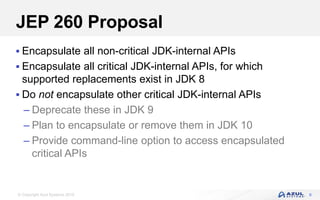
JEP 260 Proposal
 Encapsulate all non-critical JDK-internal APIs
 Encapsulate all critical JDK-internal APIs, for which
supported replacements exist in JDK 8
 Do not encapsulate other critical JDK-internal APIs
– Deprecate these in JDK 9
– Plan to encapsulate or remove them in JDK 10
– Provide command-line option to access encapsulated
critical APIs
9
© Copyright Azul Systems 2016
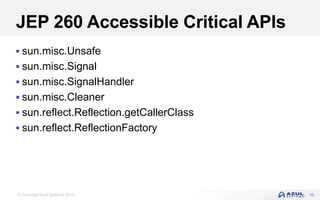
JEP 260 Accessible Critical APIs
 sun.misc.Unsafe
 sun.misc.Signal
 sun.misc.SignalHandler
 sun.misc.Cleaner
 sun.reflect.Reflection.getCallerClass
 sun.reflect.ReflectionFactory
10
© Copyright Azul Systems 2016
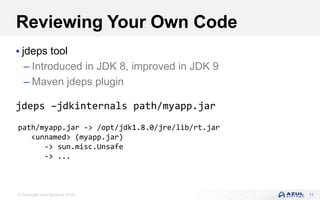
Reviewing Your Own Code
 jdeps tool
– Introduced in JDK 8, improved in JDK 9
– Maven jdeps plugin
jdeps –jdkinternals path/myapp.jar
11
path/myapp.jar -> /opt/jdk1.8.0/jre/lib/rt.jar
<unnamed> (myapp.jar)
-> sun.misc.Unsafe
-> ...
© Copyright Azul Systems 2016
Project Jigsaw And Modules
© Copyright Azul Systems 2016
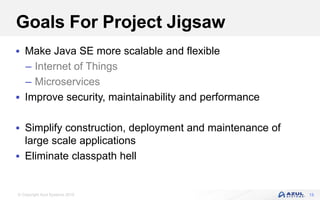
Goals For Project Jigsaw
 Make Java SE more scalable and flexible
– Internet of Things
– Microservices
 Improve security, maintainability and performance
 Simplify construction, deployment and maintenance of
large scale applications
 Eliminate classpath hell
13
© Copyright Azul Systems 2016
Module Fundamentals
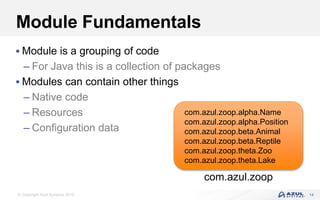
 Module is a grouping of code
– For Java this is a collection of packages
 Modules can contain other things
– Native code
– Resources
– Configuration data
14
com.azul.zoop
com.azul.zoop.alpha.Name
com.azul.zoop.alpha.Position
com.azul.zoop.beta.Animal
com.azul.zoop.beta.Reptile
com.azul.zoop.theta.Zoo
com.azul.zoop.theta.Lake
© Copyright Azul Systems 2016
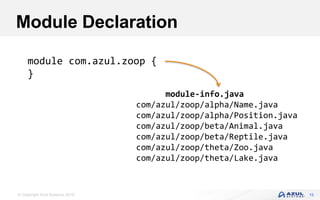
Module Declaration
15
module com.azul.zoop {
}
module-info.java
com/azul/zoop/alpha/Name.java
com/azul/zoop/alpha/Position.java
com/azul/zoop/beta/Animal.java
com/azul/zoop/beta/Reptile.java
com/azul/zoop/theta/Zoo.java
com/azul/zoop/theta/Lake.java
© Copyright Azul Systems 2016
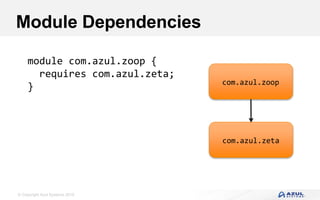
Module Dependencies
module com.azul.zoop {
requires com.azul.zeta;
} com.azul.zoop
com.azul.zeta
© Copyright Azul Systems 2016
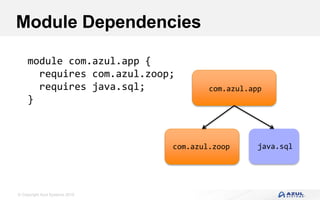
Module Dependencies
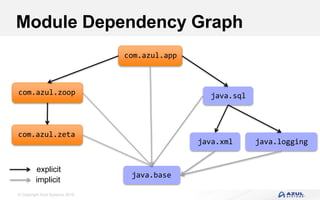
module com.azul.app {
requires com.azul.zoop;
requires java.sql;
}
com.azul.app
com.azul.zoop java.sql
© Copyright Azul Systems 2016
Module Dependency Graph
com.azul.app
java.base
java.sqlcom.azul.zoop
com.azul.zeta
java.xml java.logging
explicit
implicit
© Copyright Azul Systems 2016
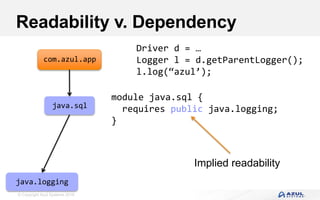
Readability v. Dependency
com.azul.app
java.sql
java.logging
module java.sql {
requires public java.logging;
}
Driver d = …
Logger l = d.getParentLogger();
l.log(“azul’);
Implied readability
© Copyright Azul Systems 2016
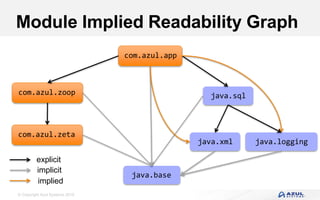
Module Implied Readability Graph
com.azul.app
java.base
java.sqlcom.azul.zoop
com.azul.zeta
java.xml java.logging
explicit
implicit
implied
© Copyright Azul Systems 2016
Package Visibility
module com.azul.zoop {
requires com.azul.zeta;
exports com.azul.zoop.alpha;
exports com.azul.zoop.beta to com.azul.app;
}
com.azul.zoop
com.azul.zoop.alpha
com.azul.zoop.beta
com.azul.zoop.thetacom.azul.app only
© Copyright Azul Systems 2016
More Package Visibility
weak module com.azul.zoop {
requires com.azul.zeta;
}
com.azul.zoop
com.azul.zoop.alpha
com.azul.zoop.beta com.azul.zoop.theta
© Copyright Azul Systems 2016
Even More Package Visibility
module com.azul.zoop {
requires com.azul.zeta;
exports com.azul.zoop.alpha;
exports com.azul.zoop.beta to com.azul.app;
exports private com.azul.theta;
}
com.azul.zoop
com.azul.zoop.theta
REFLECTIONGENERAL
com.azul.zoop.alpha
com.azul.zoop.beta
com.azul.app only
© Copyright Azul Systems 2016
Restricted Keywords
module
requires requires;
exports exports;
module {
}
© Copyright Azul Systems 2016
Accessibility
 For a package to be visible
– The package must be exported by the containing module
– The containing module must be read by the using module
 Public types from those packages can then be used
com.azul.zoopcom.azul.app
reads
© Copyright Azul Systems 2016
Java Accessibility (pre-JDK 9)
public
protected
<package>
private
© Copyright Azul Systems 2016
Java Accessibility (JDK 9)
public to everyone
public, but only to specific modules
public only within a module
protected
<package>
private
public ≠ accessible (fundamental change to Java)
© Copyright Azul Systems 2016
JDK 8 Dependencies
© Copyright Azul Systems 2016
JDK 9 Platform Modules
29
java.se
java.compact3
java.compact2
java.compact1
java.scripting
java.instrument
java.base
java.logging
java.sql
java.sql.rowset
java.xml
java.desktop
java.rmi
java.prefs
java.datatransfer
java.compiler
java.management
java.security.jgss
java.naming
java.security.sasl
All modules depend on java.base
no implied
readability=
© Copyright Azul Systems 2016
JDK 9 Platform Modules
30
java.se.e
e
java.se
java.xml.bind
java.corba
java.compiler
java.desktop
java.annotations.common
java.rmi
java.datatransfer
java.management
java.xml.ws
java.naming
java.transaction
java.activation
All modules depend on java.base
© Copyright Azul Systems 2016
Using Modules
© Copyright Azul Systems 2016
Module Path
$ javac –modulepath dir1:dir2:dir3
© Copyright Azul Systems 2016
Compilation With Module Path
33
$ javac –modulepath mods –d mods 
src/module-info.java 
src/com/azul/zoop/alpha/Name.java
mods/module-info.class
mods/com/azul/zoop/alpha/Name.class
src/module-info.java
src/com/azul/zoop/alpha/Name.java
© Copyright Azul Systems 2016
Application Execution
 -modulepath can be abbreviated to -mp
$ java –mp mods –m com.azul.app/com.azul.app.Main
Azul application initialised!
module name main class
© Copyright Azul Systems 2016
Packaging With Modular JAR Files
mods/module-info.class
mods/com/azul/app/Main.class
$ jar --create --file mylib/app.jar 
--main-class com.azul.app.Main 
-C mods .
module-info.class
com/azul/app/Main.class
app.jar
© Copyright Azul Systems 2016
JAR Files & Module Information
$ jar --file mylib/app.jar –p
Name:
com.azul.zoop
Requires:
com.azul.zeta
java.base [MANDATED]
java.sql
Main class:
com.azul.zoop.Main
© Copyright Azul Systems 2016
Application Execution (JAR)
$ java –mp mylib:mods –m com.azul.app
Azul application initialised!
© Copyright Azul Systems 2016
Linking
Modular run-time
image
…confbin
jlink
$ jlink --modulepath $JDKMODS 
--addmods java.base –output myimage
$ myimage/bin/java –listmods
java.base@9.0
© Copyright Azul Systems 2016
Linking An Application
$ jlink --modulepath $JDKMODS:$MYMODS 
--addmods com.azul.app –output myimage
$ myimage/bin/java –listmods
java.base@9.0
java.logging@9.0
java.sql@9.0
java.xml@9.0
com.azul.app@1.0
com.azul.zoop@1.0
com.azul.zeta@1.0
Version numbering for
information purposes only
“It is not a goal of the module
system to solve the version-
selection problem”
© Copyright Azul Systems 2016
Application Migration
© Copyright Azul Systems 2016
Typical Application (JDK 8)
jar
jar
jar
JDK
jar
jarjar
jar jar
jar
jar
jar
jar
Classpath
© Copyright Azul Systems 2016
Typical Application (JDK 9)
jar
jar
jar
module
java.base
module
java.desktop
module
java.datatransfer
module
java.xml
jar
jarjar
jar jar
jar
jar
jar
jar
Unnamed
module
© Copyright Azul Systems 2016
Sample Application
myapp.ja
r
libgl.jar
mylib.jar
gluegen.jar jogl.jar
module
java.base
module
java.desktop
module
java.datatransfer
module
java.xml
© Copyright Azul Systems 2016
Run Application With Classpath
$ java –classpath 
lib/myapp.jar: 
lib/mylib.jar: 
lib/libgl.jar: 
lib/gluegen.jar: 
lib/jogl.jar: 
myapp.Main
© Copyright Azul Systems 2016
Sample Application
module
myapp.ja
r
libgl.jar
module
mylib.jar
gluegen.jar jogl.jar
module
java.base
module
java.desktop
module
java.datatransfer
module
java.xml
© Copyright Azul Systems 2016
Application module-info.java
module myapp {
requires mylib;
requires java.base;
requires java.sql;
requires libgl; ????
requires gluegen; ????
requires jogl; ????
}
© Copyright Azul Systems 2016
Sample Application
module
myapp.ja
r
module
libgl.jar
module
mylib.jar
module
gluegen.jar
module
jogl.jar
module
java.base
module
java.desktop
module
java.datatransfer
module
java.xml
© Copyright Azul Systems 2016
Automatic Modules
 Real modules
 Simply place unmodified jar file on module path
– Rather than classpath
 No changes to JAR file
 Module name derived from JAR file name
 Exports all its packages
– No selectivity
 Automatically requires all modules on the module path
48
© Copyright Azul Systems 2016
Application Module Dependencies
module
myapp.ja
r
module
libgl.jar
module
mylib.jar
module
gluegen.jar
module
jogl.jar
module
java.base
module
java.desktop
module
java.datatransfer
module
java.xml
Implicit
Explicit
© Copyright Azul Systems 2016
Run Application With Modules
$ java –classpath 
lib/myapp.jar: 
lib/mylib.jar: 
lib/libgl.jar: 
lib/gluegen.jar: 
lib/jogl.jar: 
myapp.Main
$ java –mp mylib:lib –m myapp
© Copyright Azul Systems 2016
Advanced Details
© Copyright Azul Systems 2016
Modular Jar Files And JMODs
 Modular jar files are simple
– Standard jar file possibly with module-info.class file
– Can use existing (unmodified) jar files
 JMOD files
– More complex module files
– Used for modules in the JDK
– Can include native files (JNI), configuration files and
other data
– Based on zip file format (pending final details - JEP 261)
52
© Copyright Azul Systems 2016
jmod Command
 Create can specify several details:
– Main class
– Native libraries and commands
– Configuration data
– OS name, version and machine architecture
 Details included in module-info.class file
53
jmod (create | list | describe) <options> <jmod-file>
© Copyright Azul Systems 2016
Classloaders (Since JDK 1.2)
54
Bootstrap classloader (Internal Class)
Bootstrap Class Path
Extension classloader (URLClassLoader)
Extension Mechanism
Application classloader (URLClassLoader)
Class Path
© Copyright Azul Systems 2016
Classloaders (JDK 9)
55
Bootstrap classloader (Internal Class)
bootstrap class path
Platform classloader (Internal Class)
JDK classes with specific permissions
Application classloader (Internal Class)
Class & Module Path
© Copyright Azul Systems 2016
Summary
© Copyright Azul Systems 2016
Tooling Support
 NetBeans leads the way
 Early Access NetBeans 9 available
 Support for module-info.java file
– Graphing of dependencies
57
© Copyright Azul Systems 2016
Summary
 Modularisation is a big change for Java
– JVM/JRE rather than language/APIs
 Potentially disruptive changes to exposure of non-public APIs
– Is it safe?
 Developing modular code will require some learning
– Not a huge change, though
58
© Copyright Azul Systems 2016
Zulu.org
 Azul binary distribution of OpenJDK source code
 Passed all TCK tests
 Completely FREE!
– Pay us if you’d like enterprise level support
 Just announced: Embedded Zulu support for ARM 32-bit
– Intel already supported
– “Requires no licensing fee”
59
© Copyright Azul Systems 2016
Further Information
 openjdk.java.net
 openjdk.java.net/jeps
 openjdk.java.net/projects/jigsaw
 jcp.org
60
© Copyright Azul Systems 2016
© Copyright Azul Systems 2015
@speakjava
Questions
Simon Ritter
Deputy CTO, Azul Systems
61