Technologies
● HTML
● CSS
● Javascript
Interactivity
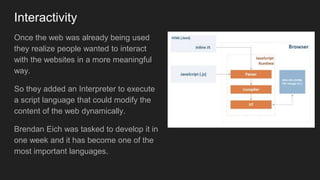
Once the web was already being used
they realize people wanted to interact
with the websites in a more meaningful
way.
So they added an Interpreter to execute
a script language that could modify the
content of the web dynamically.
Brendan Eich was tasked to develop it in
one week and it has become one of the
most important languages.
Javascript
A regular programming language, easy to start, hard to
master.
Allows to give some interactivity to the elements on the web.
Syntax similar to C or Java but with no types.
You can change the content of the HTML or the CSS applied
to an element.
You can even send or retrieve information from the internet to
update the content of the web without reloading the page.
var my_number = 10;
function say( str )
{
console.log( str
);
}
say("hello");
Javascript: insert code
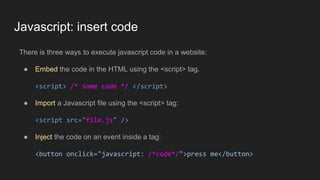
There is three ways to execute javascript code in a website:
● Embed the code in the HTML using the <script> tag.
<script> /* some code */ </script>
● Import a Javascript file using the <script> tag:
<script src="file.js" />
● Inject the code on an event inside a tag:
<button onclick="javascript: /*code*/">press me</button>
Variable Declaration
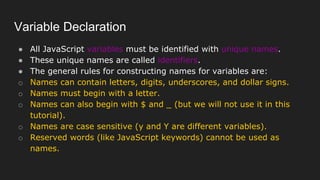
● All JavaScript variables must be identified with unique names.
● These unique names are called identifiers.
● The general rules for constructing names for variables are:
o Names can contain letters, digits, underscores, and dollar signs.
o Names must begin with a letter.
o Names can also begin with $ and _ (but we will not use it in this
tutorial).
o Names are case sensitive (y and Y are different variables).
o Reserved words (like JavaScript keywords) cannot be used as
names.
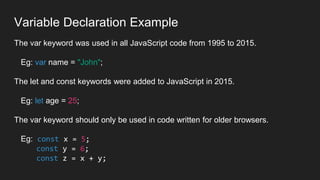
Variable Declaration Example
The var keyword was used in all JavaScript code from 1995 to 2015.
Eg: var name = "John";
The let and const keywords were added to JavaScript in 2015.
Eg: let age = 25;
The var keyword should only be used in code written for older browsers.
Eg: const x = 5;
const y = 6;
const z = x + y;
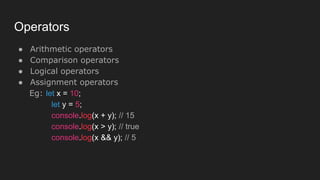
Operators
● Arithmetic operators
● Comparison operators
● Logical operators
● Assignment operators
Eg: let x = 10;
let y = 5;
console.log(x + y); // 15
console.log(x > y); // true
console.log(x && y); // 5
Control - Flow
● Control Flow
● if...else statements
● switch statements
● ternary operator
Eg: let age = 20;
let allowed = (age >= 18) ? "You are allowed to vote" : "You are not
allowed to vote";
console.log(allowed);
Loops….........
● for loop
Eg: for (let i = 1; i <= 5;
i++)
{
console.log(i);
}
● while loop
Eg: let i = 1;
while (i <= 5)
{
console.log(i);
i++;
do...while loop
Eg: let i = 1;
do {
console.log(i);
i++;
} while (i <= 5);
Functions…
● A JavaScript function is defined with the function keyword, followed by a name,
followed by parentheses ().
Syntax:
function name(parameter1, parameter2, parameter3)
{
// code to be executed
}
● Function parameters are listed inside the parentheses () in the function
definition.
● Function arguments are the values received by the function when it is invoked.
● Inside the function, the arguments (the parameters) behave as local variables.
Functions…
// Function is called, the return value will end up in x
let x = myFunction(4, 3);
function myFunction(a, b) {
// Function returns the product of a and b
return a * b;
}
Arrays…
● Creation of array:
Using an array literal is the easiest way to create a JS Array.
Syntax:
const array_name = [item1, item2, ...];
● Accessing the array:
You access an array element by referring to the index number.
const cars = ["Saab", "Volvo", "BMW"];
let car = cars[0];
Arrays…
● Changing the Arrays
This statement changes the value of the first element in cars:
const cars = ["Saab", "Volvo", "BMW"];
cars[0] = "Opel";
● Example:
let fruits = ["apple", "banana", "orange"];
console.log(fruits[0]); // apple
fruits.push("grape");
Objects
● Creating objects
● Accessing object properties
● Object methods
Eg: let person = {
name: "John",
age: 30,
greet: function() {
console.log("Hello, my name is " + this.name);
} }; console.log(person.age); // 30
person.greet(); // Hello, my name is John
DOM Manipulation…
● Accessing DOM elements
● Modifying DOM elements
● Event handling
Example:
<button id="myButton">Click me</button>
<script>
document.getElementById("myButton").addEventListener("click",
function()
{
alert("Button clicked!");
});
</script>
Asynchronous JavaScript
● setTimeout and setInterval
● Promises
● Async/await
Example:
setTimeout(function()
{
console.log("This message will appear after 3 seconds");
}, 3000);
Javascript example
<html>
<body>
<h1>This is a title</h1>
<script>
var title = document.querySelector("h1");
title.innerHTML = "This is another title";
</script>
</body>
</html>
Javascript API
Javascript comes with a rich API to do many things like:
● Access the DOM (HTML nodes)
● Do HTTP Requests
● Play videos and sounds
● Detect user actions (mouse move, key pressed)
● Launch Threads
● Access the GPU, get the Webcam image, ...
And the API keeps growing with every new update of the standard.
Check the WEB API reference to know more
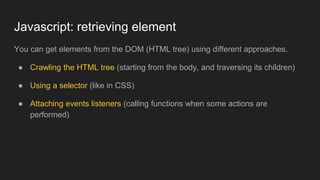
Javascript: retrieving element
You can get elements from the DOM (HTML tree) using different approaches.
● Crawling the HTML tree (starting from the body, and traversing its children)
● Using a selector (like in CSS)
● Attaching events listeners (calling functions when some actions are
performed)
Javascript: crawling the DOM
From javascript you have different variables that you can access to get
information about the website:
● document: the DOM information (HTML)
● window: the browser window
The document variable allows to crawl the tree:
document.body.children[0] // returns the first node inside body tag
Javascript: using selectors
You can retrieve elements using selectors:
var nodes = document.querySelectorAll("p.intro");
will return an array with all <p class="intro"> nodes in the web.
Or if we have already a node and we want to search inside:
var node = mynode.querySelectorAll("p.intro")
Javascript: modify nodes
From JS you can change the attributes
mynode.id = "intro"; //sets an id
mynode.className = "important"; //set class
mynode.classList.add("good"); //to add to the current classes
Change the content
mynode.innerHTML = "<p>text to show</p>"; //change content
Modify the style (CSS)
mynode.style.color = "red"; //change any css properties
or add the behaviour of a node
mynode.addEventListener("click", function(e) {
//do something
});
Javascript: create nodes
Create elements:
var element = document.createElement("div");
And attach them to the DOM:
document.querySelector("#main").appendChild( element );
Or remove it from its parent:
element.remove();
You can clone an element also easily:
var cloned = element.cloneNode(true);
Javascript: hide and show elements
Sometimes it may be useful to hide one element or show another.
You can change an element CSS directly by accessing its property style.
To avoid being displayed on the web change display to "none"
element.style.display = "none"; //hides elements from being rendered
element.style.display = ""; //displays it again
Using Inputs
If you want the user to be able to input some text we use the tag <input>:
<input type="text"/>
There are other inputs, you can check this list.
From Javascript we can attach events like "click" or "keydown".
To read or modify the content of the input:
my_input_element.value = ""; //this will clear the text inside the input
Example of a website
HTML in index.html
<link href="style.css" rel="stylesheet"/>
<h1>Welcome</h1>
<p>
<button>Click me</button>
</p>
<script src="code.js"/>
CSS in style.css
h1 { color: #333; }
button {
border: 2px solid #AAA;
background-color: #555;
}
Javascript in code.js
//fetch the button from the DOM
var button = document.querySelector("button");
//attach and event when the user clicks it
button.addEventListener("click", myfunction);
//create the function that will be called when the
button is pressed
function myfunction()
{
//this shows a popup window
alert("button clicked!");
}
Execution flow
It is important to have a clear
understanding of the execution flow of
your code.
Scripts are executed when the html is
being parsed.
Be careful accessing the DOM as the
DOM won’t contain all until all the HTML
is parsed.
It is good practice to start your code with
an init function called at the end of your
HTML.
<script>
var main =
document.querySelector("#main");
//main here is null, as the element
does
//exist yet
</script>
<div id="main"></div>
<script>
var main =
document.querySelector("#main");
//main now is the right element
</script>
jQuery
jQuery is a library that makes working with the DOM much easier, using an unified
syntax and taking advantage of selectors:
$("p").remove(); //remove all tags p
$("#main").hide(); //hides the element of id main
$("#main").append("<h1>titulo</h1>") //adds content to an element
$("#wrap").css({ color: "red" }); //change the css
$("button#send").click( function() { /* code */ });
To include this library just add this to your HTML:
<script src="https://ajax.googleapis.com/ajax/libs/jquery/3.4.1/jquery.min.js"></script>