
Javascript
function
Chapter 2
‫العارف‬
‫عبد‬
‫الباسط‬
‫أبو‬
‫شعالة‬
Table of content
1. Functions in javascript.
2. Declaration VS Expression.
3. Functions as values
4. Parameters
5. Overloading
6. Final slides with:
Here you could give a brief description of
the topic you want to talk about. For
example, if you want to talk about Mercury,
you could say that it’s the smallest planet
ABOUT THIS TOPIC
Functions are actually objects in
javascript.
The presence of an internal property
named [[Call]] is what makes function
special for any other object.
Function in javascript
The [[Call]] property is unique to functions and indicates that the
object can be executed.
[[Call]]
Declaration vs Expression
02
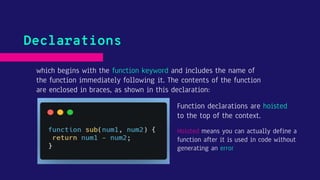
which begins with the function keyword and includes the name of
the function immediately following it. The contents of the function
are enclosed in braces, as shown in this declaration:
Declarations
Function declarations are hoisted
to the top of the context.
Hoisted means you can actually define a
function after it is used in code without
generating an error
Declarations
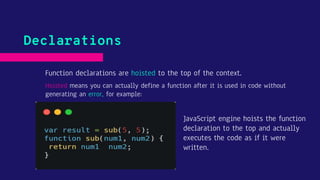
Function declarations are hoisted to the top of the context.
Hoisted means you can actually define a function after it is used in code without
generating an error, for example:
JavaScript engine hoists the function
declaration to the top and actually
executes the code as if it were
written.
Function Expression which doesn’t require a name after function
(anonymous), Instead, function expressions are typically referenced
via a variable or property, as in this expression:
Expression
This code actually assigns a
function value to the
variable sub.
semicolon at the end.
Functions as values
03
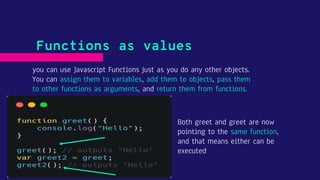
you can use Javascript Functions just as you do any other objects.
You can assign them to variables, add them to objects, pass them
to other functions as arguments, and return them from functions.
Functions as values
Both greet and greet are now
pointing to the same function,
and that means either can be
executed
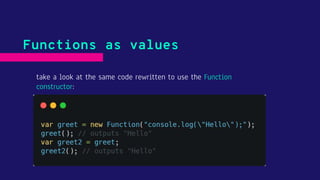
take a look at the same code rewritten to use the Function
constructor:
Functions as values
Parameters
04
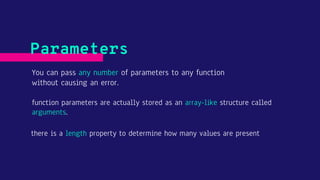
You can pass any number of parameters to any function
without causing an error.
Parameters
function parameters are actually stored as an array-like structure called
arguments.
there is a length property to determine how many values are present
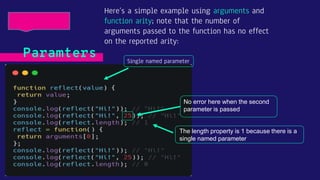
Here’s a simple example using arguments and
function arity; note that the number of
arguments passed to the function has no effect
on the reported arity:
Paramters Single named parameter
The length property is 1 because there is a
single named parameter
No error here when the second
parameter is passed
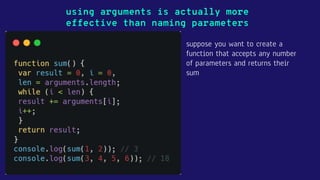
using arguments is actually more
effective than naming parameters
suppose you want to create a
function that accepts any number
of parameters and returns their
sum
Overloading
05
Overloading is the ability of a single function
to have multiple signatures
Overlaoding
A function signature is made up of the function name plus the number
and type of parameters the function expects.
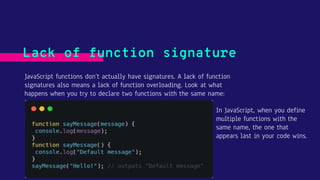
JavaScript functions don’t actually have signatures. A lack of function
signatures also means a lack of function overloading. Look at what
happens when you try to declare two functions with the same name:
Lack of function signature
In JavaScript, when you define
multiple functions with the
same name, the one that
appears last in your code wins.
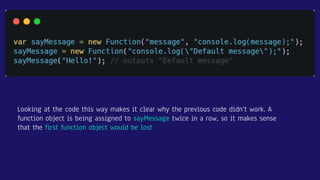
Looking at the code this way makes it clear why the previous code didn’t work. A
function object is being assigned to sayMessage twice in a row, so it makes sense
that the first function object would be lost
Mimic the function overloading
Object methods
06
The this Object
07
When a property value is actually a function, the property is considered
a method.
Object method
For example, in the following code,
the person variable is assigned an
object literal with a name property
and a method called sayName.
You can then call the method directly
from the object as in
person.sayName("Alaref").
You may have noticed something strange in the previous example. The sayName()
method references person.name directly which creates tight coupling between the
method and the object.
The this object
There are two Problems of tight coupling:
1 - if you change the variable name, you also need to remember to
change the reference to that name in the method.
2 - this sort of tight coupling makes it difficult to use the same
function for different objects.
Every scope in JavaScript has a this object that represents the calling object for
the function.
In the global scope, this represents the global object (window in web browsers).
The this object
When a function is called while attached to an object, the value of this is equal
to that object by default. So, instead of directly referencing an object inside a
method, you can reference this instead
The this object
For example, you can rewrite the code from the previous example to use this:
This code works the same as the
earlier version, but this time,
sayName() references this instead of
person.
you can easily change the name of the variable or
even reuse the function on different objects.
The this object
In this example, a function called sayName is
defined first. Then, two object literals are
created that assign sayName to be equal to the
sayNameForAll function
The last part of this example defines a global
variable called name. When sayNameForAll() is
called directly
Property of
Global object
Reference
values
Changing this
08
Even though this is typically assigned automatically, you can change its value
to achieve different goals. There are three functions methods that allow you
to change the value of this :
Changing this
● The call() method.
● The apply() method.
● The bind() method.
The call() method
09
● The call() method executes the function with a particular this value and
with specific parameters.
● The first parameter of call() is the value to which this should be equal
when the function is executed
● All subsequent parameters are the parameters that should be passed into
the function
The call() method
For example, suppose you update sayNameForAll() to take a parameter
The call() method
no parentheses after the function name
because it is accessed as an object
The apply() method works exactly the same as call() except that it accepts only
two parameters:
1. the value for this.
2. and an array or array-like object of parameters to pass to the function
instead of individually naming each parameter using call(), you can easily
pass arrays to apply() as the second argument.
Note that you can use an arguments object as the second parameter
The apply() method
This example shows the apply() method in action:
The apply() method
The first argument to bind() is the this value for the new function. All
other arguments represent named parameters that should be
permanently set in the new function.
The bind() method
The following code shows two examples that use bind(). You create the sayNameForPerson1()
function by binding the this value to person1, while sayNameForPerson2() binds this to person2
and binds the first parameter as "person2".
The bind() method