





javascript
as development platform
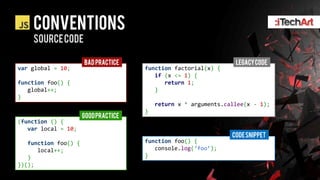
CONVENTIONS
    SOURCE CODE

                      BAD PRACTICE                                LEGACY CODE
var global = 10;                      function factorial(x) {
                                         if (x <= 1) {
function foo() {                            return 1;
   global++;                             }
}
                                          return x * arguments.callee(x - 1);
                                      }
                      GOOD PRACTICE
(function () {
   var local = 10;
                                                                 CODE SNIPPET
   function foo() {                   function foo() {
      local++;                           console.log(‘foo’);
   }                                  }
})();
WHAT IS javascript


            The world`s most misunderstood
            programming language
SOURCES OF CONFUSION
 JAVA PREFIX


Completely independent from Java
Has syntax similarities
SOURCES OF CONFUSION
 SCRIPT POSTFIX


Doesn’t mean that JS isn`t real
programming language
Full-fledged Object Oriented language
SOURCES OF CONFUSION
 WEAK LEARNING SOURCES


Standard has complicated structure makes it hard to
read and understand
Almost all books are universally bad
Internet full of bad advices and practices
LEARNING SOURCES
BOOKS
    Javascript: the definitive guide   Javascript: the GOOD parts
WHAT IS Javascript


            A scripting language designed as
            lightweight alternative to Java for Web
history
1992


          James Gosling at Sun Microsystems
          has been working on superior
          language to C++ called Oak
history
1992


          Microsoft released Windows 3.1
          and preview of Microsoft
          Windows NT for developers
history
1995


          Oak has failed as a language for
          interactive television and has been
          repurposed for Web. At this time
          language has been renamed to Java.
history
1995


          Sun Microsystems officially
          announced HotJava browser with
          support of Java-applets.
history
1995


          Web becomes hot and Microsoft
          ships Internet Explorer 1.0 and
          Internet Explorer 2.0 few month later
history
1995


          Brendan Eich at Netscape
          Communication Corporation begun
          working on lightweight and simple
          alternative to Java for Web browser
history
1995


          Later on Netscape released
          Netscape Navigator 2.0 with support
          of LiveScript and Java-applets
history
1995


          Anticipated by opportunity to free
          Web from Microsoft, Sun and Netscape
          formed the alliance

          As the result LiveScript has been
          renamed to JavaScript
history
1996


          Microsoft reverse-engineered
          JavaScript and named it JScript to
          avoid trademark issues with Sun
history
1996


          Microsoft released Internet Explorer 3
          with support of JScript
history
1996


          To prevent Microsoft from mutating
          the language, Sun and Netscape made
          their way to ECMA to standardize the
          language
history
1996


          Sun and Netscape have failed and
          Microsoft gathered full control on
          standardization process. Microsoft
          insisted on preserving some design
          errors in the language
history
1998


          ECMA International introduces
          ECMA-262 1st + 2nd edition of
          JavaScript language
VIEW STANDARD

 STANDARD
 ECMA 262


ECMA-262 is active standard that defines JavaScript
Uses term ECMAScript
Structured in a way that makes it hard to read
VIEW STANDARD

STANDARD
TIMELINE


  1997          1998          1999        2000-2009       2009            Future

1st edition   2nd edition   3rd edition   4th edition   5th edition   Harmony edition


   June          June       December                    December
WHAT IS javascript


                 One of the most popular
                 programming languages
Javascript
 POPULARITY
                          AS OF BEGINNING OF 2013


One of the most popular
programming languages
KEY persons
Brendan eich


               Inventor of JavaScript language
               at Netscape
KEY persons
DOUGLAS CROCKFORD


                    Active member of JavaScript
                    community
                    Author of JSLint and JSMin
                    Inventor of JSON data format
WHAT IS Javascript


            A programming language designed to
            be simple and flexible
DESIGN PRINCIPLES
PROGRAMMING


Lightweight & Simple
Scripting
Dynamic
Multi-paradigm
DESIGN PRINCIPLES
TARGET AUDIENCE


                  WEB AUTHORS   Professional programmers
DESIGN PRINCIPLES
SCALABILITY


Limited scalability
  Lack of modularity
  Linkage through global space
  Dynamicity over static typing
DESIGN PRINCIPLES
MULTI-PARADIGM language


     OBJECT ORIENTED      FUNCTIONAL   Imperative
DESIGN PRINCIPLES
OBJECT ORIENTED LANGUAGE


          OBJECT ORIENTED                             CODE SNIPPET
                            function Plane(mass) {
                                this.mass = mass;
                            };

                            var lightPlane = new Plane(10),
                                heavyPlane = new Plane(1000);
DESIGN PRINCIPLES
Functional language

           FUNCTIONAL                                           CODE SNIPPET
                        var
                              combine = function (a, b) {
                                  return function () {
                                      a();
                                      b();
                                  };
                              },

                              combined = combine(
                                  function () {
                                      console.log('Logging');
                                  },
                                  function () {
                                      alert('Alerting');
                                  }
                              );

                        combined();
DESIGN PRINCIPLES
OBJECT ORIENTED LANGUAGE


              Imperative                              CODE SNIPPET
                           function bound(x, min, max) {
                               var value = x;

                               value = Math.min(value, max);
                               value = Math.max(value, min);

                               return value;
                           }
WHAT IS Javascript


            A programming language that is more
            than just a Web toy
Runtime
Host environments


                             JavaScript executes in a
        JAVASCRIPT ENGINE
                             context of Engine
                             Host environment
                             powers JavaScript Engine
         HOST SPECIFIC API
HOST ENVIRONMENTS
TYPES

        WEB BROWSER   OUT OF BROWSER
HOST ENVIRONMENTS
     RESPOSIBILITIES

REPOSNSIBLE FOR                  NOT RESPONSIBLE FOR


       Input/Output        Code execution
       Graphics            Memory management
       Storage
       Networking
       Host specific API
WHAT IS Javascript


            JavaScript is a primary language of
            Web browser
HOST ENVIRONMENTS
WEB BROWSER

                                                                WEB BROWSER HOST


                               JAVASCRIPT ENGINE


                                                                   HOST SPECIFIC API


       DOCUMENT OBJECT MODEL                       BROWSER Object MODEL
WEB BROWSER
DOCUMENT OBJECT MODEL


Representation of document as
objects hierarchy
Language & browser independent
Standardized by W3C
Revisions are called DOM levels
WEB BROWSER
BROWSER Object MODEL


API for interfacing native browser
functionality
Deals with windows and frames
All functions and object starting at
window
No corresponding standard
WEB BROWSER
BROWSER Object MODEL

              Navigator
Window
               object
object

               Frames[]   Forms[]
                array      array

              Document    links[]
               object     array

                          images[]
                           array
                screen
                object
ENGINE RUNTIME
ESSENTIALS


Interpreted (no compilation step)
Dynamically typed
  Class-free
  Runtime extensibility
  Duck typing

Garbage collected
ENGINE RUNTIME
EXECUTION


Single threaded
Asynchrony via message loop
Linkage through global variables
ENGINE RUNTIME
Script distribution


Script are consumed as plain text
Interpreted or compiled in-place
*.js is a format for script files
Mime-type:
   Officially: application/javascript
   Practically: text/javascript or no MIME type at all
ENGINE RUNTIME
  Script compression

WHY?                         techniques


Less traffic consumption   GZip
Faster load time           Minification
                           Obfuscation
Runtime engine
Script inclusion


Statically
   <script> tag

Dynamically
   DOM API
   Runtime evaluation
Static inclusion
Script tag


Script can be put anywhere
on a page with <script> tag

                                                         CODE SNIPPET
     <script src="path/to/script.js" type="text/javascript"></script>
Static inclusion
Type attribute


<script> tag should have matching </script> tag, except
when document has application/xhtml+xml MIME type
                                                       BAD PRACTICE
 <script src="path/to/script.js" type="text/javascript"/>


                                                      GOOD PRACTICE
 <script src="path/to/script.js" type="text/javascript"></script>
Static inclusion
Xhtmlvalidation


Type attribute is optional, but
required for XHTML validation

                                                 CODE SNIPPET
     <script src="path/to/script.js"></script>
static inclusion
Inline scripts


<script> tag supports inlining, but generally
it is considered as bad practice

                                                CODE SNIPPET
     <script>
            console.log('Inline script');
     </script>
static inclusion
Execution ordering


Scripts attached in that way execute in
order, even if script2 got loaded sooner

                                                              CODE SNIPPET
   <script src="path/to/script1.js" type="text/javascript"></script>
   <script src="path/to/script2.js" type="text/javascript"></script>
static inclusion
Execution ordering


Same holds for inline scripts


                                                             CODE SNIPPET
   <script src="path/to/script1.js" type="text/javascript"></script>

   <script>
          console.log('Inline script');
   </script>
static inclusion
  rendering


  Script loading and execution blocks page
  rendering

                                     CODE SNIPPET                              Script.js
<script src="link/to/script.js"></script>            var link =
                                                         document.getElementById('link');
<a id="link" href="url/to/somewhere.html">Link</a>
                                                     console.log(link != null); // false
static inclusion
rendering

Consider moving script to the bottom of
the document
Not every script can be moved

                                                         GOOD PRACTICE
     <body>
        <div class="page-content">Ipsum lerrra conde ir salle.</div>

        <script src="js/script1.js"></script>
        <script src="js/script2.js"></script>
    </body>
static inclusion
Asyncloading


Scripts can be loaded asynchronously
using async attribute
Script loading does not block rendering

                                                          CODE SNIPPET
        <script src="link/to/script.js" async></script>
Static inclusion
ASYNC loading


Ordering will not be preserved
No execution time guarantee
All async scripts are guaranteed to execute
sometime before window load event

                                                          CODE SNIPPET
       <script src="link/to/script1.js" async></script>
       <script src="link/to/script2.js" async></script>
Static inclusion
defer loading


Scripts can be loaded in defer manner
using defer attribute
Script loading does not block rendering

                                                          CODE SNIPPET
        <script src="link/to/script.js" defer></script>
STATIC INCLUSION
defer loading


Ordering will be preserved
Scripts are guaranteed to start execution
right before DOMContentLoaded event

                                                          CODE SNIPPET
       <script src="link/to/script1.js" defer></script>
       <script src="link/to/script2.js" defer></script>
static INCLUSION
Async+deferloading


Causes legacy browsers to fallback to defer if
async is not supported
Modern browsers treat defer + async as async


                                                                CODE SNIPPET
       <script src="link/to/script1.js" async defer></script>
static INCLUSION
LOADING TIMELINE

                 Scripting
<script>
                 HTML Parser


                 Scripting
<script async>
                 HTML Parser


                 Scripting
<script defer>
                 HTML Parser


                  Networking   Execution   Parsing
dynamic inclusion
DOM API


Script can be attached programmatically
using DOM API
DYNAMIC INCLUSION
asynchronous


Asynchronous
  Script ordering will not be preserved


                                                             CODE SNIPPET
      var head = document.getElementsByTagName('head')[0],
          script = document.createElement('script');

      script.src = 'script.js';
      head.appendChild(script);
Dynamic inclusion
asynchronous


Asynchronous
  Script ordering will be preserved
  Older browsers require tricky solutions
                                                              CODE SNIPPET
       var head = document.getElementsByTagName('head')[0],
           script = document.createElement('script');

       script.async = false;
       script.src = 'script.js';
       head.appendChild(script);
DYNAMIC INCLUSION
DEFERRED


Deferred
  Has no effect when loaded via DOM API
                                                             CODE SNIPPET
      var head = document.getElementsByTagName('head')[0],
          script = document.createElement('script');

      script.src = 'script.js';
      script.defer = 'defer';
      head.appendChild(script);
DYNAMIC INCLUSION
Runtime evaluation


Scripts can be evaluated at Runtime with
Eval
Eval is ―EVIL‖
 Hurts performance
 Makes code hard to debug
 Compromises security
VIEW More

script INCLUSION
Parallel loading


Number of parallel HTTP connections per
hostname is limited
Typically varies from 2 ~ 6
Consider CDN and subdomain usage
WHAT IS Javascript


            JavaScript is a language that has
            many design errors
ENGINE RUNTIME
Strict EXECUTION Mode


Allows to opt-out to strict variant of
JavaScript
   Intended to correct initial design errors
   Prohibits usage of error-prone and insecure features

Standardized in ECMA 262-5
STRICT Mode
activation


Activated with a Use Strict Directive in a
Directive Prologue

                                                        CODE SNIPPET
      'use strict';

      var f = function () {
          console.log('Execution under strict mode');
      };

      f();
STRICT Mode
scoping
                                                                 CODE SNIPPET
Applied to a code unit           'use strict';

                                 eval = 10; // SyntaxError
  To a Function
                                 var f = function () {
  To a code file                     eval = 20; // SyntaxError
                                 };

Affects all inner contexts
                                                                 CODE SNIPPET
Defined lexically (statically)   eval = 10; // 10

                                 var f = function () {
                                     'use strict';
                                     eval = 20; // SyntaxError
                                 };
STRICT Mode
inheritance


Directly Evaled code inherits Strict Mode
Indirectly Evaled code doesn`t inherit
Strict Mode
Functions created via new Function ()
dont inherit Strict Mode
STRICT Mode
     Error checking

Compile time                                                         runtime


                            CODE SNIPPET                                 CODE SNIPPET
'use strict';                              (function () {
                                               'use strict';
eval = 10; // SyntaxError                      global_variable = 10; // Reference Error
                                           })();
var f = function () {
    eval = 20; // SyntaxError
};
STRICT Mode
restrictions


Reserved words
                                                             CODE SNIPPET
  Implements     Protected   "use strict";
                              var let = 10; // SyntaxError
  Interface      Public
  Let            Static
  Package        Yield
  Private
STRICT Mode
restrictions


Octal literals are not allowed
                                         CODE SNIPPET
         "use strict";
          var x = 010; // SyntaxError


Assignment to an undeclared identifier
                                         CODE SNIPPET
         "use strict";
         a = 10; // ReferenceError
STRICT Mode
restrictions


Assignment to read-only property
                                                  CODE SNIPPET
        "use strict";

        var foo = Object.defineProperties({}, {
            bar: {
                value: 10,
                writable: false // by default
            },
            baz: {
                get: function () {
                    return "baz is read-only";
                }
            }
        });

        foo.bar = 20; // TypeError
        foo.baz = 30; // TypeError
STRICT Mode
restrictions


Shadowing of inherited read-only properties

                                                     CODE SNIPPET
        "use strict";

        var foo = Object.defineProperty({}, "x", {
            value: 10,
            writable: false
        });

        var bar = Object.create(foo);
        bar.x = 20; // TypeError
STRICT Mode
restrictions


Eval and arguments
  Cannot appear as variable declaration of function name

                                               CODE SNIPPET
          "use strict";

          // SyntaxError in both cases
          var arguments;
          var eval;

          // also SyntaxError
          function eval() {}
          var foo = function arguments() {};
STRICT Mode
restrictions


Eval and arguments
   Not allowed as argument names      Not assignable

                   CODE SNIPPET                       CODE SNIPPET
"use strict";                      (function (x) {
                                       alert(arguments[0]); // 30
// SyntaxError                         arguments = 40; // TypeError
function foo(eval, arguments) {}   })(30);
STRICT Mode
restrictions


Argument and callee properties

                                                   CODE SNIPPET
        "use strict";

        function foo() {
            alert(foo.arguments); // SyntaxError
            alert(foo.caller); // SyntaxError
        }
STRICT Mode
restrictions


delete operator restrictions
                                       CODE SNIPPET
        "use strict";

        var foo = {};

        function bar(x) {
            delete x; // SyntaxError
        }

        bar(10);   // SyntaxError

        delete foo; // SyntaxError
        delete bar; // SyntaxError
STRICT Mode
   restrictions


   With statement                  this value
                    CODE SNIPPET      Null no longer coerced to window
"use strict";
                                                                 CODE SNIPPET
                                   "use strict";
// SyntaxError
with ({a: 10}) {                   function foo() {
    alert(a);                          console.log(this); // undefined
}                                  }

                                   foo();
STRICT Mode
  restrictions


this value
   Null and undefined are no longer             Primitives are not converted to
   coerced to window                            wrapper objects
                              CODE SNIPPET                                 CODE SNIPPET
"use strict";                                "use strict";

function foo() {                             Number.prototype.test = function () {
    console.log(this); // undefined              console.log(typeof this); // number
}                                            };

foo();                                       (1).test(); // number
STRICT Mode
 restrictions


this value                                                   CODE SNIPPET
                               "use strict";
  Helps to avoid missing new
                               function A(x) {
  keyword issues                   this.x = x;
                               }

                               // forget "new" keyword,
                               // error, because undefined.x = 10
                               var a = A(10);

                               var b = new A(10); // OK
STRICT Mode
 Usage guidelines


Do not apply strict mode to whole script
file blindly
  Will not work when concatenated with some other script
  Can break other scripts if after concatenation put first
  Evaled code will inherit Strict Mode

Consider wrapping your scripts with self-
calling function
WHAT IS Javascript


            JavaScript is a language that has
            simple but flexible type system
Type system
 essentials


Class-free type system
Loose typing
Everything is an object
 Technically JavaScript has primitive types but they
 can be programmed as real objects
Type system
 essentials


Two groups of types
 Primitive types
 Object types

Primitives are not real objects
Some primitives has object wrapper
Type system
        Types

Primitive types       Object types


       Number          Object
       String          Array
       Boolean         Function
       null             RegExp
       undefined        Date
numbers
 essentials


Single type represents integer and floating
point numbers
IEEE 754 64 bit numbers
Be aware of floating point errors
  0.1 + 0.2 !== 0.3
  Can be avoided by scaling
numbers
  runtime

  Runtime type                                 Number object wrapper
                             CODE SNIPPET                                 CODE SNIPPET
var foobar = 0.5;                           var a = 10;
typeof foobar; // "number"                  var b = new Number(a);
var foobar = 1;
typeof foobar; // "number"                  console.log(typeof b); // object
numbers
 Special values


Special values
  NaN
  -Infinity
  Infinity
numbers
nan


Paradoxical type
                                   CODE SNIPPET
      var foobar = NaN;
      typeof foobar; // "number"


Watch out, easy to overwrite!
                                   CODE SNIPPET
      var NaN = "string";
      typeof NaN; // "string"
numbers
nan


Getting NaN
                                     CODE SNIPPET
      var foobar = "string" * 2,
          bar = "string" / 2;
      var foo = +"string",
          barfoo = +[1, 2, 3],
          foobar2 = undefined – 2;
strings
 essentials


Unicode UTF-16
  Built-in string manipulation routines don't take
  surrogate pairs into account

Immutable
Zero-based indexing
No dedicated Char type
strings
 declaration


Literal declaration
                            CODE SNIPPET
        var a = "string";
        var b = 'string';
strings
  runtime

   Runtime type                               String object wrapper
                            CODE SNIPPET                                 CODE SNIPPET
var foobar = "variable types";             var a = 'foo';
typeof foobar; // "string"                 var b = new String(a);

                                           console.log(typeof b); // object
boolean
 essentials


Two possible predefined values
  true
  false
Generally Boolean produced by comparisons
  a === 1

Any value can be converted to Boolean