![SSBN Degree College, ATP M Vishnuvardhan
InputStream methods
Method name Description
int read():
Reads next byte from the stream as
integer and returns -1 if no data is
available in the stream
int read(byte b[])
Reads an array full of bytes from the
stream and returns actual number of
bytes read.
int read(byte b[], int start, int end)
Reads bytes in to array from the specified
start and end position form the stream.
long available()
Returns how many number of bytes yet to
be read in the stream.](https://image.slidesharecdn.com/streams-181217060536/85/Java-Streams-4-320.jpg)

![SSBN Degree College, ATP M Vishnuvardhan
OutputStream methods
Method name Description
void write(int b) Writes one byte to output stream
void write(byte b[])
Writes an array full of bytes to output
stream
void write(byte b[], int start, int end)
Writes bytes from array to output
stream from the specified start and end
position
void flush()
Flushes the output stream i.e.,
immediately releases the pending data
from stream
void close()
Closes the output stream](https://image.slidesharecdn.com/streams-181217060536/85/Java-Streams-9-320.jpg)

![SSBN Degree College, ATP M Vishnuvardhan
Reader methods
Method name Description
int read():
Reads next character from the stream as
integer and returns -1 if no data is
available in the stream.
int read(char c[])
Reads an array full of characters from the
stream and returns actual number of
characters read
int read(char c[], int start, int end)
Reads characters in to array from the
specified start and end position form the
stream
long available()
Returns how many number of bytes yet to
be read in the stream.](https://image.slidesharecdn.com/streams-181217060536/85/Java-Streams-12-320.jpg)


![SSBN Degree College, ATP M Vishnuvardhan
Writer methods
Method name Description
void write(int c) Writes one char to output stream
void write(char c[])
Writes an array full of chars to output
stream
void write(char c[], int start, int end)
Writes chars from array to output stream
from the specified start and end position
void flush()
Flushes the output stream i.e.,
immediately releases the pending data
from stream
void close()
Closes the output stream](https://image.slidesharecdn.com/streams-181217060536/85/Java-Streams-16-320.jpg)
![SSBN Degree College, ATP M Vishnuvardhan
File Methods:
String getName(): Returns the name of the file
String getPath(): Returns path of the file
boolean isFile(): Returns true if the file object is
a file otherwise false is returned
boolean isDirectory(): Returns true if the file
object is a directory
long length(): Returns the size of the file in bytes
String list[]: Returns an array of strings
representing the files present in the
directory](https://image.slidesharecdn.com/streams-181217060536/85/Java-Streams-20-320.jpg)


![SSBN Degree College, ATP M Vishnuvardhan
InputStream methods
Method name Description
int read():
Reads next byte from the stream as
integer and returns -1 if no data is
available in the stream
int read(byte b[])
Reads an array full of bytes from the
stream and returns actual number of
bytes read.
int read(byte b[], int start, int end)
Reads bytes in to array from the specified
start and end position form the stream.
long available()
Returns how many number of bytes yet to
be read in the stream.](/p?url=https%3A%2F%2Fimage.slidesharecdn.com%2Fstreams-181217060536%2F85%2FJava-Streams-4-320.jpg&__src=https%3A%2F%2Fwww.slideshare.net%2Fslideshow%2Fjava-streams-126077816%2F126077816&__type=image)


![SSBN Degree College, ATP M Vishnuvardhan
OutputStream methods
Method name Description
void write(int b) Writes one byte to output stream
void write(byte b[])
Writes an array full of bytes to output
stream
void write(byte b[], int start, int end)
Writes bytes from array to output
stream from the specified start and end
position
void flush()
Flushes the output stream i.e.,
immediately releases the pending data
from stream
void close()
Closes the output stream](/p?url=https%3A%2F%2Fimage.slidesharecdn.com%2Fstreams-181217060536%2F85%2FJava-Streams-9-320.jpg&__src=https%3A%2F%2Fwww.slideshare.net%2Fslideshow%2Fjava-streams-126077816%2F126077816&__type=image)


![SSBN Degree College, ATP M Vishnuvardhan
Reader methods
Method name Description
int read():
Reads next character from the stream as
integer and returns -1 if no data is
available in the stream.
int read(char c[])
Reads an array full of characters from the
stream and returns actual number of
characters read
int read(char c[], int start, int end)
Reads characters in to array from the
specified start and end position form the
stream
long available()
Returns how many number of bytes yet to
be read in the stream.](/p?url=https%3A%2F%2Fimage.slidesharecdn.com%2Fstreams-181217060536%2F85%2FJava-Streams-12-320.jpg&__src=https%3A%2F%2Fwww.slideshare.net%2Fslideshow%2Fjava-streams-126077816%2F126077816&__type=image)


![SSBN Degree College, ATP M Vishnuvardhan
Writer methods
Method name Description
void write(int c) Writes one char to output stream
void write(char c[])
Writes an array full of chars to output
stream
void write(char c[], int start, int end)
Writes chars from array to output stream
from the specified start and end position
void flush()
Flushes the output stream i.e.,
immediately releases the pending data
from stream
void close()
Closes the output stream](/p?url=https%3A%2F%2Fimage.slidesharecdn.com%2Fstreams-181217060536%2F85%2FJava-Streams-16-320.jpg&__src=https%3A%2F%2Fwww.slideshare.net%2Fslideshow%2Fjava-streams-126077816%2F126077816&__type=image)


![SSBN Degree College, ATP M Vishnuvardhan
File Methods:
String getName(): Returns the name of the file
String getPath(): Returns path of the file
boolean isFile(): Returns true if the file object is
a file otherwise false is returned
boolean isDirectory(): Returns true if the file
object is a directory
long length(): Returns the size of the file in bytes
String list[]: Returns an array of strings
representing the files present in the
directory](/p?url=https%3A%2F%2Fimage.slidesharecdn.com%2Fstreams-181217060536%2F85%2FJava-Streams-20-320.jpg&__src=https%3A%2F%2Fwww.slideshare.net%2Fslideshow%2Fjava-streams-126077816%2F126077816&__type=image)


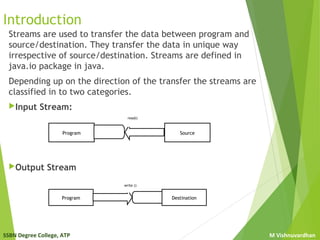
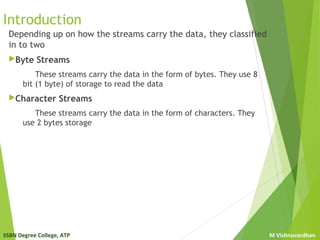
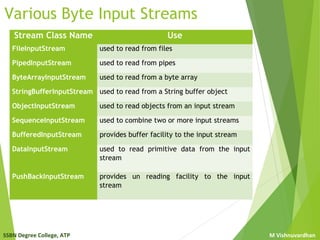
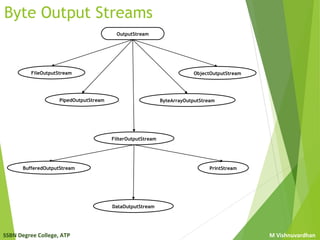
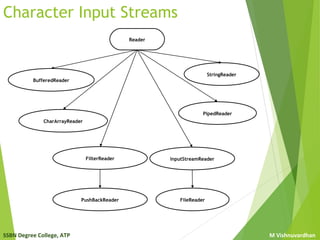
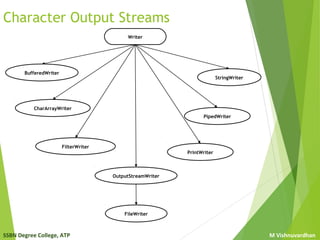
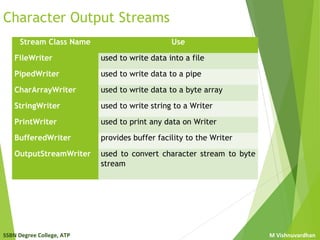
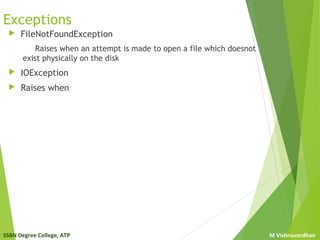
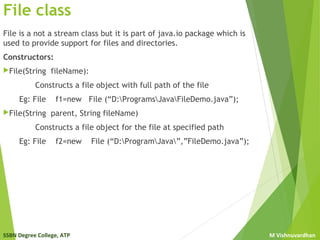
Streams are used to transfer data between a program and source/destination. They transfer data independently of the source/destination. Streams are classified as input or output streams depending on the direction of data transfer, and as byte or character streams depending on how the data is carried. Common stream classes in Java include FileInputStream, FileOutputStream, FileReader, and FileWriter for reading from and writing to files. Exceptions like FileNotFoundException may occur if a file cannot be opened.


