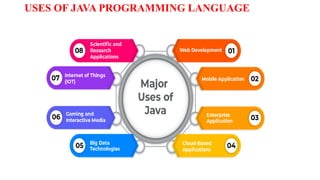
APPLICATIONS OF JAVA
DesktopGUI
Applications for Mobiles
Embedded Systems
Web Applications
Application Servers
Web Servers
Applications for Enterprises
Scientific Applications
Big Data Technologies
Business Applications
5.
Why Learn Java?
Below are some of the technologies that make use of java as an essential core of
their functionalities:
6.
REAL – WORLDEXAMPLES JAVA
Many companies or brands use Java to power their applications, software, and websites.
Some of the biggest names in social media, tech, and many other industries have chosen Java as
their programming language.
The list below offers a few examples you may be familiar with.
1. Airbnb: For the backend/server-side development of its website and Android app
2. Pinterest: For application and data processing, along with other languages
3. Uber: To develop and maintain the entirety of its software that processes ride data
4. Spotify: For the backend of this music streaming platform.
7.
REAL – WORLDEXAMPLES JAVA
1. Slack: For its backend, including the development of Slack SDK for Java
2. Amazon: For software development, including Amazon Web Services (AWS)
3. Google: For its Google Web Toolkit, Android apps, and Gmail
4. Microsoft: To help develop its web browser Edge and its Visual Studio Code
5. eBay: To run the backend of its website
6. Meta: For backend programming and Android app development for its social
media platforms, such as Facebook and Instagram
7. Netflix: For running the backend of this movie-streaming website
8.
TASK COMMONLY PERFORMEDWITH JAVA
A significant benefit to Java is the wide range of tasks it can perform.
It is highly beneficial for tasks and projects requiring high performance and quick
turnaround.
Here are a few of the most common tasks for which Java is best suited:
Building and running mobile applications
Building and scaling cloud applications
Developing chatbots and other marketing tools
Powering enterprise-level web applications
Supporting artificial intelligence (AI) and Internet of Things (IoT)
devices
Unit 1: Introductionto Java and Features of Java
History; Basic concepts of object-oriented programming; Benefits of object-oriented
programming; Features of Java; How Java differs from C and C++; Structure; Java
development kit (JDK); Java interpreter; Java virtual machine. Data types; Variable;
Type conversion and casting; Operators and expressions; Programming structure;
Operators and expressions; Decision-making and branching: If; If.. Else; Nested If;
Switch;?: Operator; Looping: While; Do; For – Jumps In Loops - Labeled loops;
Array – Types of arrays; String handling.
11.
Why Learn Java?
Below are some of the technologies that make use of java as an essential core of
their functionalities:
12.
HISTORY OF JAVA
Java is a general-purpose, object-oriented programming language developed by
Sun Microsystems of USA in 1991.
Originally called “Oak” by James Gosling.
Java was designed for the development of software for consumer electronic
devices like TVs, VRs and such other electronic machines.
13.
JAVA MILESTONES
Year Development
1990Sun Microsystem started to develop special software for electronic devices
1991 James Goslings developed a new language “OAK”.
1992 New language Oak was demonstrated in hand held devices.
1993 World Wide Web(WWW)appeared on internet and transformed the text based internet to graphical
environment. Sun developed Applets.
1994 Green project team developed a web browser “Hot Java” to run applets on internet.
1995 Oak was renamed to JAVA.
14.
JAVA MILESTONES
Year Development
1996Java established itself as the leader of internet programming. Sun released Java development kit
1.0.
1997 Sun released Java development kit 1.1(JDK 1.1).
1998 Sun released Java2 with version 1.2(SDK 1.2).
1999 Sun released Java2 standard edition (J2SE) and Enterprise Edition (J2EE).
2000 J2SE with SDK 1.3 was released.
2002 J2SE with SDK 1.4 was released.
2004 J2SE with JDK 5.0 was released.
15.
CONTD.
Java Editions
J2SE(Java 2 Standard Edition) – to develop client-side standalone
applications or applets.
J2ME (Java 2 Micro Edition) – to develop applications for mobile devices
such as cell phones.
J2EE ( Java 2 Enterprise Edition) – to develop server-side applications such
as Java Servlets and Java Serverpages.
FEATURES OF JAVA
1.Compiled and Interpreted
Usually a computer language is either compiled or interpreted.
Java combines both these approaches thus making Java a two-stage system.
First, java Compiler translates source code into what is known as Bytecode
instructions.
Bytecodes are not machine instructions and therefore, in the second stage, java
Interpreter generates machine code that can be directly executed by machine that
is running the Java program.
We can thus say that java is both a compiled and an interpreted language.
19.
FEATURES OF JAVA
2.Platform- Independent and Portable
Applications written on one platform of Java can be easily ported to another
platform as it is platform independent.
Java programs can be easily moved from one computer system to another,
anywhere at any time.
Changes and upgrades in operating systems, processors and system resources will
not force any changes in java programs.
Java ensures the portability in two ways. First, Java compiler generates
bytecode instructions that can be implemented on any machine.
Secondly, the size of the primitive data types are machine-independent.
20.
FEATURES OF JAVA
3.Object- Oriented
Java is a true object-oriented language.
Almost everything in java is an object.
All program code and data reside within objects and classes.
Java comes with an extensive set of classes, arranged in packages, that we can use
in our programs by inheritance.
21.
FEATURES OF JAVA
4.Robust
Java provides many safeguards to ensure reliable code.
It has strict compile time and run time checking for data types.
It is designed as a garbage-collected language relieving the programmers virtually
all memory management problems.
Java also incorporates the concepts of exception handling which captures series
errors and eliminates any risk of crashing the system.
In other words, java checks the code during compilation time and run time also.
Java completely takes care of memory allocation and releasing, which makes
the java program more robust.
22.
FEATURES OF JAVA
5.Secure
Security becomes an important issues for a language that is used for programming
in Internet.
Threat of viruses and abuse of resources are everywhere.
Java systems not only verify all memory access but also ensure that no viruses are
communicated with an applet.
The absence of pointers in java ensures that programs cannot gain access to
memory locations without proper authorization.
23.
FEATURES OF JAVA
6.Distributed
Java is designed as a distributed language for creating applications on networks.
It has the ability to share both data and programs.
Java has a feature called remote Method Invocation (RMI) using which a program
can invoke method of another program across a network and get the output.
This enable multiple programmers at multiple remote locations to collorate and
work together on a single project.
24.
FEATURES OF JAVA
7.Multithreaded
Multithreaded means handling multiple tasks simultaneously.
Java supports multithreaded programs.
This mans that we need not wait for the application to finish one task before
beginning of another
25.
FEATURES OF JAVA
8.Simple
Java was designed to be easy for professional programmer to learn and use
effectively.
It was modelled on C and C++ languages and it uses many constructs of C and
C++ and therefore. Java code “looks like a C++” code.
In fact, java is a simplified version of C++.
9. Dynamic
Java is capable of dynamically linking new in new class libraries, methods and
objects.
Java can also determine the type of class through a query, making it possible to
either dynamically link or abort the program, depending upon the response.
26.
How is Javadifferent from C
Major difference is that C is a Structured / Procedural programming language and
the Java is an Object-Oriented language and has mechanisms to define classes
and objects.
Java does not include the C unique statement keywords sizeof and typedef.
Java does not contain the data types struct and union.
Java does not support an explicit pointer type.
Java does not have a preprocessor and therefore we cannot use #define, #include,
and #ifdef statements.
Java does not define the type of modifiers keywords auto, extern, register,
signed, and unsigned.
27.
How is Javadifferent from C++…
C++ language
Features removed in java:
Java does not support operator over loading.
Java does bot have template classes as in C++.
Java does not support inheritance of multiple super classes by a sub class (i.e.,
multiple inheritance). This is accomplished by using ‘interface’ concept.
Java does not support global variables. Every method and variable is declared
within a class and forms part of that class.
Java doesn’t support pointers to avoid unauthorized access of memory locations.
28.
Cont…
Java does notperform automatic type conversions that result in loss of
precision.
Java does not include structures, unions and enum data types.
Preprocessor plays less important role in C++ and so eliminated entirely in java.
Java does not allow default arguments.
It is not possible to declare unsigned integers in java.
In java objects are passed by reference only. In C++ objects may be passed by
value or reference.
29.
Cont …
Features thatdiffer:
Though C++ and java supports Boolean data type, C++ takes any nonzero value
as true and zero as false. True and false in java are predefined literals that are
values for a boolean expression.
C++ supports exception handling that is similar to java's. However, in C++ there
is no requirement that a thrown exception be caught.
30.
Cont …
New featuresadded in Java:
Multithreading, that allows two or more pieces of the same program to execute
concurrently.
C++ has a set of library functions that use a common header file. But java replaces it
with its own set of API classes.
It adds packages and interfaces.
Java supports automatic garbage collection.
break and continue statements have been enhanced in java to accept labels as targets.
The use of unicode characters ensures portability.
31.
JDK
The java DevelopmentKit is a collection of tools used for developing and running
java programs.
They include
appletviewer – for viewing Java applets.
javac – java compiler which translates the java source code into bytecode
files.
java – java interpreter which runs applets and applications by interpreting the
bytecodes.
javadoc – creates HTML format documentation from java source code files
jdb – java debugger, which help us to find errors in our program.
JVM
Java Virtual Machineis the heart of entire Java program execution process.
It’s an abstract machine. It is a specification that provides runtime environment in
which java bytecode can be executed.
JVM is platform dependent.
The compiler takes the Java application source code and generates bytecodes.
Bytecodes are machine instructions for the JVM.
It is responsible for taking .class file & converting each byte code instructions into
the machine language instruction that can be executed by the microprocessor.
34.
WHAT JVM DOES
TheJVM performs following operation—
Loads code – Performed by the class loader
Verifies code – Performed by the bytecode verifier
Executes code – performed by the runtime interpreter
35.
1. The ClassLoader
The class loader loads all classes needed for the execution of the program.
After all of the classes have been loaded, the memory layout of the executable file
is determined.
At this point, specific memory addresses are assigned to symbolic references and
lookup table is created.
Because memory layout occurs at runtime, the Java technology interpreter adds
protection against unauthorized access into the restricted area of code.
36.
2. The BytecodeVerifier
Java software code passes several tests before running on your machine.
The JVM puts the code through a bytecode verifier that tests the format of code
fragments and checks code fragments for illegal code, which is code that forges
pointers, violates rights on objects, or attempts to change object type.
All class files imported across the network pass through the bytecode verifier.
37.
2. The BytecodeVerifier
Verification Process
The bytecode verifier makes four passes on the code in a program.
it ensures that the code adheres to the JVM specifications and does not violate system integrity.
If the verifier completes all four passes without returning an error message, then the following is
ensured.
The class adhere to the class file format of the JVM Specification
There are no access restriction violations
The code causes no operand stack overflows and underflows.
The types of parameters for all operational codes are correct.
No illegal data conventions, such as converting integers to object references, have
occurred.
Java Runtime Environment
Javasoftware source files are compiled in the sense that they are converted into a
set of bytecodes from the text format in which you write them.
The bytecodes are stored in .class files
At runtime, the bytecodes that make up a Java software program are loaded,
checked, and run in an interpreter.
In the case of applets, you can download the bytecodes, and then they are
interpreted by the JVM built into the browser.
The interpreter has two functions: it executes bytecodes and makes the appropriate
calls to the underlying hardware.
JIT COMPILER
The Just-In-Time(JIT) compiler is a component of the runtime environment that improves
the performance of Java applications by compiling bytecodes to native machine code at
run time.
Java programs consists of classes, which contain platform-neutral bytecodes that can be
interpreted by a JVM on many different computer architectures.
At run time, the JVM loads the class files, determines the semantics of each individual
bytecode, and performs the appropriate computation.
The additional processor and memory usage during interpretation means that a Java
application performs more slowly than a native application.
42.
JIT COMPILER
The JITcompiler helps improve the performance of Java programs by compiling bytecodes into
native machine code at run time.
The JIT compiler is enabled by default. When a method has been compiled, the JVM calls the
compiled code of that method directly instead of interpreting it.
Theoretically, if compilation did not require processor time and memory usage, compiling every
method could allow the speed of the Java program to match that of a native application.
JIT compilation does require processor time and memory usage. When the JVM first starts up,
thousands of methods are called.
Compiling all of these methods can significantly affect startup time, even if the program
eventually achieves very good peak performance.
43.
JAVA PROGRAM STRUCTURE
AJava Program may contain many classes of which only one class defines a main
method .
Classes contain data members and methods that operate on the data members of
the class. Methods may contain data type declarations and executable statements.
44.
JAVA PROGRAM STRUCTURE
1.DOCUMENTATION SECTION:
The documentation section comprises a set of comment lines giving the
name of the program, the author and other details, which the programmer would like
to refer to at a later stage.
Comments must explain why and what of classes and how of algorithms. Java also
uses a third style of comment/**….*/ known as documentation.
2. PACKAGE STATEMENT:
This Statement declares a package name and informs the compiler that the
classes defined here belong to this package.
Example : package student;
The Package statement is optional. That is, our classes do not have to be part of
package.
45.
JAVA PROGRAM STRUCTURE
3.IMPORT STATEMENT:
This is similar to #include Statement in C.
This Statement instructs the interpreter to load the test class contained in the
package student.
Using import statements, we can have access to classes that are part of other
named packages.
3. INTERFACE STATEMENT:
An interface is like a class but include a group of method declarations.
This is also an optional section and is used only when we wish to implement
the multiple inheritance feature in the program.
import student. test;
46.
JAVA PROGRAM STRUCTURE
5.CLASS DEFINITIONS:
A Java Program may contain multiple class definitions.
Classes are primary and essential elements of a Java Program.
These classes are used to map the objects of real-world problems.
6. MAIN METHOD CLASS
Since every java stand-alone program requires a Main method as its starting
point, this class is the essential part of a Java Program.
A Simple Java Program may contain only this part.
The main method creates objects of various classes and establishes
communication between them.
On reaching the end of main, the program terminates and the control passes
back to the operating system.
47.
VARIABLES
A variable isa name given to memory location.
A variable is an identifier that denotes a storage location used to store a data value.
In other words, Variables are named memory locations that are used for storing
data items of a value of a particular data type or a reference to an object.
Some examples of variable are:
Valid Variables Not Valid
bcae BCA E
height 3bcaae
Total_Mark bcae@3
bcaa for
48.
VARIABLES
A variable namemay consist of alphabets, digits, the underscore(_).
Rules for naming a variables are
They must not begin with a digit
Uppercase and lower case are distinct. This means that variable Total is
not same as TOTAL or total.
It should not be a keyword.
White spaces are not allowed.
Special characters are not allowed.
49.
VARIABLES DECLARATION
To declarea variable, you use the syntax :
To declare multiple variables using A single statement :
You can assign values to variables in your program during variable declaration.
datatype varableName;
datatype variable1,variable2 ,variable3 ,..... variableN;
datatype variableName = initvalue;
datatype variable1 = initvalue , variable2= initvalue2 , .... , variableN= initvalueN;
50.
DATA TYPE
Data typesspecify the size and types of values that can be stored,
Each variable in Java has a data type.
The data type in Java can be categories into 2
1. Primitive (also called intrinsic or built-in types)
2. Non-Primitive (also known as reference or derived)
Integer Types
Data TypeSize Range Default
Value
byte 1 byte (8 bits) -27 to 27-1 (-128 to +127 or 256 possible
values)
0
short 2 bytes (16 bits) -215 to 215-1 (-32,768 to 32,767 or 65,535
possible values )
0
int 4 bytes (32 bits) -231 to 231-1 (-2,147,483,648 to
2,147,483,647 or 4,294,967,296 possible
Values )
0
long 8 bytes (64 bits) -263 to 263-1 (-9,223,372,036854,775,808
to
9,223,372,036854,775,807, or
18,446,744,073,709,551,616
possible values)
0L
54.
Floating Point Type
Floatingpoint data type will use to hold numbers containing fractional parts such
as 27.59 and -1.375.
The float type values are single-precision numbers while the double types
represent double-precision numbers.
Data Type Size Default Value
float 32-bit 0.0f
double 64-bit 0.0d
55.
Character Type
The chardata type is used to store a single character.
The character must be surrounded by single quotes, like 'A' or 'c':
char myGrade = 'B';
System.out.println(myGrade);
56.
Boolean Type
It isused when we want to test a particular condition during the execution of the
program.
There are only two values that a Boolean can take: true or false.
Boolean type denoted by the keyword boolean and uses only one bit of storage.
Boolean values are also used in selection and iteration statements..
The words true and false cannot be used as identifiers.
57.
Type Casting
Assigning avalue of one type to a variable of another type is known as Type
Casting.
Example
int x = 10;
byte y = (byte) x;
58.
Types of Casting
Thereare TWO types of type casting.
1. Implicit Casting (Widening).
2. Explicit Casting (Narrowing).
59.
Widening Casting (Implicit)
In widening casting we converted the data or value into broad data
Example
60.
Example of widening
publicclass Test
{
public static void main(String[] args)
{
int i = 100;
long l = i; //no explicit type casting required
float f = l; //no explicit type casting required
System.out.println("Int value "+i);
System.out.println("Long value "+l);
System.out.println("Float value "+f);
}
}
Output
Int value 100
Long value 100
Float value 100.0
Example of Narrowing
publicclass Test
{
public static void main(String[] args)
{
double d = 100.04;
long l = (long)d; //explicit type casting required
int i = (int)l; //explicit type casting required
System.out.println("Double value "+d);
System.out.println("Long value "+l);
System.out.println("Int value "+i);
}
}
Output
Double value 100.04
Long value 100
Int value 100
63.
Slide 63 of35
Operators in Java
What is an operator?
• An operator is a symbol that tells the computer to perform certain mathematical or
logical manipulations.
• An operator in Java can be
– Unary: operates on a single operand
– Binary: operates on 2 operands
– Ternary: operates on 3 operands
• A Java operator can be further classified in accordance with the scheme as shown in
the slide that follows
64.
Slide 64 of35
Operators in Java
Java supports a rich set of operators which can be classified into six categories:
1. Arithmetic operators
2. Relational operators
3. Logical operators
4. Increment/Decrement operators
5. Assignment operators
6. Conditional operators
7. Bitwise operators
8. Special operators
65.
Slide 65 of35
Operators in Java
Arithmetic Operators
– Java language supports the arithmetic operators as listed
below for all integer and real numbers :
Operator Use Description
+ op1 + op2 Adds op1 and op2
- op1 - op2 Subtracts op1 from op2
* op1 * op2 Multiplies op1 by op2
/ op1 / op2 DIvide op1 by op2
% op1 % op2 The remainder of dividing op1 by op2
66.
Slide 66 of35
Operators in Java
Relational
A relational operator compares 2 values and determines
the relationship between them.
Operator Use Description
> op1 > op2 Op1 is greater than op2
>= op1 >= op2 Op1 is greater than or equal to op2
< op1 < op2 Op1 is smaller than op2
<= op1 <= op2 Op1 is smaller than or equal to op2
== op1 == op2 Op1 is equal to op2
!= op1 != op2 Op1 is not equal to op2
67.
Slide 67 of35
Operators in Java
Logical Operators
Relational operators are often used with logical operators
to construct more complex decision-making expressions.
Operator Use Description
&& op1 && op2
op1 and op2 are both true,
conditionally evaluates op2
|| op1 || op2
Either op1 and op2 are true,
conditionally evaluates op2
! ! op op is false
68.
Slide 72 of35
Operators in Java
Increment/decrement Operators
++ increase value by 1
-- decrease value by 1
Eg.
i++ OR ++i
k- - OR - -k
69.
Slide 73 of35
Operators in Java
Assignment Operators
Assignment operators are used to assign one value
to another. Listed below are the basic assignment
operators (=) as well as the shortcut assignment
operators.
Operator Use Description
= op1 = op2 Op1 = op2
+ = op1 += op2 op1 = op1 + op2
- = op1 -= op2 op1 = op1 - op2
* = op1 *= op2 op1 = op1 * op2
/ = op1 /= op2 op1 = op1 / op2
%= op1 %= op2 op1 = op1 % op2
&= op1 &= op2 op1 = op1 & op2
| = op1 |= op2 op1 = op1 | op2
70.
Slide 74 of35
Expressions
Definition : An expression is a series of variables,
operators and method calls (constructed according to
the syntax of the language) that evaluates to a single
value.
• Expression perform the work of a Java program.
• Expressions are used to :
• compute (eg. totalPrice = productCost +
shippingCost)
• assign values to variables (eg. count = 10)
• to help control the execution flow of a program
(eg while (count <10) count++;)
71.
Slide 75 of35
Expressions
Basically, there are 2 types of expressions :
Expression with operators
eg.
temperature = 98;
total = (count + 10)* 25 / 4;
count++;
72.
Slide 76 of35
Expressions
Method call expression
eg. keyboard.nextInt(),
Integer.parseInt()
A method(function) call evaluates to the return
value of the method.
The return data type of a method expression
call is the same as the data type of the return
value of that method.


![Example of widening
public class Test
{
public static void main(String[] args)
{
int i = 100;
long l = i; //no explicit type casting required
float f = l; //no explicit type casting required
System.out.println("Int value "+i);
System.out.println("Long value "+l);
System.out.println("Float value "+f);
}
}
Output
Int value 100
Long value 100
Float value 100.0](/p?url=https%3A%2F%2Fimage.slidesharecdn.com%2Fjavaprogrammingunit1prof-251110062850-bb5eedd4%2F85%2FJava-Programming_UNIT-1_Prof-Jishnu-M-S-pdf-60-320.jpg&__src=https%3A%2F%2Fwww.slideshare.net%2Fslideshow%2Fjava-programming_unit-1_prof-jishnu-m-s-pdf%2F284095833&__type=image)

![Example of Narrowing
public class Test
{
public static void main(String[] args)
{
double d = 100.04;
long l = (long)d; //explicit type casting required
int i = (int)l; //explicit type casting required
System.out.println("Double value "+d);
System.out.println("Long value "+l);
System.out.println("Int value "+i);
}
}
Output
Double value 100.04
Long value 100
Int value 100](/p?url=https%3A%2F%2Fimage.slidesharecdn.com%2Fjavaprogrammingunit1prof-251110062850-bb5eedd4%2F85%2FJava-Programming_UNIT-1_Prof-Jishnu-M-S-pdf-62-320.jpg&__src=https%3A%2F%2Fwww.slideshare.net%2Fslideshow%2Fjava-programming_unit-1_prof-jishnu-m-s-pdf%2F284095833&__type=image)


