Introduction to Object-OrientedProgramming
(OOP)
What is OOP?
Definition: Object-Oriented Programming is a paradigm that uses "objects" to design
and structure software.
Key Features:
• Focuses on objects and their interactions
• Encapsulation of data and behavior
Why OOP?
Benefits:
• Code Reusability
• Modularity
• Scalability
• Easy Maintenance
2.
Core Concepts ofOOP
1. Encapsulation: Binding data and methods together
2. Inheritance: Reusing and extending existing classes
3. Polymorphism: Ability to take multiple forms
4. Abstraction: Hiding implementation details
3.
A Way ofViewing the World
Real-world analogy:
• Scenario: You’re at the office and need food delivered to your family
at home.
• Challenge: Distance prevents you from delivering the food yourself.
• Solution: Use a food delivery service like Zomato.
4.
Agents and Communities
Agents:
Individualentities performing tasks (e.g., Zomato, hotels, you, your
family).
Community:
A system of agents working together to solve problems.
Example:
• Zomato coordinates with hotels and delivery agents to fulfill the
order.
• Objects in OOP interact similarly to solve problems.
5.
Messages and Methods
Messages:Requests sent between objects.
Example: You request Zomato to deliver food.
Methods: Actions performed by objects to handle messages.
Example: Zomato processes your request and delivers food.
6.
Responsibilities
• Responsibilities inOOP: Define an object’s behavior and tasks.
Example: Zomato’s responsibility is delivering food, using internal
techniques.
7.
Key Terminologies
1. Class
2.Object
3. Method
4. Attribute
5. Constructor
6. Interface
Example of OOP
• Language: (e.g., Python, Java, C++)
8.
Class:
• A classis a blueprint or template that defines the structure and
behavior (methods) of objects.
• It acts as a logical construct, encapsulating data (fields) and behavior
(methods) into a single unit.
• A class does not occupy memory until an object is created.
• A class is a template that defines properties and behaviors.
9.
Object
• An objectis an instance of a class.
• It represents a real-world entity with attributes (data) and behaviors
(methods).
• When a class is instantiated, memory is allocated to the object.
• An object is an actual instance of a class with specific data.
10.
Real-Time Examples ofClass and Object
1. School Management System:
• Class: Student
• Attributes: name, rollNumber, grade, age.
• Methods: attendClass(), submitAssignment().
• Object: Each student (e.g., John, Mary) is an instance of the Student class.
2. Banking System:
• Class: BankAccount
• Attributes: accountNumber, balance, accountHolderName.
• Methods: deposit(), withdraw(), checkBalance().
• Object: Individual bank accounts (e.g., John's account, Mary's account) are instances of the
BankAccount class.
11.
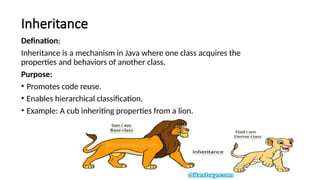
Inheritance
Defination:
Inheritance is amechanism in Java where one class acquires the
properties and behaviors of another class.
Purpose:
• Promotes code reuse.
• Enables hierarchical classification.
• Example: A cub inheriting properties from a lion.
12.
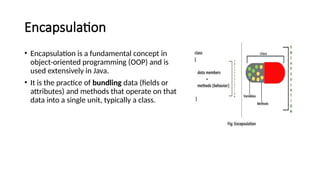
Encapsulation
• Encapsulation isa fundamental concept in
object-oriented programming (OOP) and is
used extensively in Java.
• It is the practice of bundling data (fields or
attributes) and methods that operate on that
data into a single unit, typically a class.
13.
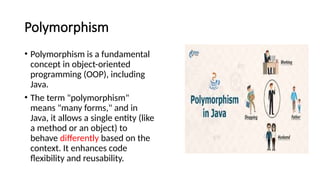
Polymorphism
• Polymorphism isa fundamental
concept in object-oriented
programming (OOP), including
Java.
• The term "polymorphism"
means "many forms," and in
Java, it allows a single entity (like
a method or an object) to
behave differently based on the
context. It enhances code
flexibility and reusability.
14.
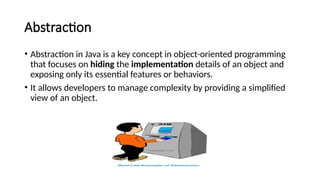
Abstraction
• Abstraction inJava is a key concept in object-oriented programming
that focuses on hiding the implementation details of an object and
exposing only its essential features or behaviors.
• It allows developers to manage complexity by providing a simplified
view of an object.
15.
Advantages and Disadvantages
Advantages:
1.Better organization of code
2. Real-world modeling
3. Easier debugging
Disadvantages:
4. Higher learning curve
5. Slightly slower performance compared to procedural programming
16.
Java Buzz Words
Javais the most popular object-oriented programming language. Java has many advanced features, a list
of key features is known as Java Buzz Words. The java team has listed the following terms as java buzz
words.
1. Simple
2. Secure
3. Portable
4. Object-oriented
5. Robust
6. Architecture-neutral (or) Platform Independent
7. Multi-threaded
8. Interpreted
9. High performance
10. Distributed
11. Dynamic
17.
1. Simple
• Javaprogramming language is very simple and easy to learn, understand, and code.
• Most of the syntaxes in java follow basic programming language C and object-oriented programmingconcepts are similar to C++.
• In a java programming language, many complicated features like pointers, operator overloading, structures, unions, etc. have been
removed. One of the most useful features is the garbage collector it makes java more simple.
2. Secure
• Java is said to be more secure programming language because it does not have pointers concept, java provides a
feature "applet" which can be embedded into a web application. The applet in java does not allow access to other
parts of the computer, which keeps away from harmful programs like viruses and unauthorized access.
3. Portable
• Portability is one of the core features of java which enables the java programs to run on any computer or operating
system. For example, an applet developed using java runs on a wide variety of CPUs, operating systems, and
browsers connected to the Internet.
4. Object-oriented
• Java is said to be a pure object-oriented programming language. In java, everything is an object. It supports all the
features of the object-oriented programming paradigm. The primitive data types java also implemented as objects
using wrapper classes, but still, it allows primitive data types to archive high-performance.
5. Robust
• Java is more robust because the java code can be executed on a variety of environments, java has a strong memory management
mechanism (garbage collector), it has a strong set of exception handling mechanism, and many more.
18.
6. Architecture-neutral (or)Platform Independent
• Java has invented to archive "write once; run anywhere, any time, forever". The java provides JVM (Java Virtual Machine) to to
archive architectural-neutral or platform-independent.
• The JVM allows the java program created using one operating system can be executed on any other operating system.
7. Multi-threaded
• Java supports multi-threading programming, which allows us to write programs that domultiple operations simultaneously.
8. Interpreted
• Java enables the creation of cross-platform programs by compiling into an intermediate representation called Java bytecode.
• The byte code is interpreted to any machine code so that it runs on the native machine.
9. High performance
• Java provides high performance with the help of features like JVM, interpretation, and its simplicity.
10. Distributed
• Java programming language supports TCP/IP protocols which enable the java to support the distributed environment of the Internet.
• Java also supports Remote Method Invocation (RMI), this feature enables a program to invoke methods across a network.
11. Dynamic
• Java is said to be dynamic because the java byte code may be dynamically updated on a running system and it has a dynamic memory
allocation and deallocation (objects and garbage collector).
19.
Overview of Java
•Java is a programming language developed in 1991 by a team of 13 employees at
Sun Microsystems, led by James Gosling, as part of the Green Project.
• Initially named Oak, it was renamed Java in 1995. Inspired by C and C++, Java
adopted their syntax and object-oriented features while addressing their
limitations.
• It introduced innovative solutions to overcome challenges faced by earlier
languages like COBOL, FORTRAN, and Small Talk.
20.
History of Java
1.The C language developed in 1972 by Dennis Ritchie had taken a decade to become the most
popular language.
2. In 1979, Bjarne Stroustrup developed C++, an enhancement to the C language with included
OOP fundamentals and features.
3. A project named “Green” was initiated in December of 1990, whose aim was to create a
programming tool that could render obsolete the C and C++ programming languages.
4. Finally in the year of 1991 the Green Team was created a new Programming language named
“OAK”.
5. After some time they found that there is already a programming language with the name
“OAK”.
6. So, the green team had a meeting to choose a new name. After so many discussions they want
to have a coffee. They went to a Coffee Shop which is just outside of the Gosling’s office and
there they have decided name as “JAVA”.
21.
Execution Process ofJava Program
1. Create a source code (.java file).
eg: filename.java
2. Compliation:
• Compile the source code using javac command.
• The Java compiler (javac) translates the source code into bytecode.
• Bytecode is an intermediate, platform-independent representation of the program, stored in a .class file.
Eg: javac filename.java
3 Execution by the JVM
• The Java Virtual Machine (JVM) executes the bytecode.
The JVM includes:
Just-in-Time (JIT) compiler converts code into machine language during program execution.
Interpreter: An interpreter directly executes source code.
Eg: java filename
4. Output:
• The JVM executes the native machine code, and the program produces the output.
23.
Classes
• Java isan object-oriented programming language, so everything in java program must be
based on the object concept. In a java programming language, the class concept defines the
skeleton of an object.
• The java class is a template of an object.
• The class defines the blueprint of an object.
• Every class in java forms a new data type.
• Once a class got created, we can generate as many objects as we want.
• Every class defines the properties and behaviors of an object.
• All the objects of a class have the same properties and behaviors that were defined in the
class.
• Every class of java programming language has the following characteristics.
• Identity - It is the name given to the class.
• State - Represents data values that are associated with an object.
• Behavior - Represents actions can be performed by an object.
24.
Creating a Class
•In java, we use the keyword class to create a class. A class in java contains properties as variables and behaviors as
methods. Following is the syntax of class in the java.
Syntax:
class <ClassName>
{
data members declaration;
methods defination;
}
• The ClassName must begin with an alphabet, and the Upper-case letter is preferred.
• The ClassName must follow all naming rules.
Eg:
class Student
{
int sno;
char name[10];
Attendsclass();
WritesExam();
}
25.
Creating an Object
•In java, an object is an instance of a class.
• When an object of a class is created, the class is said to be instantiated. All the objects
that are created using a single class have the same properties and methods. But the
value of properties is different for every object. Following is the syntax of class in the
java.
Syntax
<ClassName> <objectName> = new <ClassName>( );
Eg: Student S1=new Student();
• The objectName must begin with an alphabet, and a Lower-case letter is preferred.
• The objectName must follow all naming rules.
26.
Java Methods
• Amethod is a block of statements under a name that gets executes only when it is
called.
• Every method is used to perform a specific task.
• The major advantage of methods is code re-usability (define the code once, and use it
many times).
• In a java programming language, a method defined as a behavior of an object. That
means, every method in java must belong to a class.
• Every method declaration has the following characteristics.
• returnType - Specifies the data type of a return value.
• name - Specifies a unique name to identify it.
• parameters- The data values it may accept or recieve.
• { } - Defines the block belongs to the method.
27.
Creating a method
•A method is created inside the class and it may be created with any access specifier.
• However, specifying access specifier is optional.
Following is the syntax for creating methods in java.
Syntax
class <ClassName>
{
<accessSpecifier> <returnType> <methodName>( parameters )
{
block of statements;...
} }
• The methodName must begin with an alphabet, and the Lower-case letter is preferred.
• The methodName must follow all naming rules.
• If you don't want to pass parameters, we ignore it.
• If a method defined with return type other than void, it must contain the return
statement, otherwise, it may be ignored.
Eg:
class Student
{
public int add( a,b )
{
a+b;
}
}
28.
Calling a method
•In java, a method call precedes with the object name of the class to which it
belongs and a dot operator. It may call directly if the method defined with
the static modifier. Every method call must be made, as to the method
name with parentheses (), and it must terminate with a semicolon.
Syntax
<objectName>.<methodName>( actualArguments );
Eg: S1.add(x,y);
The method call must pass the values to parameters if it has.
• If the method has a return type, we must provide the receiver.
29.
Program:
class Student
{
String name;
intage;
void displayDetails()
{
System.out.println("Name: " + name);
System.out.println("Age: " + age);
}
public static void main(String[] args)
{
Student s1 = new Student();
s1.name = "John"; //initializing values/assigning value
s1.age = 20;
s1.displayDetails(); // Calling method
}
}
output:
Name: John
Age: 20
30.
Constructor
• In Java,a constructor is a special method used to initialize objects.
• A constructor is a special method of a class that has the same name as the class name.
• The constructor gets executes automatically on object creation.
• It does not require the explicit method call.
Example
class Student
{
String name;
Student(String name) // Constructor to initialize the object
{
this.name = name;
}
void displayDetails() // Method to display student details
{
System.out.println("Name: " + name);
}
public static void main(String[] args)
{
// Creating student objects using the constructor
Student s1 = new Student("Alice");
Student s2 = new Student("Bob");
// Displaying student details
System.out.println("Student 1 Details:");
s1.displayDetails();
s2.displayDetails();
}
}
31.
Java Variables
• Avariable is a named memory location used to store a data value.
• A variable can be defined as a container that holds a data value.
Syntax
1. datatype variablename; eg: int a;
2. datatype variablename1, variablename2; eg: int a,b,c;
3. datatype variablename = value; eg int a=10;
4. datatype variablename1 = value, variablename2 = value,...; eg: int a=10,b=20,c=40;
In java programming language variables are classified as follows.
5. Local variables
6. Instance variables
7. Static variables
8. Final variables
32.
Local variables
• Alocal variable in Java is a variable that is declared inside a method, constructor, or block and can only be accessed
within that specific method or block. It is created when the method is called and destroyed when the method
execution is completed
Example:
class Bank
{
public void calculateInterest()
{
double principal = 10000.0; //local
double rate = 5.0;
int time = 2;
double interest = (principal * rate * time) / 100; System.out.println("Interest
earned on the deposit: ₹" + interest);
}
public static void main(String[] args)
{
Bank b1 = new Bank();
b1.calculateInterest();
}
}
Explanation:
Local Variables:
principal, rate, and time are declared
inside the calculateInterest method.
Scope:
These variables exist only within the
calculateInterest method. If you try to
access them outside the method, you
will get a compile-time error.
Real-Time Context:
The method simulates calculating
interest for a customer in a banking
system.
The variables are specific to a single
calculation and do not affect or depend
on other parts of the program.
33.
Instance variables:
• Aninstance variable is a variable declared inside a class but outside any method, constructor, or block.
• Each object of the class has its own copy of the instance variables, which are used to store the object's state.
• These variables are accessible to all non-static methods of the class.
Real-Time Example: Student Information System
class Student
{
String name; // Instance variables
int rollNumber;
Student(String name, int rollNumber, double marks)
{
this.name = name;
this.rollNumber = rollNumber;
}
void displayInfo()
{
System.out.println("Student Name: " + name);
System.out.println("Roll Number: " + rollNumber);
}
public static void main(String[] args)
{
Student s1 = new Student("Shanthi", 101);
Student s2 = new Student("Ravi", 102);
s1.displayInfo();
s2.displayInfo();
}
}
Explanation:
Instance Variables:
name, rollNumber, and marks are declared at the class level,
making them instance variables.
Each object (student1, student2) gets its own copy of these
variables.
Constructor:
The constructor initializes the instance variables when an object is
created.
Scope:
Instance variables are accessible throughout the class and retain
their values as long as the object exists.
Real-Time Context:
This example mimics a student information system where each
student's details are stored in their own object. The instance
variables represent unique attributes of each student.
34.
Static variables orClass variables
• In Java, static variables are variables that belong to the class rather than any specific instance of the class. They are shared among all
instances of the class and can be accessed using the class name directly.
Key Characteristics of Static Variables:
• Shared Memory: Only one copy of the static variable exists for the class.
• Class-Level Scope: Static variables are associated with the class, not individual objects.
• Access: They can be accessed directly using the class name (e.g., ClassName.variableName).
class Employee
{
static int companyCode = 12345; // Static variable
String name; // Instance variable
Employee(String name) // Constructor
{
this.name = name;
}
void display() // Method to display details
{
System.out.println("Employee Name: " + name);
System.out.println("Company Code: " + companyCode);
}
public static void main(String[] args)
{
Employee emp1 = new Employee("Alice");
Employee emp2 = new Employee("Bob");
emp1.display();
emp2.display();
Employee.companyCode = 67890; // Modify static variable
emp1.display();
emp2.display();
}
}
35.
Final variables
• Afinal variable is a variable that declared using final keyword.
• The final variable is initialized only once, and does not allow any method to change it's value again.
• The variable created using final keyword acts as constant.
Program:
class Circle
{
final double PI = 3.14159; // Final variable
double radius; // Instance variable
Circle(double radius) // Constructor
{
this.radius = radius;
}
double Area() // Method to calculate area
{
return PI * radius * radius;
}
public static void main(String[] args)
{
Circle circle = new Circle(5.0); // Radius = 5.0
double r=circle.Area();
System.out.println("Area of the circle: " +r);
circle.PI = 3.14; // Error: Cannot assign a value to final variable 'PI'
}
}
36.
Access Modifiers:
• Accessmodifiers in Java determine the visibility and accessibility of classes, methods, variables, and constructors.
• They are used to control access to the members of a class to ensure encapsulation.
public: No restrictions.
protected: Package + Subclass.
default: Package-only.
private: Class-only.
Types of Access Modifiers:
37.
public:
* Accessible fromany class, anywhere in the program.
* Has the widest scope.
public class MyClass
{
public int myVariable; // Accessible from any class
public void myMethod()
{ // Accessible from any class
// ...
}
}
* private:
* Accessible only within the same class.
* Has the most restrictive scope.
public class MyClass
{
private int myVariable; // Accessible only within MyClass
private void myMethod()
{ // Accessible only within MyClass
// ...
}
}
* protected:
* Accessible within the same package and by subclasses (even if they
are in a different package).
package mypackage;
public class MyClass {
protected int myVariable; // Accessible within mypackage and by
subclasses
protected void myMethod() { // Accessible within mypackage and by
subclasses
// ...
• * default (no specifier):
• * Accessible only within the same package.
• * Also known as package-private.
• class MyClass { // No access specifier, so default access
• int myVariable; // Accessible only within the same package
• void myMethod() { // Accessible only within the same package
• // ...
• }
• }
• Access specifiers can be applied to classes, interfaces,
constructors, methods, and variables.
• * The default access specifier is used when no access specifier is
explicitly provided.
• * It's a good practice to use the most restrictive access specifier
that meets your needs. This helps in improving code security and
maintainability.
38.
this keyword inJava
• In Java, this is a reference variable that refers to the current
object.
39.
Garbage Collection
• Injava, garbage means unreferenced objects.
• Garbage Collection is process of reclaiming the runtime unused memory automatically.
• In other words, it is a way to destroy the unused objects.
• To do so, we were using free() function in C language and delete() in C++.
• But, in java it is performed automatically. So, java provides better memory management.
40.
1.By nulling areference:
Employee e=new Employee();
e=null;
2.By assigning a reference to another:
Employee e1=new Employee();
Employee e2=new Employee();
e1=e2; //now the first object referred by e1 is available for garbage collection
3.By anonymous object:
new Employee();
Advantage of Garbage Collection
• It makes java memory efficient because garbage collector removes the unreferenced objects from heap memory.
• It is automatically done by the garbage collector(a part of JVM) so we don't need to make extra efforts.
41.
Method Overloading inJava
• Method Overloading in Java allows multiple methods in the same class to have the same name but with different parameters.
• It improves code readability and reusability.
Rules for Overloading:
• Methods must have different parameter lists (different number, type, or sequence of parameters).
• Return type can be different, but it does NOT define overloading.
Real-World Example: Online Payment System
An E-commerce Website provides multiple ways to make a payment:
• Pay using a Credit Card
• Pay using UPI
• Pay using Wallet Balance
• Pay using Net Banking
Each method has the same name (makePayment) but different
parameters.
public class MathOperations
{
public int add(int a, int b)
{
return a + b;
}
public double add(double a, double b, double c)
{
return a + b + c;
}
}
42.
There are twoways to overload the method in java
1.By changing number of arguments
2.By changing the data type
1) Changing no. of arguments
• Defining multiple methods with the same name but different parameter lists.
• One common form of overloading is changing the number of arguments in the method signature.
In this example, we have created two methods, the first add() method performs addition of two numbers, and
the second add method performs addition of three numbers.
In this example, we are creating static methods so that we don't need to create instance for calling methods.
class Adder
{
static int add(int a, int b) // Method to add two integers
{
return a + b;
}
static int add(int a, int b, int c) // Method to add three integers
{
return a + b + c;
}
public static void main(String[] args)
{
System.out.println(Adder.add(11, 11)); // Calling the add method with two integers // Output: 22
System.out.println(Adder.add(11, 11, 11)); // Calling the add method with three integers // Output: 33
}
}
Output:
22
43.
class Restaurant
{
void applyDiscount(intamount) // Method with 1 parameter
{
System.out.println("Flat discount applied on amount: " + amount);
₹
}
void applyDiscount(int amount, int numCustomers) // Overloaded method with 2 parameters
{
System.out.println("Group discount applied for " + numCustomers + " customers on " + amount);
₹
}
}
public class Example
{
public static void main(String[] args)
{
Restaurant r = new Restaurant();
r.applyDiscount(500); // Calls method with 1 parameter
r.applyDiscount(1000, 4); // Calls method with 2 parameters
}
}
44.
2) Changing datatypeof arguments
• Changing the data type of arguments in the method signature.
• In this example, we have created two methods that differs in data type.
• The first add method receives two integer arguments and second add method receives two double arguments.
class Calculator
{
int add(int a, int b) // Method to add integers
{
return a + b;
}
double add(double a, double b) // Overloaded method to add doubles
{
return a + b;
}
}
public class A
{
public static void main(String[] args)
{
Calculator calc = new Calculator();
System.out.println("Addition of Integers: " + calc.add(5, 10));
System.out.println("Addition of Doubles: " + calc.add(5.5, 10.2));
}
}
45.
Method Binding inJava
• Method Binding in Java determines which method will be called when a method is invoked.
• Java has two types of method binding:
1. Static Binding (Early Binding)
2. Dynamic Binding (Late Binding)
1. Static Binding (Early Binding)
• Happens at compile time.
• Used for private, static, and final methods, as they cannot be overridden.
• The method call is resolved by the compiler itself.
class Animal
{
static void sound()
{
System.out.println("Animals make sounds!");
}
}
public class SBExample
{
public static void main(String[ ] args)
{
Animal a=new Animal();
a.sound(); // Method resolved at compile time
}
}
46.
2. Dynamic Binding(Late Binding)
• Happens at runtime.
• Used when a method is overridden in a subclass.
• The method call is resolved by the JVM at runtime based on the actual object type.
class Animal
{
void sound()
{
System.out.println("Animals make sounds!");
}
}
class Dog extends Animal
{
void sound()
{
System.out.println("Dog barks!");
}
}
public class DBExample
{
public static void main(String[] args)
{
Animal A1= new Dog(); // Upcasting
myAnimal.sound(); // Calls Dog's sound() method at runtime
}
}
Even though A1 is declared as Animal, the actual object is Dog, so Dog’s overridden method is called at runtime.
47.
Method Overriding inJava
Method Overriding occurs when a subclass (child class) provides a specific implementation of a method that is already defined in its
superclass (parent class).
Rules for Method Overriding
1. Same Method Name: The overriding method in the subclass must have the same name as the method in the superclass that it is
overriding.
2. Same Parameters: The overriding method must have the same number and types of parameters as the method in the superclass. This
ensures compatibility and consistency with the method signature defined in the superclass.
3. IS-A Relationship (Inheritance): Method overriding requires an IS-A relationship between the subclass and the superclass. This means
that the subclass must inherit from the superclass, either directly or indirectly, to override its methods.
4. Same Return Type: The return type of the overriding method can be the same as the return type of the overridden method in the
superclass, or it can be a subtype of the return type in the superclass.
5. Access Modifier Restrictions: The access modifier of the overriding method must be the same as or less restrictive than the access
modifier of the overridden method in the superclass.
6.No Final Methods: Methods declared as final in the superclass cannot be overridden in the subclass. This is because final methods
cannot be modified or extended.
7.No Static Methods: Static methods in Java are resolved at compile time and cannot be overridden. Instead, they are hidden in the
subclass if a method with the same signature is defined in the subclass.
48.
class Bank
{
double interest()
{
return0.0; // Default
}
}
class SBI extends Bank
{
double interest()
{
return 4.5;
}
}
class HDFC extends Bank
{
double interest()
{
return 5.0;
}
}
public class Example
{
public static void main(String[] args)
{
Bank s= new SBI();
Bank h= new HDFC();
System.out.println("SBI Interest Rate: " + s.interest() + "%");
System.out.println("HDFC Interest Rate: " + h.interest() + "%");
}
}
Output:
49.
Difference Between MethodOverloading and Method Overriding
Feature Method Overloading Method Overriding
Definition Defining multiple methods with the same name
but different parameters in the same class.
Redefining a method in the child class that is already
defined in the parent class.
Purpose Improves readability by allowing multiple ways
to perform the same operation.
Provides specific implementation in the child class for a
method inherited from the parent class.
Binding Type Static binding (compile-time binding) Dynamic binding (runtime binding)
Polymorphism Type Compile-time polymorphism Runtime polymorphism
Method Signature Methods must have different parameters
(number, type, or order) but the same name.
Method must have the same name, same parameters, and
same return type in both parent and child classes.
Return Type Can be different. Must be the same or covariant (return type can be a
subclass of the original return type).
Access Modifiers No restriction; methods can have any access
modifier.
Restriction
Static Methods Can be overloaded. Cannot be overridden
Final Methods Can be overloaded. Cannot be overridden.
Constructors Can be overloaded. Constructors cannot be overridden.
50.
Exception Handling
What isException in Java?
• In Java, an exception is an event that occurs during the execution of a program that disrupts the normal flow of
instructions.
• These exceptions can occur for various reasons, such as invalid user input, file not found, or division by zero.
• When an exception occurs, it is typically represented by an object of a subclass of the java.lang.Exception class.
What is Exception Handling?
• Exception Handling is a mechanism to handle runtime errors such as ClassNotFoundException, IOException,
SQLException, RemoteException, etc.
• The Exception Handling in Java is one of the powerful mechanism to handle the runtime errors so that the normal
flow of the application can be maintained.
• Java uses a robust exception handling model that helps developers handle errors gracefully and prevent abrupt
termination of programs.
51.
Types of Exceptionsin Java
1. Checked Exceptions: These exceptions are checked at compile-time and
must be handled using try-catch or declared using throws.
Example: IOException, SQLException
2. Unchecked Exceptions (Runtime Exceptions): These exceptions occur at
runtime and do not require explicit handling.
Example: NullPointerException, ArrayIndexOutOfBoundsException
3. Errors: These are serious issues beyond the control of the application.
Example: StackOverflowError, OutOfMemoryError
52.
Exception Handling Keywords
1.try - Defines a block of code that might throw an exception.
2. catch - Catches and handles the exception.
3. finally - A block that executes regardless of an exception.
4. throw - Used to throw an exception manually.
5. throws
Example:
1. A user has a certain balance in their account.
2. If they try to withdraw more than the available balance, the system
should throw an exception.
53.
Types of Parameters:
•In Java, parameters are used to pass values into methods. There are two types of parameters:
1. Actual Parameters
2. Formal Parameters
1. Actual Parameters (Arguments)
• These are the real values that are passed to a method when it is called.
• Actual parameters appear inside the parentheses of the method call.
2. Formal Parameters
• These are placeholders for values that will be received by the method.
• They are defined inside the method signature.
• When the method is called, actual parameters are copied into formal parameters.
54.
Example:
public class SumExample
{
publicstatic int sum(int a, int b)
{ // `a` and `b` are Formal Parameters
return a + b;
}
public static void main(String[] args)
{
int result = sum(5, 10); // 5 and 10 are Actual Parameters
System.out.println("Sum: " + result);
}
}
Output
Sum: 15
a and b are formal parameters (they act as placeholders).
5 and 10 are actual parameters (they provide the real values).
55.
Parameter Passing:
• Parameterpassing in Java refers to the mechanism of transferring data between methods.
• Java supports two ways of passing parameters to methods:
1. Pass by Value (Primitive Data Types)
2. Pass by Reference (Objects, but still passed by value)
56.
1. Pass byValue (Primitive Data Types)
In Java, primitive data types (int, double, char, boolean, etc.) are always passed by value.
This means a copy of the variable is passed to the method, and changes inside the method do not affect the original variable.
public class PassByValueExample
{
public static void modify(int x)
{
x = x + 10;
System.out.println("Inside modify() method: x = " + x);
}
}
class Example
{
public static void main(String[] args)
{
int num = 20;
System.out.println("Before method call: num = " + num);
modify(num);
System.out.println("After method call: num = " + num);
}
}
Before method call: num = 20
Inside modify() method: x = 30
After method call: num = 20
57.
2. Pass byReference (Objects - But Actually Pass by Value)
• In Java, objects are not passed by reference, but their references.
• The reference is copied, not the actual object.
• Changes made to the object's properties inside the method affect the original object.
class Bank
{
double balance;
Bank(double balance)
{
this.balance = balance;
}
void deposit(Bank account, double amount)
{
account.balance += amount; // Modifies the original object
System.out.println("Deposit Successful. New Balance: " + account.balance);
}
}
public class Demo
{
public static void main(String[] args)
{
Bank b1 = new Bank(1000);
System.out.println("Before deposit: " + b1.balance);
b1.deposit(b1, 500); // Passing reference to the method
System.out.println("After deposit: " + b1.balance);
}
}
58.
Feature Primitive DataTypes Objects (Reference Types)
Passing Mechanism Copy of the value is passed Copy of the reference is passed
Effect of Modification No effect on the original variable Changes affect the original object
Example Data Types int, double, char, boolean String, Array, Class Objects
59.
Recursion in Java
•Recursion in java is a process in which a method calls itself continuously.
• A method in java that calls itself is called recursive method.
• It makes the code compact but complex to understand.
Syntax:
returntype methodname()
{
//code to be executed
methodname(); //calling same method
}
60.
Example:
public class RecursionExample
{
//Recursive method to calculate factorial
static int factorial(int n)
{
if (n == 0)
return 1;
else
return n * factorial(n - 1); // Recursive call
}
public static void main(String[] args)
{
int number = 5; // Example input
System.out.println(factorial(number));
}
}
61.
Nested classes:
1. Writingone class in-side other class.
2. The inside class we call it as inner class
3. The ouside class we call it as outer class.
62.
Inner Classes
An innerclass is a specific type of nested class. It is a non-static nested class that has access to all members of the
enclosing class, including those marked as private. This means that an inner class can interact with the members of the
outer class as if it were a part of it.
Here is an example of an inner class:
public class OuterClass
{
private int outerData;
}
In this example, InnerClass is an inner class. It can directly access the outerData field of OuterClass.
public class InnerClass
{
public void display()
{
System.out.println("Data from outer class: " + outerData);
}
}
63.
Java String Handling
•String handling is one of the core concepts in Java programming.
• Java provides a rich set of classes and methods for handling strings, primarily through the java.lang.String
class and related classes like StringBuffer, StringBuilder, and others.
The String Constructors:
The String class supports several constructors.
To create an empty String, you call the default constructor.
For example, String s = new String();
s is string object.
64.
Method Description ReturnValue
charAt(int) Finds the character at given index char
length() Finds the length of given string int
compareTo(String) Compares two strings int
compareToIgnoreCase(String) Compares two strings, ignoring case int
concat(String) Concatenates the object string with argument string. String
toLowerCase() Converts a string to lower case letters String
toUpperCase() Converts a string to upper case letters String
equals(String) Checks whether two strings are same boolean
toString(int) Converts the value to a String object String
indexOf(String) Finds the first index of argument string in objectstring int
lastIndexOf(String) Finds the last index of argument string in objectstring int
isEmpty() Checks whether a string is empty or not boolean
replace(String, String) Replaces the first string with second string String
replaceAll(String, String) Replaces the first string with second string at all occurrences. String
substring(int, int) Extracts a sub-string from specified start and endindex values String
65.
public class Example
{
publicstatic void main(String[] args)
{
// Creating Strings
String str1 = "Hello";
String str2 = "World";
String result ;
// String Concatenation
result= str1 + " " + str2;
System.out.println("Concatenated String: " + result);
// Finding Length of a String
System.out.println("Length of str1: " + str1.length());
// String Comparison
System.out.println("str1 equals str2? " + str1.equals(str2));
// Convert to Upper and Lower Case
System.out.println("Uppercase: " + str1.toUpperCase());
System.out.println("Lowercase: " + str2.toLowerCase());
}
}
66.
Type casting andconversion:
• Type casting refers to converting a data type from one type to another.
• In Java, type casting is a method or process that converts a data type into another data type in both ways manually and automatically.
• The automatic conversion is done by the compiler and manual conversion performed by the programmer.
• The conversion of data types allows for the operations between different data types and is a crucial part of many programming tasks.
• For instance, you might need to convert an integer into a float for mathematical operations, or perhaps convert a string into an integer to perform
some calculation.
Types of Type Casting
• There are two types of type casting:
• Widening Type Casting
• Narrowing Type Casting









![Creating a Class
• In java, we use the keyword class to create a class. A class in java contains properties as variables and behaviors as
methods. Following is the syntax of class in the java.
Syntax:
class <ClassName>
{
data members declaration;
methods defination;
}
• The ClassName must begin with an alphabet, and the Upper-case letter is preferred.
• The ClassName must follow all naming rules.
Eg:
class Student
{
int sno;
char name[10];
Attendsclass();
WritesExam();
}](/p?url=https%3A%2F%2Fimage.slidesharecdn.com%2Funit-1ppt-251224090436-63043f4c%2F85%2FJava-programming-basics-Unit-1-ppt-pptx-24-320.jpg&__src=https%3A%2F%2Fwww.slideshare.net%2Fslideshow%2Fjava-programming-basics-unit-1-ppt-pptx%2F284809766&__type=image)


![Program:
class Student
{
String name;
int age;
void displayDetails()
{
System.out.println("Name: " + name);
System.out.println("Age: " + age);
}
public static void main(String[] args)
{
Student s1 = new Student();
s1.name = "John"; //initializing values/assigning value
s1.age = 20;
s1.displayDetails(); // Calling method
}
}
output:
Name: John
Age: 20](/p?url=https%3A%2F%2Fimage.slidesharecdn.com%2Funit-1ppt-251224090436-63043f4c%2F85%2FJava-programming-basics-Unit-1-ppt-pptx-29-320.jpg&__src=https%3A%2F%2Fwww.slideshare.net%2Fslideshow%2Fjava-programming-basics-unit-1-ppt-pptx%2F284809766&__type=image)
![Constructor
• In Java, a constructor is a special method used to initialize objects.
• A constructor is a special method of a class that has the same name as the class name.
• The constructor gets executes automatically on object creation.
• It does not require the explicit method call.
Example
class Student
{
String name;
Student(String name) // Constructor to initialize the object
{
this.name = name;
}
void displayDetails() // Method to display student details
{
System.out.println("Name: " + name);
}
public static void main(String[] args)
{
// Creating student objects using the constructor
Student s1 = new Student("Alice");
Student s2 = new Student("Bob");
// Displaying student details
System.out.println("Student 1 Details:");
s1.displayDetails();
s2.displayDetails();
}
}](/p?url=https%3A%2F%2Fimage.slidesharecdn.com%2Funit-1ppt-251224090436-63043f4c%2F85%2FJava-programming-basics-Unit-1-ppt-pptx-30-320.jpg&__src=https%3A%2F%2Fwww.slideshare.net%2Fslideshow%2Fjava-programming-basics-unit-1-ppt-pptx%2F284809766&__type=image)

![Local variables
• A local variable in Java is a variable that is declared inside a method, constructor, or block and can only be accessed
within that specific method or block. It is created when the method is called and destroyed when the method
execution is completed
Example:
class Bank
{
public void calculateInterest()
{
double principal = 10000.0; //local
double rate = 5.0;
int time = 2;
double interest = (principal * rate * time) / 100; System.out.println("Interest
earned on the deposit: ₹" + interest);
}
public static void main(String[] args)
{
Bank b1 = new Bank();
b1.calculateInterest();
}
}
Explanation:
Local Variables:
principal, rate, and time are declared
inside the calculateInterest method.
Scope:
These variables exist only within the
calculateInterest method. If you try to
access them outside the method, you
will get a compile-time error.
Real-Time Context:
The method simulates calculating
interest for a customer in a banking
system.
The variables are specific to a single
calculation and do not affect or depend
on other parts of the program.](/p?url=https%3A%2F%2Fimage.slidesharecdn.com%2Funit-1ppt-251224090436-63043f4c%2F85%2FJava-programming-basics-Unit-1-ppt-pptx-32-320.jpg&__src=https%3A%2F%2Fwww.slideshare.net%2Fslideshow%2Fjava-programming-basics-unit-1-ppt-pptx%2F284809766&__type=image)
![Instance variables:
• An instance variable is a variable declared inside a class but outside any method, constructor, or block.
• Each object of the class has its own copy of the instance variables, which are used to store the object's state.
• These variables are accessible to all non-static methods of the class.
Real-Time Example: Student Information System
class Student
{
String name; // Instance variables
int rollNumber;
Student(String name, int rollNumber, double marks)
{
this.name = name;
this.rollNumber = rollNumber;
}
void displayInfo()
{
System.out.println("Student Name: " + name);
System.out.println("Roll Number: " + rollNumber);
}
public static void main(String[] args)
{
Student s1 = new Student("Shanthi", 101);
Student s2 = new Student("Ravi", 102);
s1.displayInfo();
s2.displayInfo();
}
}
Explanation:
Instance Variables:
name, rollNumber, and marks are declared at the class level,
making them instance variables.
Each object (student1, student2) gets its own copy of these
variables.
Constructor:
The constructor initializes the instance variables when an object is
created.
Scope:
Instance variables are accessible throughout the class and retain
their values as long as the object exists.
Real-Time Context:
This example mimics a student information system where each
student's details are stored in their own object. The instance
variables represent unique attributes of each student.](/p?url=https%3A%2F%2Fimage.slidesharecdn.com%2Funit-1ppt-251224090436-63043f4c%2F85%2FJava-programming-basics-Unit-1-ppt-pptx-33-320.jpg&__src=https%3A%2F%2Fwww.slideshare.net%2Fslideshow%2Fjava-programming-basics-unit-1-ppt-pptx%2F284809766&__type=image)
![Static variables or Class variables
• In Java, static variables are variables that belong to the class rather than any specific instance of the class. They are shared among all
instances of the class and can be accessed using the class name directly.
Key Characteristics of Static Variables:
• Shared Memory: Only one copy of the static variable exists for the class.
• Class-Level Scope: Static variables are associated with the class, not individual objects.
• Access: They can be accessed directly using the class name (e.g., ClassName.variableName).
class Employee
{
static int companyCode = 12345; // Static variable
String name; // Instance variable
Employee(String name) // Constructor
{
this.name = name;
}
void display() // Method to display details
{
System.out.println("Employee Name: " + name);
System.out.println("Company Code: " + companyCode);
}
public static void main(String[] args)
{
Employee emp1 = new Employee("Alice");
Employee emp2 = new Employee("Bob");
emp1.display();
emp2.display();
Employee.companyCode = 67890; // Modify static variable
emp1.display();
emp2.display();
}
}](/p?url=https%3A%2F%2Fimage.slidesharecdn.com%2Funit-1ppt-251224090436-63043f4c%2F85%2FJava-programming-basics-Unit-1-ppt-pptx-34-320.jpg&__src=https%3A%2F%2Fwww.slideshare.net%2Fslideshow%2Fjava-programming-basics-unit-1-ppt-pptx%2F284809766&__type=image)
![Final variables
• A final variable is a variable that declared using final keyword.
• The final variable is initialized only once, and does not allow any method to change it's value again.
• The variable created using final keyword acts as constant.
Program:
class Circle
{
final double PI = 3.14159; // Final variable
double radius; // Instance variable
Circle(double radius) // Constructor
{
this.radius = radius;
}
double Area() // Method to calculate area
{
return PI * radius * radius;
}
public static void main(String[] args)
{
Circle circle = new Circle(5.0); // Radius = 5.0
double r=circle.Area();
System.out.println("Area of the circle: " +r);
circle.PI = 3.14; // Error: Cannot assign a value to final variable 'PI'
}
}](/p?url=https%3A%2F%2Fimage.slidesharecdn.com%2Funit-1ppt-251224090436-63043f4c%2F85%2FJava-programming-basics-Unit-1-ppt-pptx-35-320.jpg&__src=https%3A%2F%2Fwww.slideshare.net%2Fslideshow%2Fjava-programming-basics-unit-1-ppt-pptx%2F284809766&__type=image)


![There are two ways to overload the method in java
1.By changing number of arguments
2.By changing the data type
1) Changing no. of arguments
• Defining multiple methods with the same name but different parameter lists.
• One common form of overloading is changing the number of arguments in the method signature.
In this example, we have created two methods, the first add() method performs addition of two numbers, and
the second add method performs addition of three numbers.
In this example, we are creating static methods so that we don't need to create instance for calling methods.
class Adder
{
static int add(int a, int b) // Method to add two integers
{
return a + b;
}
static int add(int a, int b, int c) // Method to add three integers
{
return a + b + c;
}
public static void main(String[] args)
{
System.out.println(Adder.add(11, 11)); // Calling the add method with two integers // Output: 22
System.out.println(Adder.add(11, 11, 11)); // Calling the add method with three integers // Output: 33
}
}
Output:
22](/p?url=https%3A%2F%2Fimage.slidesharecdn.com%2Funit-1ppt-251224090436-63043f4c%2F85%2FJava-programming-basics-Unit-1-ppt-pptx-42-320.jpg&__src=https%3A%2F%2Fwww.slideshare.net%2Fslideshow%2Fjava-programming-basics-unit-1-ppt-pptx%2F284809766&__type=image)
![class Restaurant
{
void applyDiscount(int amount) // Method with 1 parameter
{
System.out.println("Flat discount applied on amount: " + amount);
₹
}
void applyDiscount(int amount, int numCustomers) // Overloaded method with 2 parameters
{
System.out.println("Group discount applied for " + numCustomers + " customers on " + amount);
₹
}
}
public class Example
{
public static void main(String[] args)
{
Restaurant r = new Restaurant();
r.applyDiscount(500); // Calls method with 1 parameter
r.applyDiscount(1000, 4); // Calls method with 2 parameters
}
}](/p?url=https%3A%2F%2Fimage.slidesharecdn.com%2Funit-1ppt-251224090436-63043f4c%2F85%2FJava-programming-basics-Unit-1-ppt-pptx-43-320.jpg&__src=https%3A%2F%2Fwww.slideshare.net%2Fslideshow%2Fjava-programming-basics-unit-1-ppt-pptx%2F284809766&__type=image)
![2) Changing datatype of arguments
• Changing the data type of arguments in the method signature.
• In this example, we have created two methods that differs in data type.
• The first add method receives two integer arguments and second add method receives two double arguments.
class Calculator
{
int add(int a, int b) // Method to add integers
{
return a + b;
}
double add(double a, double b) // Overloaded method to add doubles
{
return a + b;
}
}
public class A
{
public static void main(String[] args)
{
Calculator calc = new Calculator();
System.out.println("Addition of Integers: " + calc.add(5, 10));
System.out.println("Addition of Doubles: " + calc.add(5.5, 10.2));
}
}](/p?url=https%3A%2F%2Fimage.slidesharecdn.com%2Funit-1ppt-251224090436-63043f4c%2F85%2FJava-programming-basics-Unit-1-ppt-pptx-44-320.jpg&__src=https%3A%2F%2Fwww.slideshare.net%2Fslideshow%2Fjava-programming-basics-unit-1-ppt-pptx%2F284809766&__type=image)
![Method Binding in Java
• Method Binding in Java determines which method will be called when a method is invoked.
• Java has two types of method binding:
1. Static Binding (Early Binding)
2. Dynamic Binding (Late Binding)
1. Static Binding (Early Binding)
• Happens at compile time.
• Used for private, static, and final methods, as they cannot be overridden.
• The method call is resolved by the compiler itself.
class Animal
{
static void sound()
{
System.out.println("Animals make sounds!");
}
}
public class SBExample
{
public static void main(String[ ] args)
{
Animal a=new Animal();
a.sound(); // Method resolved at compile time
}
}](/p?url=https%3A%2F%2Fimage.slidesharecdn.com%2Funit-1ppt-251224090436-63043f4c%2F85%2FJava-programming-basics-Unit-1-ppt-pptx-45-320.jpg&__src=https%3A%2F%2Fwww.slideshare.net%2Fslideshow%2Fjava-programming-basics-unit-1-ppt-pptx%2F284809766&__type=image)
![2. Dynamic Binding (Late Binding)
• Happens at runtime.
• Used when a method is overridden in a subclass.
• The method call is resolved by the JVM at runtime based on the actual object type.
class Animal
{
void sound()
{
System.out.println("Animals make sounds!");
}
}
class Dog extends Animal
{
void sound()
{
System.out.println("Dog barks!");
}
}
public class DBExample
{
public static void main(String[] args)
{
Animal A1= new Dog(); // Upcasting
myAnimal.sound(); // Calls Dog's sound() method at runtime
}
}
Even though A1 is declared as Animal, the actual object is Dog, so Dog’s overridden method is called at runtime.](/p?url=https%3A%2F%2Fimage.slidesharecdn.com%2Funit-1ppt-251224090436-63043f4c%2F85%2FJava-programming-basics-Unit-1-ppt-pptx-46-320.jpg&__src=https%3A%2F%2Fwww.slideshare.net%2Fslideshow%2Fjava-programming-basics-unit-1-ppt-pptx%2F284809766&__type=image)

![class Bank
{
double interest()
{
return 0.0; // Default
}
}
class SBI extends Bank
{
double interest()
{
return 4.5;
}
}
class HDFC extends Bank
{
double interest()
{
return 5.0;
}
}
public class Example
{
public static void main(String[] args)
{
Bank s= new SBI();
Bank h= new HDFC();
System.out.println("SBI Interest Rate: " + s.interest() + "%");
System.out.println("HDFC Interest Rate: " + h.interest() + "%");
}
}
Output:](/p?url=https%3A%2F%2Fimage.slidesharecdn.com%2Funit-1ppt-251224090436-63043f4c%2F85%2FJava-programming-basics-Unit-1-ppt-pptx-48-320.jpg&__src=https%3A%2F%2Fwww.slideshare.net%2Fslideshow%2Fjava-programming-basics-unit-1-ppt-pptx%2F284809766&__type=image)


![Example:
public class SumExample
{
public static int sum(int a, int b)
{ // `a` and `b` are Formal Parameters
return a + b;
}
public static void main(String[] args)
{
int result = sum(5, 10); // 5 and 10 are Actual Parameters
System.out.println("Sum: " + result);
}
}
Output
Sum: 15
a and b are formal parameters (they act as placeholders).
5 and 10 are actual parameters (they provide the real values).](/p?url=https%3A%2F%2Fimage.slidesharecdn.com%2Funit-1ppt-251224090436-63043f4c%2F85%2FJava-programming-basics-Unit-1-ppt-pptx-54-320.jpg&__src=https%3A%2F%2Fwww.slideshare.net%2Fslideshow%2Fjava-programming-basics-unit-1-ppt-pptx%2F284809766&__type=image)

![1. Pass by Value (Primitive Data Types)
In Java, primitive data types (int, double, char, boolean, etc.) are always passed by value.
This means a copy of the variable is passed to the method, and changes inside the method do not affect the original variable.
public class PassByValueExample
{
public static void modify(int x)
{
x = x + 10;
System.out.println("Inside modify() method: x = " + x);
}
}
class Example
{
public static void main(String[] args)
{
int num = 20;
System.out.println("Before method call: num = " + num);
modify(num);
System.out.println("After method call: num = " + num);
}
}
Before method call: num = 20
Inside modify() method: x = 30
After method call: num = 20](/p?url=https%3A%2F%2Fimage.slidesharecdn.com%2Funit-1ppt-251224090436-63043f4c%2F85%2FJava-programming-basics-Unit-1-ppt-pptx-56-320.jpg&__src=https%3A%2F%2Fwww.slideshare.net%2Fslideshow%2Fjava-programming-basics-unit-1-ppt-pptx%2F284809766&__type=image)
![2. Pass by Reference (Objects - But Actually Pass by Value)
• In Java, objects are not passed by reference, but their references.
• The reference is copied, not the actual object.
• Changes made to the object's properties inside the method affect the original object.
class Bank
{
double balance;
Bank(double balance)
{
this.balance = balance;
}
void deposit(Bank account, double amount)
{
account.balance += amount; // Modifies the original object
System.out.println("Deposit Successful. New Balance: " + account.balance);
}
}
public class Demo
{
public static void main(String[] args)
{
Bank b1 = new Bank(1000);
System.out.println("Before deposit: " + b1.balance);
b1.deposit(b1, 500); // Passing reference to the method
System.out.println("After deposit: " + b1.balance);
}
}](/p?url=https%3A%2F%2Fimage.slidesharecdn.com%2Funit-1ppt-251224090436-63043f4c%2F85%2FJava-programming-basics-Unit-1-ppt-pptx-57-320.jpg&__src=https%3A%2F%2Fwww.slideshare.net%2Fslideshow%2Fjava-programming-basics-unit-1-ppt-pptx%2F284809766&__type=image)


![Example:
public class RecursionExample
{
// Recursive method to calculate factorial
static int factorial(int n)
{
if (n == 0)
return 1;
else
return n * factorial(n - 1); // Recursive call
}
public static void main(String[] args)
{
int number = 5; // Example input
System.out.println(factorial(number));
}
}](/p?url=https%3A%2F%2Fimage.slidesharecdn.com%2Funit-1ppt-251224090436-63043f4c%2F85%2FJava-programming-basics-Unit-1-ppt-pptx-60-320.jpg&__src=https%3A%2F%2Fwww.slideshare.net%2Fslideshow%2Fjava-programming-basics-unit-1-ppt-pptx%2F284809766&__type=image)


![public class Example
{
public static void main(String[] args)
{
// Creating Strings
String str1 = "Hello";
String str2 = "World";
String result ;
// String Concatenation
result= str1 + " " + str2;
System.out.println("Concatenated String: " + result);
// Finding Length of a String
System.out.println("Length of str1: " + str1.length());
// String Comparison
System.out.println("str1 equals str2? " + str1.equals(str2));
// Convert to Upper and Lower Case
System.out.println("Uppercase: " + str1.toUpperCase());
System.out.println("Lowercase: " + str2.toLowerCase());
}
}](/p?url=https%3A%2F%2Fimage.slidesharecdn.com%2Funit-1ppt-251224090436-63043f4c%2F85%2FJava-programming-basics-Unit-1-ppt-pptx-65-320.jpg&__src=https%3A%2F%2Fwww.slideshare.net%2Fslideshow%2Fjava-programming-basics-unit-1-ppt-pptx%2F284809766&__type=image)


