Developing iOS Apps:App Store
Add New Application ( iTunes Connect )
Upload required icon and screenshots
Upload Application Binary ( IPA File )
Waiting for app review by apple ( 7 days - Few months)
by Eakapong Kattiya www.ibluecode.com eak.k@ibluecode.com +66 086-673-2111
Saturday, June 15, 13
In-App Purchases
Order andChaos NBA Jam
by Eakapong Kattiya www.ibluecode.com eak.k@ibluecode.com +66 086-673-2111
Saturday, June 15, 13
65.
In-App Purchases (TheSmurfsVillage)
8-Year-Old Girl Racks Up $1400 Bill Buying Smurfberries in Smurf'sVillage
by Eakapong Kattiya www.ibluecode.com eak.k@ibluecode.com +66 086-673-2111
Saturday, June 15, 13

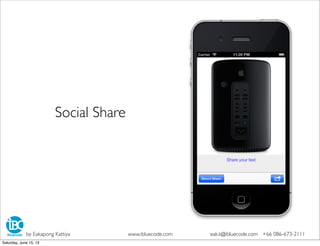
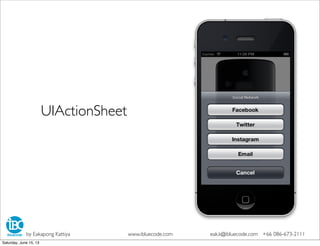
![- (IBAction)shareSocial:(id)sender {
UIActionSheet *action = [[UIActionSheet alloc]initWithTitle:@"Social Network"
delegate:self
cancelButtonTitle:@"Cancel"
destructiveButtonTitle:nil
otherButtonTitles:@"Facebook",@"Twitter",
@"Instagram",@"Email", nil];
[action showInView:self.view];
}
-(void)actionSheet:(UIActionSheet *)actionSheet clickedButtonAtIndex:(NSInteger)buttonIndex
{
if(buttonIndex == 0){
[self directShareFacebook:nil];
}
if(buttonIndex == 1){
[self directShareTwitter:nil];
}
if(buttonIndex == 2){
[self directShareInstagram:nil];
}
if(buttonIndex == 3){
[self directSendMail:nil];
}
}
UIActionSheet
by Eakapong Kattiya www.ibluecode.com eak.k@ibluecode.com +66 086-673-2111
Saturday, June 15, 13](https://image.slidesharecdn.com/iphonedeveloperbasicday5-debugingperformance-121217095327-phpapp01/85/1-July-2013-iOS-Basic-Development-Day-5-Submit-to-App-Store-4-320.jpg)
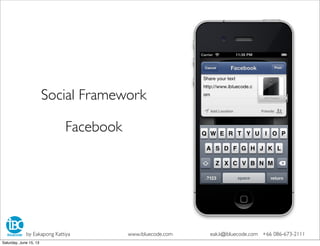
![- (IBAction)directShareFacebook:(id)sender {
if ([SLComposeViewController isAvailableForServiceType:SLServiceTypeFacebook])
{
SLComposeViewController *composeVC =
[SLComposeViewController composeViewControllerForServiceType:SLServiceTypeFacebook];
[composeVC setInitialText:self.myTextView.text];
UIImage *image = self.myImageView.image;
[composeVC addImage:image];
NSURL *url = [NSURL URLWithString:@"http://www.ibluecode.com"];
[composeVC addURL:url];
[self presentViewController:composeVC
animated:YES
completion:nil];
}
}
SLComposeViewController : Facebook
by Eakapong Kattiya www.ibluecode.com eak.k@ibluecode.com +66 086-673-2111
Saturday, June 15, 13](https://image.slidesharecdn.com/iphonedeveloperbasicday5-debugingperformance-121217095327-phpapp01/85/1-July-2013-iOS-Basic-Development-Day-5-Submit-to-App-Store-6-320.jpg)
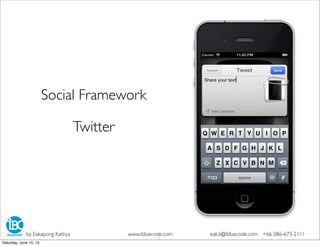
![- (IBAction)directShareTwitter:(id)sender {
if ([SLComposeViewController isAvailableForServiceType:SLServiceTypeTwitter])
{
SLComposeViewController *composeVC =
[SLComposeViewController composeViewControllerForServiceType:SLServiceTypeTwitter];
[composeVC setInitialText:self.myTextView.text];
UIImage *image = self.myImageView.image;
[composeVC addImage:image];
NSURL *url = [NSURL URLWithString:@"http://www.ibluecode.com"];
[composeVC addURL:url];
[self presentViewController:composeVC
animated:YES
completion:nil];
}
}
SLComposeViewController :Twitter
by Eakapong Kattiya www.ibluecode.com eak.k@ibluecode.com +66 086-673-2111
Saturday, June 15, 13](https://image.slidesharecdn.com/iphonedeveloperbasicday5-debugingperformance-121217095327-phpapp01/85/1-July-2013-iOS-Basic-Development-Day-5-Submit-to-App-Store-8-320.jpg)

![- (IBAction)openDocumentAction:(id)sender {
NSURL *url = [[NSBundle mainBundle] URLForResource:@"mac_pro" withExtension:@"jpg"];
self.docController = [UIDocumentInteractionController interactionControllerWithURL:url];
self.docController.delegate = self ;
BOOL isValid = [[UIApplication sharedApplication] canOpenURL:url];
NSLog(@"uti: %@", [self.docController UTI]);
if(isValid){
[self.docController presentOptionsMenuFromRect:self.view.frame
inView:self.view
animated:YES];
}
}
UIDocumentInteractionController :All
by Eakapong Kattiya www.ibluecode.com eak.k@ibluecode.com +66 086-673-2111
Saturday, June 15, 13](https://image.slidesharecdn.com/iphonedeveloperbasicday5-debugingperformance-121217095327-phpapp01/85/1-July-2013-iOS-Basic-Development-Day-5-Submit-to-App-Store-10-320.jpg)
![- (IBAction)directShareInstagram:(id)sender {
NSURL *instagramURL = [NSURL URLWithString:@"instagram://location?id=1"];
if ([[UIApplication sharedApplication] canOpenURL:instagramURL]) {
NSString *documentsDirectory = [NSHomeDirectory() stringByAppendingPathComponent:@"Documents"];
NSString *savedImagePath = [documentsDirectory stringByAppendingPathComponent:@"Image.igo"];
NSData *imageData = UIImagePNGRepresentation(self.myImageView.image);
[imageData writeToFile:savedImagePath atomically:YES];
NSURL *imageUrl = [NSURL fileURLWithPath:savedImagePath];
NSLog(@"%@",imageUrl);
UIDocumentInteractionController *docController = [UIDocumentInteractionController new];
docController.delegate = self;
docController.UTI = @"com.instagram.exclusivegram";
docController.URL = imageUrl;
[docController presentOpenInMenuFromRect:CGRectZero inView:self.view animated:YES];
}else{
[self showAlertView:@"Please install Instagram before share."];
}
}
UIDocumentInteractionController : Instagram
by Eakapong Kattiya www.ibluecode.com eak.k@ibluecode.com +66 086-673-2111
Saturday, June 15, 13](https://image.slidesharecdn.com/iphonedeveloperbasicday5-debugingperformance-121217095327-phpapp01/85/1-July-2013-iOS-Basic-Development-Day-5-Submit-to-App-Store-11-320.jpg)
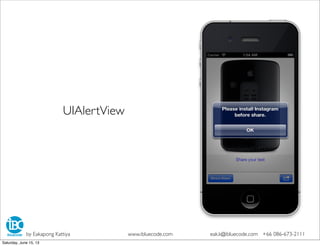
![-(void)showAlertView:(NSString*)title
{
UIAlertView *alert = [[UIAlertView alloc] initWithTitle:title
message:@""
delegate:nil
cancelButtonTitle:@"OK"
otherButtonTitles: nil];
[alert show];
}
UIAlertView
by Eakapong Kattiya www.ibluecode.com eak.k@ibluecode.com +66 086-673-2111
Saturday, June 15, 13](https://image.slidesharecdn.com/iphonedeveloperbasicday5-debugingperformance-121217095327-phpapp01/85/1-July-2013-iOS-Basic-Development-Day-5-Submit-to-App-Store-13-320.jpg)
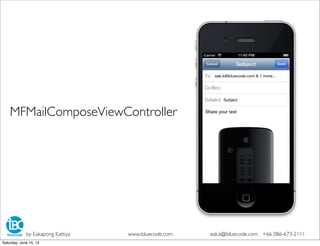
![- (IBAction)directSendMail:(id)sender {
if ([MFMailComposeViewController canSendMail])
{
MFMailComposeViewController *mailVC = [[MFMailComposeViewController alloc] init];
mailVC.mailComposeDelegate = self;
[mailVC setSubject:@"Subject"];
NSArray *toRecipients = [NSArray arrayWithObjects:
@"eak.k@ibluecode.com",
@"eakkattiya@gmail.com", nil];
[mailVC setToRecipients:toRecipients];
UIImage *myImage = self.myImageView.image ;
NSData *imageData = UIImagePNGRepresentation(myImage);
[mailVC addAttachmentData:imageData mimeType:@"image/png" fileName:@"attachment"];
NSString *emailBody = self.myTextView.text;
[mailVC setMessageBody:emailBody isHTML:NO];
//iOS 5
//[self presentModalViewController:mailer animated:YES];
//iOS 6
[self presentViewController:mailVC animated:YES completion:nil];
}
}
MFMailComposeViewController
by Eakapong Kattiya www.ibluecode.com eak.k@ibluecode.com +66 086-673-2111
Saturday, June 15, 13](https://image.slidesharecdn.com/iphonedeveloperbasicday5-debugingperformance-121217095327-phpapp01/85/1-July-2013-iOS-Basic-Development-Day-5-Submit-to-App-Store-15-320.jpg)



![1. Init UIPickerView (.h)
IBOutlet UIPickerView *myPV ;
2. bind Datasouce / Delegate (.m)
[myPV setDataSource:self];
[myPV setDelegate:self];
[myPV selectRow:0 inComponent:0 animated:NO];
[myPV selectRow:0 inComponent:1 animated:NO];
[myPV selectRow:0 inComponent:2 animated:NO];
UIPickerView
by Eakapong Kattiya www.ibluecode.com eak.k@ibluecode.com +66 086-673-2111
Saturday, June 15, 13](https://image.slidesharecdn.com/iphonedeveloperbasicday5-debugingperformance-121217095327-phpapp01/85/1-July-2013-iOS-Basic-Development-Day-5-Submit-to-App-Store-19-320.jpg)



![- (IBAction)shareSocial:(id)sender {
UIActionSheet *action = [[UIActionSheet alloc]initWithTitle:@"Social Network"
delegate:self
cancelButtonTitle:@"Cancel"
destructiveButtonTitle:nil
otherButtonTitles:@"Facebook",@"Twitter",
@"Instagram",@"Email", nil];
[action showInView:self.view];
}
-(void)actionSheet:(UIActionSheet *)actionSheet clickedButtonAtIndex:(NSInteger)buttonIndex
{
if(buttonIndex == 0){
[self directShareFacebook:nil];
}
if(buttonIndex == 1){
[self directShareTwitter:nil];
}
if(buttonIndex == 2){
[self directShareInstagram:nil];
}
if(buttonIndex == 3){
[self directSendMail:nil];
}
}
UIActionSheet
by Eakapong Kattiya www.ibluecode.com eak.k@ibluecode.com +66 086-673-2111
Saturday, June 15, 13](/p?url=https%3A%2F%2Fimage.slidesharecdn.com%2Fiphonedeveloperbasicday5-debugingperformance-121217095327-phpapp01%2F85%2F1-July-2013-iOS-Basic-Development-Day-5-Submit-to-App-Store-4-320.jpg&__src=https%3A%2F%2Fwww.slideshare.net%2Fslideshow%2Fiphone-developer-basic-day-5-debuging-performance%2F15672538%2317&__type=image)

![- (IBAction)directShareFacebook:(id)sender {
if ([SLComposeViewController isAvailableForServiceType:SLServiceTypeFacebook])
{
SLComposeViewController *composeVC =
[SLComposeViewController composeViewControllerForServiceType:SLServiceTypeFacebook];
[composeVC setInitialText:self.myTextView.text];
UIImage *image = self.myImageView.image;
[composeVC addImage:image];
NSURL *url = [NSURL URLWithString:@"http://www.ibluecode.com"];
[composeVC addURL:url];
[self presentViewController:composeVC
animated:YES
completion:nil];
}
}
SLComposeViewController : Facebook
by Eakapong Kattiya www.ibluecode.com eak.k@ibluecode.com +66 086-673-2111
Saturday, June 15, 13](/p?url=https%3A%2F%2Fimage.slidesharecdn.com%2Fiphonedeveloperbasicday5-debugingperformance-121217095327-phpapp01%2F85%2F1-July-2013-iOS-Basic-Development-Day-5-Submit-to-App-Store-6-320.jpg&__src=https%3A%2F%2Fwww.slideshare.net%2Fslideshow%2Fiphone-developer-basic-day-5-debuging-performance%2F15672538%2317&__type=image)

![- (IBAction)directShareTwitter:(id)sender {
if ([SLComposeViewController isAvailableForServiceType:SLServiceTypeTwitter])
{
SLComposeViewController *composeVC =
[SLComposeViewController composeViewControllerForServiceType:SLServiceTypeTwitter];
[composeVC setInitialText:self.myTextView.text];
UIImage *image = self.myImageView.image;
[composeVC addImage:image];
NSURL *url = [NSURL URLWithString:@"http://www.ibluecode.com"];
[composeVC addURL:url];
[self presentViewController:composeVC
animated:YES
completion:nil];
}
}
SLComposeViewController :Twitter
by Eakapong Kattiya www.ibluecode.com eak.k@ibluecode.com +66 086-673-2111
Saturday, June 15, 13](/p?url=https%3A%2F%2Fimage.slidesharecdn.com%2Fiphonedeveloperbasicday5-debugingperformance-121217095327-phpapp01%2F85%2F1-July-2013-iOS-Basic-Development-Day-5-Submit-to-App-Store-8-320.jpg&__src=https%3A%2F%2Fwww.slideshare.net%2Fslideshow%2Fiphone-developer-basic-day-5-debuging-performance%2F15672538%2317&__type=image)

![- (IBAction)openDocumentAction:(id)sender {
NSURL *url = [[NSBundle mainBundle] URLForResource:@"mac_pro" withExtension:@"jpg"];
self.docController = [UIDocumentInteractionController interactionControllerWithURL:url];
self.docController.delegate = self ;
BOOL isValid = [[UIApplication sharedApplication] canOpenURL:url];
NSLog(@"uti: %@", [self.docController UTI]);
if(isValid){
[self.docController presentOptionsMenuFromRect:self.view.frame
inView:self.view
animated:YES];
}
}
UIDocumentInteractionController :All
by Eakapong Kattiya www.ibluecode.com eak.k@ibluecode.com +66 086-673-2111
Saturday, June 15, 13](/p?url=https%3A%2F%2Fimage.slidesharecdn.com%2Fiphonedeveloperbasicday5-debugingperformance-121217095327-phpapp01%2F85%2F1-July-2013-iOS-Basic-Development-Day-5-Submit-to-App-Store-10-320.jpg&__src=https%3A%2F%2Fwww.slideshare.net%2Fslideshow%2Fiphone-developer-basic-day-5-debuging-performance%2F15672538%2317&__type=image)
![- (IBAction)directShareInstagram:(id)sender {
NSURL *instagramURL = [NSURL URLWithString:@"instagram://location?id=1"];
if ([[UIApplication sharedApplication] canOpenURL:instagramURL]) {
NSString *documentsDirectory = [NSHomeDirectory() stringByAppendingPathComponent:@"Documents"];
NSString *savedImagePath = [documentsDirectory stringByAppendingPathComponent:@"Image.igo"];
NSData *imageData = UIImagePNGRepresentation(self.myImageView.image);
[imageData writeToFile:savedImagePath atomically:YES];
NSURL *imageUrl = [NSURL fileURLWithPath:savedImagePath];
NSLog(@"%@",imageUrl);
UIDocumentInteractionController *docController = [UIDocumentInteractionController new];
docController.delegate = self;
docController.UTI = @"com.instagram.exclusivegram";
docController.URL = imageUrl;
[docController presentOpenInMenuFromRect:CGRectZero inView:self.view animated:YES];
}else{
[self showAlertView:@"Please install Instagram before share."];
}
}
UIDocumentInteractionController : Instagram
by Eakapong Kattiya www.ibluecode.com eak.k@ibluecode.com +66 086-673-2111
Saturday, June 15, 13](/p?url=https%3A%2F%2Fimage.slidesharecdn.com%2Fiphonedeveloperbasicday5-debugingperformance-121217095327-phpapp01%2F85%2F1-July-2013-iOS-Basic-Development-Day-5-Submit-to-App-Store-11-320.jpg&__src=https%3A%2F%2Fwww.slideshare.net%2Fslideshow%2Fiphone-developer-basic-day-5-debuging-performance%2F15672538%2317&__type=image)

![-(void)showAlertView:(NSString*)title
{
UIAlertView *alert = [[UIAlertView alloc] initWithTitle:title
message:@""
delegate:nil
cancelButtonTitle:@"OK"
otherButtonTitles: nil];
[alert show];
}
UIAlertView
by Eakapong Kattiya www.ibluecode.com eak.k@ibluecode.com +66 086-673-2111
Saturday, June 15, 13](/p?url=https%3A%2F%2Fimage.slidesharecdn.com%2Fiphonedeveloperbasicday5-debugingperformance-121217095327-phpapp01%2F85%2F1-July-2013-iOS-Basic-Development-Day-5-Submit-to-App-Store-13-320.jpg&__src=https%3A%2F%2Fwww.slideshare.net%2Fslideshow%2Fiphone-developer-basic-day-5-debuging-performance%2F15672538%2317&__type=image)

![- (IBAction)directSendMail:(id)sender {
if ([MFMailComposeViewController canSendMail])
{
MFMailComposeViewController *mailVC = [[MFMailComposeViewController alloc] init];
mailVC.mailComposeDelegate = self;
[mailVC setSubject:@"Subject"];
NSArray *toRecipients = [NSArray arrayWithObjects:
@"eak.k@ibluecode.com",
@"eakkattiya@gmail.com", nil];
[mailVC setToRecipients:toRecipients];
UIImage *myImage = self.myImageView.image ;
NSData *imageData = UIImagePNGRepresentation(myImage);
[mailVC addAttachmentData:imageData mimeType:@"image/png" fileName:@"attachment"];
NSString *emailBody = self.myTextView.text;
[mailVC setMessageBody:emailBody isHTML:NO];
//iOS 5
//[self presentModalViewController:mailer animated:YES];
//iOS 6
[self presentViewController:mailVC animated:YES completion:nil];
}
}
MFMailComposeViewController
by Eakapong Kattiya www.ibluecode.com eak.k@ibluecode.com +66 086-673-2111
Saturday, June 15, 13](/p?url=https%3A%2F%2Fimage.slidesharecdn.com%2Fiphonedeveloperbasicday5-debugingperformance-121217095327-phpapp01%2F85%2F1-July-2013-iOS-Basic-Development-Day-5-Submit-to-App-Store-15-320.jpg&__src=https%3A%2F%2Fwww.slideshare.net%2Fslideshow%2Fiphone-developer-basic-day-5-debuging-performance%2F15672538%2317&__type=image)


![1. Init UIPickerView (.h)
IBOutlet UIPickerView *myPV ;
2. bind Datasouce / Delegate (.m)
[myPV setDataSource:self];
[myPV setDelegate:self];
[myPV selectRow:0 inComponent:0 animated:NO];
[myPV selectRow:0 inComponent:1 animated:NO];
[myPV selectRow:0 inComponent:2 animated:NO];
UIPickerView
by Eakapong Kattiya www.ibluecode.com eak.k@ibluecode.com +66 086-673-2111
Saturday, June 15, 13](/p?url=https%3A%2F%2Fimage.slidesharecdn.com%2Fiphonedeveloperbasicday5-debugingperformance-121217095327-phpapp01%2F85%2F1-July-2013-iOS-Basic-Development-Day-5-Submit-to-App-Store-19-320.jpg&__src=https%3A%2F%2Fwww.slideshare.net%2Fslideshow%2Fiphone-developer-basic-day-5-debuging-performance%2F15672538%2317&__type=image)

![5. กําหนดการแสดงค่าเป็น Text หรือView ได้ (.m)
#pragma แสดงค&าเป*น Text
- (NSString *)pickerView:(UIPickerView *)pickerView titleForRow:
(NSInteger)row forComponent:(NSInteger)component;
{
NSMutableArray *arrayNo1 = [[NSMutableArray alloc] init];
[arrayNo1 addObject:@"0"];
[arrayNo1 addObject:@"1"];
[arrayNo1 addObject:@"2"];
[arrayNo1 addObject:@"3"];
[arrayNo1 addObject:@"4"];
[arrayNo1 addObject:@"5"];
[arrayNo1 addObject:@"6"];
[arrayNo1 addObject:@"7"];
[arrayNo1 addObject:@"8"];
[arrayNo1 addObject:@"9"];
return [arrayNo1 objectAtIndex:row];
}
UIPickerView
by Eakapong Kattiya www.ibluecode.com eak.k@ibluecode.com +66 086-673-2111
Saturday, June 15, 13](/p?url=https%3A%2F%2Fimage.slidesharecdn.com%2Fiphonedeveloperbasicday5-debugingperformance-121217095327-phpapp01%2F85%2F1-July-2013-iOS-Basic-Development-Day-5-Submit-to-App-Store-21-320.jpg&__src=https%3A%2F%2Fwww.slideshare.net%2Fslideshow%2Fiphone-developer-basic-day-5-debuging-performance%2F15672538%2317&__type=image)
![5. กําหนดการแสดงค่าเป็น Text หรือView ได้ (.m)
#pragma แสดงค&าเป*นรูปภาพ
- (UIView *)pickerView:(UIPickerView *)pickerView
viewForRow:(NSInteger)row
forComponent:(NSInteger)component
reusingView:(UIView *)view
{
NSString *imageName = [NSString stringWithFormat:@"%d.png",row];
UIImageView *bgImageView = [[UIImageView alloc]initWithImage:
[UIImage imageNamed:imageName]];
[bgImageView setFrame:CGRectMake(0, 0, 50, 50)];
[bgImageView setContentMode:UIViewContentModeScaleAspectFit];
return bgImageView;
}
UIPickerView
by Eakapong Kattiya www.ibluecode.com eak.k@ibluecode.com +66 086-673-2111
Saturday, June 15, 13](/p?url=https%3A%2F%2Fimage.slidesharecdn.com%2Fiphonedeveloperbasicday5-debugingperformance-121217095327-phpapp01%2F85%2F1-July-2013-iOS-Basic-Development-Day-5-Submit-to-App-Store-22-320.jpg&__src=https%3A%2F%2Fwww.slideshare.net%2Fslideshow%2Fiphone-developer-basic-day-5-debuging-performance%2F15672538%2317&__type=image)
![6. ใช้ Delegate เมื่อเลือกข้อมูลเสร็จ
- (void)pickerView:(UIPickerView *)pickerView
didSelectRow:(NSInteger)row
inComponent:(NSInteger)component
{
if(component == 0){
inputCol1 = [arrayNo1 objectAtIndex:row];
}
else if(component == 1){
inputCol2 = [arrayNo2 objectAtIndex:row];
}
else if(component == 2){
inputCol3 = [arrayNo3 objectAtIndex:row];
}
}
UIPickerView
by Eakapong Kattiya www.ibluecode.com eak.k@ibluecode.com +66 086-673-2111
Saturday, June 15, 13](/p?url=https%3A%2F%2Fimage.slidesharecdn.com%2Fiphonedeveloperbasicday5-debugingperformance-121217095327-phpapp01%2F85%2F1-July-2013-iOS-Basic-Development-Day-5-Submit-to-App-Store-23-320.jpg&__src=https%3A%2F%2Fwww.slideshare.net%2Fslideshow%2Fiphone-developer-basic-day-5-debuging-performance%2F15672538%2317&__type=image)


![Understanding Crash Problem
“EXC_BAD_ACCESS”
สาเหตุ :
- ทําการเรียก Object ที่ถูก release ไปแล้ว
เช่น
NSString *myString ;
[myString release] ; // ไม่มี object แล้ว
myString = @”Test” ;
การแก้ไข :
- Debug ทีละขั้น หรือ ใช้เครื่องมือ Instruments ตรวจหา
Zombies Object
by Eakapong Kattiya www.ibluecode.com eak.k@ibluecode.com +66 086-673-2111
Saturday, June 15, 13](/p?url=https%3A%2F%2Fimage.slidesharecdn.com%2Fiphonedeveloperbasicday5-debugingperformance-121217095327-phpapp01%2F85%2F1-July-2013-iOS-Basic-Development-Day-5-Submit-to-App-Store-42-320.jpg&__src=https%3A%2F%2Fwww.slideshare.net%2Fslideshow%2Fiphone-developer-basic-day-5-debuging-performance%2F15672538%2317&__type=image)
![Understanding Crash Problem
“SIGABRT” = SIGNAL ABORT
เป็นคําสั่งให้หยุดการทํางานของโปรแกรมเนื่องจากพบ Error
สาเหตุ :
- ทําการเรียก Method ที่ไม่มีอยู่ หรือ เรียกผิด เช่น
NSString *myString ;
myString = @”Test” ;
[myString releasee] ;
// Method releasee นั้นไม่มีใน Class
การแก้ไข :
- Debug ทีละขั้น และตรวจสอบ Warning
by Eakapong Kattiya www.ibluecode.com eak.k@ibluecode.com +66 086-673-2111
Saturday, June 15, 13](/p?url=https%3A%2F%2Fimage.slidesharecdn.com%2Fiphonedeveloperbasicday5-debugingperformance-121217095327-phpapp01%2F85%2F1-July-2013-iOS-Basic-Development-Day-5-Submit-to-App-Store-43-320.jpg&__src=https%3A%2F%2Fwww.slideshare.net%2Fslideshow%2Fiphone-developer-basic-day-5-debuging-performance%2F15672538%2317&__type=image)


