BKITAtom, Nov 2011

                  Hieu Le Trung


WWW course
1st day
2


Today target
 Web and relative terms
   Web and web programming
   Website vs. webpage, domain vs. URL
 Course introduction
   Objective
   Content
   Useful tools
 HTML basic
3


Web & web programming
 Web in English language and web in our daily talks
 World Wide Web and internet
4


Web & web programming cont.
 Web programming, huh?
 For front-end developer: the war between browsers
5


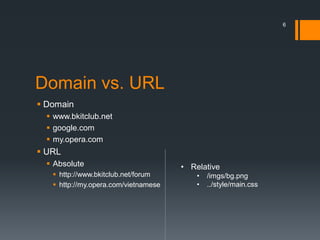
Website and webpage
            Multiple webpage


            Under one domain


  website
6


Domain vs. URL
 Domain
   www.bkitclub.net
   google.com
   my.opera.com
 URL
   Absolute                          • Relative
    http://www.bkitclub.net/forum        •   /imgs/bg.png
    http://my.opera.com/vietnamese       •   ../style/main.css
7


Course objective
 Understand our web
 Have the ability to implement a static webpage (maybe a
  website)
 Have the background to study more about web development.
8


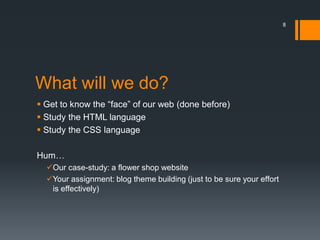
What will we do?
 Get to know the “face” of our web (done before)
 Study the HTML language
 Study the CSS language

Hum…
  Our case-study: a flower shop website
  Your assignment: blog theme building (just to be sure your effort
   is effectively)
9


Our friends
 Some major browsers
     IE 9
     Firefox 6+ with firebug add-on
     Chrome 14+
     Opera 11+
 A text editor
   Window notepad
   Notepad++, Gedit
   Netbeans, Eclipse
 W3School at http://w3school.com , BkitClub forum
10


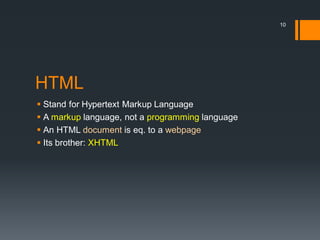
HTML
 Stand for Hypertext Markup Language
 A markup language, not a programming language
 An HTML document is eq. to a webpage
 Its brother: XHTML
11


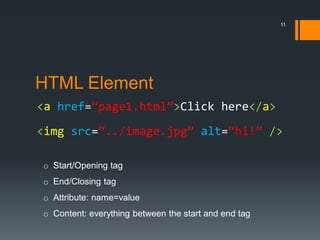
HTML Element
<a href=“page1.html”>Click here</a>
<img src=“../image.jpg” alt=“hi!” />

o Start/Opening tag
o End/Closing tag
o Attribute: name=value
o Content: everything between the start and end tag
12


HTML charater reference
 See the HTML Character Entity Reference.html
13


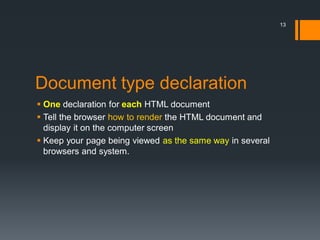
Document type declaration
 One declaration for each HTML document
 Tell the browser how to render the HTML document and
  display it on the computer screen
 Keep your page being viewed as the same way in several
  browsers and system.
14


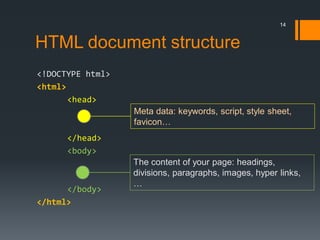
HTML document structure
<!DOCTYPE html>
<html>
       <head>
                  Meta data: keywords, script, style sheet,
                  favicon…
      </head>
      <body>
                  The content of your page: headings,
                  divisions, paragraphs, images, hyper links,
                  …
      </body>
</html>
15


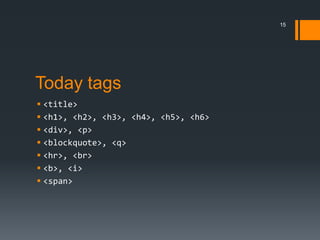
Today tags
 <title>
 <h1>, <h2>, <h3>, <h4>, <h5>, <h6>
 <div>, <p>
 <blockquote>, <q>
 <hr>, <br>
 <b>, <i>
 <span>
16


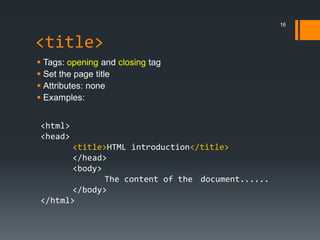
<title>
 Tags: opening and closing tag
 Set the page title
 Attributes: none
 Examples:


<html>
<head>
       <title>HTML introduction</title>
       </head>
       <body>
              The content of the document......
       </body>
</html>
17


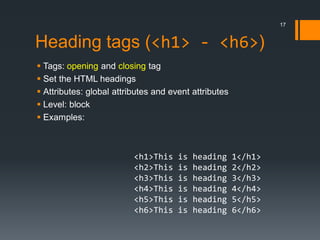
Heading tags (<h1> - <h6>)
 Tags: opening and closing tag
 Set the HTML headings
 Attributes: global attributes and event attributes
 Level: block
 Examples:


                          <h1>This    is   heading     1</h1>
                          <h2>This    is   heading     2</h2>
                          <h3>This    is   heading     3</h3>
                          <h4>This    is   heading     4</h4>
                          <h5>This    is   heading     5</h5>
                          <h6>This    is   heading     6</h6>
18


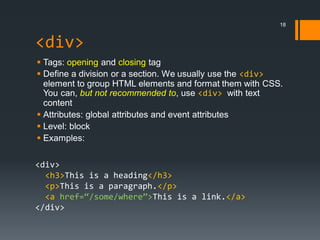
<div>
 Tags: opening and closing tag
 Define a division or a section. We usually use the <div>
  element to group HTML elements and format them with CSS.
  You can, but not recommended to, use <div> with text
  content
 Attributes: global attributes and event attributes
 Level: block
 Examples:

<div>
  <h3>This is a heading</h3>
  <p>This is a paragraph.</p>
  <a href=“/some/where”>This is a link.</a>
</div>
19


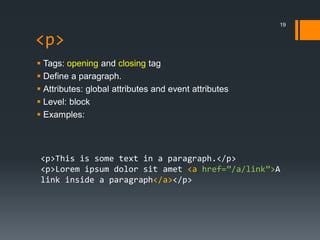
<p>
 Tags: opening and closing tag
 Define a paragraph.
 Attributes: global attributes and event attributes
 Level: block
 Examples:


 <p>This is some text in a paragraph.</p>
 <p>Lorem ipsum dolor sit amet <a href=”/a/link”>A
 link inside a paragraph</a></p>
20


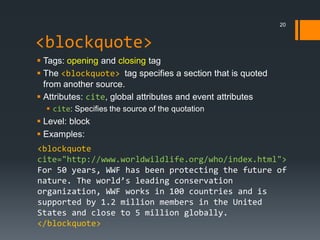
<blockquote>
 Tags: opening and closing tag
 The <blockquote> tag specifies a section that is quoted
  from another source.
 Attributes: cite, global attributes and event attributes
   cite: Specifies the source of the quotation
 Level: block
 Examples:
<blockquote
cite="http://www.worldwildlife.org/who/index.html">
For 50 years, WWF has been protecting the future of
nature. The world’s leading conservation
organization, WWF works in 100 countries and is
supported by 1.2 million members in the United
States and close to 5 million globally.
</blockquote>
21


<q>
 Tags: opening and closing tag
 Define a short quotation
 Attributes: cite, global attributes and event attributes
   cite: Specifies the source of the quotation
 Level: text
 Examples:


 <p>WWF's goal is to:
 <q>build a future where people live in harmony
 with nature</q>.
 We hope they succeed.</p>
22


<hr />
 Tags: opening and self-closing tag
 Creates a horizontal line in an HTML page.
 Attributes: global attributes and event attributes
 Level: block
 Examples:

<h1>HTML</h1>
<p>HTML is a language for describing web
pages.</p>

<hr />

<h1>CSS</h1>
<p>CSS defines how to display HTML elements.</p>
23


<br />
 Tags: opening and self-closing tag
 Inserts a single line break. We just use it to insert a line
  break, not to separate two paragraphs.
 Attributes: global attributes and event attributes
 Level: block
 Examples:


<p>This text contains<br />a line break.</p>
24


Bold and itatic text: <b> & <i>
 Tags: opening and closing tag
 Specify a bold or itatic text.
 Attributes: global attributes and event attributes
 Level: text
 Examples:


 <p>It was a <b>red</b> house with a <b>blue</b>
 door.</p>


 <p>He named his car <i>The lightning</i>, because
 it was very fast.</p>
25

<span>
 Tags: opening and closing tag
 Provide localized formatting within documents. This tag is
  also used to group inline elements.
 Attributes: global attributes and event attributes
 Level: text
 Examples:


<p>My mother has <span
style="color:lightblue">light blue</span>
eyes.</p>
26


YĂŞu cáş§u
Hiện thực một HTML document theo yêu cầu sau:

 Trên trình duyệt hiển thị tiêu đề của trang web là Cửa hàng
  hoa <tĂŞn cáť­a hĂ ng>
 Có sử dụng <hr /> và quotation
 Có ít nhất hai đoạn, mỗi đoạn có ít nhất một heading
   Giới thiệu về cửa hàng
   Giới thiệu về chủ cửa hàng (có thể về bạn)
 Các nội dụng thêm

Chú ý: tệp tin có phần mở rộng là .html hoặc .htm
BKITAtom, Nov 2011

                  Hieu Le Trung


WWW course
2nd day
2


Today target
 HTML tags
     Link
     Image
     List
     Table
     Iframe
     Link, script and style
3


Hyper link <a>
 Tags: opening and closing tag
 Defines a hyperlink, which is used to link from one page to
  another.
 Attributes: href, hreflang, rel, target global
  attributes and event attributes
 Level: inline
4


  Hyper link <a>
   Attributes http://www.w3schools.com/html5/tag_a.asp

Attribute       Description
href            The URL of the page link goes to
hreflang        The language of the linked document
rel             The relationship between the current document and
                the linked document
target          How to open the linked document
5


Image <img>
 Tags: opening and self-closing tag
 Defines an image in an HTML page.
 Attributes: src, alt, height, width global attributes and
  event attributes
 Level: inline
6


  Image <img>
   Attributes http://www.w3schools.com/html5/tag_img.asp

Attribute       Description
src             The URL of the image
alt             The alternate text for an image
width           The width of the image
height          The height of the image
7


URL Review

              http://mydomain.com


index.html   animal                           plants


                      cats.html     flowers            trees.html


                      dogs.html           roses.html
8


 HTML table
  What is a table?

                             Table header


Attribute Description
src        The URL of the image
alt        The alternate text for an image
                                             Table rows
width      The width of the image
height     The height of the image


         Table columns
9


HTML table – simple table
A simple table structure

<table>
    <tr>
         <td></td>
                           Define a row
         <td></td>
    </tr>
    <tr>
         <td></td>         Define a cell
         <td></td>
    </tr>
</table>
10


HTML table – simple table
A simple table structure with spanning cell


                  Cell merged
                  horizontally


                                              Cell merged
                                               vertically


Use <td> attributes: colspan and rowspan
11


HTML table – more semantic
Additional elements: <th>, <thead>, <tbody> and
<tfoot> and <caption>


 <th>: define a header cell. It has the same attributes as the
  <td> element.

 <thead> Define the table headers

 <tbody> Define the table body

 <tfoot> Define the table footer

 The table header, body and footer elements have no visual
  effect.

 <caption> Define the caption of the table
12


Use HTML table in layout
 Years ago, the story begins …


                               Now, we use CSS instead!
13


HTML list
• The first item                    1. The first item
• The second item                   2. The second item
• The third item                    3. The third item

   An unordered list                    An ordered list


We use <ul> or <ol> with the help of <li> tags to define
unordered (or ordered) list in HTML
14


HTML list
<ul>                                   <ol>
    <li></li>                              <li></li>
    <li></li>                              <li></li>
</ul>                                  </ol>
   An unordered list                        An ordered list


The list is no longer styled by HTML code in HTML5, we format
our lists by CSS.

The ordered list has the start attribute to set the initial value
for the first item of the list.
15


 HTML form
HTML forms are used to pass data to a server.
<form> tag defines a form. Its attributes:
      • action: specifies where to send the data of the form

      • enctype: specifies how form-data should be encoded
        before sending it to the server.
      • method: specifies how to send form data
      • name: the name of the form

Inside the <form> tag, we can define many elements.
16


   HTML form elements
             Defines an input control (textbox, password box,
<input />
             submit and cancel button, radio, checkbox)
<textarea>   Defines a multi-line text input control
<label>      Defines a label for an input element
<fieldset>   Defines a border around elements in a form
<legend>     Defines a caption for a fieldset element
<select>     Defines a select list (drop-down list)
<optgroup>   Defines a group of related options in a select list
<option>     Defines an option in a select list
<button>     Defines a push button

                   http://www.w3schools.com/html/html_forms.asp
17


<pre>
 Tags: opening and closing tag
 Defines preformatted text. This section is displayed in
  monospace font and it preserves both space and line break.
 Attributes: global attributes and event attributes
 Level: block
18


<script>
 Tags: opening and closing tag
 Define a client-side script, such as a JavaScript.
 Attributes: src global attributes and event attributes
   src the URL to the external script file
 Level: none
19


HTML comments
 The browser ignores these comment when rendering the
  HTML document.
 Usage:

<!-- The comment -->

 Use comments to quickly view your changes in a “safety”
  way or in debugging process.
20


And more HTML tags …

Tag              Description
<style>          Define an internal style for the HTML
                 document
<base>           Set the base URL for all relative URL in the
                 HTML document
<link>           Define the relationship between a document
                 and a external source (especially a style
                 sheet)
<meta>           Provide metadata for the document
<object>         Embed an object to the HTML document
                 (usually a shockwave flash object)

      Even more in http://www.w3schools.com/html5/html5_reference.asp
21


Internal frame <iframe>
 Tags: opening and closing tag
 Embed an external HTML document in to this document.
 Attributes: src global attributes and event attributes
 Level: block


      Even more in http://www.w3schools.com/html5/html5_reference.asp
22


Your task (30 min)
Improve your flower shop website. Be sure that you have at
least 03 pages:
   Home page: introduce your shop, the shop location, your slogan,
    what you sell …
   Showcase page: introduce which flower you have in your store,
    their price, their description, ….
   About page: introduce yourself


You can use images in the /action/imgs folder
23


Next subject

Cascading Style Sheet
BKITAtom, Nov 2011
        Hieu Le Trung


WWW course

          3rd day
TODAY TARGET
       Introduction                    Text formation
           Content and style               Text align
           CSS and CSS attachment          Color and text color
           HTML class and id
       Cascading Style Sheet
           Syntax
           The “cascading”
           CSS selector (simple)
       CSS width, height
           Length and percentage
           Width and height

    2
CONTENT AND STYLE
       Any document has two aspects: content and style

                             You see
    How is it
                                                           CSS
    presented?

                           Information
    What is
                                                          HTML
    presented?

                         You understand


    3
CSS – WHAT IS IT
       CSS stands for “Cascading Style Sheet”
       It’s a W3C recommendation
       CSS defines how to display HTML elements


    4
ATTACH THE CSS STYLE TO A PAGE
       Define style of each element by its style attribute.
       Define style inside the <style></style> of the HTML
        document.
       Use <link> tag to define a link to an external style
        sheet.
           <link rel=“stylesheet”
            href=“url/to/the/css/file” type=“text/css” />


       Import external style to current style
           /* CSS rule (in a CSS file or inside the
            <style> tag) */
            @import url(“url/to/the/css/file”);
    5
CLASS AND ID
       Both of them are one of the HTML global element
        attributes
       An id should be unique in a HTML document.
       A class can be applied to many elements in a HTML
        document.
    <div id=“main” class=“doc-section”>
        <h1 class=“title”>......</h1>
        <div class=“post”>

        </div>
    </div>


    6
TODAY TARGET
       Introduction                    Text formation
           Content and style               Text align
           CSS and CSS attachment          Color and text color
           HTML class and id
       Cascading Style Sheet
           The “cascading”
           CSS Syntax
           CSS selector (simple)
       CSS width, height
           Length and percentage
           Width and height

    7
THE SIMPLE “CASCADING”
       The higher priority rules overrides the lower one
           The style in style attribute (not recommended)
           The style inside the <style> tag
           The style “imported” inside the <style> tag via @import
           The external style sheet which is linked to by the <link> tag
           The style “imported” inside an external style sheet.
           The default browser style
       The style defined later overrides the previous one.
       View more at http://www.w3.org/TR/CSS2/cascade.html

    8
CSS SYNTAX
       A set of rules
       A rules
           One selector
           One or more declaration


       Each declaration
           A css property
           Its value: length, percent, color, url, constant
    9
THE CSS SIMPLE SELECTORS
    Define the elements this rule applies to
    A selector can be one or a sequence of
        Universal selector *
        HTML element
         h1 { ... }
        Id definition
         #mainwrap { ... }
        Class definition
         .post { ... }
    Selectors can be grouped
        h1, h2, .post, #wrap { ... }
    See more at http://www.w3.org/TR/CSS2/selector.html
    10
THE CSS SIMPLE SELECTORS (cont.)
    Any p element inside a blockquote element
        blockquote p { … }
    Any h1 element inside a element which the id is
     “sidebox”
        #sidebox h1 { … }
    Any p element have the class custom-para
        p.custom-para { … }


    11
TODAY TARGET
    Introduction                    Text formation
        Content and style               Text align
        CSS and CSS attachment          Color and text color
        HTML class and id
    Cascading Style Sheet
        The “cascading”
        CSS Syntax
        CSS selector (simple)
    CSS width, height
        Width and height
        Length and percentage

    12
CSS PROPERTIES : WIDTH and HEIGHT


            width


           ELEMENT        height


13
CSS PROPERTIES : WIDTH and HEIGHT
    width: set the width of an element


         Value     Description

         auto      The browser calculates the width. This is default

         length    Defines the width in px, cm, etc.

         %         Defines the width in percent of the containing block

                   Specifies that the value of the width property should
         inherit
                   be inherited from the parent element

                   http://www.w3schools.com/cssref/pr_dim_width.asp


    14
CSS PROPERTIES : WIDTH and HEIGHT
    height: set the height of an element


         Value     Description

         auto      The browser calculates the height. This is default

         length    Defines the height in px, cm, etc.

         %         Defines the height in percent of the containing block

                   Specifies that the value of the height property should
         inherit
                   be inherited from the parent element

                   http://www.w3schools.com/cssref/pr_dim_width.asp


    15
CSS LENGTH and PERCENTAGE
    Length: px, em, mm, cm, in, pt

    Notation      Meaning

    px            One pixel in normal screen display

    em            The font height

    pt            1/72 inch

    mm, cm, in    millimeters, centimeters, inches


    Percentage: %
    16
MORE ABOUT DIMENSION …
    max-width
    min-width
    max-height
    min-height


    17
TODAY TARGET
    Introduction                    Text formation
        Content and style               Text align
        CSS and CSS attachment          Color and text color
        HTML class and id
    Cascading Style Sheet
        The “cascading”
        CSS Syntax
        CSS selector (simple)
    CSS width, height
        Width and height
        Length and percentage

    18
CSS PROPERTIES: TEXT-ALIGN
    Specifies the horizontal alignment of text in an element.

         Value         Description
         left          Aligns the text to the left (default if ltr)
         right         Aligns the text to the right (default if rtl)

         center        Centers the text

                       Stretches the lines so that each line has equal width
         justify
                       (like in newspapers and magazines)
                       Specifies that the value of the text-align property should
         inherit
                       be inherited from the parent element

                   http://www.w3schools.com/cssref/pr_text_text-align.asp

    19
CSS PROPERTIES: COLOR
    Specifies the color of text (foreground color)

Value          Description

               Specifies the text color. Look at CSS Color Values for a
color
               complete list of possible color values.

               Specifies that the color should be inherited from the parent
inherit        element. IE8 requires !DOCTYPE, IE9 and above support this
               value.


    20
CSS COLOR
    RGB color model
    HSL color model (CSS3 – advanced)


    21
CSS COLOR VALUES
    CSS color name: red, white, navy, …
    Numerical CSS color values:
        RGB or RRGGBB values: #06f, #00ff27,…
        RGBA values (CSS3): rgba(r, g, b, alpha) or
         rgba(r%, g%, b%, alpha)
    transparent
    More at: http://www.w3.org/TR/css3-color/


    22
ACTION

     Do more, get more …


23
FIREFOX EXTENSIONS
    Firebug


    Rainbow color tool


    24
YOUR TASK
    Improve your previous website by applying the new CSS
     rules


    25
Next subject

     CSS text formation (cont.), CSS font and CSS box model


26
BKITAtom, Dec 2011
        Hieu Le Trung


WWW course

          4th day
TODAY TARGET
       Text formation (cont)              Background
           Text decoration                    Image and color
           Text Transformation                Position and repeat and
           Text-indent                         attachment
       Font properties
           Font families
           Font size and line height
           Font style
           Font weight
           Font variation


    2
CSS PROPERTIES : TEXT-DECORATION
       text-decoration: set the width of an element
Value                   Description
none                    Defines a normal text. This is default
underline               Defines a line below the text

overline                Defines a line above the text

line-through            Defines a line through the text

blink                   Defines a blinking text
                        Specifies that the value of the text-decoration property
inherit
                        should be inherited from the parent element
               http://www.w3schools.com/cssref/pr_text_text-decoration.asp
    3
CSS PROPERTIES : TEXT-TRANSFORM
       text-transform: controls the capitalization of text.
    Value          Description
    none           No capitalization. The text renders as it is. This is default

    capitalize     Transforms the first character of each word to uppercase


    uppercase      Transforms all characters to uppercase


    lowercase      Transforms all characters to lowercase

                   Specifies that the value of the text-transform property
    inherit
                   should be inherited from the parent element


    4
CSS PROPERTIES : TEXT-IDENT
       text-ident: specifies the indentation of the first line in
        a text-block.


                   Lorem ipsum dolor sit amet, lugens quia
           quod ait regem ut casus homini interimat potius
           accipiet. Rationem non potentiae Apollonium
           contigit cum obiectum dixit. Dionysiadis eum est se
           sed esse deprecor.


    5
CSS PROPERTIES : TEXT-IDENT


    Value       Description

    length      Defines a fixed indentation in px, pt, cm, em, etc.

                Defines the indentation in % of the width of the parent
    %
                element

                Specifies that the value of the text-indent property should
    inherit
                be inherited from the parent element

              http://www.w3schools.com/cssref/pr_text_text-indent.asp


6
TODAY TARGET
       Text formation (cont)              Background
           Text decoration                    Image and color
           Text Transformation                Position and repeat and
           Text-indent                         attachment
       Font properties
           Font families
           Font size and line height
           Font style
           Font weight
           Font variation


    7
CSS FONTS – SERIF AND SANS-SERIF
       Serif and Sans-serif fonts


       Times New Roman,                Arial, Tahoma, Verdana,
        Georgia                          Segoe UI, Ubuntu


       Monospace fonts
           Courier New, Lucida Console, Consolas, Ubuntu
            Mono
    8
CSS PROPERTIES : FONT-FAMILY
       font-family: set font of the element

          Value               Description

          family-name
                              A prioritized list of font family names
          generic-
                              and/or generic family names
          family

                              Specifies that the font family should be
          inherit
                              inherited from the parent element

                  http://www.w3schools.com/cssref/pr_font_font-family.asp

       Try each font in the declared list until the browser finds
        this font in the local machine.
    9
CSS PROPERTIES : FONT-SIZE
    font-size: set size of a font
Value                      Description
xx-small, x-small,
small, medium, large, Sets the font-size to a certain size
x-large, xx-large
                           Sets the font-size to a smaller size than the
smaller
                           parent element
                           Sets the font-size to a larger size than the
larger
                           parent element
length                     Sets the font-size to a fixed size in px, cm, etc.
                           Sets the font-size to a percent of the parent
%
                           element's font size
                           Specifies that the font size should be inherited
inherit
                           from the parent element
    10
CSS PROPERTIES : LINE-HEIGHT
    line-height: specifies the line height.

     Value     Description

     normal    A normal line height. This is default
               A number that will be multiplied with the current font
     number
               size to set the line height
     length    A fixed line height in px, pt, cm, etc.
     %         A line height in percent of the current font size
               Specifies that the value of the line-height property should
     inherit
               be inherited from the parent element


    11
CSS PROPERTIES : FONT-WEIGHT
    font-weight: sets how thick or thin characters in text
     should be displayed.
     Value                Description
     normal               Defines normal characters. This is default
     bold                 Defines thick characters
     bolder               Defines thicker characters
     lighter              Defines lighter characters
     100,    200,   300, Defines from thin to thick characters. 400 is
     400,    500,   600, the same as normal, and 700 is the same as
     700,    800,   900 bold
                          Specifies that the font weight should be
     inherit
                          inherited from the parent element

    12
CSS PROPERTIES : FONT-STYLE
    font-style: set the font style of the text

         Value           Description
                         The browser displays a normal font style. This is
         normal
                         default
         italic          The browser displays an italic font style

         oblique         The browser displays an oblique font style

                         Specifies that the font style should be inherited
         inherit
                         from the parent element

                   http://www.w3schools.com/cssref/pr_font_font-variant.asp


    13
CSS PROPERTIES : FONT-VARIATION
    Font-variation: decide whether this text appears in
     the small-cap format.
         Value        Description

         normal       The browser displays a normal font. This is default

         small-caps   The browser displays a small-caps font
                      Specifies that the font variant should be inherited
         inherit
                      from the parent element


         A SMALL-CAP FONT IS DISPLAYED LIKE THIS, JOHN!


    14
CSS PROPERTIES : FONT
    font: sets all the font properties in one declaration.

Value             Description
font-style        Specifies the font style. See font-style for possible values
                  Specifies the font variant. See font-variant for possible
font-variant
                  values
                  Specifies the font weight. See font-weight for possible
font-weight
                  values
font-
                  Specifies the font size and the line-height. See font-size
size/line-
                  and line-height for possible values
height
font-family       Specifies the font family. See font-family for possible values

    15
TODAY TARGET
    Text formation (cont)              Background
        Text decoration                    Image and color
        Text Transformation                Position and repeat and
        Text-indent                         attachment
    Font properties
        Font families
        Font size and line height
        Font style
        Font weight
        Font variation


    16
CSS PROPERTIES : BACKGROUND-COLOR
    background-color: sets the background color of an
     element.
    Include padding and border, not margin (read more in the
     5th day)

         Value         Description
                       Specifies the background color. Look at CSS Color Values
         color
                       for a complete list of possible color values.

                       Specifies that the background color should be
         transparent
                       transparent. This is default

                       Specifies that the background color should be inherited
         inherit
                       from the parent element
    17
CSS PROPERTIES : BACKGROUND-IMAGE
    background-image: sets the background image for an
     element.

Value        Description

url('URL') The URL to the image

none         No background image will be displayed. This is default

             Specifies that the background image should be inherited from
inherit
             the parent element


    18
CSS PROPERTIES : BACKGROUND-REPEAT
    background-repeat: sets if/how a background image
     will be repeated.
    Value       Description

                The background image will be repeated both vertically and
    repeat
                horizontally. This is default

    repeat-x    The background image will be repeated only horizontally

    repeat-y    The background image will be repeated only vertically

    no-repeat   The background-image will not be repeated

                Specifies that the setting of the background-repeat property
    inherit
                should be inherited from the parent element

    19
CSS PROPERTIES : BACKGROUND-ATTACHMENT
    ackground-attachment: sets whether a background
     image is fixed or scrolls with the rest of the page.

Value      Description

           The background image scrolls with the rest of the page. This is
scroll
           default

fixed      The background image is fixed

           Specifies that the setting of the background-attachment property
inherit
           should be inherited from the parent element


    20
CSS PROPERTIES: BACKGROUND-POSITION
    background-position: sets the starting position of a
     background image.


    21
CSS PROPERTIES: BACKGROUND-POSITION
Value           Description
left top
left center
left bottom
right top
right center    If you only specify one keyword, the other value will be "center"
right bottom
center top
center center
center bottom
                The first value is the horizontal position and the second value is the vertical.
x% y%           The top left corner is 0% 0%. The right bottom corner is 100% 100%. If you
                only specify one value, the other value will be 50%. . Default value is: 0% 0%
                The first value is the horizontal position and the second value is the vertical.
                The top left corner is 0 0. Units can be pixels (0px 0px) or any other CSS
xpos ypos
                units. If you only specify one value, the other value will be 50%.You can mix
                % and positions
                Specifies that the setting of the background-position property should be
inherit
                inherited from the parent element
  22
CSS PROPERTIES : BACKGROUND
    background: sets all the background properties in one
     declaration.

Value                Description

background-color     Specifies the background color to be used
background-
                     Specifies the position of the background images
position
background-repeat    Specifies how to repeat the background images

background-          Specifies whether the background images are fixed or
attachment           scrolls with the rest of the page

background-image     Specifies ONE or MORE background images to be used


    23
ACTION

     Do more, get more …


24
YOUR TASK
    Improve your previous website by applying the new CSS
     rules


    25